The Best LED Desk Lamps for Studying and Eye Comfort
If you read or work at a desk for hours, your lamp does more for your eyes than almost anything else on the desk. The problem isn't usually brightness. It's the shape of the light. A bare LED throws a hot core with a sharp edge, so your pupils keep readjusting as your eyes move from the page to the shadow beside it. That's the low-grade tiredness you feel at hour three. A good lamp spreads light evenly, dims low enough for evening, and reaches over your monitor to land where you're actually working.
Here's the honest caveat: almost nothing in this category proves its eye-care claims. Phrases like flicker-free, anti-blue-light and eye-caring get printed on boxes without any independent lab behind them. Only a handful of brands pay for third-party spectral testing, and most listings don't publish lux at a stated distance either — just a wattage number that tells you nothing about light output. So you're mostly shopping on diffuser design, arm reach and dimming range, and judging the rest from what owners report after months of use.
We read the listings, spec sheets, published reviews and owner feedback for five lamps and weighed them on how evenly they light a desk, how far they reach, and how low they dim. We think that the LitONES LED Desk Lamp is the best LED desk lamp for most people, and that the KableRika Desk Lamp Double Light is the one to buy if you run dual monitors or a wide desk and want coverage instead of a single pool.
Everything we recommend

Soft, even light on an arm that actually reaches

Two heads spread light across a wide or dual-monitor desk

A basic gooseneck that charges your phone too

Light that reshapes and retunes itself all day, for a lot
Preset modes a kid can use without asking for help
At a glance
| Product | Brightness Levels | Auto Timer | Price | |
|---|---|---|---|---|
| LitONES LED Desk Lamp for Home OfficeTop pick | — | — | $79.99 |
| Dyson Solarcycle Morph™ Desk Light CD06Upgrade pick | — | — | $649.99 |
| Lampat Dimmable LED Desk LampAlso great | 5 Levels | 1 Hr | $19.99 |
| 15W LED Desk Lamp with USB ChargingBudget pick | 5 Levels | 30-120 Min | $19.99 |
| KableRika Desk Lamp Double Light: Bright LedRunner-up | 4 Levels | 30 Min | $43.99 |
How we picked
Even light, not hot spots. We looked for diffusers, edge-lit panels or multiple heads rather than a bare LED array behind clear plastic. Even coverage across the work surface does more for comfort over a long session than raw brightness does.
Reach and adjustability. We compared published arm lengths, joint counts and working heights, favoring lamps that can clear a monitor and put light in front of it. A lamp you can't position correctly is a dim lamp no matter what it's rated for.
Dimming and color range. We prioritized lamps with several brightness steps and at least three color temperatures, since one setting can't serve both a bright morning and a late-evening session. Memory of your last setting was a tiebreaker.
Verified claims. We separated named third-party certifications and disclosed CRI figures from marketing phrases like eye-caring and anti-blue-light. Where a lamp only self-declares, we say so rather than repeating the claim.
What owners report. We read owner feedback for patterns over months of use — sagging joints, mismatched color modes, assembly trouble — and weighted repeated complaints more heavily than one-off gripes.
Top pick
Soft, even light on an arm that actually reaches
LitONES LED Desk Lamp for Home Office
The LitONES pushes its light through an edge-lit diffuser, so you get a wide, soft wash instead of a glaring hot spot. A five-joint swing arm and a heavy metal base let you park that light over a keyboard, a textbook or your face on a video call.
$79.99fromAmazonThe diffuser is the whole point. Most desk lamps aim a naked LED array at your desk, which gives you a bright core and a fast falloff. LitONES runs the light through an edge-lit panel instead, so the pool is broad and soft. In practice that means fewer hard shadows across a notebook and less squinting when you glance from your screen to a page. The listing puts CRI at 95 or better, which is why print looks crisp rather than washed out.
The arm matters more than the wattage. You get five pivot joints, a 26.7-inch arm and a 7-inch rotating head. That's enough to clear a monitor and drop light in front of it. A lamp that can't reach past your screen ends up lighting the wall behind it, and that's the real reason people call a lamp dim when the problem is placement. The 0.27-inch metal base is thin enough to slide under a keyboard tray.
It stays where you put it. The weighted metal base holds position through repeated adjustments, and owners who've had it for a while report the joints don't sag or drift. Cheap swing arms creep downward over a few months until you're propping them up. This one doesn't seem to, which is the difference between a lamp you keep using and one you shove to the corner of the desk.
The dimming range covers the whole day. Brightness and color temperature both adjust across a wide span, and the lamp remembers your last setting instead of blasting you at full power every time you tap it. That memory sounds trivial until you turn a lamp on at 11 p.m. and get hit with daylight white. You can also set a timer if you want it to shut itself off.
It doubles as a webcam light. Angle the head up and the diffused panel fills your face evenly, which is a genuinely better look than a ring light aimed straight at you. If you take a lot of calls, that saves you buying a second fixture. It's a nice bonus rather than a reason to buy, but it's the kind of thing you'll use more than you expect.
Flaws but not dealbreakers
There's no independent certification behind the eye-care claims. LitONES doesn't carry a TÜV Rheinland flicker-free or low-blue-light mark, so the case here rests on the diffuser design and what owners report — not on lab data. For most people that's fine. If you already know you're flicker-sensitive, or you do color-critical work, you'd want a named third-party badge, and you won't find one on this lamp.
Buy the wrong version and you'll be annoyed. LitONES sells a weighted-base model and a clamp-on model under separate listings, and they look nearly identical in thumbnails. The base version takes up desk space; the clamp version frees it but needs the right desk edge and won't work against a wall. Check which one you're ordering and measure your desk thickness first.
It's not the brightest lamp here. If you do fine detail work — soldering, model painting, drafting small linework — you may want more raw output than this puts on the surface. For reading, screen work and homework it's plenty. For a jeweler's bench it isn't.
LitONES backs the lamp with a 36-month warranty and rates the 84 LED beads for 100,000 hours.
Runner-up
Two heads spread light across a wide or dual-monitor desk
KableRika Desk Lamp Double Light: Bright Led
The KableRika unfolds to nearly 28 inches wide with two independently angled LED bars, so it covers a dual-monitor setup or an L-shaped desk instead of lighting one spot. It costs a fraction of the premium options and gives up certification and polish to get there.
$43.99fromAmazonTwo heads solve the coverage problem. Single-head lamps light a circle. If your desk is wide, or you run two monitors, the edges stay dim and you keep sliding your work into the bright part. The KableRika spans 27.8 inches unfolded with 180-degree adjustable bars, so light lands across the whole surface. Fold the heads together and you get a concentrated side light instead.
The gooseneck goes high enough to clear a monitor. It reaches about 24.6 inches of working height, which means you can hang the heads above a screen and aim down, or bring them close to a drafting pad. That flexibility is unusual at this end of the market, where most lamps top out well below monitor height and end up shining into the back of your display.
The controls are where you can see them. Touch buttons sit on the front of the light bar, facing you, so you're not groping around a base you can't see. You get four brightness levels and four color modes, plus a 30-minute auto-off timer. It remembers your last setting after a power cut, which matters if your desk runs off a switched outlet.
The base is heavy for what it is. A 3-pound metal base keeps a tall, wide lamp from tipping when you swing a head around, and its footprint is small relative to the span you get. If you've got a curved ultrawide or an L-shaped desk, this is the shape of lamp that fits the shape of your workspace.
Flaws but not dealbreakers
Build consistency is the weak spot. Owner feedback points to unit-to-unit variation — a head that won't hold its angle, a stiff or loose joint, cosmetic sloppiness out of the box. Most people get a good one. Enough don't that you should unbox it, run it through its modes and swing both heads before the return window closes.
Assembly isn't quite plug-in-and-go. The lamp ships in pieces and the instructions are terse. Budget a few minutes and follow the diagram rather than guessing, because forcing the gooseneck into the base is how these get bent.
No independent certification, and no published lux figures. Like most lamps here, the eye-care language is the manufacturer's own. The diffused bars and wide dimming range are real design choices, but nobody outside the company has measured the output.
Budget pick
A basic gooseneck that charges your phone too
15W LED Desk Lamp with USB Charging
The ZAPLIT is a compact 15W gooseneck with three color temperatures, five brightness levels and both USB-A and USB-C ports on the base. It won't reach across a desk or light a wide workspace, but it's enough light for a dorm nightstand or a small study corner.
$19.99fromAmazonThe USB ports earn their keep in a dorm room. Outlets are scarce in student housing, and this lamp gives you back two. You can run a phone off the USB-A port and earbuds or a watch off the Type-C at the same time. Neither is fast charging, and the ports can't power the lamp itself — you need the included adapter for that.
A silicone gooseneck bends anywhere and stays. The 3.5-inch head holds 60 beads and pivots 360 degrees, so you can crank it low over a book or point it at a wall for bounce. There's no swing arm, so reach is short. For a nightstand or a small desk where the lamp sits right next to your work, that's not a real limitation.
The timer and night-light mode fit bedtime reading. You can set auto-off at 30, 60, 90 or 120 minutes, and one tap drops it to the lowest brightness. If you read yourself to sleep, that combination means you're not waking up at 3 a.m. to a lit room. The three temperatures — warm, natural and cool — cover evening reading through daytime study.
The base is small and stays put. It's weighted with a non-slip, anti-scratch bottom and takes up very little room, which is the right trade for a crowded dorm desk or a nightstand that also holds a book, a glass and a charger.
Flaws but not dealbreakers
It's the least capable lamp here for real desk work. Short reach, one small head, no arm. If you're lighting a full-size desk for four-hour sessions, this isn't enough lamp and you'll feel it. It's a supplementary or small-space light, not a primary workstation fixture.
Owners report inconsistency between units. Color temperature that doesn't quite match the labels, and materials that feel light in the hand, come up often enough to mention. It's inexpensive, so the downside is limited — but check that all three temperature modes look right when it arrives.
No certification of any kind. The listing calls the LEDs flicker-free and glare-free. Nobody independent has verified that. If you get headaches under cheap lighting, spend more.
Upgrade pick
Light that reshapes and retunes itself all day, for a lot
Dyson Solarcycle Morph™ Desk Light CD06
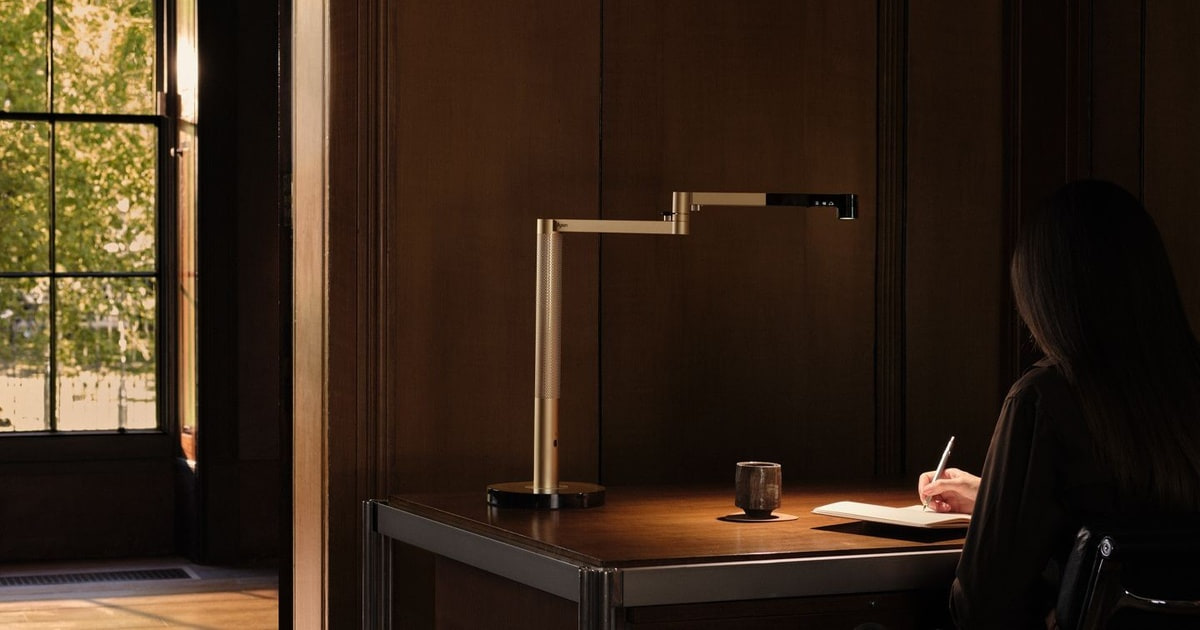
The Dyson Solarcycle Morph tracks local daylight and shifts its brightness and color temperature automatically, and the head reconfigures between task, indirect, feature and ambient light. It's engineered and finished far beyond anything else here, and priced accordingly.
$649.99fromAmazonIt adjusts itself so you don't have to. The lamp tracks local daylight for your location and time, then tunes brightness and color temperature to match. Through the MyDyson app you can also enter your age, which matters more than it sounds: older eyes need substantially more light to reach the same retinal illuminance. Set it once and it handles the rest of the day.
One fixture does four jobs. The head morphs between focused task light, indirect uplight bounced off the ceiling, a feature light and a broad ambient glow. The uplight mode is the quietly useful one — it lifts the whole room's brightness so there's less contrast between a bright monitor and a dark wall behind it, which is a common cause of evening eye fatigue.
Dyson designed around glare and flicker. The listing cites glare control and low optical flicker as design goals, and Heat Pipe cooling keeps the LEDs at a stable temperature. Dyson claims that gives the light quality a 60-year life. Whether or not you'll own it that long, thermal management is the real reason cheap LEDs shift color and dim over a few years.
The hardware feels like the price. A machined aluminum arm, precisely damped pivots, nearly 8 pounds of lamp. It moves the way an expensive thing should and holds any position you leave it in. If you're furnishing a home office you'll look at every day, that's part of what you're buying.
Flaws but not dealbreakers
It costs more than most people's entire desk. This is by a wide margin the most expensive lamp in this guide, and the gap isn't small. Nothing about the light on your page is several times better than the LitONES. What you're paying for is automation, materials and design.
The best features need your phone. Age-based tuning, daylight tracking and lighting history all live in the MyDyson app. If you don't want another app and another account tied to a lamp, you're buying a very nice manual light for a lot of money.
No dedicated low-blue-light certification. Despite careful spectral engineering, there's no TÜV Rheinland low-blue-light badge on it. And a proprietary LED array in a premium fixture is not something you swap cheaply once it's out of warranty.
Also great
Preset modes a kid can use without asking for help
Lampat Dimmable LED Desk Lamp
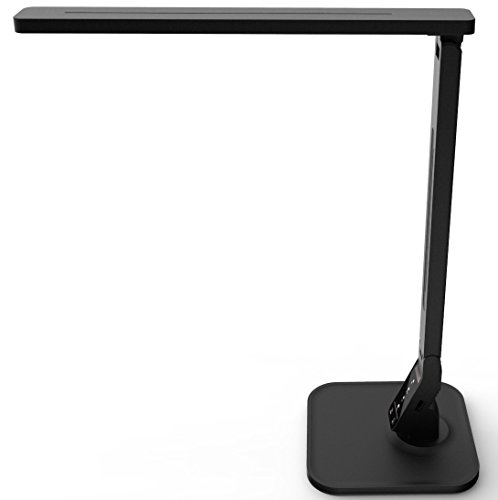
The Lampat gives you four one-touch modes — reading, studying, relaxation and bedtime — instead of raw Kelvin values and percentages. For a homework desk, that means a child picks the right light without an adult standing over the controls.
$19.99fromAmazonPresets beat sliders for kids. Ask an eight-year-old to set 4500K at 60 percent and you'll get a blank stare. Ask them to tap Studying and they're done. Each mode is pre-tuned for its task, so the lamp is correctly set most of the time rather than stuck wherever it was last left.
The bedtime mode is the one you'll actually use. It drops to a dim, warm setting meant to be the last light before sleep. Pair it with the one-hour auto timer and homework can roll into reading in bed without a bright white lamp fighting the wind-down. The five-level dimmer gives you room to fine-tune within a mode.
Touch controls hold up to small hands. There's no switch to break and no knob to snap off. The panel is a flat touch surface, and the lamp's low, compact profile suits a child-sized homework desk better than a tall swing arm that can be knocked over.
A USB port keeps one cable off the desk. The 5V/1A port is slow by current standards, but it's fine for topping up a tablet or a set of earbuds overnight, and it's one less wall wart in a shared room.
Flaws but not dealbreakers
It's not bright enough for serious detail work. Output is well below the LitONES and the Dyson. For worksheets and reading it's fine. For a teenager doing technical drawing or fine art, you'll want more light on the page.
The specs you'd want to check aren't published. Lampat doesn't prominently disclose CRI, and there's no independent certification. It's a step up from a completely unspecified lamp, but you're taking the mode labels on trust.
Five brightness steps is coarse. If you like dialing in exactly the right level as the room darkens, you'll find yourself between two settings more often than you'd like.
Who this is for
This guide is for anyone who spends real hours at a desk — students, remote workers, anyone doing hobby work that needs good light on a surface. If you're at your desk four or more hours a day, or you've noticed headaches and tired eyes late in a session, a better lamp is one of the cheaper fixes available to you. It also helps if you're lighting a wide desk, a dual-monitor setup or a kid's homework station, since those have specific shapes that a single small lamp won't cover.
It's not for everyone, though. If you already have good, even overhead light and you don't do close text work, you probably don't need a task lamp at all. We cover corded LED task lamps for desks. We don't cover floor lamps, clamp-only monitor light bars, battery-powered portables, or specialist fixtures for photography or medical work. And if you need a lamp with independently verified flicker and blue-light test data, be aware that most of this category — including our top pick — doesn't offer one.
How we picked
We weighed five lamps on the things that actually change how your eyes feel at the end of a session. Even light: we favored diffusers, edge-lit panels and multi-head designs over bare LEDs, because a soft wash beats a hot spot with a hard edge. Reach: we compared arm lengths, joint counts and working heights, since a lamp that can't clear your monitor lights the wall instead of your desk. Dimming and color: several brightness steps and at least three color temperatures, so one lamp serves morning study and late reading. Verified claims: named third-party certifications and published CRI count; the phrase eye-caring on a box does not. Owner reports: we looked for repeated failure patterns over months, not first-week impressions.
The competition
These five lamps are what our research surfaced in this category, not a survey of everything on the market. Every product we looked at is covered above as a pick — there's no separate also-ran group in this guide, because each lamp here fills a role that a specific kind of buyer needs. If you want one more thing to weigh before you order, it's this: match the lamp's shape to your desk's shape, and check the arm reach against the distance from where the base will sit to where your hands actually are.
Placement and care
Where you put a lamp matters as much as which one you buy. Set it on the side opposite your writing hand — left if you're right-handed — so your arm doesn't cast a shadow across the page. Aim the head so light hits the surface at a slanted angle, not straight down and never toward your eyes. If you can see the bright edge of the diffuser while looking at your screen, tilt it further. For dusting, wipe the diffuser and head with a dry microfiber cloth with the lamp off and cool; a dusty panel dims noticeably over a year. Don't force a gooseneck past its bend point, and if a swing arm starts to sag, check the joint tension screws before assuming the lamp is done.
Questions we get
What color temperature should I use for studying?
Somewhere in the 4500K to 5500K range works best for focused reading and note-taking. That neutral-to-cool white raises contrast between text and paper and helps you stay alert. Going much above 6500K for hours tends to increase glare sensitivity, and it's a poor choice at night. Shift to 3000K–3500K in the evening so your lamp isn't working against your sleep.
Is warm or cool light better for reading at night?
Warm, in the 2700K to 3500K range, if you care about falling asleep afterward. Blue-rich light above 5000K in the evening suppresses melatonin and pushes sleep onset later. The catch is that very warm light reads as dimmer and flattens contrast, so small print gets harder. A neutral-warm setting around 3500K at moderate brightness is the practical compromise.
How much light does a study lamp actually need?
Aim for roughly 300 to 500 lux at the surface, measured about 40 to 50 cm from the task — that's the general ergonomics recommendation for reading and close work. Detail work like drafting or fine crafts wants more. Don't infer brightness from wattage, since watts measure power draw, not output. Look for lumens or, better, lux stated at a specific distance.
What does TÜV Rheinland certification actually mean?
It means an independent German testing organization physically measured the product in an accredited lab and confirmed it meets a defined threshold — for flicker modulation or for short-wavelength blue light output. A company can't award it to itself; samples have to be submitted. That's the difference between a certification and a marketing phrase. Most lamps in this guide, including our top pick, don't carry one.
Can an LED lamp really cause headaches?
A poorly made one can. Invisible flicker from a cheap driver circuit still gets processed by your visual system even when you can't consciously see it, and that adds up over hours. High fixed color temperatures increase glare sensitivity, and low color rendering makes your eyes work harder to resolve contrast. A well-diffused, dimmable lamp with good color rendering removes most of that risk.
What is CRI and should I care?
CRI rates how accurately a light shows colors compared with natural daylight, on a scale to 100. At 80 things look slightly washed out; at 95 they look close to sunlight. For reading it matters because text edges resolve more cleanly and your eyes spend less effort interpreting the scene. Look for 90 or higher, and be suspicious of any lamp that leaves CRI off the spec sheet entirely.
Why you should trust us
For this guide:
- We read the manufacturer listings and published specifications for all five lamps, comparing arm reach, joint counts, dimming steps and color temperature ranges side by side.
- We reviewed owner feedback across each product for repeated patterns — sagging arms, inconsistent color modes, assembly difficulty — rather than isolated complaints.
- We checked which eye-care claims are backed by named third-party certification and which are the manufacturer's own, and we flag the difference in every pick.
- We read owner reviews on every listing, weighted toward the critical ones, because that is where the recurring failures show up.
- We have a systematic way of automatically fetching the latest prices, so the numbers on this page stay current.
- This is a research-focused guide, so the team may not own every product listed — though we often do own the top winners, which gives us extra context for the recommendations.
- We don't accept free products, and the retailer commission never changes which product we recommend.
Sources
Best Desk Lamps 2026 — Wirecutter / The New York Times, Wirecutter
Best Desk Lamps — Tom's Guide, Tom's Guide
The Best Desk Lamps — PCMag, PCMag
Best Desk Lamps — Good Housekeeping, Good Housekeeping
Best Desk Lamps — The Spruce, The Spruce
Blue Light Has a Dark Side — Harvard Health Publishing, Harvard Health Publishing
Computers, Digital Devices and Eye Strain — American Academy of Ophthalmology, American Academy of Ophthalmology
IEEE 1789-2015: Recommended Practices for Modulating Current in High-Brightness LEDs for Mitigating Health Risks, IEEE Standards Association
Amazon product listings and owner reviews for all 5 products
Manufacturer specification pages for each product
Some passages in this guide may be paraphrased with AI help. Prices are refreshed automatically.
More like this.
Continue exploring home reviews and recommendations.

The Best UV LED Nail Lamps
A gel manicure only works if the gel actually cures. That's the whole job of a nail lamp, and it's why the wrong one can waste an hour of careful…

The Best Baby Food Makers
Making your own baby food sounds ambitious until you do it once. You steam a sweet potato, blend it smooth, spoon it into a tray, and freeze it. That's…

The Best Weatherstripping Kits
Drafts announce themselves in small ways. A cold ribbon of air across your ankles at the front door. A curtain that stirs when nothing's open.…

The Best Washable Area Rugs for Living Rooms
A living room rug takes more abuse than any other textile in your home. Muddy paws track across it, a toddler drops a full sippy cup on it, someone eats…

The Best Toilet Flapper Replacement Kits
A running toilet is easy to ignore. It's a hiss behind a closed door, a refill that kicks on at 2 a.m., a water bill that creeps up without explanation.…

The Best Charcuterie Boards and Serving Sets
A charcuterie board earns its keep on the nights you don't want to cook. You put out some cheese, a few slices of salami, olives, a handful of grapes, and…