The Best Webcams for Streaming and Video Calls
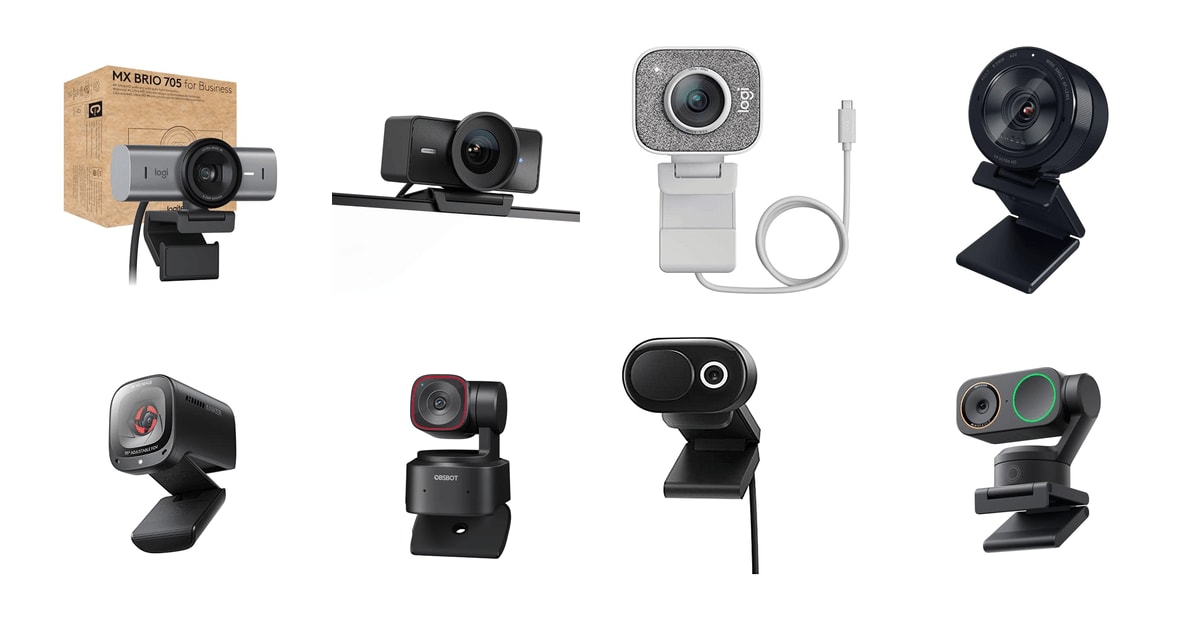
Most of us are on camera more than we'd like to admit. A morning standup, a client call, a Sunday-night stream — and the laptop's built-in camera makes you look like a smeary security still. A good webcam fixes the two things that actually matter: a sensor that can handle the light in your real room, and framing that keeps your face where people expect it. Everything else, from 4K to HDR to AI tracking, sits on top of those two. Get them right and you look like a person instead of a rumor.
Here's the honest part. No webcam beats a lamp. Every camera in this guide struggles in a room lit by one ceiling fixture, and the cheap ones get grainy fast. Platform limits bite too: Zoom caps standard accounts at 1080p 30fps and reserves 1080p 60fps for paid tiers, so your 4K feed gets downscaled before anyone sees it. And built-in microphones, even the good ones, still sound like built-in microphones. If audio is your job, budget for a separate mic.
We looked at what published reviews, manufacturer specifications and owner feedback say about the webcams people are actually buying. We think that the Logitech MX Brio 705 is the best webcam for most people, and that the Insta360 Link 2 Pro is the one to buy if you move around while you talk.
Everything we recommend

Sharp 4K, solid low-light, and it works on every platform

It follows you around the room while you talk
Most of what you need for calls, in a pocket-size body

True 4K at 60fps and DSLR-style control, if you'll use it

The one to get if your room goes dim after sundown
At a glance
| Product | Resolution | Max FPS | Price | |
|---|---|---|---|---|
| Logitech MX Brio 705 for Business 4KTop pick | 4K Ultra HD | — | $199.99 |
| Elgato Facecam 4KUpgrade pick | 4K | 60 FPS | $179.99On sale |
 | Logitech StreamCam - White - 1080P HDAlso in lineup | 1080p | 60 FPS | $68.44 |
| Razer Kiyo Pro Ultra 4K WebcamAlso great | 4K | 30 FPS | $399.99 |
| Anker PowerConf C200 2K Webcam for PC/Laptop/MacBudget pick | 2K | — | $69.99 |
 | OBSBOT Tiny 2 Lite 4K Webcam forAlso consider | 4K | — | $119On sale |
 | Microsoft Modern Webcam with Built-in Noise CancellingAlso in lineup | — | — | $44.99 |
| Insta360 Link 2 ProRunner-up | 4K | — | $249.99 |
How we picked
Light in real rooms. We weighted sensor size and lens aperture over headline resolution, because a large-sensor 1080p camera usually beats a small-sensor 4K one after dark. Published lab reviews and owner reports about backlit desks and dim offices carried the most weight here.
Framing and tracking. We looked for cameras that keep your face centered without you thinking about it, whether through software auto-framing or a motorized gimbal. Manufacturer specifications on tracking speed and pan range, plus owner accounts of how it behaves when you stand up, informed the picks.
Works without a fight. Certification for Teams, Zoom and Meet, plus cross-platform support for Windows and macOS, mattered a lot. Repeated owner complaints about required drivers, missing Mac software or dead microphones counted heavily against a camera.
Mic and privacy. We favored dual-microphone arrays with noise suppression and a physical lens cover over a software-only privacy toggle. We treat integrated audio as a backup, not a replacement for a dedicated mic.
Mounting and build. A camera has to grip a monitor, take a tripod thread, and not sag by the end of a call. Mount design is one of the most common sources of owner frustration, so we read those reports closely.
Top pick
Sharp 4K, solid low-light, and it works on every platform
Logitech MX Brio 705 for Business 4K
A 4K webcam that handles ordinary office lighting better than most, frames you automatically, and needs no fussing to work with Teams, Zoom or Meet. It's the one we'd put on a monitor and then stop thinking about.
$199.99fromAmazonThis is the webcam we'd hand to almost anyone. It shoots 4K, it autofocuses without hunting, and it keeps your face centered as you shift in your chair. Certification for Microsoft Teams, Zoom and Google Meet means you're not chasing drivers before a call. Owners consistently describe it as working out of the box on both Windows and macOS, which sounds boring until you've had a camera fail you two minutes before a meeting.
Color is where it separates from cheaper cameras. RTINGS.com measured a color accuracy delta E of 1.8 on the MX Brio 705 under standard office lighting, which puts it near the top of their webcam rankings. In plain terms: your skin looks like your skin, not like a wax figure lit by a fish tank. Logitech's face-based enhancement pushes exposure toward your face rather than the bright window behind you, and owners with backlit desks say that's the difference.
The lens does well in the kind of light most home offices actually have — one overhead fixture, maybe a lamp, and a monitor. Several owners who already use a key light report they're not sure the light is doing much anymore. That's a useful signal. You still won't get a clean image in a dark room, but you probably won't need to rearrange your desk lamps to look presentable.
Show Mode is more useful than it sounds. Tilt the camera down and it flips the image so you can hold up a sketch, a part, a page of notes. Teachers and anyone who demos physical things will use it constantly. The mount also grips a monitor firmly and takes a tripod, and the built-in privacy shutter means you don't have to trust a software toggle when the call ends.
Flaws but not dealbreakers
It doesn't support Windows Hello face login, and the older Brio did. If you sign into a work laptop with your face all day, that's a real step backward and worth knowing before you buy.
Zoom and framing controls live in Logitech's software, so you have to keep that running to adjust your shot mid-call. A few owners find that annoying, and they're right — a physical zoom ring would be better. This is also the pricier end of the plug-and-play category, and if you only ever join 1080p calls, you're paying for headroom you won't see.
Runner-up
It follows you around the room while you talk
Insta360 Link 2 Pro
A motorized 4K camera on a gimbal that physically pans and tilts to keep you in frame. If you teach, demo, pace or stand at your desk, it does the job a second person would otherwise have to do.
$249.99fromAmazonStand up to write on a whiteboard and a normal webcam loses you. This one turns its head. The gimbal pans and tilts to track you across the room, and owners who record workout classes, run telehealth sessions or teach from a standing desk describe it as the feature that made the camera worth it. Tom's Guide has praised how quickly Insta360's gimbal recomposes, clocking the Link 2's framing at under half a second.
The sensor is the real reason it's here, not the motor. At 1/1.3 inches it's large for a webcam, and larger sensors gather more light per pixel than higher-megapixel small ones. Owners with a bright window behind their desk repeatedly say it handles the backlight without blowing them out. The software also produces a natural-looking background blur without a green screen, which is the effect most people are actually after.
It plays well with the rest of a desk setup. It works across Windows, macOS, ChromeOS and Linux, it's compatible with Teams, Zoom and Twitch, and it integrates with Elgato's Stream Deck so you can jump between presets with one key. The dual microphones use directional beamforming to favor your voice over the room, which helps if you share a space with a dishwasher or a dog.
For a camera with moving parts, it's small and light — under half a pound, sitting on a monitor without drooping. Owners who mount it on a separate arm say that's the best setup, since it stays put when the laptop moves. The tracking can feel slightly uncanny at first. Most people get used to it within a day.
Flaws but not dealbreakers
This is the most expensive webcam here, and the gimbal is the reason. If you sit still in one chair, you're paying for motors you'll never move.
Reliability isn't spotless. Some owners report the camera cutting out, and at least one traced it to an incompatible USB-C port on an older computer. Insta360 also notes hardware compatibility limits in its own listing. And unlike the earlier Link, switching to portrait orientation isn't a single click, which is a small but real irritation if you cut vertical video.
Budget pick
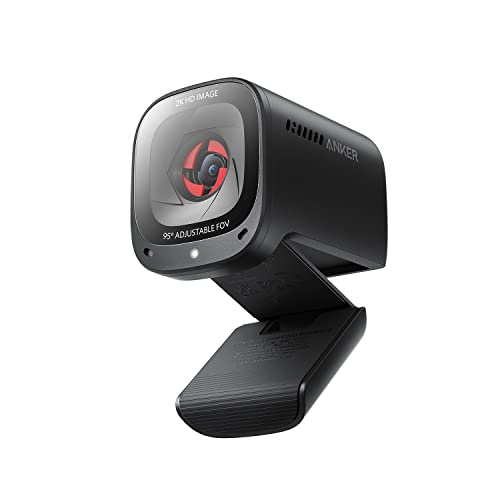
Most of what you need for calls, in a pocket-size body
Anker PowerConf C200 2K Webcam for PC/Laptop/Mac
A tiny 2K webcam with dual noise-canceling mics, a sliding privacy cover and three selectable fields of view. For anyone replacing a bad laptop camera without much to spend, it's the obvious answer.
$69.99fromAmazonNothing else here does this much for so little. You get 2K resolution, which is a visible step up from the 1080p cameras it competes with, plus low-light correction that keeps you from turning into noise after dark. PCMag gave it their Best Value designation in a webcam roundup, finding its image quality comparable to cameras costing two to three times more. Owner feedback lines up: people who arrived skeptical tend to leave surprised.
The microphones are better than the category norm. Two of them, with AI noise cancellation, and owners taking work calls from busy rooms say colleagues can hear them fine without a headset. You can also pick between a 65, 78 or 95 degree field of view in software, which matters more than it sounds — the narrow setting crops out the laundry pile without you moving the desk.
It's genuinely small, about the size of a stack of poker chips, and it slips into a laptop bag without a case. Setup is close to plug-and-play on Windows and macOS, with a companion app only if you want to change settings. The integrated sliding lens cover is the kind of thing that should be standard on every camera and somehow isn't.
Flaws but not dealbreakers
The mount design draws the most complaints. It holds on a monitor, but it's fussier to position than the clips on pricier cameras, and it doesn't inspire much confidence on a thin laptop lid.
There's no optical zoom and no gimbal, so what you frame is what you get. Several owners wish it could pull in closer for a tighter head-and-shoulders shot. And while low-light correction helps, it's still a small sensor — in a genuinely dark room this will look softer and noisier than the Razer or the Insta360.
Upgrade pickOn sale
True 4K at 60fps and DSLR-style control, if you'll use it
Elgato Facecam 4K
A studio webcam with a Sony STARVIS 2 sensor, uncompressed 4K60 output and manual controls that save to onboard memory. It's built for people who light their shot on purpose and want to dial it in.
$179.99fromAmazonList priceMost webcams decide how you look. This one hands you the dials. Camera Hub gives you exposure, white balance, focus and field of view as manual settings, and the camera stores them in built-in flash memory so your look survives a reboot or a move to a different computer. Streamers who spend their time in OBS rather than Zoom will appreciate that the settings follow the hardware, not the software install.
It also takes standard 49mm lens filters, which is unusual and genuinely fun. Screw on a diffusion or ND filter and you get a look no software filter reproduces convincingly. Combine that with uncompressed 4K60 output and HDR support and you have a camera aimed squarely at recorded content, where the extra resolution actually survives to the finished video.
The sensor is the point of the upgrade. The STARVIS 2 chip resolves fine detail — hair, fabric texture, the edges of glasses — that cheaper cameras smear away. Owners running it alongside a prompter and a Stream Deck describe it as the piece that made a full Elgato setup click. If you're producing YouTube video rather than sitting in meetings, that detail is what you're paying for.
It's light, at roughly a quarter pound, and the body is compact for something with this much glass in front. Uncompressed output does mean it leans on your computer's USB bandwidth rather than compressing in-camera, which is exactly what you want for a clean feed into OBS and exactly what you don't need for a Teams call.
Flaws but not dealbreakers
It's demanding about light. The most pointed owner complaint comes from someone running it in an office lit by three bright ceiling bulbs who still found the image underexposed. Plan on a key light. If you won't add one, buy the Razer or the Insta360 instead.
The software is the weak link. Several owners describe Camera Hub as adequate rather than good, and a few say the body feels less substantial than its size suggests. There's also no meaningful built-in microphone story here — this is a video-only tool, and it assumes you already own a mic.
Also great
The one to get if your room goes dim after sundown
Razer Kiyo Pro Ultra 4K Webcam
A 4K camera with a large Sony STARVIS 2 sensor and an unusually bright f/1.7 lens, so it holds detail when the sun goes down. It also produces real optical background blur, no green screen required.
$399.99fromAmazonLate-night streamers and anyone with a north-facing room should start here. Razer's specifications put the lens at f/1.7, and Tom's Guide notes that's roughly 2.5 times the light of the f/2.8 lenses most webcams use. Pair that with a 1/1.2-inch sensor and 2.9 micron pixels and you get a picture that stays clean when the overhead light is off and the monitor is doing most of the work.
The background blur is optical, not a software cutout. Because the lens is fast and the sensor is large, the background actually falls out of focus, so you don't get the crunchy halo around your ears that virtual blur produces. Owners doing live selling and camera-facing sales work call it out specifically. It's the closest thing here to looking like you set up a real camera.
Razer's app is unusually deep for a webcam. You can set field of view, ISO and shutter speed, then save profiles for different times of day — one for afternoon light, one for a night stream. Owners who bought it to replace a DSLR-and-capture-card rig say it gets most of the way there with a fraction of the setup. HDR at 30fps helps in high-contrast rooms.
Note the output ceiling: raw 4K30 gets converted to uncompressed 4K24, 1440p30 or 1080p60 for a live stream. For Twitch that's fine — Twitch's own guidelines target 1080p at 6,000 kbps, and the 1080p60 mode is exactly what you'd stream. If you want 4K at 60fps to a recording, the Elgato is the camera for that job.
Flaws but not dealbreakers
Razer's Synapse software is Windows-only, and it's where the interesting controls live. Mac owners get a working camera with no first-party settings panel, and several have resorted to buying a third-party utility to change anything. Some Windows owners also report bugs saving profiles to the camera.
Autofocus struggles at close range and at odd angles, particularly if you tilt the camera down over a desk project. It's also physically the largest and heaviest option here, so it needs a sturdy monitor edge or a tripod rather than a thin laptop lid.
Who this is for
Buy one of these if your laptop camera is making you look worse than you are, and you're on video enough for that to matter. An Owl Labs survey of hybrid workers found that 71% said video call quality directly affected how professional their colleagues perceived them, and remote or hybrid arrangements still account for around 28% of paid workdays in the U.S. according to Stanford's WFH Research tracker. If you stream, teach, sell or interview on camera, a real webcam is one of the few upgrades that changes how you come across.
Skip the upgrade if you take two calls a month with your camera off, or if you already run a mirrorless camera through a capture card — no webcam here will match that. This guide covers USB webcams that clip to a monitor or sit on a tripod. It doesn't cover conference-room bars, PTZ cameras for auditoriums, action cameras pressed into webcam duty, or capture-card setups. And if audio is the thing people complain about, spend on a microphone first.
How we picked
We built the shortlist around five things. Light: sensor size and lens aperture matter more than pixel count once the sun goes down, so we favored large sensors and fast glass over 4K badges. Framing: auto-framing or a motorized gimbal should keep you centered without you touching anything, and we leaned on published specifications for tracking speed and pan range. Compatibility: Teams, Zoom and Meet certification plus working macOS support, because a camera that needs a driver you can't install on a locked work laptop is useless. Audio and privacy: dual mics with noise suppression, and a physical shutter rather than a software switch. Build: a mount that grips a monitor, a tripod thread, and no sag halfway through a call.
Other webcams for streaming and video calls worth considering
If you want AI tracking with almost no desk footprint: The OBSBOT Tiny 2 Lite 4K Webcam for ($119) — The OBSBOT Tiny 2 Lite packs a motorized gimbal and a 4K sensor into something roughly the size of a shot glass. OBSBOT's documentation says its tracking latches onto a subject within 0.3 seconds and holds through 160 degrees of pan, and gesture control lets you lock tracking or zoom with a raised hand — handy when you're across the room. Owners routinely say it beats cameras costing much more, and several have run one for years without trouble. The Lite trims whiteboard mode and voice control from the full Tiny 2, and a minority of owners report tracking or connection quirks that dragged on. It's a close call against the Insta360, which has the bigger sensor and the steadier reputation.
The competition
This is what our research surfaced, not a census of every webcam sold. These two are worth knowing about, and one of them is the right answer for a specific kind of buyer.
The Microsoft Modern Webcam with Built-in Noise Cancelling ($44.99) — The Microsoft Modern Webcam is the corporate-IT answer. It's certified for Teams and Zoom, it's plug-and-play on Windows 11 with no third-party software, and that last part is the whole pitch — owners on security-locked company laptops say it's the only external camera they could actually use. It has HDR, light correction and a privacy shutter with an indicator light. But it's 1080p 30fps with fixed focus rated for roughly 0.4 to 1.5 meters, so it's built for sitting at a desk and nothing else. The microphone often needs a permissions dig or an extra Microsoft app before it works, the monitor mount draws frequent complaints, and Mac owners report a rougher experience than the certification implies. Buy it if your laptop won't let you install anything; otherwise the Anker gives you more picture.
The Logitech StreamCam - White - 1080P HD ($68.44) — The Logitech StreamCam remains a smart design. It shoots 1080p at 60fps over USB-C, uses AI facial tracking for focus and exposure, and rotates 90 degrees into a full-HD portrait mode — Wirecutter singled out that vertical mode as the feature that sets it apart for anyone cutting Reels, Shorts or TikToks. If short-form vertical video is your main output, nothing else here does it as cleanly. Two things hold it back. This is a renewed listing, and owner reports on renewed units are uneven: missing tripod hardware, rough packaging, and at least one camera that quit after a few months. And 1080p leaves no room to crop or digitally zoom the way a 4K sensor does. Worth it for the portrait trick, less so as your only camera.
Setup and placement
Put the camera at eye level. That single change does more for how you look than any spec on this page — clip it to the top of your monitor, or raise it on a small tripod if your screen sits low. Then get light on your face, not behind it. A lamp beside the monitor beats a window at your back every time, and if you have a window, turn to face it. Wipe the lens now and then; a fingerprint reads as a permanent soft-focus filter. Keep the manufacturer's app installed if you rely on auto-framing or saved profiles, since most cameras need it running to apply those settings. And close the physical shutter when you're done. It's the only privacy control that doesn't depend on software behaving.
Questions we get
Is a 4K webcam worth it for Zoom calls?
Not for the resolution itself. Zoom caps standard accounts at 1080p 30fps, and only Pro and Business tiers get 1080p 60fps, so a 4K feed gets downscaled before anyone sees it. The real benefit is headroom — extra pixels give auto-framing and digital zoom room to crop in without turning mushy. If you never crop, a good 1080p or 2K camera is plenty.
What webcam works best in a dark or dimly lit room?
The Razer Kiyo Pro Ultra, because of its f/1.7 lens and 1/1.2-inch sensor. Tom's Guide puts that aperture at roughly 2.5 times the light of a typical f/2.8 webcam lens, and a bigger sensor collects more of it per pixel. The Insta360 Link 2 Pro is a close second with its 1/1.3-inch sensor. That said, adding one lamp beside your monitor will do more than any camera swap.
Do I need a separate microphone if I buy a premium webcam?
For meetings, no — the dual-mic arrays on the Anker, the Insta360 and the MX Brio are fine, and noise cancellation handles a noisy room. For anything people will listen to on purpose, yes. A dedicated USB microphone still beats every integrated webcam mic, because it sits close to your mouth instead of three feet away on a monitor.
Can a webcam replace a mirrorless camera for streaming?
Almost, and the gap keeps closing. Owners who swapped a DSLR-and-capture-card rig for the Razer or the Elgato describe losing a small amount of image quality and a great deal of hassle. What you give up is interchangeable lenses and the shallow depth of field that comes with a large sensor. What you gain is one USB cable and no batteries to change mid-stream.
How do I get a blurred background without a green screen?
Two ways. Optical blur, which the Razer Kiyo Pro Ultra produces with its fast lens and big sensor, and which looks natural because it's real. Or software blur from the camera's own app — Insta360's suite does a convincing version. Either beats the blur built into Zoom or Teams, which tends to chew on the edges of your hair and glasses.
Do gimbal webcams work on a Mac?
Yes. Both the Insta360 Link 2 Pro and the OBSBOT Tiny 2 Lite support macOS, with companion apps for tracking modes and presets. The bigger Mac question is Razer's, since its Synapse software is Windows-only — the Kiyo Pro Ultra works as a camera on macOS, but you'll need a third-party utility to change its settings.
Why you should trust us
For this guide:
- We read published lab reviews and rankings from RTINGS.com, Tom's Guide, PCMag and Digital Trends, along with each manufacturer's own specifications for sensor size, aperture, tracking behavior and platform certification.
- We compared what Zoom, Twitch and the Microsoft Teams certification program publish about resolution caps, encoding targets and device requirements, so our advice reflects what these cameras can actually deliver end to end.
- We read through owner feedback for every camera here, looking for repeated themes — mount design, missing Mac software, low-light complaints — rather than individual opinions.
- We read owner reviews on every listing, weighted toward the critical ones, because that is where the recurring failures show up.
- We have a systematic way of automatically fetching the latest prices, so the numbers on this page stay current.
- This is a research-focused guide, so the team may not own every product listed — though we often do own the top winners, which gives us extra context for the recommendations.
- We don't accept free products, and the retailer commission never changes which product we recommend.
Sources
Best Webcams 2026 — Wirecutter / New York Times, Wirecutter
Logitech MX Brio 705 Review — RTINGS.com, RTINGS.com
Best Webcams for Streaming 2026 — Tom's Guide, Tom's Guide
Elgato Facecam Pro Full Review — Digital Trends, Digital Trends
Best Webcams for Working from Home — PCMag, PCMag
Razer Kiyo Pro Ultra Review — The Verge, The Verge
Best Budget Webcams 2026 — TechRadar, TechRadar
OBSBOT Tiny 2 Lite In-Depth Review — YouTube Creator Academy, RTINGS.com
Insta360 Link 2 Review — CreatorIQ / Streaming Blog, TechRadar
Microsoft Modern Webcam — Teams Certified Device Specs, Microsoft
Anker PowerConf C200 Lab Test Results — RTINGS.com, RTINGS.com
State of Remote Work 2025 — Buffer / Owl Labs Survey, Buffer / Owl Labs
Amazon product listings and owner reviews for all 8 products
Manufacturer specification pages for each product
Some passages in this guide may be paraphrased with AI help. Prices are refreshed automatically.
More like this.
Continue exploring electronics reviews and recommendations.

The Best Streaming Webcams
A webcam is the one piece of your setup everyone else stares at. Your audience will forgive a rough transition or a missed clip, but a soft, washed-out…

The Best Wireless Video Doorbell Cameras
A video doorbell earns its keep on ordinary days. A driver drops a box while you're at work. A neighbor stops by and you're in the shower. Someone knocks…

The Best Govee Smart Lights
Smart lights sell themselves on party tricks, but you live with them differently. What you actually want is a strip behind the TV that stops the wall from…

The Best Bluetooth Multi-Device Keyboards
A multi-device keyboard earns its keep in the small moments. You're typing an email on your work laptop, a Slack message pops up on your personal desktop,…

The Best Smart Humidifiers
Dry indoor air shows up in small ways first. Your lips crack, the hardwood gaps open, and you shock yourself on the doorknob every time you reach for it.…

The Best Gifts for Vinyl Record Collectors
Records are a hobby with a long tail of small problems. Dust down in the grooves. Albums stacked on the floor because there's nowhere to put them. A…