The Best Bluetooth Multi-Device Keyboards
A multi-device keyboard earns its keep in the small moments. You're typing an email on your work laptop, a Slack message pops up on your personal desktop, and your iPad is propped up with a reference doc open. Without one keyboard that jumps between all three, you're reaching across the desk and swapping hands all day. Buffer's State of Remote Work survey found that 68% of remote workers regularly use two or more devices at once. That's a lot of reaching.
No keyboard switches instantly. PCMag's lab work puts hardware device-switch keys at under two seconds, and Fn-key combos at four to eight. Two seconds doesn't sound like much until you do it forty times a day. Bluetooth also drops out sometimes, especially in an office full of competing signals, and every keyboard here has owners who've hit a stubborn reconnect. A 2.4 GHz dongle helps, but it eats a USB port.
You also have to pick a side on typing feel. Slim scissor keys are quiet and travel well but feel a bit dead. Mechanical boards feel wonderful and sound like a small machine shop to the person next to you. We think that the Logitech MX Keys S is the best Bluetooth multi-device keyboard for most people, and that the Keychron K8 Pro is the one to buy if you want real mechanical switches without giving up device switching.
Everything we recommend

Quiet, fast switching, and it works on everything

Real mechanical feel that still hops between three devices

The same typing feel in a much smaller footprint

Split and curved, for wrists that already hurt
Three devices and a mouse, for a fraction of the price
Prices as of Oct 22, 7:36 AM PT · Details
At a glance
| Product | Devices | Battery Life | Price | |
|---|---|---|---|---|
| Logitech MX Keys S Wireless Keyboard LowTop pick | 3 Devices | 10 Days | $119.99 |
| Keychron K8 Pro QMK/VIA Wireless Mechanical KeyboardRunner-up | 3 Devices | — | Check price |
| Logitech MX Keys Mini Minimalist Wireless IlluminatedAlso great | 3 Devices | 10 Days | $99.99 |
| Logitech Ergo K860 Wireless Ergonomic Split KeyboardUpgrade pick | — | — | $119.99On sale |
 | Keychron K3 Version 2 QMK 75% WirelessAlso consider | 3 Devices | — | $84 |
 | Apple Magic Keyboard with Touch ID forAlso consider | — | ~1 Month | Check price |
 | Microsoft Surface KeyboardAlso in lineup | — | — | Check price |
| Arteck Universal Multi-Device Bluetooth Keyboard and MouseBudget pick | 3 Devices | 6 Months | $49.99 |
Prices as of Oct 22, 7:36 AM PT · Details
How we picked
Device switching. We prioritized keyboards with dedicated hardware switch keys over Fn-key combinations, since PCMag's lab work shows hardware keys complete a switch in under two seconds versus four to eight. Three pairings was our floor.
Typing feel. We read published reviews and owner feedback for each switch type, looking for scooped or contoured keycaps on scissor boards and pre-lubed switches with screw-in stabilizers on mechanical ones. Boards that owners described as mushy or rattly didn't make the cut.
Battery and charging. We favored USB-C rechargeable designs over AAA batteries and cross-checked manufacturer runtime claims against independent rundowns from RTINGS.com and Keyboard University. Anything needing a weekly charge was out.
Cross-platform support. We looked for documented support across Windows, macOS, Linux, iPadOS and Android, plus included keycaps or a physical toggle for Mac and Windows modifier layouts. Single-ecosystem boards had to earn their place another way.
Build and materials. We compared spec sheets for frame material and keycap plastic, preferring aluminum frames and double-shot PBT over ABS, and read long-term owner reports for keys failing or legends wearing off.
Top pick
Quiet, fast switching, and it works on everything
Logitech MX Keys S Wireless Keyboard Low
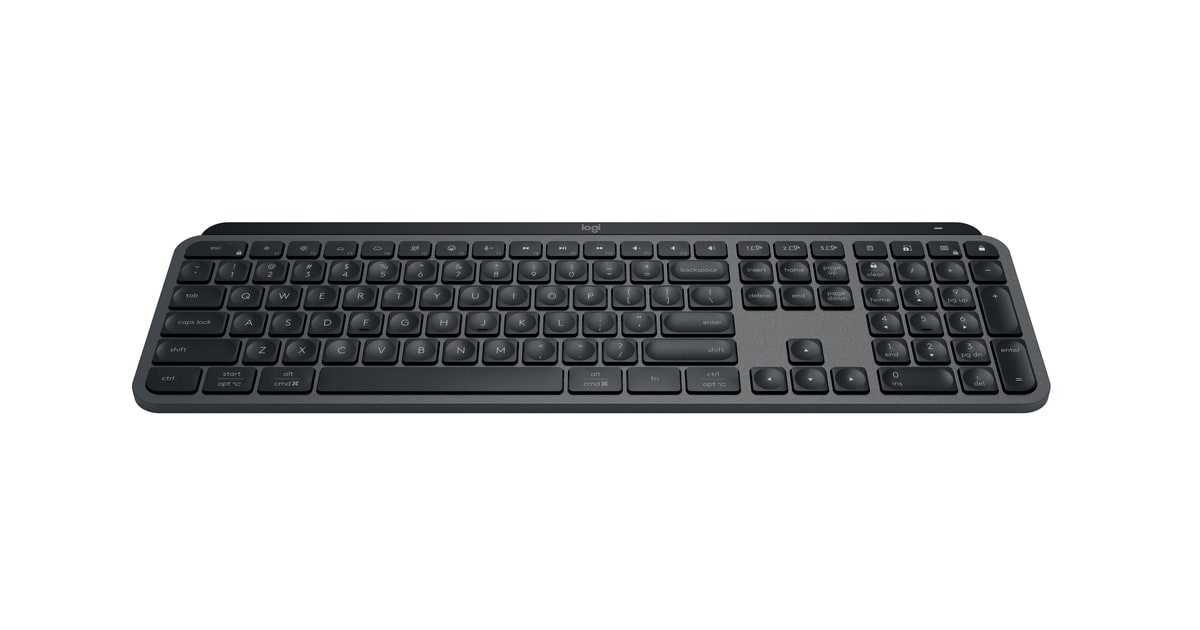
The MX Keys S pairs with three devices and swaps between them with a single dedicated key. The backlight wakes when your hands get close, the keys are dished to catch your fingertips, and it charges over USB-C instead of eating AAAs.
$119.99fromAmazonPrices as of Oct 22, 7:36 AM PT · Details
The three device keys across the top row are the whole point. They're dedicated buttons, not an Fn combo you have to remember. PCMag's testing puts hardware switch keys under two seconds versus four to eight for combo implementations, and you feel that difference every single time. Owners describe a short mental adjustment period at first, then it becomes muscle memory. After a week you stop thinking about which machine you're typing on.
Logitech supports Windows, macOS, Linux and ChromeOS out of the box, which matters more than it sounds. If you run a MacBook for work and a Windows desktop at home, you'll get the right modifier behavior on both without hunting for firmware. The Logi Options+ app handles per-machine customization, and you can build Smart Actions that fire several steps from one keystroke.
The typing feel is laptop-like, not mechanical, and Logitech's spherically-dished keycaps genuinely help. Each key has a small scoop that catches your fingertip, so you drift off home row less than you would on flat chiclet keys. It's quiet enough for a shared office or a call with your camera on. Owners who've come from full mechanical boards mostly report they don't miss the travel.
Flow is the feature that justifies the price. Pair the MX Keys S with an MX Master mouse and you can push your cursor from one computer to the other and keep typing, and drag files across as if they were one machine, per The Verge. If you run two computers on one desk, this collapses two setups into one. RTINGS.com measured 5.2ms average Bluetooth latency, which is imperceptible for typing.
Battery is a non-issue if you manage the backlight. RTINGS.com's figures line up with Logitech's claim: about 10 days with backlighting on, up to five months with it off. The proximity sensor helps here, since the lights only wake when your hands approach. And the USB-C cable charges it fast enough that a coffee break tops you up.
Flaws but not dealbreakers
The layout takes some getting used to, and not everyone forgives it. Logitech moved some familiar keys around and dropped others in favor of screenshot and dictation functions, which frustrates people who lean on the standard Windows arrangement. If you use Print Screen constantly, check the layout photos before you buy.
It's low-profile and flat, with no adjustable feet and no wrist rest. Plenty of owners end up buying a separate rest to get comfortable. And a minority report keys becoming flaky after a year or two of hard daily use, which is worth knowing on a keyboard this expensive.
Logitech's standard hardware warranty applies; check the current terms on the listing before you buy.
Runner-up
Real mechanical feel that still hops between three devices
Keychron K8 Pro QMK/VIA Wireless Mechanical Keyboard
The K8 Pro is a tenkeyless mechanical board with an aluminum frame, PBT keycaps and hot-swappable switches. It connects to three devices over Bluetooth 5.1 or runs wired over USB-C, and QMK/VIA lets you remap any key you want.
Check priceatAmazonPrices as of Oct 22, 7:36 AM PT · Details
Most multi-device keyboards ask you to accept flat, quiet, laptop-style keys as the price of wireless convenience. The K8 Pro doesn't. You get full-travel Gateron G Pro Red switches, pre-lubed and rated for 50 million keystrokes, in a board that still pairs with your laptop, your desktop and your tablet. If typing is most of your job, that trade stops being a trade.
The hot-swap PCB is what makes this a keyboard you can keep. Tom's Hardware confirms the sockets accept both 3-pin and 5-pin MX-style switches, so you can pull the linear reds and drop in tactiles or something quieter without touching a soldering iron. Don't like the sound? Change it in twenty minutes for the cost of a switch set. That's a repair path most wireless keyboards simply don't have.
The build is the other reason to want one. An aluminum frame gives it real weight, so it doesn't slide when you type hard, and the double-shot PBT keycaps won't go shiny the way cheap ABS does after a year. Keychron also screwed the stabilizers into the PCB, which cuts the rattle on the space bar and enter key that makes budget mechanicals sound cheap.
Both Mac and Windows layouts are supported, with extra keycaps in the box and a physical toggle to switch modes. QMK and VIA mean you can remap anything and build macros that live in the keyboard itself, not in software on one machine. That's genuinely useful if you switch between operating systems all day and want your shortcuts to follow you.
Flaws but not dealbreakers
It's loud. Linear reds are quieter than clicky switches, but this is still a mechanical keyboard with an aluminum case, and the people around you will hear it. If you take a lot of calls with your mic hot, look elsewhere or plan on a switch swap.
The board sits tall, and the front edge is high enough that many owners add a wrist rest to type comfortably for long stretches. It's not a small adjustment coming from a laptop keyboard.
Keychron's QMK implementation on macOS has rough edges, and some owners report fighting with firmware and layer behavior to get Mac shortcuts working the way they expect. There are also scattered reports of individual keys failing within the first year, though the hot-swap sockets at least give you a fix.
Also great
The same typing feel in a much smaller footprint
Logitech MX Keys Mini Minimalist Wireless Illuminated
The MX Keys Mini is the MX Keys S with the number pad amputated. You get the same dished keys, the same proximity backlight and the same three-device switching, in a board small enough to slide into a bag.
$99.99fromAmazonPrices as of Oct 22, 7:36 AM PT · Details
If your desk is small, this is the better Logitech. Losing the number pad pulls the keyboard in by several inches, which lets you bring your mouse closer to your body. That's an ergonomic win, not just a space one, because your shoulder isn't rotated outward all day. Writers and developers who never touch a number pad generally don't miss it at all.
Everything that makes the MX Keys S good carries over. Same spherically-dished keycaps, same near-silent scissor action, same proximity-triggered backlight that adapts to your room lighting. Same 10-day battery with the lights on and roughly five months with them off, per Logitech's spec. Same three-device pairing with dedicated switch keys across the top.
It travels well, which the full-size model doesn't. At about a pound and a half and just under an inch thick, it fits in a laptop sleeve pocket, so you can run the same keyboard at home, at the office and at a coffee shop. Pair it with an MX Anywhere mouse and you get Flow between two machines in a kit that fits in a small bag.
There's one catch worth knowing up front: the Mini ships without a Logi Bolt receiver in the box. It's Bluetooth-only unless you buy a Bolt dongle separately. For most people Bluetooth is fine, but if your office is RF-congested, budget for the receiver.
Flaws but not dealbreakers
No number pad, obviously. If you do accounting, data entry or anything involving long strings of digits, the top-row numbers will slow you down and you'll want the full-size model instead.
Like the full-size version, it's flat with no tilt adjustment and no wrist rest. And a meaningful minority of owners report keys misfiring or repeating after a year or two of heavy use, which is the most common complaint on this board.
Upgrade pickOn sale
Split and curved, for wrists that already hurt
Logitech Ergo K860 Wireless Ergonomic Split Keyboard
The ERGO K860 splits the key layout, curves it, and puts a memory-foam wrist rest under your palms. It's the pick if you type all day and your forearms have started complaining about it.
$119.99fromAmazonList pricePrices as of Oct 22, 7:36 AM PT · Details
If you have wrist or forearm pain, the ergonomics are the whole argument. A Logitech-commissioned study cited by Wirecutter found the K860's split curved layout cuts ulnar wrist deviation by up to 25% and forearm muscle strain by up to 17% against a standard flat board. United States Ergonomics certified the design. Those are manufacturer-sponsored numbers, so treat them as directional, but the geometry does what it claims: your hands sit at a more natural angle.
The pillowed wrist rest is a bigger deal than the spec sheet makes it sound. It's memory foam, it's curved, and it's attached, so it can't wander off the desk. Owners dealing with carpal tunnel and RSI consistently point to it as the reason they can still type at the end of a workday. Logitech also gives you reverse-tilt legs at 0, -4 and -7 degrees, which matters if you work at a standing desk.
The keys themselves are the same scooped, quiet, low-travel design Logitech uses across its productivity line, so you get comfort without a loud board. It's full-size with a number pad and a caps-lock indicator light. You can connect over Bluetooth or the included USB receiver, and it holds two devices rather than three.
Plan for a real adjustment period. Moving from a flat keyboard to a split curved one costs you accuracy for a week or two while your fingers relearn where the B and Y keys live. Owners are near-unanimous on this: it feels wrong, then one day it doesn't, and going back to a flat board feels worse.
Flaws but not dealbreakers
Two device pairings, not three. If juggling three machines is the reason you're shopping, that's a hard limitation, and it's the main reason this isn't our top pick.
It's big and heavy, so it isn't going anywhere. This is a keyboard for one desk. Setup documentation is also thin, and some owners report occasional lockups that need a reconnect to clear.
Logitech's standard hardware warranty applies; check the current terms on the listing before you buy.
Budget pick
Three devices and a mouse, for a fraction of the price
Arteck Universal Multi-Device Bluetooth Keyboard and Mouse
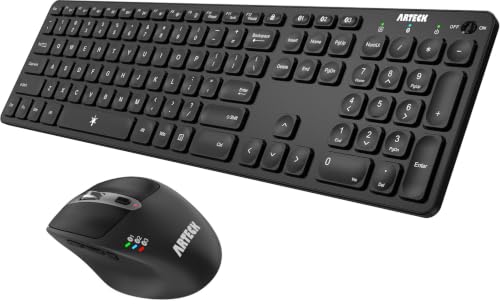
The Arteck set gives you a full-size scissor-switch keyboard and an ergonomic mouse that both hop between three Bluetooth devices. It costs a small fraction of what the Logitech kit does and covers the same basic job.
$49.99fromAmazonPrices as of Oct 22, 7:36 AM PT · Details
Not everyone needs Flow and a proximity backlight. If you just want one keyboard that types on your work laptop, your home PC and your iPad, this does that for a fraction of the price of the premium options. It's full-size with a number pad, it's slim, and it switches devices with a single key press rather than a memorized combo.
The battery claim is the standout spec. Arteck rates the rechargeable keyboard at roughly six months per charge and the mouse at four, based on two hours of daily use. Both charge over USB-C, so you're not stockpiling AAAs. Even if real-world use lands short of those numbers, you'll charge this a couple of times a year, not a couple of times a month.
Compatibility is broad and uncomplicated: Windows, macOS, iPadOS, iOS and Android. The mouse adds a DPI button that cycles 800 through 2400, two side buttons for browser back and forward, and a window-switching button. For a package this inexpensive, getting a competent mouse thrown in changes the math considerably.
Owners consistently describe the typing feel as better than the price suggests, with quiet scissor keys that don't feel mushy. It's not a Logitech, and the plastic build makes that obvious the moment you pick it up. But for a second desk, a home office you use a few hours a week, or a first multi-device keyboard, it clears the bar.
Flaws but not dealbreakers
The mouse is the weak half. Owners report it disconnecting mid-session while still showing a connected light, and a scroll wheel that develops a loud squeal after a few months. If the mouse matters to you, plan on replacing it eventually.
There's no backlight, and the build is plastic throughout, so it flexes if you press on it. Don't expect the solid, planted feel of the metal-framed options here.
Arteck includes a 24-month warranty.
Who this is for
Buy one of these if you regularly type on two or more machines and you're tired of the shuffle. That's the hybrid worker with a company laptop and a personal desktop, the Mac-and-Windows household, the writer who drafts on a tablet and edits on a computer. It's also worth it if you already own a keyboard you like but it only talks to one device, because the switching is the feature you're actually buying. If you use exactly one computer and never plan to add a second, you can skip the whole category and buy a better single-device board for the same money.
This guide covers wireless keyboards that pair with multiple devices at once and let you switch between them from the keyboard itself. We're not covering gaming keyboards, where wired connections and specialized switches change the calculus entirely, or fully split ergonomic boards with separate halves and tenting kits. We also aren't covering keyboard cases built for a specific tablet, since those are single-device by design.
How we picked
We built the shortlist around a handful of things that actually change your day. Switching: dedicated hardware keys for at least three paired devices, because Fn-key combos take two to four times longer and you'll do this dozens of times a day. Typing feel: contoured keycaps on slim boards, pre-lubed switches and screw-in stabilizers on mechanical ones, judged from published reviews and owner reports rather than marketing copy. Power: USB-C rechargeable over disposable AAAs, with independently checked runtimes long enough that charging is a monthly chore at worst. Compatibility: documented support across Windows, macOS, Linux, iPadOS and Android, with proper Mac modifier handling instead of a workaround. Build: aluminum frames and double-shot PBT keycaps where the price allows, and long-term owner feedback about keys failing or legends wearing away.
Other bluetooth multi-device keyboards worth considering
If you want mechanical switches in a keyboard you can actually travel with: The Keychron K3 Version 2 QMK 75% Wireless — The Keychron K3 splits the difference between a laptop keyboard and a full mechanical board. It uses low-profile switches in a 75% layout, so it's under an inch thick and just over a pound, with a reinforced aluminum body that keeps it rigid. You still get three-device Bluetooth 5.1 pairing, QMK firmware for remapping, white backlighting and Mac and Windows keycaps in the box. Keyboard University's rundown puts its 1,800 mAh battery at roughly 15 to 20 days of typical office use. What you give up is key travel, which feels shallow if you're coming from a full-height mechanical, and the 75% layout crowds the arrow keys and function row. A few owners have also had trouble getting warranty service honored, so buy from a seller with a return window you trust.
If everything you own has an Apple logo on it: The Apple Magic Keyboard with Touch ID for — The Magic Keyboard with Touch ID does one thing no other keyboard here can: it logs you into your Mac with your fingerprint, and it fills in passwords and approves purchases without you typing anything. Per 9to5Mac, iCloud-based Handoff lets it follow you across paired Apple devices on Apple Silicon Macs, so switching often happens without you pressing anything at all. The scissor keys are shallow but precise, the aluminum-and-plastic build is very light, and Apple rates the battery at about a month between USB-C charges. The catch is that Touch ID only works on Apple Silicon Macs, and the automatic switching is an Apple-ecosystem trick that does nothing for your Windows desktop. There's also no backlight, and some owners report the fingerprint setup prompt simply never appearing.
The competition
Here's what our research surfaced, not a complete map of the market. Multi-device keyboards are a crowded category, and new boards land every few months, so treat this as the set of well-supported options we could evaluate against published specs, reviews and owner feedback.
The Microsoft Surface Keyboard — The Microsoft Surface Keyboard (2nd Edition) is a slim, quiet Bluetooth board built to match Surface hardware, and owner sentiment on it is warm. But the listing gives us almost nothing to work with: no feature bullets, no stated device-pairing count, no battery figure. Multi-device switching is the entire premise of this guide, and we can't confirm from the available specs that this board switches between paired devices from the keyboard at all. If you're deep in the Surface ecosystem and Swift Pair matters to you, it's worth investigating directly with Microsoft's documentation before buying.
Setup and living with it
Pair every device you plan to use on day one, before you settle into a workflow. These keyboards remember their pairings in separate slots, so once channel one is your work laptop and channel two is your desktop, you stop thinking about it. Label the slots mentally and stick to the order. If a connection gets flaky, the fix is almost always re-pairing that one channel rather than resetting the whole keyboard. Bluetooth 5.0 holds a stable link out to about 10 meters line-of-sight, per RTINGS.com, while a 2.4 GHz dongle stretches to roughly 30 but costs you a USB port. In a crowded office, the dongle is worth that port. Turn the backlight off when you don't need it, since that single change stretches battery from days to months on the Logitech boards. And keep crumbs out of a mechanical board; a can of compressed air every few weeks does more than any deep clean.
Questions we get
How many devices can a Bluetooth keyboard connect to at once?
Three is the standard for good multi-device keyboards, and that covers most people: a work machine, a personal machine and a phone or tablet. Some ergonomic models, including the ERGO K860, hold only two. The keyboard stays paired to all of them at once and switches which one it's typing to, so you're not re-pairing every time.
What's the difference between Logi Bolt and Bluetooth, and which is better?
Bluetooth is built into your devices and needs no dongle, but it shares crowded airspace. Logi Bolt is Logitech's 2.4 GHz protocol and needs a USB receiver, and TechRadar's testing found up to 3x lower latency than Bluetooth 5.0 in RF-congested offices. Use Bolt on your main computer if you can spare the port, and Bluetooth for everything else.
Can I use one keyboard with an iPad and a laptop at the same time?
Yes, and it's one of the best reasons to buy one of these. Pair the iPad to one channel and the laptop to another, then press the corresponding device key to move between them. Every pick here supports iPadOS alongside Windows and macOS. Just note that iPadOS handles some function keys differently than a desktop OS does.
Is there a good mechanical keyboard that connects to three devices over Bluetooth?
The Keychron K8 Pro is our pick for that. It pairs with three devices over Bluetooth 5.1, runs wired over USB-C when you'd rather, and uses hot-swappable switches so you can change the feel later. The K3 does the same in a slimmer low-profile body if you want something more portable.
How long does the battery actually last?
It depends almost entirely on the backlight. The Logitech boards are rated for about 10 days with lighting on and up to five months with it off, per RTINGS.com. The Arteck set claims roughly six months for the keyboard, and Keyboard University measured the Keychron K3 at about 15 to 20 days of typical office use. Turning the backlight down is the single biggest thing you control.
Will the keyboard remember its pairings when I switch devices?
Yes. Each device lives in its own slot, and the keyboard holds all of them simultaneously, so switching is a single key press rather than a new pairing. The slots survive a full battery drain too. You'd only need to re-pair if you deliberately overwrite a slot or reset the keyboard.
Why you should trust us
For this guide:
- We compared manufacturer spec sheets for every keyboard here against independent measurements from RTINGS.com, PCMag, TechRadar, Tom's Hardware and Keyboard University.
- We read published reviews and owner feedback themes for each model, paying particular attention to long-term reports about key failures, connection drops and warranty service.
- We did not use, install or measure any of these keyboards ourselves.
- We read owner reviews on every listing, weighted toward the critical ones, because that is where the recurring failures show up.
- We have a systematic way of automatically fetching the latest prices, so the numbers on this page stay current.
- This is a research-focused guide, so the team may not own every product listed — though we often do own the top winners, which gives us extra context for the recommendations.
- We don't accept free products, and the retailer commission never changes which product we recommend.
Sources
Best Wireless Keyboards – Wirecutter (NYT), Wirecutter
Logitech MX Keys S Review – RTINGS.com, RTINGS.com
Best Keyboards 2026 – TechRadar, TechRadar
Logitech ERGO K860 Review – Wirecutter, Wirecutter
Keychron K8 Pro Review – Tom's Hardware, Tom's Hardware
Best Multi-Device Keyboards – PCMag, PCMag
Logitech MX Keys Mini Review – The Verge, The Verge
Best Keyboards for Mac – 9to5Mac, 9to5Mac
Keychron K3 Pro Review – Keyboard University, Keyboard University
Wireless Keyboard Buying Guide 2026 – RTINGS.com, RTINGS.com
State of Remote Work Report 2025 – Buffer, Buffer
Microsoft Bluetooth Keyboard Review – Laptop Mag, Laptop Mag
Amazon product listings and owner reviews for all 8 products
Manufacturer specification pages for each product
Some passages in this guide may be paraphrased with AI help.
Product prices and availability are accurate as of the date/time indicated and are subject to change. Any price and availability information displayed on Amazon.com at the time of purchase will apply to the purchase of this product.
More like this.
Continue exploring electronics reviews and recommendations.

The 7 Best Portable Bluetooth Keyboards for Travel in 2026: Lightweight, Multi-Device Picks
Expert-tested portable Bluetooth keyboards for travel in 2026. Compare weight, battery life, and multi-device pairing across 7 top picks from Logitech, Keychron, nuphy, and more.

The Best Budget Mechanical Keyboards
A mechanical keyboard is one of the few upgrades you feel every single minute you're at a desk. The keys have a defined bottom, a consistent weight, and a…

The Best USB Hubs And Multi-Port Adapters For Laptops (2026)
Your laptop probably has two USB-C ports, maybe three. One of them is busy charging. That leaves one port for a monitor, a mouse, a keyboard, an external…

The Best Logitech Mice, Keyboards, and Accessories
You touch your mouse and keyboard more than anything else on your desk - thousands of clicks and keystrokes between the first coffee and quitting time. So…

The Best Mechanical Keyboards for Gaming and Typing
A keyboard is the thing you touch for hours a day, and a mechanical one changes that in two ways. Every key gets its own switch, so presses feel crisper…

The Best Motorcycle Bluetooth Intercoms
A good intercom changes what a ride feels like. Instead of pulling over at every fork to shout through a raised visor, you just talk. You hear…