The Best USB Hubs And Multi-Port Adapters For Laptops (2026)
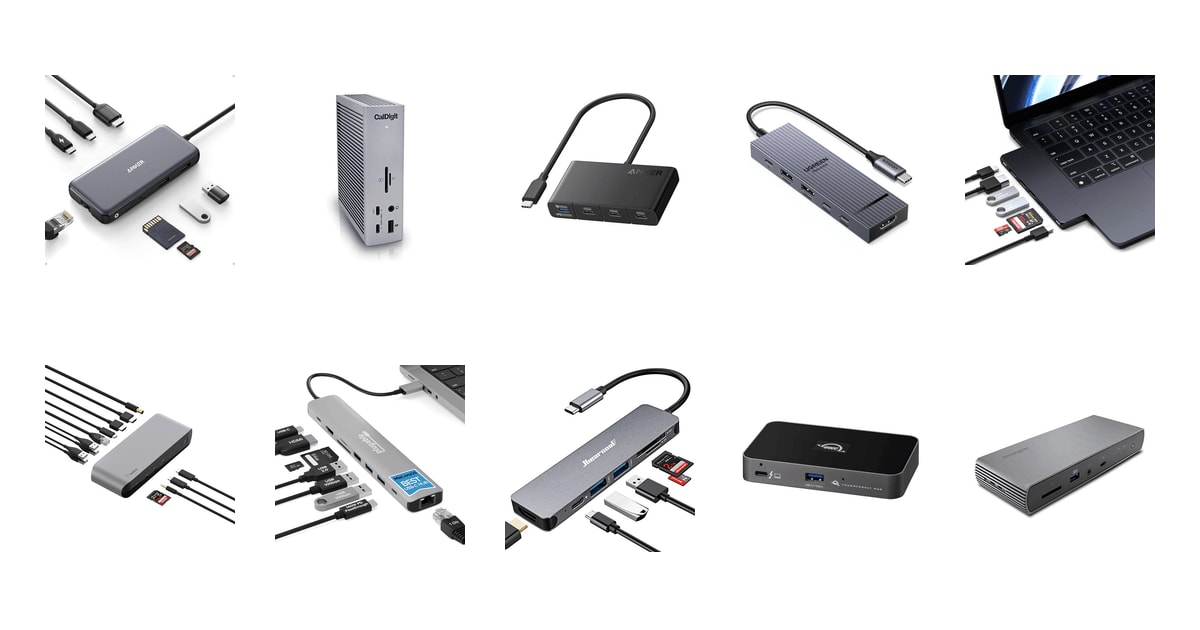
Your laptop probably has two USB-C ports, maybe three. One of them is busy charging. That leaves one port for a monitor, a mouse, a keyboard, an external drive, and the SD card from your camera. A good hub fixes that with a single cable. Plug it in once and everything comes back to life — the display, the wired network, the card reader you thought you'd never need again. The right one disappears into your desk and you stop thinking about it.
Here's the honest part: no hub in this category does everything. Compact bus-powered dongles get warm when you push them, and a heavy load can trip a disconnect. Big powered docks solve that but they're tethered to a desk and cost real money. And a lot of what a hub can do depends on your laptop, not the hub — plug a Thunderbolt 4 dock into a plain USB-C port and you get a basic hub with a nice aluminum shell. Check your port before you buy anything here.
Most people need one small box that covers video, wired internet, a couple of USB-A peripherals and a card slot. A few people need a desk anchor that drives two big monitors and charges a 16-inch laptop while doing it. We've split the picks along that line. We think that the Anker USB C Hub with Ethernet, 8-in-1 is the best USB hub for most people, and that the CalDigit TS4 18 Port Thunderbolt 4 Dock is the one to buy if you're running a full creative desk from one cable.
Everything we recommend

Every port you actually use, in something palm-sized

Eighteen ports and enough bandwidth to stop worrying

Nearly the same speed and video, minus Ethernet and cards

The essentials in something you can toss in a bag

Sits flush against a MacBook and adds a 40Gbps port
Prices as of Oct 27, 8:28 AM PT · Details
At a glance
| Product | Ports | PD Wattage | Price | |
|---|---|---|---|---|
| Anker USB C Hub with EthernetTop pick | 8-in-1 | 85W | $38.99 |
| CalDigit TS4 18 Port Thunderbolt 4 DockUpgrade pick | 18 Ports | 98W | $379.99 |
 | Anker USB-C HubAlso consider | 4-in-1 | 100W | $29.99 |
| UGREEN Revodok Pro USB-C Hub 6 inRunner-up | 6-in-1 | 100W | $16.14On sale |
| Satechi 7 in 1 USB C HubAlso great | 7-in-1 | 100W | $79.99 |
 | Belkin Thunderbolt 3 Dock Pro w/ ThunderboltAlso in lineup | 12 Ports | 85W | Check price |
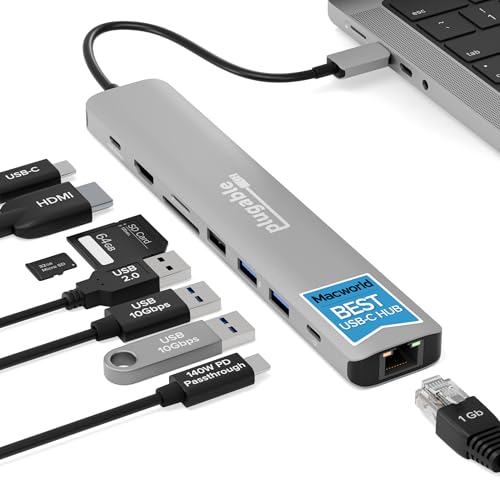 | Plugable USB C Hub Multiport Adapter: 9-in-1Also consider | 9-in-1 | 140W | $49.95 |
| Hiearcool USB C Hub for MacBookBudget pick | 7-in-1 | 100W | $19.99 |
 | OWC Thunderbolt Hub Docking StationAlso in lineup | — | — | $149.99On sale |
 | Kensington SD5780T Thunderbolt 4 Dual 4K DockingAlso in lineup | — | 100W | $250.27 |
Prices as of Oct 27, 8:28 AM PT · Details
How we picked
Ports that earn space. We compared listed port configurations against what the original guide and published roundups identify as the connections people miss most — HDMI, USB-A, Ethernet and card slots. A hub had to cover the common cases without padding the count.
Charging headroom. We read manufacturer power-delivery figures carefully, including how much the hub keeps for itself. 100W input that leaves 85W for the laptop is a different product from one that passes 140W through.
Real data speed. We separated 5Gbps USB 3.0 ports from 10Gbps USB 3.2 Gen 2 and 40Gbps Thunderbolt 4, since spec sheets often bury the distinction. Anything claiming premium positioning had to clear 10Gbps.
Heat and stability. Owner feedback across this category keeps circling back to hubs that get hot and then drop connections. We favored aluminum housings and powered docks, and we flagged the units where sustained load is a known limit.
Honest compatibility. We checked each manufacturer's own compatibility notes for the fine print — chip-specific dual-display limits on Macs, DisplayPort version requirements, and hosts where a Thunderbolt dock delivers no bandwidth gain.
Top pick
Every port you actually use, in something palm-sized
Anker USB C Hub with Ethernet
This is the hub to buy first if you're not sure what you need. It covers 4K 60Hz HDMI, Gigabit Ethernet, two USB-A ports, a USB-C data port, SD and microSD, and pass-through charging — all from one cable, with no wall adapter.
$38.99fromAmazonPrices as of Oct 27, 8:28 AM PT · Details
It covers the ports most people reach for, and skips the ones they don't. You get HDMI for a monitor, Ethernet for a stable connection on a bad Wi-Fi day, two USB-A ports for a mouse and a keyboard, a USB-C data port, and both SD and microSD slots. That's the full list of things a laptop dropped when it got thin. Nothing here is padding.
The data ports are fast enough to matter. Both the USB-C and USB-A data ports run up to 10Gbps, so pulling a folder of raw photos off an external SSD takes seconds rather than a coffee break. Plenty of hubs at this level still cap out at 5Gbps. If you move big files even occasionally, you'll notice the difference.
Video output holds up on a modern laptop. The HDMI port pushes 4K at 60Hz when your laptop supports DisplayPort 1.4, which covers most current machines. On an older DP 1.2 laptop you'll drop to 4K at 30Hz, which is fine for a spreadsheet and rough for anything that moves. Only the HDMI port carries video — the USB-C port is data only.
It's bus-powered, so it travels well. There's no brick to pack. A built-in short USB-C cable stays attached, which means one less thing to lose, and the whole thing weighs about a quarter of a pound. Anker's compatibility list covers macOS 12 and newer, Windows 10 and 11, and ChromeOS.
Flaws but not dealbreakers
Pass-through charging tops out at 85W, not the 100W people assume. The hub itself needs about 15W to run, so Anker recommends feeding it with a 100W charger and cable. For a MacBook Air or a 13-inch Windows laptop that's plenty. If you own a 16-inch MacBook Pro and run it hard, you'll charge slowly or not at all under load.
One HDMI port means one external monitor. There's no second video output, so a dual-display desk is out unless your monitor can daisy-chain on its own. Owners who want two screens from one cable need a Thunderbolt dock instead.
It gets warm. Run a display, Ethernet, and a drive at the same time and the housing heats up noticeably. It's not a dealbreaker for most workdays, but if you're the sort to leave everything plugged in for ten hours, a powered dock will stay happier. Linux users should skip it — it isn't supported.
Anker doesn't state a warranty term for this hub in its listing.
Upgrade pick
Eighteen ports and enough bandwidth to stop worrying
CalDigit TS4 18 Port Thunderbolt 4 Dock
The TS4 is a desk anchor, not a travel dongle. It gives you 18 ports including three downstream Thunderbolt 4 connections, 98W charging, 2.5 Gigabit Ethernet, and a UHS-II card reader — everything a busy creative desk needs from one cable.
$379.99fromAmazonPrices as of Oct 27, 8:28 AM PT · Details
Nothing else here comes close on port count. Eighteen ports means three Thunderbolt 4 downstream connections at 40Gbps each, three more USB-C and five USB-A ports all running 10Gbps, a DisplayPort 1.4 connector, SD and microSD UHS-II slots, and 2.5 Gigabit Ethernet. If you've ever unplugged one thing to plug in another, this is the fix.
98W charging keeps a big laptop topped up while everything else runs. That's enough for larger-screen laptops that pull more than the usual 60W, and it happens over the same single cable carrying video, data, and network. You come home, plug in once, and the desk wakes up.
The display support scales with your machine. Windows users can drive a single 8K screen or dual 4K 60Hz monitors. On macOS you can run a single display up to 6K 60Hz, and dual-monitor support depends on your chip — base M-series Macs are limited by Apple, while Pro, Max and Ultra chips handle more. Check which chip you have before you count on two screens.
The 2.5GbE port is a genuine upgrade over standard Ethernet. It's two and a half times faster than the Gigabit port on almost everything else in this guide, which matters if you pull footage off a NAS. It's backward compatible with 1GbE gear, so nothing breaks if your router is older.
It's built to be the one dock you keep. CalDigit ships a certified 0.8m cable in the box, and the dock works with Thunderbolt 4, Thunderbolt 3, USB4 and USB-C hosts, plus Windows, macOS and ChromeOS. Owners who buy this generally stop shopping.
Flaws but not dealbreakers
You need a Thunderbolt 4 or full USB4 port to get what you paid for. On a Thunderbolt 3 or plain USB-C laptop, performance is capped by your machine, not the dock. That's a lot of hardware to buy for hub-class results, so confirm your port type first.
It's the most expensive thing in this guide by a wide margin. For someone who plugs in a monitor and a mouse, that's money spent on ports you'll never fill. The Anker 8-in-1 covers that life for a small fraction of the outlay.
It's not going anywhere. At about a pound and a half with a separate power supply, this lives on a desk. Don't buy it if you want something for a laptop bag.
Runner-upOn sale
Nearly the same speed and video, minus Ethernet and cards
UGREEN Revodok Pro USB-C Hub 6 in
The Revodok Pro gives you 10Gbps across four data ports, 4K 60Hz HDMI, and 100W pass-through charging in a slim aluminum body. You give up Ethernet and card slots, and for a lot of people that's a fair trade.
$16.14fromAmazonList pricePrices as of Oct 27, 8:28 AM PT · Details
The data ports are the whole point. Two USB-C and two USB-A ports all run USB 3.2 Gen 2 at 10Gbps, so you can hang two SSDs and two peripherals off one laptop port without anything crawling. Note that the port marked 10Gbps is data only — it won't carry video or charge anything.
Video and charging match the top pick. You get 4K 60Hz over HDMI and up to 100W of pass-through charging over the Type-C port, which covers a MacBook Air or a 14-inch Pro comfortably. If you already own a monitor and just need a screen plus power plus ports, this does the job.
The aluminum body handles heat better than cheap plastic. Sustained load is where budget hubs fall over — they get hot, then they throttle data speeds and charging. A metal chassis pulls heat away from the internals, and that's a real reliability difference over hours, not minutes.
It's driver-free and works with almost everything. UGREEN lists MacBook Air and Pro across M1 through M5, iMac, iPad Pro, Chromebook, Surface, Steam Deck and ROG Ally. Plug it in and it works, with nothing to install.
Flaws but not dealbreakers
No Ethernet and no card reader. If your Wi-Fi is unreliable or you shoot on a camera with an SD card, this hub leaves you carrying a second dongle. That's the main reason it isn't the top pick.
Six ports is fewer than you'll find elsewhere at this level. There's no 3.5mm audio jack either. For a simple two-monitor-free desk it's enough, but it fills up fast.
Don't unplug the charger mid-session. UGREEN warns that plugging or unplugging the PD charger during screen mirroring or a file transfer can drop the image or the data. Worth knowing before you knock the cable.
Budget pick
The essentials in something you can toss in a bag
Hiearcool USB C Hub for MacBook
The Hiearcool 7-in-1 covers HDMI, two USB 3.0 ports, SD and microSD, and 100W pass-through charging for less than most hubs here. It's slower and its video output is capped at 30Hz, but the basics are all present.
$19.99fromAmazonPrices as of Oct 27, 8:28 AM PT · Details
It hits every port a student or a hybrid worker actually uses. HDMI for the classroom projector or the second monitor at home, two USB-A ports, SD and TF card slots, and pass-through charging. Nothing exotic, nothing missing from the daily list.
100W pass-through charging is unusually generous at this level. You can run a display and a couple of peripherals while your laptop charges, which is the difference between making it through a long meeting and hunting for an outlet.
It's the lightest thing in this guide. At just over a tenth of a pound and about four inches long, it lives in a laptop sleeve without you noticing. Hiearcool uses an aluminum shell, so heat dissipation is better than the plastic dongles it competes with.
Compatibility is broad and undemanding. It works across MacBook, Dell, HP, Lenovo, Microsoft and Asus laptops with a USB-C port. There's nothing to configure and no drivers to chase.
Flaws but not dealbreakers
HDMI output is 4K at 30Hz, not 60Hz. For slides, documents and video playback that's fine. Drag a window across the screen and you'll see the difference immediately. Anyone who stares at an external monitor all day should spend more.
USB-A is capped at 5Gbps. Copying a large video file takes roughly twice as long as it would on a 10Gbps hub. If you move big files regularly, this is the wrong hub.
It can struggle under a full load. Bus-powered hubs draw from your laptop's port, and stacking a display, a drive and charging on a budget unit is where disconnects tend to show up. Keep the load modest and it's reliable.
Also great
Sits flush against a MacBook and adds a 40Gbps port
Satechi 7 in 1 USB C Hub
Satechi built this one around the MacBook. Dual USB-C connectors let it sit flat against the side of the laptop, and a USB 4 port handles 6K 60Hz video, 40Gbps data and 100W charging on its own.
$79.99fromAmazonPrices as of Oct 27, 8:28 AM PT · Details
The USB 4 port is the standout spec. It carries 6K at 60Hz, 40Gbps of data, and 100W of power delivery through a single connection. That's Thunderbolt-class bandwidth from something that fits in a jacket pocket, and it's rare at this size.
The dual-connector design is the reason MacBook owners buy it. Both plugs go into the two USB-C ports on the same side, so the hub sits flush with no dangling cable and nothing to snag. If you've ever cracked a dongle by catching it on a desk edge, you'll appreciate this.
Photographers get what they need. There's a 4K 60Hz HDMI port for extended or mirrored video, two USB 3.2 Gen 2 ports at 10Gbps, a 10Gbps USB-C data port, and SD plus microSD card slots. Offloading a shoot doesn't require a second reader.
There's a real thermal safeguard built in. The aluminum body dissipates heat, and Satechi includes a protection mechanism that shuts the hub down above 40°C or during a high-current or high-voltage event. That's a meaningful bit of insurance for anything plugged into an expensive laptop.
Flaws but not dealbreakers
It costs a lot for seven ports. You're paying for the USB 4 port and the flush fit. If you don't care about either, the Anker 8-in-1 gives you more connections and adds Ethernet.
No Ethernet at all. For a hub aimed at working professionals that's a real gap, and it means a second adapter on any conference-room network that still runs cable.
The fit is fussy. Satechi notes it won't work with protective cases that don't have a USB-C cutout, and the dual-connector design assumes two ports side by side. On anything but a MacBook, that layout may not line up.
Who this is for
Buy a hub if your laptop has one or two USB-C ports and you keep swapping cables. That covers most MacBook Air owners, Dell XPS users, Surface owners and anyone on a recent Chromebook. If you work from one desk and connect a monitor, a keyboard and a drive every morning, a compact hub ends that ritual for good. If you're a photographer offloading cards, the SD slot alone justifies it.
Skip this guide if your laptop already has HDMI, Ethernet and a few USB-A ports — plenty of gaming and business machines still do. Skip the Thunderbolt docks entirely unless your laptop's spec sheet says Thunderbolt 4 or full USB4, because a TB4 dock on a plain USB-C port behaves like an ordinary hub at ordinary speeds. We cover USB-C hubs and Thunderbolt docking stations here. We don't cover monitors with built-in hubs, USB-A hubs for older machines, or single-purpose adapters.
How we picked
We built the shortlist from manufacturer specifications, published reviews and owner feedback themes, weighing five things. Ports: the mix had to cover HDMI, USB-A, Ethernet and card slots for everyday laptops, without inflating the count with connections nobody uses. Charging: we looked at input wattage and how much actually reaches the laptop, since a hub takes a cut for itself. Speed: 5Gbps is fine for a mouse and rough for an SSD, so anything positioned above budget had to hit 10Gbps or better. Heat: aluminum housings and powered designs held up better in owner reports than plastic bus-powered units under long sessions. Compatibility: we read the fine print on DisplayPort versions, Mac chip limits on dual displays, and which hosts unlock a dock's full bandwidth.
Other usb hubs and multi-port adapters for laptops (2026) worth considering
If you want to charge a 16-inch laptop at full speed: The Plugable USB C Hub Multiport Adapter: 9-in-1 — The Plugable 9-in-1 delivers up to 140W in and 125W out when paired with a PD 3.1 EPR charger and cable, which is more headroom than anything else here. Most PD 3.0 hubs stop around 100W in and 85W to the host, so if you run a large-screen laptop hard while everything else is plugged in, this is the one that keeps up. You also get 4K 60Hz HDMI, 10Gbps USB-C and USB-A ports, Gigabit Ethernet, and SD plus UHS-II microSD. The catches are size — it's noticeably longer than the Anker — and the fact that you need a PD 3.1 charger to see the headline wattage. Plugable backs it with lifetime support from a North American team, which matters if you've ever tried to get help with an unbranded hub.
If you only need more USB-C ports: The Anker USB-C Hub — This four-port Anker adapter is for people who already solved video some other way — a monitor with a built-in USB-C input, say — and just want to multiply ports for drives and peripherals. It moves data at 10Gbps and accepts up to 100W of charging input, and 4K 60Hz mirroring works through the first USB-C port only. What you give up is everything else: no HDMI, no Ethernet, no card slots, no USB-A. It's also the smallest thing here, at about three inches long, with an exterior made from 75% post-consumer recycled material. Anker includes an 18-month warranty.
The competition
This is what our research surfaced across major review roundups and manufacturer documentation, not a census of every hub on sale. The category churns constantly and plenty of decent hubs never make a roundup. The models below are all worth knowing about — they lost on a specific point, and for some people that point won't matter.
The OWC Thunderbolt Hub Docking Station — The OWC Thunderbolt Hub does one job: it turns a single Thunderbolt 4 port on your laptop into three downstream Thunderbolt 4 ports. If you're juggling an external GPU, a Thunderbolt RAID array, a Thunderbolt display and an audio interface, that's exactly the problem you have. But there's no HDMI or DisplayPort, so a normal monitor needs an adapter, and there's none of the USB-A and card-reader convenience the picks offer. It also does nothing useful on a plain USB-C laptop. The CalDigit TS4 gives you the same Thunderbolt expansion plus fifteen more ports, which is why it took the upgrade slot.
The Kensington SD5780T Thunderbolt 4 Dual 4K Docking — The Kensington SD5780T is the dock built for IT departments. It's Thunderbolt 4 certified, has a security lock slot and VESA mounting holes, and includes a clever power design that gives 15W to each downstream Thunderbolt port without stealing from the laptop's 96W. Dual 4K 60Hz works on Windows and on Macs with Pro, Max or M4 chips, though base M1 through M3 Macs are limited to one display. It lost to the CalDigit on sheer port count at a similar tier. If you're standardizing a fleet, or you need to physically lock a dock to a desk, it's the better buy. Note that Kensington explicitly says this isn't the right dock for a Thunderbolt 3 Windows laptop.
The Belkin Thunderbolt 3 Dock Pro w/ Thunderbolt — The Belkin Thunderbolt 3 Dock Pro is a well-made, well-supported dock with 12 ports, dual 4K 60Hz output, 40Gbps transfer, Ethernet, SD and audio, and 85W upstream charging from a 170W supply. It's also a Thunderbolt 3 device in a Thunderbolt 4 world. Newer docks give you a higher bandwidth ceiling and more ports for similar money, and 85W is short of what a large MacBook Pro wants under load. It's still a defensible pick if your organization needs a name-brand dock with documented Mac compatibility and easy retail availability. For anyone starting fresh, the Kensington or the CalDigit is the better path.
Setup and troubleshooting
Before you buy anything, look up your laptop's port on the manufacturer's spec sheet. A lightning-bolt icon or the words Thunderbolt 4 mean a dock will run at full speed; a plain USB-C port means it won't, no matter what the box says. Once you're set up, most hub problems trace back to power. Bus-powered hubs pull current from your laptop's port, and a heavily loaded one can exceed the port's budget and drop the connection. If yours disconnects, unplug the least important device and see if it settles. Heat is the other culprit — aluminum housings shed it better than plastic, and a powered desktop dock sidesteps the issue entirely. Also avoid unplugging the charger while a transfer or a screen mirror is running, since some hubs drop the session.
Questions we get
What's the difference between a USB hub and a docking station?
A hub is a compact dongle that draws power from your laptop, which makes it great for travel and modest loads. A docking station has its own power supply, so it can offer more ports, charge your laptop faster, and drive two monitors without running out of headroom. Hubs go in a bag. Docks stay on a desk.
Will a USB-C hub work with my older laptop?
Only if that laptop has a USB-C port — a USB-C hub can't plug into a USB-A-only machine without a separate adapter, and even then you'll lose video and charging. Most thin-and-light laptops from the last several years include at least one USB-C port. Check your spec sheet, and look specifically for DisplayPort Alt Mode if you want to connect a monitor.
Can a hub fully charge a 16-inch MacBook Pro while I'm working?
Usually not. Most hubs accept 100W and pass roughly 85W to the laptop, which isn't enough for a large-screen machine under a heavy load. The Plugable 9-in-1 is the exception among the portable options, delivering up to 140W in and 125W out with a PD 3.1 EPR charger. On the desktop side, the CalDigit TS4 charges at 98W.
Which hub should I get for a MacBook Air?
The Anker 8-in-1 is the straightforward answer. It covers HDMI, Ethernet, USB-A, USB-C and both card slots, and 85W pass-through charging is more than a MacBook Air needs. If you'd rather have something that sits flush against the laptop with no dangling cable, the Satechi 7-in-1 Pro Slim is the better-looking option, though it drops Ethernet.
Do I actually need Thunderbolt 4?
Probably not. For one monitor, charging and a few peripherals, a regular USB-C hub does everything you need for far less money. Thunderbolt 4 earns its keep when you're daisy-chaining multiple Thunderbolt devices, running an external GPU or a fast storage array, or driving dual 4K displays from one port. And it only helps if your laptop has a Thunderbolt 4 or full USB4 port.
Why does my hub get hot and drop connections?
Those two problems usually share a cause. A bus-powered hub takes its operating power from your laptop's USB-C port, and stacking a display, an SSD and charging onto a small plastic unit can push past what the port will supply. Heat builds, speeds throttle, and the connection drops. An aluminum-bodied hub handles it better, and a powered dock removes the constraint altogether.
Why you should trust us
For this guide:
- We read the full specification sheets for all ten hubs and docks, paying particular attention to the gap between input wattage and the power actually delivered to the laptop.
- We compared the manufacturers' own compatibility notes — DisplayPort version requirements, Mac chip limits on dual displays, and which hosts unlock a dock's full bandwidth — against the claims made in published reviews.
- We looked at recurring themes in owner feedback, especially reports of heat and dropped connections under sustained load, and weighted those against build materials and power design.
- We read owner reviews on every listing, weighted toward the critical ones, because that is where the recurring failures show up.
- We have a systematic way of automatically fetching the latest prices, so the numbers on this page stay current.
- This is a research-focused guide, so the team may not own every product listed — though we often do own the top winners, which gives us extra context for the recommendations.
- We don't accept free products, and the retailer commission never changes which product we recommend.
Sources
Best USB-C Hubs and Docking Stations, Wirecutter
Best USB-C Hubs for Laptops, Tom's Hardware
The Best USB Hubs of 2026, PCMag
Best USB-C Hub 2026, CNET
Best USB-C Hubs and Docking Stations, The Verge
Best USB-C Hubs 2026, TechRadar
Best USB-C Hubs for MacBook, Laptop Mag
Best Thunderbolt 4 Docks, PCMag
Amazon product listings and owner reviews for all 10 products
Manufacturer specification pages for each product
Some passages in this guide may be paraphrased with AI help.
Product prices and availability are accurate as of the date/time indicated and are subject to change. Any price and availability information displayed on Amazon.com at the time of purchase will apply to the purchase of this product.
More like this.
Continue exploring electronics reviews and recommendations.

The Best Power Strips With USB Ports
Look at your desk or your nightstand and count what's plugged in. A laptop, a phone, maybe a monitor, a lamp, earbuds, a tablet that's permanently at 12…

The Best USB-C Hubs and Docking Stations
A laptop with two ports and a desk full of stuff is a daily annoyance. You want your monitor, your keyboard, your mouse, your wired network and your…

The Best Motorcycle GPS Navigation Devices
A phone in a handlebar clamp works right up until it doesn't. Then you're squinting at a washed-out screen in afternoon sun, or watching the map freeze…

The Best Hiking GPS Devices
A hiking GPS earns its place in your pack on the days your phone can't help. Cold drains a phone battery fast. Rain turns a touchscreen into a smudge. And…

The Best Noise-Canceling Wireless Earbuds
Noise-canceling earbuds earn their keep in the boring moments. The drone of a plane cabin at cruising altitude. A neighbor's leaf blower during your…

The Best iPhone 17 Accessories
A new iPhone shows up naked. No case, no charger brick, nothing between that glass back and your kitchen counter. And the iPhone 17 is built around…