The Best Power Strips With USB Ports
Look at your desk or your nightstand and count what's plugged in. A laptop, a phone, maybe a monitor, a lamp, earbuds, a tablet that's permanently at 12 percent. Wall outlets come in pairs, and half of them get swallowed by one fat adapter. A power strip with built-in USB solves both problems at once: more AC outlets for the big stuff, and ports for everything that charges over a cable. You stop hunting for a free brick, and your bag gets lighter too.
No strip here nails everything. Surge protection wears out quietly — the joules get used up as the strip absorbs hits, and Consumer Reports notes there's usually nothing to tell you when you're no longer protected. Joule ratings also say nothing about clamping voltage, which is the number that decides whether a spike reaches your computer. And the USB ports come with a real trade-off: strips with a dozen outlets tend to have slow, low-wattage USB, while the ones that charge a laptop at full speed give you only two AC sockets.
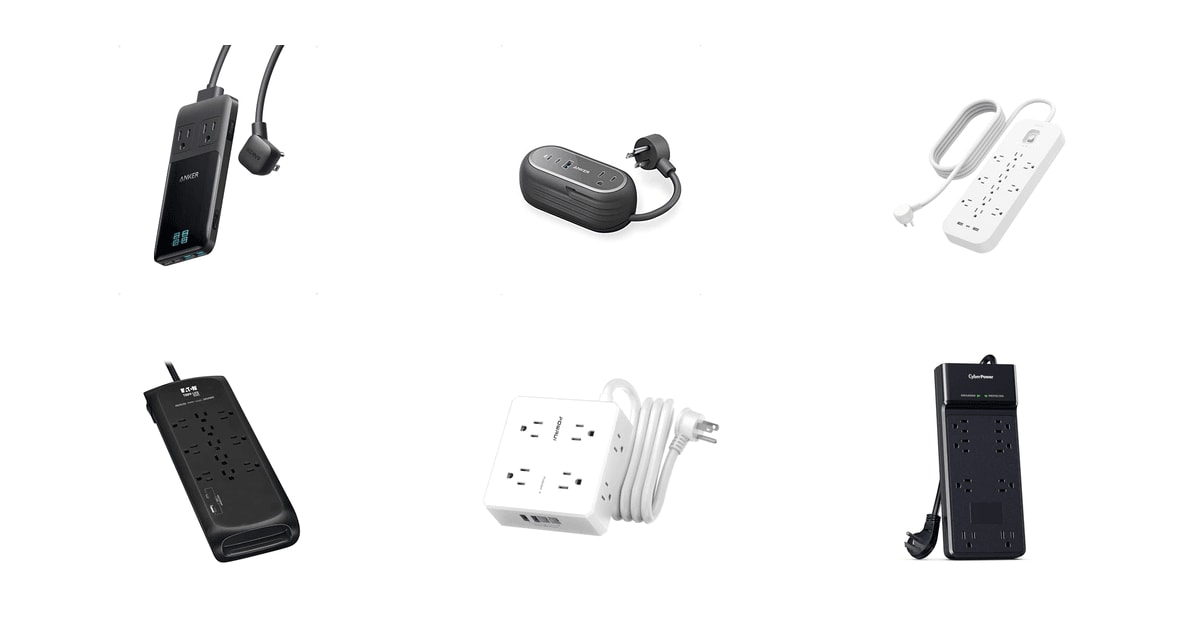
So pick for the job. If the strip lives behind a desk or a TV stand, you want outlet count, spacing and a long cord, and the USB ports are a bonus for phones. If it lives in a bag or on a clean desk, you want fast USB-C, and you'll trade outlets to get it. We think that the Belkin 12-Outlet Surge Protector is the best power strip with USB ports for most people, and that the Tripp Lite TLP118DBUC is the one to buy if you want a higher surge rating and a longer cord.
Everything we recommend

Plenty of outlets and a flat plug, if you can live with one USB-C

A higher surge rating and a longer cord, with slower USB

Four USB ports and wide-spaced outlets, with specs left unstated

Laptop-speed USB-C in a slim slab, if two outlets are enough
Prices as of Nov 4, 9:24 AM PT · Details
At a glance
| Product | Outlets/USB Ports | Joules | Price | |
|---|---|---|---|---|
| Anker Prime Charging StationUpgrade pick | 2 AC/2C+2A USB | — | $79.99 |
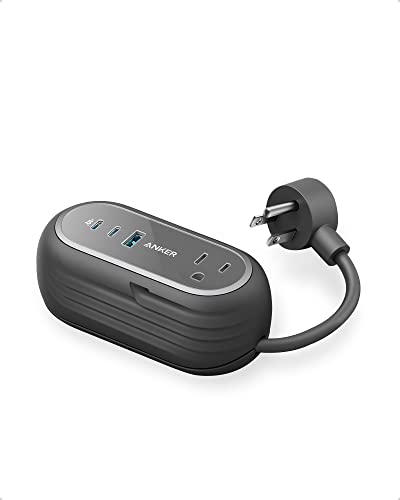 | Anker GaNPrime 65W Charging StationAlso consider | 2 AC/1C+1A USB | — | Check price |
| Belkin 12-Outlet Surge Protector Power StripTop pick | 12 AC/2A+1C USB | 3480J | $41.95 |
| Eaton Tripp Lite TLP118DBUC Surge Protector 11Runner-up | 11 AC/1C+1A USB | 4200J | $50.11 |
| Surge Protector Power Strip - 6 FtBudget pick | 8 AC/2C+2A USB | — | $12.99 |
 | CyberPower CSB806R1 Essential Surge ProtectorAlso in lineup | 8 AC Outlets | 4800J | $25.45 |
Prices as of Nov 4, 9:24 AM PT · Details
How we picked
Surge rating and certification. Published joule ratings and safety listings were the first filter, with 1,000 joules as a floor for anything with a circuit board and 2,000 as the sensible target for a home office. UL 1449 listing, or an equivalent third-party listing, was non-negotiable.
Outlets you can use. We read spec sheets and dimensions for outlet spacing, side-facing sockets and rotating designs, since a fat adapter that covers two sockets turns a twelve-outlet strip into a ten-outlet one. Owner feedback about which plugs actually fit carried real weight here.
USB speed, not port count. We compared published watts per port rather than counting ports, because a 5-volt port charges a phone and a Power Delivery port charges a laptop. Anything claiming laptop charging had to state a Power Delivery wattage.
Cord, plug and mounting. We favored six feet of cord or more, flat plugs that let furniture sit against the wall, and keyhole slots for getting the strip off the floor. Short cords quietly force you into a second extension.
What owners report over time. We looked through owner feedback for repeated themes rather than isolated complaints — heat, indicator brightness, loose outlets, charging speed. Those patterns shaped the flaws in each pick.
Top pick
Plenty of outlets and a flat plug, if you can live with one USB-C
Belkin 12-Outlet Surge Protector Power Strip
The Belkin gives you twelve surge-protected outlets, spaced so bulky adapters don't cover their neighbors, plus two USB-A ports and one USB-C. A six-foot flat-plug cord and an included wall mount let it sit flush behind a desk or hang underneath one.
$41.95fromAmazonPrices as of Nov 4, 9:24 AM PT · Details
The outlet count is what most people actually run out of. Twelve is more than a desk usually needs, which is the point — you'll grow into it. Belkin mixes tight spacing along the bar with wider gaps at the ends, so a laptop brick or a monitor transformer doesn't blank out the socket beside it. Owners who swap in this strip keep coming back to that layout. If you've ever left an outlet empty because a plug was too fat, you know why it matters.
The cord matters more than it sounds like it should. A flat plug lets a desk, dresser or couch sit flush to the wall instead of bowing out an inch. Six feet reaches across most rooms without a second extension cord. And Belkin includes a mount, so you can screw the strip to the underside of a desk and keep it off the floor, away from the vacuum and the dog.
The protection here clears the bar for a computer. Belkin rates the strip at 3,480 joules, comfortably past the 2,000 that makes sense for a home office running a monitor, a printer and a backup drive. It's UL certified, which isn't a formality: the NFPA estimates that roughly 49,000 home fires a year in the US involve extension cords, power strips and similar accessories. A master switch kills everything at once.
The USB ports are a convenience, not a replacement for your laptop charger. One USB-C and two USB-A cover the daily stuff — the phone on the desk, earbuds, an e-reader, a game controller. That's two or three wall bricks you don't have to plug in, which leaves the AC outlets free for the things that genuinely need them.
Flaws but not dealbreakers
Belkin doesn't publish a wattage for the USB-C port, and nothing in the listing points to Power Delivery. Plan on phone-and-tablet speed. If you were hoping to leave the laptop charger in a drawer, this isn't the strip that gets you there.
It's also a big bar, close to a foot long and heavier than it looks. Under a desk or behind a TV, that's fine. On a nightstand it's absurd. And like every surge protector, its joules burn down with each hit, and you won't get a clear signal when they're gone.
Runner-up
A higher surge rating and a longer cord, with slower USB
Eaton Tripp Lite TLP118DBUC Surge Protector 11
The Tripp Lite TLP118DBUC has eleven outlets, a 4,200-joule surge rating and an eight-foot braided cord with a flat plug. Six side-facing outlets swallow bulky transformers, and EMI/RFI filtering cleans up line noise that can creep into audio and networking gear.
$50.11fromAmazonPrices as of Nov 4, 9:24 AM PT · Details
Eight feet of cord is the quiet reason to buy this one. Most strips give you six, and those last two feet decide whether you reach the outlet behind the entertainment center or give up and move furniture. The cord is braided and flat, so it lies down behind a couch instead of kinking, and the plug sits flush to the wall.
The surge rating is the highest among our picks, and the certifications behind it are the right ones. Tripp Lite lists both UL 1363 and UL 1449, and the fourth edition of 1449 requires a thermal cutoff and caps residential clamping at 500 volts. The 4,200-joule rating leaves room for a home office full of gear. There's a resettable 15-amp breaker built into the switch, plus LEDs that confirm the outlet is grounded and the protection is still live.
Six of the eleven outlets face sideways, which sounds minor until you own three wall warts. Bulky transformers hang off the edge instead of covering the socket next door, so you get eleven usable outlets rather than eight. Keyhole slots on the bottom let you mount it under a desk or on a wall, which keeps the whole tangle off the carpet.
EMI and RFI filtering is the other reason IT folks stick with this line. Line noise from a motor, a dimmer switch or a cheap LED driver shows up as hum in speakers and occasionally as flaky behavior on older gear. It won't fix a bad circuit. But it's sensible insurance between your wall and a mixer, a router or a small home server.
Flaws but not dealbreakers
The USB is the weak spot. One USB-C and one USB-A share four amps between them, so you're looking at phone speed, and it drops further when both ports are busy. There's no Power Delivery here, so your laptop still needs its own charger.
Owner feedback on this exact model is thin, so our read leans on the spec sheet and Tripp Lite's long track record with surge gear. It's also 13 inches long, which is a lot of strip for a small desk.
Eaton covers the TLP118DBUC with a lifetime limited manufacturer's warranty.
Budget pick
Four USB ports and wide-spaced outlets, with specs left unstated
Surge Protector Power Strip - 6 Ft
The POWRUI strip packs eight widely spaced outlets across three sides, four USB ports — two of them USB-C — and a six-foot flat-plug cord. It holds more devices per square inch than anything else here, and it's ETL listed for safety.
$12.99fromAmazonPrices as of Nov 4, 9:24 AM PT · Details
A three-sided block beats a long bar in most of the places you'll actually put one. The eight outlets face three directions with about 1.78 inches between them, wider than the 1.5 inches you usually get. Plugs stop fighting for space. Behind a nightstand or a couch, you're setting down something the size of a sandwich instead of threading a foot-long bar into the gap.
Four USB ports, two of them USB-C, is more USB than anything else here. In a dorm room or a guest room, that's the whole ballgame — four phones charging while the lamp, the fan and a laptop brick occupy the AC outlets. Nobody has to go hunting for a wall charger at midnight.
The small details are thought through. The plug is flat and right-angled, the cord is six feet, reusable ties keep the slack tidy, and two keyholes on the back let you mount it under a desk or inside a media cabinet. It's ETL listed, which is a real third-party safety listing rather than a claim the brand made up.
Owners tend to buy a second one. The recurring theme in feedback is people working through the house replacing older strips room by room, which is about the strongest signal you can get on a budget strip. It's also the smallest and lightest of our surge-protected picks, so it travels well to a hotel or a rental.
Flaws but not dealbreakers
The USB ports are slow. USB-A runs at 5 volts and 2.4 amps, USB-C at 5 volts and 3 amps — about 15 watts, with no Power Delivery. That's fine for a phone overnight and hopeless for a laptop, which will slowly drain while it's plugged in.
POWRUI doesn't publish a joule rating anywhere in the listing, and that's the number we most wanted to see. ETL listing covers construction and overload behavior, but without joules you can't tell how big a spike this strip will absorb. Owners also flag the indicator light as bright — no problem in an office, annoying in a bedroom.
POWRUI backs the strip with a 12-month warranty and a 30-day return window.
Upgrade pick
Laptop-speed USB-C in a slim slab, if two outlets are enough
Anker Prime Charging Station
The Anker Prime 6-in-1 is a 140-watt GaN charger with two AC outlets built in, two USB-C ports, two USB-A ports and a display showing what each port draws. It's about three-quarters of an inch thick and comes with a detachable five-foot cord.
$79.99fromAmazonPrices as of Nov 4, 9:24 AM PT · Details
This one replaces chargers instead of just adding outlets. A single USB-C port pushes up to 140 watts, which is genuine laptop territory — Anker's own figure has it filling a 16-inch MacBook Pro in about an hour and a quarter. With two AC outlets, two USB-C and two USB-A, a laptop, a tablet, a phone and a couple of plugs all run off one wall socket. The wall brick stays home.
The reason it's this thin is gallium nitride. GaN semiconductors switch ten to twenty times faster than silicon, which lets a charger hit the same wattage in a package 40 to 60 percent smaller while running cooler. This one is roughly three-quarters of an inch thick and weighs about a pound, with a pop-up AC outlet that folds flat when you're not using it.
It's built for travel, and that's where it earns its keep. Hotel rooms hand you one usable outlet next to the bed. This turns it into six places to plug in, out of a bag, with a detachable cord you can leave behind when you don't need the extra reach. A small display shows what each port is drawing, which is oddly useful when you're wondering why the laptop is charging slowly.
Anker's ActiveShield 2.0 monitors temperature continuously, and the company adds a connected-equipment guarantee that runs for the product's full service life. That isn't surge protection in the joule sense. But it's a meaningful commitment for something you'll leave charging a laptop unattended on a hotel desk overnight.
Flaws but not dealbreakers
Two AC outlets. That's the whole story, and it's why this can't be your desk strip. It's a charger that happens to have outlets, not a power strip that happens to charge.
Anker doesn't publish a joule rating, so don't lean on it to protect a TV or a desktop from a spike. And some owners report a faint electrical hiss under heavy load, though plenty of others describe theirs as silent.
It also costs several times what the budget pick does. That's easy to justify if it replaces two laptop chargers in your bag, and hard to justify if it just sits on a desk.
Anker covers the Prime 6-in-1 with a 24-month warranty.
Who this is for
Buy one of these if you're short on outlets and tired of wall bricks eating the ones you have. That's most home offices, most dorm rooms, and just about every entertainment center. If you're charging a phone, a tablet and a laptop in the same spot every night, the built-in USB genuinely saves you clutter. And if your gear is worth protecting — a computer, a console, a TV — the joule rating is worth paying attention to, because it's the spec that quietly separates a surge protector from a glorified extension cord.
Skip this category if you need battery backup. A surge protector rides out a spike, but it does nothing when the power drops, so a desktop or a network-attached drive wants a UPS instead. Skip it too for high-draw appliances: space heaters, window air conditioners and microwaves belong in a wall outlet, full stop. This guide covers strips and blocks with USB charging built in. It doesn't cover UPS units, whole-home surge panels, single-outlet wall taps or plain extension cords.
How we picked
Surge rating: we treated 1,000 joules as the floor for anything with a circuit board, and looked for 2,000 or more on strips meant for a home office. Certification: UL 1449 listing, or an equivalent third-party listing, was a hard requirement rather than a nice-to-have. Outlets: we counted usable outlets rather than printed ones, favoring wide spacing and side-facing sockets that fit fat adapters. USB: we weighted watts per port far more heavily than port count, since a 5-volt port tops off a phone while a Power Delivery port keeps a laptop running. Cord and mounting: flat plugs, six feet or more of cord, and keyholes for getting the whole thing off the floor.
Other power strips with usb ports worth considering
If you want a power strip that lives in your backpack: The Anker GaNPrime 65W Charging Station — The Anker 615 is the smaller, cheaper sibling of our upgrade pick, with two AC outlets, two USB-C ports and one USB-A in something that weighs about as much as a paperback. Its 65-watt USB-C output is still real laptop charging — Anker says it takes a 14-inch MacBook Pro to half in 37 minutes — and GaN keeps it cool while doing it. You give up a lot to get that size: the cord is only three feet, there's no joule rating, and total power is shared, so a laptop and a phone charging together each get less. Think of it as a travel charger with outlets attached, not a strip for your desk.
The competition
This is what our research surfaced, not everything on the shelf. Power strips turn over constantly, and there are hundreds of near-identical bars from brands that appear and vanish, so we stuck to models with published specs from companies that stand behind them.
The CyberPower CSB806R1 Essential Surge Protector — The CyberPower CSB806R1 is a genuinely good surge protector with one disqualifying problem for this guide: it has no USB ports at all. What it does have is the highest joule rating in this group at 4,800, eight outlets with four widely spaced for bulky adapters, EMI/RFI filtering, a six-foot cord with a right-angle plug, keyhole mounting slots, a limited lifetime warranty and a connected-equipment guarantee. If you already own a good desk charger and just want plain, well-protected outlet expansion behind a TV, it's an easy buy. Just remember that a big joule number tells you how much a strip can absorb, not how little voltage it lets through.
Installation and safety notes
Plug the strip straight into a wall outlet, never into another strip or an extension cord — daisy-chaining is how people overload a circuit. Keep high-draw appliances off it entirely: space heaters, window air conditioners, microwaves and hair dryers pull more current than a strip should carry. Don't run it under a rug, where heat has nowhere to go. Glance at the ground and protected LEDs now and then, because if the protected light is out, what you own is an extension cord. Surge protection also has a shelf life. The varistors that absorb spikes degrade with every hit, and the standard advice is to replace a strip every two to three years even when it looks perfectly fine.
Questions we get
What's the difference between a power strip and a surge protector with USB ports?
A plain power strip just splits one outlet into several. A surge protector adds components that shunt voltage spikes away from your gear, and it's rated in joules for how much it can absorb before it's spent. Every pick here except the Anker Prime is a true surge protector. If a listing doesn't state a joule rating, assume you're getting outlets, not protection.
How many joules of surge protection do I actually need for a home office?
Treat 1,000 joules as the bare minimum for anything with a circuit board in it. For a desk with a computer, a monitor and a printer, 2,000 or more gives you headroom, because the rating is cumulative and burns down over the strip's life. Our top pick's 3,480 joules and the Tripp Lite's 4,200 both clear that comfortably.
Can I plug a power strip into another power strip?
No. Daisy-chaining concentrates the load of both strips on a single circuit, which is a common way to trip a breaker or start a fire, and it voids most surge warranties. Fire codes and workplace rules generally prohibit it outright. If you need more outlets, run a second strip to a different wall outlet, ideally on a different circuit.
Do USB ports on power strips charge as fast as a wall charger?
Usually not. Most strips run their USB at 5 volts and a couple of amps, which works out to 12 to 15 watts — plenty for a phone overnight, not enough for a laptop. Fast charging requires USB-C Power Delivery, and the current spec goes all the way to 240 watts over a single cable. Among our picks, only the Anker Prime charges at real laptop speed.
What does clamping voltage mean, and why does a lower number matter?
Clamping voltage, sometimes listed as VPR, is the level at which the strip starts diverting a spike away from your gear. Lower means less voltage reaches your computer. UL recommends 500 volts or below for residential equipment, and PCMag has found that many budget strips clamp above 800 volts. That's a big difference for sensitive electronics, and it's a spec most brands don't advertise.
How long does surge protection last before it wears out?
There's no fixed lifespan, and that's exactly the problem. The varistors inside degrade with every surge, and one large hit can consume most of a low-rated strip's capacity with no outward sign. Wirecutter suggests replacing a surge protector every two to three years even if it looks fine. Buying a higher joule rating up front simply buys you more time.
Why you should trust us
For this guide:
- We read the published specifications for every strip here — joule ratings, USB output, cord length, plug shape and safety listings — and flagged the places where a manufacturer left a number out.
- We compared those specs against UL's surge-protection standard and published guidance from Consumer Reports, PCMag, Tom's Guide and the NFPA.
- We read through owner feedback looking for repeated themes rather than one-off complaints, which is where the notes on indicator brightness, faint charger noise and slow USB charging came from.
- We read owner reviews on every listing, weighted toward the critical ones, because that is where the recurring failures show up.
- We have a systematic way of automatically fetching the latest prices, so the numbers on this page stay current.
- This is a research-focused guide, so the team may not own every product listed — though we often do own the top winners, which gives us extra context for the recommendations.
- We don't accept free products, and the retailer commission never changes which product we recommend.
Sources
Best Surge Protectors 2026 — Wirecutter (NYTimes), Wirecutter
Best Surge Protectors and Power Strips — Tom's Guide, Tom's Guide
The Best Power Strips — PCMag, PCMag
Best Surge Protectors — CNET, CNET
Surge Protector Ratings & Reviews — Consumer Reports, Consumer Reports
Electrical Home Fire Statistics — NFPA, National Fire Protection Association
UL 1449 Standard for Surge Protective Devices — UL, Underwriters Laboratories
USB Charger and USB Power Delivery Overview — USB-IF, USB Implementers Forum
Best Power Strips with USB Ports — Good Housekeeping, Good Housekeeping
Best Power Strips and Surge Protectors — SafeWise, SafeWise
Amazon product listings and owner reviews for all 6 products
Manufacturer specification pages for each product
Some passages in this guide may be paraphrased with AI help.
Product prices and availability are accurate as of the date/time indicated and are subject to change. Any price and availability information displayed on Amazon.com at the time of purchase will apply to the purchase of this product.
More like this.
Continue exploring electronics reviews and recommendations.

The Best USB Hubs And Multi-Port Adapters For Laptops (2026)
Your laptop probably has two USB-C ports, maybe three. One of them is busy charging. That leaves one port for a monitor, a mouse, a keyboard, an external…

The Best Smart RGB LED Strip Lights for Bedrooms
Bedroom light gets used in a specific way. You want a soft glow behind the headboard at night, something bright enough to find a charging cable, and a…

The Best USB Microphones for Podcasting
Your voice is the whole show. Listeners will forgive a rambling tangent, but they'll click away from a thin, echoey recording within seconds. A USB…

The Best Portable USB-C Monitors
A second screen changes how a laptop feels. Spreadsheets stop hiding behind browser tabs, and a video call stops covering your notes. What makes a…

The Best USB-C Hubs and Docking Stations
A laptop with two ports and a desk full of stuff is a daily annoyance. You want your monitor, your keyboard, your mouse, your wired network and your…

The Best Solar Power Banks and Portable Chargers
A charger you carry outside has one job: keep your phone alive when there's no outlet for days. That sounds simple until you're three nights into a trip…