The Best USB Microphones for Podcasting
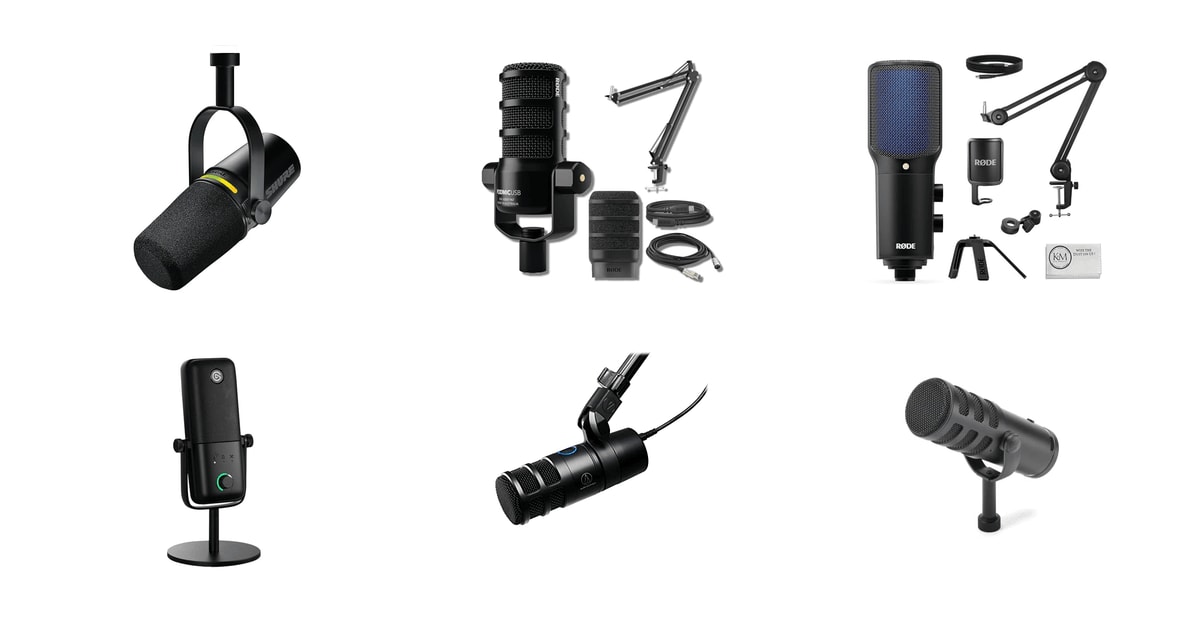
Your voice is the whole show. Listeners will forgive a rambling tangent, but they'll click away from a thin, echoey recording within seconds. A USB microphone plugs straight into your laptop and skips the mixer, the interface, and the tangle of cables that used to stand between you and a publishable episode. The good ones give you a gain knob you can reach mid-sentence and a headphone jack so you hear yourself in real time. That's most of what a solo host actually needs.
Here's the part nobody puts on the box: no USB mic fixes your room. If you record in a bare home office with hardwood floors and a big window, you'll hear the room in your recording no matter what you buy. Dynamic mics help a lot because they ignore sound that isn't right in front of them. Condensers pick up more detail, which also means more of your neighbor's leaf blower. Soft furnishings, a rug, and closer mic placement do more for your audio than another hundred dollars of microphone.
We looked at dynamic mics and condensers, dual-output models and plug-and-play starters, and weighed manufacturer specs against published reviews and what owners report after months of use. We think that the Shure MV7+ is the best USB microphone for podcasting for most people, and that the Rode PodMic USB bundle is the one to buy if you want a boom arm and XLR cable in the same box.
Everything we recommend

Broadcast-grade voice with a real upgrade path built in

A complete desk setup, not just a microphone

The pick if you stream and cut episodes from the same session

Dual outputs and broadcast build for a lot less money
A tight, focused pickup for a room you can't quiet down
Prices as of Nov 4, 9:24 AM PT · Details
At a glance
| Product | Capsule Type | Outputs | Price | |
|---|---|---|---|---|
| Shure MV7+ USB-C & XLR Podcast DynamicTop pick | Dynamic | USB-C and XLR | $255 |
| Rode PodMic USB Dynamic Broadcast Microphone BundleRunner-up | Dynamic | USB-C and XLR | $229.99 |
 | Rode NT-USB+ Professional USB Microphone with MicrophoneAlso consider | Condenser | USB-C | $209 |
| Elgato Wave:3 MK.2 USB Condenser MicrophoneAlso great | Condenser | USB-C | $134.99 |
| Audio-Technica AT2040USB Dynamic USB MicrophoneAlso great | Dynamic | USB | $159 |
| SAMSON Q9U XLR/USB Dynamic Broadcast MicrophoneBudget pick | Dynamic | XLR and USB | $149.99 |
 | Logitech for Creators Blue Snowball iCE USBAlso in lineup | Condenser | USB | $49.95 |
Prices as of Nov 4, 9:24 AM PT · Details
How we picked
Room forgiveness. We weighted dynamic capsules and tight polar patterns heavily, because published reviews and owner feedback both point to untreated rooms as the single biggest audio problem for home podcasters. A mic that rejects your room does more for your show than one that captures extra detail.
Recording resolution. We required 24-bit recording at 48kHz or better, which every mic here meets according to manufacturer specifications. Mics capped at 16-bit leave you less room to fix a quiet take in editing.
Onboard controls. We looked for a physical gain or level control, a mute you can hit without touching software, and a headphone jack for zero-latency monitoring. Spec sheets confirm which mics have all three, and owner feedback confirms how much the mute button gets used.
Upgrade path. Dual USB and XLR outputs let one mic serve a laptop today and an audio interface later. We treated that as a meaningful advantage, since it's the difference between buying once and buying twice.
What owners report over time. We read through owner feedback looking for patterns after months and years of use — failures, output levels, stand compatibility, software frustration. One-off complaints we set aside; repeated themes shaped the flaws sections above.
Top pick
Broadcast-grade voice with a real upgrade path built in
Shure MV7+ USB-C & XLR Podcast Dynamic
The MV7+ is a dynamic mic with both USB-C and XLR outputs, so it works plugged into your laptop today and into a mixer later. Auto Level Mode and real-time denoising keep your levels steady even when you lean in and out of frame.
$255fromAmazonPrices as of Nov 4, 9:24 AM PT · Details
This is the mic that gets recommended more than any other, and the reasons hold up. Shure builds the MV7+ around a dynamic capsule descended from its SM broadcast line, the family that's been sitting in radio studios for decades. Dynamic capsules hear what's directly in front of them and largely ignore the rest. In a spare bedroom with a ceiling fan and a dog, that's the difference between a clean take and an hour of cleanup.
The controls are where you'll notice it day to day. There's a full-color LED touch panel with real-time level metering and tap-to-mute, so you can silence yourself with one finger when someone walks in. Auto Level Mode adjusts gain based on how close you are and how loud you're being. If you're the kind of host who gestures and drifts off-axis when you get excited, that feature quietly saves the take.
Dual USB-C and XLR outputs mean this mic outlives your current setup. Start by plugging it into a MacBook. A year from now, when you add an interface or a Rodecaster-style mixer, the same mic connects over XLR and sounds better for it. Owners who've made that jump report exactly this — the mic scales up instead of getting replaced. That's a rare thing to buy once.
The onboard processing goes further than most. There's a real-time denoiser for background hum and built-in reverb modes — Plate, Hall, Studio — if you want a little space around a voiceover. You don't have to use any of it. But having a compressor-free way to make a dry room sound less clinical, without opening a plugin, saves time when you're editing at midnight.
Flaws but not dealbreakers
It's the priciest mic here by a good margin, and if you only record occasionally, that's hard to justify. The value shows up over years, not weeks.
The denoiser isn't magic. Owners who record next to loud speakers or in genuinely noisy rooms still reach for cleanup software afterward. Treat it as a helper, not a fix.
You'll want a boom arm. The MV7+ is heavy and long, and a flimsy desktop stand puts it too low and too far away — which undoes the proximity advantage that makes it sound good in the first place.
Runner-up
A complete desk setup, not just a microphone
Rode PodMic USB Dynamic Broadcast Microphone Bundle
The PodMic USB is a broadcast-style dynamic mic with USB-C and XLR out, onboard APHEX processing, and a headphone jack. This bundle adds a 27-inch aluminum boom arm and an XLR cable, so there's nothing else to order.
$229.99fromAmazonPrices as of Nov 4, 9:24 AM PT · Details
Most first-time podcasters buy a mic, record one episode, and then realize they also need a boom arm, a pop filter, and a cable. This bundle skips that sequence. The PodMic USB has a pop filter built into the capsule housing and a swing-mount yoke with shock isolation, and the box includes a 27-inch aluminum arm rated for the mic's weight plus a 10-foot XLR cable.
The onboard APHEX processing is the real differentiator. A noise gate cuts your keyboard between phrases. A compressor evens out the moments when you go quiet and then laugh loudly. Aural Exciter adds presence. All of it runs in the mic, so what lands in your recording software is already close to broadcast-ready. If you don't want to learn a plugin chain, this does that job for you.
The cardioid dynamic capsule covers 20 Hz to 20 kHz and records at 24-bit/48 kHz, with a 3.5mm headphone jack for zero-latency monitoring. That last part matters more than it sounds. Hearing yourself with no delay changes how you speak — you stop over-projecting, and your delivery gets more natural. Any mic without it makes you guess.
The arm's external tension springs are the small detail that pays off. Cheaper arms creak audibly when you reposition mid-recording, and that noise goes straight into your track. This one moves quietly. If you and a co-host share a desk and swing mics around between takes, that silence is worth something.
Flaws but not dealbreakers
Owners report that USB output level runs a bit low, so you may need to push gain in your recording software or move closer than you expect. Over XLR into a decent interface, the problem goes away.
This is a third-party bundle rather than a Rode-assembled kit, and at least one owner reports a unit failing after the warranty window. The mic itself has a strong reputation; the bundling adds a layer between you and support if something goes wrong.
Also great
The pick if you stream and cut episodes from the same session
Elgato Wave:3 MK.2 USB Condenser Microphone
The Wave:3 MK.2 is a cardioid condenser with Clipguard 2.0 anti-distortion and the Wave Link software mixer. It's built for creators who record a live stream and publish the audio as a podcast without rebuilding their setup twice.
$134.99fromAmazonPrices as of Nov 4, 9:24 AM PT · Details
Clipguard is the feature you'll appreciate on the take you can't redo. Elgato runs a second capsule at lower gain that kicks in when your voice spikes past what the primary capsule can handle. So when your guest says something that makes you shout-laugh, the recording doesn't turn into a burst of digital crunch. For live recording where there's no second take, that's genuine insurance.
Wave Link is the other half of the value, and it's bundled free. It handles up to nine audio channels — mic, system audio, browser, game, music, chat, AUX, and two virtual inputs — with separate routing for what you hear and what your audience hears. If you're playing clips during an episode, or you want music in your headphones but not in the recording, this replaces a hardware mixer.
Physically it's the smallest and lightest mic among our picks, under half a pound. It sits neatly in frame on camera without blocking your face, and the multifunction dial handles gain, headphone volume, and monitoring blend with a press. Tap the top to mute. There's an LED ring so you can see your level without looking at the screen.
It's a condenser, and that shapes who should buy it. The capsule picks up more of the room than a dynamic mic does, which means detail and air if your space is decent, and reverb if it isn't. Owners who record in furnished rooms are consistently happy. If your podcast studio is an empty garage, take one of the dynamic picks instead.
Flaws but not dealbreakers
Wave Link has a learning curve. Owners describe the software as powerful but not immediately obvious, and you'll spend an evening figuring out routing before it clicks.
As a condenser, it hears your room. Untreated spaces with hard floors and bare walls will show up in your recording in a way the MV7+ or PodMic largely avoid.
USB only. There's no XLR output, so when you eventually add an audio interface, this mic doesn't come with you.
Budget pick
Dual outputs and broadcast build for a lot less money
SAMSON Q9U XLR/USB Dynamic Broadcast Microphone
The Q9U is a dynamic broadcast mic with simultaneous USB-C and XLR output, zero-latency headphone monitoring, and a mute switch that kills both outputs. It costs a fraction of the MV7+ and covers the same fundamentals.
$149.99fromAmazonPrices as of Nov 4, 9:24 AM PT · Details
Look at what the Q9U includes and the price stops making sense in a good way. USB-C and XLR out, a 3.5mm headphone jack with no latency, an onboard mute switch, an internal pneumatic shock mount, and a dual-layer windscreen. That's the feature list of a much more expensive mic. Samson has been undercutting on hardware for years, and this is the clearest example in the category.
The cardioid dynamic capsule with a neodymium magnet is the part that matters for podcasting. It rejects off-axis sound well, so your air conditioner and your keyboard stay mostly out of the recording. It also puts out enough level to drive a mixer or interface properly over XLR — a lot of dynamic mics need a booster to do that. The pneumatic shock mount handles desk thumps without an external cradle.
The converter runs at 24-bit/96kHz with no drivers to install. Plug it into a Mac or a Windows machine and it works. For a podcast you'll publish at 48kHz anyway, the extra headroom isn't the point — the point is you're recording well above the 16-bit floor that hobbles cheap mics, and you never touch a driver installer.
Owners who came from a Blue Yeti or a gaming headset consistently describe the jump as large, and several have kept the Q9U as a daily driver for years across podcasting, streaming, and video. It's heavy and solid in a way that reads as durable. That said, the reviews aren't unanimous — see below.
Flaws but not dealbreakers
Reliability is the question mark. Most owners report years of trouble-free use, but a meaningful minority hit problems within the first months. It's the least consistent track record among our picks.
It's heavy — nearly two pounds and ten inches long. Lightweight boom arms sag under it, and owners specifically warn against clamping a loaded arm to a glass desk. Budget for a sturdy arm.
There's no companion software, no onboard DSP, and no touch panel. You get a good capsule and good connectors. Processing is on you.
Also great
A tight, focused pickup for a room you can't quiet down
Audio-Technica AT2040USB Dynamic USB Microphone
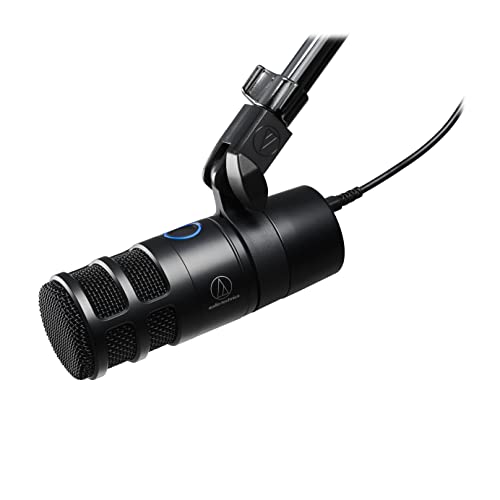
The AT2040USB is a dynamic broadcast mic with a hypercardioid pattern — a narrower pickup than the usual cardioid. It's the one to get if your recording space has noise you can't remove, like a shared apartment or a room facing a busy street.
$159fromAmazonPrices as of Nov 4, 9:24 AM PT · Details
Hypercardioid is the reason to pick this over the other dynamics here. The pattern is tighter than cardioid, so it hears a narrower slice of the world directly in front of it and rejects more of everything else. Practically, that means a roommate on a call in the next room, or traffic through a window, lands quieter in your recording. If your room is the problem, this is the most direct hardware answer.
Audio-Technica keeps the controls simple and useful. There's a headphone jack with its own amplifier and a volume knob for real-time monitoring, a silent soft-touch mute button, and an LED ring that glows blue when you're live and red when you're muted. Glance down and you know your state. That LED has saved more than one host from a two-minute monologue into a muted mic.
It's plug-and-play over USB with no drivers, and owners moving up from gaming headsets describe the change as obvious and immediate. Several note that it handles lower voices well without getting boomy — helpful if you've ever listened back and thought you sounded like you were talking into a barrel.
The tight pattern has a cost worth understanding upfront. Hypercardioid mics are less forgiving about where your mouth is. Drift a few inches off-axis and the level drops more than it would with a cardioid. Set it up once on a stable arm, aim it at your mouth, and stay put. Wanderers should look at the MV7+ and its Auto Level Mode instead.
Flaws but not dealbreakers
USB only. No XLR output means no upgrade path to an interface later — you'd be buying a new mic.
It's heavy for its size at over 1.3 pounds, and owners report cheaper mic stands struggling to hold position with it mounted.
The narrow pickup demands consistent mic technique. If you move around while you talk, your levels will move with you.
Who this is for
This guide is for anyone starting or upgrading a podcast who wants to plug a mic into a computer and record something publishable. That includes first-time hosts with no gear at all, hobbyists moving up from a laptop or webcam mic, remote workers who record interviews, and streamers who cut episodes from live sessions. If you're recording alone in a spare room or a home office, everything here is aimed at you.
Skip this guide if you already own an audio interface or a mixer — buy an XLR mic instead and spend the savings on a better preamp. Also skip it if you need to record more than two people in the same room, which really wants one mic per person and a mixer. We only cover USB microphones you can use without additional hardware, so pure XLR mics, lavaliers, shotgun mics, and headset mics are out of scope.
How we picked
Room forgiveness: We favored dynamic capsules and tight polar patterns, since the biggest audio problem most podcasters have is the room, not the mic. Recording resolution: Every pick records at 24-bit/48kHz or better, per manufacturer specifications — 16-bit mics leave you nowhere to go when a take comes in quiet. Onboard controls: A physical level control, a mute button you can reach, and a headphone jack for zero-latency monitoring were close to mandatory. Upgrade path: Mics with both USB and XLR outputs earn extra credit, because they still work when you add an interface. What owners report over time: We looked for repeated themes in owner feedback — output levels, stand compatibility, software learning curves, and failures after months of use — and let those shape what we flag as flaws.
Other usb microphones for podcasting worth considering
If you have a quiet, furnished room and want the most detailed voice: The Rode NT-USB+ Professional USB Microphone with Microphone — The Rode NT-USB+ is a studio-grade condenser with an ultra-low-noise Revolution preamp, and it records at 24-bit/48kHz over USB-C. It ships with a detachable pop filter and a desktop stand, and this bundle adds an arm and a cloth. APHEX processing — including Aural Exciter and Big Bottom — runs through Rode Central. In a room with a rug, curtains, and a bookshelf, it'll sound richer and airier than any dynamic mic here. But it's a condenser, so it hears everything: your room, your fan, your street. Owner feedback on this listing is thin, and at least one buyer reports crackling and audio artifacts, which is worth knowing before you commit.
The competition
This is what our research surfaced in this category, not a census of everything for sale. USB microphones turn over quickly, and plenty of capable mics — including older models still widely recommended — aren't represented here. What follows is the rest of the lineup we looked at and why each one lost out.
The Logitech for Creators Blue Snowball iCE USB — The Blue Snowball iCE is the lowest-friction entry point in the whole category: a plug-and-play cardioid condenser with no drivers, a tripod stand, and a retro look that photographs well on camera. Owners have kept them running for a decade. But it lacks the things that make podcasting easier — there's no mute button, no gain control, and no headphone jack, so you're monitoring blind and adjusting levels in software. It's also physically bulky enough that owners complain it blocks their monitor. This listing is a renewed unit, which lowers the barrier further but adds some uncertainty about condition. If your budget genuinely won't stretch further, it beats a laptop mic by a wide margin. Everyone else should save for the Q9U.
Setup and placement
Placement beats gear. Get the mic within a fist's distance of your mouth and slightly off to one side, so your plosives blow past it instead of into it — that alone removes most of the popping you'd otherwise edit out. Mount it on a boom arm rather than the desktop stand it came with; desk stands sit too low and transmit every keyboard press up into the capsule. Check the thread before you buy an arm, since most mics use 5/8-inch and most arms include a 3/8-inch adapter. Then treat the room, cheaply: a rug, curtains, and a full bookshelf kill more reverb than any setting on the mic. Record a two-minute test and listen on headphones before you commit to an episode.
Questions we get
Should I buy a USB or XLR microphone for podcasting?
Buy USB if you're recording alone into a computer and don't own an interface — it's fewer boxes, fewer cables, and fewer things to get wrong. Buy XLR if you already have an interface or mixer, or if you need to record multiple people in one room. The best answer for most people is a mic with both, like the Shure MV7+, the Rode PodMic USB, or the Samson Q9U, so the decision isn't permanent.
What's the difference between a dynamic and a condenser microphone?
A dynamic mic needs sound to be loud and close, so it mostly ignores your room, your fan, and the street. A condenser is far more sensitive and captures more detail and air, but it also captures your echo and your neighbor's dog. For a typical untreated spare room, dynamic is the safer choice. Condensers reward a furnished, quiet space.
Which mic works best in a noisy or untreated room?
The Audio-Technica AT2040USB, because its hypercardioid pattern is narrower than the cardioid pattern most mics use and rejects more of what's beside and behind it. The Shure MV7+ is a close second and adds real-time denoising on top of a dynamic capsule. Either way, move closer to the mic — proximity is the strongest noise-rejection tool you have.
Do I need an audio interface if I already have a USB microphone?
No. A USB mic contains its own preamp and converter, which is the whole point — it does the interface's job internally. You'd add an interface when you need to record two or more mics simultaneously, or when you want a better preamp than the one built into the mic. If that's on your horizon, buy a mic with an XLR output now so you're not replacing it later.
Can I record two people with one USB microphone?
Not well with any of our picks, since they're all cardioid or hypercardioid and aimed at one mouth. Some multi-pattern USB mics offer a bidirectional mode that picks up two people sitting face to face, which is a workable compromise for an occasional in-person interview. For anything you're publishing regularly, one mic per person sounds substantially better and gives you separate tracks to edit.
Do USB microphones work with Zoom, Teams, and Riverside?
Yes. Every mic here shows up as a standard audio input device, so you just select it in the app's sound settings. For remote interview platforms like Riverside or Zencastr, that also means the platform records your local audio at full quality rather than the compressed call stream. Plug in the mic before you open the app, or you may have to switch inputs mid-call.
Why you should trust us
For this guide:
- We read manufacturer specification sheets for every microphone here, comparing capsule type, polar pattern, bit depth, sample rate, output options, and onboard controls.
- We reviewed published recommendations from outlets including Wirecutter and RTINGS.com, which maintains comparable acoustic measurements across USB microphones.
- We read through owner feedback on each listing looking for recurring themes — output levels, stand and boom arm compatibility, software learning curves, and failures reported after months of use.
- We read owner reviews on every listing, weighted toward the critical ones, because that is where the recurring failures show up.
- We have a systematic way of automatically fetching the latest prices, so the numbers on this page stay current.
- This is a research-focused guide, so the team may not own every product listed — though we often do own the top winners, which gives us extra context for the recommendations.
- We don't accept free products, and the retailer commission never changes which product we recommend.
Sources
The Best USB Microphone — Wirecutter (NYT), Wirecutter
Best Podcast Microphones — RTINGS.com Lab Tests, RTINGS.com
The Best USB Microphones for 2026 — PCMag, PCMag
Best Podcast Microphones 2026 — Tom's Guide, Tom's Guide
Best USB Microphones 2026 — TechRadar, TechRadar
Best Podcast Microphone 2026 — The Podcast Host, The Podcast Host
Shure MV7+ Full Specifications — Shure Official, Shure (Manufacturer)
Rode NT-USB+ Specifications — Rode Official, Rode (Manufacturer)
Rode PodMic USB Specifications — Rode Official, Rode (Manufacturer)
Elgato Wave:3 Specifications — Elgato Official, Elgato (Manufacturer)
Infinite Dial 2024 — Podcast Listener Statistics — Edison Research, Edison Research
Podcasting Industry Overview — Statista, Statista
Amazon product listings and owner reviews for all 7 products
Manufacturer specification pages for each product
Some passages in this guide may be paraphrased with AI help.
Product prices and availability are accurate as of the date/time indicated and are subject to change. Any price and availability information displayed on Amazon.com at the time of purchase will apply to the purchase of this product.
More like this.
Continue exploring electronics reviews and recommendations.

The Best USB Hubs And Multi-Port Adapters For Laptops (2026)
Your laptop probably has two USB-C ports, maybe three. One of them is busy charging. That leaves one port for a monitor, a mouse, a keyboard, an external…

The Best USB-C Hubs and Docking Stations
A laptop with two ports and a desk full of stuff is a daily annoyance. You want your monitor, your keyboard, your mouse, your wired network and your…

The Best Portable USB-C Monitors
A second screen changes how a laptop feels. Spreadsheets stop hiding behind browser tabs, and a video call stops covering your notes. What makes a…

The Best Power Strips With USB Ports
Look at your desk or your nightstand and count what's plugged in. A laptop, a phone, maybe a monitor, a lamp, earbuds, a tablet that's permanently at 12…

The Best Mini Projectors
A mini projector's job is simple. It turns a blank wall into a hundred-inch screen, then disappears into a drawer. That's a good trade if you rent, if…

The Best Karaoke Machines
A karaoke machine earns its keep on the nights you weren't planning anything. Someone's birthday dinner runs long, the kids won't go to bed, and suddenly…