The Best Budget Mechanical Keyboards
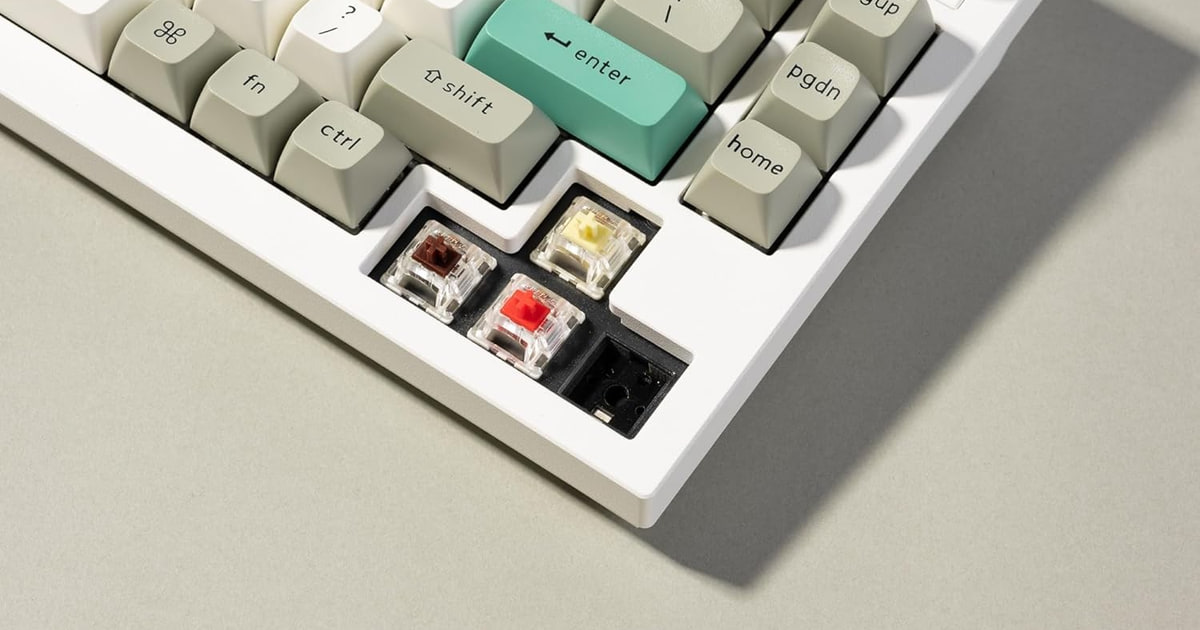
A mechanical keyboard is one of the few upgrades you feel every single minute you're at a desk. The keys have a defined bottom, a consistent weight, and a sound that's yours to choose. Membrane boards mush out after a couple of years because the rubber under each key gives up. Mechanical switches don't work that way — Cherry rates its switches for 100 million presses, Gateron for 50 to 70 million, and even entry-level Outemu switches for 50 million. A membrane key is rated for about 5 million. That's the whole pitch.
Here's the part nobody puts on the box: budget boards make noise, and you can't fully fix that. Even the quiet ones clack. If you share an office, take calls at a kitchen table, or sit near a partner watching TV, someone will notice. Foam layers and gasket mounting help — enthusiast acoustic testing suggests gaskets shave roughly 5 to 10dB off peak typing sound versus a screwed-down tray mount — but they don't make a keyboard silent. Budget stabilizers also rattle on the long keys. That's the tier.
The good news is that the features that used to cost a fortune have trickled down. Hot-swap sockets, open-source QMK firmware, south-facing RGB, real gasket mounts and double-shot PBT keycaps all show up on affordable boards now. You mostly pick based on layout, connectivity and how much fiddling you want to do. We think that the Keychron V3 8K is the best budget mechanical keyboard for most people, and that the Royal Kludge RK84 is the one to buy if you need to jump between a laptop, a tablet and a desktop.
Everything we recommend

Open firmware and a solid TKL build, with no wireless
Three ways to connect, at the cost of deep customization

A real mechanical board for barely more than a membrane

Sounds great out of the box, but the software is closed

Aluminum, gaskets and wireless, if you'll pay for it
Prices as of Nov 4, 9:24 AM PT · Details
At a glance
| Product | Layout | Switch Type | Price | |
|---|---|---|---|---|
| Keychron V3 8K TKL Wired Mechanical KeyboardTop pick | 80% TKL | Tactile Brown | $74.99 |
| RK ROYAL KLUDGE RK84 Wireless RGB 75%Runner-up | 75% | Brown Switch | $59.99 |
| Redragon K552 Mechanical KeyboardBudget pick | 87-Key | Red Switch | $36.99 |
 | EPOMAKER TH80 V2 PRO Wireless Gaming KeyboardAlso in lineup | 75% | Sea Salt Silent | Check price |
| Akko 5075B Plus World Tour Mechanical KeyboardAlso great | 75% | Piano Switch | $69.99 |
 | nuphy Air75 V2 Low Profile Wireless MechanicalAlso consider | Air75 | Gateron Aloe | $149.99 |
 | GLORIOUS GMMK 2 Gaming Mechanical Keyboard -Also consider | 96% | Fox Linear | Check price |
| Keychron Q1 Max RGB QMK/VIA Custom MechanicalUpgrade pick | — | Gateron Jupiter Red | $229.99 |
Prices as of Nov 4, 9:24 AM PT · Details
How we picked
Switch and feel. We compared manufacturer actuation specs across linear, tactile and clicky options and weighted boards with hot-swap sockets, since being able to change switches later matters more than getting them right on day one.
Layout and footprint. We favored 75% and TKL layouts, which keep the function row and arrows while cutting roughly a quarter to a third of the width of a full-size board. Full-size only earned a spot where the number pad was the point.
Firmware and remapping. Open QMK and VIA support outranked proprietary drivers. A board you can remap in a browser without an installed app stays useful after the manufacturer moves on.
Sound and damping. We looked for gasket mounting, foam layers and pre-lubed switches, drawing on enthusiast acoustic comparisons that put gaskets roughly 5 to 10dB below equivalent tray-mount builds.
Keycap material. PBT was close to a requirement. Abrasion comparisons show budget ABS going glossy within 200 to 400 hours of typing, while PBT holds up past 1,000.
Top pick
Open firmware and a solid TKL build, with no wireless
Keychron V3 8K TKL Wired Mechanical Keyboard
The Keychron V3 8K is a tenkeyless board with hot-swap sockets, PBT keycaps, a volume knob and browser-based remapping that needs no installed software. It's wired only, which is the trade you make for an 8000 Hz polling rate and a lower price than Keychron's metal boards.
$74.99fromAmazonPrices as of Nov 4, 9:24 AM PT · Details
Remapping is the feature that keeps this board useful for years. The V3 8K uses Keychron's Launcher web app, so you open a browser tab, plug in, and move keys around. No account, no installer, no driver that stops getting updates. If you decide Caps Lock should be Escape, or you want a layer with arrow keys under your right hand, that takes about a minute. Boards locked to proprietary software age badly when the company loses interest.
The TKL layout drops the number pad but keeps the function row, the arrows and the navigation cluster. For most people that's the right cut. You get several inches of desk back for mouse sweeps, and you don't lose the F-keys you actually use for renaming files or muting a call. If you enter numbers all day in a spreadsheet, this is the wrong shape and you should look at the 96% board further down.
Owner feedback is consistent on build: solid case, no flex, satisfying typing. The knob is the weak spot — more than one owner calls it cheap-feeling compared with the rest of the board. A few also note the Caps Lock indicator is dim enough that you can't tell at a glance whether it's on. Neither ruins the keyboard, but they're the kind of small misses that separate this from Keychron's aluminum boards.
The 8000 Hz polling rate is marketing more than benefit for most of you. It's real, and it's a fine reason to accept a wired-only board, but the difference between 1000 Hz and 8000 Hz is not something you'll notice while writing email or playing anything but the twitchiest shooter. Buy this for the firmware, the hot-swap sockets and the oil-resistant PBT keycaps. Treat the polling rate as a bonus.
Flaws but not dealbreakers
There's no wireless at all. If you want one keyboard that hops between a work laptop and a personal desktop, this isn't it — you'll be unplugging a cable.
The stock tactile browns get described by owners as slightly more fatiguing than Keychron's older brown switches. Hot-swap sockets make that fixable for the cost of a set of switches, but it's an annoying thing to discover after unboxing.
The knob feels cheaper than the rest of the board, and the Caps Lock light is faint. Small things, but you'll bump into both daily.
Runner-up
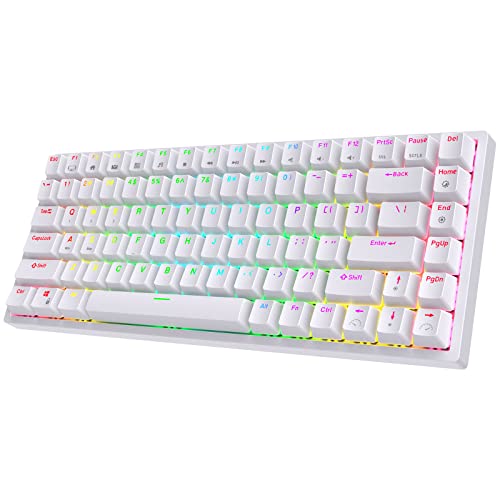
Three ways to connect, at the cost of deep customization
RK ROYAL KLUDGE RK84 Wireless RGB 75%
The RK84 connects over Bluetooth 5.0, a 2.4GHz dongle or USB-C, and it packs a 75% layout with hot-swap sockets and USB pass-through ports. Battery life runs long with the backlight off. It's the practical choice when one keyboard has to serve several machines.
$59.99fromAmazonPrices as of Nov 4, 9:24 AM PT · Details
If you switch between a work laptop, a home desktop and a tablet, this is the one. Bluetooth handles the tablet, the 2.4GHz dongle handles the gaming machine, and USB-C is there when a battery dies at the worst moment. Latency testing from RTINGS puts budget 2.4GHz dongles around 1ms — effectively wired. Bluetooth adds roughly 8 to 16ms, which matters in a shooter and is invisible while typing.
The 75% layout is the smartest compromise in keyboards. You keep the function row, real arrow keys and the navigation keys you reach for, and you cut roughly a quarter to a third of the footprint versus full-size. Everything sits closer together than on a TKL, so there's a short adjustment period around the Delete and Home column. Most people stop noticing within a week.
Owners who came to the RK84 after researching for weeks tend to describe it as punching above its price, and the hot-swap PCB means the stock switches aren't a life sentence. The two built-in USB pass-through ports are genuinely handy — plug in a mouse dongle or a flash drive without crawling behind a tower.
Royal Kludge has a spotty history here that's worth knowing. Older reviews describe dongle problems and repeated keystrokes on early units, and at least one owner went through a replacement before getting a good board. Newer batches read much better. Buy from a seller with an easy return path anyway.
Flaws but not dealbreakers
Modding potential is limited compared with the enthusiast boards here. There's no gasket mount and no QMK support — you're using Royal Kludge's own software for remapping, which is less capable and less future-proof than VIA.
Quality control is the real risk. Reports of key chatter and finicky dongles are common enough in owner feedback that we'd treat a smooth first week as a good sign rather than a guarantee.
Battery life is only long with the RGB off. Run the lights and you'll be charging often.
Budget pick
A real mechanical board for barely more than a membrane
Redragon K552 Mechanical Keyboard
The Redragon K552 is a wired tenkeyless board with linear red switches, a metal top plate and rainbow backlighting. It's the least expensive way to find out whether you actually like mechanical keyboards, and it's heavy enough that it doesn't slide around.
$36.99fromAmazonPrices as of Nov 4, 9:24 AM PT · Details
This is the board to buy when you're not sure you want a mechanical keyboard. It costs a fraction of everything else here, and it still gives you real switches, a steel top plate and full N-key rollover. Owners upgrading from membrane keyboards describe the jump as immediate and obvious. If you hate it, you're out very little. If you love it, you've learned what to look for next.
The linear reds are smooth and take a light, consistent press with no bump — good for gaming and fine for typing once your fingers learn not to bottom out. A software driver handles key remapping and macros, though it's Windows-oriented and clunky. Plug-and-play works everywhere without it.
Set your expectations correctly and you'll be happy. This is a tray-mount board with a hollow case, budget stabilizers and ABS keycaps. It's loud, and there's a pingy quality to the sound that enthusiasts notice right away. Owners who love it usually mention modding it — foam in the case, lube on the stabilizers — which turns it into something considerably nicer for an hour of work.
The keycaps will shine. Abrasion testing puts visible gloss on budget ABS at 200 to 400 hours of typing, while PBT holds out past 1,000. At eight hours a day that's a couple of months before your WASD cluster starts looking polished. A cheap PBT set fixes it and costs less than most of the other keyboards here.
Flaws but not dealbreakers
It's loud, and the hollowness makes it sound cheaper than it feels. In an open office or a shared room, this is the board most likely to earn you a comment.
The switches are soldered, not hot-swap. If you don't like the reds, you're either living with them or picking up a soldering iron.
ABS keycaps and stock stabilizers mean rattly space bars and shine within months. Both are fixable, but you're the one doing the fixing.
Also great
Sounds great out of the box, but the software is closed
Akko 5075B Plus World Tour Mechanical Keyboard
The Akko 5075B Plus is a gasket-mounted 75% board with pre-lubed switches, three layers of sound-damping foam and double-shot PBT keycaps. It connects over Bluetooth, 2.4GHz or USB-C, and it needs no modding to sound good.
$69.99fromAmazonPrices as of Nov 4, 9:24 AM PT · Details
Most budget boards get good after you open them up. This one arrives that way. Akko puts silicone plate foam, case foam and an IXPE switch pad inside, mounts the plate on gaskets rather than screwing it to the case, and ships pre-lubed switches. The result is the deep, muted sound enthusiasts chase, without you buying a screwdriver. Owners consistently describe it as thocky and thick for a plastic board.
The keycaps alone justify a lot of the price. Double-shot PBT in Cherry profile means the legends are molded through rather than printed, so they won't wear off, and the texture won't turn glossy the way ABS does. On a budget board this is usually the first corner cut. Akko doesn't cut it.
The 75% layout with a rotary knob covers most of what you need — function row, arrows, media control under your thumb and finger. Triple-mode wireless with a 3000mAh battery handles a tablet and a desktop without a second keyboard. Owners point to it as a clear step up from cheaper name brands without reaching Keychron's metal-body tier.
One real limitation: remapping happens through the Akko Cloud Driver, not VIA or QMK. It works, but it's a browser-based proprietary tool, and if you ever want the 32-layer, macro-heavy, tap-dance setup QMK allows, you can't have it here. For most people that's academic. For tinkerers it's the reason to pay more.
Flaws but not dealbreakers
Customization is capped by the proprietary driver. Enthusiast owners call this out specifically as the board's shortcoming — great hardware, closed software.
The case is plastic. It's rigid and well-damped plastic, but it doesn't have the heft or the cool feel of an aluminum board.
The themed colorways are loud by design. If you want something that disappears into a professional desk, look elsewhere.
Upgrade pick
Aluminum, gaskets and wireless, if you'll pay for it
Keychron Q1 Max RGB QMK/VIA Custom Mechanical
The Keychron Q1 Max is a CNC aluminum 75% board with a double-gasket mount, screw-in stabilizers, hot-swap sockets, QMK/VIA support and both 2.4GHz and Bluetooth 5.1. It's the most expensive board here and the last stop before a full custom build.
$229.99fromAmazonPrices as of Nov 4, 9:24 AM PT · Details
Everything a budget board approximates, this one just does. Full metal body instead of plastic. Double-gasket mount instead of a tray. Screw-in stabilizers instead of clip-ins, so the space bar doesn't rattle. QMK and VIA instead of a proprietary driver. Add 2.4GHz at 1000 Hz plus Bluetooth for up to three devices, and there's nothing left on the feature list to want.
The weight is the part people don't expect. This board doesn't move. Owners describe it as heavy and thick, with a low linear sound they compare favorably to keyboards from Razer and Logitech that cost more. If you've only used plastic boards, the difference in how a keystroke resolves is immediately obvious.
QMK and VIA are the long-term reason to buy this. QMK supports up to 32 remappable layers, per-key RGB control, macros, tap-dance and combos, all free and open-source. That means the keyboard adapts to whatever you're doing five years from now, and it doesn't depend on Keychron maintaining an app.
Fair warning on where this sits. It's a splurge, and it's the ceiling of what we'd call budget-adjacent. If you're not going to remap anything, don't care about metal, and just want a keyboard that types well, the V3 8K gets you most of the way for much less.
Flaws but not dealbreakers
It costs several times what our budget pick does. The improvements are real, but they're diminishing returns unless you're at this keyboard for hours a day.
Shipping damage shows up in owner feedback more than we'd like — a missing footrest on one unit, a replacement that arrived worse. Inspect it the day it lands.
At this weight it's not a keyboard you toss in a bag. It's meant to live on one desk.
Who this is for
This guide is for anyone moving off a membrane keyboard, or off a first cheap mechanical, without spending enthusiast money. That covers students who type all day, remote workers who want a nicer daily driver, gamers who want a lighter and more consistent keypress, and beginners who like the idea of swapping switches later. Every board here can be your only keyboard.
It's not for you if you need something silent, or if you already own a well-built board and are chasing marginal sound improvements — at that point you're buying switches and keycaps, not a new keyboard. We also stayed away from full custom kits, ergonomic split boards and low-profile laptop-style keyboards, which are different purchases with different trade-offs. If you enter numbers all day, skip straight to the 96% and full-size options here.
How we picked
Switches: we prioritized hot-swap sockets so you're not stuck with the stock feel, and compared actuation weights across linear, tactile and clicky options. Layout: 75% and TKL boards won for keeping the function row and arrows while freeing real desk space, with full-size reserved for people who need the number pad. Firmware: open QMK and VIA support beat proprietary drivers, since browser-based remapping outlives any app. Sound: we favored gasket mounts, foam layers and pre-lubed switches over hollow tray-mount cases. Keycaps: PBT over ABS, because budget ABS goes shiny within a few months of daily typing.
Other budget mechanical keyboards worth considering
If you want the number pad without a full-size board: The GLORIOUS GMMK 2 Gaming Mechanical Keyboard - — The Glorious GMMK 2 in its 96% layout squeezes a number pad, function row and arrows into roughly the width of a TKL by eliminating the gaps between clusters. Every switch is hot-swappable, the keycaps are double-shot, and there's sound-dampening material inside — owners repeatedly describe it as quiet out of the box, which is unusual for a gaming board. It's wired only and configured through GLORIOUS CORE rather than VIA, so it's less flexible long-term than the Keychron boards. One owner reported keys failing after 20 months; the hot-swap sockets at least make that repairable.
If you type on a laptop and want mechanical keys anyway: The nuphy Air75 V2 Low Profile Wireless Mechanical — The Nuphy Air75 V2 is barely half an inch thick, which puts it close to laptop key height rather than standard mechanical height. That's the point — if you're used to a MacBook, a normal mechanical board feels like a step stool. You still get hot-swap sockets, double-shot PBT keycaps, QMK/VIA support and 1000 Hz polling over both 2.4GHz and wired. What you give up is travel and sound: low-profile switches are shallower and thinner-sounding than full-height ones, and there's no fixing that with foam. It's a slim board that also travels well, not a desk board that happens to be thin.
The competition
These are the other boards our research turned up, not a survey of everything sold. The budget category churns constantly, and a keyboard landing here usually lost on one specific thing rather than being bad.
The EPOMAKER TH80 V2 PRO Wireless Gaming Keyboard — The Epomaker TH80 V2 Pro is genuinely appealing hardware. It's over a kilogram, hot-swaps both the keys and the knob module, layers PORON, IXPE, EPDM and silicone inside for sound damping, and adds a small glass screen showing time and battery. The Sea Salt Silent switches draw praise from owners for being quiet without going mushy. What sank it is software: it's not VIA-compatible, and remapping and screen control happen through separate proprietary tools that owners describe as janky and browser-dependent. Some also find the transparent keycaps hard to read. If you want the sound and the screen and don't care about remapping, it's a fine buy — the Akko just does the same acoustic work with better keycaps.
Care and quieting
Two cheap fixes take most budget boards a long way. First, pull the space bar, shift and enter keys and put a dab of thick lubricant on the stabilizer wires where they contact the housing — that rattle is what makes an inexpensive board sound inexpensive. Second, open the case and lay a sheet of craft foam or shelf liner between the PCB and the bottom shell to kill the hollow echo. Neither takes an hour. For everyday upkeep, pull the keycaps every few months and wash them in warm soapy water while you vacuum the plate. If a key starts chattering on a hot-swap board, yank the switch with a puller and drop in a spare — that's a sixty-second repair, not a warranty claim.
Questions we get
Are budget mechanical keyboards actually worth it over a membrane keyboard?
Yes, mostly for longevity and consistency. Membrane keys are rated for around 5 million presses before the rubber dome softens; mechanical switches are rated for 50 to 100 million depending on brand. You also get a defined actuation point instead of mush, which is what people mean when they say typing feels better.
What's the difference between hot-swap and soldered keyboards?
Hot-swap boards have sockets, so you pull a switch out with a cheap puller and push a new one in — about a minute per switch, no tools beyond the puller. Soldered boards have the switches fixed to the PCB permanently. Hot-swap is worth prioritizing because it lets you fix a dead switch yourself and change the feel of the keyboard without buying another one.
Which switch type should I get for gaming?
Linear, in most cases. Linears have no tactile bump and no click, so the press is smooth and quick, and light ones like Gateron Yellows actuate at 35g with 2mm of pre-travel. Tactiles give you a bump that confirms the press, which many people prefer for long typing sessions. Clickies are loud and best avoided if anyone else can hear you.
How loud are these in an open office?
Loud enough that people notice. A gasket-mounted board with foam and silent switches, like the Akko or the Epomaker, is the polite end of the range; a bare tray-mount board like the Redragon is the opposite. Enthusiast acoustic comparisons put gasket designs roughly 5 to 10dB below tray mounts. If you take a lot of calls, pick silent linears and add foam.
Do PBT keycaps actually matter, or is that enthusiast noise?
They matter. Abrasion comparisons show budget ABS keycaps developing visible gloss after 200 to 400 hours of typing, while PBT resists shine past 1,000 hours. At full-time desk use that's a few months versus a few years. A replacement PBT set is inexpensive, so it's not a reason to skip a good board that ships with ABS.
What are QMK and VIA, and do I need them?
QMK is open-source keyboard firmware and VIA is the graphical tool for configuring it, usually right in a browser. Together they support up to 32 remappable layers, per-key RGB, macros and combos, all free. You don't strictly need them, but a board with QMK support stays configurable regardless of whether the manufacturer keeps updating an app — which is why we weighted it heavily.
Is wireless worth it on a budget board, or should I stay wired?
Wireless is fine now if you use the 2.4GHz dongle. Latency testing puts budget dongles around 1ms, functionally matching a cable. Bluetooth adds roughly 8 to 16ms, which you'll never feel while typing but might in a competitive shooter. If one keyboard has to serve several devices, go wireless; if it lives on one desk, wired saves you money and charging.
Why you should trust us
For this guide:
- We compared manufacturer switch specifications, listed layouts and firmware support across every board in this guide.
- We read published reviews and roundups covering budget keyboards, including latency measurements and keycap durability comparisons.
- We reviewed recurring themes in owner feedback — quality-control complaints, sound descriptions and software frustrations — to identify which flaws show up repeatedly rather than once.
- We read owner reviews on every listing, weighted toward the critical ones, because that is where the recurring failures show up.
- We have a systematic way of automatically fetching the latest prices, so the numbers on this page stay current.
- This is a research-focused guide, so the team may not own every product listed — though we often do own the top winners, which gives us extra context for the recommendations.
- We don't accept free products, and the retailer commission never changes which product we recommend.
Sources
Best Mechanical Keyboards 2026 — Wirecutter, Wirecutter (NYT)
Best Mechanical Keyboards Ranked — RTINGS.com, RTINGS.com
Best Budget Mechanical Keyboards — Tom's Hardware, Tom's Hardware
The Best Mechanical Keyboards — PCMag, PCMag
Best Budget Mechanical Keyboards — TechRadar, TechRadar
r/MechanicalKeyboards Community Recommendations Wiki, r/MechanicalKeyboards (Reddit)
Best Mechanical Keyboards — Digital Trends, Digital Trends
Keyboard Switch Guide and Comparison — Switch & Click, Switch & Click
QMK Firmware Official Documentation, QMK Firmware (Open Source Project)
Best Wireless Mechanical Keyboards — RTINGS.com, RTINGS.com
Mechanical Keyboard Market Size Report 2024–2030, Grand View Research
PBT vs ABS Keycaps: Which Is Better? — Digital Trends, Digital Trends
Amazon product listings and owner reviews for all 8 products
Manufacturer specification pages for each product
Some passages in this guide may be paraphrased with AI help.
Product prices and availability are accurate as of the date/time indicated and are subject to change. Any price and availability information displayed on Amazon.com at the time of purchase will apply to the purchase of this product.
More like this.
Continue exploring electronics reviews and recommendations.

The Best Mechanical Keyboards for Gaming and Typing
A keyboard is the thing you touch for hours a day, and a mechanical one changes that in two ways. Every key gets its own switch, so presses feel crisper…

The Best Budget Noise Canceling Headphones
Noise canceling headphones earn their keep in the boring parts of your day. The bus that idles for ten minutes. The open-plan office where someone always…

The Best Turntables for Budget Vinyl Listening
Vinyl asks something of you that streaming doesn't. You get up, flip the record, set the needle down. That ritual is most of the appeal, and a good budget…

The 7 Best Portable Bluetooth Keyboards for Travel in 2026: Lightweight, Multi-Device Picks
Expert-tested portable Bluetooth keyboards for travel in 2026. Compare weight, battery life, and multi-device pairing across 7 top picks from Logitech, Keychron, nuphy, and more.

The Best Logitech Mice, Keyboards, and Accessories
You touch your mouse and keyboard more than anything else on your desk - thousands of clicks and keystrokes between the first coffee and quitting time. So…

The Best Bluetooth Multi-Device Keyboards
A multi-device keyboard earns its keep in the small moments. You're typing an email on your work laptop, a Slack message pops up on your personal desktop,…