The Best Logitech Mice, Keyboards, and Accessories
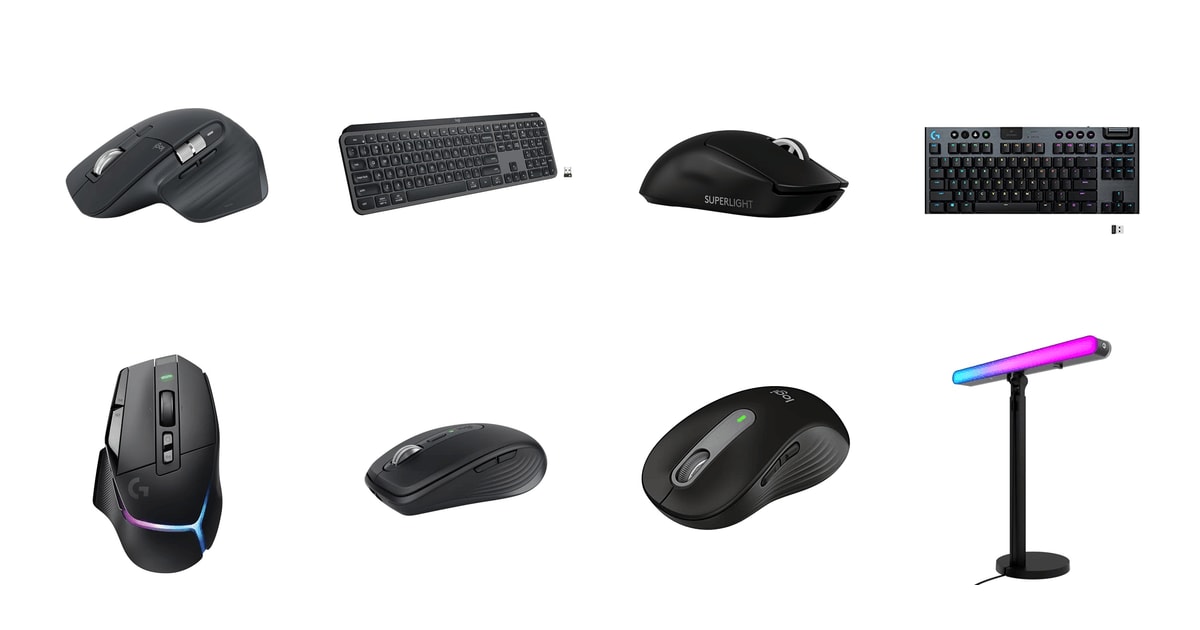
You touch your mouse and keyboard more than anything else on your desk — thousands of clicks and keystrokes between the first coffee and quitting time. So the small things matter more than a spec sheet suggests. The shape has to let your wrist sit flat all day. The pairing has to survive a hop over to your laptop. And the click shouldn't carry across a shared room. Logitech sells a lot of gear, and the real differences between its lines come down to those daily details, not DPI numbers.
No single Logitech device does all of it. The mouse that's best for spreadsheets is too heavy for a shooter, and the 60-gram gaming mouse can't hand your cursor off to a second computer. The software is the other soft spot: owners of both Options+ and G HUB regularly run into profiles that won't sync, settings that reset, and pairing that takes a second try. Battery claims are optimistic too, since the big numbers usually assume you've turned the backlight off.
So shop for the desk you actually sit at. A quiet click matters if you share a room; weight matters if you play competitively; a spare AA matters if you'd rather never plug anything in. Most people are choosing between one great everyday mouse, one smaller version of it, and one cheap one that's good enough. We think that the Logitech MX Master 3S is the best Logitech mouse for most people, and that the Logitech MX Anywhere 3S is the one to buy if you work out of a bag more than a desk.
Everything we recommend

The quiet, comfortable everyday mouse for most desks

Nearly the same mouse, small enough for a jacket pocket

Quiet clicks and about two years per battery, for far less

About 60 grams and 95 rated hours, if you play to win

A quiet, low-profile board that lights up as you reach
At a glance
| Product | Price | |
|---|---|---|
| Logitech MX Master 3S Bluetooth Wireless MouseTop pick | $79.99On sale |
| Logitech MX Keys S Wireless Keyboard LowAlso great | $119.99On sale |
| Logitech G PRO X Superlight 2 WirelessAlso great | $153.49On sale |
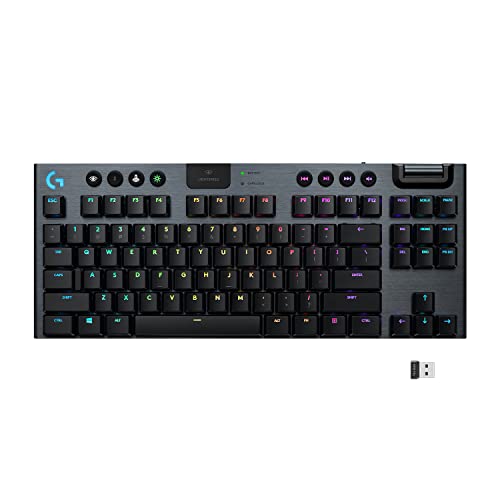 | Logitech G915 TKL Tenkeyless Lightspeed Wireless RGBAlso consider | $114.98On sale |
 | Logitech G502 X Plus Wireless RGB GamingAlso consider | $147.99On sale |
| Logitech MX Anywhere 3S Compact Wireless MouseRunner-up | $69.99On sale |
| Logitech Signature M650 Wireless Mouse Small toBudget pick | $33.99On sale |
 | Logitech G Beam LX Premium Dual-Sided RGBAlso in lineup | $99 |
How we picked
All-day comfort. We weighed shape, size and grip style against published ergonomic guidance, including Consumer Reports' finding that scroll placement and adjustable sensitivity drive wrist strain more than anything else. Anything that only suits one hand size or one grip got flagged rather than dismissed.
Click and key noise. Quiet matters in open offices and shared apartments, so we favored the SilentTouch and Quiet Clicks models and checked those claims against published reviews. Owner feedback about noise carrying on video calls was a tiebreaker.
Connection and switching. We looked at whether a device uses Bluetooth, Logi Bolt or LIGHTSPEED, whether a receiver is actually in the box, and how many computers it can switch between. For gaming picks, the low-latency wireless link mattered more than multi-device support.
Battery and charging. We compared manufacturer battery ratings against the conditions attached to them, since backlight-off numbers look very different from real use. A replaceable AA and a USB-C port both count as wins, for different buyers.
Software you live with. Options+ and G HUB carry a lot of each product's value, from per-app profiles to Flow, so we read owner feedback about sync failures and setup headaches rather than taking the feature lists at face value.
Top pickOn sale
The quiet, comfortable everyday mouse for most desks
Logitech MX Master 3S Bluetooth Wireless Mouse
The MX Master 3S is the mouse to buy if you work at a computer all day and want to stop thinking about your mouse. It's shaped so your hand rests instead of grips, the clicks barely make a sound, and it switches between three machines.
$79.99fromAmazonList priceThis is the mouse most people should buy and then forget about. The shell is tall and sculpted, with a thumb rest that lets your hand settle rather than clench. That's the whole pitch. If you spend eight hours in a browser, a spreadsheet and a chat app, the difference between resting and gripping shows up in your forearm by Thursday. Consumer Reports points to scroll-wheel placement and adjustable sensitivity as the two biggest factors in wrist strain, and this mouse gets both right.
The quiet clicks are why it works in a shared room. Logitech rates them at roughly 90 percent less click noise than the original MX Master 3, and published reviews at The Verge back that claim up. You still get a firm, definite click — it just doesn't travel. If you take calls at the kitchen table, or sit a few feet from a coworker, that's the difference between a mouse nobody notices and one everybody does.
Tracking is the other quiet win. RTINGS notes the 8000 DPI Darkfield sensor works on surfaces that stop cheaper mice cold, glass included. In practice that means a bare kitchen counter, a hotel desk with a lacquered top, or a glass-topped table all work without a pad. The MagSpeed wheel helps just as much: flick it and it free-spins through a long document, or click it into ratcheted mode for line-by-line work.
One mouse, three computers. Logitech's Flow lets an MX-series mouse and keyboard control up to three machines, moving the cursor between them and carrying copy-and-paste along with it. If you run a work laptop next to a personal desktop, you stop reaching for a second mouse. Options+ adds per-app button profiles on top, so the side button can mean one thing in Chrome and another in Premiere.
Flaws but not dealbreakers
This listing is the Bluetooth edition, which matters. There's no Logi Bolt receiver in the box and no charging cable either. Bluetooth is fine for everyday work, but if your PC's Bluetooth is temperamental, or you want the steadier Bolt link, that's a separate purchase. Charging needs a USB-C cable you supply yourself.
It's a big mouse, and it's for right hands only. Small hands and fingertip grips won't love the tall hump. It also weighs more than twice what the Superlight 2 does, so it's the wrong tool for competitive shooters. Options+ can be fussy as well — owners report customizations that don't stick until they re-pair or reinstall.
Runner-upOn sale
Nearly the same mouse, small enough for a jacket pocket
Logitech MX Anywhere 3S Compact Wireless Mouse
The MX Anywhere 3S packs the Master's sensor, scroll wheel and quiet clicks into a body that fits a jacket pocket. Buy it if your desk changes every day — a coffee shop, a hotel room, a hot desk — and you'd rather not carry a full-size mouse.
$69.99fromAmazonList priceTechRadar puts it at roughly 100 grams, and it's short enough to vanish into a laptop sleeve pocket. That's the point. A travel mouse only helps if you actually bring it, and this one doesn't make you decide between a real mouse and a light bag. Owners who used to leave a mouse at home now keep this one in the same pouch as their charger.
You give up far less than the size suggests. It carries the same 8000 DPI sensor as the MX Master 3S, the same MagSpeed electromagnetic wheel, and the same Quiet Clicks. So you still get glass tracking, a wheel that free-spins through a long report, and clicks that won't bother the person across the café table. For a lot of people, this is simply the Master in a smaller shell.
It pairs with up to three devices over Bluetooth across Windows, macOS, ChromeOS and Linux, which is the feature that earns its spot in a bag. Land at a client site, tap the switch button, keep working. Logitech also lists it as Engineered for Intel Evo, its shorthand for a Bluetooth connection that's supposed to hold up without a dongle.
Flaws but not dealbreakers
Small is a trade, not a free win. Over a full eight-hour day, a large hand will feel the missing palm support, and this shape asks more of your fingers than the Master does. If your primary desk is the one you sit at every day, buy the bigger mouse and keep this as the travel spare.
Like the MX Master 3S listing above, this one ships without a receiver — Logitech includes a USB-C charging cable instead, and the mouse only works with a Bolt receiver you buy separately. Some owners also mention a beat of lag when it wakes from sleep, which is common for Bluetooth mice but still mildly annoying.
Budget pickOn sale
Quiet clicks and about two years per battery, for far less
Logitech Signature M650 Wireless Mouse Small to
The Signature M650 covers what most people actually do with a mouse: browsing, email, documents. It's quiet, comfortable for small to medium hands, connects over Bluetooth or a Bolt receiver, and runs about two years on the AA battery in the box.
$33.99fromAmazonList priceMost people would be perfectly happy stopping here. If your mouse work is scrolling articles, answering email and dragging cells around, the M650 does all of it without complaint. The soft thumb area and rubber side grips keep your hand in place, and the SmartWheel switches between line-by-line precision and fast free scrolling for long pages. It's the mouse we'd put in a student's hands or on a second desk.
Logitech rates it for up to 24 months on a single AA, a figure PCMag repeats, and the battery comes in the box. That changes the routine more than it sounds like it would. No cable, no nightly dock, no low-battery warning in the middle of a call. When it finally dies, you swap a battery and get back to work.
SilentTouch cuts the click noise by about 90 percent, and owners in shared apartments and open offices bring it up constantly. Logitech also sells this shape in more than one size and in a left-handed version, which is rare — most quiet, cheap mice are right-hand-only. That alone makes it the easiest recommendation here for a lefty.
Flaws but not dealbreakers
The sensor isn't in the same class as the MX line. Owners who do precise work — photo retouching, CAD, fine selections — report it feels less exact than they'd like, and there's less sensitivity headroom to tune. A few also find the side buttons a bit twitchy and easy to trigger by accident.
Flow is an MX-series feature, so you don't get the seamless multi-computer cursor handoff here. And the shape is aimed at small to medium hands; if yours are large, it'll feel cramped by mid-afternoon.
Also greatOn sale
About 60 grams and 95 rated hours, if you play to win
Logitech G PRO X Superlight 2 Wireless
The G PRO X Superlight 2 is the mouse to buy if you play competitive shooters and want the lightest, fastest thing Logitech makes. It's about 60 grams, the HERO 2 sensor tracks well past what any human needs, and the battery is rated for 95 hours.
$153.49fromAmazonList priceWeight is the whole reason this mouse exists. At around 60 grams, per PCMag, it's less than half of what the MX Master 3S weighs, and you feel that on every flick and micro-correction. Owners describe the switch from a normal gaming mouse as making their aim feel less like dragging something around. If you play at a low sensitivity and swing your whole arm, this is the difference-maker.
The HERO 2 sensor tracks past 888 inches per second with DPI settings far higher than anyone actually uses, and Logitech runs it with no smoothing, filtering or acceleration. Combined with 8 kHz polling, zero-additive PTFE feet and LIGHTFORCE hybrid switches, it's the loadout that shows up on a lot of tournament desks. That's not marketing — it's what the pros are handed.
Battery holds up too. Logitech rates it at up to 95 hours over LIGHTSPEED wireless, and it charges over USB-C, so a match-day top-up is quick. If you already run a POWERPLAY pad, it works with that as well and effectively never needs plugging in.
It's a plain mouse, deliberately. No RGB, no thumb-button cluster, no tunable weights — a symmetrical shell, two side buttons and a wheel. Some people find that spartan. If you want your mouse to do fifteen things, the G502 X Plus below is the better fit.
Flaws but not dealbreakers
It's a dongle mouse. There's no Bluetooth, no Easy-Switch, no jumping between a work laptop and a desktop — the LIGHTSPEED receiver moves with it or it doesn't work. That makes it a poor everyday office mouse despite being perfectly comfortable for one.
It's also the most expensive mouse here by a wide margin, and it asks you to accept Logitech's click reliability record. Owners of several generations of Logitech gaming mice report left-click or middle-click double-clicking developing after months of use. Most units are fine, but it's the complaint that keeps surfacing.
Also greatOn sale
A quiet, low-profile board that lights up as you reach
Logitech MX Keys S Wireless Keyboard Low
The MX Keys S is the keyboard half of this setup. The flat, dished keys type like a good laptop, the backlight comes on as your hands approach, and it switches between three computers on nearly any operating system.
$119.99fromAmazonList priceIf you've ever preferred typing on your laptop to typing on the clunky keyboard next to it, this is that feeling on a full-size board. The keys are low-profile and spherically dished, so your fingertips land in the middle without hunting. It's quieter than a mechanical keyboard by a wide margin, which matters if you type through calls or share a room with someone who doesn't.
Smart Illumination is the small feature that people end up loving. CNET describes it well: the backlight reads ambient light and your hands approaching, then brightens or stays dark accordingly. Work in a dim room at night and the keys light as you reach for them. Work by a bright window and they stay off, which is what saves the battery.
Battery works out to about 10 days with the backlight on, or up to 5 months with it off, and it charges over the included USB-C cable. Pairing covers up to three devices over Bluetooth Low Energy or the Logi Bolt receiver in the box — and unlike the two MX mice here, this one does include a receiver. Windows, macOS and Linux are all supported.
Smart Actions in Options+ are worth setting up once. You can chain several steps onto one keystroke — open the apps you start the day with, mute and switch inputs, whatever your routine is. Paired with an MX mouse and Flow, one keyboard covers up to three computers, so the second machine on your desk doesn't need its own board.
Flaws but not dealbreakers
The layout takes adjusting to. The most common owner complaint is the missing dedicated print-screen key, replaced by a screenshot key elsewhere on the board, and a few relocated function keys that will trip up muscle memory for a week or two.
It's also not a mechanical keyboard and doesn't pretend to be. If you want deep travel and a satisfying thock, look elsewhere. And with the backlight on, ten days between charges means you'll be plugging it in more often than the five-month headline suggests.
Who this is for
This guide is for anyone building or refreshing a desk around Logitech gear — remote workers, students, creative pros and gamers. If you're on a bundled office mouse and your wrist aches by Friday, or you're still re-pairing a keyboard every time you switch laptops, an upgrade here pays off quickly. Gamers are covered too, but they're shopping for something different: weight, sensor speed and a dedicated wireless link instead of multi-device switching.
You can skip all of this if a working mouse and keyboard already sit in front of you and nothing about them bothers you. These aren't devices that make you faster; they make eight hours less tiring. We only cover mice, keyboards and one desk accessory that Logitech currently sells through the listings we were given, so trackballs, headsets, webcams, ergonomic vertical mice and non-Logitech alternatives are out of scope.
How we picked
We started with the things you notice by the end of a workday, not the spec sheet. Comfort: shape, size and grip fit came first, guided by ergonomic research pointing at scroll placement and adjustable sensitivity as the main drivers of wrist strain. Noise: quiet clicks and low-profile keys earned real credit, since most people now work within earshot of someone. Connection: we checked Bluetooth versus Logi Bolt versus LIGHTSPEED, how many computers a device switches between, and whether a receiver is included at all. Battery: we read the fine print behind every rating, because backlight-off numbers aren't what you'll live with. Software: Options+ and G HUB carry much of the value here, so owner reports of sync and setup trouble counted against a product.
Other logitech mice, keyboards, and accessories worth considering
If you want more buttons and don't mind more mouse: The Logitech G502 X Plus Wireless RGB Gaming ($147.99) — The G502 X Plus is the fully loaded gaming mouse to the Superlight 2's stripped-down one. You get LIGHTFORCE hybrid optical-mechanical switches rated for 50 million clicks, a HERO sensor good for up to 25,600 DPI, a free-spinning wheel, 8-LED LIGHTSYNC RGB and a reversible, removable DPI-shift button you can set up for your grip. Owners coming from the wired G502 say it feels familiar right down to the shape. What you give up is weight — it's meaningfully heavier than the Superlight 2 — and you inherit G HUB, which is the loudest complaint in its reviews.
If you want a low-profile mechanical keyboard for gaming: The Logitech G915 TKL Tenkeyless Lightspeed Wireless RGB ($114.98) — The G915 TKL uses low-profile GL mechanical switches — tactile, linear or clicky — in an aircraft-grade aluminum frame that's barely thicker than a laptop. It runs over LIGHTSPEED wireless or Bluetooth, stores the receiver in the back, and gets about 40 hours per charge with a roughly three-hour recharge. Dropping the number pad frees up real mouse room. Two caveats: this is a Renewed listing, so condition varies more than a sealed unit, and owners flag an older micro-USB charging port plus number-row symbols that aren't backlit, which is hard to read in a dark room.
More from Logitech
This is what our research turned up around the picks above, not a survey of everything Logitech sells. A product landing here isn't necessarily bad — it usually means it serves a narrower buyer than the picks do, or that this particular listing comes with strings attached.
The Logitech G Beam LX Premium Dual-Sided RGB ($99) — The G Beam LX is a dual-sided desk light rather than an input device: a front-facing key light using Logitech's TrueSoft diffusion to even out shadows on your face, plus rear-facing LIGHTSYNC RGB with 16 million colors for the wall behind you. Brightness and color temperature adjust from 2,700K to 6,500K with buttons on the bar or through G HUB over Bluetooth or USB-A. If you stream, or your video calls happen in a dim room, it's a sensible add-on to a Logitech setup. But it's a Renewed listing with very little owner feedback behind it, and what exists is mixed — one report of a light arriving visibly damaged, another of a pair that wouldn't sync in G HUB on a Mac. Buy it if you specifically want a two-in-one key light and RGB bar, and check the unit carefully when it lands.
Setup and battery care
Charge a new mouse or keyboard before you start, then install Options+ or G HUB once and set everything up in a single sitting — button assignments, Easy-Switch channels, Flow, backlight rules. Doing it piecemeal is where most of the software frustration comes from. If a device ships with a Logi Bolt receiver, tape it inside the battery compartment or a drawer you'll remember, because a lost receiver is a real headache to replace. Turn the keyboard backlight off when you don't need it and you'll go from days between charges to months. Wipe the mouse feet every few weeks; grit under the PTFE skates makes a smooth mouse feel scratchy long before anything is actually wrong.
Questions we get
Is the MX Master 3S worth the extra money over the Signature M650?
It depends on how precise your work is. The M650 handles browsing, email and documents just fine, and it's quiet and comfortable doing it. The MX Master 3S buys you the 8000 DPI Darkfield sensor that tracks on glass, the MagSpeed wheel, a shape that supports a large hand for eight hours, and Flow across up to three computers. If you edit photos or juggle two machines, that's worth it; if you don't, it isn't.
What's the difference between Logi Bolt and Bluetooth?
Logi Bolt is Logitech's own USB receiver protocol, and it generally holds a steadier, lower-latency connection than standard Bluetooth — useful in offices crowded with wireless signals. Bluetooth's advantage is that it needs no dongle and no free USB port, which is why travel mice lean on it. Note that the MX Master 3S and MX Anywhere 3S listings here don't include a receiver, so Bolt is a separate purchase for both.
Can I use one Logitech mouse and keyboard across several computers?
Yes, with the MX line. Flow lets an MX-series mouse and keyboard control up to three computers, moving your cursor between screens and carrying copy-and-paste with it. The MX Master 3S, MX Anywhere 3S and MX Keys S all pair to three devices and switch with a button press. The gaming picks don't do this — the Superlight 2 goes wherever its LIGHTSPEED receiver goes.
Does the G PRO X Superlight 2 work for office use too?
It's comfortable enough for it, and 95 rated hours of battery means you won't be charging it often. But it's built for one job. There's no Bluetooth and no multi-device switching, so you can't hop between a work laptop and a desktop, and there are only two side buttons to customize. If you want one mouse for gaming and work both, the G502 X Plus is the more flexible choice.
Which of these is quietest for an open office or a shared apartment?
The Signature M650 and the two MX mice all use quiet switches — Logitech rates SilentTouch and Quiet Clicks at roughly 90 percent less click noise than their predecessors, and reviewers who've compared them agree the difference is obvious. For typing, the MX Keys S is far quieter than any mechanical board, including the G915 TKL. A gaming mouse and a clicky mechanical keyboard are the two things to avoid in a shared room.
Do these work with a Mac, or are they PC-only?
They work with Macs. The MX Keys S pairs with Windows, macOS and Linux, and the MX Anywhere 3S adds ChromeOS to that list; Options+ runs on both Windows and macOS. The one wrinkle is G HUB, the gaming software, where owners report more Mac trouble — including pairing problems with the Beam LX. Plan on the gaming gear being a smoother experience on Windows.
Why you should trust us
For this guide:
- We read published reviews and reference coverage of these lines from RTINGS, PCMag, The Verge, TechRadar, CNET, Engadget and Wirecutter, plus Consumer Reports' guidance on what actually reduces wrist strain.
- We compared Logitech's own specifications for sensors, switches, wireless protocols and battery ratings against the conditions attached to each claim.
- We read through owner feedback for every listing here, looking for repeated themes — software sync failures, click reliability, sizing complaints — rather than one-off reports.
- We read owner reviews on every listing, weighted toward the critical ones, because that is where the recurring failures show up.
- We have a systematic way of automatically fetching the latest prices, so the numbers on this page stay current.
- This is a research-focused guide, so the team may not own every product listed — though we often do own the top winners, which gives us extra context for the recommendations.
- We don't accept free products, and the retailer commission never changes which product we recommend.
Sources
Best Wireless Mouse 2026, RTINGS.com
The Best Computer Mouse, Wirecutter (NYT)
Logitech MX Master 3S Review, The Verge
Logitech G Pro X Superlight 2 Review, PCMag
Best Gaming Mouse 2026, RTINGS.com
Logitech G915 X Review, Engadget
Best Mechanical Keyboards 2026, Tom's Guide
Logitech MX Keys S Review, CNET
Best Budget Mouse 2026, PCMag
Logitech MX Anywhere 3S Review, TechRadar
Logitech Litra Beam LX Review, The Verge
Logi Options+ Software Overview, Logitech (Manufacturer)
Amazon product listings and owner reviews for all 8 products
Manufacturer specification pages for each product
Some passages in this guide may be paraphrased with AI help. Prices are refreshed automatically.
More like this.
Continue exploring electronics reviews and recommendations.

The Best Wireless Mice for Productivity
You touch your mouse thousands of times a day, and most of those touches are boring. You're scrolling a long spreadsheet, dragging a window to a second…

The Best Wireless Gaming Mice
A gaming mouse is the one piece of gear your hand touches for every second you play. Weight, shape, and how the shell fits your grip matter far more than…

The Best Bluetooth Multi-Device Keyboards
A multi-device keyboard earns its keep in the small moments. You're typing an email on your work laptop, a Slack message pops up on your personal desktop,…

The 7 Best Portable Bluetooth Keyboards for Travel in 2026: Lightweight, Multi-Device Picks
Expert-tested portable Bluetooth keyboards for travel in 2026. Compare weight, battery life, and multi-device pairing across 7 top picks from Logitech, Keychron, nuphy, and more.

The Best Mechanical Keyboards for Gaming and Typing
A keyboard is the thing you touch for hours a day, and a mechanical one changes that in two ways. Every key gets its own switch, so presses feel crisper…

The Best Budget Mechanical Keyboards
A mechanical keyboard is one of the few upgrades you feel every single minute you're at a desk. The keys have a defined bottom, a consistent weight, and a…