The Best Wireless Gaming Mice
A gaming mouse is the one piece of gear your hand touches for every second you play. Weight, shape, and how the shell fits your grip matter far more than any number printed on the box. A good wireless mouse should feel like nothing in your hand, wake up instantly, and hold a charge long enough that you never think about it mid-session. Sensor ceilings, polling rates, and lighting zones are mostly noise once a mouse clears a fairly low bar, and nearly all of these clear it.
Here's the honest part: no mouse fits every hand, and no spec sheet can tell you which shape is right for yours. A 54-gram shell that feels perfect under a fingertip grip can feel cramped and tippy under a palm. Ultralight designs also drop the things some players want most, like a full bank of side buttons, a thumb rest, or lighting. And every rechargeable mouse loses some capacity over years of use. Buy from somewhere with a return window, and be willing to use it.
Most people are really choosing between two mice: a stripped-down ultralight for shooters, or a heavier one with enough controls to run an MMO rotation. Decide which one you are before you start comparing sensors. Then match the shape to your grip and hand size, and only after that worry about features. We think that the Logitech G PRO X Superlight 2 DEX is the best wireless gaming mouse for most people, and that the Razer Viper V3 Pro is the one to buy if you're left-handed or you want the lightest symmetrical shape.
Everything we recommend

Ultralight, right-hand shaped, and no reason to go back to wired

Lighter and fully symmetrical, if you don't need a right-hand shape

The competitive essentials in a small shell, nothing more

Thirteen buttons and a free-spin wheel, at nearly double the weight

The classic right-hand ergonomic shape, now genuinely light
At a glance
| Product | Weight | Max DPI | Price | |
|---|---|---|---|---|
| Logitech G PRO X Superlight 2 DEXTop pick | 60g | 44K DPI | $99.99On sale |
| Razer Viper V3 Pro Wireless Esports GamingRunner-up | 54g | 35K DPI | $119.99 |
| Razer DeathAdder V3 HyperSpeed Wireless Gaming Mouse:Also great | 55g | 26K DPI | $79.99On sale |
| Logitech G502 X Plus Wireless Gaming Mouse:Upgrade pick | — | 25K DPI | $127.99On sale |
 | Pulsar Gaming Gears X2V2 mini Wireless GamingAlso consider | 51g | 26000 DPI | $44.89 |
 | Razer Basilisk V3 Pro Wireless Gaming Mouse:Also consider | — | 30K DPI | $99.99 |
| SteelSeries Esports Mini Wireless FPS Gaming MouseBudget pick | 74g | 18K CPI | $39.79 |
 | HyperX Pulsefire Haste 2Also consider | 61g | 26K DPI | $59.99On sale |
 | ASUS ROG Gladius III Wireless Aimpoint GamingAlso consider | 79g | 36K DPI | $85.99On sale |
 | Corsair Dark CORE RGB PRO SE WirelessAlso in lineup | — | 18,000 DPI | $59.99 |
 | logitech G305 LIGHTSPEED Wireless Gaming MouseAlso in lineup | — | 12,000 DPI | $24.83On sale |
 | Superglide - Fastest and Smoothest Mouse Feet/SkatesAlso in lineup | — | — | $21.95 |
How we picked
Shape and grip fit. We treated shell shape and size as the first filter, since a mouse that doesn't match your hand will never feel right regardless of its sensor. We compared manufacturer dimensions against grip-style guidance from published reviews and community sizing advice.
Weight and balance. We looked for shooter-focused mice under about 65 grams, and for heavier mice we required that the extra weight buy something concrete, like buttons or a better wheel. Solid shells were preferred over honeycomb cutouts.
Wireless connection. We only considered mice with a proper 2.4 GHz link, because Bluetooth adds enough latency to be a problem in competitive play. Published latency measurements put the major implementations from Logitech, Razer, and Corsair effectively level with wired.
Switch durability. Double-click failure is the most common reason a gaming mouse dies, so we favored optical and magnetic switches rated for 90 to 100 million clicks. Spec sheets and long-term owner reports both point the same direction here.
Battery and charging. We looked for at least a work week of heavy play per charge and USB-C rather than proprietary connectors. Manufacturer runtime claims assume lighting off and standard polling, so we treated the quoted numbers as ceilings.
Top pickOn sale
Ultralight, right-hand shaped, and no reason to go back to wired
Logitech G PRO X Superlight 2 DEX
The Superlight 2 DEX is a 60-gram right-handed shell built around Logitech's HERO 2 sensor and LIGHTSPEED wireless. It's the one to get if you mostly play shooters and want a shape that supports your thumb without piling on bulk, buttons, or lighting you'll never turn on.
$99.99fromAmazonList priceAt 60 grams, it gets out of your way. That's light enough that after an hour you stop noticing the mouse and start noticing your aim. Fast direction changes cost less effort, and your forearm holds up better across a long night of matches. Logitech gets there with a solid shell rather than honeycomb cutouts, so you don't end up with dust and crumbs collecting inside the mouse.
The DEX shape is the reason to choose this over the plain Superlight. Logitech made the shell asymmetrical, with a thumb shelf that gives your hand something to brace against. If you drag your mouse across a big pad at low sensitivity, that lateral support is what keeps a light mouse from sliding out from under your grip. Left-handed players are out of luck here, though, and should look at the Viper V3 Pro instead.
The HERO 2 sensor is more precise than you need, which is the point. Logitech quotes sub-micron tracking up to 44K DPI, 888 IPS, and 88 g of acceleration. You'll never run settings anywhere near that. What matters is that the sensor stays linear and predictable at the 400 to 3,200 DPI range real players use, and published reviews consistently put it at the top of that group.
LIGHTSPEED wireless has quietly settled the cable argument. Logitech rates the connection for polling up to 8 kHz, and reviewers who measure latency put 2.4 GHz links like this one level with wired. Pros compete on them, which is about as strong an endorsement as a peripheral gets. Battery runs up to 95 hours on a charge, it tops up over USB-C with the included cable, and it works with the PowerPlay mat if you own one.
Flaws but not dealbreakers
This listing is a renewed unit, not a sealed retail box. Renewed means inspected and refurbished, so expect the possibility of light cosmetic wear, scuffed feet, or generic packaging. The internals should be fine, but check the mouse feet and click feel the day it arrives rather than a month later, while you can still send it back.
Five buttons is the entire layout. Left, right, wheel click, DPI, and two thumb buttons cover a shooter and nothing else. If you play an MMO, a MOBA, or anything where you'd like a row of macros under your thumb, this mouse will frustrate you within a week. The G502 X Plus or the Basilisk V3 Pro are the right answers there.
There's no lighting and not much onboard personality. Logitech cut RGB to save weight and battery, and profile management lives in G Hub rather than on a dedicated switch. If you want your desk to match, or you'd rather not install another background app, this isn't the mouse for you.
Runner-up
Lighter and fully symmetrical, if you don't need a right-hand shape
Razer Viper V3 Pro Wireless Esports Gaming
The Viper V3 Pro is a 54-gram symmetrical mouse with Razer's Focus Pro 35K Gen-2 sensor, Gen-3 optical switches, and up to 95 hours of battery. It's the pick for left-handed players and for anyone who prefers a straight, even shell over a contoured one.
$119.99fromAmazonIt's the lightest flagship here, by a margin you can feel. Six grams sounds like nothing written down. In practice, it's the difference between a mouse that follows your wrist and one you're steering. Razer worked the weight out of the shell rather than drilling holes in it, so the top stays rigid under a hard click.
The symmetrical shape works for either hand. That's rare at this level, and left-handed players have been ignored by the big brands for years. It also suits claw and fingertip grips well, since there's no contour telling your fingers where to sit. Eight programmable buttons give you a little more room than our top pick without turning into a keypad.
Gen-3 optical switches are the real durability story. Razer rates them for 90 million clicks with 0.2 ms actuation and no debounce delay. More usefully, optical actuation removes the metal-on-metal contact that causes the double-click failures gaming mice are notorious for after a year or two of heavy use. If you've replaced a mouse for that reason before, this matters more than any sensor spec.
Battery and tracking both hold up under real schedules. Razer quotes up to 95 hours per charge, and the Focus Pro 35K Gen-2 sensor tracks on a wider range of surfaces than most, including glass. The 1-DPI step adjustment is a small thing that helps if you're chasing an exact eDPI rather than settling for the nearest 50.
Flaws but not dealbreakers
The 8,000 Hz polling headline needs a separate dongle. The HyperPolling wireless dongle is sold on its own, so the mouse in the box runs at the standard rate. That's fine for almost everyone, since the gains above 2,000 Hz are hard to perceive and need CPU headroom to even materialize. Just don't buy this expecting the top-line number out of the box.
A flat shape is less supportive over long sessions. Palm grip players who like a mouse that fills the hand often find symmetrical shells fatiguing, because there's no arch under the palm. If you've always used a DeathAdder or a G502, this will feel like a downgrade in comfort even as it improves in weight.
It's stripped bare, and priced at the top of the market. No lighting, no onboard flourishes, nothing but the shell and the sensor. That's the correct call for competitive play, but it makes the premium harder to swallow if you're not playing at a level where six grams changes anything.
Budget pick
The competitive essentials in a small shell, nothing more
SteelSeries Esports Mini Wireless FPS Gaming Mouse
The Esports Mini Wireless cuts a competitive mouse down to five buttons, a lag-free 2.4 GHz link, and magnetic optical switches rated for 100 million clicks. If you have small or medium hands and you're moving off a wired mouse, it covers the things that actually matter.
$39.79fromAmazonIt's built around what pro players actually use, not what sells a box. SteelSeries developed the Prime line with input from more than 100 competitive players, and the result is a short list: a clean five-button layout, a reliable 2.4 GHz link, and a shape you can flick with. Nothing here is decorative, which is exactly why it costs so much less than the flagships.
The magnetic optical switches are the standout. They actuate through a magnetic field instead of physical metal contact, and SteelSeries rates them for 100 million clicks. That's a longer life than most mechanical switches manage, and it sidesteps the double-click problem that kills so many mice a year or two in. For a mouse at this price, that's an unusually good bet on longevity.
Battery life and tracking are well past the threshold that matters. SteelSeries quotes up to 100 hours on the Quantum 2.0 wireless connection, with fast charging when you do run down. The TrueMove Air sensor tops out at 18K CPI and 400 IPS, which sounds modest next to the 35K numbers elsewhere and is still far beyond any setting you'd play at.
The mini shell suits fingertip and claw grips. The body is short and narrow, so your fingers sit toward the front and your palm floats. If that's already how you hold a mouse, this shape will feel natural immediately, and the light front end makes small aim corrections easy.
Flaws but not dealbreakers
Small hands only, really. The mini form factor is the whole idea, and it's the whole risk. Measure your hand from wrist crease to middle fingertip and check it against SteelSeries' size guide before you order. Larger hands will end up gripping the front third of the mouse, which is uncomfortable and imprecise.
Five buttons and no lighting means no flexibility later. There's nowhere to put a macro, a push-to-talk, or an ability bind beyond the two thumb buttons. That's fine for a shooter and limiting for anything else, so don't buy this as a do-everything mouse. SteelSeries GG also isn't as deep as G Hub or Synapse, though most people never need what those add.
Upgrade pickOn sale
Thirteen buttons and a free-spin wheel, at nearly double the weight
Logitech G502 X Plus Wireless Gaming Mouse:
The G502 X Plus goes the opposite direction from the ultralights: 13 programmable buttons, a magnetic scroll wheel that free-spins, hybrid optical-mechanical switches, and full lighting. It weighs roughly twice what our top pick does, and that's the trade you're agreeing to.
$127.99fromAmazonList priceThirteen programmable controls change what a mouse can do. If you play an MMO, a MOBA, or a strategy game, you can pull half your keybinds off the keyboard and onto your thumb. The DPI-shift button is reversible and removable, so you can set it up around your grip instead of working around Logitech's. No other mouse here gives you this much to program.
The SmartShift wheel is the feature you'll miss on every other mouse. Flick it and the wheel switches from notched, precise clicking to a free spin that coasts through a long inventory or a document in one motion. It's a small mechanism that changes how you move around a game, and going back to a fixed wheel afterward feels slow.
LIGHTFORCE switches split the difference between optical and mechanical. You get optical actuation speed with the tactile snap of a mechanical click, so it feels crisp rather than mushy while avoiding contact wear. Underneath, the HERO 25K sensor tracks with no smoothing, filtering, or acceleration, which is all any sensor really needs to do.
Charging is barely a consideration. Logitech quotes up to 130 hours per charge, and it tops up over USB-C. If you own a PowerPlay mat, the mouse charges while you play and you can stop thinking about battery entirely. Turn on the eight-LED lighting and expect to lose a meaningful chunk of that runtime.
Flaws but not dealbreakers
It's heavy, and no amount of feature count fixes that. At roughly 114 grams, it's close to double our top pick. For fast-flick shooters that means more wrist fatigue and slower direction changes, full stop. Plenty of MMO and strategy players actively prefer the planted, deliberate feel, but know which camp you're in before buying.
It's the most expensive mouse here, and the PowerPlay mat isn't included. The wireless-charging pitch only works if you buy the mat separately, which pushes the real cost of the full experience well past everything else in this guide. Without it you're back to plugging in a cable like everyone else.
Also greatOn sale
The classic right-hand ergonomic shape, now genuinely light
Razer DeathAdder V3 HyperSpeed Wireless Gaming Mouse:
The DeathAdder V3 HyperSpeed puts Razer's familiar right-handed shape into a 55-gram body with a 26K sensor and up to 100 hours of battery. If a palm grip is how you play, this shell has been comfortable for a very long time and it's finally light too.
$79.99fromAmazonList priceThis is the ergonomic shape most people already know they like. The DeathAdder curve fills the palm and arches under the heel of your hand, which is why it's been a default recommendation for palm and relaxed claw grips for years. Razer refined it with input from competitive players, and the mass-centralized build keeps it from feeling front-heavy when you swipe.
Getting that shape down to 55 grams is the news. Ergonomic mice used to mean 80 grams and up, and that was the price of comfort. This one is within a gram of the Viper V3 Pro. You keep the support and lose the fatigue, which is a rare combination and the main reason it's here.
The core specs are competitive without being flashy. The Focus X 26K sensor tracks with 99.6% resolution accuracy, and Gen-3 optical switches carry the same 90-million-click rating and 0.2 ms actuation as Razer's flagship. Eight programmable controls give you a couple of spare binds. Battery runs up to 100 hours over USB-C, and you can upgrade to 8,000 Hz polling later with Razer's separate dongle.
Flaws but not dealbreakers
Right hands only. The whole appeal is the asymmetrical curve, and there's no left-handed version. Symmetrical shapes like the Viper V3 Pro or the Pulsar are the alternatives if that rules you out.
No Bluetooth, and the coating can get slick. It's 2.4 GHz or nothing, so you can't pair it with a tablet or a laptop that's short on USB ports. The smooth-touch finish also feels great dry and less secure once your hands warm up, which is a real annoyance in a hot room. Grip tape solves it cheaply.
Who this is for
This guide is for anyone buying a wireless mouse to game with, whether that's your first cordless mouse or a replacement for one that started double-clicking. If you play shooters and care about aim, the ultralight picks are where to start. If you play games with big ability bars or long inventories, skip straight to the heavier, button-dense options, because the weight difference will bother you far less than running out of binds. Nearly every mouse here is right-handed or symmetrical, and left-handed players have exactly one strong choice in the Viper V3 Pro.
This isn't the guide for you if you mainly want a mouse for work and spreadsheets, where a quiet, Bluetooth-first office mouse makes more sense. We also stuck to mice with a 2.4 GHz dongle and left out wired-only models, dedicated MMO mice with 12-button thumb grids, and vertical or trackball designs. If your current mouse fits your hand and clicks reliably, the honest advice is to keep it and spend the money on a bigger mouse pad instead.
How we picked
Shape and grip fit: we started with shell dimensions and grip guidance, because the wrong shape ruins a great sensor and no spec makes up for it. Weight and balance: under about 65 grams for shooter mice, and for anything heavier the extra mass had to buy real features rather than just bulk. Wireless connection: a proper 2.4 GHz link only, since Bluetooth latency is fine for a laptop and not for a match. Switch durability: optical or magnetic switches rated in the tens of millions of clicks, because worn contacts are what actually kill gaming mice. Battery and charging: at least a week of heavy play per charge, over USB-C, with the understanding that lighting and high polling rates eat into every quoted figure.
Other wireless gaming mice worth considering
If you want the lightest mouse here: The Pulsar Gaming Gears X2V2 mini Wireless Gaming ($44.89) — The Pulsar X2V2 mini weighs 51 grams, which undercuts everything else in this guide, and it runs PixArt's PAW3395 sensor with Motion Sync at up to 26,000 DPI. That's the same sensor tier the big brands charge far more for. The V2 revision reworked the internal structure for a more rigid shell and moved to an indirect wheel click, which kills the rattle the original was known for, and optical switches handle the click durability. The catch is the sizing: mini means mini, and large hands should not attempt it. It's symmetrical only, there's no Bluetooth mode, and Pulsar doesn't have the service network of Logitech or Razer if something goes wrong.
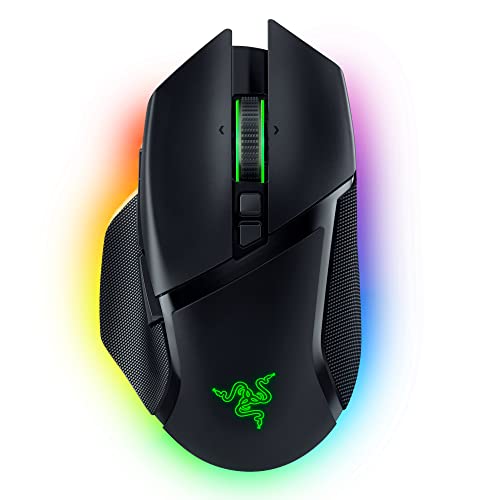
If you want MMO buttons plus lighting: The Razer Basilisk V3 Pro Wireless Gaming Mouse: ($99.99) — The Basilisk V3 Pro is the heavy, feature-loaded counterpart to Razer's own ultralights, with 13 programmable controls, a HyperScroll tilt wheel that free-spins or clicks, and 13 zones of Chroma lighting with underglow. Three connection modes mean you can run 2.4 GHz at your desk, Bluetooth on a laptop, and wired when the battery dies. The Focus Pro 30K sensor and Gen-3 optical switches are the same proven parts used across Razer's line. It's around 110 grams, so fast-flick shooter players should look elsewhere, and Synapse has a long history of being heavier on system resources than it needs to be. For an ability-bar game, it's hard to beat.
If you're cutting the cord for the first time: The HyperX Pulsefire Haste 2 ($59.99) — The Pulsefire Haste 2 Wireless is the least fussy way to move from a wired mouse to a good wireless one. It's 61 grams with a solid upper shell rather than honeycomb, runs up to 100 hours per charge, and gives you both a 2.4 GHz dongle and Bluetooth. The HyperX 26K sensor tracks to 650 IPS, the switches are rated for 100 million clicks, and HyperX includes grip tape in the box, which more brands should do. It's symmetrical, so it won't suit everyone's palm, there's no lighting, and NGenuity is thinner software than G Hub or Synapse. None of that will matter much if you just want a reliable mouse.
If you want hot-swappable switches: The ASUS ROG Gladius III Wireless Aimpoint Gaming ($85.99) — The ROG Gladius III Wireless AimPoint lets you pull the switches out of their sockets and drop in a different feel without soldering, which no other mouse here offers. It's a 79-gram right-handed ergonomic shell with tri-mode connectivity, up to 119 hours on 2.4 GHz, and an AimPoint sensor rated to 36,000 DPI with under 1% CPI deviation, one of the tighter accuracy figures published. The trade-offs are weight and software: 79 grams is noticeably more than the ultralights, and Armoury Crate is resource-heavy and has a reputation for being temperamental. If you already run other ROG gear, that integration is a genuine reason to pick it.
The competition
This is what our research surfaced across the wireless gaming mouse category, not a survey of everything on the market. The two mice below are worth knowing about, but each lost to a pick for a specific reason rather than a vague one, and each still makes sense for a particular buyer.
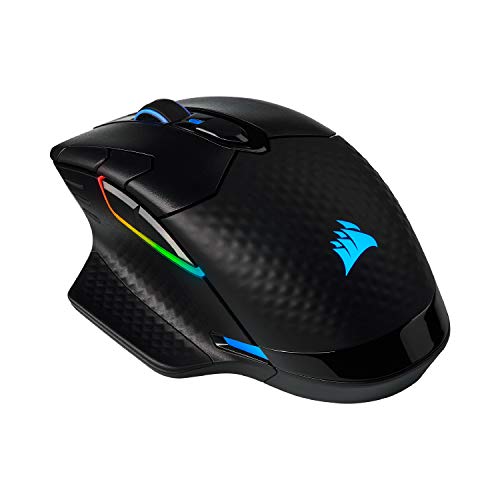
The Corsair Dark CORE RGB PRO SE Wireless ($59.99) — The Corsair Dark CORE RGB PRO SE is the only mouse here with Qi wireless charging, so it tops up on any compatible pad including Corsair's own mouse mat. It also has the widest platform support in the group, explicitly covering PC, Mac, PS5, PS4, and Xbox, plus three connection modes and 2,000 Hz hyper-polling with eight programmable buttons and nine lighting zones. What sinks it for gaming is the combination of weight and age: at roughly 133 grams it's the heaviest mouse in this guide, which rules it out for flick-heavy shooters, and the PixArt PAW3392 sensor at 18,000 DPI is a generation behind the flagships. If you're deep in the Corsair ecosystem and you want charging to be automatic, it still earns a place on your desk.
The logitech G305 LIGHTSPEED Wireless Gaming Mouse ($24.83) — The Logitech G305 LIGHTSPEED, sold here as a renewed unit, remains one of the easiest wireless recommendations for a strict budget. It runs on a single AA battery for up to 250 hours, which means you never wait for a charge, you just swap in a fresh cell and keep playing. The HERO 12K sensor and LIGHTSPEED connection are more than good enough for casual and even fairly serious play. It loses to the SteelSeries Esports Mini on two counts: the AA cell adds weight the ultralights don't carry, and mechanical switches leave it exposed to the double-click failures optical switches avoid. Renewed condition also means accepting possible cosmetic wear. As a first wireless mouse for a new PC gamer, it's still a sensible buy.
Care and setup
Two things fix most wireless mouse complaints. First, move the dongle. If your PC sits under a desk behind a metal panel, plug the receiver into a front port or run it on a short USB extension near the pad, and keep it away from your Wi-Fi router and USB 3 enclosures, which are common sources of interference. Second, clean the feet. Grit picked up off the pad is what makes a smooth mouse feel scratchy, so wipe the skates and the sensor lens with a dry microfiber cloth every few weeks and replace worn PTFE feet rather than buying a new mouse. Beyond that, charge over USB-C rather than running flat every time, turn lighting down if you'd rather have runtime, and use grip tape if a smooth shell gets slick during long sessions.
Questions we get
Is wireless latency still a problem for competitive gaming?
Not with a 2.4 GHz connection. Logitech's LIGHTSPEED, Razer's HyperSpeed, and Corsair's SLIPSTREAM all measure at or under a millisecond in published testing, which is indistinguishable from wired in play. Pros compete wirelessly at the top level of every major shooter. Bluetooth is a different story and adds enough delay that you shouldn't use it for anything competitive.
What weight should I look for?
For shooters, most players land under about 65 grams, because lighter mice cause less forearm fatigue and let you change direction faster. Palm grip players often prefer 70 to 90 grams for the added stability. Grip style matters more than the raw number, though. A 60-gram mouse in a shape that fights your hand is worse than a 79-gram mouse that fits it.
Does a high polling rate actually help?
A little, and less than the marketing suggests. Polling rate is how many times per second the mouse reports its position, and 1,000 Hz is the standard. Going to 4,000 or 8,000 Hz reduces micro-jitter, but you need CPU headroom to process it and a very fast display to see it. If you're gaming at 144 or 165 Hz, leave it at 1,000 Hz and save the battery.
Are optical switches better than mechanical ones?
For durability, yes. Mechanical switches wear at the metal contact point, which is what causes the double-click failures that kill so many mice after a year or two of heavy use. Optical switches actuate with a light beam, and SteelSeries uses a magnetic field, so there's no contact to wear out. Razer rates its Gen-3 optical switches for 90 million clicks. Some people find optical clicks slightly less tactile, which is a fair trade for not replacing the mouse.
What DPI should I actually use?
Lower than the box implies. Most competitive shooter players sit between 400 and 800 DPI with a large pad and low in-game sensitivity. If your desk is small or you prefer quicker turns, 1,600 to 3,200 works well. What matters is your effective DPI, meaning your mouse DPI multiplied by the in-game sensitivity, so find a combination that feels consistent and stop adjusting it.
Can I use one of these on a PS5 or Xbox?
Sometimes, with caveats. The Corsair Dark CORE RGB PRO SE lists PS5, PS4, and Xbox support outright. Most other dongle-based mice are recognized as standard USB devices, but you'll need a PC to set DPI and button assignments first, since those settings then live on the mouse. Console support for mouse input varies by game, so check the specific title before you count on it.
Why you should trust us
For this guide:
- We read manufacturer spec sheets for every mouse in this guide and compared the claims side by side, particularly weight, sensor specs, switch ratings, and quoted battery life.
- We drew on published reviews and measurement-focused outlets for latency, sensor behavior, and shape guidance, since those are the things a spec sheet can't settle.
- We weighed long-running owner feedback themes, especially around double-click failure and coating grip, when deciding which drawbacks belonged in each pick's flaws.
- We read owner reviews on every listing, weighted toward the critical ones, because that is where the recurring failures show up.
- We have a systematic way of automatically fetching the latest prices, so the numbers on this page stay current.
- This is a research-focused guide, so the team may not own every product listed — though we often do own the top winners, which gives us extra context for the recommendations.
- We don't accept free products, and the retailer commission never changes which product we recommend.
Sources
Best Wireless Gaming Mouse 2026 — Rtings.com, Rtings
The Best Gaming Mouse in 2026 — PCMag, PCMag
Best Wireless Gaming Mouse — Tom's Hardware, Tom's Hardware
Best Gaming Mouse 2026 — IGN, IGN
Best Wireless Gaming Mouse — Digital Trends, Digital Trends
Amazon product listings and owner reviews for all 12 products
Manufacturer specification pages for each product
Some passages in this guide may be paraphrased with AI help. Prices are refreshed automatically.
More like this.
Continue exploring electronics reviews and recommendations.

The Best Wireless Mice for Productivity
You touch your mouse thousands of times a day, and most of those touches are boring. You're scrolling a long spreadsheet, dragging a window to a second…

The Best Logitech Mice, Keyboards, and Accessories
You touch your mouse and keyboard more than anything else on your desk - thousands of clicks and keystrokes between the first coffee and quitting time. So…

The Best Gaming Headsets
A gaming headset does two jobs at once, and most people only think about the first. It has to put you inside the game - footsteps behind you, a reload two…

The Best Mechanical Keyboards for Gaming and Typing
A keyboard is the thing your hands touch for eight hours a day, and most of us settle for whatever came in the box with the computer. A good mechanical…

The Best Gaming Chairs
A gaming chair is the one piece of your setup you touch for every second you use it. Mice and keyboards get swapped on a whim, but the chair is what…

The Best Gifts for Gamers
Gaming gifts are easy to get wrong and wonderful to get right. The person on your list probably already owns a console, a controller and some kind of…