The Best Razer Gaming Gear
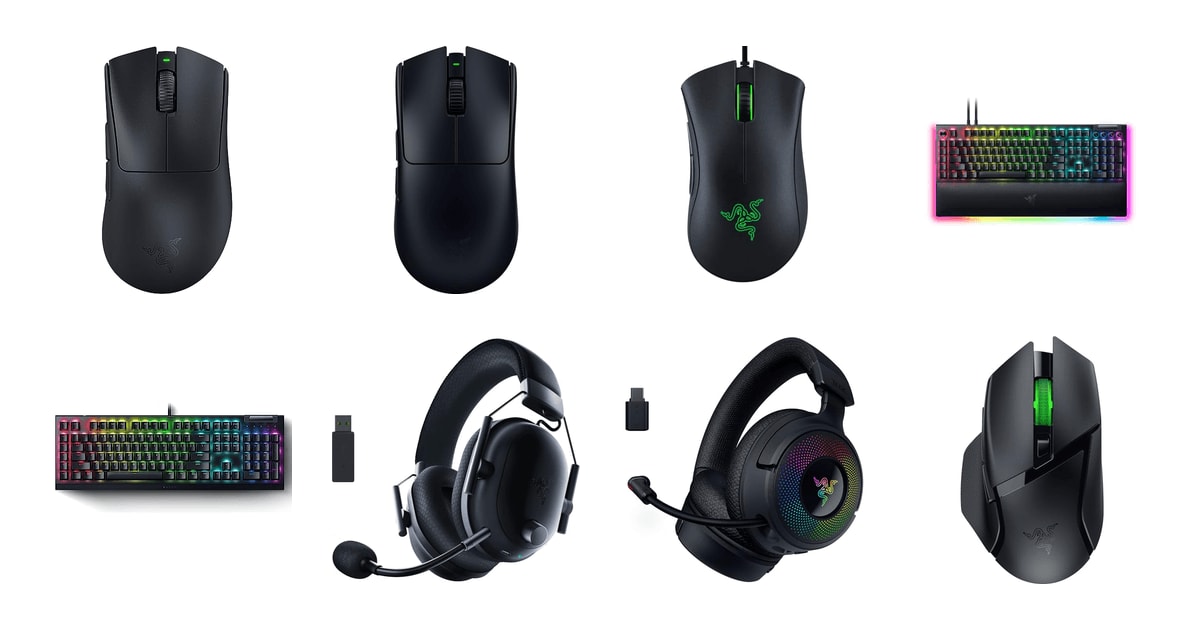
Gaming gear is the part of your setup you actually touch. A mouse that fits your hand wrong will nag at you for years, and a headset that pinches will end every long session early. Razer sells more of this stuff in the US than anyone, so its shapes and switches have become defaults that other brands copy. That's genuinely useful for you as a shopper: the DeathAdder shell and the Viper shell are known quantities, and you can usually figure out which one suits your grip before you buy.
Here's the catch, and it applies to the whole lineup. Almost everything good on a Razer device lives behind Synapse, the company's configuration software, and owners report it fairly often as the weak link — profiles that don't stick, features that need a restart, updates that break something that worked. Razer's customer support also draws consistent complaints in owner feedback. If you want a device you plug in once and never think about, that's worth knowing before you spend.
The gear itself, though, is mostly excellent, and Razer's wireless is as good as anyone's. We think that the Razer DeathAdder V3 Pro is the best Razer gaming gear for most people, and that the Razer Viper V3 Pro is the one to buy if you play FPS games competitively and want the lightest mouse Razer makes.
Everything we recommend

The comfortable shape, now light enough for serious play

Lighter and flatter, for players who chase every millisecond

The famous shape for a fraction of the money, with a cable

The headset to pick when your teammates need to hear you
At a glance
| Product | Device Type | Battery Life | Price | |
|---|---|---|---|---|
| Razer DeathAdder V3 Pro Wireless Gaming MouseTop pick | Wireless Gaming Mouse | 90 Hr Battery | $79.99On sale |
| Razer Viper V3 Pro Wireless Esports GamingRunner-up | Esports Gaming Mouse | 95 Hours | $119.99 |
| Razer DeathAdder Essential Ergonomic Wired Gaming MouseBudget pick | Wired Gaming Mouse | — | $20.99On sale |
 | Razer BlackWidow V4 Pro Wired Mechanical GamingAlso in lineup | Gaming Keyboard | — | $229.99 |
 | Razer BlackWidow V4 X Mechanical Gaming KeyboardAlso consider | Gaming Keyboard | — | $99.99On sale |
| Razer BlackShark V2 Pro Wireless Gaming HeadsetAlso great | Wireless Gaming Headset | 70 Hr Battery | $129.99On sale |
 | Razer Kraken V4 Wireless 2.4GHzAlso consider | Gaming Headset | — | $173.99 |
 | Razer Basilisk V3 X HyperSpeed Customizable WirelessAlso consider | Wireless Gaming Mouse | 285 Hours | $39.98On sale |
How we picked
Sensor and tracking. We compared published sensor measurements, including RTINGS' resolution-accuracy figures, against Razer's own specifications for each mouse. A sensor had to track cleanly across common surfaces without spinouts to make the cut.
Shape and grip fit. We read owner feedback specifically for hand size and grip style, since that's where gaming mice succeed or fail. We wanted picks that clearly serve palm grips and clearly serve claw grips, rather than one compromise shape.
Wireless and battery. We looked for latency comparisons from Tom's Hardware and battery ratings from Razer's spec sheets. Anything wireless had to run long enough that charging is a weekly habit, not a daily one.
Switches and build. We compared rated click and keystroke lifecycles across the lineup, and weighed them against owner reports of keys or switches failing early. Doubleshot keycaps and lubricated stabilizers counted in the keyboards' favor.
Software burden. Razer Synapse unlocks most of the good features across this lineup, so we read owner feedback for how much friction that creates. Devices that need the software just to work as advertised were marked down.
Top pickOn sale
The comfortable shape, now light enough for serious play
Razer DeathAdder V3 Pro Wireless Gaming Mouse
The DeathAdder V3 Pro pairs Razer's classic right-handed shape with a 63g body and a top-tier optical sensor. If you use a palm grip or have larger hands, this is the one that won't leave your wrist aching after a four-hour session.
$79.99fromAmazonList priceThe DeathAdder shape is the reason to buy this mouse. It's a right-handed hump that fills your palm instead of asking you to claw at a flat slab. Razer has sold this silhouette for well over a decade, and owners with big hands keep saying it's the only mouse that doesn't feel like a toy. If you've ever finished a night of gaming with a sore wrist, that arch is doing real work.
What's new is the weight. Ergonomic mice used to be the heavy ones — you picked comfort or you picked speed. At 63g the V3 Pro is lighter than most flat, symmetrical mice were a few years ago, so you're no longer trading agility for a shape that fits. Owner feedback on this point is remarkably consistent: people coming from older DeathAdders describe the difference as immediate.
The Focus Pro sensor tracks cleanly on more surfaces than you'd expect, glass included, and RTINGS measured 99.8% resolution accuracy on the newer Focus Pro 35K version of this sensor family. Practically, that means the cursor goes where your hand goes. Razer rates the optical switches for 90 million clicks with a 0.2ms actuation — the double-click failures that plagued older mechanical switches shouldn't happen here.
Battery life is the quiet luxury. Razer rates it at up to 90 hours, which for most people means charging every couple of weeks rather than remembering to plug in nightly. It charges over USB-C, so you can keep playing while it tops up. And if you want to push latency further, it supports 8000Hz polling with Razer's separate HyperPolling dongle — though that's a niche upgrade, not something most players will notice.
Flaws but not dealbreakers
This mouse is built for medium-to-large right hands. If your hand is small or you grip with your fingertips, the hump that makes it comfortable for other people will feel like too much mouse. The Viper's flatter shape is the better call there.
It's also a stripped-down design — five buttons, no MMO-style side cluster, no Chroma lighting. That's deliberate for esports, but if you want macros on your thumb or RGB that syncs with your desk, look at the Basilisk instead.
The Synapse caveat applies here as much as anywhere. You need the software to remap buttons or store profiles, and owner reports about Razer's support experience when something goes wrong are not encouraging.
Runner-up
Lighter and flatter, for players who chase every millisecond
Razer Viper V3 Pro Wireless Esports Gaming
At 54g the Viper V3 Pro is the lightest mouse Razer makes, with a symmetrical shape built for claw and fingertip grips. It's the pick for competitive FPS players, and it costs more than the DeathAdder for a shape fewer people will love.
$119.99fromAmazonNine grams doesn't sound like much until you flick. The Viper V3 Pro comes in at 54g against the DeathAdder's 63g, and the shape is flat and symmetrical rather than humped. If you play Valorant or CS at a low sensitivity and make large arm movements, that combination is easier to whip around and stop precisely.
This is the mouse for claw and fingertip grips. Owners moving over from other lightweight competitors — the popular Logitech superlights, various Glorious models — consistently describe the Viper's shape as the better fit for holding the mouse with arched fingers rather than a full palm. If that's how you hold yours, the DeathAdder's hump will just get in the way.
It's the only mouse here with 8000Hz HyperPolling built in, no extra dongle required. Whether you can feel the difference between 1000Hz and 8000Hz is genuinely debatable, and most players can't. But Tom's Hardware found Razer's HyperSpeed wireless produced click latency comparable to a wired connection in blind A/B comparisons — the wireless penalty that used to justify a cable is effectively gone.
Battery holds up to 95 hours by Razer's rating, the longest of the two flagship mice, and the Gen-3 optical switches carry the same 90-million-click, 0.2ms specification as the DeathAdder. You're not giving up durability or endurance to get the lighter body.
Flaws but not dealbreakers
It's the most expensive mouse in this guide, and the gap over the DeathAdder buys you a shape preference and a polling number rather than better tracking. If you're not playing competitively, that's a hard case to make.
The flat symmetrical body offers less support than the DeathAdder if you rest your whole palm on the mouse. Long non-gaming sessions — spreadsheets, editing, browsing — are noticeably less comfortable on this shape.
Like the DeathAdder, it's a minimalist design with no lighting and few buttons. That's the point, but it's worth saying out loud.
Budget pickOn sale
The famous shape for a fraction of the money, with a cable
Razer DeathAdder Essential Ergonomic Wired Gaming Mouse
The DeathAdder Essential is the same broad ergonomic form as Razer's flagship, built with a simpler sensor and a wire. It's the mouse to buy for a first gaming PC, a spare desk, or a kid who'll outgrow it in two years.
$20.99fromAmazonList priceYou're getting the shape, and the shape is most of what matters. The Essential keeps the DeathAdder's right-handed ergonomic shell while dropping the price to a fraction of the V3 Pro's. For a first gaming setup, that's the right trade — a comfortable mouse with a decent sensor beats an uncomfortable one with a great sensor, every time.
The compromises are honest ones. You get a 6,400 DPI optical sensor instead of the flagship Focus Pro, mechanical switches rated for 10 million clicks instead of optical ones rated for 90 million, and a cable instead of HyperSpeed wireless. None of those will hold back anyone below a high competitive level, and the wire never needs charging.
It's heavier than the wireless models, and that's fine here. Owners regularly describe it as comfortable through six-hour sessions, and plenty of them are using it for work as much as for games. Five programmable buttons and on-the-fly DPI switching cover the basics through Synapse.
This is also the safest recommendation in the guide if you're buying for someone else. It has the widest owner base of anything here by a wide margin, and the complaints that do come up are minor and mechanical — a stiff scroll-wheel click, mostly — rather than connectivity or software failures.
Flaws but not dealbreakers
The lighting is a single fixed green, not Chroma RGB. Several owners have been surprised by that. If you're building a color-themed setup, this mouse won't join in.
A handful of owners report the scroll wheel click getting stiff over time, needing a firmer press than it should. It's not widespread, but it's the recurring gripe.
The cable is a plain rubber one, not the soft braided kind found on premium wired mice, so it drags a bit more across a desk. A mouse bungee fixes it if that bothers you.
Also greatOn sale
The headset to pick when your teammates need to hear you
Razer BlackShark V2 Pro Wireless Gaming Headset
The BlackShark V2 Pro pairs 50mm TriForce titanium drivers with a detachable wideband mic that reviewers rate among the best in wireless gaming headsets. Battery runs up to 70 hours, so charging becomes a monthly chore rather than a nightly one.
$129.99fromAmazonList priceThe microphone is the headline. Tom's Guide found the BlackShark V2 Pro's onboard mic clarity beat several competing wireless headsets in side-by-side voice comparisons, and owners describe it as close to broadcast quality. If you're calling out positions in a squad or hopping on Discord for hours, that matters more than a slightly wider soundstage.
The audio itself measures well too. RTINGS rated the TriForce titanium 50mm drivers above average for frequency response consistency in headphone testing, which in plain terms means it sounds the same each time you put it on. Razer includes FPS-tuned profiles on the headset, and the closed memory-foam earcups seal out enough room noise that you don't need to crank the volume.
Battery is rated up to 70 hours over HyperSpeed wireless. Owners routinely say they forget it's wireless until the low-battery chime shows up a week or two in. A USB-C top-up while you sleep is the whole maintenance story.
Comfort holds up for small and medium heads — owners who wear glasses report the plush breathable padding stays livable through long sessions. That's not universal across the size range, which is the next section's problem.
Flaws but not dealbreakers
Owner feedback on durability is genuinely mixed, and this is the shakiest product in the guide on that front. Several people with larger heads report the headband failing under stretch, and there's a recurring complaint about the mic connection going flaky. If you have a big head, take that seriously.
A subset of owners describe audio distortion when several apps — a game, Discord and music at once — are running through the headset simultaneously. Others never see it, which points at a driver or Synapse issue rather than the hardware.
Razer's support process draws the loudest criticism here of anything in this guide, with owners reporting slow or unanswered warranty claims. That's a real risk on a product where hardware failures aren't rare.
Who this is for
This guide is for you if you've already decided on Razer — maybe you like the Chroma lighting, maybe you want everything syncing through one Synapse profile, maybe you just got along with a DeathAdder years ago. Within that, we've covered mice, keyboards and headsets across budget, mid-range and flagship tiers, so you can build a whole desk from one brand. Competitive FPS players, streamers who need macro controls, and first-time buyers are all served by something here.
You should look elsewhere if software friction is a dealbreaker. Almost every good feature on these devices runs through Synapse, and owner feedback on it — and on Razer's support when hardware fails — is the consistent sore point across the lineup. We also don't cover Razer's laptops, chairs, capture cards or controllers here; this is peripherals only, and only the models available now.
How we picked
We built this guide from published reviews, Razer's own specification sheets and recurring themes in owner feedback, weighted across five things. Sensor and tracking: measured resolution accuracy and clean tracking across surfaces, not just a big DPI number on the box. Shape and grip fit: whether a device clearly suits palm, claw or fingertip grips, since fit decides comfort more than any spec. Wireless and battery: latency close enough to wired that you can't feel the difference, plus battery long enough to forget about. Switches and build: rated click and keystroke lifecycles, keycap construction, and whether owners report early failures. Software burden: how much of a device stops working properly without Synapse running.
Other razer gaming gear worth considering
If you want wireless without the flagship price: The Razer Basilisk V3 X HyperSpeed Customizable Wireless ($39.98) — The Basilisk V3 X HyperSpeed brings HyperSpeed wireless and Bluetooth to a mouse that costs a fraction of the V3 Pro, and IGN ranked it a top budget pick for its 18,000 DPI sensor. The battery numbers are absurd — Razer rates up to 285 hours on HyperSpeed and 535 on Bluetooth, running on a AA battery you can swap in seconds instead of a sealed cell you'll eventually have to live with. You get nine programmable controls and Chroma lighting too, which the flagship mice skip. What you give up is weight and sensor grade: at roughly four ounces it's much heavier than the V3 Pro, and it uses mechanical switches rather than optical. A few owners report it being slow to wake from sleep. For everything short of ranked FPS, it's a lot of mouse.
If you want the mechanical keyboard without the flagship extras: The Razer BlackWidow V4 X Mechanical Gaming Keyboard ($99.99) — The BlackWidow V4 X keeps what most people actually use from the V4 Pro — the same Yellow linear switches with a 1.2mm actuation and 45g force, doubleshot ABS keycaps, per-key Chroma, six macro keys and a media roller — while dropping the command dial, the leatherette wrist rest and the underglow. It also adds foam under the circuit board and lubricated stabilizers, so it sounds better than its price suggests. PC Gamer found its hot-swap sockets take standard 5-pin mechanical switches, which is unusual at this tier and means you can change the feel later without soldering. It's a pound lighter than the V4 Pro and, judging by owner feedback volume, a lot less trouble. Skip it only if you specifically need the dial.
If you want one headset for PC, console and phone: The Razer Kraken V4 Wireless 2.4GHz ($173.99) — The Kraken V4 is the flexible one. It runs 2.4GHz wireless, Bluetooth and USB wired, so the same headset covers your PC, a PS5 and your phone without rebuying anything. Engadget noted its haptic bass module adds physical feedback timed to explosions and gunfire — a gimmick to some people, genuinely fun to others. You also get THX Spatial Audio, a retractable wideband mic, quick game/chat mixing and nine-zone Chroma per earcup. The trade-offs against the BlackShark: 40mm drivers instead of 50mm, and a lighter build that owners like for headache-prone heads. Owner feedback flags Bluetooth settings not sticking and some early failures, so it's the more adventurous pick of the two.
More from Razer
Here's the rest of what our research turned up in Razer's current lineup. This isn't everything the company sells — it's the models that came up repeatedly in reviews and owner discussion, sorted by who each one actually suits.
The Razer BlackWidow V4 Pro Wired Mechanical Gaming ($229.99) — The BlackWidow V4 Pro is the keyboard for streamers and anyone who lives in macros. PCMag found its command dial and eight dedicated macro keys meaningfully speed up stream-switching compared to boards without dedicated controls, and the magnetic leatherette wrist rest plus three-sided underglow make it the showpiece of the lineup. The Yellow linear switches are the same quiet, fast ones as the V4 X. Two things to weigh: it needs Synapse to unlock a large share of its features, which owners find frustrating, and there's a recurring report of individual keys failing after a year or two. If your workflow genuinely uses a dial and eight macros, it's the only board here that offers them. If it doesn't, the V4 X gets you the same typing feel with fewer moving parts.
Is Razer worth it?
Razer is the biggest name in US gaming peripherals by dollar sales, and it earned that with shapes and switches other brands now imitate. The DeathAdder silhouette has been a reference point for over a decade, HyperSpeed wireless measures close enough to wired that Tom's Hardware couldn't separate them in blind comparisons, and Chroma RGB is the most widely supported lighting ecosystem in games. On hardware, the company competes at the top of every category it enters. The consistent knock is everything around the hardware. Synapse is where the good features live, and owners describe profiles that don't stick, features that need a restart, and updates that break things. Support draws sharper criticism still, with warranty claims reported as slow or unanswered — a real concern on the headsets, where failures aren't rare. Razer's specs are honest and its industrial design is excellent. Just go in knowing that when something breaks, sorting it out can be a hassle. Rivals like Logitech and SteelSeries generally have a calmer software story, if that's your priority.
Not set on Razer?
It compares Razer's mice against Logitech, Glorious and the rest, so you can see where the DeathAdder and Viper actually land in the wider field. our full wireless gaming mice guide →
Worth reading before you commit to the BlackShark, since it covers brands with steadier durability records across both wireless and wired options. our gaming headsets guide →
If you type as much as you game, it covers boards from enthusiast brands with better stock switches and sound than anything in Razer's mainstream lineup. our mechanical keyboards guide →
Setup and software notes
Plan on installing Razer Synapse, because most of what you paid for lives there — button remapping, macros, DPI stages, Chroma effects and cross-device cloud profiles that sync your mouse, keyboard and headset together. Update firmware before you customize anything; a few features on the V4 Pro's command dial behaved differently across Windows versions, and firmware brings devices in line. Save profiles to the cloud so a reinstall doesn't cost you your setup, and store what you can to onboard memory if you'll use the device on another machine. For the wireless mice, keep the dongle near your desk rather than around the back of a tower — 2.4GHz gets weaker through metal. Wipe the mouse feet occasionally so they glide, and keep the headset's detachable mic capped when you're not using it.
Questions we get
What's the best Razer gaming mouse?
For most people it's the DeathAdder V3 Pro. It combines Razer's most comfortable shape with a 63g body, the Focus Pro sensor and up to 90 hours of battery. If you play competitive FPS with a claw or fingertip grip, the 54g Viper V3 Pro is the better fit.
What's the difference between the DeathAdder V3 Pro and the Viper V3 Pro?
Shape and weight, mostly. The DeathAdder is a humped right-handed design at 63g built for palm grips; the Viper is flat, symmetrical and 54g, built for claw and fingertip grips. The Viper also has 8000Hz polling built in, while the DeathAdder needs a separate HyperPolling dongle to hit that rate. Both use top-tier optical sensors and Gen-3 optical switches.
What is HyperSpeed wireless and how does it compare to Bluetooth?
HyperSpeed is Razer's 2.4GHz connection over a USB dongle, and it's built for low latency — Tom's Hardware couldn't distinguish it from wired in blind A/B comparisons. Bluetooth is slower to respond but sips less power, which is why the Basilisk V3 X lasts far longer on it. Use HyperSpeed for games and Bluetooth for travel or a second device.
What's the best Razer mouse for small hands?
The Viper V3 Pro. Its flat symmetrical shape and 54g weight suit smaller hands and fingertip grips much better than the DeathAdder's tall hump, which owners with large hands specifically praise. If you want something cheaper, the DeathAdder Essential is a middle-ground size that owners describe as workable across most hand sizes.
Are Razer optical switches better than mechanical ones?
For mice, yes on paper. Razer rates its Gen-3 optical mouse switches for 90 million clicks with 0.2ms actuation and no debounce delay, versus 10 million clicks on the mechanical switches in the DeathAdder Essential and 60 million on the Basilisk's Gen-2 mechanical switches. Optical switches also avoid the double-click failure that eventually hits many mechanical mice. For keyboards, it's a feel preference rather than a clear win.
How long does the BlackShark V2 Pro battery last?
Razer rates it at up to 70 hours of wireless use on a full charge, and owners generally report going a week or more between charges. It recharges over USB-C, so an overnight top-up covers you. Real-world life depends on volume and whether you're using the mic constantly.
Why you should trust us
For this guide:
- We read published reviews and measurements from RTINGS, Tom's Hardware, Tom's Guide, PCMag, PC Gamer, IGN and Engadget covering Razer's current mice, keyboards and headsets.
- We compared Razer's own specification sheets across the lineup for weight, sensor grade, switch lifecycle, polling rate and battery ratings.
- We read through owner feedback for each model, looking for the complaints that repeat — hand-size fit, Synapse friction, support experience and early hardware failures.
- We read owner reviews on every listing, weighted toward the critical ones, because that is where the recurring failures show up.
- We have a systematic way of automatically fetching the latest prices, so the numbers on this page stay current.
- This is a research-focused guide, so the team may not own every product listed — though we often do own the top winners, which gives us extra context for the recommendations.
- We don't accept free products, and the retailer commission never changes which product we recommend.
Sources
Razer DeathAdder V3 Pro Review, RTINGS.com
Razer Viper V3 Pro Review, RTINGS.com
Razer BlackShark V2 Pro Review, RTINGS.com
Best Gaming Mice 2026, PCMag
Best Gaming Keyboards 2026, PCMag
Razer BlackWidow V4 Pro Review, Tom's Hardware
Best Gaming Headsets 2026, Tom's Guide
Razer Synapse Software Overview and Specs, Razer (Manufacturer)
Razer DeathAdder V3 Pro Specifications, Razer (Manufacturer)
Razer Viper V3 Pro Specifications, Razer (Manufacturer)
Best Wireless Gaming Mice, Tested and Reviewed, IGN
Razer BlackWidow V4 X Review, PC Gamer
Amazon product listings and owner reviews for all 8 products
Manufacturer specification pages for each product
Some passages in this guide may be paraphrased with AI help. Prices are refreshed automatically.
More like this.
Continue exploring electronics reviews and recommendations.

The Best Wireless Gaming Mice
A gaming mouse is the one piece of gear your hand touches for every second you play. Weight, shape, and how the shell fits your grip matter far more than…

The Best Gaming Headsets
A gaming headset does two jobs at once, and most people only think about the first. It has to put you inside the game - footsteps behind you, a reload two…

The Best Gaming Chairs
A gaming chair is the one piece of your setup you touch for every second you use it. Mice and keyboards get swapped on a whim, but the chair is what…

The Best Mechanical Keyboards for Gaming and Typing
A keyboard is the thing you touch for hours a day, and a mechanical one changes that in two ways. Every key gets its own switch, so presses feel crisper…

The Best Portable Audio Gear
Portable audio is one of the few gadget categories where a good pick genuinely changes your day. The right noise-canceling headphones turn a screaming jet…

The Best Outdoor Tech Gear
Outdoor electronics live a hard life. They ride in a hip belt through a rainstorm, sit on a dashboard at 130 degrees, get dropped on granite, and then…