The Best Wireless Mice for Productivity
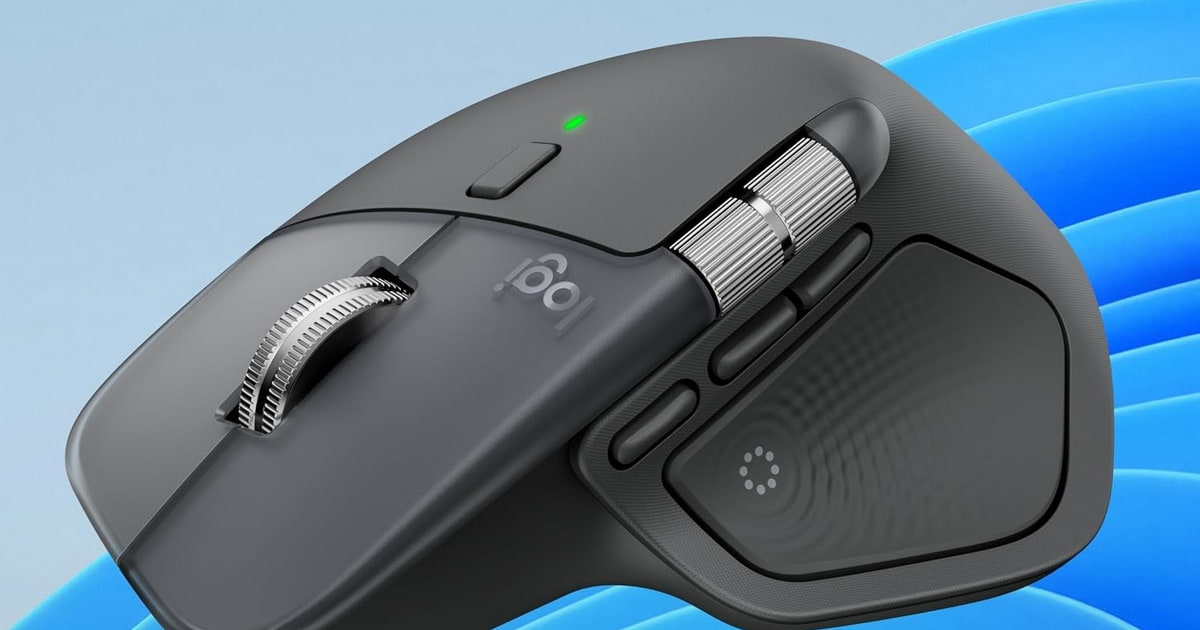
You touch your mouse thousands of times a day, and most of those touches are boring. You're scrolling a long spreadsheet, dragging a window to a second monitor, clicking through a slide deck. A good productivity mouse makes those motions disappear. It fits your hand so your wrist stays neutral, it scrolls fast enough that you stop dreading row 4,000, and it doesn't click loudly enough to annoy the person next to you. A bad one leaves your forearm sore by Thursday.
Here's the honest part. No mouse fixes a bad desk setup, and no mouse cures wrist pain on its own. Vertical shapes reduce forearm pronation, but they take a week or two to feel normal, and they're clumsier for fine cursor work like photo masking. Premium mice lean hard on companion software, which means another background app and another account. And hand shape is personal in a way specs can't capture. A mouse that feels perfect to a reviewer with large hands may feel like a brick in yours.
We focused on mice built for desk work rather than competitive gaming: multi-device pairing, quiet switches, fast scrolling, and batteries you rarely think about. We looked at manufacturer specifications, published reviews from outlets like RTINGS.com, PCMag and The Verge, and recurring themes in owner feedback. We think that the Logitech MX Master 4 is the best wireless mouse for productivity for most people, and that the Logitech Signature M650 is the one to buy if you want the essentials without spending much.
Everything we recommend

The fastest scrolling and the most comfortable shape, if you can pay

Quiet, comfortable, and you'll forget the battery exists

Vertical relief for a sore wrist, with a real learning curve

Nearly all of the MX magic, small enough for a laptop bag

Office quiet with gaming guts, and lighting you can turn off
Prices as of Oct 24, 6:27 AM PT · Details
At a glance
| Product | Battery life | Scroll wheel | Price | |
|---|---|---|---|---|
| Logitech MX Master 4 Ergonomic Wireless MouseTop pick | — | — | $118 |
| Logitech Signature M650 Wireless Mouse Small toBudget pick | Up to 24 months, AA | — | $33.99On sale |
 | Microsoft Surface Precision Mouse - GreyAlso consider | Up to 3 months | Precise and fluid | $299.99 |
| Logitech MX Anywhere 3S Compact Wireless MouseUpgrade pick | — | MagSpeed, 1000 lines/sec | $69.99On sale |
| Razer Pro Click V2 Wireless MouseRunner-up | Up to 3.5 months | HyperScroll | $89.99 |
| Logitech Lift Vertical Ergonomic Wireless Mouse -Also great | Up to 2 years | SmartWheel | Check price |
 | Apple Magic Mouse - White Multi-Touch SurfaceAlso in lineup | About a month | Multi-Touch surface | $79 |
 | Logitech G604 Lightspeed Wireless Gaming MouseAlso consider | 240 hrs Lightspeed, AA | — | $349.99 |
Prices as of Oct 24, 6:27 AM PT · Details
How we picked
Comfort for full days. We prioritized shapes that published reviews and owner feedback describe as comfortable across eight-hour sessions, not just short stints. Vertical and sculpted designs backed by ergonomist input got extra weight.
Scrolling that keeps up. Spreadsheet and long-document users are the core audience here, so free-spin or dual-mode wheels were close to mandatory. Wirecutter noted that long-document readers strongly preferred free-spinning wheels for reduced hand fatigue.
Battery you ignore. We looked for manufacturer ratings measured in months or years, plus fast USB-C top-ups on rechargeable models. RTINGS.com measured 70 days per charge on the MX Master 4, which set the bar.
Quiet enough to share. Click noise matters in open offices and on video calls, so we favored mice with silent or reduced-noise switches. Manufacturer claims of roughly 90% noise reduction lined up with owner feedback.
Multi-device switching. Pairing with three or more devices and switching with one button is now standard on serious productivity mice, and The Verge confirms three-device support across the MX and Surface lines. Anything that couldn't do it lost points.
Top pick
The fastest scrolling and the most comfortable shape, if you can pay
Logitech MX Master 4 Ergonomic Wireless Mouse
The MX Master 4 pairs Logitech's electromagnetic MagSpeed wheel with a tall, sculpted shape that props your palm up instead of flattening it. It's the mouse to get if you live in long documents, big spreadsheets, or a three-monitor setup.
$118fromAmazonPrices as of Oct 24, 6:27 AM PT · Details
The scroll wheel is the whole reason to buy this mouse. Flick it once and it free-spins, and Logitech rates it at 1,000 lines per second. A 25-page document goes by in about a second. Then it catches and stops on the row you want. If you spend your day in Excel, a long PDF, or a Slack channel you've ignored since lunch, that one part changes how the work feels more than any sensor spec.
The shape is tall and asymmetric, with a thumb rest that keeps your hand angled slightly rather than pressed flat. It's not a vertical mouse, so there's no adjustment period. Your palm just sits higher. There's a second wheel under your thumb for horizontal scrolling, which sounds like a gimmick until you're dragging a wide spreadsheet sideways for the tenth time in an hour. Owners with medium and large hands consistently find it comfortable for full workdays.
Battery anxiety isn't a thing here. RTINGS.com measured 70 days on a single charge under mixed use. Even if your mileage is half that, you'll charge this thing a handful of times a year. And when you do forget, Logitech says one minute on USB-C buys you roughly three hours. It charges while you use it, which sounds obvious until you meet a mouse that doesn't.
The extras are more useful than the marketing suggests. The Haptic Sense panel buzzes gently to confirm actions, and the Actions Ring puts an app-aware shortcut overlay right under your cursor. Both are configurable in Logi Options+, where you can also set per-app button profiles. That's the feature that actually matters for productivity: your side button can mean one thing in Chrome and another in Premiere. The 8,000 DPI Darkfield sensor tracks on glass, so a glass-topped desk isn't a problem.
Quiet Clicks round it out. Logitech claims 90% less click noise than its older switches, and the feel is soft rather than mushy. If you take a lot of calls, or share a room with someone who's on calls, this matters more than you'd expect.
Flaws but not dealbreakers
It's big and it's heavy. If you have small hands, or you toss your mouse in a laptop bag every morning, this is the wrong shape and the wrong size. Look at the MX Anywhere 3S instead.
It's also the most expensive mouse here by a wide margin, and much of what makes it great depends on Logi Options+. If you work on a locked-down corporate machine where you can't install software, you lose the per-app profiles, the Actions Ring customization and the haptics tuning. What's left is still a very good mouse, but you're paying for parts you can't reach.
Owner feedback on this generation is more mixed than on the previous MX Masters, with some buyers questioning whether the haptics and Actions Ring justify the step up from a 3S they already own. That's a fair question, and the answer for many people is no.
Budget pickOn sale
Quiet, comfortable, and you'll forget the battery exists
Logitech Signature M650 Wireless Mouse Small to
The Signature M650 covers the things that actually matter day to day: a comfortable shape, near-silent clicks, dual-mode wireless, and a scroll wheel that switches into fast mode when you flick it. It costs a small fraction of the MX Master 4.
$33.99fromAmazonList pricePrices as of Oct 24, 6:27 AM PT · Details
Most people don't need more mouse than this. You get a contoured shape with rubber side grips, two customizable side buttons, and a SmartWheel that shifts from line-by-line precision into fast scrolling when you spin it hard. That last part is the budget cousin of MagSpeed. It isn't as smooth or as fast, but it solves the same problem, which is that ratcheting through a thousand rows is miserable.
The battery situation is almost funny. Logitech rates it for 24 months on the single AA it ships with. You'll likely replace a keyboard, a laptop, and a desk chair before you think about this mouse's power. There's no charging cable to lose and no dead-mouse-at-9am scramble. Some people prefer rechargeable, and that's a real preference, but two years is two years.
It's genuinely quiet. Logitech's SilentTouch switches cut click noise by about 90%, and the sound that's left is a soft thunk rather than a snap. In an open office or a shared home office, that's the difference between people noticing your mouse and not. The scroll wheel is a little louder than the clicks, but it's not disruptive.
Connection is flexible. You can pair over Bluetooth Low Energy or use a Logi Bolt receiver, and Logi Options+ lets you map the side buttons to copy and paste, back and forward, or whatever you use constantly. This is a mouse sized for small to medium hands, and Logitech sells it in multiple sizes and handedness options, so check that before you buy.
Flaws but not dealbreakers
The build is plainly cheaper than the MX line. It's lighter, the plastics feel less dense, and the scroll wheel's fast mode engages with a slight lurch instead of the MX's smooth glide. Nothing here feels fragile, but nothing feels luxurious either.
There's no thumb wheel for horizontal scrolling and no free-spin flywheel, so very long spreadsheets still take more work than they would on an MX Master 4. If side-to-side navigation is a daily chore for you, that gap is real.
Also great
Vertical relief for a sore wrist, with a real learning curve
Logitech Lift Vertical Ergonomic Wireless Mouse -
The Lift holds your hand at a 57-degree angle, closer to a handshake than a flat palm, which takes the twist out of your forearm. If your wrist aches by mid-afternoon, this is the first thing to try.
Check priceatAmazonPrices as of Oct 24, 6:27 AM PT · Details
A flat mouse asks your forearm to rotate so your palm faces down. Hold that for eight hours and it adds up. The Lift's vertical shape removes most of that rotation. PCMag reports that the 57-degree grip angle noticeably reduced wrist fatigue during multi-hour typing and browsing sessions compared with flat ergonomic mice. Physical therapists cited in Consumer Reports point the same direction, finding that vertical designs lower forearm muscle activity by keeping the wrist more neutral.
Buy this one before you buy an expensive brace. Logitech had the Lift designed and approved against criteria set by ergonomists, and unlike most vertical mice it's sized for small to medium right hands rather than assuming everyone has large ones. The textured grip and thumb rest are genuinely comfortable, and the clicks are quiet enough for a shared room.
The practical stuff is handled. There's a SmartWheel for smooth scrolling, customizable buttons under your fingers, Bluetooth Low Energy or Logi Bolt connectivity across Windows, macOS, iPadOS, ChromeOS and Linux, and up to two years of battery life. Nothing about living with it is fussy. This is one of the most widely bought mice in the lineup, and owner sentiment skews positive on comfort specifically.
Give it two weeks. Almost everyone finds a vertical mouse awkward at first, because your fingers approach the buttons from a new angle and your aim wanders. That settles. If it hasn't settled after a couple of weeks, a vertical shape probably isn't for you, and that's worth knowing before you commit.
Flaws but not dealbreakers
Fine cursor work is harder. Because your hand pivots from the wrist rather than gliding flat, precise selections in a photo editor or a CAD window are fiddlier than on the MX Master 4. Owners doing detailed creative work often keep a flat mouse alongside it.
It's right-hand only in this version, and it's shaped for small to medium hands. Large hands tend to overhang it. Logitech sells a left-handed variant separately, but this listing isn't it.
A vertical mouse relieves strain; it doesn't diagnose or treat anything. If you have persistent pain or numbness, see a clinician rather than shopping.
Upgrade pickOn sale
Nearly all of the MX magic, small enough for a laptop bag
Logitech MX Anywhere 3S Compact Wireless Mouse
The MX Anywhere 3S shrinks the MagSpeed wheel and the Darkfield sensor into a mouse that fits a jacket pocket. It's the one to buy if you work from cafes, hotel desks, and whatever surface is available.
$69.99fromAmazonList pricePrices as of Oct 24, 6:27 AM PT · Details
This is the travel mouse that doesn't feel like a compromise. It has the same 1,000-lines-per-second MagSpeed wheel as the flagship and the same Quiet Clicks, in a body about four inches long. You give up the palm support and the thumb wheel. You keep the thing that makes MX mice worth it, which is that scrolling stops being a chore.
The 8K DPI Darkfield sensor is the other reason to pick this one. TechRadar reports it tracks on glass as thin as 4mm, which covers most glass desks and conference tables. Hotel rooms have terrible surfaces. Coffee shops have worse ones. A mouse that works on all of them without a pad is worth something when you're setting up in twenty seconds before a call.
It pairs with up to three devices over Bluetooth and works across Windows, macOS, ChromeOS and Linux, so one button gets you from a work laptop to a personal machine to a tablet. It charges over USB-C. Read the box carefully, though: it ships with a cable and no receiver, and if you want the Logi Bolt dongle you buy it separately.
The trade-off is posture. A compact mouse means a claw or fingertip grip, with your palm hovering rather than resting. That's fine for a few hours in an airport. For eight hours a day at a fixed desk, a full-size shape is kinder to your hand, which is why this is the upgrade for travelers rather than the pick for everyone.
Flaws but not dealbreakers
No receiver in the box. If your work machine has flaky Bluetooth, or you need it for a device that won't pair, you're buying a Logi Bolt dongle on top of the mouse.
The small body isn't built for all-day desk use. Owners with larger hands report cramping after long sessions, and there's no thumb wheel for horizontal scrolling.
It costs meaningfully more than the M650 while giving you a smaller mouse, which feels backwards until you understand that you're paying for the sensor and the wheel, not the size.
Runner-up
Office quiet with gaming guts, and lighting you can turn off
Razer Pro Click V2 Wireless Mouse
The Pro Click V2 is Razer's attempt at a mouse that works for spreadsheets at 4pm and games at 9pm. It has quiet mechanical switches rated for 60 million clicks, a fast-scroll wheel, and it pairs with up to five devices.
$89.99fromAmazonPrices as of Oct 24, 6:27 AM PT · Details
Razer built this on gaming hardware and then made it behave. The Focus Pro 30K sensor tracks on glass with 99.8% resolution accuracy, which is far more precision than any office task needs, and the mechanical switches are rated for 60 million clicks. That's roughly triple the 20 million typical of standard office mice. Engadget found the HyperScroll wheel and quiet switches made it nearly indistinguishable from a dedicated office mouse.
Five-device pairing is the feature to notice. Most premium mice cap out at three. If you run a work laptop, a personal desktop, a tablet and a second machine you keep for testing, a dedicated switch button that cycles all of them is genuinely useful. There's an extended thumb rest for wrist posture, and the shape is sculpted for right hands only.
Battery is rated at up to 3.5 months under Razer's test conditions, and five minutes on the included USB-C cable gets you about two working days. That's a good safety net. Razer Synapse 4 handles button mapping and includes one-click prompts for AI tools, which will either save you time or sit unused depending on how you work.
The RGB is the awkward part in an office. There are 14 lighting zones with full underglow, and you can dial all of it down or off in software. Left on, it looks like a gaming mouse, because it is one.
Flaws but not dealbreakers
Owner feedback on this model is the weakest in the lineup by a clear margin, with a meaningfully lower average rating and complaints touching software and connection reliability. That's why it's the runner-up rather than the top pick, and it's why we'd steer a pure office worker to the MX Master 4 first.
Synapse is a heavier piece of software than Logi Options+, and it's the kind of app IT departments sometimes block. Without it, you lose the device switching customization and the button mapping.
The right-handed sculpt is aggressive. Left-handed users are out entirely, and the RGB underglow is hard to justify in a conference room even when it's switched off.
Who this is for
This guide is for people who use a mouse to work. That's remote and hybrid office workers, analysts who live in spreadsheets, anyone juggling two or three machines, and anyone whose wrist has started complaining. If you're setting up a home office and want one mouse that handles a laptop and a desktop without fuss, you're in the right place. If your wrist hurts, start with the vertical option and give it two weeks before you judge it.
This isn't a gaming guide. We didn't rank these on polling rate, click latency in shooters, or weight in grams, and if competitive play is your priority you should read a guide built for that. RTINGS.com found that premium wireless mice register clicks within about a millisecond of their wired equivalents, so wireless lag is a non-issue for office work regardless. We also skipped trackballs and drawing tablets, which solve related problems in very different ways. And if the mouse you have is comfortable and quiet, you probably don't need a new one.
How we picked
We built the shortlist around the things that decide whether you like a mouse six months in. Comfort: the shape has to hold up for a full workday, which is why sculpted and vertical designs backed by ergonomist review rose to the top. Scrolling: free-spin or dual-mode wheels make long documents and big spreadsheets bearable, and reviewers consistently favor them over plain ratchets. Battery: we wanted months or years between charges, plus a fast USB-C top-up when you forget. Noise: quiet switches matter on calls and in shared rooms. Switching: pairing across at least three devices with one button is table stakes now. Software: per-app button profiles are worth more to a productivity user than any DPI number above 8,000.
Other wireless mice for productivity worth considering
If you want a heavier mouse tuned for Windows: The Microsoft Surface Precision Mouse - Grey — The Surface Precision Mouse is the densest, most planted-feeling mouse here, and that weight is the point. It sits still under a heavy hand and glides with more inertia than the plastic-light M650. You get three customizable buttons, Smart Switch control across three computers, a rechargeable battery rated for up to three months, and the option to plug it in and keep working. What you give up is the free-spin flywheel. Scrolling is smooth and precise but not fast in the MagSpeed sense, so long spreadsheets take more wheel. It's also an older design with a thinner owner base than the Logitech mice, and Microsoft's software is less actively developed than Logi Options+. For a Windows desktop where the mouse never leaves the pad, it's still a satisfying thing to use.
If you want a wall of programmable buttons: The Logitech G604 Lightspeed Wireless Gaming Mouse — The G604 Lightspeed is a gaming mouse, but the reason to consider it for work is the 15 programmable controls, including six thumb buttons. That's more than double what a typical productivity mouse gives you. If your job involves repetitive macros, keyboard-shortcut-heavy editing software, or an ERP system with a dozen constant actions, you can bind all of it to your thumb. It has a dual-mode Hyperfast scroll wheel that free-spins for long documents, toggles between Bluetooth and 1ms Lightspeed wireless, and runs up to 240 hours in Lightspeed or about 5.5 months on Bluetooth from one AA battery. The catch is that it's shaped and styled like gaming gear, it's chunky, and setting up 15 buttons is a project. Most people don't need this. A few people need exactly this.
The competition
This is what our research surfaced, not a census of every wireless mouse you can buy. We concentrated on models with meaningful published coverage and enough owner feedback to spot patterns. Plenty of decent mice from smaller brands never made the list, and a mouse's absence here isn't a verdict against it.
The Apple Magic Mouse - White Multi-Touch Surface — The Apple Magic Mouse is the one product here that people either love or refuse to touch. The Multi-Touch surface is genuinely good: swiping between web pages and scrolling through documents feels like using a trackpad, and on a Mac it pairs itself the moment you plug in the included USB-C cable. Battery runs about a month between charges. The problem is the shape and the port. It's flat and low, which gives your hand nowhere to rest during long sessions, and the charging port sits on the bottom, so the mouse is unusable while it charges. MacRumors notes that this design hasn't changed since 2015, and reviewers still flag it. If you're deep in the Mac ecosystem and you value the gestures more than you value palm support, buy it knowing what you're getting. Everyone else should take the MX Master 4, which works fine on macOS.
Care and setup
Two habits keep a wireless mouse feeling new. First, wipe the feet and the sensor window every month or so. Dust and skin oil collect on the PTFE pads, and a gritty mouse feels sluggish long before it looks dirty. A dry microfiber cloth handles most of it, and a slightly damp one handles the rest. Keep liquid away from the seams. Second, set up your software once and properly. Both Logi Options+ and Razer Synapse let you build per-app button profiles, and that's where most of the productivity gain hides. Spend twenty minutes mapping your side buttons to the three shortcuts you actually use, then leave it alone. If you're using an AA-powered mouse, keep a spare battery in the same drawer as the cables.
Questions we get
What's the best wireless mouse for spreadsheets and Excel work?
The Logitech MX Master 4, mainly for the wheel. Its MagSpeed flywheel spins at up to 1,000 lines per second and then stops precisely where you want, and the separate thumb wheel handles horizontal scrolling across wide sheets. If you don't want to spend that much, the Signature M650's SmartWheel switches into fast mode with a flick and covers most of the same ground.
Is a vertical mouse better for wrist pain than a regular mouse?
For many people, yes. Physical therapists cited in Consumer Reports found vertical designs reduce forearm muscle activity by keeping the wrist in a more neutral, handshake-like position. PCMag reports the Logitech Lift's 57-degree angle noticeably reduced wrist fatigue over multi-hour sessions. Expect a week or two of awkwardness while your aim adjusts, and see a clinician if the pain is persistent.
Do wireless mice have noticeable input lag compared to wired mice?
Not for office work. RTINGS.com found that premium wireless mice using Logitech Lightspeed or Razer HyperSpeed register clicks within about a millisecond of their wired counterparts. That's imperceptible when you're writing email or building a deck. Competitive gamers argue about the remaining difference; nobody else needs to.
Is Bluetooth or a USB dongle better for a work mouse?
A dongle is more reliable, especially on desktops with older Bluetooth radios or in offices crowded with wireless devices. Bluetooth wins on convenience, since it uses no port and works with tablets and phones. The good news is that most mice here do both, so pair over Bluetooth first and switch to a receiver if the connection stutters.
What DPI is best for everyday office and productivity use?
Somewhere between 800 and 1,600 DPI suits most people at typical monitor sizes, and you'll want the higher end if you run a 4K or multi-monitor setup. Sensors rated at 4,000 to 8,000 DPI give you all the headroom you need. Anything advertised above that is gaming marketing, and it won't make your cursor better at finding a cell in a spreadsheet.
What's the quietest wireless mouse for open offices?
The Logitech Signature M650 and the MX Master 4 both use switches rated at roughly 90% less click noise than standard ones, and the sound they make is a soft thud rather than a snap. The Logitech Lift is similarly quiet. Scroll wheel noise is the part people forget, so if your neighbor is sensitive, a free-spin wheel is quieter in bursts than a loud ratchet.
Why you should trust us
For this guide:
- We read manufacturer specification sheets for every mouse here and compared their claims about battery life, scroll speed, sensor resolution and click noise against each other.
- We reviewed published coverage from RTINGS.com, PCMag, The Verge, TechRadar, Engadget, Consumer Reports, MacRumors and Wirecutter, focusing on battery measurements, ergonomics findings and click latency.
- We looked for recurring themes in owner feedback, particularly around long-session comfort, software reliability and hand-size fit.
- We read owner reviews on every listing, weighted toward the critical ones, because that is where the recurring failures show up.
- We have a systematic way of automatically fetching the latest prices, so the numbers on this page stay current.
- This is a research-focused guide, so the team may not own every product listed — though we often do own the top winners, which gives us extra context for the recommendations.
- We don't accept free products, and the retailer commission never changes which product we recommend.
Sources
Logitech MX Master 4 Review, RTINGS.com
Best Wireless Mouse for 2026, Wirecutter (NYT)
The Best Ergonomic Mice for Wrist Pain, Tom's Guide
Logitech Lift Vertical Ergonomic Mouse Review, PCMag
Microsoft Surface Precision Mouse Review, The Verge
Razer Pro Click V2 Review: Office Ergonomics Meets Gaming Precision, Engadget
Logitech MX Anywhere 3S Review, TechRadar
Best Mouse for Carpal Tunnel and RSI, According to Physical Therapists, Consumer Reports
Apple Magic Mouse Review: Still Divisive in 2026, MacRumors
Logitech G604 Lightspeed Review, RTINGS.com
How We Test Mice: Sensor Accuracy, Click Latency, and Battery Life, RTINGS.com
Logitech Options+ Software Overview and Feature Breakdown, Logitech (Manufacturer)
Amazon product listings and owner reviews for all 8 products
Manufacturer specification pages for each product
Some passages in this guide may be paraphrased with AI help.
Product prices and availability are accurate as of the date/time indicated and are subject to change. Any price and availability information displayed on Amazon.com at the time of purchase will apply to the purchase of this product.
More like this.
Continue exploring electronics reviews and recommendations.

The Best Wireless Gaming Mice
A gaming mouse is the one piece of gear your hand touches for every second you play. Weight, shape, and how the shell fits your grip matter far more than…

The Best Logitech Mice, Keyboards, and Accessories
You touch your mouse and keyboard more than anything else on your desk - thousands of clicks and keystrokes between the first coffee and quitting time. So…

The Best Wireless Subwoofers
Bass is the part of a movie you feel more than hear. A soundbar alone can only move so much air, so explosions land flat and a bass line in a song just…

The Best Noise-Cancelling Wireless Earbuds
Good noise cancellation changes what a commute feels like. The subway rumble drops away, the plane engine turns into a distant hush, and the guy on…

The Best Wireless CarPlay Adapters
Every trip starts the same way. You get in, dig out the cable, plug the phone in, and wait for the screen to catch up. A wireless adapter kills that…

The Best Wireless Earbuds
Wireless earbuds have quietly become the thing you reach for more than any other gadget. You wear them on the bus, on a work call, while loading the…