The Best Wireless CarPlay Adapters
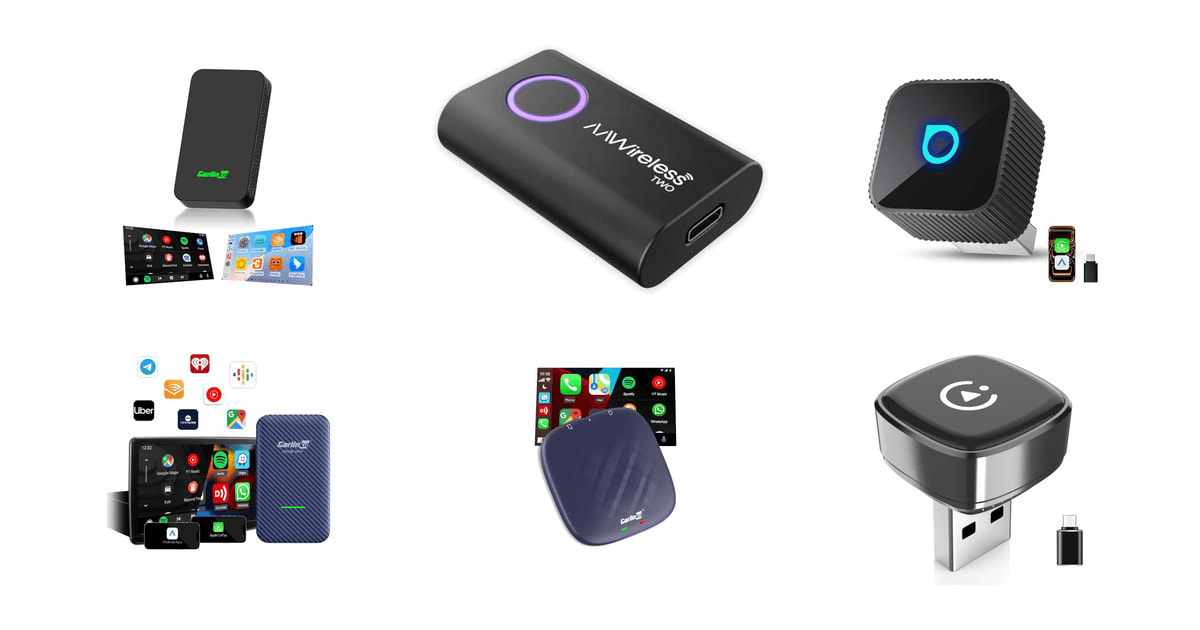
Every trip starts the same way. You get in, dig out the cable, plug the phone in, and wait for the screen to catch up. A wireless adapter kills that ritual. You plug the dongle into the USB port once, pair the phone once, and after that your maps and music come up on their own while you're still buckling the seat belt. It's a small change, but you notice it every single day, which is why these things sell as well as they do.
Here's the part the boxes bury: none of these adapters can add CarPlay to a car that doesn't already have it. They convert a factory wired connection to a wireless one, and that's all. Every one of them also adds a wireless hop, so you'll live with a short delay at startup and the occasional dropout a cable would never hand you. Aftermarket radios from Pioneer, Kenwood, Alpine and JVC mostly don't work. BMW and Tesla owners are out entirely.
So the real question is narrower than it looks. You want the one that connects fast, stays connected, and doesn't cook itself in a hot console. We leaned on manufacturer specs, published reviews, and the patterns in owner feedback — especially the complaints, which cluster in useful ways. We think that the Pluvixa Wireless CarPlay Adapter is the best wireless CarPlay adapter for most people, and that the OTTOCAST Mini Slim is the one to buy if you also need Android Auto.
Everything we recommend

Wireless CarPlay and nothing else, which is the point

Both phone platforms, in a metal body that runs cooler

Newer wireless hardware, if you'll pay more for it

The steadiest connection here, for Android drivers only
At a glance
| Product | Compatibility | Connectivity | Price | |
|---|---|---|---|---|
 | Carlinkit 5.0 Wireless CarPlay & Android AutoAlso in lineup | 800+ Models | Dual-Band Wi-Fi | $55.99 |
| AAWireless TwoAlso great | — | Bluetooth & Wi-Fi | $64.99 |
| OTTOCAST Mini Slim Wireless CarPlay Adapter &Runner-up | — | Wi-Fi 5GHz, BT 5.0 | $43.99 |
 | CarlinKit 4.0 Wireless CarPlay 2026 Apple AdapterAlso consider | 98% Of Models | Dual-Band Wi-Fi | $53.19On sale |
 | Carlinkit Tbox Plus Android 13.0 CarPlay BoxAlso in lineup | — | — | $206.89 |
| Wireless Carplay AdapterTop pick | 800+ Vehicles | — | $18.85On sale |
| OTTOCAST Mini PicoUpgrade pick | — | Wi-Fi 6, BT 5.4 | $49.99 |
How we picked
Connection speed. We looked for adapters whose specs and owner reports agree on a connect time under about ten seconds from engine start. Anything past fifteen feels slow on a drive you make twice a day.
Dropout reports. Published reviews tell you how an adapter behaves on day one, and owner feedback tells you how it behaves in month six. We weighted repeated, specific failures — mid-drive disconnects, units that quit after a few weeks — much more heavily than one-off gripes.
Heat handling. We paid attention to housing material and heat dissipation claims, because a chip cooking in a summer console sits behind a lot of dropouts and dead adapters.
Phone compatibility. We checked whether each adapter covers CarPlay, Android Auto, or both, and what phone software it needs. In a mixed household, dual-protocol support is the difference between one purchase and two.
Update support. Brands that ship firmware through an app or a website can fix pairing bugs when Apple or Google changes something underneath them. Unbranded adapters generally can't, and their owners live with whatever shipped.
Top pickOn sale
Wireless CarPlay and nothing else, which is the point
Wireless Carplay Adapter
This is a plain wireless CarPlay dongle for iPhone owners whose car already has factory wired CarPlay. It's tiny, it sits nearly flush in the port, and owner feedback on it runs more consistently positive than anything else here — most people plug it in, pair once, and forget it exists.
$18.85fromAmazonList priceFor most drivers, the boring adapter is the right adapter. The Pluvixa does one job: it turns your car's wired CarPlay into wireless CarPlay. Maps, music, Siri, calls and texts all come through the factory interface the way they do over a cable, and your steering wheel buttons keep working. There's no app to install, no account to make, no settings page you'll ever need to visit twice.
Setup is three steps. Plug it into the USB port you'd normally use for CarPlay, switch on Bluetooth, and pick the adapter's name from the list. After that first pairing your phone reconnects on its own every time you start the car, and owners commonly describe it coming up in about ten seconds — before you've backed out of the driveway.
It's also physically small, which matters more than you'd guess. Bigger dongles hang out of a console port, knock against a gear selector, or block the port next to them. The Pluvixa's grey body sits close to flush, and a USB-C adapter comes in the box, so it works whether your car has the old rectangular port or the newer oval one.
The quieter win is your phone's charging port. Plugging and unplugging a connector twice a day wears that port out, and a worn port is an annoying, expensive repair. Go wireless and the cable lives in the glovebox for emergencies. If you've already had one phone go flaky at the port, that alone can pay for the adapter.
Flaws but not dealbreakers
CarPlay only, with no exceptions. If anyone who regularly drives the car carries an Android phone, this is the wrong adapter for your household. BMW is out, and so are modified or aftermarket head units. Your phone also needs both Wi-Fi and Bluetooth switched on, which trips up people who keep Wi-Fi off to save battery.
The failure mode owners describe isn't so much dropouts as sluggishness — a beat of delay when you swipe through a long playlist, or a slow wake-up on some head units. Pluvixa is also a young brand without much of a firmware track record, so we wouldn't count on years of compatibility updates as phone software keeps moving. One more small thing: the grey and orange versions aren't the same hardware, so order the one you actually want.
Runner-up
Both phone platforms, in a metal body that runs cooler
OTTOCAST Mini Slim Wireless CarPlay Adapter &
The Mini Slim handles wireless CarPlay and wireless Android Auto in a dongle roughly the size of a thumbnail. Its aluminum frame pulls heat away from the chip better than the plastic shells most rivals use, which matters a lot if you leave it plugged in through a hot summer.
$43.99fromAmazonIf your household is split between iPhones and Android phones, one adapter beats two. The Mini Slim covers both — iOS 10 and up, Android 11 and up — and it remembers two phone profiles, so a couple can trade the car back and forth without anyone re-pairing. Whoever gets in first gets the screen, and nobody has to touch a settings menu.
Heat is the failure mode nobody warns you about. These adapters sit in a console that bakes in July, and a hot chip is a chip that drops the connection or reboots itself. Ottocast built this one around an aluminum alloy frame instead of the usual plastic shell, so heat moves out of the housing rather than pooling around the processor. A little warmth in use is normal; hot enough to worry about isn't.
It's genuinely tiny — about two centimeters and a few grams — and both USB-A and USB-C connectors are included. Owners driving Mazdas, Subarus and Toyotas describe the same sequence: plug in, pair, done, with reconnects landing somewhere near five seconds once the A7S chip and Bluetooth 5.0 finish their handshake.
Nothing about how you use the car changes, which is the whole goal. Steering wheel controls, the touchscreen, the physical knobs, Siri and Google Assistant all behave the way they did with a cable in place. That matters more than it sounds. The adapters people give up on are usually the ones that quietly break some small habit.
Flaws but not dealbreakers
This is the pick with the most uneven owner feedback among our top choices. One complaint comes up again and again: the CarPlay screen doesn't come back after you switch over to the car's own climate or radio display, forcing a reconnect. A smaller group reports units that worked fine for a few weeks and then quit for good. Both are the kind of problem firmware can address, and Ottocast does ship updates, but keep the return window in mind.
The slim vertical profile assumes a port you plug into from above. In a car with a horizontally oriented USB port, it juts out sideways and can crowd whatever sits next to it. And like everything else here, BMW and Tesla are unsupported.
Upgrade pick
Newer wireless hardware, if you'll pay more for it
OTTOCAST Mini Pico
The Mini Pico is the only adapter here built on a Wi-Fi 6 chipset with Bluetooth 5.4, the newest radios you can get in a CarPlay dongle. If you park in a dense apartment lot where every 5GHz channel is crowded, that's the difference between a clean handoff and a stutter.
$49.99fromAmazonWi-Fi 6 is real here, but it isn't magic. Nearly every adapter in this category runs Wi-Fi 5 on a 5GHz channel. Wi-Fi 6 handles congestion better, which is exactly the problem in an apartment garage or a packed downtown block where dozens of networks are fighting for air. On a quiet suburban street, you won't notice a thing.
The small hardware touches are the better reason to buy it. Bluetooth 5.4 makes the initial handshake steadier and is easier on your phone's battery than older radios. A one-tap button ends the session without unplugging anything, so handing the car to your partner takes a second instead of a fumble behind the console. A USB-A to USB-C adapter comes in the box.
It's the smallest thing on this list, well under an ounce, and once it's paired it comes up in roughly ten seconds from engine start. Everything else works the way you'd expect: your factory screen, your factory buttons, your usual voice assistant. Ottocast backs it with ongoing support and firmware help, which counts for something in a category where new phone software regularly breaks pairing.
Flaws but not dealbreakers
The honest problem is that the thing you're paying extra for is the thing you're least likely to notice. In ordinary driving Wi-Fi 5 is plenty, and the Mini Slim does the same job for less. Owner sentiment on the Pico also reads more mixed than its spec sheet suggests, and Ottocast doesn't claim the aluminum frame the Mini Slim uses to shed heat — so a console in direct afternoon sun is still a console in direct afternoon sun.
Also great
The steadiest connection here, for Android drivers only
AAWireless Two
Buy this one if you use Android Auto and you're done troubleshooting. It's made in Europe, it has the longest owner track record of anything here, and its companion app can actually fix the problems that other dongles just leave you stuck with.
$64.99fromAmazonAAWireless has been doing one thing for years: wireless Android Auto. Not CarPlay, not app streaming, not video. That focus shows up in the details — a multifunction button that re-pairs or switches phones without digging through menus, unlimited saved phones for road trips where four people take turns driving, and a setup owners routinely finish in a couple of minutes.
The companion app is the real product. Most adapters ship and then go quiet. This one gives you settings you'll actually use: force the connection down to 2.4GHz if one stretch of road keeps dropping you, or turn on auto-standby so the dongle powers itself off when your car keeps its USB port live after shutoff. Owners with always-on ports credit that setting with saving their battery.
It's also the one adapter whose owner feedback skews clearly positive over a long stretch of time, across everything from a Tundra with a Galaxy to a Corolla with a Pixel. When people do complain, it's usually about a few specific dead spots on a familiar commute rather than the adapter failing outright — and the 2.4GHz switch is the usual fix.
Reliability is the entire argument for spending more here. A cheap dongle that drops twice a week costs you more attention than the cable ever did. If you've already burned through one adapter that pairs on the third try, this is the one that ends the cycle.
Flaws but not dealbreakers
It's Android Auto only, full stop. If you carry an iPhone, or share the car with someone who does, it does nothing for you, and no firmware update will change that. It also needs Android 11 or newer, which rules out some older budget handsets.
It isn't flawless either. Some owners report the phone dropping mid-drive in the same handful of geographic spots, and the fix — moving to 2.4GHz — costs you a bit of phone battery. Setup is plug-and-play in theory, but the people who skip the app tend to be the ones who struggle.
Who this is for
You want one of these if your car already shows CarPlay or Android Auto when you plug your phone in, and you're tired of doing it. That's the whole audience. Check before you buy: open the infotainment settings and look for CarPlay or Android Auto. If it only wakes up with a cable attached, you've got factory wired support and these adapters apply to you.
Skip them if your factory screen has no CarPlay support at all — no dongle adds it, and you'd need a new head unit instead. Skip them if you run an aftermarket radio from Pioneer, Kenwood, Alpine or JVC, where support is close to nonexistent. BMW and Tesla owners are out too. This guide covers adapters that convert an existing wired connection, not replacement head units, mounts or chargers.
How we picked
Connection speed: under about ten seconds from a cold start, per the specs and what owners describe. Dropout reports: we read for repeated, specific failures rather than one-star venting. Heat handling: housing material and heat dissipation, because a cooked chip is behind a lot of dead adapters. Phone compatibility: CarPlay, Android Auto or both, and which phone software each one requires. Update support: whether the brand ships firmware that can fix pairing after iOS or Android shifts under it.
Other wireless carplay adapters worth considering
If you want one adapter that remembers everyone in the house: The CarlinKit 4.0 Wireless CarPlay 2026 Apple Adapter ($53.19) — The CarlinKit 4.0 CPC200-CP2A stores up to five phones and reconnects each of them automatically, which is the answer for a car three or four people drive with their own devices. It handles both CarPlay and Android Auto, and it's flexible enough that owners have made it work in unusual places, including a touring motorcycle on a multi-state trip. What you give up is consistency. The same listing draws people who rode thousands of miles without a hiccup and people who watch it disconnect at the same intersection every morning. Anti-interference circuitry helps in crowded urban Wi-Fi, but expect a little lag while music is playing, and expect resolution on the factory screen to look slightly softer than a wired session.
The competition
This is what our research surfaced, not a census of the category. New adapters appear constantly, many of them the same reference design under a different name, and we've stuck to models with enough spec detail and enough owner feedback to say something useful.
The Carlinkit 5.0 Wireless CarPlay & Android Auto ($55.99) — The Carlinkit 5.0 2air is the dual-protocol dongle most people find first, and on paper it's strong: a dual-channel connection in about ten seconds, dual-band Wi-Fi, a stated compatibility list running to hundreds of factory models going back a decade, and online firmware updates. Owner feedback is where it wobbles. The people who like it really like it, and some say it's the only adapter that stopped locking up their phone in summer heat. But a meaningful share report the connection dropping and the adapter falling back to its initial setup on every restart, and a few describe the phone slowing down noticeably while it's plugged in. The plastic housing also runs warmer than the Mini Slim's aluminum. If you want Carlinkit's dual-protocol approach, the 4.0 above has the calmer record.
The Carlinkit Tbox Plus Android 13.0 CarPlay Box ($206.89) — The Carlinkit Tbox Plus isn't really a dongle. It's a small Android 13 computer with 8GB of memory and 128GB of storage that happens to also do wireless CarPlay and Android Auto. Plug it in and your factory screen can run YouTube, Netflix and sideloaded apps, plus local video from an SD card, and its processor genuinely wakes up sluggish older head units. That's a real capability, and the people who bought it to watch something while an EV charges are happy. But it costs several times what a plain adapter does, streaming leans on your phone's hotspot, it draws far more power — an overnight battery risk if your USB port stays live — and it runs hot. Owner feedback is the weakest of anything here: crashes, freezes, and SIM slots that stop being recognized after an update come up over and over. Buy it only if the Android layer is the actual goal.
Installation and setup notes
Before anything else, confirm you have factory wired CarPlay or Android Auto. Open the infotainment settings, look for it, and check that it only activates with a cable attached. Use the same USB port you'd use for a wired connection, since many cars have a second port that only charges. Pair once with the car parked, with both Wi-Fi and Bluetooth on, and give it a full minute the first time. After that it's automatic. Check for firmware after any major phone software update, because those updates are the most common reason a working dongle suddenly won't pair. And if your USB port stays powered after you shut the car off, unplug the adapter when the car will sit for a while, or use a standby setting if the brand offers one.
Questions we get
Do wireless CarPlay adapters work with any car?
No. Your car has to already have factory wired CarPlay or Android Auto built into its screen. These adapters convert that wired connection to a wireless one; they can't add CarPlay to a system that never had it. BMW, Tesla and most aftermarket radios are unsupported, so check your make, model and trim against the manufacturer's list first.
Is there noticeable lag compared with a cable?
With a good adapter, not much. Maps scroll and media controls respond close to the way they do wired, and most people stop noticing within a week. You may catch a beat of delay swiping through a long playlist, and an older head unit with a slow processor makes it more obvious. Cheap unbranded dongles are where lag turns into a real complaint.
How long does it take to connect when I start the car?
Roughly five to fifteen seconds, depending on the adapter and your phone. The Mini Slim targets about five seconds, while the Mini Pico and the Carlinkit models quote something closer to ten. It's automatic after that first pairing, though your phone's own Bluetooth and Wi-Fi radios add a second or two on top.
Do these adapters overheat in summer?
Heat is the most common cause of dropouts and early failures in this category. Plastic-bodied dongles trap more of it around the chip than the Mini Slim's aluminum frame does. The Tbox Plus runs hottest by a wide margin because of its Android processor. Some warmth during normal use is expected on all of them.
Can one of these drain my car battery overnight?
A simple dongle sips power in standby and won't flatten a healthy battery. The Tbox Plus is the exception, since it pulls several times more current, and if your USB port stays live after shutoff that's a genuine risk. The AAWireless Two's app includes an auto-standby setting built for exactly this problem.
My adapter keeps disconnecting while I drive. What should I do?
Update the firmware first, because most dropout complaints on current adapters trace back to software. Then make sure your phone isn't juggling other Bluetooth or Wi-Fi connections while you drive, and reseat the dongle firmly in the port. If it still drops, forcing the connection to 2.4GHz helps in some cars. A unit that fails repeatedly in the first few weeks is a return, not a project.
Why you should trust us
For this guide:
- We read manufacturer spec sheets and listing details for every adapter here, comparing chipsets, stated connect times, housing materials and vehicle compatibility claims.
- We went through published reviews and a large volume of owner feedback, looking for failure patterns that repeat across many buyers rather than isolated complaints.
- We also weighed how seriously each brand appears to take firmware support, since that's what decides whether an adapter still pairs after your phone updates itself.
- We read owner reviews on every listing, weighted toward the critical ones, because that is where the recurring failures show up.
- We have a systematic way of automatically fetching the latest prices, so the numbers on this page stay current.
- This is a research-focused guide, so the team may not own every product listed — though we often do own the top winners, which gives us extra context for the recommendations.
- We don't accept free products, and the retailer commission never changes which product we recommend.
Sources
Best Wireless CarPlay Adapters — Wirecutter, Wirecutter / NYT
Best Wireless CarPlay Adapters 2026 — CNET, CNET
Best Wireless CarPlay Adapters Tested — Tom's Guide, Tom's Guide
Best Wireless CarPlay Dongle Reviews — PCMag, PCMag
Best Wireless CarPlay Adapters — TechRadar, TechRadar
Amazon product listings and owner reviews for all 7 products
Manufacturer specification pages for each product
Some passages in this guide may be paraphrased with AI help. Prices are refreshed automatically.
More like this.
Continue exploring electronics reviews and recommendations.

The Best Car Bluetooth and Aux Adapters
Most cars on the road still have a stereo that can't talk to your phone. If yours has an aux jack, a small receiver bridges that gap without touching your…

The Best Trailer Wiring Harness Adapters
Trailer wiring is the part of towing nobody thinks about until the lights don't work. You hitch up the boat trailer at 5 a.m., flip on the turn signal,…

The Best USB Hubs And Multi-Port Adapters For Laptops
Your laptop probably has two USB-C ports, maybe three. One of them is busy charging. That leaves one port for a monitor, a mouse, a keyboard, an external…

The Best Universal Travel Adapters
You land at midnight with a phone at 4 percent, a dead laptop, and a hotel room whose only free outlet sits behind the nightstand. That's the moment a…

The Best Wireless Backup Camera Kits
Backing up is where most parking-lot damage happens, and mirrors alone won't show you the toddler's scooter lying behind your bumper. A wireless backup…

The Best Wireless Gaming Mice
A gaming mouse is the one piece of gear your hand touches for every second you play. Weight, shape, and how the shell fits your grip matter far more than…