The Best Gifts for Grandparents
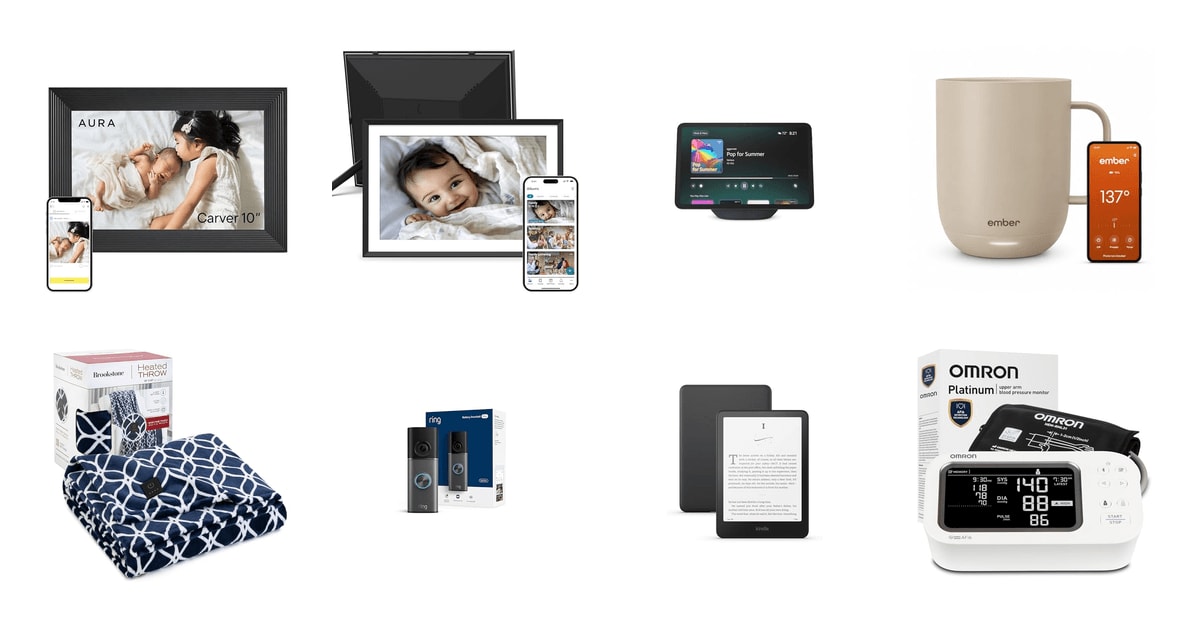
The best gift for a grandparent isn't the one that impresses at the table. It's the one that's still in daily use six months later. That usually means something they don't have to learn, charge nightly, or ask you to fix over the phone. A frame that lights up with new baby photos gets looked at every morning. A gadget that needs an app walkthrough tends to migrate to a closet shelf. When you're shopping from a distance, that gap between opened and used is the whole game.
Here's the honest catch: almost everything good in this category needs Wi-Fi and a phone number attached to an account. Photo frames, smart displays, doorbells, health monitors — they all want a network password and someone to walk through the first screen. None of them arrive setup-free unless you handle that part yourself before wrapping. And a few of them lean on subscriptions for their better features, which is a cost your recipient may not expect.
So plan on doing the setup yourself. Load the photos, sign in to the account, connect the Wi-Fi, then box it back up. Our favorite gift here is the Aura Carver, because it asks nothing of the person receiving it after that first plug-in, and the Kindle Paperwhite is the safe choice when you're less sure of their taste.
Everything we recommend

Plug it in once, and the family keeps feeding it forever
For the grandparent who asks for photos of the kids constantly
$149 from Amazon
Almost impossible to get wrong for anyone who reads
For the grandparent who reads two library books a week
$199.99 from Amazon
Cozy, safe, and needs no Wi-Fi at all
For the grandparent who's cold in every room of the house
$68.99 from Amazon
Video calls without a phone, an app, or any fumbling
For the far-away grandparent who wants to see faces, not hear voices
$189.99 from Amazon
Fixes the cold half-cup, if they drink slowly
For the coffee drinker who reheats the same cup three times a morning
$99.99 from Amazon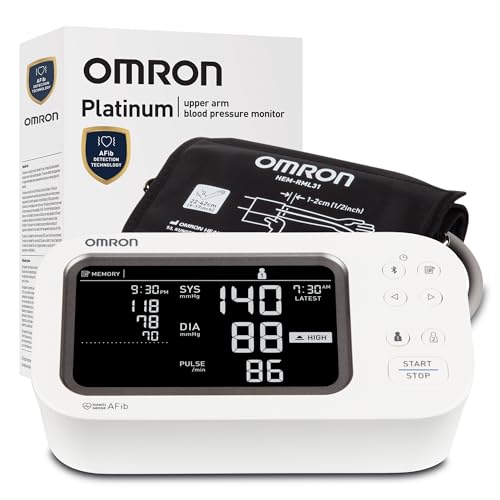
For the grandparent whose doctor asked them to track their numbers
$93.53 from Amazon
For the grandparent living alone who hesitates before opening the door
$249.99 from Amazon
For a second frame, or for the grandparent who likes short video clips
$79.99 from AmazonHow we picked
Setup burden. We favored gifts a giver can fully configure before wrapping, because Pew found only 26% of adults 65+ feel very confident using new apps. Anything requiring the recipient to complete a long onboarding got marked down.
Daily use, not novelty. We looked for products that owner feedback describes being used months later, not just admired on the day. Photo frames and blankets score well here; anything with a learning curve tends to stall.
Safety and peace of mind. For anything that heats, we required an auto shut-off, following reviewer guidance that it's essential for devices used by older adults. For health products, we required clinical validation rather than marketing claims.
No hidden ongoing costs. We checked whether core features sit behind a subscription, because a monthly fee landing on your recipient's card is a bad surprise. Frames with unlimited free storage ranked above ones that gate it.
Unwraps well. A gift has to land in the moment too. We preferred products that arrive in decent packaging, can be preloaded with something personal, and are understandable without a manual.
Our favorite gift
Plug it in once, and the family keeps feeding it forever
Aura HD Digital Picture Frame
For the grandparent who asks for photos of the kids constantly
The Aura Carver is a 10-inch Wi-Fi photo frame with unlimited storage and no subscription. You preload it with photos and a message before you ship it, so it's already showing grandkids the moment the box opens.
$149fromAmazonThis is the rare tech gift that demands nothing from the person opening it. You set up the account, load the pictures, and connect the Wi-Fi before it ever leaves your house. Aura sells it that way on purpose — it ships in gift packaging that's meant to be handed over already loaded. Your recipient plugs it in and sees the grandkids. That's the entire interaction required of them, now and forever.
The part that keeps it alive long after the holidays is the invite system. You can add siblings, cousins, and the grandkids' parents to the same frame, and each of them can push photos from their phone whenever they want. A soccer game on Saturday shows up in a living room three states away by Sunday. Nobody has to remember to mail anything. Owners describe adding photos as a quick tap, which is exactly the low bar you want.
Storage is unlimited and there's no subscription, which matters more than it sounds. Plenty of competing frames gate their better features behind a monthly fee that your recipient eventually gets asked to pay. This one doesn't. The frame auto-rotates between portrait and landscape, so vertical phone photos don't end up letterboxed with black bars on both sides.
Wirecutter's evaluation called the Carver's image processing sharper and more color-accurate than any competing digital frame they looked at, and Aura's own review data shows ease of use for the recipient as the top reason buyers choose it. Both of those point at the same thing. This isn't the frame with the longest spec list. It's the one that looks good on a mantel and stays out of its owner's way.
Flaws but not dealbreakers
It needs Wi-Fi, and it needs a network password typed in at setup. If your grandparent's router password is on a sticker behind a bookcase, sort that out before you ship it rather than over the phone on Christmas morning.
There's no battery, so it lives wherever there's an outlet. On a lot of mantels and hallway tables, that means a visible cord. And at 10 inches it's a real object, not a small one — measure the shelf you have in mind.
Safest bet
Almost impossible to get wrong for anyone who reads
Amazon Kindle Paperwhite 16GB
For the grandparent who reads two library books a week
The Kindle Paperwhite has a 7-inch glare-free screen, adjustable font sizes, and a battery that goes weeks between charges. For a reader with aging eyes, it solves the large-print problem that libraries and bookstores usually can't.
$199.99fromAmazonIf you know one thing about your recipient and it's that they read, this is a very hard gift to miss. Font size is adjustable up to sizes no printed book offers, which quietly fixes the large-print hunt at the library. The screen is e-ink, not a backlit tablet display, so it reads like paper under a lamp or out on a porch in full sun.
The battery is the underrated part. A single charge lasts up to 12 weeks, so this isn't a device that needs nightly plugging in. That matters for a recipient who isn't in the habit of charging things. It also weighs under half a pound, which is easier on arthritic hands than a hardcover held open for an hour.
The warm-light setting shifts the display from white toward amber, which is more comfortable for reading in a dim bedroom at night. RTINGS measured this generation's display uniformity at 94.3%, among the highest they've recorded for an e-reader — meaning the light across the page is even, with no bright patches or dim corners to fight through on a long chapter.
There's also nothing on it. No social feeds, no notifications, no apps stacking up. For a giver, that's a real advantage: you're handing over a device that can only do one thing, so there's very little to explain and almost nothing that can go confusingly wrong.
Flaws but not dealbreakers
Buying books on it means an Amazon account with a payment method attached, and that setup step is on you if you want it to work out of the box. Public library borrowing through Libby works well but takes a few taps to link the first time.
Some readers just want the paper. If your recipient is attached to the physical object — the shelf, the dust jacket, the feel of it — a screen is not a substitute, and no amount of font adjustment will change that.
Best budget gift
Cozy, safe, and needs no Wi-Fi at all
Brookstone Electric Heated Plush Throw Blanket
For the grandparent who's cold in every room of the house
The Brookstone plush heated throw is a 50-by-60-inch electric blanket with 10 heat settings and a 12-hour auto shut-off. It's machine washable and needs no app, account, or network — just an outlet.
$68.99fromAmazonNot everything good has to connect to anything. This is a plug-in blanket with a button controller, and that's the whole appeal. There's no account to make, no password to type, no app that'll push a confusing update in six months. Your recipient plugs it in, presses a button, and gets warm. For a grandparent who genuinely doesn't want more technology in the house, that simplicity is the feature.
The safety piece is worth flagging to whoever's worried about it. A 12-hour auto shut-off timer means it can't run indefinitely if someone falls asleep under it. Forbes Vetted's reviewers called auto shut-off non-negotiable for any electric blanket meant for older users, pointing to research that seniors are more likely to doze off with a heating device still on. If that's your specific worry, this handles it.
It's a throw, not a bed blanket — 50 by 60 inches, sized for a recliner or the end of a couch. Ten heat settings give real range between barely-warm and toasty. Owner feedback consistently calls it light on the lap, which matters for someone who wants warmth without weight pressing down on their legs.
It's also machine washable and dryer safe, which is the difference between a blanket that gets used daily and one that gets protected from use. And it unwraps well: soft, immediately understandable, no explanation required.
Flaws but not dealbreakers
Some owners find the heat milder than they expected, especially at the middle settings. If your recipient wants scorching, this may read as merely pleasant.
The controller sits at a corner of the blanket, and several owners mention bumping it on by accident — a knee, an elbow, a dog. Not a hazard given the auto shut-off, but mildly annoying.
The instructions say not to use it with an extension cord, so the outlet needs to be within reach of where they actually sit.
Best splurgeOn sale
Video calls without a phone, an app, or any fumbling
Amazon Echo Show 11
For the far-away grandparent who wants to see faces, not hear voices
The Echo Show 11 is an 11-inch smart display with an auto-framing camera and voice-driven calling. Your recipient says who to call, and the screen handles the rest — no phone unlocking, no app hunting, no hanging up by accident.
$189.99fromAmazonList priceAARP's research found that 72% of adults 65 and older wish they could video call family more easily, and the NRF's holiday survey put gifts that help me stay connected with family at the top of the same group's wish list. That's the problem this solves. Calling is a voice command, not a sequence of taps on a phone your recipient has to find, unlock, and navigate first.
The camera is what makes it work for older users specifically. It's a centered, auto-framing lens that keeps the person in shot as they shift around, with 3.3x zoom and noise reduction. PCMag singled out auto-framing on Echo Show devices as the thing that eliminates the awkward repositioning that turns video calls into a chore. Nobody has to hold still or hunt for their own face in a little window.
In the hours between calls it's not dead weight. The 11-inch screen runs a photo slideshow when idle, so it does some of what a digital frame does. It shows the weather, sets kitchen timers, plays music with better sound than most bedside speakers, and handles smart home controls if there are any in the house. The screen is large enough to read from across a room.
This is the most expensive thing on our list, so it's worth being clear about who it's for. It suits a household where video calls are the actual goal — grandkids in another time zone, a relative who can't travel easily. If the point is just photos, the Aura does that better for less.
Flaws but not dealbreakers
It's an always-listening microphone and a camera in someone's living space, and not every grandparent is comfortable with that. Ask before you buy. A privacy shutter and mute button exist, but the objection is often about the concept, not the controls.
Owner feedback on this generation is more mixed than the frame or the Kindle. A meaningful share of buyers report freezes that need a hard unplug to clear, and some longtime Echo owners think earlier models handled certain things better. That's a real risk for a recipient who won't troubleshoot.
Setup involves an Amazon account and Wi-Fi, and some features assume ongoing familiarity with what Alexa can do. Do the setup yourself, and be prepared to be the help desk.
Best stocking stuffer
Fixes the cold half-cup, if they drink slowly
Ember Temperature Control Smart Mug 2
For the coffee drinker who reheats the same cup three times a morning
The Ember Mug 2 holds coffee or tea between 120 and 145 degrees for up to 80 minutes on battery, or all day on its charging coaster. It's a small, specific fix for a small, specific daily annoyance.
$99.99fromAmazonSome grandparents pour a cup, get distracted by the mail or a phone call, and come back to something lukewarm. This mug is the answer to exactly that. Set a temperature and it holds it — up to 80 minutes off the coaster, indefinitely while resting on it. Owners who drink slowly tend to be the ones who describe it as hard to give up.
Buy it for the coaster habit, not the battery. The realistic use is leaving it parked on the charging coaster on a side table or desk, where it stays warm all day and tops itself up. Treated as a portable travel mug, it disappoints. Treated as a stationary warm spot for a cup, it does the job it's designed for.
It's small and it unwraps beautifully, which is why it works as a stocking-sized gift rather than a centerpiece. There's an app for setting exact temperatures, but you can set that yourself beforehand and your recipient never needs to open it. The mug remembers the setting.
One caution on the match: this suits someone who nurses a cup over an hour. Somebody who drinks their coffee hot and fast in ten minutes won't notice the difference, and the mug will feel like a solution to a problem they don't have.
Flaws but not dealbreakers
It won't reheat a cold drink well. It's built to hold a hot drink at temperature, not to warm one back up from room temperature, and owners who expected the latter come away disappointed.
It's hand-wash only and can't be submerged, which adds a small chore to a daily-use item. Metal spoons can scratch the interior over time.
Longer-term owner feedback is more mixed than the first weeks suggest, with some reporting reduced battery performance after months of use. It's an expensive mug to have degrade.
Who this is for
This guide is for adult children and grandchildren shopping for someone who probably says they don't need anything. It covers the range from a small stocking gift to a real splurge, and it leans toward things a giver can set up in advance — which is the difference between a gift that gets used and one that gets thanked for and shelved. It's especially aimed at families spread across states, where the gift is doing double duty as a way to stay in touch.
It's less useful if your recipient is genuinely hostile to anything that plugs in, though the heated throw and the Kindle both work for that person. We're also not covering the sentimental-craft category — engraved keepsakes, custom photo books, framed handprints — which are often the right answer from a young grandchild and cost almost nothing. Nothing here needs to be your only gift. A frame plus a hand-written note from the grandkids is a better package than either alone.
How we picked
We weighted a handful of things over feature lists. Setup burden: whoever's giving the gift should be able to finish the whole configuration before it's wrapped, since only about a quarter of adults 65+ say they're very confident with new apps. Daily use: we looked for owner feedback describing use months in, not excitement on day one. Safety: anything that heats needed an auto shut-off, and anything health-related needed clinical validation rather than marketing language. Ongoing costs: core features hidden behind a subscription counted against a product, because that bill lands on your recipient. Unwrapping: good packaging, the option to preload something personal, and no manual required.
Other gifts for grandparents worth considering
If you want a health gift that won't feel patronizing: The OMRON Platinum Blood Pressure Monitor & Upper ($93.53) — The Omron Platinum is an upper-arm cuff with AFib detection, memory for 100 readings each across two users, and Bluetooth sync to a free app that generates reports for a doctor's visit. Consumer Reports validated Omron's Platinum monitor to within ±2 mmHg of clinical readings, which is the accuracy bar that actually matters here. It works entirely without the app if your recipient prefers, and it comes with the cuff, an AC adapter, batteries, and a case. The framing is everything, though — this lands well for someone already tracking their blood pressure at a doctor's request, and lands badly as an unprompted gift to someone who hasn't mentioned it. If nobody's asked them to monitor anything, pick something else.
If you want peace of mind about who's at their door: The Ring Battery Doorbell 4K Pro ($249.99) — The Ring Battery Doorbell 4K Pro lets your recipient see and talk to whoever's outside without getting up or opening anything — useful for someone with mobility trouble, and reassuring for anyone uneasy about unexpected knocks. It's battery-powered with a quick-release pack, so there's no wiring to deal with, and the 4K sensor plus 10x zoom means faces are actually identifiable rather than a smear. Radar-based motion detection cuts down on alerts from passing cars. Two big caveats: recorded video history requires a Ring subscription, and someone has to physically mount it. If you're not going to be there to install it and manage the app, this isn't a gift, it's a project.
If you want a photo frame for less: The NIX WiFi Digital Picture Frame Powered by ($79.99) — The NIX frame powered by Nixplay covers the same core idea as our top pick — a 10.1-inch Wi-Fi display that family members can send photos to from an app or by plain email. That email option is genuinely handy for a relative who won't install anything. It handles short video clips too, does AI smart-centering so faces don't get cropped oddly, and auto-rotates between portrait and landscape. Nixplay also stores photos on encrypted US servers and holds a privacy certification, which will matter to some families. The trade-off is that some features sit behind a paid tier, and this particular listing has very little owner feedback to go on. Good as a second frame for a spare bedroom or a second set of grandparents; we'd still start with the Aura.
More good gifts
This is what our research surfaced in this category, not a survey of everything you could buy a grandparent. There are whole categories we didn't cover — engraved jewelry, custom photo books, seed subscriptions, a standing lunch date — that are often the better answer, especially from a grandchild with more time than money. Everything below suits a specific person; think about who's on your list rather than which item ranks highest.
Setting it up before you wrap it
Do the setup at your house, not theirs. For the Aura frame and the Echo Show, that means creating the account, connecting them to your own Wi-Fi to confirm they work, loading photos, then unplugging and reboxing. You'll still need your recipient's home Wi-Fi password to finish on their end, so ask a relative for it quietly ahead of time — that one detail derails more gift setups than anything else. Add a short written note listing the account email and password, taped inside the box, because it will get asked for eventually. For the heated throw, point out the auto shut-off and the corner controller so nobody's confused by it turning itself off. And offer to be the person they call, once, rather than assuming a manual will do it.
Questions we get
What do you get a grandparent who already has everything?
Give them something that generates new content rather than more objects. A digital frame like the Aura Carver isn't really a thing on a shelf — it's a stream of new grandkid photos that changes every week. The same logic applies to a smart display used for video calls. Both stay interesting because the family keeps feeding them.
What's good for a grandparent who doesn't like technology?
The heated throw is the clearest answer here: it plugs into a wall, has one button controller, and involves no account or network. The Kindle is also gentler than it sounds, since it does exactly one thing and you can set it up entirely before gifting. Avoid anything with a microphone or camera unless you know they'd welcome it.
Are digital photo frames actually a good gift?
Yes, and they're the one category where research and owner feedback point the same direction. They ask nothing of the recipient after the initial plug-in but keep delivering something new whenever a relative uploads. The one thing to get right is doing the account setup and photo loading yourself first — a frame that arrives empty and needs configuring is a much worse gift.
What helps a grandparent who lives alone feel safer?
A video doorbell is the most direct answer, since it lets them see and speak to whoever's outside without getting up or opening the door. The Ring Battery Doorbell 4K Pro handles that without wiring. Just budget your own time for mounting it and setting up the app, and know that saved video history needs a subscription.
What's best for a grandparent far away who wants to stay connected?
Pick based on which direction you want the connection to flow. A photo frame is one-way and effortless — you send, they see, nobody has to be free at the same time. A smart display with a good camera is two-way and better for actual conversation, especially with grandkids who won't sit still for a phone call.
Do grandparents prefer sentimental gifts or practical ones?
The strongest gifts here are both at once. A frame full of family photos is sentimental every day and practical in that it requires nothing. Survey data consistently shows adults 65 and older rank staying connected with family above experiences, consumables, or clothing — so lean toward gifts that carry a relationship inside them.
Why you should trust us
For this guide:
- We read published evaluations from Wirecutter, PCMag, Consumer Reports, RTINGS, and Forbes Vetted alongside manufacturer specifications for every product here.
- We reviewed survey research from AARP, Pew Research Center, and the National Retail Federation on what adults 65 and older actually want and how confident they feel with new technology.
- We read through owner feedback themes on each listing to identify the flaws and long-term frustrations that spec sheets leave out.
- We read owner reviews on every listing, weighted toward the critical ones, because that is where the recurring failures show up.
- We have a systematic way of automatically fetching the latest prices, so the numbers on this page stay current.
- This is a research-focused guide, so the team may not own every product listed — though we often do own the top winners, which gives us extra context for the recommendations.
- We don't accept free products, and the retailer commission never changes which product we recommend.
Sources
Best Digital Photo Frames 2026 — Wirecutter, Wirecutter
Best Gifts for Grandparents 2026 — Good Housekeeping, Good Housekeeping
Best Smart Home Devices for Seniors — AARP, AARP
Best Blood Pressure Monitors 2026 — Consumer Reports, Consumer Reports
Tech and Seniors 2024: Adoption and Attitudes — Pew Research Center, Pew Research Center
Best Amazon Echo Show Devices Ranked — PCMag, PCMag
Best Gifts for Older Adults 2026 — The Spruce, The Spruce
Best Heated Throws and Electric Blankets — Forbes, Forbes
Kindle Paperwhite (2024) Full Review — RTINGS.com, RTINGS.com
Best Video Doorbells 2026 — Tom's Guide, Tom's Guide
2025 Holiday Spending Survey — National Retail Federation, National Retail Federation
Aura Frames Carver Review — Reviewed by USA Today, Reviewed by USA Today
Amazon product listings and owner reviews for all 8 products
Manufacturer specification pages for each product
Some passages in this guide may be paraphrased with AI help. Prices are refreshed automatically.
More like this.
Continue exploring home reviews and recommendations.

The Best Artificial Christmas Trees
An artificial tree is something you own for a decade and use for six weeks a year. So the things that matter aren't the ones printed on the box. You care…

The Best Small-Kitchen Organizers
A small kitchen doesn't hold less stuff. It holds the same stockpots, the same sheet pans, the same drawer full of spatulas - packed into a fraction of…

The Best Electric Blankets and Heated Throws
A heated blanket is one of the few things in a cold house that fixes the problem right where you are. You don't have to warm the whole bedroom to sleep…

The Best Outdoor Faucet Covers
An outdoor faucet cover is one of the smallest purchases you'll ever make that can save you thousands. When a spigot freezes, the ice expands inside the…

The Best Filtered Shower Heads
Your shower water carries whatever your city put in it to keep the pipes safe. That's usually chlorine or chloramine, plus whatever the pipes themselves…

The Best Radiator Covers and Heat Deflectors
A cast iron radiator is a strange piece of furniture. It's hot, it's heavy, it sits under the window in the best spot in the room, and it looks like it…