The Best Label Makers for Home Organization
A label maker earns its keep in the boring places. The bin of winter hats. The spice jars that all look alike. The tangle of black cords behind the TV. Once things have names, you stop opening three containers to find the rice. What you really want is a machine you'll keep using: quick to wake up, easy to type on or design in, and cheap enough to feed that you don't ration labels. And the label has to stay stuck and stay readable.
No label maker is free of annoyances. The machine is the small purchase; the tape is the long one. App-based models tuck some of their prettiest templates behind a subscription, and owners of the Phomemo app run into that fast. Keyboard models hold you to the fonts built into the box. Thermal labels — the inkless kind nearly every small model prints — can fade in a sunny window or a hot garage. Plan on redoing a few over time. That's the category, not a defect in one product.
So the right pick depends on how you like to work. If you enjoy fussing with fonts on your phone, an app model pays off. If you'd rather type a word and hit print, a keyboard machine is less to think about. And if you're labeling a hundred moving boxes, you want something driven from a computer. We think that the Brother P-touch CUBE Plus is the best label maker for most people, and that the NIIMBOT D110 is the one to buy if you mostly want tidy pantry and bin labels without spending much.
Everything we recommend

The most design freedom, on tape that survives a steamy kitchen

Pocket-size, and inexpensive to keep stocked with tape
For labeling an entire move or storage overhaul in one sitting

Type on real keys and skip the phone entirely
Prices as of Oct 23, 7:21 AM PT · Details
At a glance
| Product | Control | Labels or tape | Price | |
|---|---|---|---|---|
| NIIMBOT D110 Upgrade Mini Label MakerBudget pick | Bluetooth | — | $14.39On sale |
 | Phomemo M110 Label MakersAlso consider | Bluetooth | Thermal, up to 2 in | $36.99 |
| Brother P-touch CUBE Plus Bluetooth Label MakerTop pick | Bluetooth | TZe tape to 24 mm | $114.99 |
| DYMO Label Maker LabelManager 160 Portable LabelAlso great | QWERTY keyboard | DYMO tape to 12 mm | $43.92 |
 | NIIMBOT B21 Label MakerAlso consider | Bluetooth | Thermal, 0.8–2 in | Check price |
| DYMO Label Printer LabelWriter 450 Direct ThermalUpgrade pick | — | LabelWriter labels | $199.95 |
 | Brother P-Touch PT-D210 Label Maker - ThermalAlso in lineup | — | Thermal transfer | $65.99 |
 | Epson C51CB69010 LabelWorks LW-300 Label MakerAlso in lineup | — | — | $199.99 |
Prices as of Oct 23, 7:21 AM PT · Details
How we picked
Print legibility. We looked for at least 200 DPI on the app-connected models, since that's the threshold where small text stays crisp on a spice jar or a file tab. For keyboard models we read published reviews on how clean the type looks at the smallest sizes.
Cost per label. We compared tape ecosystems using manufacturer specs and reporting on third-party refill pricing. Machines that take widely available or generic-compatible rolls scored better, because the tape costs more over a few years than the printer does.
Durability of the label. We favored laminated tape for kitchens, bathrooms and garages after published testing found it resists fading and peeling better than plain thermal stock. Plain thermal is fine in a pantry or an office.
How you drive it. We kept both kinds in the running: app models for design flexibility and matching label sets, keyboard models for anyone who doesn't want a phone in the loop. Published reviews back both preferences.
Everyday usability. We weighted setup friction, charging method and size, since a label maker that's awkward to start up gets used once. Owner feedback themes around app quirks and paywalled templates counted here too.
Top pick
The most design freedom, on tape that survives a steamy kitchen
Brother P-touch CUBE Plus Bluetooth Label Maker
The P-touch CUBE Plus prints from your phone or computer on laminated Brother TZe tape up to 24 mm wide. You get the deepest font, frame and template library here, plus labels tough enough for a bathroom shelf or a garage tote.
$114.99fromAmazonPrices as of Oct 23, 7:21 AM PT · Details
No other label maker here gives you this much say over how a label looks. Brother offers three apps — Design&Print, iPrint&Label and the desktop P-touch Editor — and Wirecutter's testers pointed to the CUBE Plus for its 400-plus built-in fonts and icons. That matters more than it sounds. If you want every pantry label in one typeface, centered, with a little jar icon, you can set it once and print twenty.
It also prints wide. Tape runs up to 24 mm, about an inch, which is the difference between a label you can read across the garage and one you have to walk up to. Narrow tape is fine for a cord or a file tab. For a storage tote on a high shelf, you want the width, and most pocket-size models can't go there.
Brother's TZe tape is laminated, and that's the quiet reason this pick lasts. CNET's review found TZe resisted fading and peeling in kitchen and bathroom humidity better than plain thermal labels. If you're labeling a spice rack next to the stove or a bin under a bathroom sink, that lamination is doing real work.
It's the machine you won't outgrow. The battery is rechargeable rather than a drawer of AAs, and TechRadar's review put it at roughly two weeks of moderate daily use per charge. You can drive it from a laptop when you have a big batch to run, then throw it in a bag for the closet project on Saturday. Most people buy one label maker. This is a good one to buy.
Flaws but not dealbreakers
It's the bulkiest of the portable picks, closer to a small cube than a phone, so it doesn't disappear into a junk drawer. There's no keyboard and no screen either — without a paired phone or computer, you can't print anything. If a teenager or a grandparent needs to grab it and label a lunch container, that dependency is a real hassle.
TZe cartridges cost more per roll than the generic thermal rolls the NIIMBOT and Phomemo machines take; USA Today Reviewed found third-party tape for those models runs about half the price of brand-name TZe or D1. You're paying for the lamination and the durability. Worth it in a kitchen, less so if you're relabeling craft bins every few months.
Budget pickOn sale
Pocket-size, and inexpensive to keep stocked with tape
NIIMBOT D110 Upgrade Mini Label Maker
The NIIMBOT D110 is a palm-size Bluetooth printer that runs off your phone and needs no ink or ribbon. It prints at 203 DPI on clear, colored or round thermal labels, and it costs a fraction of what the Brother does.
$14.39fromAmazonTypical pricePrices as of Oct 23, 7:21 AM PT · Details
It's genuinely small — under four inches tall and about a third of a pound — so it lives in a drawer and comes out when you think of it. That's most of why people finish projects with this one. You reach for the spice jars on a Tuesday night because the machine is right there, not because you scheduled an organizing afternoon.
The print is sharper than the size suggests. At 203 DPI, small type stays legible on a narrow label, which is what you need on a spice jar or a file tab. Real Simple noted the D110 prints over Bluetooth from an app carrying more than a hundred ready-made templates for home organization. Pick one, type the word, print. You're not designing anything from scratch.
It takes clear tape, and that's the look most people are after right now. The Spruce's organizing writers describe transparent labels as the most requested style for a cohesive, minimalist pantry. Black text floating on a glass jar reads as intentional in a way a white sticker doesn't. The D110 also takes colored and round labels for kids' bins and cord tags.
Running costs stay low. There's no ink or toner — it's direct thermal — and NIIMBOT tape has a healthy third-party market, which USA Today Reviewed pegs at roughly half the per-roll price of brand-name Brother or DYMO tape. Charging is over USB-C, full in about two hours. Plenty for one closet, one pantry and a stack of cords in an evening.
Flaws but not dealbreakers
Thermal labels without lamination are the trade-off. They're fine in a pantry or a home office, but heat, sunlight and steam will fade them faster than the Brother's laminated TZe tape. Don't put these on a bin that lives in a hot garage or on a jar right beside the stove.
You need your phone. Every label goes through the NIIMBOT app, so there's a small learning curve for anyone who doesn't want another app on their home screen. And labels here are narrow — this isn't the tool for a big, readable banner across a storage tote.
Upgrade pick
For labeling an entire move or storage overhaul in one sitting
DYMO Label Printer LabelWriter 450 Direct Thermal
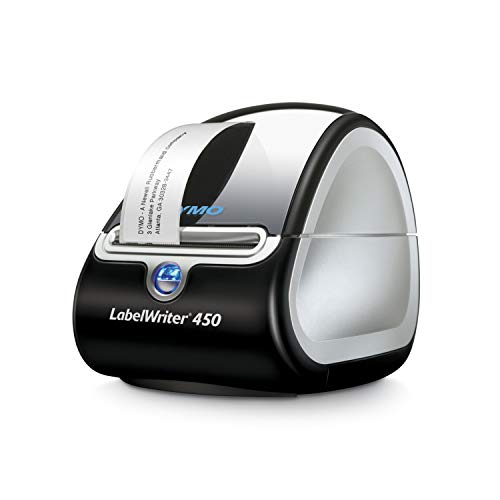
The DYMO LabelWriter 450 is a desktop thermal printer that runs off your PC or Mac and prints up to 51 labels a minute. If you're boxing up a house or setting up a filing system, it turns an afternoon of labeling into twenty minutes.
$199.95fromAmazonPrices as of Oct 23, 7:21 AM PT · Details
This is a volume machine, and volume is a different problem. Handheld models print one label, cut it, and wait for you to type the next. The LabelWriter 450 pulls names straight out of Microsoft Word, Excel, Outlook and Google Contacts and prints up to 51 labels per minute, per DYMO's specs. Fifty file folders or a hundred moving boxes stop being a chore and start being a print job.
It also kills sheet labels, which is a bigger relief than it sounds. No more printing a page of thirty to use four, then hunting for the half-used sheet next quarter. You print exactly the number you need. Like the small thermal models, it uses no ink or toner at all, so there's nothing to replace but labels.
Because it sits on a desk and prints wider address- and file-size labels, it's the right answer for a home office, a mail station or a storage overhaul. Better Homes & Gardens' organizers recommend durable, weather-resistant labels for garage and basement bins — pair those with a run of computer-generated names and a whole basement gets sorted in an afternoon.
Flaws but not dealbreakers
It's tethered and it's not portable. This thing needs a computer and a spot on a desk, so it's useless for walking around the house sticking labels on jars. Think of it as a second label maker for big projects, not a replacement for a handheld.
Label choice is narrower and more DYMO-specific than the tape ecosystems on the other picks — the label formats lean toward shipping, mailing and filing rather than the small clear jar labels people want for a pantry. And DYMO notes it isn't compatible with DYMO stamps, which trips up some buyers.
Also great
Type on real keys and skip the phone entirely
DYMO Label Maker LabelManager 160 Portable Label
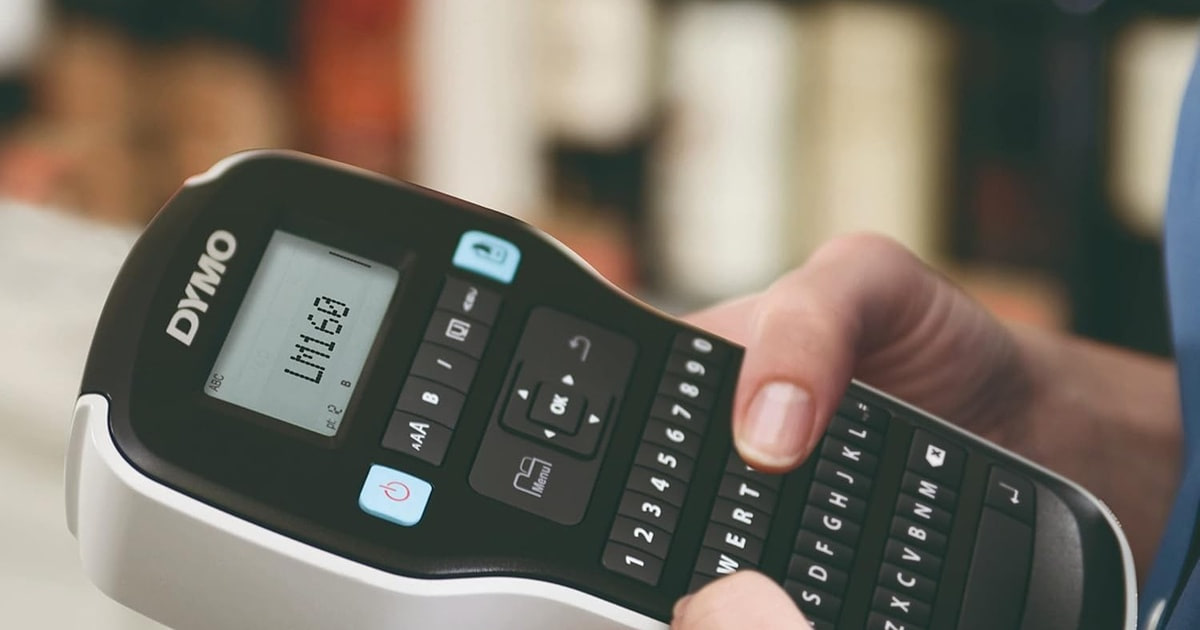
The DYMO LabelManager 160 has a QWERTY keyboard, a small display and no app at all. Anyone in the house can pick it up, type a word and print a durable D1 tape label in about fifteen seconds.
$43.92fromAmazonPrices as of Oct 23, 7:21 AM PT · Details
Some people don't want a label maker that requires a phone, a login and a Bluetooth pairing. If that's you, this is the one. Tom's Guide found the LabelManager 160's built-in keyboard and small LCD made it the fastest standalone option to operate, with no app or pairing at any point. Hand it to a kid or a houseguest and they'll figure it out.
The keyboard is the whole argument, and it's a good one. You type on a familiar QWERTY layout, format with one-touch keys, and pick from more than 200 symbols and clip art plus 20-plus ways to style the text, according to DYMO. Good Housekeeping's testers did rate app-connected models higher for making matching, aesthetic label sets — so if a coordinated pantry is the goal, weigh that.
D1 tape is easy to live with. It comes in a dozen-plus colors at 6, 9 and 12 mm widths and turns up in any office-supply aisle, so you're not waiting on a delivery mid-project. The machine is light, runs on batteries with an automatic shut-off, and doesn't care whether your phone is charged.
Flaws but not dealbreakers
The screen is small and monochrome, so you're previewing a line of text, not a design. There's no way to drop in an icon you found online or build a template you'll reuse across thirty jars. That's the cost of skipping the app.
Tape tops out at 12 mm, which is narrow for a big storage tote label, and D1 cartridges run pricier per roll than the generic thermal rolls the NIIMBOT and Phomemo models take. Battery-powered means occasionally buying batteries too.
Who this is for
Buy one if you've got a pantry of unmarked jars, a garage of identical bins, or a kid whose water bottle keeps coming home as somebody else's. It's also worth it for a home filing system, a craft room, or a move. Renters get a lot out of these too — a printed label on a bin or a shelf edge does the organizing without anything permanent going on the wall. If you label a handful of things a year, a marker and masking tape still work fine.
This guide covers label makers for home organization: small handhelds, phone-driven thermal printers and one desktop unit for high-volume jobs. We're not covering industrial or shipping-scale printers, thermal receipt printers, or printable sticker sheets for an inkjet. And we didn't chase every model on the market — this is the group the research pointed at, not a census.
How we picked
Legibility: we wanted 200 DPI or better on the app models, the point where small type on a spice jar still reads. Cost per label: the tape outlasts the machine in your budget, so we compared refill ecosystems and how much cheaper third-party rolls run. Durability: laminated tape for humid kitchens, bathrooms and hot garages; plain thermal is fine for a pantry shelf. Control: app models win on matching, icon-heavy label sets, keyboard models win on grab-and-go simplicity, and we picked a good one of each. Everyday use: charging method, size, and how much fuss it takes to get from idea to printed label.
Other label makers for home organization worth considering
If you want wider labels and a bigger clip-art library: The Phomemo M110 Label Makers — The Phomemo M110 prints up to two inches wide, which is roomier than the D110 and better for bin fronts and shelf edges. Its Print Master app carries a deep template library, supports Excel batch printing and even does OCR on text in photos. Bluetooth pairs in a couple of seconds at up to 33 feet. The catch is the app: owners consistently report that only a slice of those templates is free, with the rest sitting behind a subscription. If you're happy building your own layouts, that stings less.
If you want to label a lot of bins in one sitting: The NIIMBOT B21 Label Maker — The NIIMBOT B21 is the step up from the D110 — labels from 0.8 to 2 inches wide, a bigger battery good for about four hours of continuous work after 90 minutes of charging, and an app with 20-plus fonts and more than a thousand icons plus batch printing, serial numbers and QR codes. It's the one to get for a closet-and-pantry overhaul weekend. It's noticeably chunkier than the D110, though, and NIIMBOT says it isn't compatible with iPads, which surprises some buyers.
The competition
This is what our research surfaced, not everything sold. A few models came close enough to mention, and one of them may still be right for you.
The Brother P-Touch PT-D210 Label Maker - Thermal — The Brother P-touch PT-D210 is the classic beginner handheld: a built-in keyboard, a small screen, thermal transfer printing and no app to install. It's a reasonable, simpler alternative to our DYMO keyboard pick, and it takes the same TZe tape as our top pick, which is a real advantage if you already have cartridges. It lost mainly because the LabelManager 160 has the better-documented case for speed and ease of use as a standalone, and because this listing gives you very little to go on. Buy it if you want a no-app Brother that shares tape with a CUBE Plus.
The Epson C51CB69010 LabelWorks LW-300 Label Maker — The Epson LabelWorks LW-300 is a capable standalone with 14 fonts, 10 styles, over 300 symbols and more than 75 frames — more built-in variety than most keyboard machines — plus storage for 30 saved files and a split-back label that peels fast. Epson also claims smaller margins and up to 60% less tape waste than other brands. It's a fine choice for cord, kitchen and file labeling. It didn't make the picks because Epson's LC tape is harder to find on a shelf than DYMO D1 or Brother TZe, and the design library still can't match what a phone app puts in front of you.
Tape, adhesive and label care
Wipe the surface with rubbing alcohol and let it dry before you stick anything down. Adhesive fails on dusty plastic bins and greasy jars far more often than it fails on its own. For kitchens, bathrooms and anywhere humid, use laminated tape — published testing found it holds up to steam and moisture better than plain thermal stock — and organizing experts recommend waterproof, laminated labels for garages and basements, where temperature swings do the damage. Keep spare thermal rolls out of hot cars and sunny windowsills, since the paper darkens with heat and light even before you print on it. If you're renting or expect to relabel, put the label on a strip of clear tape first, or on the bin rather than the shelf. Peeling it off later takes a fingernail and a little patience.
Questions we get
Do I need an app-connected label maker, or is a keyboard model enough?
It depends on how much you care about the look. Good Housekeeping's testers rated app-connected models higher for creating aesthetic, matching label sets, because you get real fonts, icons and reusable templates. A keyboard model like the LabelManager 160 is faster for one-off labels and works when your phone is dead. If you're doing a whole pantry in one style, go with the app.
What's the difference between thermal and ribbon-based label makers?
Thermal printers, including the NIIMBOT and Phomemo models and the DYMO LabelWriter 450, burn the image into heat-sensitive label stock, so there's no ink or toner to buy — PCMag notes that lowers the long-term cost per label. Ribbon-based and laminated-tape machines use a transfer film, which costs more per roll but produces a tougher label. Thermal is cheaper to run; laminated lasts longer in heat and humidity.
Are NIIMBOT label makers actually good, or just a social-media trend?
Both, honestly. Apartment Therapy traced a surge in pantry-organization label maker content on TikTok and Pinterest driven largely by budget thermal models like these. But the D110 prints at 203 DPI, takes clear and colored tape, and costs little to keep stocked, so the hype landed on a genuinely useful machine. Just don't expect the label durability of laminated tape.
What tape should I use for a kitchen, bathroom or garage?
Laminated. CNET's review found Brother's TZe laminated tape resisted fading and peeling in kitchen and bathroom humidity better than standard thermal labels, and Better Homes & Gardens' organizers specifically recommend waterproof, laminated tape for garage, basement and outdoor bins. Plain thermal labels are fine on a pantry shelf or a file folder, where they're not getting steamed or baked.
Can I use third-party tape instead of the brand-name refills?
Often yes, and it makes a difference. USA Today Reviewed found third-party compatible rolls for NIIMBOT and Phomemo models run roughly half the per-roll price of brand-name Brother TZe or DYMO D1 tape. Brother and DYMO both recommend authentic cartridges for best results, and some machines are pickier than others about generics. If reliability matters more than savings, stick with the brand tape.
What's the best label maker for tiny text on spice jars?
Print resolution is what matters here, and 200 DPI or better is the line to look for — below that, small type gets mushy. The NIIMBOT D110 hits 203 DPI and takes clear tape, which is the most requested style for a coordinated pantry, according to The Spruce's organizing writers. The Brother CUBE Plus gives you finer control over font and spacing if you want every jar to match exactly.
Why you should trust us
For this guide:
- We read published reviews and testing writeups from Wirecutter, Good Housekeeping, CNET, Tom's Guide, TechRadar, PCMag, Real Simple, The Spruce, Better Homes & Gardens, Apartment Therapy and USA Today Reviewed on label makers for home use.
- We compared manufacturer specifications and Amazon listing details for every model here, including print resolution, tape widths, battery claims and refill compatibility.
- We reviewed owner feedback themes — app paywalls, tape availability, label durability — to shape the flaws and caveats in each write-up.
- We read owner reviews on every listing, weighted toward the critical ones, because that is where the recurring failures show up.
- We have a systematic way of automatically fetching the latest prices, so the numbers on this page stay current.
- This is a research-focused guide, so the team may not own every product listed — though we often do own the top winners, which gives us extra context for the recommendations.
- We don't accept free products, and the retailer commission never changes which product we recommend.
Sources
The Best Label Makers for 2026 - Wirecutter, Wirecutter
We Tested the Best Label Makers for Home Organization, Good Housekeeping
Best Label Makers of 2026, Tested by Editors, CNET
The Best Label Makers for Organizing Your Home and Office, PCMag
8 Best Label Makers for a More Organized Home, The Spruce
The Viral NIIMBOT Label Maker Everyone's Using for Pantry Organization, Real Simple
Best Label Makers, According to Organizing Experts, Better Homes & Gardens
Brother P-touch CUBE Plus Review, TechRadar
DYMO LabelManager 160 Review: Simple and Reliable, Tom's Guide
Best Label Makers Tested in Our Home Organization Lab, Good Housekeeping Institute
Why Everyone on TikTok Is Obsessed with Label Makers, Apartment Therapy
Brother P-touch Official Product Specifications, Brother USA
Amazon product listings and owner reviews for all 8 products
Manufacturer specification pages for each product
Some passages in this guide may be paraphrased with AI help.
Product prices and availability are accurate as of the date/time indicated and are subject to change. Any price and availability information displayed on Amazon.com at the time of purchase will apply to the purchase of this product.
More like this.
Continue exploring home reviews and recommendations.

The Best Bluetooth Label Makers
A label maker earns its keep in the boring moments. You're staring at four identical white bins in the garage, or a drawer of charging cables that all…

The Best Closet Organization Systems
You open your closet more times a day than you open the oven. Most closets ship with one rod and one shelf, which wastes the three feet of air above the…

The Best Pantry Organization Bin Sets
A pantry bin set does two jobs at once. It keeps flour and cereal from going stale, and it lets you see what you already own so you stop buying a fourth…

The Best Car Organization Gadgets
Cars accumulate junk. Receipts slide under the seat, a phone drops into the console gap, and grocery bags tip over the second you take a left turn. The…

The Best Baby Food Makers
Making your own baby food sounds ambitious until you do it once. You steam a sweet potato, blend it smooth, spoon it into a tray, and freeze it. That's…

The Best Sushi Making Kits
Homemade sushi is mostly a rice problem. Get the rice sticky and cooled to room temperature, and the rolling part is easier than it looks. A kit's job is…