The Best Bluetooth Label Makers
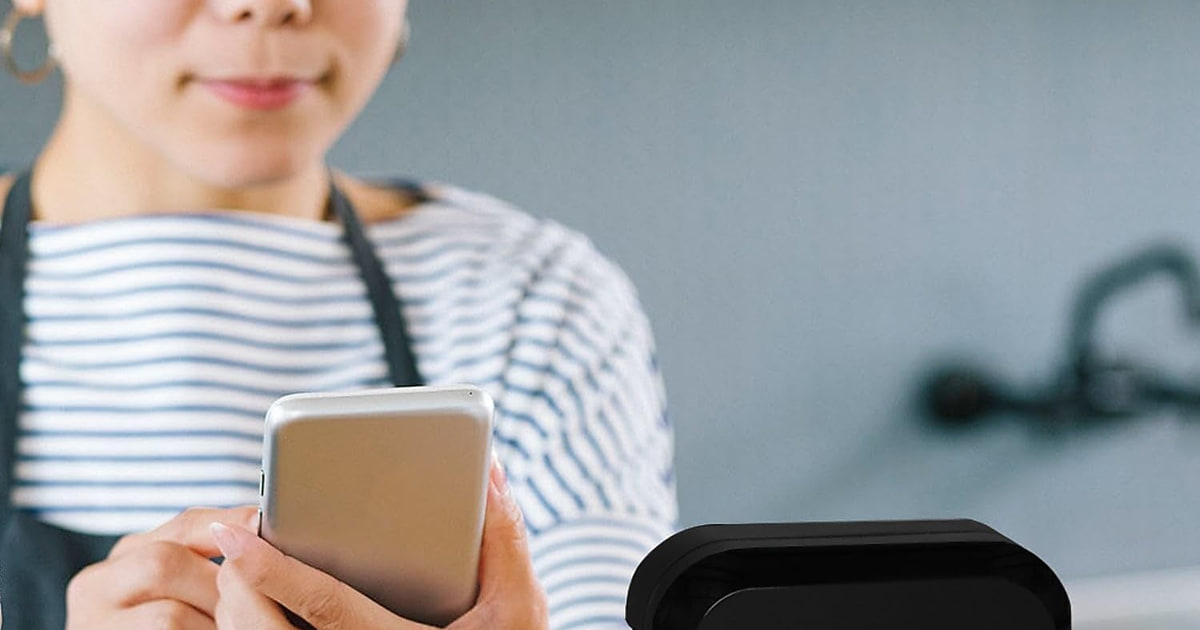
Most of us buy a label maker for one project — the pantry, the craft bin, the cable spaghetti behind the TV — and then keep using it for years. That's why the boring parts matter more than the flashy ones. Can you get replacement tape without waiting on a shipment? Does the app pair on the first try, every time? Will the label still be readable after a few months on a sunny shelf? Bluetooth models move the design work to your phone, which is where the good templates and the QR code tools live.
None of these are standalone machines. Every one needs a paired phone or tablet, so if your battery's dead or an app update goes sideways, you're not printing. Companion apps are the weak link across the whole category, and even the polished ones get cranky after a phone OS update. Each model also has an ongoing supply cost, whether that's tape cartridges or thermal rolls. If you want a keyboard you can type on with no phone involved, buy a wired label maker instead.
So the right pick comes down to volume and durability. Label a few dozen jars and you mostly want easy tape sourcing and an app that behaves. Print hundreds of labels a month and supply cost starts to dominate everything else. Label a breaker panel and you need materials that survive heat, solvents and sunlight. We think that the Brother P-touch CUBE Plus PT-P710BT is the best Bluetooth label maker for most people, and that the NIIMBOT B21 Pro is the one to buy if you print in high volume and don't want to keep buying cartridges.
Everything we recommend

The easiest tape to restock, and the app you'll actually use

Sharper printing and no cartridges, as long as it stays indoors
The simplest way in, if you label things only now and then

Twice the resolution and wider tape, for labels others will read
At a glance
| Product | Max Tape Width | Resolution | Price | |
|---|---|---|---|---|
| Brother P-touch CUBE Plus Bluetooth Label MakerTop pick | 1 in (24mm) | — | $114.99 |
| NIIMBOT B21 Pro Label MakerRunner-up | 2 in (50mm) | 300 DPI | $69.99 |
| Brother P-Touch Cube XP Monochrome Label MakerUpgrade pick | 1-1/2 in (36mm) | 360 DPI | $349.99 |
 | LABELWORKS Epson LW-C410PX Portable Bluetooth Label MachineAlso consider | 3/4 in (18mm) | — | $53 |
 | Brady M211 Portable Bluetooth Monochrome Label PrinterAlso consider | — | — | $165.35On sale |
 | Phomemo M110 Label Makers - Barcode LabelAlso in lineup | 20-50mm | — | $36.99On sale |
| DYMO LetraTag 200B Bluetooth Compact Label MakerBudget pick | — | — | $46.31 |
How we picked
Tape you can restock. We checked which label systems sit on shelves at national retailers and which ones you can only order online. A printer you can't feed on short notice is a paperweight.
Print resolution. We compared spec sheets and treated 180 dpi as the floor, since that's the consumer standard. We gave real credit to the 300 and 360 dpi models, because sharpness only shows up on small text, barcodes and logos.
App reliability. Published reviews and owner feedback complain about apps far more often than hardware, so we weighted pairing behavior, platform support and template depth heavily. iPad and desktop support counted.
Label durability. We separated laminated tape from thermal paper, because only laminated tape survives sunlight, heat and moisture. For freezer, outdoor or electrical work, thermal was disqualifying.
Power and portability. We noted whether each model uses a built-in rechargeable battery or disposable AAs, and how much it weighs if you carry it between rooms or onto a job site.
Top pick
The easiest tape to restock, and the app you'll actually use
Brother P-touch CUBE Plus Bluetooth Label Maker
The P-touch CUBE Plus prints on laminated TZe tape from 3.5mm up to 24mm wide, and you can buy that tape at almost any office or big-box store. Three Brother apps give you more than 600 templates, QR codes and a preview that matches what comes out.
$114.99fromAmazonTape is the thing you'll buy again and again, and Brother's is everywhere. TZe cartridges sit on shelves at Staples, Best Buy, Target and Walmart, so you're not stuck waiting on a delivery in the middle of a project. Widths run 3.5, 6, 9, 12, 18 and 24mm, in matte, premium glitter and extra-strength versions. Label a spice jar this week and a storage bin next week, and you won't outgrow it.
The software is why this one stays on the counter instead of in a drawer. Brother gives you three options: P-touch Design&Print and iPrint&Label on your phone, plus P-touch Editor on a computer. Between them you get a template library past 600 designs, custom QR code generation and a drag-and-drop editor with a real print preview. Published reviews and owner feedback both point to quick pairing on iPhone and Android that stays connected.
Laminated tape means the label survives the room it lives in. At the usual 180 dpi, text on 12mm tape and wider comes out clean and easy to read across a kitchen. The laminate shrugs off water, scrubbing, cooking grease and sunlight, so a freezer bin or a bathroom shelf label still reads months later. Small type on 6mm tape looks a bit rough, but that's true of nearly every unit at this level.
It arrives ready to print, and it charges instead of eating batteries. In the box you get a black-on-white starter roll and a black-on-glitter-gold roll, both 24mm, plus a built-in lithium-ion battery and a USB cable. So there's no supply run before your first label. It's about the size of a coffee mug and weighs under a pound and a half, which makes it easy to carry from the pantry to the garage.
Flaws but not dealbreakers
Stock is the real catch. This model drops in and out of availability online, and you'll sometimes find it listed as unavailable altogether. Check Staples, Best Buy or Brother directly before you commit to it. If you need something in hand quickly, the DYMO LetraTag 200B and the NIIMBOT B21 Pro are far easier to find.
Cartridges add up if you print constantly. Every label comes off a TZe roll, and those cost more per label than plain thermal stock. For a few labels a week, that's noise. For a small business printing hundreds of price tags a month, a thermal model will cost you noticeably less to feed.
24mm is the ceiling. That covers pantry bins, file folders and most shelf labels, but it won't produce signage-scale output. If you need labels wide enough to read across a stockroom, you have to step up to the PT-P910BT and its 36mm tape.
Runner-up
Sharper printing and no cartridges, as long as it stays indoors
NIIMBOT B21 Pro Label Maker
The B21 Pro prints at 300 dpi, which is sharp enough for tiny type, small logos and even photos on a sticker. It runs on a built-in battery, needs no ink or ribbon, and can lay down red and black at the same time on the right paper.
$69.99fromAmazon300 dpi is the headline, and it's a real one. Most consumer label makers print at 180 to 203 dpi. The B21 Pro's print head is sharper than that, and the difference shows up exactly where it matters: sub-8pt text, barcodes that have to scan on the first pass, and small logos on product stickers. If you sell things and your labels represent you, that clarity is worth more than another template pack.
No ink, no ribbon, no cartridge. Thermal printing puts heat straight onto heat-sensitive stock, so the only thing you ever buy is the label roll itself. That keeps your running cost low when you print in bulk, and it's why small shops, resellers and anyone tagging inventory keep landing on this style of printer. Rolls run from 0.8 to 2 inches wide, with the largest labels at 50mm by 170mm.
The battery lasts long enough that you'll forget it has one. A built-in 1500mAh cell charges in about four hours and, per the spec sheet, covers roughly two weeks of typical use. No hunting for AAs halfway through a project. It weighs about 1.3 pounds and connects to a phone over Bluetooth or to a computer over USB if you'd rather edit on a bigger screen.
Red and black at once is a genuine trick at this level. With NIIMBOT's dual-color thermal paper, you can print a warning line in red next to black body text, or color-code an entire shelving system without swapping anything. The app backs it up with 30-plus fonts, 100-plus borders, over 1,500 symbols, automatic sticker-size detection and batch printing from a list.
Flaws but not dealbreakers
Thermal labels fade, and there's no way around it. Direct sun, heat above roughly 140F and sustained moisture will wash them out. That rules out outdoor bins, a car dashboard, a garage in July and anything that gets steamed or soaked regularly. For freezer, outdoor or panel labeling, buy a laminated-tape model instead.
It won't work with an iPad. The listing is explicit: iPhone and Android only. If your household does its planning on a tablet, that's an annoying wall to hit after unboxing. The Brother and DYMO picks don't have that restriction.
The fun features need the pricier paper. Photo printing and dual-color printing both require NIIMBOT's special stock, which costs more per roll than plain thermal labels and generally has to be ordered online rather than picked up locally.
Budget pick
The simplest way in, if you label things only now and then
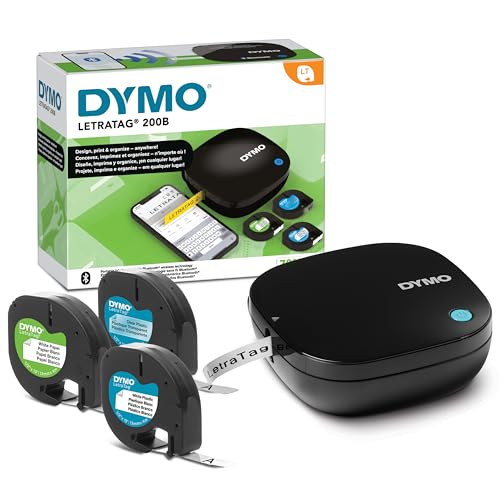
DYMO LetraTag 200B Bluetooth Compact Label Maker
The LetraTag 200B pairs itself the second you open the DYMO app, weighs about as much as a paperback, and the value pack ships with three assorted tape rolls. You can be labeling within five minutes of opening the box, with nothing else to buy.
$46.31fromAmazonPairing is the whole pitch, and it works. There's no device list to scroll, no PIN to type. Open the DYMO app, and the printer connects. For anyone who has fought a Bluetooth speaker for ten minutes, that matters more than a template count. It's the model to hand a family member who wants to label the shelf and never think about firmware again.
It's light enough to keep in a drawer and forget about. DYMO cut about 42% of the weight compared with the older LetraTag 100T and 100H, and the result is barely over half a pound. You can carry it around the house one-handed while you work through a closet. The footprint is small enough to leave on a desk without it taking over.
The value pack means you're not shopping on day one. Three assorted tape rolls come in the box, and LetraTag cassettes are stocked at Target, Walmart and Staples when you run out. DYMO's authentic cassettes use 100% recycled material and come in a range of colors and types, so restocking is about as easy as it gets outside of Brother's TZe system.
The app does enough for everyday labels. You get five font sizes, 15 box styles, more than 100 icons, underlining, multiple text lines and a date insert, plus eight saved templates to start from. That's not a design suite. But for a folder tab, a leftovers container or a kid's lunchbox, it gets you a clean label in about thirty seconds.
Flaws but not dealbreakers
12mm is the narrowest ceiling here. That's fine for folder tabs, cords and jars you read up close. It's not enough for a pantry bin you want to identify from across the room. If big, legible labels are the point, the NIIMBOT B21 Pro or the Phomemo M110 print much wider.
It runs on four AA batteries, and they're not included. So the out-of-the-box experience depends on whether you keep AAs in a drawer. On the upside, a dead battery in the field is a thirty-second fix rather than a charging break.
The app is the most basic in this group. Minimal templates, limited design flexibility, no deep library to grow into. If you want QR codes, logos or barcodes, look at the Brother models instead.
Upgrade pick
Twice the resolution and wider tape, for labels others will read
Brother P-Touch Cube XP Monochrome Label Maker
The P-touch CUBE XP prints at 360 dpi on laminated tape up to 36mm wide, with a built-in half and full cutter for clean edges. If your labels carry barcodes, logos or shelf signage that customers and coworkers see, this is the one that holds up.
$349.99fromAmazon360 dpi is double the consumer standard, and you can see it. Small point sizes stay crisp instead of going fuzzy, which is what you want on a patch panel port, a cable tail or a bin label packed with part numbers. Logos keep their edges. Barcodes scan reliably, especially on Brother's Premium Matte tape, which is made for exactly that job.
36mm tape is the widest you'll find in a Bluetooth label maker. That's signage territory. Shelf headers, equipment placards, classroom bins and stockroom aisle markers all become possible without switching to a different class of printer. Nothing else in this guide gets close, and it's the single clearest reason to spend up from the PT-P710BT.
The cutter is the detail you notice on the hundredth label. A built-in half and full cutter gives you clean edges with no fraying, and the half cut leaves the backing scored so you can peel a label without picking at a corner. When you're producing a batch rather than a one-off, that saves a surprising amount of fiddling.
The software is identical to the cheaper Brother, which makes upgrading painless. The same iPrint&Label and P-touch Design&Print apps drive it, plus P-touch Editor on a desktop and the Share Label template for custom QR codes. It runs on the same TZe laminated tapes, including Extra Strength for rough surfaces. Brother also publishes SDKs, so a business can print from its own inventory or POS software.
Flaws but not dealbreakers
It costs several times what the standard CUBE Plus does. Unless you genuinely need 36mm tape or 360 dpi output, the PT-P710BT prints the same TZe tape from the same apps for a fraction of the outlay. Buying this for pantry jars is a lot of printer for the job.
It's the bulkier Brother. At 2.34 pounds it's noticeably heavier than the CUBE Plus, and it takes up more desk space. Fine as a fixture in an office or workroom, less pleasant to carry room to room.
Availability can be thin. Stock on this model tends to run low, so if you decide it's the one, don't assume it'll be there next time you look.
Who this is for
Buy one of these if you design on your phone and want templates, QR codes and barcodes without being tethered to a computer. That covers home organizers working through a pantry or craft room, small sellers tagging product, teachers labeling classroom bins, and IT and facilities staff marking cables and panels. If you want something more casual, a budget model with automatic pairing will scratch the itch without much commitment.
Skip them if you want to type on the machine itself. Every model here is app-only, with no physical keyboard, so a dead phone means no labels. Wired keyboard label makers still exist and still make sense for a shared office drawer. This guide also sticks to monochrome and dual-color printers; if you want full-color photo-style labels, you need a dedicated color label printer, which is a different category with different supply costs.
How we picked
We ranked these on the things that decide whether a label maker gets used or shelved. Tape sourcing: whether replacement cartridges or rolls are stocked in stores or only online, and how many widths and materials the system offers. Resolution: 180 dpi is the standard and it's fine for most labels, but 300 and 360 dpi models earn their keep on small type, logos and barcodes. App quality: pairing reliability, template depth, iOS and Android support, and whether there's desktop software when you'd rather use a keyboard. Durability: laminated tape resists sun, water and abrasion, while thermal paper doesn't, which settles most outdoor and freezer questions on its own. Power: built-in rechargeable batteries avoid mid-project failure, and AAs are easier to swap in the field. Size: weight and footprint matter if you carry it around.
Other bluetooth label makers worth considering
If you label electrical panels, cable trays or server racks: The Brady M211 Portable Bluetooth Monochrome Label Printer ($165.35) — The Brady M211 is the only model here built for a job site rather than a kitchen. It carries MIL-STD-810G drop-resistance certification and an IP41 rating against dust and moisture, and it prints on heat-shrink tubing, vinyl wraps, polyester and UL-listed industrial materials that consumer machines simply don't support. The Brady app adds templates for panel directories, wire wraps, patch panels and cable ID, plus a guided material-selection flow that matches print settings to the installed cartridge. What you give up is portability and running cost: it's the heaviest unit here, its cartridges cost more than consumer tape, and for a home with no compliance requirements it's more printer than the job needs.
If you want labels that look decorative, not just functional: The LABELWORKS Epson LW-C410PX Portable Bluetooth Label Machine ($53) — The Epson LW-C410PX is the crafter's pick. Its LABELWORKS PX tape line runs to matte, metallic, pearl, gold imprint and ribbon, so a jar label can look like part of the decor instead of an office supply. It's the lightest printer here at about nine tenths of a pound, the Label Editor Mobile app is free and includes a live print preview, and Epson backs it with a full-service lifetime warranty that replaces the machine if it breaks. The trade-offs are real: 18mm is the maximum width, the template library is shallower than Brother's, and proprietary PX cassettes are hard to find in physical stores, so plan on ordering tape online.
The competition
These are the models our research surfaced as the main contenders, not a survey of everything sold. One more is worth knowing about, mostly because it's popular for reasons that have little to do with print quality.
The Phomemo M110 Label Makers - Barcode Label ($36.99) — The Phomemo M110 is the tiny thermal printer you've seen in home-organization videos, and it's genuinely charming: under half a pound, pocket-sized, pairs over Bluetooth 4.0 in about two seconds at up to 33 feet, and prints labels from 20mm to 52mm wide, which is wider than anything else here. The Print Master app supports Excel batch printing and includes OCR, so you can photograph text on a package and turn it into an editable label. It lost to the NIIMBOT B21 Pro on print sharpness and color, and owner feedback flags app crashes on some Android phones. Its labels also fade in sun, heat and moisture like any thermal stock. Still, if you want the smallest possible printer and love transparent, kraft, gold and decorative rolls for indoor organizing, it's a reasonable buy.
Tape, batteries and setup
Sort out supplies before you buy, not after. Brother TZe and DYMO LetraTag cassettes are stocked in stores nationwide, while NIIMBOT, Phomemo and Epson PX stock generally has to be ordered online, so factor in shipping time if you're labeling against a deadline. Store spare rolls somewhere cool and dark, since thermal paper darkens with heat and light even before you print on it. Setup is the same everywhere: download the maker's app, power on the printer, turn on Bluetooth, then pick your model in the app, which usually connects within ten seconds and rarely asks for a PIN. Keep laminated tape away from the printer's cutter when you swap cassettes, and let a rechargeable model charge fully before its first use.
Questions we get
Do these work with both iPhone and Android?
Yes, all of them pair with iPhones and Android phones over Bluetooth. One exception is worth knowing: the NIIMBOT B21 Pro's listing states it doesn't support iPad, so it's phone-only on the Apple side. If you plan to design on a tablet, the Brother models, the Brady M211 and the DYMO LetraTag 200B are safer choices.
What's the difference between thermal and laminated tape?
Thermal printers, like the NIIMBOT B21 Pro and Phomemo M110, use heat to darken heat-sensitive paper, so there's no ink or ribbon and the supply cost per label is low. The catch is that those labels fade in sunlight, heat above roughly 140F and sustained moisture. Laminated tape models from Brother, Brady, DYMO and Epson print onto a sealed tape that resists UV, water and scrubbing. Choose thermal for high-volume indoor labeling and laminated tape for anything outdoors, in a freezer or on equipment.
How far does the Bluetooth connection reach?
Specs across these models land around 30 to 33 feet in open space. Inside a house with walls and other wireless traffic, expect closer to 20 to 25 feet in practice. Range isn't a useful way to tell these apart, since they all use standard Bluetooth 4.0 or 5.0 and behave about the same at normal indoor distances.
Can I use one without a phone?
No. None of these have a built-in keyboard, and all of them need a paired phone or tablet running the manufacturer's app. If you want to type directly on the machine, buy a traditional wired label maker instead. It's the main reason some people keep an old keyboard model in the office drawer alongside a Bluetooth one.
Which one prints in color?
The NIIMBOT B21 Pro is the only model here that prints two colors at once, laying down red and black together on NIIMBOT's dual-color thermal paper. The Epson LW-C410PX offers colored and metallic tape backgrounds but prints monochrome text onto them. For true full-color photo labels, you need a dedicated color label printer, which is outside this guide.
Which is best for electrical panels and cables?
The Brady M211, without much competition. It's the only model here with MIL-STD-810G drop-resistance certification and an IP41 dust and moisture rating, and it prints on heat-shrink tubing, vinyl and UL-listed polyester used for code-compliant panel and wire marking. Its app also ships with panel directory, wire wrap and cable ID templates that no consumer label app includes.
Why you should trust us
For this guide:
- We read manufacturer spec sheets for all seven models, comparing print resolution, tape width range, label materials, battery type and stated platform support.
- We reviewed published reviews and owner feedback themes for app stability, pairing behavior and how each label material holds up to sun, heat and moisture.
- We compared how easy each tape or label system is to restock at national retailers versus online only.
- We read owner reviews on every listing, weighted toward the critical ones, because that is where the recurring failures show up.
- We have a systematic way of automatically fetching the latest prices, so the numbers on this page stay current.
- This is a research-focused guide, so the team may not own every product listed — though we often do own the top winners, which gives us extra context for the recommendations.
- We don't accept free products, and the retailer commission never changes which product we recommend.
Sources
Best Label Makers of 2026 — Wirecutter, Wirecutter
The Best Label Makers for 2026 — PCMag, PCMag
Best Label Makers Tested in 2026 — Tom's Guide, Tom's Guide
Best Label Makers — Good Housekeeping, Good Housekeeping
Best Label Makers Reviewed — The Spruce, The Spruce
Brother P-touch CUBE Plus PT-P710BT — Official Product Page, Brother USA
Brady M211 Portable Label Printer — Official Product Page, Brady
Bluetooth Wireless Technology: Range and Performance Characteristics, Bluetooth SIG
Amazon product listings and owner reviews for all 7 products
Manufacturer specification pages for each product
Some passages in this guide may be paraphrased with AI help. Prices are refreshed automatically.
More like this.
Continue exploring electronics reviews and recommendations.

The Best Label Makers for Home Organization
A label maker earns its keep in the boring places. The bin of winter hats. The spice jars that all look alike. The tangle of black cords behind the TV.…

The Best Car Bluetooth and Aux Adapters
Most cars on the road still have a stereo that can't talk to your phone. If yours has an aux jack, a small receiver bridges that gap without touching your…

The Best Bluetooth Trackers for Luggage and Keys
A Bluetooth tracker earns its keep in about four seconds - the moment you tap your phone, hear a chirp from under the couch cushion, and stop tearing the…

The Best Bluetooth Multi-Device Keyboards
A multi-device keyboard earns its keep in the small moments. You're typing an email on your work laptop, a Slack message pops up on your personal desktop,…

The Best Motorcycle Bluetooth Intercoms
A good intercom changes what a ride feels like. Instead of pulling over at every fork to shout through a raised visor, you just talk. You hear…

The 7 Best Portable Bluetooth Keyboards for Travel in 2026: Lightweight, Multi-Device Picks
Expert-tested portable Bluetooth keyboards for travel in 2026. Compare weight, battery life, and multi-device pairing across 7 top picks from Logitech, Keychron, nuphy, and more.