The Best Belkin Accessories
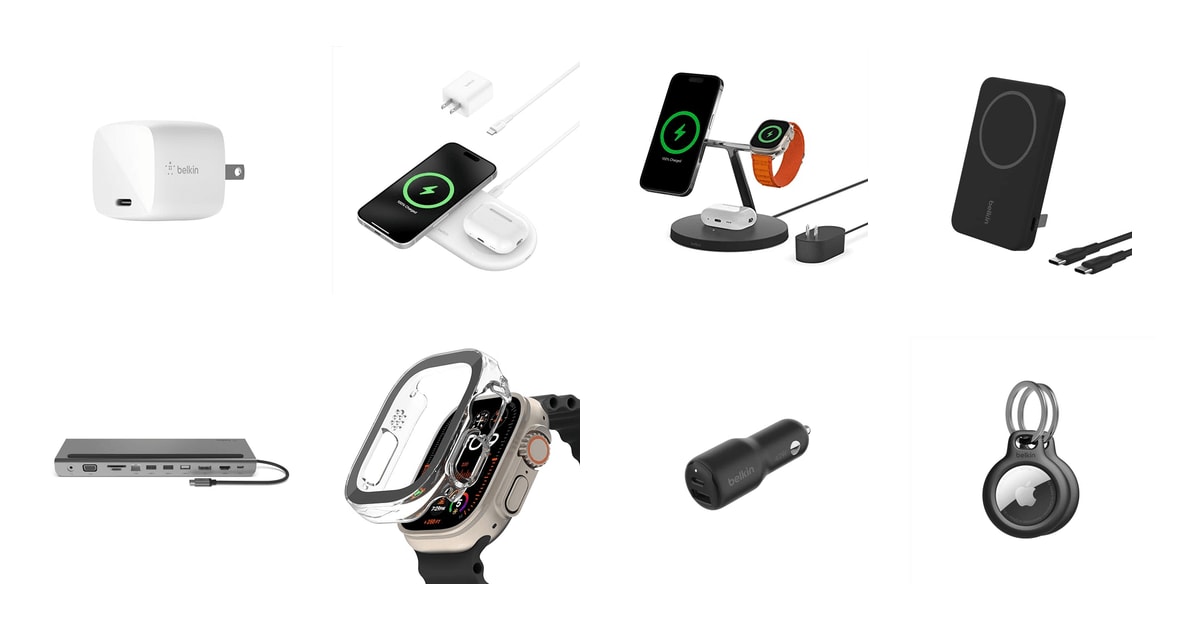
Belkin sits in a useful spot in the charging world. It's not Apple, so it's usually cheaper, but it's one of the small group of companies Apple licenses to build MagSafe-certified chargers, which means its wireless pads hit the full 15W speed instead of the 7.5W that many uncertified pads cap at. TechRadar's MagSafe comparisons found exactly that gap. So if you've got an iPhone, an Apple Watch, and a drawer of cables you'd rather not deal with, Belkin's lineup is worth a look.
The catch is that Belkin's charging gear runs hot and doesn't always age gracefully. Owner feedback across its wireless products keeps circling back to the same two complaints: things get warm during a charge, and a meaningful number of units stop working somewhere in the first year. The 2-year warranty helps, and CNET notes it's longer than the 1-year standard from many charging brands. But you'll probably have to use it at some point, and that's a hassle nobody wants on a nightstand charger.
The other thing to know is that Belkin covers a lot of ground — wall bricks, docks, power banks, car chargers, even AirTag holders — and the quality isn't even across all of it. Some products here are genuinely excellent and some are just fine. We think that the Belkin 30W GaN USB-C charger block is the best Belkin accessory for most people, and that the Belkin MagSafe 3-in-1 Wireless Charging Stand is the one to buy if you own an iPhone, an Apple Watch, and AirPods and want one thing on your nightstand instead of three.
Everything we recommend

Small, fast, and it covers a phone or a laptop

One base for iPhone, Watch, and AirPods, if the price sits right

A car charger that actually charges fast, for two people

Two devices at Qi2 speed in something you can pack flat

Pocketable magnetic backup power, with a real kickstand
How we picked
Certified charging speed. We looked for MagSafe or Qi2 certification on every wireless product, because published comparisons from TechRadar found uncertified pads often cap iPhones at 7.5W. Anything that couldn't reach the full 15W didn't make the picks.
Real-world wattage. We read spec sheets against published charging benchmarks — Wirecutter's note that 20W-to-30W PD chargers hit 50% in roughly half an hour set our floor for wall and car chargers.
Heat and failure reports. We read through owner feedback themes on each listing looking for repeated patterns rather than one-off complaints. Overheating and early failure came up often enough on Belkin's wireless line that we weighted it heavily.
Warranty coverage. CNET reports Belkin backs many BoostCharge products with a 2-year limited warranty against the 1-year standard elsewhere. We favored products that also carry the Connected Equipment Warranty.
Size and portability. We compared listed dimensions and weights directly, since a charger you leave at home is worthless. Folding prongs and sub-half-inch thickness earned real credit.
Top pick
Small, fast, and it covers a phone or a laptop
Belkin 30W GaN USB C Charger Block
This is the charger you throw in a bag and stop thinking about. Thirty watts is enough to fast-charge an iPhone, top up an iPad Pro, or keep a MacBook Air going, and the folding prongs mean it won't snag on anything in your backpack.
$19.55fromAmazonIf you buy one Belkin thing, make it this one. Thirty watts is the sweet spot for most people's daily life. Wirecutter's testing notes that a USB-C PD charger in the 20W-to-30W range gets a modern iPhone from empty to about half in roughly half an hour. That's the coffee-shop refill most of us actually need. And it's got enough headroom to charge a MacBook Air overnight, which a 20W brick can't do.
Belkin uses gallium nitride instead of the older silicon, and PCMag points out that's what lets it stay so small at this wattage. GaN wastes less energy as heat, so you can pack more power into less plastic. In practice that means a brick that doesn't hog the outlet next to it or block the second socket on a hotel nightstand.
The prongs fold flat. That sounds minor until you've fished a charger out of a bag and found it's punched a hole in the lining. Owners who travel with it consistently mention the size and the fold as the reason they picked it over Apple's, which costs more and doesn't fold.
The protection story is the quietly reassuring part. Belkin lists certified over-voltage protection and USB-C Power Delivery certification, which matters more than it sounds. Consumer Reports advises choosing chargers with proper certification specifically because uncertified budget bricks carry real fire and overheating risk. This one also carries a Connected Equipment Warranty, so Belkin's on the hook if the charger damages what's plugged into it.
Flaws but not dealbreakers
It's a single port. If you want to charge a phone and a watch at the same time, you'll need a hub or a second brick, and at that point some of the size advantage evaporates. A dual-port charger of similar wattage would be more flexible for the same footprint.
Thirty watts will charge a MacBook Air, but slowly, and it won't keep up with a MacBook Pro under load. If your laptop is your main reason for buying, look at something rated higher.
The 30W GaN charger comes with a 2-year limited warranty plus a Connected Equipment Warranty.
Upgrade pick
One base for iPhone, Watch, and AirPods, if the price sits right
Belkin MagSafe 3 in 1 Wireless Charging
This charges an iPhone at the full 15W, an Apple Watch faster than the older generation did, and AirPods, all from one plug. It's the tidiest solution for anyone fully inside Apple's ecosystem, and it doubles as a StandBy display stand.
$59.99fromAmazonIf you own all three Apple devices, this replaces three cables with one object. That's the entire pitch, and it works. The iPhone snaps on magnetically at 15W, the Watch puck charges Series 7 and newer about a third faster than the previous generation, and the AirPods sit on the base. Owners who've moved into Apple's ecosystem piece by piece — phone, then earbuds, then watch — describe this as the thing that finally cleaned up the nightstand.
The magnet is strong and the base is heavy enough to stay put. That combination matters more than the spec sheet suggests. Cheaper magnetic stands are light, so lifting your phone drags the whole charger up with it. At about a pound and three quarters, this one stays on the table when you grab your phone at 6 a.m.
Because the phone sits upright and sideways, StandBy works — the iOS mode that turns your phone into a clock, a photo frame, or a widget panel while it charges. It's a small thing, but it makes the charger useful during the day instead of only at night.
Digital Trends points out that 3-in-1 MagSafe stations typically run two to three times what a plain MagSafe puck costs, because of the extra Watch and earbud coils. That's the trade here. You're paying for consolidation, not for faster charging. Belkin also backs this one with a 2-year warranty and a Connected Equipment Warranty.
Flaws but not dealbreakers
Reliability is the real concern. Owner feedback on this stand includes a stubborn thread of units that quit charging within the first six months, sometimes more than once for the same buyer. The counterweight is that people who've gone through Belkin's warranty process report it going smoothly, but you may well need it.
It's the most expensive thing in this guide and it only makes sense if you own all three device types. If you don't have an Apple Watch, you're paying for a coil you'll never use.
It's not a travel charger. At more than five inches on every side and nearly two pounds, it lives on a desk or a nightstand and stays there.
Belkin covers this stand with a 2-year warranty and a Connected Equipment Warranty.
Also great
A car charger that actually charges fast, for two people
Belkin BoostCharge 42W Dual Port Fast Car
Two ports, 42 watts between them, and PPS support so it negotiates the right voltage for whatever's plugged in. Belkin says it takes an iPhone from empty to half in 21 minutes, and owner feedback on this one is unusually consistent.
$24.99fromAmazonGas-station car chargers are a lottery. This one isn't — it's the most consistently well-received product in Belkin's lineup here, and the reason is simple: it charges at a speed you'd actually notice on a commute. Belkin's listing claims 0 to 50% in 21 minutes for an iPhone and 26 for a Galaxy. Android Authority's car charger roundup makes the broader point that dual-port PD chargers in this class can fast-charge a phone and a tablet at once without either one crawling.
The USB-C-plus-USB-A combination is the practical choice, not the purist one. A dual-C charger looks more modern. But if your passenger is still on an older cable, or your dashcam is, the USB-A port saves you a dongle. PPS support means it adjusts voltage on the fly for phones that ask for it, which is how Samsung's fastest charging works.
One thing worth understanding: the 42 watts is the combined total across both ports, not what each one delivers. Owners have noted this. It's not misleading exactly, but if you're expecting 42W into a single laptop, that's not what this does. For two phones, or a phone and a tablet, it's plenty.
It's tiny — about two and a half inches long and barely an ounce — so it disappears into the socket instead of jutting into your knee. The housing uses post-consumer recycled content and the packaging is plastic-free, if that's something you weigh.
Flaws but not dealbreakers
No cable is included, which is standard for car chargers but still worth knowing before it arrives.
Split the 42 watts across two ports and neither device gets full speed. If you're regularly charging two things at once and want both fast, a higher-rated charger is the better buy.
This car charger carries a 2-year warranty and a Connected Equipment Warranty.
Runner-up
Two devices at Qi2 speed in something you can pack flat
Belkin Qi2 15W 2 in 1 Wireless
This flat pad charges a phone at the full 15W with Qi2 magnets and an earbud case at 5W beside it, plus there's a USB-C output port for a third device. It's barely half an inch thick, so it travels far better than any stand.
$66fromAmazonThis is the 3-in-1 stand's flatter, cheaper cousin, and for travel it's the better object. Half an inch thick and a little over six inches wide means it slides into a laptop sleeve. The stand doesn't. If you want proper Qi2 magnetic charging in a hotel room without packing something the size of a grapefruit, this is the answer.
It ships with a 30W power supply and a USB-C cable in the box, which is less common than it should be — plenty of wireless chargers arrive expecting you to already own a brick. The extra USB-C output port turns the pad into a small hub, so you can run an Apple Watch cable off it and cover three devices from one outlet.
Qi2 is the reason it hits 15W. It's the open standard that borrowed MagSafe's magnet ring, so alignment happens by itself and you don't get the slow-charge-all-night surprise from a phone that drifted off the coil. It works through a MagSafe-compatible case up to about 3mm thick, so you don't have to strip your phone every evening.
Belkin lists Samsung Galaxy S25 compatibility, and Qi2 support on Android is genuinely useful. But read that carefully — Qi2 charging on Android depends on your phone having the magnets or your case supplying them. Some Samsung owners have been caught out by this.
Flaws but not dealbreakers
It runs warm. Owner feedback mentions heat during charging more often here than we'd like, and at least some units have failed within the first couple of months. The 2-year warranty is the backstop, but this is the pick where we'd register the purchase date.
The 15W magnet grips hard. Grab the phone one-handed and you can lift the whole pad off the desk, sometimes yanking the cable loose. Annoying, not a dealbreaker.
The secondary pad is 5W, so it's for AirPods and similar. Don't expect it to charge a second phone at any useful speed.
Budget pick
Pocketable magnetic backup power, with a real kickstand
Belkin 5000mAh 15W Qi2 MagSafe Power Bank
A 5,000mAh magnetic pack that snaps onto the back of an iPhone and adds roughly a phone's worth of charge. The built-in kickstand props your phone up for video, and a USB-C cable lets you charge a second device at the same time.
$59.95fromAmazonA magnetic power bank solves a specific problem: your phone is at 20% and you're still out. This one snaps on, charges wirelessly at up to 15W with Qi2, and rides along in your pocket while you walk. No cable dangling, no juggling. At about six ounces and half an inch thick, it's the kind of thing you'll actually carry instead of leaving on the counter.
The kickstand is more useful than it sounds. Flip it out and your phone stands up on a tray table while it charges. That's a plane, a train, a hotel desk. Belkin also includes a USB-C cable, so you can charge a friend's phone off the same pack while yours sits on the magnets.
Five thousand milliamp-hours is roughly one full phone charge, not two. Belkin frames it as about 16 extra hours of use or video playback. If you're covering a day of navigation and photos on a trip, that's the right number. If you want to go two days off-grid, you want something bigger and heavier.
Engadget's coverage of Belkin's larger MagSafe banks notes USB-C PD passthrough — charging the bank and the phone together from one outlet. That's the pattern across this line, and it means one wall socket handles your overnight top-up for both.
Flaws but not dealbreakers
Heat is the recurring complaint, and it's a real one. Wireless charging through a magnetic coil generates warmth, and owners report phones getting hot enough that iOS throttles charging or stops it around 80%. Using the cable instead of the magnets sidesteps most of this.
Wireless charging from a battery is inefficient, so you'll get less out of the 5,000mAh than the number suggests. Some owners have also found the pack doesn't hold its charge well over weeks of sitting in a bag.
It's smaller than Belkin's 20,000mAh models. If you need to charge a phone three times over, this isn't the pack for that.
Who this is for
This guide is for anyone who wants Apple-compatible charging gear without paying Apple prices, and for Android owners who want a name-brand USB-C PD charger with actual safety certification behind it. If you're deep in Apple's ecosystem — iPhone, Watch, AirPods — Belkin's MagSafe products are among the few third-party options certified to charge at full speed. If you just need a wall brick for a phone, the 30W GaN is all you need and the rest of this guide is optional reading.
You should skip most of this if you're hard on your gear or you charge in a hot car every day. Belkin's wireless products run warm and owner reports of early failure are common enough that we won't wave them off, even with a 2-year warranty. We've limited this guide to Belkin's charging, docking, and Apple-accessory products sold on Amazon. It's not a survey of every charger on the market, and it doesn't cover cables, surge protectors, or Belkin's networking gear.
How we picked
Certified speed: we required MagSafe or Qi2 certification on anything wireless, since published comparisons show uncertified pads cutting iPhone charging roughly in half. Real wattage: we checked spec sheets against published PD benchmarks, using the 20W-to-30W half-hour-to-50% figure as a floor. Heat and durability: we read owner feedback themes for repeated overheating and early-failure patterns, not isolated complaints. Warranty: we favored the 2-year coverage and Connected Equipment Warranty that Belkin puts on much of its charging line. Size: we compared listed dimensions and weights, because portability decides whether a charger gets used or forgotten in a drawer.
Other belkin accessories worth considering
If you want to run two monitors off a laptop: The Belkin USB C Hub ($75.99) — This 11-port dock turns a MacBook or a USB-C laptop into a proper desk setup — HDMI, DisplayPort, VGA, Ethernet, three USB-A ports, SD and microSD slots, and 100W pass-through to charge the laptop. The VGA port sounds dated until you're the person with an older office monitor, and then it's the reason you buy this one. Ars Technica notes Belkin's higher-end Connect USB4 docks can drive dual 4K displays at 60Hz; this is the more affordable USB-C tier, so expect 4K at lower refresh rates and 5Gbps data. Two catches: it needs its own 65W-plus power adapter, which isn't in the box, and the rubber strips meant to hold your laptop in stand mode are slippery enough that owners complain about it sliding.
If you want a keychain for your AirTag: The Belkin Apple AirTag Secure Holder with Key ($16.99) — Apple sells the AirTag without any way to attach it to anything, which is a strange decision that a whole accessory market now exists to fix. This two-pack holder uses a twist-and-lock design so the tag can't shake free, keeps the engraving visible, and comes with decent key rings. 9to5Mac notes Belkin's Secure Holder line is among the few AirTag accessories certified under Apple's Made for AirTag program. It's chunkier than some minimalist holders, and the plain loop is harder to thread onto a keyring than a carabiner would be. But it's cheap, it works on luggage and pet collars, and owners who've had one on their keys for years report it holding up.
The competition
Here's what our research turned up across Belkin's charging and accessory range — not everything the company sells, and not everything on Amazon. The product below made the shortlist but didn't earn a spot.
The Belkin ScreenForce Tempered Glass for Apple Watch ($29.99) — The ScreenForce Tempered Glass for the 49mm Apple Watch Ultra is Belkin's snap-on protector for its biggest watch, with a curved 3D edge, 9H scratch rating, and an antimicrobial coating. Belkin's broader ScreenForce line has a good reputation — Tom's Guide notes the company markets UltraGlass 2 as surviving drops from up to eight feet against roughly four to six for standard tempered glass. This particular Ultra protector doesn't live up to that reputation. Owner feedback points repeatedly at the same problems: it scuffs within weeks, touch response gets sluggish near the edges, water seeps under it in the shower, and at least some units have shattered from short drops. The bezel geometry is cut for the Ultra 2, so Ultra 3 owners get a thicker border than they'd expect. If you swim or shower with your watch, skip it outright. If you mostly want scratch protection at a desk and you're willing to replace it periodically, it still snaps on and off easily, which is more than most protectors manage.
Setup and care
Wireless chargers get warm, and heat is what kills batteries over time. Give any magnetic charger or power bank some air — don't leave your phone charging under a pillow, on a mattress, or inside a bag. If your phone stops charging around 80% and feels hot, that's iOS protecting the battery, not the charger failing. Take the case off if it's thick, or switch to a cable for that session. For power banks, top them up every couple of months even when you're not using them; lithium cells sitting empty for long stretches lose capacity. And register your purchase with Belkin when it arrives. The 2-year warranty is one of the better reasons to buy this brand, and you'll want the receipt findable if a unit quits in month seven.
Questions we get
Is Belkin a good brand for chargers?
Broadly, yes. Belkin's chargers carry proper safety certifications, which Consumer Reports flags as the main thing separating a safe charger from a risky one, and the 2-year warranty beats the 1-year standard from many competitors. The weak spot is durability on the wireless products, where owner reports of overheating and early failure are common enough to take seriously. The wall and car chargers hold up better than the wireless pads and stands.
Does Belkin make official Apple MagSafe chargers?
Belkin is one of a small group of manufacturers Apple has officially licensed to build MagSafe-certified chargers. That certification is what guarantees the full 15W wireless charging speed on compatible iPhones. TechRadar's comparisons found uncertified third-party pads often cap at 7.5W — about half the speed. Belkin is independent, though, not owned by Apple.
Is a 3-in-1 MagSafe stand worth it over separate chargers?
Only if you own an iPhone, an Apple Watch, and AirPods. Digital Trends notes 3-in-1 stations typically cost two to three times what a standalone MagSafe puck does, because of the extra coils. You're paying for one plug and one object on the nightstand instead of three, not for faster charging. If you're missing any one of those devices, buy the individual chargers.
Can Belkin wireless chargers charge Android phones?
Qi2 chargers like the 2-in-1 pad can, but there's a catch. Qi2 uses magnets for alignment, and most Android phones don't have them built in — you need a case that supplies the magnet ring. Without it you'll fall back to slower standard Qi charging or struggle to keep the phone aligned. Check your specific phone before you buy.
Are Belkin car chargers fast enough for USB-C PD phones?
Yes. The 42W dual-port car charger supports USB-C Power Delivery 3.0 and PPS, which lets it negotiate the right voltage for your phone rather than pushing a fixed output. Belkin lists 0 to 50% in 21 minutes for an iPhone. Just remember the 42 watts is the combined total across both ports, so charging two devices at once means neither gets full speed.
Does Belkin's warranty cover damage to my phone from a faulty charger?
On many products, yes — that's what the Connected Equipment Warranty is. The 3-in-1 stand and the 42W car charger both list CEW coverage alongside the standard 2-year limited warranty. It covers damage the charger causes to a connected device, not accidental damage you cause. Coverage varies by product, so check the specific listing.
Why you should trust us
For this guide:
- We read Belkin's published specifications for every product here alongside coverage from PCMag, Wirecutter, TechRadar, CNET, Ars Technica, Engadget, 9to5Mac, Tom's Guide, Android Authority, Digital Trends and Consumer Reports.
- We compared listed wattages, dimensions, certifications and warranty terms across the lineup to see which claims held up against each other.
- We read through owner feedback on each listing for recurring themes — particularly heat, longevity and case compatibility — rather than individual complaints.
- We read owner reviews on every listing, weighted toward the critical ones, because that is where the recurring failures show up.
- We have a systematic way of automatically fetching the latest prices, so the numbers on this page stay current.
- This is a research-focused guide, so the team may not own every product listed — though we often do own the top winners, which gives us extra context for the recommendations.
- We don't accept free products, and the retailer commission never changes which product we recommend.
Sources
The Best USB-C Chargers - Wirecutter, Wirecutter
The Best Power Banks - Wirecutter, Wirecutter
Best Wireless Chargers 2026, CNET
Best MagSafe Chargers and Accessories, TechRadar
Best USB-C Hubs and Docking Stations, PCMag
Belkin BoostCharge Pro 3-in-1 Wireless Charger Review, The Verge
Best Portable Chargers and Power Banks, Engadget
Best Screen Protectors for iPhone, Tom's Guide
Best Car Chargers for Phones, Android Authority
Best MagSafe-Compatible Accessories for iPhone, 9to5Mac
USB4 and Thunderbolt Dock Testing and Buying Guide, Ars Technica
Best Charging Accessories 2026, Digital Trends
Amazon product listings and owner reviews for all 8 products
Manufacturer specification pages for each product
Some passages in this guide may be paraphrased with AI help. Prices are refreshed automatically.
More like this.
Continue exploring electronics reviews and recommendations.

The Best Portable External SSDs
A portable SSD is the rare gadget that quietly gives you back time. Copying a day's worth of 4K footage off a camera card, backing up a laptop before a…

The Best Noise-Cancelling Wireless Earbuds
Good noise cancelling changes how a commute feels. The train rumble drops away, an airplane's engine drone turns into a soft hush, and the open-plan…

The Best Headlight Restoration Kits
Cloudy headlights sneak up on you. One night you're driving a back road and realize the pool of light in front of the car has shrunk to a smudge. That's…

The Best Smartwatches
A smartwatch earns its place on your wrist in small moments. It taps you when a text matters and stays quiet when it doesn't. It counts your laps, nags…

The Best Magnetic Pickup Tools
A dropped bolt is a small problem that eats an afternoon. It ricochets off the alternator, slips into a seam you can't see, and suddenly you're pulling a…

The Best Portable Car Vacuums
Cleaning a car is mostly a reaching problem. The crumbs live in the seat track, the sand settles into the carpet pile, and the dog hair works its way into…