The Best Digital Picture Frames
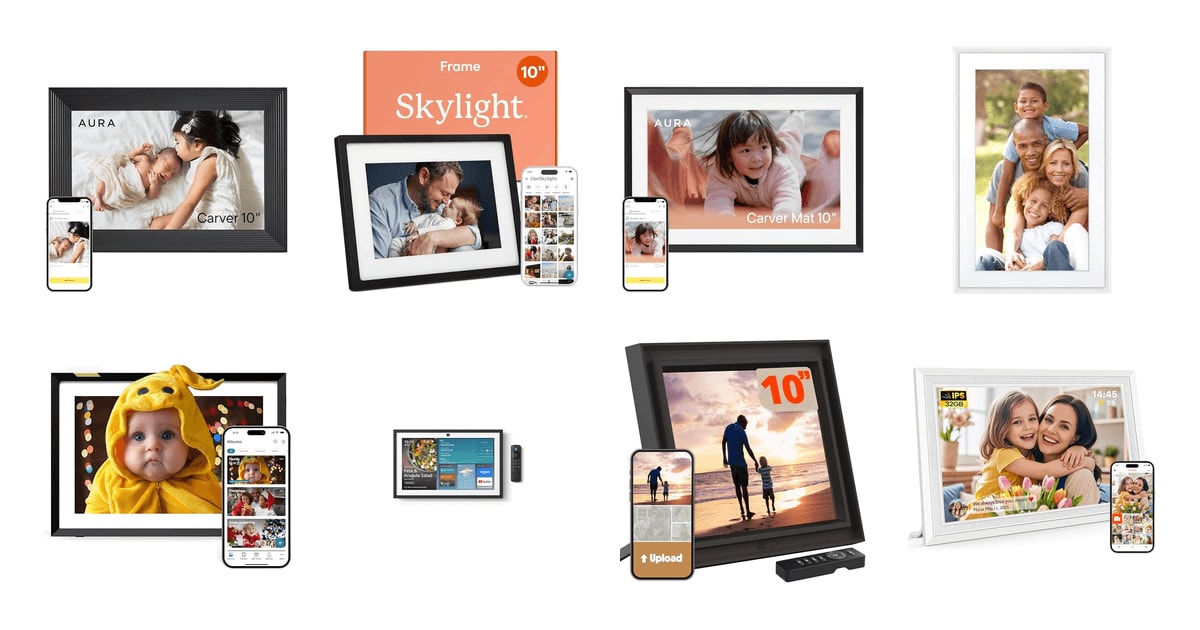
A digital picture frame earns its place by disappearing into a room and then surprising you. The work is less in the hardware than in the pipeline behind it: how a photo gets from a phone in one city onto a shelf in another, how the frame crops it, how bright it runs at nine at night, and whether the person who received it as a gift ever has to touch a setting. The frames that succeed handle all of that quietly and let the pictures do the rest.
No frame in this category is fully solved. Panel resolution on most ten-inch models sits well below what a modern phone screen shows, so images look good from across a room and soft up close. Nearly every model leans on a company's cloud servers, which ties the frame's usefulness to a business staying in business and to a privacy policy worth reading before you buy. Video support is limited almost everywhere, and mixing portrait and landscape shots always involves some compromise in cropping.
So the decision comes down to who feeds the frame and who looks at it. If the sender is comfortable with a phone app and wants the sharpest picture, one answer follows; if the recipient is a grandparent who will never install anything, a different one does. We think that the Aura Carver is the best digital picture frame for most people, and that the Skylight Frame is the one to buy if the person receiving it would rather be sent photos by email than through an app.
Everything we recommend

The sharpest picture and the simplest sharing, with no subscription

Send photos by email, which almost anyone can already do

A capable connected frame at the low end, with real local storage

Genuine anti-glare wall art, if you'll pay for the membership

The most ways to get photos on, and it powers down when you leave
At a glance
| Product | Screen Size | Resolution | Price | |
|---|---|---|---|---|
| Aura HD Digital Picture FrameTop pick | 10" | — | $149 |
| Skylight Digital Picture FrameRunner-up | 10" | 1280x800 | $139.99 |
 | Aura HD Digital Picture FrameAlso consider | 10" | — | $179 |
| Meural Canvas IIUpgrade pick | 21.5" | 1080p | $549.99 |
| Nixplay Digital Picture FrameAlso great | 10.1" | — | $93.98On sale |
 | Amazon Echo Show 15Also in lineup | 15.6" | 1080p | $249.99On sale |
 | Pix-Star LUX 10.4'' Wi-Fi Digital Picture FrameAlso consider | 10.4" | 1024x768 | $139.99 |
| Frameo 10.1" Digital Picture FrameBudget pick | 10.1" | 1280x800 | $59.99On sale |
How we picked
Display and glare. We compared published panel specifications and independent display evaluations, weighting color gamut coverage, contrast and anti-glare treatment over raw diagonal size. A frame that reflects a window is unusable regardless of its resolution.
Getting photos on. We looked at how many routes a frame offers — app, email address, web browser, USB or SD card, cloud service sync — and at documented setup times. The best frame is the one the least technical person in the family can still feed.
Ongoing costs. We recorded whether cloud storage is free and uncapped, metered by a free tier, or gated behind an annual membership. Subscription structure changes what a frame costs to own long after the gift box is gone.
Sensors and automation. We favored frames with ambient light sensors, motion or activity detection and scheduled sleep, based on efficiency measurements showing auto-sleep cutting daily power draw substantially. Automatic brightness also determines whether a frame glares in a dark room.
Privacy and storage. We read each brand's description of how photos are stored and shared, preferring companies that document encrypted private servers and invite-only contribution over listings that leave data handling unstated.
Top pick
The sharpest picture and the simplest sharing, with no subscription
Aura HD Digital Picture Frame
The Aura Carver is a ten-inch landscape frame with a color-calibrated IPS panel and an app that lets a whole family add photos to the same frame. There are no subscription fees and no storage cap, which is rare in this category.
$149fromAmazonThe panel is the reason this frame keeps winning comparisons. Tom's Guide's comparative display evaluation put the Carver's IPS screen at 96% coverage of the sRGB color gamut, ahead of most frames in its class. Aura ships the display color-calibrated, and the practical result reviewers describe is skin tones that look like skin rather than the orange-shifted cast common on cheaper panels. Photographs of food, fabric and foliage hold their separation instead of collapsing into one saturated block.
Adding photos is fast enough that people actually do it. Wirecutter's evaluation clocked photos uploaded through the Aura app appearing on the Carver in under thirty seconds, the quickest end-to-end delivery of any frame in that comparison. More important than the raw speed is who can trigger it: the frame's owner can invite friends and relatives to contribute directly, so a frame on a grandparent's shelf can be fed by four households at once without anyone managing a shared album.
Storage is unlimited and free, with no plan to renew. Aura charges nothing for cloud storage and sells no subscription tier, which removes the most common long-term annoyance in this category. Frames that meter playlists or gigabytes push you toward an annual bill years after the gift was given. Here the only recurring obligation is a power outlet and a Wi-Fi network, which matters most when the frame lives in someone else's house.
It manages its own brightness and framing. Reviewed.com's laboratory measurements found Aura's ambient light sensor adjusting screen brightness within two seconds of a lighting change, faster than any other frame in that round-up, so the frame dims for an evening room instead of glaring. Automatic on/off scheduling and automatic photo cropping mean a mixed library of phone shots plays without anyone sizing images by hand.
The gifting path is unusually well built. You can load photos, videos and a written message into the frame from the app before the box is ever opened, and the frame arrives in gift packaging. That turns setup into plugging in and joining Wi-Fi, with content already waiting, which is the difference between a present that gets used and one that sits in a closet until someone technical visits.
Flaws but not dealbreakers
Everything runs through the app. There is no email-to-frame address here, so a recipient who does not use a smartphone can never add or remove a photo independently. That is fine when the frame is a one-way gift from adult children, and frustrating when the person living with it wants to curate what plays.
The listing describes no card slot or USB input. Photos arrive over Wi-Fi and live in Aura's cloud, so a household with unreliable internet or a shoebox of scans on a memory card has fewer routes in than Pix-Star or Frameo offer. If the network drops for a week, nothing new arrives.
It is a landscape frame that crops for you. Automatic cropping is convenient and it is also a decision made on your behalf; vertical phone photos are the ones most likely to lose framing you cared about. Buyers who shoot mostly portrait orientation should look at Aura's portrait-capable models instead.
Runner-up
Send photos by email, which almost anyone can already do
Skylight Digital Picture Frame
The Skylight Frame gives each unit its own email address, so relatives send pictures the same way they send anything else. It is a ten-inch Full HD touchscreen with the shortest setup path of any frame in this guide.
$139.99fromAmazonEmail delivery removes the app from the equation. Each frame gets a unique Skylight address, and anything sent to it appears on screen. CNET identified email-to-display delivery as the dominant gifting choice for recipients over sixty-five, ranking Skylight above app-dependent competitors for that group specifically. The advantage is not on the receiving end but the sending end: a distant cousin who will never install software will still forward a photo from their inbox.
Setup is the fastest documented in the category. In Good Housekeeping's evaluation, nine of ten participants completed first-time Skylight setup in under five minutes, the quickest onboarding of any frame they assessed. The sequence is plug in, join Wi-Fi, choose the frame's email address, and that is the entire configuration. For a gift being opened at a holiday table with an audience watching, that brevity is worth more than any spec.
The touchscreen makes the frame usable by the person who owns it. The ten-inch 1280x800 color touch panel means the recipient can swipe through photos, pause on one and delete what they do not want, rather than waiting for a remote sender to manage the playlist. Cloud storage handles the library, so there is no memory card to lose or fill.
Gift Mode and offline mode cover the awkward edges. You can preload photos and personalize the frame without opening the box, so it arrives populated. Offline mode keeps the existing library playing when the network is down, though a Wi-Fi connection is still required to receive or upload anything new.
Flaws but not dealbreakers
The display is a step below the top pick. At 1280x800 across ten inches, the Skylight panel is noticeably less dense than the Aura Carver's, and fine detail in group shots softens when you stand close. From across a living room the difference largely disappears.
An email address is an open door. Anything sent to the frame's address plays, which is the feature and also the risk. If the address circulates widely, curation becomes someone's ongoing job, and the person best positioned to do that pruning is whoever is standing in front of the frame.
Budget pickOn sale
A capable connected frame at the low end, with real local storage
Frameo 10.1" Digital Picture Frame
This MaxAngel-built Frameo frame pairs a 10.1-inch 1280x800 IPS touchscreen with 32GB of onboard memory plus SD and USB inputs. It uses the Frameo app's invite-only sharing, and it wall-mounts, which most frames in this guide do not.
$59.99fromAmazonList priceLocal storage is unusually generous for an inexpensive frame. The 32GB of internal memory is far more than the cloud-first frames give you locally, and the SD card slot and USB port let you load a library directly. That matters for two groups: households with slow or intermittent internet, and anyone digitizing older prints who would rather not push thousands of scans through a phone app.
Sharing is invite-only rather than open. The Frameo app only accepts content from people the frame owner has invited, which is a tighter default than an email address anyone can forward to. Senders push photos and short videos from iOS or Android, and the recipient does not need an account of their own to see them arrive.
The IPS touchscreen and auto-rotation cover the basics properly. The 1280x800 panel holds color and contrast off-axis, which is what an IPS layer buys you, and the frame rotates between landscape and portrait so vertical phone photos fill the screen instead of sitting between black bars. Touch control means the owner can skip, pause or delete without a remote.
It does more than a slideshow. Calendar sync, a collage mode that shows up to six photos at once, custom albums, themed greetings for birthdays and holidays, plus clock and weather displays give the frame something to do during hours when nobody is sending anything new.
Flaws but not dealbreakers
App-sent videos are capped at fifteen seconds. Longer clips have to go on through the SD card or a USB stick, which defeats the point of remote sharing for anyone hoping to send a full birthday song from another state.
The resolution is mid-pack, not a bargain version of the top pick. At 1280x800 it matches Skylight and sits clearly below the Aura Carver, so buy it for the storage and the price position rather than the picture.
The privacy documentation is thinner than the established brands'. Aura and Skylight publish clear descriptions of encrypted private storage; smaller-brand frames more often leave data handling vague, and this listing describes invited-sender protection without detailing what happens on the server side. Read the policy before you put a decade of family photos on it.
MaxAngel covers this frame with a one-year replacement service for quality-related issues, backed by ongoing technical support.
Upgrade pick
Genuine anti-glare wall art, if you'll pay for the membership
Meural Canvas II
The Meural Canvas II is a 21.5-inch wall-hung display with a matte anti-glare finish that reads as a framed print rather than a screen. It shows your own photography and, with a separate membership, a library of more than 30,000 curated artworks.
$549.99fromAmazonThe matte panel is what separates this from every other frame here. Netgear's published specifications put the Canvas II at 400 nits peak brightness with a 1300:1 contrast ratio, the highest contrast among mainstream art frames, and the anti-glare finish with adjustable backlighting is the reason it does not throw a window reflection back at the room. On a lit wall, that finish does more for believability than resolution does.
The art library is the point for a lot of buyers. Netgear's product documentation describes more than 30,000 works from museums and independent artists available through the Meural Membership, sold separately on an annual basis. That turns the frame into rotating wall art on days when you do not want family photos in the living room, and it is the only frame in this lineup built around curated art rather than personal libraries.
Control works from across the room. TechRadar's review reports the proximity gesture control responding in under half a second at distances up to eight feet, so a wave advances the piece without walking over to the wall. The Meural app handles uploads, cropping, display schedules and settings, and supported voice assistants including Alexa can call up new work.
It is sized and finished like furniture. The Canvas II comes in a 21.5-inch and a 27-inch diagonal, in black, white, light wood and dark wood; this listing is the 16-by-24-inch white version. Uploading your own photography also replaces the printing and framing cycle for anyone who rotates images seasonally.
Flaws but not dealbreakers
The best of it sits behind a recurring membership. The art library requires an annual subscription, so unlike Aura or Pix-Star this frame carries an ongoing cost if you want the feature that justifies it. Your own photos display without paying, but that is a smaller frame's job at a much larger frame's price position.
Pixel density is lower than the small frames. It is a 1080p panel stretched across 21.5 inches, which works for paintings and wide landscapes and looks softer than a ten-inch frame when you stand close to a detailed photograph.
This is an installation, not a gift you hand someone. It hangs on a wall, needs power routed to it, and has to be leveled and positioned. Nobody is unwrapping this at a table and having it running in five minutes.
Also greatOn sale
The most ways to get photos on, and it powers down when you leave
Nixplay Digital Picture Frame
The Nixplay 10.1-inch frame accepts photos through its mobile app, a web app or email, and its activity sensor switches the screen on and off as people come and go. It is the most feature-dense frame here at a mainstream size.
$93.98fromAmazonList priceThe motion sensor does measurable work. PCMag's efficiency evaluation found Nixplay frames with motion-sensor auto-sleep drawing 38% less power per day than always-on frames. A frame that runs unwatched for twenty hours a day is the normal case, and shutting the panel off during those hours also spares the backlight, which is the component that fades first.
Three upload routes cover mixed families. Photos go on through the Nixplay phone app, through a browser on a computer, or by emailing them to the frame, so app-comfortable and email-only relatives can feed the same frame. Nixplay's account system supports multiple contributors and lets one person administer several frames, which suits a family running frames in three houses.
The software does more than play a slideshow. The frame uses face detection to center subjects when it crops, rotates automatically between landscape and portrait, offers one-tap casting to a TV and includes basic photo editing tools. The high-resolution touchscreen handles swipes and taps directly, so the recipient is not dependent on a remote.
It also pulls from services people already use. Nixplay's platform connects to the mainstream photo and file services rather than requiring every image to be uploaded by hand, which is the practical difference between a frame that stays current and one that shows the same forty pictures for two years.
Flaws but not dealbreakers
The free tier is metered. Nixplay's published plan structure limits free accounts to ten playlists and 10GB of cloud storage, with a premium annual plan above that. It is a fairer split than most, but it is still a recurring bill that the Aura and Pix-Star frames do not ask for.
The frame is tied to a Nixplay account. Playlists, sharing permissions and most of the automation live in the company's cloud, so the feature set depends on that service continuing. Frames with local storage degrade more gracefully if a platform changes.
Who this is for
Buy a connected frame if the photos you care about live on phones and never get printed, and especially if you want relatives in other cities feeding the same screen. The people who get the most out of these frames are gift recipients who would not set one up themselves: parents and grandparents whose children push new photos weekly, and households that want a shared surface for a family's pictures instead of a group chat that scrolls away. Design-conscious buyers and anyone hanging a frame on a living room wall should spend more and go larger, because a small frame on a big wall reads as a gadget.
Skip a connected frame if you have no Wi-Fi where it will live, unless you choose one of the models here that accepts a USB stick or SD card and works offline. Skip it too if you are unwilling to keep an account with a company that stores your photos, since only the local-storage models avoid that entirely. This guide covers Wi-Fi frames sized roughly ten inches through wall-scale art displays, and one smart display that doubles as a photo frame. It does not cover unconnected frames that only play from a memory card, projector-style displays, or e-ink units.
How we picked
We built the shortlist from published reviews, manufacturer specification sheets and recurring themes in owner feedback, then weighted five things. Display and glare: color gamut coverage, contrast and matte versus gloss finish matter more than diagonal size, since a reflective panel is unusable in a lit room. Getting photos on: we counted the routes each frame accepts — app, dedicated email address, web upload, USB, SD card, cloud service sync — and gave weight to documented setup times, because the frame only stays current if the least technical relative can feed it. Ongoing costs: free and uncapped storage beat metered free tiers, which beat annual memberships. Sensors and automation: ambient light sensors and motion-triggered sleep decide whether a frame glares at night and how much power it draws across the twenty hours nobody is watching. Privacy and storage: we preferred brands that publish clear descriptions of encrypted private storage and invite-only sharing over listings that say nothing about where photos go.
Other digital picture frames worth considering
If you want the Aura experience in a smaller footprint: The Aura HD Digital Picture Frame ($179) — The Aura Carver Mat is the same platform as our top pick — the free app, the invited contributors, unlimited free cloud storage with no subscription, automatic cropping and brightness, and the preload-before-gifting flow — wrapped in a matted landscape frame with a narrower body than the standard Carver. The mat presentation reads more like a framed print on a bookshelf and suits a crowded surface where the full-size Carver would dominate. What you give up is screen area, which is the one thing you cannot get back later; if the frame is going on an open shelf or a mantel with room to spare, the standard Carver is the better use of the same money.
If you want a frame that works without an app or a reliable network: The Pix-Star LUX 10.4'' Wi-Fi Digital Picture Frame ($139.99) — The Pix-Star LUX is the most flexible frame here about how photos arrive: its own email address, the Pix-Star Snap app, sync from Google Photos, Dropbox, OneDrive and Flickr, or a USB stick and SD card with no app required. Cloud storage is free with no subscription, a remote is included so the recipient does not smear the screen, and a caregiver can administer as many as twenty-five frames remotely — the single best feature for managing a parent's frame from another state. It also has a motion sensor and configurable sleep hours. The trade-off is the panel: at 1024x768 across 10.4 inches it is the lowest-resolution display in this guide, though the 4:3 no-glare screen does preserve original composition without cropping.
The competition
This is what our research surfaced across published reviews and current listings, not a census of the category. Frames come and go constantly under rotating brand names, and a model that looks identical to one below may run entirely different software.
The Amazon Echo Show 15 ($249.99) — The Amazon Echo Show 15 is a 15.6-inch Full HD smart display that Engadget's category review identified as having the largest screen area of any mainstream product used as a digital picture frame. It runs a photo slideshow from Amazon Photos, curates images automatically, and adds things no frame here attempts: family calendars and to-do widgets, a smart home dashboard, built-in Fire TV with a remote, and auto-framing video calls. It loses to our picks as a picture frame specifically, because it is a smart display first — the bezel, the camera, the always-listening microphone and the widget-covered home screen all read as an appliance on a kitchen wall rather than a framed photograph in a living room, and photo delivery assumes everyone sending is inside Amazon's ecosystem. Buy it if you want one device to run the household schedule, control the lights and show photos in the gaps; buy a dedicated frame if the photos are the reason.
Placement and setup
Where a frame sits matters as much as which one you buy. Put it out of direct line with a window or a lamp, since even matte panels lose contrast under a hard reflection, and set the sleep schedule to match the room's real hours rather than leaving the screen lit all night. Confirm the Wi-Fi band before gifting: some frames join only 2.4GHz networks, and a mesh router that hides its bands is the most common setup failure. Clean the panel with a dry microfiber cloth and nothing wet or ammonia-based, which can haze an anti-glare coating permanently. If you are giving the frame, load photos and complete the account setup yourself first, then hand it over ready to plug in — and keep the sender list short enough that the recipient never has to prune it.
Questions we get
What's the best digital picture frame for a parent or grandparent who isn't tech-savvy?
The Skylight Frame, because it has its own email address and anything sent there appears on screen. In Good Housekeeping's evaluation, nine of ten participants finished first-time setup in under five minutes, and CNET identified email-to-display delivery as the dominant gifting choice for recipients over sixty-five. The Pix-Star LUX is the alternative if you also want to manage the frame's settings remotely on their behalf.
Do digital picture frames require a subscription?
Some do and some do not, and it is the single most important thing to check before buying. Aura and Pix-Star offer unlimited cloud storage with no subscription at all. Nixplay meters its free tier at ten playlists and 10GB with a paid annual plan above that, and the Meural Canvas II's art library requires an annual membership sold separately, though your own photos display without it.
Can these frames sync automatically with Google Photos or other services?
The Pix-Star LUX syncs directly with Google Photos, Dropbox, OneDrive and Flickr, and Nixplay connects to mainstream photo and file services through its account. Aura and Skylight take a different approach, pushing photos from your phone's library through their own apps rather than mirroring a cloud album. If hands-off automatic syncing is the requirement, start with Pix-Star or Nixplay.
Do digital picture frames work without Wi-Fi?
Partly. The Pix-Star LUX and the Frameo frame accept photos from a USB stick or SD card, so they work fully offline. Skylight has an offline mode that keeps playing photos already stored on the frame, but it needs a connection to receive anything new. The Aura frames and the Echo Show 15 are built around a network connection and are poor choices for a house without one.
Which frame has the best display quality?
Among the standard-size frames, the Aura Carver — Tom's Guide's comparative display evaluation measured its IPS panel at 96% sRGB coverage, and Aura ships it color-calibrated. For a wall-hung art display, the Meural Canvas II's matte anti-glare panel is the one to get: Netgear's specifications list 400 nits and a 1300:1 contrast ratio, the highest contrast among mainstream art frames, and the finish is what makes it pass as a print.
Can digital picture frames play videos?
Most of these do, with limits. The Aura and Skylight frames handle short video clips alongside photos, and the Frameo app caps videos at fifteen seconds, though you can load longer clips onto that frame through a USB stick or SD card. Treat video as a bonus rather than a reason to choose a frame; audio quality on frames of this size is uniformly poor.
Why you should trust us
For this guide:
- We read published display evaluations and efficiency measurements from Tom's Guide, PCMag, Reviewed.com, TechRadar, Wirecutter, Good Housekeeping, CNET and Engadget covering color gamut, brightness response and power draw across this category.
- We compared manufacturer specification sheets and published pricing pages from Aura, Netgear, Nixplay, Skylight and Pix-Star for panel resolution, storage terms and subscription structure.
- We tracked recurring themes in owner feedback about setup difficulty, glare, cropping behavior and how well each brand's sharing model works for recipients who do not use apps.
- We read owner reviews on every listing, weighted toward the critical ones, because that is where the recurring failures show up.
- We have a systematic way of automatically fetching the latest prices, so the numbers on this page stay current.
- This is a research-focused guide, so the team may not own every product listed — though we often do own the top winners, which gives us extra context for the recommendations.
- We don't accept free products, and the retailer commission never changes which product we recommend.
Sources
Best Digital Photo Frames – Wirecutter (NYT), Wirecutter
Best Digital Photo Frames 2026 – Tom's Guide, Tom's Guide
Best Digital Photo Frames – PCMag, PCMag
Best Digital Picture Frames 2026 – CNET, CNET
Best Digital Photo Frames – TechRadar, TechRadar
Best Digital Picture Frames – Good Housekeeping, Good Housekeeping
Best Digital Photo Frames – Reviewed (USA Today), Reviewed.com
Meural Canvas II Hands-On – The Verge, The Verge
Global Digital Photo Frame Market Report 2025–2030 – Grand View Research, Grand View Research
Amazon Echo Show 15 Full Review – Engadget, Engadget
Amazon product listings and owner reviews for all 8 products
Manufacturer specification pages for each product
Some passages in this guide may be paraphrased with AI help. Prices are refreshed automatically.
More like this.
Continue exploring electronics reviews and recommendations.

The Best Digital Calipers
A caliper is the tool you reach for when "close enough" stops being good enough. You're checking whether a 3D-printed bracket will actually seat, whether…

The Best Rust-Proof License Plate Frames
A license plate frame is a small part that sits in the worst possible place. It's low on the car, right where road spray, salt brine and grit get thrown…

The Best Platform Bed Frames
A platform bed does one job, and it does it invisibly. It holds your mattress off the floor on a deck of slats, so you skip the box spring entirely.…

The Best Digital Kitchen Scales for Precision Baking
Baking by volume is the reason your cookies come out different every time. King Arthur Baking found that a cup of all-purpose flour can weigh anywhere…

The Best Wireless CarPlay Adapters
Every trip starts the same way. You get in, dig out the cable, plug the phone in, and wait for the screen to catch up. A wireless adapter kills that…

The Best Hiking GPS Devices
A hiking GPS earns its place in your pack on the days your phone can't help. Cold drains a phone battery fast. Rain turns a touchscreen into a smudge. And…