The Best Gifts for Engineers
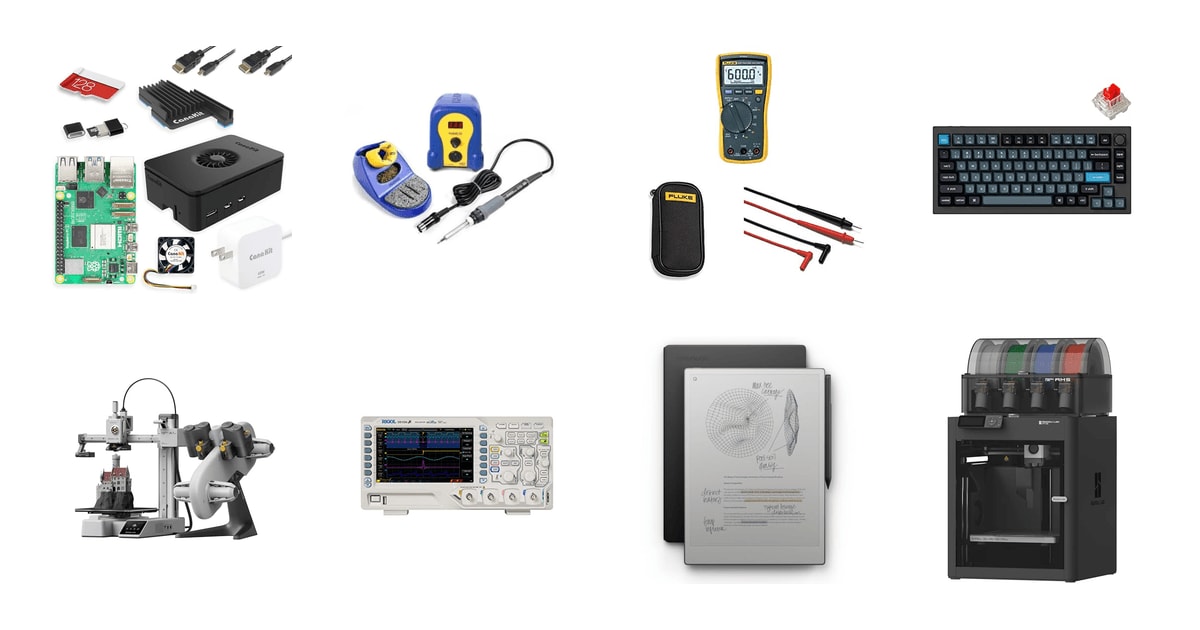
Engineers are famously hard to shop for. They already own the obvious stuff, they have opinions about brands, and they can tell a real tool from a novelty mug in about two seconds. The good news is that a great engineering gift doesn't require you to know more than they do. It's about picking something with actual capability behind it — a machine that makes parts, a board that runs projects, a tool that gets used on a Saturday afternoon instead of sitting in a drawer.
Here's the catch: engineering isn't one job. A soldering station thrills an electronics person and baffles a civil engineer. A multimeter that a power engineer treasures will gather dust next to a software developer's monitor. Nothing in this guide works for every engineer, and anyone who tells you otherwise is selling desk toys. If you can get one hint about what they actually build — circuits, code, brackets, bridges — your odds improve enormously.
So we sorted these by recipient rather than by rank. Some are bench tools for people who fix things at home. Some are desk gear that any engineer will touch forty hours a week. A few are big enough that you'd only buy them for someone close. Our favorite gift here is the Bambu Lab A1 Mini Combo, and the Keychron Q1 Pro is the safe choice when you're less sure what they tinker with.
Everything we recommend

A real prototyping machine that sets itself up in an evening
For the tinkerer who keeps saying they should get a 3D printer
$332.10 from Amazon
An enclosed printer for parts that have to survive real use
For the mechanical engineer who prototypes real parts at home
$549 from Amazon
The desk upgrade that works no matter what they engineer
For the engineer who's at a keyboard eight hours a day
$157 from Amazon
A whole computer's worth of side projects in one small box
For the engineer who keeps talking about a home lab project
$259.95 from Amazon
The bench upgrade that says you know what they actually do
For the electronics hobbyist still using a cheap pencil iron
$121.47 from Amazon
For the note-taker sketching schematics on the backs of envelopes
$699 from Amazon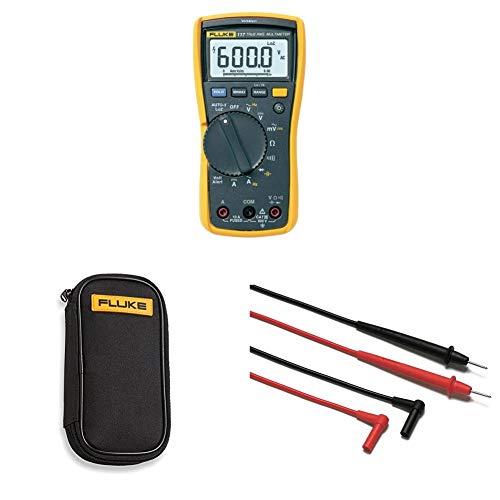
For the electrician-minded engineer who checks live circuits
$337.55 from Amazon
For the EE building out a home electronics bench
$349 from AmazonHow we picked
Discipline fit. We sorted every product by which engineer it actually serves, using manufacturer documentation and published reviews aimed at each field. A gift that only suits electrical engineers had to be excellent for them, not merely interesting to everyone.
Real capability. We looked for tools with published specs that mean something in practice — chamber temperatures, heat-up times, safety ratings, benchmark results. Novelty items and desk toys didn't make the shortlist.
First day out of the box. Owner feedback made it obvious that gifts stall when setup is a project. We favored products with documented setup times measured in minutes and calibration handled by the machine.
Room to grow. We preferred open ecosystems, hot-swappable parts, widely available consumables and active communities. Engineers modify things, and gear that welcomes that stays in use for years.
Giftability. We weighed weight, footprint, noise, ventilation and return policy, because a present that needs a garage and a dedicated circuit isn't a present. Anything that demanded a hard conversation before unwrapping got demoted.
Our favorite gift
A real prototyping machine that sets itself up in an evening
Bambu Lab A1 Mini Combo
For the tinkerer who keeps saying they should get a 3D printer
This compact printer calibrates itself, prints in multiple colors with the included AMS lite, and goes from sealed box to first print in about twenty minutes. It turns a vague interest in making things into a Saturday of actually making them.
$332.10fromAmazonThe setup is the gift. Older printers asked you to level a bed with a sheet of paper and then chase warped first layers for an hour. The A1 Mini handles bed leveling, Z-offset and flow calibration on its own in minutes. Bambu puts first-print setup at about twenty minutes, and owners describe unboxing it and printing the same evening. That matters when your recipient is excited on the day and busy all the week after.
Picture the drawer in their place with the broken bracket, the cable clip that snapped, the knob that fell off the stereo. Those are the first things people print. The build area is small, so nobody's making furniture here. But for enclosures, jigs, replacement clips and hobby parts, it covers most of what an engineer wants to make at home.
The AMS lite in this combo feeds four spools and swaps colors mid-print. It's genuinely fun, and fun is what keeps a printer in use instead of shelved. Fair warning: every color change purges filament, so multicolor prints waste noticeably more plastic. Owners pick up on that fast. Most settle into printing single-color and saving the four-spool trick for models and gifts.
It's quiet enough to live in a normal room. The A1 Mini sits on a desk or a shelf without taking over, and it's driven from a phone app, so nobody has to babysit it. If your recipient rents a small apartment, that counts for more than top speed. A printer exiled to the garage is a printer that gets used a lot less.
Flaws but not dealbreakers
It's open-frame, so it's limited to PLA, PETG and other easygoing filaments. ABS and carbon-fiber blends need a heated enclosure, which this doesn't have. If your engineer wants functional parts that live in a hot car, they'll outgrow it.
Reliability isn't flawless. Most owners report months of trouble-free printing, but a real minority hit clogged nozzles and failed prints after heavy use, and upkeep falls to them. Bambu also leans hard on its own slicer and cloud, which some open-source purists grumble about.
Best splurge
An enclosed printer for parts that have to survive real use
Bambu Lab P1S Combo
For the mechanical engineer who prototypes real parts at home
The P1S puts fast, self-calibrating printing inside a closed heated box, so tougher filaments like ABS and ASA come out without warping or splitting. It's the gift for someone who's already printed plenty and now wants parts that hold up under load.
$549fromAmazonThe enclosure is the whole point. Open printers bleed heat, and ABS and ASA shrink as they cool, so corners lift and layers pull apart. Bambu rates the P1S chamber to sustain roughly 60°C, which keeps those materials stable start to finish. For a mechanical engineer, that's the line between a display piece and a bracket they'd bolt to something.
It's fast without being fussy. The P1S is specified up to 500 mm/s with 20,000 mm/s² acceleration, and it still does automatic bed leveling and a fifteen-minute assembly. Owners who've run printers costing several times as much say the output holds its own. You're buying a serious machine, not a temperamental one.
The AMS in this combo does more here than color. Multi-material printing means dissolvable supports and two-tone functional parts, not just colorful trinkets. It's also where things get complicated — four spools, filament paths, humidity to keep an eye on. Someone brand new to printing will find this more machine than they need on day one.
Think about where it goes before you buy it. It weighs close to fifty pounds and occupies a solid cube of bench or shelf. This is not a surprise-under-the-tree-in-the-living-room gift. If your recipient is short on space, the A1 Mini is the kinder call, and nobody's going to be disappointed by it.
Flaws but not dealbreakers
The same enclosure that makes ABS possible also traps fumes, and ABS smells. Owners run it in a garage, a basement or a room they can air out, and many add filtration. Plan for ventilation before it arrives.
Bambu lists carbon- and glass-fiber filaments as not recommended on the stock hardware, so the toughest materials still call for a hardened nozzle. And while most owners are delighted, a visible minority report early trouble and returns. Buy from a seller with a clean return path.
Safest bet
The desk upgrade that works no matter what they engineer
Keychron Q1 Pro Wireless Custom Mechanical Keyboard
For the engineer who's at a keyboard eight hours a day
A heavy aluminum 75% keyboard with gasket mounting, hot-swappable switches and both Bluetooth and wired modes. It's the rare engineering gift that doesn't require you to know whether your person writes firmware, ships code or lives inside a CAD model.
$157fromAmazonAlmost every engineer types for a living. A recent developer survey found that roughly two-thirds of professional developers now use a dedicated mechanical keyboard as their daily driver, well up from the same survey a few editions earlier. That's not a niche taste anymore. Whether your person writes Python, runs simulations or dimensions drawings, this is eight hours a day of small improvement.
The Q1 Pro is built like a small anvil. The case is full aluminum, the stabilizers screw in, and silicone pads sit between the top and bottom halves. RTINGS' ergonomics work suggests gasket-mounted boards like this cut high-frequency vibration into the desk by something like a third compared with rigid tray mounts. It sounds deeper and lands softer.
It's programmable through QMK and VIA, which is the part engineers get attached to. They can remap any key, build macros for their editor, and shuffle layers without installing sketchy software. It pairs with three devices over Bluetooth and handles both Mac and Windows layouts, so it follows them from the work laptop to the home machine.
Hot-swap sockets mean the switches aren't a permanent decision. This one ships with linear reds — smooth, fairly quiet, offensive to nobody. If your recipient turns out to prefer something tactile or clicky, they pull the reds with a puller and drop new ones in. No soldering. That's a useful safety net when you're guessing at someone's taste.
Flaws but not dealbreakers
This is a renewed listing, not a factory-sealed box. Renewed units are inspected and usually fine, but cosmetics vary and the packaging won't have that new-product feel. For a gift, where the unwrapping is half the moment, weigh that.
It's heavy and not meant to travel, and the 75% layout drops the dedicated number pad. An engineer who lives in spreadsheets will miss it. Battery life also falls off quickly with the RGB lighting turned up, so most people just leave it plugged in.
Best for beginners
A whole computer's worth of side projects in one small box
CanaKit Raspberry Pi 5 Starter Kit PRO
For the engineer who keeps talking about a home lab project
This kit pairs the 8GB Raspberry Pi 5 with a case, cooling fan, heat sink, a 45W power supply and a 128GB card already loaded with the OS. There's nothing else to order and nothing to research — they plug it in and start building.
$259.95fromAmazonA bare Raspberry Pi makes a lousy gift. It shows up as a naked board, and then the recipient goes hunting for a power supply with the right wattage, a case, cooling and a card. This CanaKit bundle removes all of that homework. Owners consistently describe it as complete, and several note the components are over-specced rather than just adequate.
The Pi 5 is a real jump, not a nudge. Its quad-core Cortex-A76 runs at 2.4GHz, and published benchmarks put it at roughly two to three times the CPU performance of the Pi 4. That's the difference between a board that technically boots a desktop and one your engineer will happily leave running in a closet as a server.
The projects suggest themselves. Owners run these as Pi-hole DNS servers, Home Assistant hubs, digital signage players and file servers. Raspberry Pi OS now ships with a desktop, VS Code and the GPIO Python libraries already installed, so the gap between opening the box and blinking an LED is about twenty minutes. For a software person curious about hardware, it's the perfect on-ramp.
It suits both halves of the engineering world, which is why it's such a low-risk pick. Hardware people wire sensors to the GPIO header. Software people spin up containers and self-host the things they're tired of subscribing to. Either way it stays useful long after the novelty of a gift wears off.
Flaws but not dealbreakers
It's a computer, not an appliance. Some assembly is required, and your recipient will end up in a terminal window at some point. If they've never touched Linux and have no interest in starting, this becomes a very tidy paperweight.
The case draws mild complaints — it's glossy, it shows every fingerprint, and the power button is nobody's favorite. None of that affects how the Pi runs. There's also no keyboard, mouse or monitor here, so make sure they have spares or are comfortable running it headless over the network.
Most personal
The bench upgrade that says you know what they actually do
Hakko FX888DX-010 - Digital Soldering Station with
For the electronics hobbyist still using a cheap pencil iron
A digital soldering station with a rotary temperature dial, quick heat-up and a tip supply that'll outlast the recipient's interest in the hobby. If they solder at home, this replaces the worst tool on their bench.
$121.47fromAmazonEntry-level soldering irons make soldering feel hard. They take a minute or more to come up to temperature, then sag the second they touch a ground plane, so joints come out dull and lumpy and beginners decide they're bad at this. The FX-888DX is specified to hit 750°F in about thirty seconds and stay there. Owners who came from cheap irons describe it as the tool they wish they'd bought decades earlier.
Hakko is a name your recipient will recognize before they read the box. That's part of the gift. Handing an electronics person a blue-and-yellow Hakko station signals that you asked around and paid attention, in a way that a no-name kit from a marketplace listing never does.
The DX revision trades the older button menu for a rotary dial, which sounds trivial and isn't. Changing temperature on the previous version meant a small ritual with the manual open next to you. Here you turn a knob and read a number. Owners call out that dial specifically as the reason to get this one.
Tips are the long game. Hakko sells a wide range and they're easy to find, so the station adapts from fine surface-mount work to fat power connectors and stays serviceable for years. The unit is heavy, with grippy feet, so it stays put when your recipient inevitably yanks the cord.
Flaws but not dealbreakers
It's useless to most engineers. A civil, software or systems engineer has no reason to own a soldering station, so this gift lands hard or not at all. Only buy it if you know they build circuits.
The station arrives fairly bare. No solder, no fume extraction, and the stock tip is a general-purpose one that fine surface-mount work will outgrow. Budget for a few accessories. And a hot iron in a house with small kids needs a plan for where it lives.
Who this is for
This guide is for anyone shopping for an engineer they don't fully understand: a partner buying for a software developer, a parent buying for an engineering student, a manager pulling together something for a mechanical engineer on the team. We've covered gear that gets used at a desk or on a home bench — prototyping tools, test equipment, productivity hardware. We haven't covered clothing, books, mugs, puzzle boxes or anything whose main feature is a joke about tolerances.
If you know almost nothing about your recipient's work, start with the keyboard or the Raspberry Pi kit. Both land well across every discipline. If you know they solder, test circuits or design parts, the bench tools here will mean far more, but they only work if you're right about that. And if this is an office gift exchange with a spending cap and a recipient you barely know, skip the big machines entirely — a printer someone has to find space for isn't a kindness.
How we picked
We built this list around five things. Discipline fit: every gift here is judged by which kind of engineer it serves, because a soldering station and a digital notepad have almost no overlap in audience. Real capability: we stuck to products with published specifications that change how work gets done — sustained chamber temperature, heat-up time, safety category, benchmark scores. First day out of the box: owner feedback shows gifts die during setup, so we favored machines that calibrate themselves and document a setup measured in minutes. Room to grow: open ecosystems, hot-swappable switches, easy-to-find tips and active user communities keep a gift in service for years. Giftability: weight, noise, ventilation and returns all matter when someone else has to live with the thing.
Other gifts for engineers worth considering
If you want a gift for an engineer who thinks on paper: The reMarkable Paper Pro with Marker Plus and ($699) — The Paper Pro is a large color E Ink slab with an 11.8-inch writing surface, a textured overlay and a marker with an eraser on the end. It does one job: writing, sketching and marking up PDFs with no notifications anywhere in sight. Engineers use it for schematic sketches, design review comments and meeting notes that convert into typed text. What you give up is everything else — no browser, no apps, no calendar — and it costs a lot for a device that deliberately does less. Owners split sharply on that. The ones who love it stopped buying legal pads entirely; the ones who don't felt the writing experience didn't justify the outlay, and a few report hardware trouble out of the box.
If you want a tool a working professional would actually carry: The Fluke 117 Electricians True RMS Multimeter with ($337.55) — Fluke is the multimeter brand electrical engineers trust, and the 117 is the one they hand to people working on real building wiring. It reads true RMS, picks AC or DC automatically, and has non-contact voltage detection built in, so your recipient can tell whether a wire is live before touching it. Low input impedance keeps ghost voltages from producing nonsense readings. It carries CAT III 600V and CAT IV 300V safety ratings, which budget meters generally don't meet and which an engineer clocks instantly. This bundle adds a soft case and a hard-point lead set, though the meter already ships with probes, so treat those as spares. It's a narrow gift: deeply appreciated by anyone who touches mains wiring, pointless for someone who writes software.
More good gifts
This is what our research surfaced, not a survey of everything sold to engineers. The product below didn't land in the picks because it suits a narrower recipient — not because there's anything wrong with it.
The Rigol DS1054Z Digital Oscilloscope ($349) — The DS1054Z is the oscilloscope that home labs have been built around for years. Four channels, 50MHz of rated bandwidth, 1GSa/s sampling and deep memory, plus serial triggering and decode for UART, I2C and SPI — the buses your recipient's microcontroller projects actually run on. There's also a well-documented community firmware unlock on the EEVblog forums that opens up 100MHz bandwidth and the decode options normally sold as paid upgrades, which is half of why engineers are so fond of it. This is a specialist's gift. It only makes sense if you already know your person debugs circuits, it needs real bench space, and the cooling fan is audible in a quiet room. But if that's who you're shopping for, almost nothing else here will thrill them more.
Before you wrap it
The big machines here need a plan, not just a bow. A 3D printer wants a stable surface, a nearby outlet and Wi-Fi, and the enclosed one wants a room your recipient can ventilate. Check the footprint against their actual desk before you buy. Filament absorbs moisture, so a spool that sits open for months prints badly; a sealed bin with desiccant is a thoughtful add-on. Soldering stations want a fireproof surface and somewhere out of a toddler's reach. And for anything expensive, keep the order details handy — a few owners of every machine in this guide hit an early defect, and a clean return window is worth more than a surprise.
Questions we get
What's a good gift for a software engineer?
Desk gear, almost always. The Keychron Q1 Pro is our safest pick because every software engineer types all day and a programmable, hot-swappable board is an upgrade they'll notice immediately. The Raspberry Pi 5 kit is the other strong option — plenty of developers want a hardware side project and never get around to buying the parts.
What do electrical engineers actually want?
Bench tools with real brands on them. A Hakko soldering station and a Fluke multimeter are the two things electronics people recognize on sight and rarely buy for themselves. If your recipient already owns both, the Rigol oscilloscope is the natural next tier.
Is a 3D printer a good gift for an engineer?
Yes, more than it used to be. Automatic calibration means a printer like the A1 Mini goes from box to first print in an evening instead of a frustrating weekend. The catch is space and noise, so make sure your recipient has somewhere to put it before you commit.
Is a Raspberry Pi a good gift for someone who isn't an expert?
It's a good gift for someone who's curious, not necessarily someone who's experienced. The kit we recommend includes the case, cooling, power supply and a card with the OS already installed, so nothing needs researching. But it's still a Linux computer, and your recipient will spend some time in a terminal.
Can a non-engineer buy a good gift for an engineer?
Absolutely, as long as you pick something broad instead of guessing at a specialty. Keyboards and Raspberry Pi kits work across every discipline. Save the soldering stations and multimeters for cases where you know what they build.
What's a good gift for a new engineering graduate?
Something they'll use at the desk they're about to spend years at. A quality mechanical keyboard is the most reliable choice, and the reMarkable Paper Pro suits new engineers who take a lot of notes and sit in a lot of meetings. Both travel between jobs, which matters early in a career.
Why you should trust us
For this guide:
- We read manufacturer specification sheets and product documentation for every product here, including print speeds, chamber temperatures, heat-up times and safety ratings.
- We compared published benchmarks and review coverage from outlets including Tom's Hardware and RTINGS, along with community documentation on the EEVblog forums.
- We read through owner feedback for each listing to find the recurring complaints — filament waste, noise, case quality, early failures — and reflected those themes in the flaws.
- We read owner reviews on every listing, weighted toward the critical ones, because that is where the recurring failures show up.
- We have a systematic way of automatically fetching the latest prices, so the numbers on this page stay current.
- This is a research-focused guide, so the team may not own every product listed — though we often do own the top winners, which gives us extra context for the recommendations.
- We don't accept free products, and the retailer commission never changes which product we recommend.
Sources
Best 3D Printers 2026 — Tom's Guide, Tom's Guide
Raspberry Pi 5 Review — Tom's Hardware, Tom's Hardware
Best Soldering Irons and Stations — Wirecutter, Wirecutter
Best Multimeters — PCMag, PCMag
Best Mechanical Keyboards 2026 — RTINGS.com, RTINGS.com
reMarkable Paper Pro Review — The Verge, The Verge
Rigol DS1054Z Mega Thread — EEVblog Forum, EEVblog
Bambu Lab P1S Review — All3DP, All3DP
Stack Overflow Developer Survey 2025, Stack Overflow
IEEE Spectrum Gift Guide for Engineers, IEEE Spectrum
Amazon product listings and owner reviews for all 8 products
Manufacturer specification pages for each product
Some passages in this guide may be paraphrased with AI help. Prices are refreshed automatically.
More like this.
Continue exploring electronics reviews and recommendations.

The Best Portable Car Vacuums
Cleaning a car is mostly a reaching problem. The crumbs live in the seat track, the sand settles into the carpet pile, and the dog hair works its way into…

The Best E-Readers
An e-reader lives in the gaps of your day. You read a few pages waiting for coffee, a chapter before bed, an hour on a plane. So the things that matter…

The Best Backup Camera Rearview Mirrors
Most of your driving happens facing forward. But the two minutes a day you spend in reverse are where the dents and the tragedies happen. Federal safety…

The Best Wire Strippers and Crimpers for Automotive Work
Car wiring punishes sloppy work. Strip a wire with the wrong tool and you nick a few strands you'll never see again under heat shrink. Crimp a terminal…

The Best Commuter E-Bike Accessories
A commuter e-bike gets you to work. The gear bolted to it decides whether the ride is pleasant or grim. You're out in traffic at speeds a regular bike…

The Best Magnetic Parts Trays
Anyone who's dropped a caliper bolt into gravel knows the appeal of a magnetic parts tray. You stick it to a fender, a tool cart rail, or the side of an…