The Best E-Readers
An e-reader lives in the gaps of your day. You read a few pages waiting for coffee, a chapter before bed, an hour on a plane. So the things that matter aren't the ones on the spec sheet. They're whether the screen stays readable on a sunny patio, whether the battery survives a two-week trip, and whether you can borrow a library book without dragging out a laptop. Weight matters too, because you'll be holding this thing for hours at a stretch.
Here's the honest part: none of these devices is good at everything. Color E Ink is real now, but it's dimmer and coarser than any phone screen, so comics look pleasant rather than punchy. Big screens make PDFs readable, then get heavy in your hand. Waterproofing tends to vanish exactly where you'd want it most, on the large note-taking models. And every one of these readers is slower than the glass slab already in your pocket. You're trading speed for calm.
So pick for how you actually read, not for the longest feature list. If you mostly read novels and library loans, a small monochrome reader is plenty, and the extras are money you don't need to spend. If covers, comic panels and color highlights matter to you, pay for a color panel. If you annotate dense PDFs for work or school, you need a big screen and a real pen. We think that the Kobo Libra Colour is the best e-reader for most people, and that the Kobo Clara BW is the one to buy if you mainly read borrowed novels and want to keep the cost down.
Everything we recommend

Color and page-turn buttons, if you'll pay a bit more

Small, waterproof and simple, if you can skip color
A page-sized screen and an included pen, at real weight
At a glance
| Product | Screen Size | Storage | Price | |
|---|---|---|---|---|
| Kobo Libra ColourTop pick | — | 32GB | $259.99 |
| Kobo Clara BWBudget pick | — | 16GB | $159.99 |
| Kobo Elipsa 2EUpgrade pick | 10.3" | 32GB | $399.99 |
 | PocketBook InkPad Color 3 E Ink E-ReaderAlso in lineup | 7.8" | 32GB | $345 |
 | Aircawin for 6.13" Onyx Boox Palma 2/BooxAlso in lineup | — | — | $7.55On sale |
How we picked
Text and lighting. We compared panel specs and published reviews to find readers whose text stays sharp and glare-free in direct sun. Adjustable warm front lighting was a requirement, not a bonus, because most people read at night.
Library borrowing. We prioritized devices that let you browse a public library catalog, place holds and download loans on the device itself. Anything that pushed you to a desktop browser or a separate account setup lost ground.
Water resistance. We treated an IPX8 rating as a real advantage, since owner feedback across the category is full of bathtub and poolside stories. Where manufacturer claims and published reviews disagreed, we flagged it rather than assuming the best case.
Format flexibility. We favored readers that open ePub, PDF and comic archives without a conversion step on a computer. Spec sheets and reviews both make clear how much friction that removes for anyone with an existing library.
Battery and weight. We looked for multi-week battery claims backed up by reviewer experience, and we weighed each device against how long you'd realistically hold it. Anything past about twelve ounces is a two-handed reader.
Top pick
Color and page-turn buttons, if you'll pay a bit more
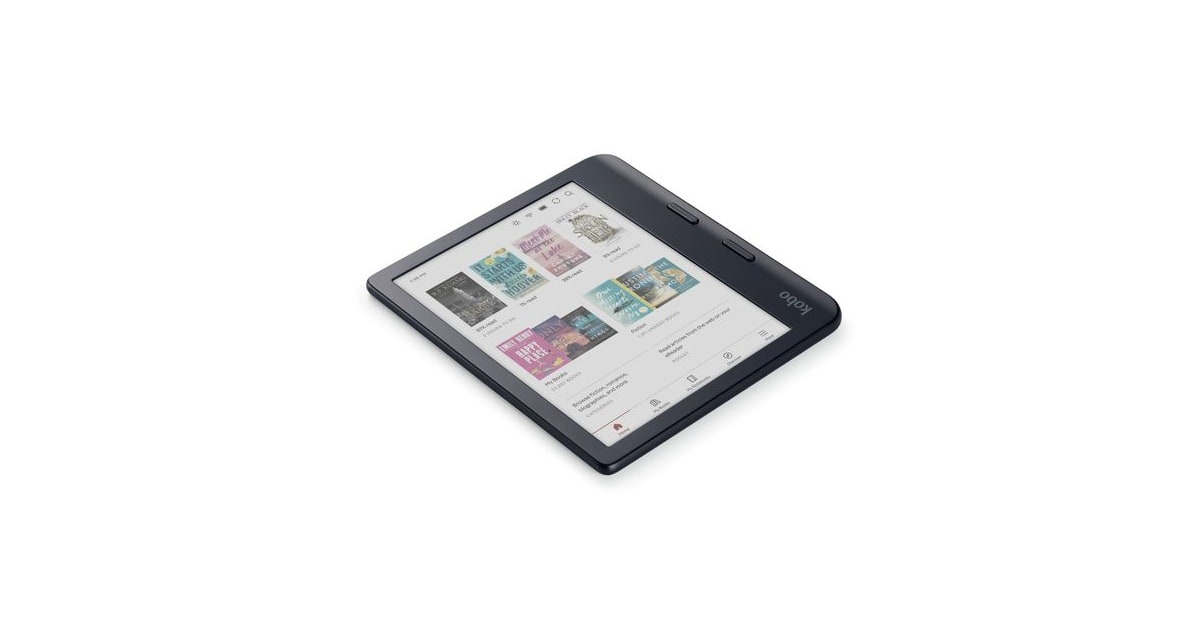
Kobo Libra Colour
The Libra Colour reads like a good paperback, and it shows comic panels, cover art and colored highlights that monochrome readers flatten into gray. You also get physical page-turn buttons, full waterproofing and library borrowing built into the software, which is more than any single Kindle gives you.
$259.99fromAmazonThe color panel is the reason to buy this one. Book covers, comic pages and colored highlights show up as actual color instead of gray mush. Published reviews of this generation of color E Ink describe a clear jump in saturation over the panels that came before it. You won't mistake it for a tablet. But if you read graphic novels, or mark up a textbook in three highlighter shades, that difference shows up on every page you turn.
Plain text still looks as sharp as it does on a monochrome reader. The color layer sits over a high-resolution black-and-white panel, so a novel renders crisply. That matters more than it sounds. Most of what you read is words, and you shouldn't have to give up text quality to get color. Reviewers comparing it against Kobo's mono readers consistently call the text side a wash, which is exactly what you want.
The page-turn buttons are the underrated part. The body is asymmetric, with a thicker grip edge and buttons on both sides. You can hold it one-handed on a crowded train and turn pages with your thumb, without reaching across the screen. Flip it over and the layout rotates for your other hand. If you've ever fumbled a swipe with wet fingers or gloves on, you'll understand the appeal within a day.
You can read it in the bath without thinking about it. Kobo rates it IPX8, which it defines as up to an hour in two meters of water. Splashes, rain and a drop in the tub are non-events. Wipe it off and keep reading. Pool decks and sandy beach bags are the other place this pays off, and it's the main reason we'd take this over the bigger note-taking model for a vacation.
Library books land on it without a computer. OverDrive and Libby support is built into Kobo's software, so you sign in with your library card, browse your branch's catalog, place holds and start reading right there. No desktop step, no shuffling files around. It also opens ePub, PDF, CBZ and a long list of other formats straight off the drive, so books you already own mostly just work.
Flaws but not dealbreakers
Color resolution is the compromise you're accepting. The color layer runs at a much lower resolution than the black-and-white text, so illustrations look pleasant rather than sharp. Photographs look worse than they do on a cheap tablet, and colors read as muted pastels under the front light. For covers and comic panels, that's fine. For anything you'd want to study closely, it isn't.
The stylus isn't in the box. Kobo sells its pen separately, and the seven-inch page is cramped for real note-taking anyway. Treat handwriting here as margin scribbles, not a notebook replacement. If writing is a big part of why you're shopping, the Elipsa 2E includes the pen and gives you room to use it.
Kobo's store is smaller than Amazon's. You'll occasionally search for a title and come up empty, especially with genre releases and Amazon exclusives. Owners work around it with library loans and sideloaded ePub files, which the device handles natively. Still, if your reading life runs on Kindle Unlimited or Audible, switching costs you something real.
Budget pick
Small, waterproof and simple, if you can skip color
Kobo Clara BW
The Clara BW is a compact monochrome reader that does the core job — novels and library loans — as well as anything here. You give up color, page-turn buttons and any stylus support, and in return you get the same waterproofing and the same library borrowing for a lot less.
$159.99fromAmazonText quality is where E Ink stopped improving, and this has it. The 6-inch panel renders novels as crisply as readers costing far more. Past this point, the differences aren't visible at normal reading distance. So for straight prose, you're not compromising at all. You're just not paying for a color layer, a pen digitizer or a bigger sheet of glass you might never use.
Waterproofing at this size and price is unusual. Kobo gives it the same IPX8 rating as our top pick — up to an hour in two meters of water. That's the feature most likely to matter and the one most often missing from small, inexpensive readers. Bath readers, beach readers and anyone who reads next to a toddler with a sippy cup should treat it as the deciding spec.
It disappears into a coat pocket. At roughly six ounces and about a third of an inch thick, it slips into a jacket or a small bag without a thought, which means you'll actually carry it. The grip is comfortable one-handed for long stretches. There's no asymmetric bezel to get used to, and nothing to snag on a bag lining.
Warm lighting and library access come standard. ComfortLight PRO shifts the front light from daylight white toward amber, on a schedule if you want, so a dark bedroom stops feeling like a flashlight to the face. Dark mode flips pages to white-on-black instead. And Libby and OverDrive are built in, same as on the pricier Kobos, so borrowing happens entirely on the device.
Flaws but not dealbreakers
There are no page-turn buttons. Every page turn is a tap or a swipe on the glass. That's fine on the couch and mildly annoying on a packed bus with one hand full, and it's the single clearest reason to step up to the Libra Colour. Owners who read one-handed tend to notice within the first week.
It's monochrome, and storage is sealed. Covers, comics and colored highlights all come through in gray, and there's no microSD slot to add space. The 16GB on board holds roughly 12,000 books, which is far more than anyone's active queue. But a big collection of image-heavy PDFs or scanned comics will fill it faster than you'd expect.
Upgrade pick
A page-sized screen and an included pen, at real weight
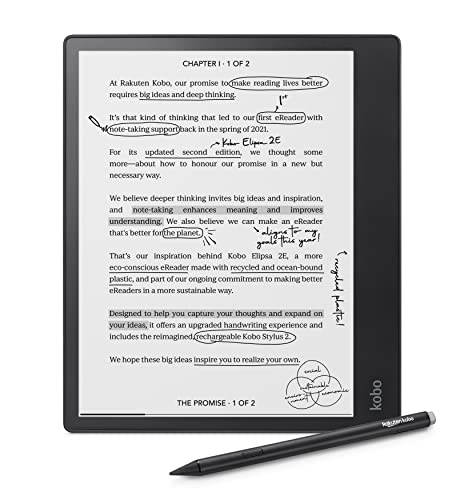
Kobo Elipsa 2E
The Elipsa 2E is for people who read PDFs and write in the margins. Its 10.3-inch screen shows a full-size document page without pinching or panning, and the Kobo Stylus 2 comes in the box rather than as a separate purchase.
$399.99fromAmazonThe screen size is the whole point. A standard academic paper or a scanned textbook page fits on it at close to actual size. If you've tried reading a two-column PDF on a 6-inch reader, you know the routine: zoom, pan, lose your place, repeat. That routine goes away here. For students, lawyers and anyone who reads documents rather than novels, it's the difference between using an e-reader and giving up on one.
The pen is included, and it's a good one. The Kobo Stylus 2 supports thousands of pressure levels, so lines thicken as you press. You can write directly on ebooks and PDFs, not just in a separate notes app. Competing writing tablets often charge extra for their pen, so factor that in when you're comparing. Published reviews describe the writing feel as close to pen on paper.
Your notes don't get stranded on the device. Handwritten pages and notebooks sync to Dropbox automatically, so what you scribble in a meeting is on your laptop afterward. That's the part that decides whether a writing tablet becomes a habit or a drawer ornament. There's 32GB on board, which is enough for a full document library plus years of notebooks.
It's still a proper Kobo reader underneath. Libby and OverDrive borrowing work the same as on the smaller models, ePub and PDF open natively, and ComfortLight PRO warms the front light for night reading. So it's not a single-purpose writing slab. It's a large reader that happens to write, which is a better deal than a writing slab that reads badly.
Flaws but not dealbreakers
There's no water resistance at all. No rating, no splash protection, nothing. That's a strange omission on the most expensive device here, and it rules out the bath and the poolside. Keep it away from the kitchen counter and the beach bag, and don't assume the recycled-plastic shell buys you any margin, because it doesn't.
It's heavy for reading in bed. At roughly fourteen ounces, it's about double the weight of the small Kobo, and your wrist will tell you so after half an hour held up. Most owners end up propping it on a knee or a table. Buy it for desk and lap reading, not for one-handed novel sessions.
Big panel, lower pixel density. Spreading the same technology across a 10.3-inch screen means text isn't quite as dense as on the 6-inch models. It's perfectly readable, and you likely won't notice unless you go looking. But if you're buying purely for novels, you'd get sharper type from a smaller reader.
Who this is for
This guide is for anyone who reads books and wants a screen that behaves like paper. That includes people leaving Amazon's ecosystem, library regulars who borrow through Libby, students who annotate PDFs, and comic readers who want color without a tablet's glare and notifications. If you already own a recent e-reader that you like, none of these is a big enough leap to justify replacing it. Upgrade when your battery is fading, your screen has a crack, or you need something the old one genuinely can't do, like color or handwriting.
We cover dedicated E Ink reading devices here, not tablets and not phones. If you read mostly at night in short bursts and don't mind a backlit screen, a tablet you already own will do the job and cost you nothing. We also don't cover accessories, cases or replacement parts. And note that every device in this guide asks something of you: sideloading a file now and then, or setting up a library card, or living with a screen that redraws slowly. That's the deal with E Ink.
How we picked
Text and lighting: we wanted sharp, glare-free type and adjustable warm light, since that's what determines whether long sessions feel comfortable or tiring. Library borrowing: built-in OverDrive and Libby access beat any setup that sends you to a computer first, because friction is what stops people from borrowing. Water resistance: an IPX8 rating earns real credit here, and we say so plainly when a device doesn't have one. Format flexibility: native ePub, PDF and comic-archive support means the books you already own just open, with no conversion step. Battery and weight: we favored multi-week battery claims that reviewers back up, and we judged each device by how long you'd actually want to hold it.
The competition
This is what our research surfaced in this category, not a census of everything you can buy. Plenty of good readers exist that we didn't have listing facts or published reviews for, and the market shifts constantly. What follows is the device that came close but didn't earn a pick, along with the kind of reader who should still take a hard look at it.
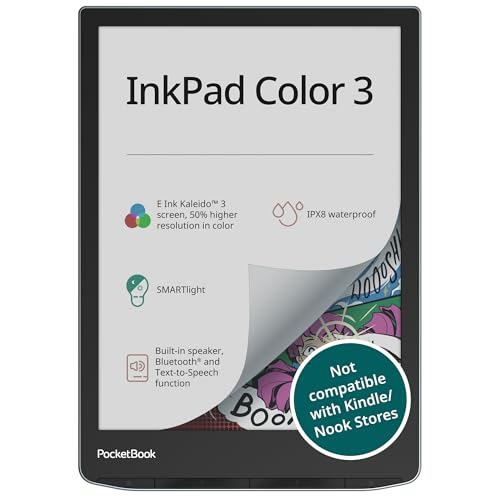
The PocketBook InkPad Color 3 E Ink E-Reader ($345) — The PocketBook InkPad Color 3 has the largest color screen here at 7.8 inches, physical page-turn buttons, and a microSD slot — a real advantage if your manga collection outgrows fixed storage. It also opens more file types than anything else in this guide, including comic archives, with no conversion step. It lost to the Libra Colour on software: published reviews consistently describe PocketBook's interface as clunkier than Kobo's, and there's no built-in Libby or OverDrive, so library loans mean setting up Adobe DRM on a computer first. Its water-resistance claims are inconsistent between the listing and published reviews, so we wouldn't count on submersion. Support outside Europe is thinner too. Comic readers who don't borrow from a library should still consider it.
Setup and care
Skip the screen protector — E Ink is already matte, and a film only muddies the text. If your reader is rated IPX8, rinse it under a tap after a beach day and dry the port before charging, because salt and sand do more damage than water does. Charge to full before a trip and turn Wi-Fi off; that alone is most of the difference between a two-week battery and a two-month one. Don't leave any of these in a hot car, since E Ink panels and their adhesives don't love heat. For library borrowing, set up your card in the device's settings first, and get an Adobe ID sorted on a computer if you go with PocketBook. Keep a cheap folio case on the big writing model — its screen is the most exposed here.
Questions we get
What's the best alternative to a Kindle?
The Kobo Libra Colour, for most people. It combines a color screen, physical page-turn buttons, IPX8 waterproofing and built-in library borrowing in one device, and it opens ePub files without any conversion step. If you read mainly novels and don't need color, the Kobo Clara BW gets you the same reading quality and the same library access in a smaller, cheaper package.
Which e-reader works best with Libby and library books?
Kobo's readers do. Libby and OverDrive support is built into the software on the Libra Colour, Clara BW and Elipsa 2E, so you can browse your library's catalog, place holds and start reading without touching a computer. PocketBook devices can read library loans, but you'll need to set up an Adobe ID on a desktop first. Kindles technically manage it through a browser workaround, which works but isn't pleasant.
Is color E Ink worth paying extra for?
It depends entirely on what you read. For comics, graphic novels, magazines and color-coded study highlights, yes — those things are genuinely better in color. For novels, no, because the text renders identically and you'd be paying for a layer you never see. Set your expectations to muted watercolor rather than a phone screen, and you won't be disappointed.
Can I read an e-reader in bright sunlight?
Yes, and this is E Ink's biggest advantage over any phone or tablet. The screen reflects ambient light instead of shining at you, so it gets easier to read as the sun gets brighter, much like paper. Turn the front light off outdoors and you'll have no trouble. The glare-free front glass on the Kobo and PocketBook models keeps reflections down further.
How long does the battery actually last?
On a dedicated reader like the Kobo models here, plan on several weeks of real use per charge if you keep Wi-Fi off between downloads. Manufacturers quote figures based on about half an hour of reading a day, so heavy readers should expect less. Front light brightness is the other big drain. Either way, you're charging monthly rather than nightly.
Which one should I get for annotating PDFs and taking notes?
The Kobo Elipsa 2E. Its 10.3-inch screen shows a full document page without zooming, the Kobo Stylus 2 is included rather than sold separately, and handwritten notes sync to Dropbox on their own. The Libra Colour accepts a stylus too, but the pen costs extra and the page is small for real writing. Just remember the Elipsa 2E has no water resistance at all.
Why you should trust us
For this guide:
- We read manufacturer spec sheets and listing details for every device here, and compared them against published reviews of the same models and panel generations.
- We weighed recurring themes in owner feedback — one-handed reading, water accidents, storage limits and software friction — more heavily than any single opinion.
- We flagged the places where a manufacturer's claim and independent reviews disagree, rather than repeating the claim.
- We read owner reviews on every listing, weighted toward the critical ones, because that is where the recurring failures show up.
- We have a systematic way of automatically fetching the latest prices, so the numbers on this page stay current.
- This is a research-focused guide, so the team may not own every product listed — though we often do own the top winners, which gives us extra context for the recommendations.
- We don't accept free products, and the retailer commission never changes which product we recommend.
Sources
Best E-Readers 2026 — The Verge, The Verge
Best E-Readers 2026: Kindle Alternatives — Wirecutter / New York Times, Wirecutter / NYT
Best E-Readers 2025–2026 — Wired, Wired
Kobo Libra Colour Review — Good e-Reader, Good e-Reader
ONYX BOOX Palma 2 Review and Discussion — MobileRead Forums, MobileRead Forums
E Ink Holdings Kaleido 3 Color E Ink Product Specifications, E Ink Holdings
PocketBook InkPad Color 3 Review — The Digital Reader, The Digital Reader
Daylight DC-1 E Ink Tablet Review — The Verge, The Verge
Amazon product listings and owner reviews for all 5 products
Manufacturer specification pages for each product
Some passages in this guide may be paraphrased with AI help. Prices are refreshed automatically.
More like this.
Continue exploring electronics reviews and recommendations.

The Best Waterproof E-Readers
Reading in the bath used to mean paperbacks with wavy, buckled pages. A waterproof e-reader fixes that. Every device here carries at least an IPX8 rating,…

The Best Science Books for Curious Readers
A good science book has to do two jobs at once. It has to be accurate, and it has to keep you turning pages on a Tuesday night when you're tired. Most…

The Best Floor Lamps for Reading
A good reading lamp does one job. It puts light on the page without putting it in your eyes. The ceiling fixture doesn't manage that. It washes the room,…

The Best Chapter Books For Early Readers Ages 6 To 8
The jump from picture books to chapter books is where a lot of kids stall out. One night they're happily reading about a duck, and the next you hand them…

The Best E-Readers
A good e-reader earns its keep by disappearing. You pick it up, the text is there, and nothing buzzes at you. The screen reflects light instead of…

The Best Car Stereo Head Units
Your factory stereo is probably the oldest piece of technology you touch every day. Replace it and you get wireless Apple CarPlay or Android Auto, a…