The Best E-Readers
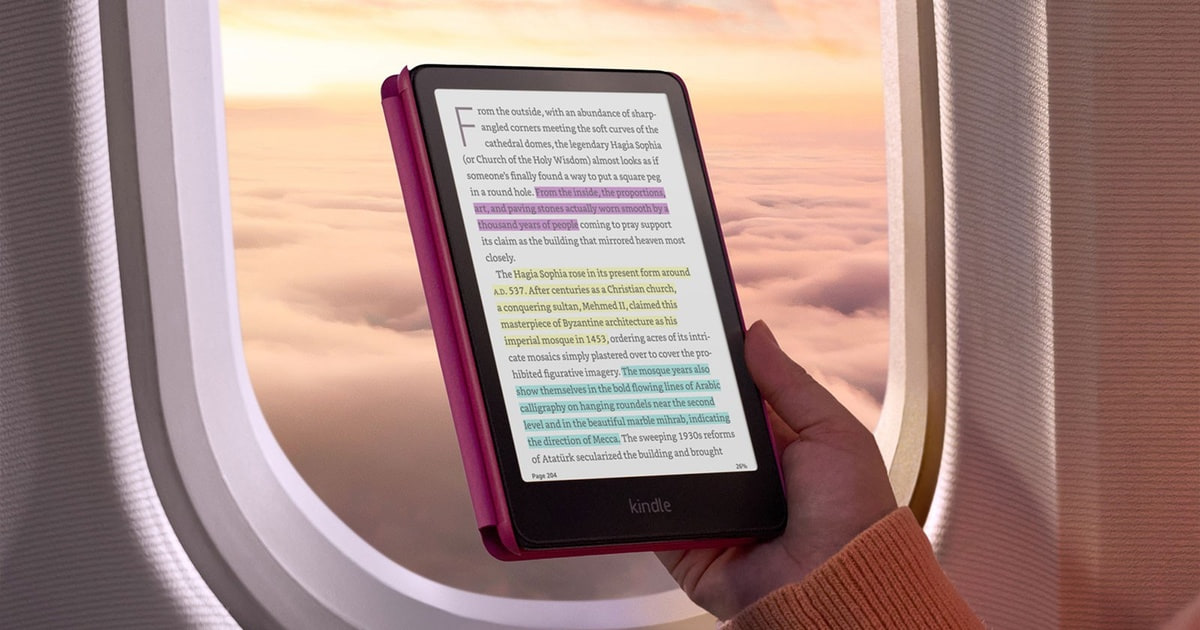
A good e-reader earns its keep by disappearing. You pick it up, the text is there, and nothing buzzes at you. The screen reflects light instead of throwing it at your face, so a chapter at the beach actually reads better than one on your phone, and a chapter in bed doesn't leave your eyes stinging. Battery life gets measured in weeks, not hours. If you read an hour a day, that combination is why a dedicated device still beats the tablet already sitting on your nightstand.
None of them is a tablet, though, and you shouldn't want one to be. E-ink refreshes slowly, so page turns have a faint flicker and old text ghosts behind the new page on every device here. Color panels drop to a lower resolution when color is on, which means comics look good but not glossy-magazine good. And every one of these readers pushes you toward one bookstore. Switching later means converting files or living with two apps.
So the choice comes down to two questions. Do you borrow from the library, and do you write on what you read? If the answer to both is no, the mainstream Amazon option covers you completely. We think that the Kindle Paperwhite 16GB is the best e-reader for most people, and that the Kobo Clara BW is the one to buy if most of your books come from Libby or OverDrive.
Everything we recommend

The sharpest screen and longest battery, for almost anyone

Borrow straight from the library, on a smaller screen

A notebook and a library in one, if you actually write

Color covers and highlights, if you accept softer color
At a glance
| Product | Storage | Battery Life | Price | |
|---|---|---|---|---|
| Amazon Kindle Paperwhite 16GBTop pick | 16GB | Up to 12 weeks | $199.99 |
 | Amazon Kindle Paperwhite Signature Edition 32GBAlso consider | 32GB | Up to 12 weeks | $249.99 |
| Amazon Kindle Colorsoft 16 GBAlso great | 16 GB | Up to 8 weeks | $289.99 |
| Amazon Kindle ScribeUpgrade pick | 64GB | — | $449.99 |
 | Amazon Kindle Kids 16GBAlso consider | 16GB | Up to 6 weeks | $122.99On sale |
| Kobo Clara BWRunner-up | 16GB | — | $159.99 |
 | Kobo Libra ColourAlso consider | — | — | $233.99 |
 | Kobo Elipsa 2EAlso in lineup | 32GB | — | $399.99 |
How we picked
Screen and sharpness. We compared panel generation, size and pixel density across every listing, since a 300-ppi display is the baseline for text that doesn't look ragged at small font sizes. Color models had to be judged on their black-and-white mode too, because that's where most reading happens.
Getting books on it. We weighed how each device handles library loans through Libby and OverDrive, and whether it opens ePub files without conversion. A device that adds a browser step to every loan loses ground with heavy borrowers.
Battery and charging. We treated manufacturer-rated battery figures as a ceiling, not a promise, and looked for owner reports of charge intervals in normal use. Wireless charging counted as a convenience, not a requirement.
Water and durability. IPX8 protection to two meters for an hour is the standard in this category, and we treated its absence as a real limitation. Owner feedback about screens failing or devices bricking after months of use weighed against a product.
Writing and annotation. Only two devices here accept a stylus, so we looked at what comes in the box, whether the pen needs charging, and how annotations survive a font-size change on a reflowable ebook.
Top pick
The sharpest screen and longest battery, for almost anyone
Amazon Kindle Paperwhite 16GB
The Paperwhite pairs a 7-inch, 300-ppi glare-free screen with IPX8 waterproofing and a charge that Amazon rates at up to 12 weeks. It's the version of the Kindle that fixes the small annoyances of the cheaper one without adding much weight or bulk.
$199.99fromAmazonThe seven-inch screen is the whole reason to buy this one. Amazon's entry-level Kindle gives you six inches, and that missing inch matters more than it sounds. You get more words per page, fewer taps per chapter, and room to bump the font up without turning every page into a single paragraph. The panel runs at 300 ppi with a higher contrast ratio than the previous generation, so letters keep clean edges even at small sizes.
Battery life is the part people underestimate until they live with it. Amazon rates a single USB-C charge at up to 12 weeks, and that figure assumes light reading with Wi-Fi off. Read half an hour a night with Wi-Fi on and you'll still go a couple of months between charges. The practical effect is that you stop thinking about the battery at all, which is not something you can say about any tablet.
It's also the rare gadget you can take into the tub. The IPX8 rating covers two meters of water for an hour, so a poolside splash or a slip into the bath is an inconvenience, not a funeral. Owners who read outdoors keep coming back to this point. Sunscreen and sand are still your problem, but water isn't, and that changes where you're willing to bring it.
What you don't get is what makes it work. There's no browser worth using, no notifications, no feed. Amazon says page turns are 25% faster than the last generation and the device is about 20% quicker overall, and the speed matters mostly because it keeps you from noticing the hardware. Readers who switch over from phone reading consistently describe the same thing: they finish more books, and their eyes stop aching at night.
Flaws but not dealbreakers
There's no wireless charging here, and no physical page-turn buttons. Amazon has never put buttons on a Kindle, so if you read one-handed on a train and hate reaching across the glass, the Kobo models are the only real answer. Storage tops out at 16GB at this tier, which holds thousands of books but fills faster if you keep audiobooks on the device.
Library borrowing is the bigger catch. Libby works with Kindles, but loans have to route through Amazon's delivery step rather than downloading straight to the device. It's a few extra taps in a browser every single time. If you check out a book or two a week, that friction adds up, and the Kobo option below removes it entirely.
Runner-up
Borrow straight from the library, on a smaller screen
Kobo Clara BW
The Clara BW reads library books natively through Libby and OverDrive, handles ePub files with no conversion, and costs meaningfully less than the Paperwhite. The screen is 6 inches instead of 7, and Kobo's store is smaller than Amazon's.
$159.99fromAmazonIf you're a regular at your library's digital shelf, this is the device that respects your time. Borrowing happens on the Clara BW itself: search, tap, read. No laptop, no Amazon redirect, no wondering whether the loan actually landed. Owners who moved over from a Kindle almost always name this as the reason, and it's the single clearest functional difference between the two ecosystems.
The reading experience itself is close to a wash. The Clara BW uses an E Ink Carta 1300 HD panel at 300 ppi, the same display generation as the Paperwhite's. Black-and-white text looks essentially equivalent side by side. It's IPX8 waterproof to the same two meters for 60 minutes, and ComfortLight PRO shifts the front light toward amber at night while cutting blue light.
Open formats are the other quiet advantage. Drag an ePub onto it over USB and it just opens, no Calibre, no Send to Kindle, no converted file with broken formatting. That matters if you buy from independent stores, download public-domain classics, or have a decade of files from somewhere other than Amazon. Kobo also builds in a dark mode and reading stats that some people find genuinely motivating.
The size is a real trade, not a rounding error. At 6 inches and well under half a pound, it slips into a coat pocket and reads comfortably in one hand for a long stretch. You'll see less text per page than on the Paperwhite and turn pages more often. For pocketability, plenty of readers consider that a win rather than a compromise.
Flaws but not dealbreakers
Kobo's bookstore is smaller than Amazon's, and its sales are less aggressive. If most of your purchases already live in a Kindle account, moving them over isn't practical, and buying new titles in two places gets annoying fast.
Some owners report ghosting between pages and occasional sluggishness when typing on the on-screen keyboard. Neither ruins the reading, but the keyboard lag is noticeable when you're searching a title. There's no wireless charging either, so it's USB-C every time.
Upgrade pick
A notebook and a library in one, if you actually write
Amazon Kindle Scribe
The Scribe is the only Kindle that takes a stylus, and it comes with the Premium Pen in the box. A 10.2-inch, 300-ppi screen shows a full PDF page without zooming, and built-in AI tools convert handwriting to typed text and summarize notes.
$449.99fromAmazonThis one is worth it only if you write. As a reader, the Scribe is a big, heavy Paperwhite with more storage. As a notebook, it's a different category of device: you can mark up an imported PDF directly on the page, and Active Canvas opens margin space in a book when you start writing on it. If your annotations currently live in a stack of legal pads you never reopen, that's the pitch.
The 10.2-inch screen is the feature that justifies the size. Academic papers, sheet music, technical manuals and anything with two columns render at full page without pinch-zooming and panning. That's the failure mode of reading PDFs on a 7-inch reader, and the reason people give up on it. The included Premium Pen needs no charging and no pairing, which is one less thing to think about mid-thought.
The AI tools are more useful than they sound. Handwriting conversion turns a page of scrawl into readable text, and note summarization compresses a long meeting into something you'd actually revisit. You need Wi-Fi for the cloud processing, so they're not available on a plane. Students and people who take notes in meetings tend to be the ones who get the most out of them.
With 64GB, you can keep a real document archive on the device instead of shuttling files back and forth. PDFs are far larger than ebooks, and a semester of course readings or a few years of technical documentation eats storage that a text-only library never would.
Flaws but not dealbreakers
It's heavy. At roughly 0.95 pounds, it's more than twice the Paperwhite, and holding it above your face in bed gets old quickly. It's also the most expensive Kindle by a wide margin, which is impossible to justify if you don't annotate regularly.
Owner feedback on this generation is more mixed than on the Paperwhite line, with a small but real cluster of complaints about hardware quality out of the box. Check yours carefully during the return window. And e-ink refresh limits still apply: rapid sketching ghosts noticeably, so it's a device for writing and marking up, not drawing.
Also great
Color covers and highlights, if you accept softer color
Amazon Kindle Colorsoft 16 GB
The Colorsoft is Amazon's first Kindle with a dedicated color e-ink panel, built for color rather than a filter layered on a black-and-white screen. It's the pick for magazines, illustrated non-fiction and anyone who color-codes highlights.
$289.99fromAmazonColor highlighting is the feature that sneaks up on you. You can mark passages in yellow, orange, blue or pink, which turns a re-read of a dense book into something you can actually navigate. If you study, annotate for work, or run a book club, that's a real organizational tool rather than a novelty. Covers and illustrations also render in color, which makes browsing your own library more pleasant than it sounds.
Amazon built a display optimized for color here instead of adapting the Paperwhite panel, and it shows in how the device handles mixed content. Magazine layouts, cookbooks and illustrated non-fiction hold together without the backlight glare of a tablet. Text-heavy chapters still render sharply in black and white, so you're not giving up your novel reading to get the color.
Everything else matches the Paperwhite closely. Same 7-inch size, same IPX8 waterproofing to two meters for 60 minutes, same amber-to-white light adjustment for reading after dark. Amazon rates the battery at up to 8 weeks rather than 12, which is still weeks rather than hours, and still long enough that you'll forget when you last charged it.
Owners who read graphic novels and comics on it are consistently the happiest buyers, and the ones who read only text-based fiction are the ones asking whether it was worth it. That split is a good self-test. If nothing you read has pictures in it, the Paperwhite gives you a sharper screen for less money.
Flaws but not dealbreakers
Color mode runs at 150 ppi, half the resolution of black-and-white mode, and several owners describe the color as muted rather than vivid. Set your expectations at watercolor, not a phone screen. If you want saturated comic panels, a tablet still wins on color and loses on everything else.
It costs a good deal more than the standard Paperwhite for a benefit that only some readers use, and like every Kindle, it has no physical page-turn buttons. Battery life is also shorter than the Paperwhite's rated figure.
Who this is for
This guide is for anyone who reads books on a screen and is tired of doing it on a phone. If you finish a book a month or more, a dedicated e-ink reader will change how your eyes feel at the end of a long session, and it removes the notification that pulls you out of chapter three. It's also for the specific cases: the library regular, the person marking up PDFs for work or school, and the parent handing a device to a nine-year-old.
It's not for you if you read a few pages a year, or if you mostly want one device for video, email and the occasional novel. That's a tablet, and no e-reader here is a good tablet. We're also only covering dedicated reading devices, not phones, LCD tablets, or the reading apps that run on them. Everything here is Wi-Fi only, so none of them download a book without a network.
How we picked
Screen: we treated 300 ppi as the floor for text and judged color panels on their black-and-white mode, since that's where most of your reading happens. Books: native Libby and OverDrive borrowing and no-conversion ePub support separated the open devices from the ones that route you through a browser. Battery: manufacturer figures set the ceiling, and owner reports set the realistic expectation of weeks, not hours. Water: IPX8 to two meters for an hour is the category standard, and going without it is a real limitation for anyone who reads near a pool or a tub. Writing: for the two stylus devices, we looked at what's included, whether the pen needs charging, and how notes hold up when you change the font size.
Other e-readers worth considering
If you want wireless charging and double the storage: The Amazon Kindle Paperwhite Signature Edition 32GB ($249.99) — The Paperwhite Signature Edition is the same reader as our top pick with three additions: Qi wireless charging, a light sensor that adjusts brightness on its own, and 32GB instead of 16GB. Drop-and-go charging is genuinely nicer if you already keep a pad on your nightstand. But you're paying a premium for convenience, and owners are candid that the extras are pleasant rather than essential. The auto-brightness can also misjudge a room with a lamp on one side, and you'll end up overriding it. If you don't own a Qi pad and read plain text, buy the standard Paperwhite and spend the difference on books.
If you want color and physical page-turn buttons: The Kobo Libra Colour ($233.99) — The Kobo Libra Colour puts a 7-inch Kaleido 3 color panel behind actual buttons, which is something Kindle has never offered. For manga and comics, where you're flipping constantly, buttons beat tapping glass, and CBZ and CBR archives open natively without conversion. Add Libby borrowing on the device and open ePub support and it's the most flexible color reader here. Color runs at the same reduced resolution as the Colorsoft's, so it's not sharper, just better equipped. Some owners have hit friction setting up a Kobo account, which requires a card on file, so budget a few minutes for that.
If you want an e-reader for a kid: The Amazon Kindle Kids 16GB ($122.99) — Kindle Kids is a 6-inch Kindle with a protective cover, a two-year guarantee that covers breakage, and a six-month Amazon Kids+ subscription in the box. The guarantee is the real product: handing a child a device you'd otherwise flinch about is the whole point. There are no apps, videos or games, and the front light is as bright at maximum as the Paperwhite's. Two cautions. The subscription auto-renews monthly after the trial, so set a reminder, and the device still works as a full ad-free Kindle without it. And a handful of parents report slow interfaces or units that stop powering on, which is where that guarantee earns its keep.
The competition
These are the other readers our research turned up in this lineup, not a survey of everything sold. Neither is a bad device. Each is built for a narrower reader than the picks above, and both ask for a lot of money to serve that reader.
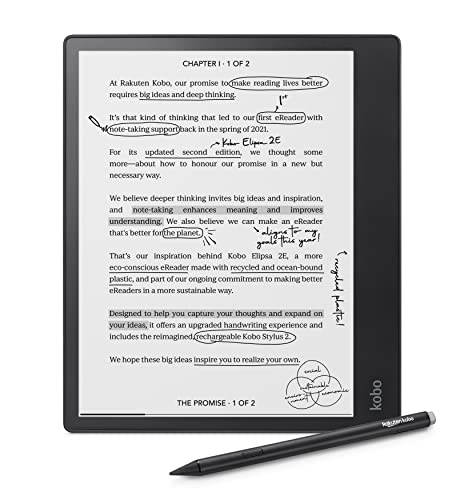
The Kobo Elipsa 2E ($399.99) — The Kobo Elipsa 2E is the open-ecosystem answer to the Kindle Scribe: a 10.3-inch Carta 1200 screen, a rechargeable Kobo Stylus 2 in the box, 32GB of storage, and native Libby borrowing. Its markup technology keeps annotations anchored when you change font size, which matters if you re-read what you've marked. It's also lighter than the Scribe, which owners notice. But it has no AI note tools, the stylus needs charging, and owner feedback is the most divided of anything here, with recurring reports of frozen screens and sluggish notebook performance. Choose it if you need library access and PDF sideloading in a big annotating device, and you're willing to accept that risk.
Living with an e-reader
Buy a case with a magnetic cover. It puts the device to sleep when you close it, which stops accidental page turns in a bag and saves a surprising amount of battery. Wipe the screen with a dry microfiber cloth only, and skip glass cleaner entirely, since e-ink surfaces are plastic and haze permanently. If yours is IPX8 and takes a dunk in a pool, rinse it in fresh water and let it dry fully before charging, because salt and chlorine sit in the USB-C port. Store it around half charged if you're setting it aside for a season. And download your next few books before a flight, since every device here needs Wi-Fi to fetch anything new.
Questions we get
Which Kindle should I buy?
For most people it's the Paperwhite 16GB: a 7-inch, 300-ppi screen, IPX8 waterproofing, and a charge rated at up to 12 weeks. Step up to the Signature Edition only if you want wireless charging and 32GB. Pick the Colorsoft if you read magazines, comics or illustrated non-fiction, and the Scribe only if you'll genuinely annotate documents.
What's the best e-reader for borrowing library books?
The Kobo Clara BW. It connects to Libby and OverDrive on the device itself, so you search, borrow and start reading without touching a computer. Kindles do work with Libby, but every loan has to be routed through Amazon's delivery step in a browser first. If you borrow weekly, that difference is the whole decision.
What's the real difference between Kindle and Kobo?
Kindle is a closed ecosystem with a much larger store, proprietary formats, and syncing across Amazon's apps on any phone or laptop. Kobo is open: ePub files work by drag and drop, and library borrowing is built in. If your existing purchases are all Amazon, moving is more trouble than it's worth. If you're starting fresh and use the library, Kobo is the easier life.
Do Kindles read ePub files?
Not directly. Amazon uses its own formats, so an ePub has to be converted with a tool like Calibre or sent through Send to Kindle, which converts it for you. Kobo devices open ePub natively with no extra step, and the Onyx Boox Palma runs Android, so you can install whichever reading app you prefer.
How long does the battery actually last?
Manufacturer figures assume light reading with Wi-Fi off, so treat them as a ceiling. A Paperwhite rated at up to 12 weeks realistically goes about two months for someone reading 30 to 60 minutes a night with Wi-Fi on. Heavy readers at high brightness will see closer to a month. E-ink only draws power when the page changes, which is why the number is weeks and not hours.
Can I read one in bright sunlight?
Yes, and it's one of the strongest reasons to own one. E-ink reflects ambient light instead of fighting it, so direct sun makes the page easier to read rather than harder. Every device here is glare-free outdoors. A phone or tablet in the same conditions turns into a mirror and needs maximum brightness to stay legible.
Why you should trust us
For this guide:
- We compared manufacturer specifications across all nine listings, including panel generation, pixel density, waterproof rating, storage and rated battery life.
- We read published reviews and coverage of each line, along with owner feedback, to find the failure modes that show up after months rather than days.
- We did not use, install or measure any of these devices ourselves, and every claim here comes from those published specifications, reviews and owner reports.
- We read owner reviews on every listing, weighted toward the critical ones, because that is where the recurring failures show up.
- We have a systematic way of automatically fetching the latest prices, so the numbers on this page stay current.
- This is a research-focused guide, so the team may not own every product listed — though we often do own the top winners, which gives us extra context for the recommendations.
- We don't accept free products, and the retailer commission never changes which product we recommend.
Sources
The Best E-Readers for 2026 — Wirecutter (NYT), Wirecutter
Best E-Readers Ranked & Tested — RTINGS.com, RTINGS.com
Best E-Readers of 2026 — PCMag, PCMag
Best E-Readers 2026: Every Model Tested — TechRadar, TechRadar
Best E-Readers for 2026 — CNET, CNET
Amazon product listings and owner reviews for all 8 products
Manufacturer specification pages for each product
Some passages in this guide may be paraphrased with AI help. Prices are refreshed automatically.
More like this.
Continue exploring lifestyle reviews and recommendations.

The Best Science Books for Curious Readers
A good science book has to do two jobs at once. It has to be accurate, and it has to keep you turning pages on a Tuesday night when you're tired. Most…

The Best Chapter Books For Early Readers Ages 6 To 8
The jump from picture books to chapter books is where a lot of kids stall out. One night they're happily reading about a duck, and the next you hand them…

The Best Waterproof E-Readers
Reading in the bath used to mean paperbacks with wavy, buckled pages. A waterproof e-reader fixes that. Every device here carries at least an IPX8 rating,…

The Best Floor Lamps for Reading
A good reading lamp does one job. It puts light on the page without putting it in your eyes. The ceiling fixture doesn't manage that. It washes the room,…

The Best E-Readers
An e-reader lives in the gaps of your day. You read a few pages waiting for coffee, a chapter before bed, an hour on a plane. So the things that matter…

The Best Avalanche Beacons
An avalanche transceiver spends almost all of its life doing nothing. It rides in a harness under your jacket, pulsing away on 457 kHz, and you forget…