The Best Waterproof E-Readers
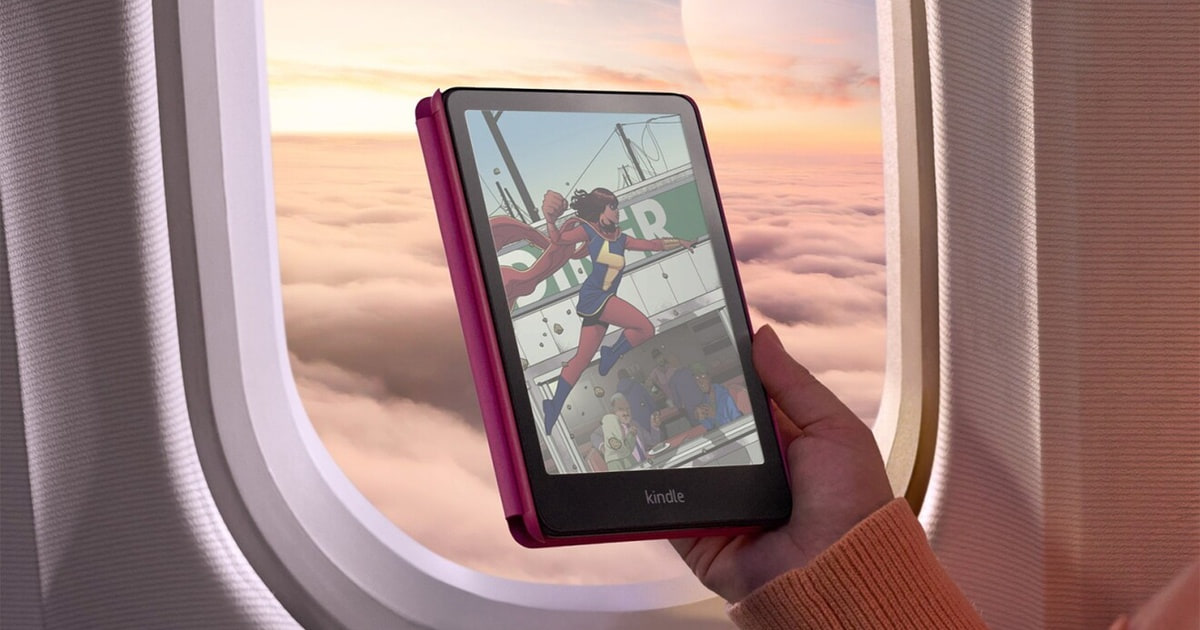
Reading in the bath used to mean paperbacks with wavy, buckled pages. A waterproof e-reader fixes that. Every device here carries at least an IPX8 rating, which means it's rated to survive roughly half an hour under two meters of fresh water. In practice that covers the things that actually happen to a book: a drop in the tub, a splash at the pool, a sudden downpour on the beach. You stop babying the thing and just read.
But no e-reader stays waterproof forever. IPX8 testing uses clean fresh water, in a lab, on a brand-new device. Salt and chlorine work at the seals over months, and a charging port that's been knocked around stops sealing as well as it once did. None of these are dive gear. Color E Ink has the other honest limitation: it's much better than it was, but it still looks muted next to a phone screen, and it costs you a little text contrast.
So think about how you'll actually use one. Screen size drives comfort more than anything else — six inches slips into a jacket pocket, seven is the sweet spot for most people, and ten inches is for PDFs and margin notes. Then pick your ecosystem, because that's the choice that's hard to undo once you've bought a few hundred books. We think that the Amazon Kindle Paperwhite is the best waterproof e-reader for most people, and that the Kobo Libra Colour is the one to buy if you read comics or borrow heavily from your library.
Everything we recommend

A sharp screen and weeks of battery, if Amazon suits you

Real buttons and color, at some cost to text contrast

A small screen and few extras, but the text looks great

A ten-inch page and a pen, if PDFs are why you're buying

Color covers and highlights, with a shorter battery run
Prices as of Oct 27, 8:28 AM PT · Details
At a glance
| Product | Storage | Waterproof Rating | Price | |
|---|---|---|---|---|
| Amazon Kindle Paperwhite 16GBTop pick | 16GB | Waterproof | $199.99 |
 | Amazon Kindle Paperwhite Signature Edition 32GBAlso consider | 32GB | Waterproof | $249.99 |
| Amazon Kindle Colorsoft 16 GBAlso great | 16 GB | Waterproof | $289.99 |
| Amazon Kindle ScribeUpgrade pick | 16GB | — | $399.99 |
| Kobo Clara BWBudget pick | 16GB | IPX8 | $159.99 |
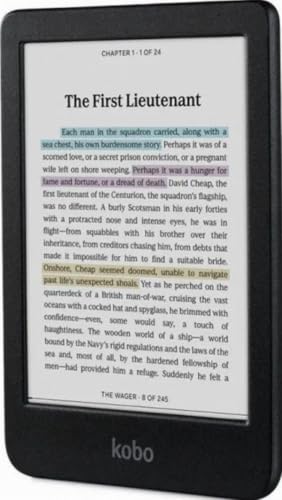 | Kobo Clara ColourAlso consider | 16GB | IPX8 | $177.99 |
| Kobo Libra ColourRunner-up | — | Waterproof | Check price |
 | Kobo Sage PowerCoverAlso in lineup | — | — | $49.99 |
 | Kobo Elipsa 2E Black SleepcoverAlso in lineup | — | — | $69.99 |
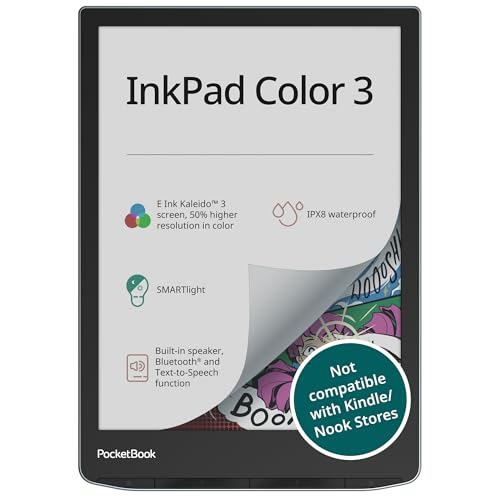 | PocketBook InkPad Color 3 E Ink E-ReaderAlso in lineup | 32GB | IPX8 | $345 |
Prices as of Oct 27, 8:28 AM PT · Details
How we picked
Water rating. We required at least a certified IPX8 rating, which covers thirty to sixty minutes at two meters in fresh water, and we treated anything rated only for splashes as disqualified. IP68 earns a nod for added dust protection, but it doesn't change what happens in a bathtub.
Screen and sharpness. We compared panel specs and published reviews for resolution, contrast and glare behavior in bright sun. Anything short of a 300-ppi-class display for text reading was out.
Battery claims. We took manufacturer battery figures as a ceiling, not a promise, and weighed them against what reviewers and owners describe after months of nightly reading. Weeks per charge was the bar; days was not.
Ecosystem and formats. We looked at what happens when you want a library book or a sideloaded EPUB. Native Libby and OverDrive support counted heavily for readers who borrow, and Amazon's store counted for readers who buy.
Buttons and extras. We noted physical page-turn buttons, stylus support, wireless charging and memory card slots, and asked whether each one changes daily use or just the spec sheet.
Top pick
A sharp screen and weeks of battery, if Amazon suits you
Amazon Kindle Paperwhite 16GB
The Paperwhite gets the basics right: a glare-free seven-inch screen, an IPX8 rating for tub and poolside reading, and a charge that lasts weeks. It's the least fussy way to read anywhere, as long as you're happy buying your books from Amazon.
$199.99fromAmazonPrices as of Oct 27, 8:28 AM PT · Details
The screen is the reason to buy this one. It's a seven-inch glare-free E Ink display with a higher contrast ratio than the previous Paperwhite, and it stays readable in direct midday sun, right where a phone turns into a mirror. You can shift the front light from white to amber, which matters more than it sounds. Amber at night keeps you from feeling wide awake at midnight.
You'll forget it needs charging. Amazon rates a single USB-C charge at up to twelve weeks, and published reviews back up the general shape of that claim for ordinary reading. In practice that means you charge it when you happen to think of it, not on any schedule. Take it on a two-week trip and leave the cable at home. No tablet comes close.
Page turns are quick enough to disappear. Amazon says this generation turns pages about 25% faster than the last one, and reviewers who've used both describe it as the end of that half-second stutter. That sounds like a small thing until you're flipping back three pages to check a name. Fast page turns are what make an e-reader feel like a book instead of a gadget.
The waterproofing is the boring, dependable kind. IPX8 covers two meters of fresh water for thirty minutes, and owners who read in the bath every night consistently report no trouble with it. At under half a pound, it's light enough to hold in one hand above the water anyway. Drop it and you fish it out, dry it off, and keep going.
Flaws but not dealbreakers
There are no physical page-turn buttons. If you read one-handed, lying down, or with gloves on, that's a genuine loss. You tap or swipe the screen, which is fine most of the time but gets awkward when your other hand is holding a coffee. Kobo's Libra Colour keeps its buttons, and readers who prefer them tend to feel strongly about it.
You're marrying Amazon's bookstore. There's no native Libby or OverDrive support, so borrowing from your public library means going through Amazon's own lending pipeline, and that's not available everywhere. Open EPUB files need converting or sending through Send to Kindle. If you already have a big sideloaded library, a Kobo will annoy you less.
It charges by cable only, and it's black and white. The Signature Edition adds wireless charging and double the storage, and the Colorsoft adds color. This one adds nothing. That's mostly a compliment, but if covers and highlights in color appeal to you, you'll want to look one model up.
Runner-up
Real buttons and color, at some cost to text contrast
Kobo Libra Colour
The Libra Colour pairs a seven-inch Kaleido 3 color screen with physical page-turn buttons and open library borrowing. It's the one to get for manga, comics and illustrated books, or if you'd rather not shop inside Amazon's store.
Check priceatAmazonPrices as of Oct 27, 8:28 AM PT · Details
The physical page-turn buttons are the headline. Almost nobody ships them anymore, and if you read one-handed on a train or in bed, they change the experience completely. You click with a thumb instead of hunting for a tap zone. Reviewers routinely single them out as the reason to pick a Libra over a similarly priced Kindle, and owners who've had one rarely go back.
Color at seven inches is big enough to matter. Kaleido 3 gives you real saturation in comic panels, graphic novels, children's books and illustrated non-fiction, and the extra inch over the Clara Colour makes a visible difference for full-page art. Covers look like covers again. You can highlight in color too, which is a small thing that makes textbooks and non-fiction easier to skim later.
It's built for library borrowers. Kobo supports EPUB natively and hooks into Libby and OverDrive, so you can browse your local library's catalog on the device and borrow straight to it. No conversion, no email pipeline, no sideloading. If most of your reading comes free from the public library, this is a much simpler life than any Kindle offers.
Storage and waterproofing keep pace with the picks. Thirty-two gigabytes is enough for a long manga run, which matters because comic files are far bigger than novels. The IPX8 rating meets the same two-meter, thirty-minute fresh-water standard as everything else here, so the beach and the bath are both fine.
Flaws but not dealbreakers
Color E Ink costs you contrast on plain text. The color filter layer sits over the panel, and black-and-white pages look slightly grayer and less crisp than they do on the Paperwhite or the Clara BW. Most people stop noticing within a week. But if you read novels almost exclusively and care about sharp type, a black-and-white screen is still the better tool.
It's heavier and pricier than the small Kobos. At around two hundred grams it's noticeably more device than a six-inch reader, and it costs meaningfully more than the Clara Colour for what's mostly a bigger screen and buttons. If you never read comics, that premium is hard to justify.
Budget pick
A small screen and few extras, but the text looks great
Kobo Clara BW
The Clara BW is the least complicated waterproof e-reader worth owning: a sharp six-inch black-and-white screen, IPX8 protection, and free library borrowing through Libby. It skips color, buttons and wireless charging to keep the price down.
$159.99fromAmazonPrices as of Oct 27, 8:28 AM PT · Details
The text is as sharp as anything here. Kobo uses an E Ink Carta 1300 HD panel, and for straight novel reading it's every bit as crisp as the screens on far more expensive readers. You're giving up screen size, not quality. If your reading is mostly fiction, this is the honest budget answer rather than a compromise you'll regret.
ComfortLight PRO makes late-night reading easier. You can slide the front light from cool white to warm amber and dial back blue light, and there's a full Dark Mode if you'd rather read white type on black. Bath and bedside reading are where lighting changes most, and having the warm end of the range available genuinely helps you wind down.
It borrows from the library without any fuss. Libby and OverDrive integration is built in, so you search your local branch's catalog from the device and the book lands on it. For readers who go through several books a month, that's the difference between paying for everything and paying for almost nothing.
It's tiny and it's rated for full submersion. At roughly 170 grams it's the easiest device here to hold above a bathtub for an hour, and Kobo rates the IPX8 protection for up to sixty minutes in two meters of water. Sixteen gigabytes holds more novels than you'll read in a decade.
Flaws but not dealbreakers
Six inches feels cramped if you've used a seven-inch reader. You'll turn pages more often and large-print settings eat the page quickly. For PDFs it's close to useless. If you have any doubt, spend a bit more and go up a size — nobody regrets the bigger screen.
The extras are all missing. No color, no page-turn buttons, no wireless charging. That's the trade you're making, and it's a fair one. But it means the Clara BW is a device you'll want to replace if your reading habits change, rather than one that grows with you.
Upgrade pick
A ten-inch page and a pen, if PDFs are why you're buying
Amazon Kindle Scribe
The Scribe is a waterproof e-reader and a notebook in one, with a 10.2-inch screen that shows a full PDF page without reflowing it. The Premium Pen is included, and built-in AI tools tidy up and summarize your handwritten notes.
$399.99fromAmazonPrices as of Oct 27, 8:28 AM PT · Details
A full-size page changes what you can read. Academic papers, technical manuals, sheet music and anything with figures or two-column layouts fall apart on a seven-inch screen. At 10.2 inches and 300 ppi, the Scribe shows them as they were laid out. If you've been pinching and scrolling through PDFs on a small reader, this is the fix.
The pen is included and it feels right. Amazon's Premium Pen needs no charging and no pairing — you pick it up and write. Active Canvas opens space in a book's margins as you write, so annotations sit alongside the text instead of floating in a separate file. For students and anyone who marks up documents for work, that's the whole pitch.
The note tools do something useful. Built-in AI turns messy handwriting into readable type and condenses long notebooks into summaries you can actually skim. No other device here does that. If you take meeting notes or lecture notes by hand and never reread them, this is the feature that makes them worth taking.
It's still IPX8 rated, which is rare at this size. Big E Ink tablets usually skip waterproofing entirely. This one keeps the same fresh-water protection as the pocket-size readers, so a poolside afternoon or a rained-on backpack isn't a disaster.
Flaws but not dealbreakers
It's the heaviest device here, by a lot. Just under a pound and nearly the footprint of a sheet of paper means you'll rest it on your lap or a table rather than hold it up. One-handed reading in the bath is off the table. This is a desk-and-armchair device.
Sixteen gigabytes is thin for a document machine. PDFs and handwritten notebooks are much larger than novels, and there's no memory card slot to fall back on. If you're archiving years of scanned papers, you'll be managing storage.
Non-Amazon files need a detour. Documents go on through Send to Kindle, and EPUB files get converted along the way, which sometimes mangles formatting. The Kobo side handles open formats and library PDFs more gracefully.
Also great
Color covers and highlights, with a shorter battery run
Amazon Kindle Colorsoft 16 GB
The Colorsoft is a Paperwhite with a color screen, so covers, illustrations and highlights all show up in color. It's the pick if you're staying with Amazon but want more than gray pages, and you accept a shorter run between charges.
$289.99fromAmazonPrices as of Oct 27, 8:28 AM PT · Details
It's the Paperwhite you already want, with color added. Same seven-inch footprint, same IPX8 rating, same distraction-free software and the same Amazon library. Nothing about the reading experience changes except the palette. If you've used a Kindle before, there's no adjustment period at all.
Color highlighting is genuinely handy. You can mark passages in yellow, orange, blue or pink and review them by chapter later, which turns highlighting into an organizing system rather than a smear of one color. For book clubs, study, or anyone who reads non-fiction with a purpose, it's more useful than it sounds.
Illustrated books finally look like themselves. Cookbooks, graphic memoirs, kids' books, magazines and anything with charts benefit immediately. Amazon tuned this panel for color specifically, rather than treating it as a Paperwhite variant, and reviewers describe the result as paper-like rather than screen-like.
The waterproofing isn't watered down for the color panel. It carries the same IPX8 rating as the black-and-white Kindles, so bath and poolside use is no different. Adjustable white-to-amber lighting carries over too.
Flaws but not dealbreakers
The battery doesn't last as long. Amazon rates it at up to eight weeks against the Paperwhite's twelve. Still excellent, but it's a real reduction, and heavy front-light use in color eats into it faster.
Color E Ink is not tablet color. It's soft and slightly washed out compared with an LCD, and if you're picturing the saturation of a phone screen you'll be disappointed on day one. Set expectations to nice watercolor rather than glossy print.
You pay more and get less storage than the Signature Edition. Sixteen gigabytes is plenty for text but tight if you load a lot of illustrated content, which is exactly what this device is for.
Who this is for
Buy one of these if you already read on a screen and keep worrying about where that screen is. Bath readers, poolside readers, beach readers and anyone whose commute involves rain get the most out of waterproofing, but it also quietly protects against the spilled glass of water on the nightstand. If you have a working e-reader that isn't waterproof and you read at a desk, there's no urgency here — the newer screens are nicer, not transformative.
This guide covers dedicated E Ink readers only. Tablets that happen to have a reading app aren't in scope, because the whole appeal is a screen that doesn't glare, doesn't buzz at you and lasts weeks. We also skipped cases, covers and styluses sold on their own, even when they turn up in searches for the readers they attach to.
How we picked
Water rating: we required certified IPX8 at minimum, so a full dunk in the tub is survivable rather than a gamble. Screen and sharpness: we compared panel specs and published reviews for contrast and glare in direct sun, and held out for 300-ppi-class text. Battery claims: manufacturer numbers set the ceiling, and owner reports set the reality check; weeks per charge was the threshold. Ecosystem and formats: we weighed native Libby and OverDrive borrowing against Amazon's store, since that choice is expensive to reverse. Buttons and extras: page-turn buttons, styluses, wireless charging and memory card slots only counted when they change how you read.
Other waterproof e-readers worth considering
If you want wireless charging and double the storage: The Amazon Kindle Paperwhite Signature Edition 32GB — The Paperwhite Signature Edition is the same reader as our top pick with three additions: Qi wireless charging, thirty-two gigabytes instead of sixteen, and a front light that adjusts itself as the room changes. That last one is the sleeper feature — for bath and bedside reading, where the light shifts constantly, not reaching for the brightness slider is a small daily relief. You pay a premium for all three, and Qi charging is slower than plugging in the cable. If you rarely fill sixteen gigabytes and don't mind a cable, save the money and take the standard Paperwhite.
If you want color without moving up to a bigger reader: The Kobo Clara Colour — The Clara Colour is the Clara BW with a Kaleido 3 color panel, so you get color covers, color highlights and readable comics in a body that still weighs under 200 grams. It costs only a little more than the black-and-white version, which makes the upgrade close to automatic if you read anything illustrated. The catch is size: six inches is tight for comic panels and graphic novels, so you'll zoom and pan more than you'd like. Text also loses a touch of contrast next to the Clara BW. For pure novel reading, the black-and-white model is still the better screen.
The competition
Here's what our research turned up beyond the picks. It isn't every waterproof e-reader on the market — it's the ones that came up often enough in reviews and listings to be worth a verdict.
The PocketBook InkPad Color 3 E Ink E-Reader — The PocketBook InkPad Color 3 is the specialist's device. It reads more than eighteen file formats natively, including DJVU, FB2, MOBI and CBZ, and it's the only one here with a memory card slot, so storage is effectively unlimited. It also carries a full IP68 rating, which adds certified dust resistance on top of the water protection — useful at the beach, if not decisive. But it's heavy for a 7.8-inch reader, there's no Libby or OverDrive integration, the store and app selection are thin next to Amazon's and Kobo's, and software updates arrive slowly. It lost to the picks because most people's libraries are EPUB and PDF, and both Kobo and Kindle handle those better and cheaper. Choose it if you've spent years collecting files in awkward formats and you're tired of converting them.
Care and waterproofing
IPX8 and IP68 ratings are earned in fresh water, so treat salt and chlorine as the enemy. After an ocean swim, a chlorinated pool or a hot tub, rinse the reader under clean tap water and dry it fully before you go anywhere near the charging port. Salt crystals and chlorine residue build up on the seals and gaskets over time, and that's how a waterproof device quietly stops being one. Never plug in a damp USB-C port; give it a few hours, because charging through moisture damages readers regardless of their rating. Sand is the other quiet killer — it grinds into the port and the seam around the screen, so keep the reader in a sleeve when it's not in your hands, and rinse rather than wipe grit off the glass.
Questions we get
What does an IPX8 rating actually mean for an e-reader?
It means the device is rated to sit in fresh water up to two meters deep for at least thirty minutes without damage — Kobo rates its readers for up to sixty. Every reader in this guide meets that bar, so the bath, the pool deck and a rainstorm are all fine. None of them are rated for diving or for long stretches underwater.
Is a Kindle Paperwhite safe to read in the bath?
Yes. The IPX8 rating covers full submersion in fresh water, so a drop in the tub means you fish it out and dry it off. The one rule is the charging port: let it dry completely before you plug in, because charging a wet port can kill a device no matter how it's rated.
What's the best waterproof e-reader if you're on a tight budget?
The Kobo Clara BW is our budget pick, and it's the better choice if you borrow from the library, since Libby and OverDrive are built in. If you'd rather buy books from Amazon, the standard Paperwhite is the entry point, because the cheaper base Kindle isn't waterproof at all. Both give you a sharp 300-ppi-class screen.
What's the difference between IPX8 and IP68?
The X in IPX8 means no dust rating was assigned — only water resistance was certified. IP68 certifies both dust and water protection at equivalent depths. For bath or poolside reading they behave the same; the PocketBook's IP68 rating just adds documented dust protection that the others technically lack.
Can you take a waterproof e-reader in the ocean?
You can read next to the ocean without worrying, but don't treat it as a swimming companion. These ratings were earned in fresh water, and salt degrades seals and ports faster than anything else. Rinse the reader with clean water and dry it thoroughly after any salt or chlorine exposure.
Does color E Ink make text harder to read?
A little, yes. The color filter layer sits over the panel, so black-and-white pages look slightly grayer than they do on a dedicated black-and-white screen. Most people adjust within a few days. If you read almost nothing but novels, a black-and-white reader is still the sharper choice.
Why you should trust us
For this guide:
- We read published reviews of every reader in this guide and compared them against manufacturer spec sheets for screen resolution, water rating, weight and battery claims.
- We looked at recurring themes in owner feedback — what people say about page-turn buttons, front-light behavior and long-term waterproofing — to decide which flaws were worth flagging.
- We did not evaluate any of these devices ourselves, and we say so plainly wherever a claim comes from a manufacturer rather than a reviewer.
- We read owner reviews on every listing, weighted toward the critical ones, because that is where the recurring failures show up.
- We have a systematic way of automatically fetching the latest prices, so the numbers on this page stay current.
- This is a research-focused guide, so the team may not own every product listed — though we often do own the top winners, which gives us extra context for the recommendations.
- We don't accept free products, and the retailer commission never changes which product we recommend.
Sources
Best E-Readers 2026 — Wirecutter, Wirecutter / NYT
Best Waterproof E-Reader 2025 — RTINGS.com, RTINGS.com
Best E-Readers of 2026 — Tom's Guide, Tom's Guide
Best E-Readers 2026 — TechRadar, TechRadar
Best E-Readers 2025 — PCMag, PCMag
Kindle Paperwhite (2024) Review — The Verge, The Verge
Amazon Kindle Colorsoft Review — The Verge, The Verge
Kobo Libra Colour Review — The Verge, The Verge
Amazon product listings and owner reviews for all 10 products
Manufacturer specification pages for each product
Some passages in this guide may be paraphrased with AI help.
Product prices and availability are accurate as of the date/time indicated and are subject to change. Any price and availability information displayed on Amazon.com at the time of purchase will apply to the purchase of this product.
More like this.
Continue exploring electronics reviews and recommendations.

The Best E-Readers of 2026
An e-reader lives in the gaps of your day. You read a few pages waiting for coffee, a chapter before bed, an hour on a plane. So the things that matter…

The Best Waterproof Roof Cargo Bags
A soft roof bag is the simplest way to buy back space in a packed car. You strap it down, you load it, and suddenly the middle seat isn't a luggage shelf…

The Best E-Readers of 2026
A good e-reader earns its keep by disappearing. You pick it up, the text is there, and nothing buzzes at you. The screen reflects light instead of…

The Best Chapter Books For Early Readers Ages 6 To 8
The jump from picture books to chapter books is where a lot of kids stall out. One night they're happily reading about a duck, and the next you hand them…

The Best Science Books for Curious Readers
A good science book has to do two jobs at once. It has to be accurate, and it has to keep you turning pages on a Tuesday night when you're tired. Most…

The Best Floor Lamps for Reading
A good reading lamp does one job. It puts light on the page without putting it in your eyes. The ceiling fixture doesn't manage that. It washes the room,…