The Best Gifts For Programmers And Developers
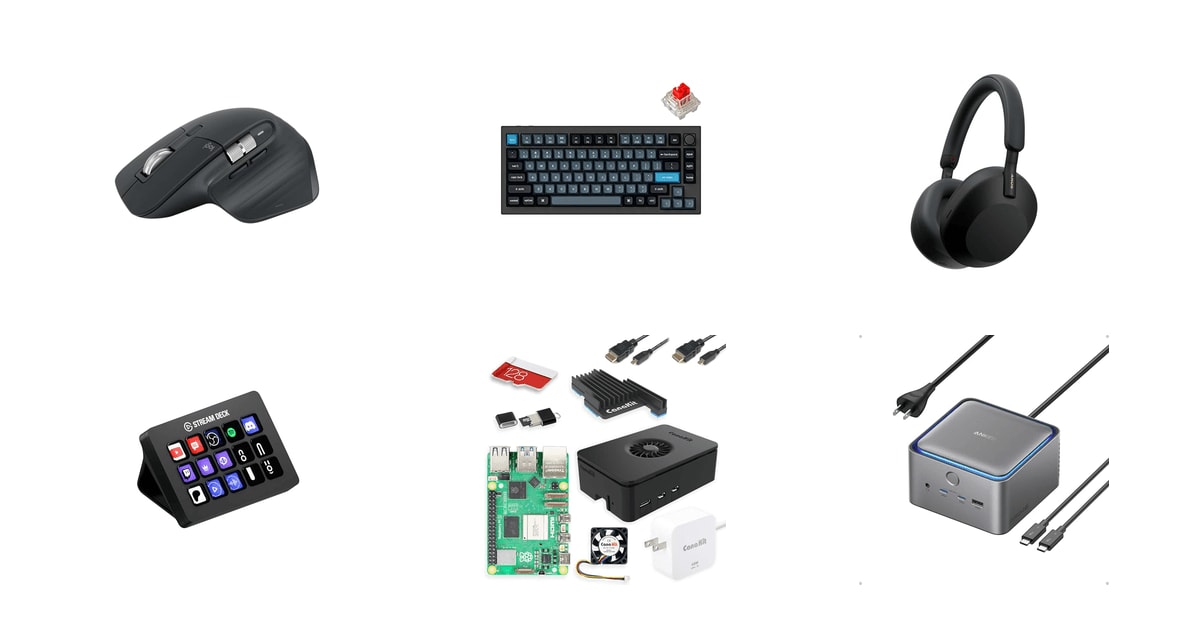
Programmers spend their whole day touching three or four objects: a keyboard, a mouse, a pair of headphones, and whatever cable mess connects the laptop to the desk. That's what makes them easy to shop for. The tools they use for eight hours are the ones where a small upgrade gets noticed every single day. A developer who's been typing on a laptop keyboard since their first job will feel the difference in a good mechanical board within an hour. You don't need to understand their code to buy something they'll actually reach for.
Here's the honest caveat: developers have opinions, and the more senior they are, the stronger those opinions get. Switch feel, keyboard layout, whether the scroll wheel should click — these are genuinely personal, and a well-meaning gift can land wrong. Some of them already own the obvious stuff. So the safest gifts are the ones with broad appeal or an easy return path, and the riskiest are the ones that ask the recipient to relearn how they type. We've flagged which is which.
We've leaned on published reviews, manufacturer specs, and what owners consistently say after months of use. Our favorite gift here is the Keychron Q1 Pro, and the Logitech MX Master 3S is the safe choice when you're less sure of their setup or their taste in switches.
Everything we recommend

A serious keyboard that unwraps well and sounds quiet
For the dev still typing on their laptop keyboard
$157 from Amazon
Almost nobody dislikes it, and it works with everything
For the friend whose desk you've never actually seen
$84.99 from Amazon
The quiet-on-demand gift for someone with noisy neighbors
For the developer stuck in an open-plan office
$198 from Amazon
A real mechanical keyboard without the premium price
For the junior dev setting up their first desk
$54.99 from Amazon
Fifteen buttons they'll spend a whole weekend programming
For the automator who scripts everything already
$129.99 from Amazon
For the tinkerer with a shelf of unfinished projects
$259.95 from Amazon
For the laptop developer drowning in dongles
$319.99 from AmazonHow we picked
Daily-use impact. We prioritized things a developer touches for hours at a stretch — keyboards, mice, headphones, the desk connection. Novelty items and desk toys didn't make the list, because they stop being interesting by week two.
Cross-platform support. Developers rarely stay on one operating system. We checked spec sheets and owner feedback for macOS, Windows, and Linux support, and we flagged the places where a product works well on two of the three and awkwardly on the last.
Gift risk. Some gifts require the recipient to change a habit or match a personal preference. We looked at how easy each one is to return, whether it needs a specific setup to work at all, and how much taste it assumes.
Build and longevity. We read published reviews and long-term owner reports for signs of what breaks. Switch lifespan ratings, case construction, and repeated complaints about failures in the first few months all counted.
Ergonomic evidence. For anything that supports the hands and wrists, we leaned on published research and manufacturer survey data rather than marketing claims about comfort.
Our favorite gift
A serious keyboard that unwraps well and sounds quiet
Keychron Q1 Pro Wireless Custom Mechanical Keyboard
For the dev still typing on their laptop keyboard
A full-aluminum 75% mechanical keyboard with gasket mounting, hot-swappable switches, and Bluetooth for up to three devices. It's the upgrade most developers want and won't buy for themselves.
$157fromAmazonThis is the gift that makes someone's daily work feel different. Your developer types thousands of words a day — commit messages, Slack replies, actual code. The Q1 Pro's double-gasket design puts silicone between the plate and the case, which softens each keystroke instead of sending it straight into a metal shell. TechRadar found gasket mounting cuts keystroke vibration by roughly 35% versus cheaper tray-mount boards. It feels cushioned. It also sounds like less.
The aluminum body is the part that sells it when they open the box. It's heavy enough that it doesn't slide around, and it looks like an object rather than a peripheral. That matters for a gift — a plastic keyboard reads as functional, this one reads as a present. Keychron pairs it with double-shot PBT keycaps, which resist the shiny finger-grease patches that show up on cheap keycaps after a year of heavy use.
If they're picky about switches — and a lot of developers are — the hot-swap sockets mean they can pull the pre-lubed reds and drop in Cherry, Gateron, or whatever they've been reading about, no soldering. That's the escape hatch that makes this a lower-risk gift than it looks. QMK and VIA support means they can remap anything, build macros, and set up layers. For a programmer, that's a toy in the best sense.
Bluetooth 5.1 pairs to three devices, so it works across a work laptop, a personal machine, and a tablet with a key combo. It's fully compatible with both Mac and Windows, and Keychron ships the extra keycaps for the swap. If your recipient runs Linux, QMK stores the layout on the board itself, so it behaves the same everywhere.
Flaws but not dealbreakers
The 75% layout drops the dedicated number pad. If your developer does a lot of numeric entry — data work, spreadsheets, finance-adjacent code — they'll miss it. Ask before you buy, or check whether their current keyboard has one.
This particular listing is a renewed unit, which means it's been inspected and repackaged rather than sold new. That's fine for value but slightly awkward as a gift if the recipient is the type to notice packaging. It's worth knowing before you wrap it.
It's heavy. That's mostly a virtue on a desk, but it makes this a bad choice for someone who works from coffee shops or hot-desks between offices.
Safest betOn sale
Almost nobody dislikes it, and it works with everything
Logitech MX Master 3S Bluetooth Wireless Mouse
For the friend whose desk you've never actually seen
Logitech's flagship productivity mouse, with an 8,000 DPI sensor that tracks on glass, near-silent clicks, and pairing for three devices. It's the peripheral developers recommend to each other most often.
$84.99fromAmazonList priceWhen you don't know much about someone's setup, this is the gift with the highest hit rate. It works on macOS, Windows, and Linux. It tracks on glass desks, wood, and fabric. It pairs to three machines and switches between them with a button, which matters for anyone juggling a work laptop and a personal one. PCMag has named it an Editors' Choice across two review cycles running — it's not a fashionable pick, it's a consensus one.
The scroll wheel is the part people become evangelists about. Logitech's MagSpeed wheel spins up to 1,000 lines a second and flips automatically between ratcheted clicks and free spin. If your recipient reads long files, scans logs, or scrolls through thousand-line diffs, that's a real difference in their day. Owners who upgrade from a basic office mouse say they won't go back.
The quiet clicks are worth calling out separately. Logitech rates them at 90% less noise than a standard click, which sounds like marketing until you picture a developer on a video call, or someone working next to a sleeping baby. Owner feedback keeps circling back to this — people notice the silence more than they expected to.
The shape is built around a raised, angled palm rest with the thumb buttons placed where a thumb actually rests. For someone clicking and dragging for six hours, that posture matters. CDC and NIOSH data shows people doing keyboard-intensive work for six-plus hours a day carry a 27–45% higher risk of carpal tunnel, and while a mouse alone won't fix that, a comfortable one is a reasonable place to start.
Flaws but not dealbreakers
This is the Bluetooth-only edition. There's no USB receiver and no charging cable in the box, so if your recipient's desktop lacks Bluetooth, it won't work out of the wrapping paper. Check first, or buy a receiver-equipped version.
Getting the most out of it means installing Logi Options+, and some owners find the software fussy — settings that don't stick, permissions to grant on macOS. The mouse works fine without it, but the app-specific customizations are the reason to buy this over something cheaper.
If they already own an MX Master 2S, the jump is small. Owners upgrading within the line often say it's a refinement, not a revelation.
Best splurgeOn sale
The quiet-on-demand gift for someone with noisy neighbors
Sony WH-1000XM5 Premium Noise Cancelling Wireless Headphones
For the developer stuck in an open-plan office
Sony's flagship noise-canceling headphones, with eight microphones, two processors, and 30 hours of battery. For a developer in an open office or a house with kids, it's the difference between shallow work and deep focus.
$198fromAmazonList priceOpen-plan offices are a hard problem, and this is the closest thing to a fix that fits in a gift box. RTINGS' lab measurements put the WH-1000XM5 at 97.2% ambient noise reduction at 300Hz — the top ANC result they recorded in the over-ear category across their 2024–2025 test cycle. That frequency range is roughly where conversation and HVAC hum live. Your developer will hear their editor and not much else.
Battery is the practical selling point. Sony rates 30 hours with ANC on and 40 with it off, so a forgotten charge doesn't wreck the workday. Three minutes on USB-C gets three hours back, which covers the panicked moment before a standup. Multipoint pairing keeps them connected to a laptop and a phone at once.
These are also the best call headphones on this list. Four beamforming mics and Sony's voice processing mean the person on the other end of the standup can actually hear them, which is not something you can say about most headphones aimed at listening. If your recipient spends half their week on video calls, this does double duty.
As a gift, they present well. They're light, the earpads are soft leather, and owners routinely wear them for multi-hour stretches without complaint. Sizing isn't a risk the way it is with earbuds — over-ear is over-ear.
Flaws but not dealbreakers
The Bluetooth relationship with Windows PCs is where owner complaints cluster. Several report connection drops, awkward switching between the call profile and the listening profile, and general fussiness that Mac and phone users don't hit. If your recipient's main machine is a Windows desktop, factor that in.
They don't fold flat at the hinge the way earlier Sony models did. The case is bigger as a result, which is a minor annoyance for someone commuting with a full backpack.
This is the most expensive gift here besides the dock. If you're shopping for a colleague rather than a partner or close friend, it may land as more than you meant to spend.
Best budget gift
A real mechanical keyboard without the premium price
Keychron C3 Pro TKL 80% Wired Mechanical
For the junior dev setting up their first desk
A wired tenkeyless board with gasket mounting, hot-swappable switches, and QMK programmability. For a developer who's never used a mechanical keyboard, it's a genuine step up from whatever came with the laptop.
$54.99fromAmazonFor someone starting their first developer job, this is the upgrade with the biggest gap between what it costs and how much better it feels. The Stack Overflow Developer Survey found 38% of the 65,000-plus developers who responded use a mechanical keyboard as their main input device, up 12 points since 2020. Your junior dev has probably watched senior colleagues type on one and quietly wondered.
It carries more of the good stuff than a budget board usually does. Gasket-mount structure, acoustic foam inside the case, shine-through PBT keycaps, and hot-swap sockets rated for 50 million keystrokes. QMK and Keychron's browser-based Launcher mean they can remap keys without installing anything — for a programmer, that's the first fun afternoon with it.
The tenkeyless layout is the right call for a first mechanical keyboard. It keeps the arrow keys and function row that developers actually use while dropping the number pad, which pulls the mouse closer to the body and eases shoulder strain. It's a smaller change than a split ergonomic board and much easier to adapt to.
It's wired, which is a genuine advantage for a desk setup — nothing to charge, no pairing, no dropped connection mid-sentence. The 8,000Hz polling rate is aimed at gamers more than coders, but it costs nothing and they can dial it down in the Launcher.
Flaws but not dealbreakers
Owner reports on this specific model are mixed in a way the others here aren't. A handful describe dead or double-registering keys within a few months, and stuck modifier keys. Hot-swap sockets make a bad switch easy to replace, but a bad socket isn't a home fix.
Support responsiveness comes up in owner complaints too. Keep the receipt and buy from a source with a clean return window, because that's your real safety net here.
The cable is on the short side. If their tower sits on the floor, they may need an extension.
Most personal
Fifteen buttons they'll spend a whole weekend programming
Elgato Stream Deck MK.2 Studio Controller
For the automator who scripts everything already
Fifteen customizable LCD keys that trigger anything — build scripts, deploy commands, mute on a call, or switch scenes. It's sold to streamers, but developers who get one tend to become loud about it.
$129.99fromAmazonMost people file the Stream Deck under streaming gear, which is exactly why it works as a gift. The developer on your list probably hasn't bought one. Elgato's marketplace carries 300-plus integrations, including plugins for VS Code, GitHub Actions, Jira, Slack, and Zoom, so the mapping work is mostly picking rather than building.
This is the gift for the person who automates everything already. If they've written shell aliases for commands they run twice a day, they'll take one look at fifteen programmable keys and start planning. How-To Geek's workflow case studies estimated 40 to 45 minutes saved per workday when developers mapped IDE and CI/CD shortcuts to physical keys. Treat that as directional rather than a promise — the real appeal is that fiddling with it is fun.
The LCD screens under each key are the detail that makes it stick. Every button shows what it does, and the icon changes with state, so a mute key looks different when the mic is live. Nothing to memorize. Owners who aren't streamers — game designers, disabled users who need to collapse multi-key inputs into one press — consistently describe it as more useful than they expected.
It unwraps well. It's a small, solid object with a screen that lights up the moment it's plugged in, which is more satisfying to open than most peripherals. Setup is drag-and-drop, so even a recipient who doesn't want a project can have it working in ten minutes.
Flaws but not dealbreakers
It's a Windows and macOS product first. Linux users can get it working through community tools, but it's not officially supported, and a developer who lives in Linux will have to do the legwork.
Fifteen keys sounds like a lot until they start mapping. Folders and pages solve it, but there's a real ceiling here, and heavy users end up wanting the larger model.
If your recipient doesn't already have a habit of automating things, this can sit unused. It rewards the tinkerer, not the person who just wants their laptop to work.
Who this is for
This guide is for anyone shopping for a person who writes code — a partner, a sibling, an office secret santa draw, or a new grad starting their first engineering job. You don't need to know what language they use. Most of these picks work regardless of stack, operating system, or seniority, and we've noted the few cases where you'd want to check their setup first.
We've focused on physical desk gear a developer uses every day. We're not covering software subscriptions, courses, books, ergonomic chairs, or monitors — those either need the recipient's own account or don't ship well as a surprise. If you're shopping for someone who already owns a nice keyboard and good headphones, skip to the dock and the Raspberry Pi kit; those are the ones that fill gaps a well-equipped developer still has.
How we picked
We weighed a handful of things when sorting this lineup. Daily-use impact: we stuck to gear a developer handles for hours a day, not desk toys that lose their charm by week two. Cross-platform support: we checked spec sheets and owner reports for macOS, Windows, and Linux, and flagged the places where support gets shaky. Gift risk: we considered how much personal taste each pick assumes and how easy it is to return if it misses. Build and longevity: we read published reviews and long-term owner feedback for patterns of early failure. Ergonomic evidence: for anything that touches the hands, we leaned on published research and survey data over comfort marketing.
Other gifts for programmers and developers worth considering
If you want a gift that turns into a project: The CanaKit Raspberry Pi 5 Starter Kit PRO ($259.95) — This is the pick for a developer who builds things for fun. The Raspberry Pi 5 at its core scores two to three times higher than the Pi 4 on Geekbench 5, and PCIe 2.0 support means NVMe storage is on the table for the first time — enough horsepower for a real home server, a Pi-hole, home automation, or running a local AI model. CanaKit's bundle takes the guesswork out of gifting it: case, fan, heat sink, 45W power supply, and a 128GB card preloaded with the OS. What it gives up is immediacy. It's a weekend, not an unboxing, so buy it for someone who wants the weekend.
If you want to fix their cable mess in one shot: The Anker Prime TB5 Docking Station ($319.99) — A developer using a laptop as their main machine plugs and unplugs the same four cables every day. This Thunderbolt 5 dock collapses that into one. Fourteen ports, including two Thunderbolt 5 downstream, three USB-A, 2.5Gbps Ethernet, HDMI 2.1 or DisplayPort 2.1, and card readers, with 140W of upstream charging that covers even a power-hungry laptop. The power supply is internal, so there's no brick under the desk. The trade-offs are real: owners report noticeable fan noise, sluggish SD card speeds, and some finicky behavior across mixed Apple hardware. It also carries a 24-month warranty. It's the least exciting thing here to unwrap and possibly the most useful.
More good gifts
Here's what our research turned up beyond the picks above — not everything a developer might want, just the products we looked at closely for this guide. Nothing here is a bad gift. They're matches for narrower situations, and if one of them describes your recipient better than the picks do, buy it instead.
Making it land
A few practical notes before you wrap anything. Keyboards and mice are the easiest to get wrong on preference, so keep the gift receipt and don't be offended if they swap switches — that's half the appeal of a hot-swap board. If you're gifting the mouse, confirm their computer has Bluetooth, because this edition ships without a receiver. Headphones need almost no setup, but a Windows-desktop user may spend an evening wrestling with pairing. For the Raspberry Pi kit, know that you're gifting a project rather than a finished device; pair it with a note about what they could build if you want it to feel less like homework. And with anything programmable, resist the urge to set it up for them. Configuring it is the fun part.
Questions we get
What tech gifts do software engineers actually want?
The consistent answers are keyboards, mice, headphones, and anything that reduces cable clutter. These are the things they touch all day, so a quality upgrade gets noticed immediately. Novelty items — mugs with code jokes, desk gadgets — tend to get shelved fast. When in doubt, upgrade something they already use rather than adding something new.
What mechanical keyboard do most developers use?
There's no single answer, but mechanical keyboards in general have become the norm rather than the exception. The Stack Overflow Developer Survey found 38% of respondents use one as their primary input device, up 12 points since 2020. Keychron shows up constantly in developer communities because the boards work on Mac, Windows, and Linux out of the box and support QMK for remapping. That cross-platform support is why we picked two of them here.
Are split ergonomic keyboards actually worth it for programmers?
For someone dealing with wrist or shoulder pain, they can be genuinely helpful — ZSA's survey of its Moonlander users found 78% reported less discomfort within four weeks. But they're a hard gift. Split boards demand real relearning, and someone who doesn't want that project will resent the box. Buy one only if the recipient has specifically said they want it.
Is a Raspberry Pi a good gift for a software developer?
It depends entirely on whether they tinker. For a developer who builds home servers, plays with embedded projects, or wants to run something locally, the Pi 5 is a great gift — it's two to three times faster than the Pi 4 and finally supports NVMe storage. For a developer who codes at work and closes the laptop at 6pm, it'll gather dust. A complete starter kit lowers the barrier a lot.
Is an Elgato Stream Deck actually useful for developers, or just streamers?
It's genuinely useful outside streaming. Developers map build commands, test runs, deploy triggers, and meeting controls to the physical keys, and Elgato's marketplace includes plugins for VS Code, GitHub Actions, Jira, and Slack. How-To Geek's case studies estimated 40 to 45 minutes saved per workday from mapped IDE and CI/CD shortcuts. The catch is that it rewards people who like automating things — for anyone else, it's fifteen unassigned buttons.
What's a good gift for a junior developer starting their first tech job?
Something that upgrades their desk without assuming preferences they haven't formed yet. A budget mechanical keyboard is the classic move — it's a clear step up from a laptop keyboard, and hot-swappable switches let them figure out what they like. A good mouse is the other safe choice. Save the split ergonomic keyboards and Raspberry Pi kits for people who've asked for them.
Do developers prefer wireless or wired keyboards?
It splits by setup rather than by preference. Developers who move between a work laptop and a personal machine tend to want wireless with multi-device pairing, since one keyboard covers everything. Developers with a fixed desk often prefer wired — nothing to charge, nothing to re-pair. If you don't know which they are, a board that does both, like the Q1 Pro, sidesteps the question.
Why you should trust us
For this guide:
- We read published reviews from RTINGS, PCMag, TechRadar, Tom's Hardware, and Wirecutter alongside manufacturer specifications for every product here.
- We compared recurring themes in owner feedback — what breaks, what surprises people, and what they wish they'd known — rather than relying on any single account.
- We consulted the Stack Overflow Developer Survey, CDC and NIOSH ergonomics data, and manufacturer survey results to check claims about how developers actually work.
- We read owner reviews on every listing, weighted toward the critical ones, because that is where the recurring failures show up.
- We have a systematic way of automatically fetching the latest prices, so the numbers on this page stay current.
- This is a research-focused guide, so the team may not own every product listed — though we often do own the top winners, which gives us extra context for the recommendations.
- We don't accept free products, and the retailer commission never changes which product we recommend.
Sources
Best Mechanical Keyboards 2026 — Wirecutter, Wirecutter
Sony WH-1000XM5 Review — RTINGS.com, RTINGS.com
Stack Overflow Developer Survey 2025, Stack Overflow
Raspberry Pi 5 Full Review — Tom's Hardware, Tom's Hardware
Logitech MX Master 3S Review — PCMag, PCMag
Best Thunderbolt 4 Docks 2026 — Wirecutter, Wirecutter
ZSA Moonlander Mark I — Product Page & Customer Research, ZSA Technology Labs
Ergonomics and Musculoskeletal Health — NIOSH, CDC / NIOSH
Elgato Stream Deck MK.2 Review — The Verge, The Verge
Stream Deck for Developer Productivity — How-To Geek, How-To Geek
Best Gifts for Developers & Programmers 2025 — TechRadar, TechRadar
Best Noise-Canceling Headphones 2026 — RTINGS.com, RTINGS.com
Amazon product listings and owner reviews for all 7 products
Manufacturer specification pages for each product
Some passages in this guide may be paraphrased with AI help. Prices are refreshed automatically.
More like this.
Continue exploring electronics reviews and recommendations.

The Best Mesh WiFi Systems
Dead zones are the whole reason mesh systems exist. One router stuck in a corner means the back bedroom drops video calls and the garage gets nothing at…

The Best Windshield Snow Covers
Scraping ice off a windshield is the worst five minutes of a winter morning. Your hands go numb, your coffee gets cold in the cup holder, and you're late…

The Best Smart Propane Tank Level Monitors
Propane always runs out at the worst moment. The burgers are half done, or the camper's furnace quits overnight, or the water heater goes cold on a…

The Best Gifts for Gamers
Gaming gifts are easy to get wrong and wonderful to get right. The person on your list probably already owns a console, a controller and some kind of…

The Best Windshield De-Icer Sprays
Scraping a frozen windshield is a miserable way to start a day. A de-icer spray shortcuts it: you soak the glass, wait a few seconds, and push the slush…

The Best Hitch-Mounted Bike Racks
A hitch rack is the difference between a bike trip you look forward to and one you dread. Roof racks mean lifting a 30-pound bike over your head in a…