The Best Gifts for Remote Workers
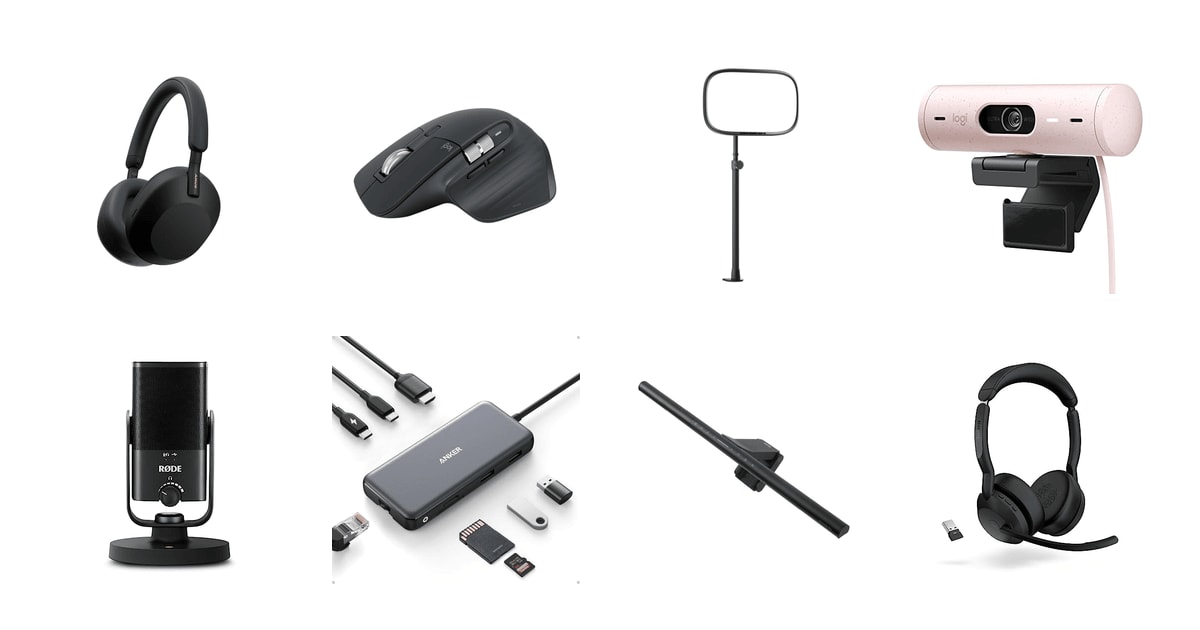
The person you're shopping for spends most of their waking hours at a desk in their own home. That's the whole opportunity here. A gift that shaves friction off their workday — a mic that makes them sound like a person instead of a drive-thru speaker, a light that stops their face from going gray at 4 p.m. — gets used every single day. Owl Labs found that 62% of full-time remote workers have bought home office gear with their own money. Somebody on your list is already paying for this stuff.
Here's the honest caveat: nothing in this category fixes a bad room. If your recipient works from a dim corner of a shared apartment with a hollow-core door, a webcam won't make that go away, and neither will noise cancellation, entirely. These are upgrades, not renovations. And almost everything here needs setup — pairing, an app, a port that may already be full. Gear that plugs in and works without a driver is the safest bet, and we've weighted our picks that way.
We'd also skip chairs, desks, and monitors as gifts. Ergonomics are too personal, sizing is a guess, and returns are miserable when the box weighs 40 pounds. Electronics unwrap better and land better. Our favorite gift here is the Sony WH-1000XM5, and the Anker 8-in-1 USB-C Hub is the safe choice when you're less sure of their setup or their taste.
Everything we recommend

Near-total quiet, and they'll use it every single day
For the one whose neighbor started a home renovation
$198 from Amazon
Fixes a dark desk without putting glare on the screen
For the person whose desk is in the darkest corner of the house
$139 from Amazon
Solves a daily annoyance for almost anyone with a laptop
For anyone with a thin laptop and a drawer of adapters
$35.99 from Amazon
They'll sound like a podcast host on their next call
For the one who's tired of sounding like a drive-thru speaker
$103 from Amazon
Makes anyone look better on camera with zero skill required
For the friend whose face is a silhouette on every Zoom call
$139.99 from Amazon
For the salesperson or support rep who lives on back-to-back calls
$242.24 from Amazon
For the spreadsheet person whose wrist aches by Friday
$84.99 from Amazon
For the one still using a laptop's built-in camera
$99.99 from AmazonHow we picked
Works out of the box. We favored gear that spec sheets and owner feedback both describe as plug-and-play, with no driver install or account setup required. A gift that needs troubleshooting on the day it's opened is a bad gift.
Daily-use payoff. We looked for products that a remote worker touches every workday, not once a month. Published reviews and survey data both point at audio, lighting, and connectivity as the areas where an upgrade is felt immediately.
Broad compatibility. We prioritized USB-C connectivity and stated support across macOS, Windows, and ChromeOS, since givers often don't know exactly what machine the recipient uses.
Unwraps well. We weighted self-contained products that don't require a second purchase to be useful, and we noted in the flaws where an arm, adapter, or charger is realistically needed.
Return risk. We steered away from categories where fit and personal preference make returns likely — chairs, desks, keyboards, and monitors — and stuck to gear where taste matters less.
Our favorite giftOn sale
Near-total quiet, and they'll use it every single day
Sony WH-1000XM5 Premium Noise Cancelling Wireless Headphones
For the one whose neighbor started a home renovation
Sony's flagship noise-cancelers block the leaf blower, the dishwasher, and the upstairs neighbor's treadmill. Battery runs about 30 hours, so your recipient can forget to charge them for a week and still be fine. It's the most-requested remote work gift for a reason.
$198fromAmazonList priceIf you buy one thing on this list, buy these. Noise-canceling headphones top consumer surveys of what remote workers want, year after year. RTINGS measured the XM5's low-frequency attenuation at more than 35 dB below 200 Hz — among the best of any consumer headphone they've evaluated. In practice that's the range where HVAC hum, traffic, and appliance drone live. Your recipient puts them on and the house goes quiet.
The gifting math is good, too. Eight microphones and two processors handle the cancellation, and the Auto NC Optimizer adjusts to how they're wearing them without any fiddling. There's no software to install before the first use. They open the box, pair to a phone, and it works. That matters if you're shipping this to someone who doesn't want a project on Christmas morning.
Owners who wear these for long stretches keep coming back to the comfort. The earcups are soft, the headband is light, and the whole thing weighs about half a pound. Multipoint pairing means they can stay connected to a laptop and a phone at once, so a call comes through without any menu-diving. For someone who's on and off calls all day, that's the feature they'll notice by week two.
Battery life is where these stop feeling like a gadget and start feeling like furniture. Thirty hours of playback, and a three-minute charge buys about three hours. Your recipient can leave them off the cable overnight and still get through a full day of meetings. Charging anxiety is the thing that kills daily-driver headphones, and these mostly don't have it.
Flaws but not dealbreakers
Bluetooth on Windows is the recurring complaint. Some owners report dropouts, reconnection trouble, or having to re-pair when switching between a PC and a phone. It's not universal, and the XM5 has a reset procedure that resolves a lot of it. But if your recipient is a Windows-only user with a picky Bluetooth stack, know that's the sore spot.
The call mic is good, not great. Four beamforming mics pick up voice cleanly enough for most meetings, but people who spend their whole day on calls will get better results from a dedicated headset or a desk mic. These are for listening and focus first.
They don't fold flat the way older Sony models did, so the case is bulkier than you'd expect. Not a dealbreaker, but worth knowing if your recipient travels with a small bag.
Sony covers the WH-1000XM5 with a one-year limited warranty.
Best splurge
Fixes a dark desk without putting glare on the screen
BenQ ScreenBar Pro LED Monitor Light Bar
For the person whose desk is in the darkest corner of the house
The ScreenBar Pro clamps to the top of a monitor and throws over 1,000 lux onto the desk with none of it bouncing back at the screen. A motion sensor turns it on when they sit down. It's the desk accessory people don't know to want.
$139fromAmazonThis is the gift that gets a reaction. A monitor light bar solves a problem your recipient has quietly tolerated for years: the desk is dark, but a lamp either eats workspace or reflects off the screen. BenQ's asymmetric optics aim the light down onto the desktop and keep it off the display. Owners who tried several cheaper bars first describe this one as the point where they stopped shopping.
The motion sensor is the small touch that makes it feel expensive. An ultrasonic sensor picks up movement within about two feet, lights up when they sit down, and shuts off after five minutes of nobody there. No switch, no app, no habit to build. It just knows.
Fit is broad enough that you can gift it without an interrogation. The clamp handles monitors from about 0.17 to 2.56 inches thick and curvature from 1000R to 1800R, including odd back designs and non-flat top bezels. It sits low enough not to block a webcam. Power comes over USB-C, or the included adapter if their ports are full.
It also happens to be the pick that most directly addresses eye strain. Over 1,000 lux at center, spread across roughly a 33-by-20-inch area, means their keyboard and notepad are actually lit instead of sitting in monitor glow. Brightness and color temperature adjust separately, so a late-night session can go warm.
Flaws but not dealbreakers
This is the most expensive desk accessory here, and it's a hard sell if your recipient's room is already bright. In a sunny office with good overheads, they'll appreciate the look more than the light.
It occupies the top of one monitor. Someone running a triple-monitor array will light the middle screen's desk area well and leave the wings dimmer, which is fine but not the seamless wash the marketing images suggest.
Safest betOn sale
Solves a daily annoyance for almost anyone with a laptop
Anker USB-C Hub
For anyone with a thin laptop and a drawer of adapters
Anker's 8-in-1 hub adds HDMI, Ethernet, two USB-A ports, a USB-C data port, SD and microSD slots, and pass-through charging to a laptop that probably has two ports total. It's plug-and-play on Mac, Windows, and ChromeOS.
$35.99fromAmazonList pricePort scarcity is the most universal complaint in modern laptop life, and it's the reason a hub is such a reliable gift. Your recipient has a thin laptop with two or three USB-C ports, and one of those is always the charger. This gives them a 4K HDMI output, gigabit Ethernet, two USB-A ports for the mouse dongle and the old flash drive, plus SD and microSD readers.
The real gifting advantage is that it can't miss on compatibility. It works with USB-C, USB4, and Thunderbolt, and supports macOS 12 and newer, Windows 10 and 11, and ChromeOS. There's no driver to install and no account to make. If you don't know exactly what machine your recipient uses — a common situation for a team gift or a new-hire kit — this is the item you can send without asking.
Pass-through charging up to 85 W means it doesn't cost them a port to use. They plug their existing charger into the hub and the laptop keeps charging while everything else runs. Tom's Hardware measured sustained delivery in this class high enough to run a 16-inch MacBook Pro alongside a 4K display and peripherals from one cable.
It's palm-sized and weighs about a quarter pound, which makes it the rare useful gift that also travels. Someone who works from a coffee shop two days a week can drop it in a bag and have a full desk setup wherever they land.
Flaws but not dealbreakers
The built-in cable is short — about 7.5 inches — and several owners wish it were longer. Depending on where their ports sit, the hub may dangle rather than rest flat next to the laptop.
The hub needs 15 W just to run itself, so a weak charger will leave the laptop charging slowly or not at all. If you're gifting this to someone using an old 30 W brick, it may underperform until they upgrade the charger.
Ethernet throughput can drop below gigabit speeds depending on how the laptop allocates bandwidth across the hub's ports. Fine for calls and browsing, less ideal for someone moving huge files over the wire. And it isn't compatible with Linux.
Most personal
They'll sound like a podcast host on their next call
RØDE NT-USB Mini Studio-Quality USB Condenser Microphone
For the one who's tired of sounding like a drive-thru speaker
The RØDE NT-USB Mini is a metal studio condenser about the size of a coffee mug, with a magnetic desk stand and a headphone jack built in. It plugs into USB and works immediately. The audio difference on the first call is unmistakable.
$103fromAmazonA microphone is the upgrade people notice on someone else's behalf. Your recipient hears themselves fine; their colleagues hear laptop-mic mush. RØDE's cardioid condenser capsule has a self-noise floor of 16 dB(A) per the company's specs — quieter than plenty of professional mics — so it picks up voice and leaves the room fan behind it.
It's the pick that flatters the giver, honestly. This is a real studio mic in a small package, and it looks like one. All-metal body, magnetic base, satisfyingly heavy in the hand. Owners consistently remark on the build the moment they unbox it. If you want a gift that reads as thoughtful and expensive on the table, this photographs and unwraps better than anything else here.
Setup is a USB cable and nothing else. There's no interface, no phantom power, no driver. The built-in headphone amp with its own volume knob means they can monitor themselves while recording, which is the feature that turns a call mic into something they'll use for a podcast or a voice memo to their kid.
For anyone who does more than meetings — records training videos, dabbles in music, hosts a small show — the free RØDE Connect software adds a noise gate, compressor, and the APHEX processing. That's optional depth they can grow into rather than a setup hurdle on day one.
Flaws but not dealbreakers
It has no shock mount and no boom arm in the box. It sits on a desk, which means keyboard clatter and desk bumps can travel into the recording. Someone typing during calls may want an arm eventually, and that's a second purchase.
A desk mic asks for desk space and a bit of positioning discipline. If your recipient is on video all day, the mic will be visible in frame, and some people don't want that. A headset is the tidier answer for them.
A few owners have noted cosmetic marks on the finish out of the box. It doesn't affect the sound, but it's worth inspecting before wrapping.
Best for beginners
Makes anyone look better on camera with zero skill required
Elgato Key Light Air MK.2
For the friend whose face is a silhouette on every Zoom call
Elgato's 15-inch LED panel puts soft, even light on a face from the edge of a desk. It's up to 2,100 lumens with a full 2900K–7000K range, controlled by touch or from a phone. It's the fastest visible improvement on a video call.
$139.99fromAmazonBuffer's remote work survey put an unprofessional-looking home environment on camera among the top pain points remote workers report. Lighting is the simplest fix for it. A panel like this sits beside the monitor and erases the window backlight that turns your recipient into a shadow. The change is visible in the first thirty seconds of the next meeting.
This MK.2 version runs up to 2,100 lumens, about 50% brighter than the original Key Light Air, with 256 LEDs behind a diffuser and a CRI above 94%. That last number is the one that matters for skin tone — high CRI means faces look like faces rather than waxy or green. Tom's Guide has measured this family of lights as strong enough to counteract harsh window backlighting where cheaper ring lights give up.
Control is the reason to pick this over a generic panel. Brightness and color temperature adjust with a touch on the light itself, or from the Elgato Control Center on a desktop, tablet, or phone over Wi-Fi. Owners of the earlier Air models complained about flaky connections; the MK.2 adds 5 GHz Wi-Fi, and early feedback points to a noticeably more reliable link.
Power is flexible in a way that solves real desk problems. It runs from a laptop's USB-C, a PD 3.0+ adapter for full output, or a battery bank on the MagSafe ring. The desk clamp adjusts from about 60 to 88 cm, and the panel detaches for a tripod or arm if your recipient's setup changes.
Flaws but not dealbreakers
It needs a desk edge to clamp to, and a clamp that thick doesn't fit every desk. Glass tops, thick butcher block, and desks pushed flush against a wall can all be a problem. Check their desk before you buy if you can do it without spoiling the surprise.
Full brightness requires a proper PD adapter. Running it off a laptop port works but caps the output, which is a quiet disappointment if your recipient plugs it in and wonders why it's dimmer than the box promised.
This is a newer revision with a thin track record so far. The design is well established, but there's less accumulated owner feedback on this specific model than on the light it replaces.
Who this is for
This guide is for anyone buying a present for someone who works from home: a partner who shares the office, a friend on a holiday list, a manager putting together team appreciation gifts, or an HR team assembling new-hire kits for a distributed staff. It works across budget tiers, from a hub you'd send to a whole team to a light bar you'd give to one person you know well. If you're self-gifting with a gift card, it works for that too.
It doesn't cover the big-ticket ergonomic stuff. Chairs, standing desks, keyboards, and monitors are all deeply personal, and buying one for someone else is a coin flip you'll both regret. Nicholas Bloom's research at Stanford found remote workers can be substantially more productive when their space supports focused work, with noise and poor video presence the two obstacles people name most. That's exactly where a gift can help, and it's where we've concentrated. If your recipient already has great headphones and a good camera, skip to the light bar or the hub.
How we picked
We built this list around what actually survives contact with a real workday. Setup: it should work the moment it's plugged in, with no driver, no account, and no phone call to you for help. Daily payoff: we favored the categories that published reviews and remote work surveys keep flagging — noise, lighting, audio, and ports — over gadgets that get used once. Compatibility: USB-C and stated support for macOS, Windows, and ChromeOS, because you often don't know what laptop is on the other end. Unwrapping: self-contained boxes beat things that need a second purchase, and where an accessory is realistically required, we say so. Return risk: we avoided anything where fit or personal taste makes a return likely, which rules out chairs, desks, and monitors entirely.
Other gifts for remote workers worth considering
If you want a headset built for someone who's on calls all day: The Jabra Evolve2 55 Stereo Wireless Headset with ($242.24) — The Jabra Evolve2 55 is the pick for a recipient whose job is talking. It's certified for Microsoft Teams, which in practice means no driver conflicts and no fifteen-minute setup call — a real consideration when you're gifting to someone non-technical. Hybrid ANC handles the room, two premium mics handle their voice, and it connects to a laptop and a phone at the same time. Owners with quiet voices report that colleagues noticed the improvement. Where it gives up ground to the Sony is music: this is a work tool first, and it isn't the headphone you'd reach for on a walk. Some owners find it gets uncomfortable after a full day, and a few report earpads wearing out sooner than they'd like.
If you want something for wrist comfort: The Logitech MX Master 3S Bluetooth Wireless Mouse ($84.99) — The MX Master 3S is the mouse people replace their mouse with and then buy a second one for the other desk. The MagSpeed wheel scrolls up to 1,000 lines per second — Logitech cites 87% more precision than a standard ratchet wheel — which genuinely cuts down the flicking motion during long document reviews. The shape encourages a more natural wrist angle, the clicks are about 90% quieter, and it tracks on glass. Easy-Switch moves it between three machines with a button press. The catch for gifting: this Bluetooth edition ships without a USB receiver or a charging cable, so your recipient needs working Bluetooth and a spare USB-C cable. And Logi Options+ is a real software install, which makes it less of a pure plug-and-play gift than the rest of this list.
More good gifts
Here's what else our research surfaced. This isn't the whole market — it's the shortlist of well-reviewed home office gear that came up repeatedly and didn't quite land as a headline pick for the recipients above. Any of these is a good gift for the right person.
The Logitech Brio 500 Full HD Webcam: Auto ($99.99) — The Logitech Brio 500 is the webcam to give someone who's never upgraded from their laptop camera. PCMag's roundup found its RightLight 4 auto-exposure produced the most natural skin tones of any webcam in its class, beating cameras well above it in backlit and mixed-light rooms — exactly the situation someone working next to a window is in. RightSight auto-framing keeps them centered when they lean or stand, Show Mode tilts down to point at whatever's on the desk, and a privacy shutter twists closed between meetings. It's 1080p rather than 4K, which is the honest trade: it's tuned for looking good on a call, not for recording film. This pink version is a fun gift for the right person and a wrong guess for the wrong one, so consider the recipient's taste before you commit.
Making the gift land
A little setup thought goes a long way here. If you're giving the light bar or the Key Light, quietly check their desk first — clamp thickness and monitor curvature are the two things that turn a great gift into a return. For the hub, look at what charger they use; a weak brick will make it feel slow through no fault of its own. Anything USB-C is worth pairing with a decent cable if you're not sure they have a spare, since that's the single most common reason a new accessory sits in its box for a week. And if your recipient isn't technical, include a note saying which items need no software at all — the Sony headphones, the RØDE mic, and the Anker hub all work the moment they're plugged in. That reassurance is part of the gift.
Questions we get
What's the best gift for someone who works from home?
Noise-canceling headphones, year after year. They top consumer surveys of what remote workers want, and they solve the problem people complain about most: household noise during focused work. The Sony WH-1000XM5 is our favorite here because the cancellation is genuinely excellent and the battery lasts about 30 hours.
What do remote workers actually want as gifts?
Audio and lighting, mostly. Owl Labs found 62% of full-time remote workers have already bought home office equipment with their own money, which tells you the demand is real and unmet. Skip the novelty desk toys and buy something that improves how they sound and look on a call, or that removes a daily annoyance like port shortage.
Are noise-canceling headphones worth it for remote work?
For anyone in a shared or noisy home, yes. RTINGS measured the Sony XM5's low-frequency attenuation at over 35 dB below 200 Hz, which is the range where HVAC, traffic, and appliances sit. That's enough to make a busy house feel like an empty one. If your recipient already works in a quiet dedicated room, the payoff is smaller.
Is a ring light or a panel light better for video calls?
A panel, in most cases. Ring lights produce a harder, more directional light and a distinctive circular catchlight in the eyes, and cheaper ones struggle against a bright window. A diffused panel like the Elgato Key Light Air spreads light more softly across the face and has enough output to counteract backlighting, which is the most common problem in a home office.
What's a good gift for a remote worker who already has a nice setup?
A monitor light bar. It's the accessory people rarely buy for themselves and immediately like once they have one, and it doesn't duplicate anything they own. The BenQ ScreenBar Pro is the one to get: its asymmetric optics keep glare off the screen, and the motion sensor means they never touch a switch.
What are the best bulk gifts to send to a remote team?
A USB-C hub is the one item that works without knowing anything about each recipient's machine. The Anker 8-in-1 supports macOS, Windows, and ChromeOS with no driver install, so nobody on the team has to file a help ticket to use their present. It also solves a problem literally everyone with a modern thin laptop has.
Why you should trust us
For this guide:
- We read published measurements and reviews from RTINGS, PCMag, Tom's Guide, and Tom's Hardware alongside manufacturer specifications from Sony, Logitech, RØDE, Elgato, BenQ, Anker, and Jabra.
- We reviewed survey data on remote work from Buffer, Owl Labs, and Stanford research by Nicholas Bloom to understand what remote workers report needing.
- We read through owner feedback themes for every product here, paying particular attention to setup difficulty, compatibility complaints, and durability reports.
- We read owner reviews on every listing, weighted toward the critical ones, because that is where the recurring failures show up.
- We have a systematic way of automatically fetching the latest prices, so the numbers on this page stay current.
- This is a research-focused guide, so the team may not own every product listed — though we often do own the top winners, which gives us extra context for the recommendations.
- We don't accept free products, and the retailer commission never changes which product we recommend.
Sources
Sony WH-1000XM5 Wireless Headphones Review — RTINGS.com, RTINGS.com
The Best Webcams for 2026 — Wirecutter, Wirecutter
Logitech MX Master 3S Review — PCMag, PCMag
Elgato Key Light Air Review — Tom's Guide, Tom's Guide
Best USB Microphones for Remote Work and Podcasting — Tom's Guide, Tom's Guide
State of Remote Work 2024 — Buffer, Buffer
State of Hybrid Work 2024 — Owl Labs, Owl Labs
BenQ ScreenBar Plus Review — The Verge, The Verge
Best USB-C Hubs and Laptop Docking Stations — Tom's Hardware, Tom's Hardware
Jabra Evolve2 55 Review — PCMag, PCMag
Working from Home Works: Evidence from a Chinese Experiment — Stanford GSB, Stanford Graduate School of Business
Amazon product listings and owner reviews for all 8 products
Manufacturer specification pages for each product
Some passages in this guide may be paraphrased with AI help. Prices are refreshed automatically.
More like this.
Continue exploring electronics reviews and recommendations.

The Best Tow Straps and Kinetic Recovery Ropes
Getting stuck is rarely dramatic. You back down a boat ramp that's slicker than it looked, or you pull onto a soft shoulder in the rain, and suddenly your…

The Best Gifts for Gamers
Gaming gifts are easy to get wrong and wonderful to get right. The person on your list probably already owns a console, a controller and some kind of…

The Best Portable Audio Gear
Portable audio is one of the few gadget categories where a good pick genuinely changes your day. The right noise-canceling headphones turn a screaming jet…

The Best Powered Car Subwoofers
Most factory car stereos stop working somewhere around 80 to 100Hz, according to measurements published by CNET's Roadshow car audio coverage. That's not…

The Best Waterless Car Wash Products
If you live in an apartment, park in a garage, or just don't want to drag out a hose, a waterless wash is how you keep a car looking clean. You spray a…

The Best Waterproof Roof Cargo Bags
A soft roof bag is the simplest way to buy back space in a packed car. You strap it down, you load it, and suddenly the middle seat isn't a luggage shelf…