The Best Camera Lens Attachments for iPhone
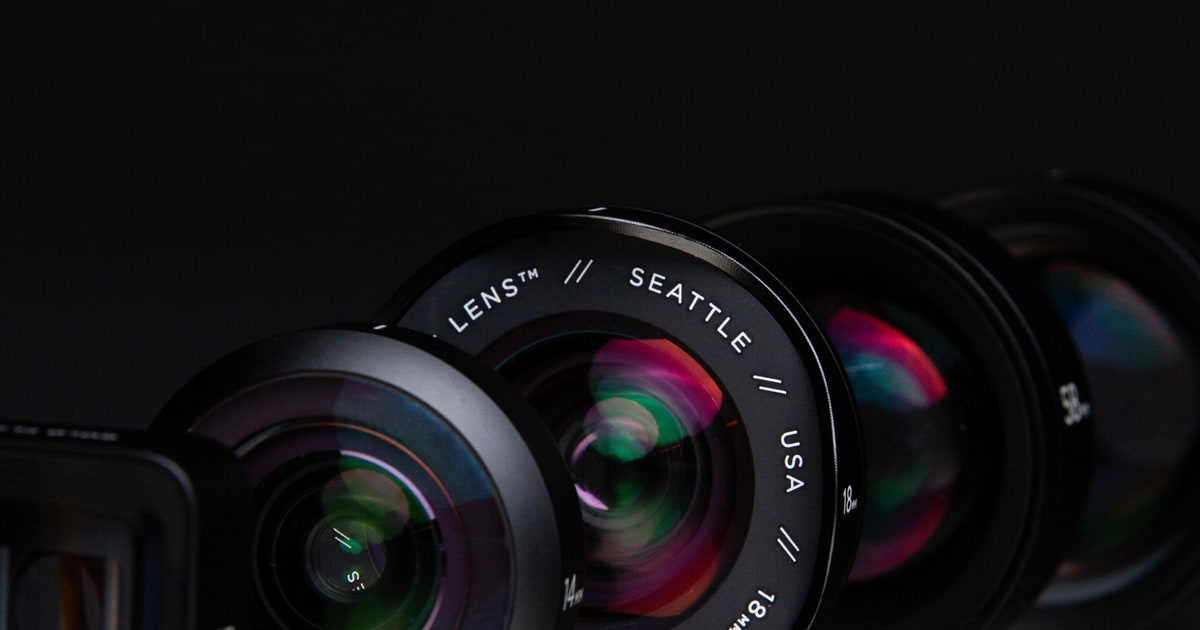
Your iPhone already has three cameras, so the question isn't whether you need more glass — it's whether an add-on lens gets you something the phone genuinely can't do. A real macro lens does. So does a true anamorphic squeeze, or a spotting-scope-grade telephoto for birds across a pond. Everything else tends to duplicate what the phone's own ultra-wide and telephoto already handle, only with more vignetting and one more thing to carry. The good attachments are the ones that go somewhere your phone can't follow.
Here's the part nobody puts on the box: every one of these lenses sits in front of a camera that Apple tuned to work without it. That means edge softness, occasional autofocus hunting, and a real risk of the phone silently switching to a different rear camera mid-shot and ruining your alignment. Clip-on mounts drift. Case-based mounts require buying the case. And newer iPhones with larger sensors are less forgiving of cheap glass than older ones were. No attachment here is a plug-and-play upgrade to the whole camera system.
We think that the Xenvo Pro Lens Kit is the best camera lens attachment for most people, and that the Moment 1.55x Anamorphic Mobile Lens is the one to buy if you shoot video and want a genuine cinematic look straight out of the phone.
Everything we recommend

The macro lens most people actually wanted, plus a light

A true widescreen squeeze for video, if you'll buy the case

Four lenses and a tripod, with the rough edges you'd expect
Prices as of Nov 4, 9:24 AM PT · Details
At a glance
| Product | Zoom/Magnification | Lens Type | Price | |
|---|---|---|---|---|
| Moment 1.55x Anamorphic Mobile LensUpgrade pick | 1.55x | Anamorphic | $199 |
 | Moment 18mm Wide Lens for iPhoneAlso in lineup | 18mm | Wide-Angle | $90On sale |
 | Evil eye 36X Telephoto Lens for iPhoneAlso consider | 36X | Telephoto | Check price |
| Xenvo Pro Lens Kit for iPhone andTop pick | 15x Macro | 0.45x Wide | $39.99 |
| APEXEL 4 in 1 Phone Photography KitBudget pick | 18X Telephoto | 4 in 1 Kit | $30.98 |
Prices as of Nov 4, 9:24 AM PT · Details
How we picked
Does something your phone can't. We prioritized optics that add a capability rather than duplicate a built-in camera. Macro, anamorphic squeeze, fisheye and long telephoto passed; modest wide-angle adapters mostly didn't.
Mount stability. Published reviews and owner feedback agree that alignment is the single biggest failure point for phone lenses. We favored drop-in case mounts and clips that owners describe as holding position rather than drifting.
Edge quality and vignetting. We read specs on glass and housing construction and cross-checked against owner reports of dark corners and soft edges. Kits where vignetting is a routine complaint got marked down.
Compatibility honesty. Several lenses in this category are sold for phones they don't actually suit. We weighted manufacturer compatibility statements against what owners of current iPhones report seeing.
What comes in the box. Cases, clips, tripods and lights make the difference between a lens you use and one you lose. We looked at whether the included extras address the real problems, like shake and alignment.
Top pick
The macro lens most people actually wanted, plus a light
Xenvo Pro Lens Kit for iPhone and
A two-lens clip-on kit with a 15x macro, a 0.45x wide-angle, a rechargeable LED, and a case that holds it all. The macro is the reason to buy it — it gets you closer than any iPhone camera does on its own.
$39.99fromAmazonPrices as of Nov 4, 9:24 AM PT · Details
The macro lens is the one piece here your phone can't replicate. Apple's ultra-wide does a decent close-focus trick, but it's a crop, and it puts the phone body inches from your subject. The Clarus 15x gets you to roughly half an inch and pulls out texture — thread in fabric, pollen on a stamen, the grain in a leaf. Owners who came from DSLR glass consistently say the detail holds up, which is a high bar for a clip-on.
The wide-angle is the weaker half, and it's fair to say so. On a phone that already has an ultra-wide built in, a 0.45x adapter is redundant for most shots. It earns its keep in tight rooms and for group selfies where the front camera runs out of frame. Owners do report clean corners rather than the dark, smeary edges cheap adapters produce — that's the difference the aluminum-and-glass build buys you.
The clip is the part that decides whether you like this kit. TruGrip slides along the phone's edge so you can line the lens up over whichever camera you want, and it holds without wobbling once it's seated. But you have to seat it. Alignment is a small ritual every time, and if your phone camera auto-switches between lenses mid-shot, your framing goes with it. Owners solve this by shooting in a pro or manual camera mode that locks the lens choice.
The GlowClip LED sounds like packaging filler and mostly isn't. Phone flash is a harsh burst that flattens everything; a continuous warm light lets you see the exposure before you take it, which matters a lot at macro distances where your own hand casts a shadow. The honest caveat comes straight from owners: the battery doesn't last as long as you'd like. Charge it before you leave the house.
Flaws but not dealbreakers
If you own a recent Pro iPhone and you're buying this specifically for extreme macro — copying fine printed patterns, inspecting circuit boards — several owners report it doesn't beat what the phone already does. The 15x figure describes the lens, not the final magnification you get after the phone's own optics are in the chain. Set expectations at very good close-ups, not microscopy.
It's a clip-on, which means it's a compromise by design. You'll spend a few seconds aligning it, you'll occasionally get a soft corner, and you can't leave it attached in your pocket. There's also a small population of owners who received units that underperformed badly enough to sour them entirely, so check yours against a control shot early.
Upgrade pick
A true widescreen squeeze for video, if you'll buy the case
Moment 1.55x Anamorphic Mobile Lens
Moment's 1.55x anamorphic gives you a 2.76:1 frame and the horizontal flare that reads as cinema, with no digital cropping. It only works on a Moment case with a T-Series mount, so it's a system purchase, not an impulse buy.
$199fromAmazonPrices as of Nov 4, 9:24 AM PT · Details
Anamorphic is the one optical effect that phones genuinely fake badly. Shoot 2.39:1 in the stock camera and you're just throwing pixels away at the top and bottom. This lens squeezes a wider field onto the full sensor, so you keep the resolution and get the ultra-wide frame when you de-squeeze in editing. The oval bokeh and the streaked highlights come along for free, and they're the part people notice.
Gold Flare or Blue Flare is a real choice, not a color option. Gold gives you warm, gentle streaks that sit comfortably in daylight and skin tones. Blue is the high-contrast, sci-fi look — sharper, cooler, more obviously a lens effect. Neither is correctable later, so pick the one that matches the kind of thing you shoot rather than the one that looks best in a demo reel.
The build is the reason this costs what it does. Moment's T-Series glass is cut for phones with three rear cameras and full sensor coverage, so you're not fighting vignetting the way you do with a generic clip. The drop-in mount aligns the lens the same way every time — no eyeballing, no drift halfway through a take. If you shoot handheld and moving, that repeatability is worth more than any spec on the box.
You can stack filters on it, which matters more for video than most people expect. Moment's 67mm filter mount takes an ND so you can hold a cinematic shutter speed in bright sun, or a CPL to kill reflections off water and glass. That's a workflow phones can't do natively, and it's the point where this stops being an accessory and starts being a small camera system.
Flaws but not dealbreakers
The case requirement is the deal-breaker for a lot of people, and it should be stated plainly: no Moment case with a T-Series drop-in mount, no lens. You're buying into an ecosystem, and the total outlay is well above every other option here. The filter mount is another separate piece.
Anamorphic footage needs de-squeezing in post. Some apps handle it automatically, but the stock camera roll doesn't, so your clips look horizontally compressed until you process them. If you want to shoot and share in one motion, this will frustrate you.
Budget pick
Four lenses and a tripod, with the rough edges you'd expect
APEXEL 4 in 1 Phone Photography Kit
Apexel's kit bundles an 18x telephoto, a 198-degree fisheye, a 15x macro, and a 0.63x wide-angle with a flexible tripod and clips. It's the widest range of effects for the least money, and the least consistent execution.
$30.98fromAmazonPrices as of Nov 4, 9:24 AM PT · Details
The fisheye is the standout, and it's the reason to consider this over a two-lens kit. A 198-degree circular frame is a genuinely different picture — skateparks, ceilings, dogs shoved right up to the glass. Your iPhone has nothing like it, and the effect is fun in a way that spec sheets don't capture. The macro and wide-angle here are competent rather than special.
The 18x telephoto is where this kit asks the most of you. It's a small periscope, and it has to sit precisely over the phone's camera or you'll get a dark ring around the frame. Owners describe the fix as zooming the phone slightly to crop the vignette out, which works but costs you resolution. Handheld shake at that magnification is severe. Use the included tripod or don't bother.
The flexible tripod and the second clip are more useful than the marketing suggests. Bendable legs wrap around a railing or a branch, which is exactly what you need when you're using the telephoto and any hand contact ruins the shot. The zipped case keeps the small parts together, and owners who lose pieces almost always lost them by not using it.
This kit is compatible with basically anything — iPhone, Android, front camera or rear — because the clip's screw ring slides. That flexibility is real, and it's why the kit shows up on so many different phones. It also means nothing is optimized for your specific camera, which is the trade you're making.
Flaws but not dealbreakers
The instructions are thin to the point of being useless, and the wide-angle and macro arrive screwed together in a way that confuses people who don't know to unscrew them. Set aside an evening to figure this out at home. Owners who first opened the box the night before a trip mostly ended up leaving it behind.
Chromatic aberration through the telephoto periscope is visible — colored fringing on high-contrast edges. It doesn't ruin most shots and some people like the retro look, but it's there. Overall owner sentiment on this kit is genuinely mixed, more so than on our top pick.
Who this is for
Buy an attachment if you have a specific shot in mind that your phone keeps failing at. Bugs and jewelry and fabric texture, wide cinematic video, a fisheye for skate clips, a bird two hundred yards out. That specificity matters, because the general-purpose case for these lenses got much weaker once phones shipped with three cameras of their own. If you just want better photos in ordinary situations, spend the money on a small tripod and learn your phone's manual controls instead.
This guide covers lenses and lens kits that mount over an existing iPhone camera. It doesn't cover phone cases on their own, gimbals, external mics, or standalone cameras. Note that compatibility here is genuinely finicky — a lens designed around one generation's camera layout can produce blur or cropping on another, so match the mount to your exact phone before you commit.
How we picked
We started from a simple filter and worked down. Real added capability: the lens has to do something your iPhone's own three cameras can't, which rules out most modest wide-angle adapters. Mount stability: alignment is where these products fail, so we favored drop-in case mounts and clips that owners say hold their position through a shot. Edge quality: we compared glass and housing specs against owner reports of vignetting and corner softness. Compatibility honesty: several listings claim phones they don't suit, so we weighed manufacturer statements against what owners of current iPhones actually describe. Useful extras: a tripod, a decent clip or a fill light often does more for your photos than the lens itself.
Other camera lens attachments for iphone worth considering
If you want serious reach for wildlife or concerts: The Evil eye 36X Telephoto Lens for iPhone — The Evil eye 36x telephoto is closer to a monocular than a lens attachment, and that's the point. It has an adjustable focus ring, an aluminum body, and a tripod, and it'll pull in something a long way off in a way no phone zoom can match. It's also heavy, awkward to assemble, and completely useless for anything closer than a stadium away — one owner bought it hoping for close-ups and was rightly disappointed. Buy it only if distance is the entire reason you're shopping.
The competition
This is what our research surfaced, not a census of every phone lens sold. The category churns constantly, and plenty of near-identical kits appear under different brand names. Here's the one product we looked at that didn't earn a pick.
The Moment 18mm Wide Lens for iPhone — Moment's 18mm Wide Lens is beautifully made — cinema glass, aerospace-grade metal, the same drop-in mount system as the anamorphic. The problem is what it's competing against. Your iPhone already has a genuine ultra-wide, and owners of recent Pro models report that mounting this over the main or telephoto camera produces softer corners and, in some cases, outright blur on video. Moment is explicit that the T-Series version is for iPhone 14 and newer while the M-Series is for older phones, and getting that wrong causes most of the complaints. It's the right lens if you're already in the Moment case ecosystem and want an 18mm field of view without a digital crop — but for most iPhone owners, the built-in ultra-wide gets there for free.
Getting good results
Clean the phone's camera glass and the attachment glass before every session — a fingerprint under an add-on lens turns into a hazy smear across the whole frame. Shoot in a pro or manual camera mode that lets you lock which rear camera is active, because the stock app will switch cameras on its own and throw off your alignment mid-shot. For macro, brace your hands on something solid and move the phone rather than the subject; the depth of field is razor thin. For anything telephoto, use a tripod, since even breathing shows up at high magnification. Store the small parts in the case they came with. These lens elements scratch easily, and a scratched element is a permanent flare in every photo you take afterward.
Questions we get
Do these lenses work with the iPhone 17 Pro?
Clip-on kits like the Xenvo and Apexel work on essentially any phone, since the clip slides to reach whichever camera you want. Moment's T-Series lenses need a Moment case with a drop-in mount, and Moment states T-Series is designed for iPhone 14 and newer. The bigger practical issue on recent Pro models is that the phone may switch cameras automatically, so lock your lens choice in the camera app.
Will an attachment scratch my phone's camera?
It can, and owners do report it. Clips that press metal against the camera housing are the main risk, so check that the padding is intact before you mount it. Case-based drop-in mounts hold the lens away from the phone glass and are safer on this front.
Why do I get dark corners in my photos?
That's vignetting, and it usually means the attachment isn't centered over the camera or its opening is too narrow for the phone's field of view. Nudge the clip until the dark ring disappears. If it won't go away, zooming in slightly crops it out, though you lose some resolution doing it.
Is a macro attachment better than my phone's macro mode?
For most people, yes, but not by as much as the magnification numbers imply. Apple's macro mode is a crop of the ultra-wide camera, so a dedicated macro element gets you closer with more real detail. If you need extreme magnification for technical work, though, several owners of recent Pro iPhones found the difference smaller than they expected.
What does an anamorphic lens actually do?
It optically squeezes a wider field of view onto the sensor, so you get a 2.76:1 widescreen frame without cropping away pixels. It also produces the horizontal flares and oval highlights people associate with movies. You have to de-squeeze the footage in editing before it looks right.
Do I need a tripod?
For wide-angle and macro, no — though bracing helps at close focus. For any high-magnification telephoto, absolutely. At 18x or 36x, the smallest hand tremor turns into visible blur, which is the most common complaint owners have about long lenses on phones.
Why you should trust us
For this guide:
- We compared manufacturer specifications, mount systems and stated phone compatibility across every lens and kit in this guide.
- We read published coverage of phone lens attachments alongside owner feedback, focusing on recurring themes like vignetting, mount drift and camera auto-switching on recent iPhones.
- We weighted complaints that appeared repeatedly across different owners more heavily than isolated reports.
- We read owner reviews on every listing, weighted toward the critical ones, because that is where the recurring failures show up.
- We have a systematic way of automatically fetching the latest prices, so the numbers on this page stay current.
- This is a research-focused guide, so the team may not own every product listed — though we often do own the top winners, which gives us extra context for the recommendations.
- We don't accept free products, and the retailer commission never changes which product we recommend.
Sources
Best iPhone Camera Lenses 2026 — Wirecutter, Wirecutter
Moment Anamorphic Lens Deep Dive — PetaPixel, PetaPixel
Best Smartphone Camera Lenses Tested — Tom's Guide, Tom's Guide
iPhone 17 Pro Full Camera Review — 9to5Mac, 9to5Mac
Mobile Lens Comparison: Clip-On vs. Case-Mount — Digital Camera World, Digital Camera World
Sandmarc Telephoto Lens Review — PhoneArena, PhoneArena
iPhone Lens Attachment Buyer's Guide — MacRumors, MacRumors
Best iPhone Camera Accessories Roundup — iMore, iMore
Shiftcam ProLens Travel System Review — The Phoblographer, The Phoblographer
Optical Bench Testing: Mobile Lens Attachments — DPReview, DPReview
Best iPhone Lens Attachments — B&H Explora, B&H Explora
Ulanzi M-Mount Wide Angle Lens Lab Test — Mobile Photography School, Mobile Photography School
Amazon product listings and owner reviews for all 5 products
Manufacturer specification pages for each product
Some passages in this guide may be paraphrased with AI help.
Product prices and availability are accurate as of the date/time indicated and are subject to change. Any price and availability information displayed on Amazon.com at the time of purchase will apply to the purchase of this product.
More like this.
Continue exploring electronics reviews and recommendations.

The Best iPhone 17 Accessories
A new iPhone shows up naked. No case, no charger brick, nothing between that glass back and your kitchen counter. And the iPhone 17 is built around…

The Best iPhone 17 Cases and Screen Protectors
A case is the accessory you touch more than any other. It decides how your phone feels in your hand, whether it slides off the arm of the couch, and…

The Best iPhone 17 and 17 Pro Accessories
A new iPhone is naked for about ten minutes before something has to go on it. A case, a screen protector, a charger that lives on the nightstand. Those…

The Best MagSafe Accessories for iPhone
Magnets changed how you use your phone, and most people don't notice until the magnets are bad. A good MagSafe accessory snaps into place on the first…

The Best Zero-Turn Mower Accessories and Attachments
A zero-turn mower is a big purchase, and most of them ship set up for one job: throwing clippings out the side. The accessories that matter change what…

The Best Stand Mixer Attachments
Your stand mixer is a motor with a bowl bolted to it. That motor spends most of its life whipping cream and kneading bread, but the little hub on the…