The Best Laptops
A laptop is the thing you carry every day, so what matters most is boring stuff. How long it runs off the charger. Whether the fan spins up when you open a dozen tabs. How the keyboard feels at hour six. Benchmark charts rarely change your afternoon, but a screen you can read next to a window does, and so does a hinge that still feels tight after two years of getting shoved into a backpack. That's what we weighted here.
No laptop nails all of it. The machines that run longest tend to have the fewest ports, and the ones with an HDMI jack and an SD reader are usually heavier and thirstier. Gaming laptops still get loud under load, no matter how thin the chassis. And on the Windows side, the chips with the best battery life are ARM-based, which means a small slice of older software still runs through emulation or not at all. You're picking which compromise you can live with.
Most people don't need a workstation. You need something quiet that boots fast, survives a travel day, and doesn't sound like a hair dryer during a video call. We think that the Apple MacBook Air 13-inch with M4 is the best laptop for most people, and that the Microsoft Surface Laptop 7 is the one to buy if you need Windows.
Everything we recommend

Fanless, quiet, and it lasts all day, if you don't need Windows

The Windows ultrabook that finally runs a full workday

A brighter screen, more ports, and no throttling under load
The best keyboard on a Windows laptop, in a two-pound body
Prices as of Nov 5, 9:31 AM PT · Details
At a glance
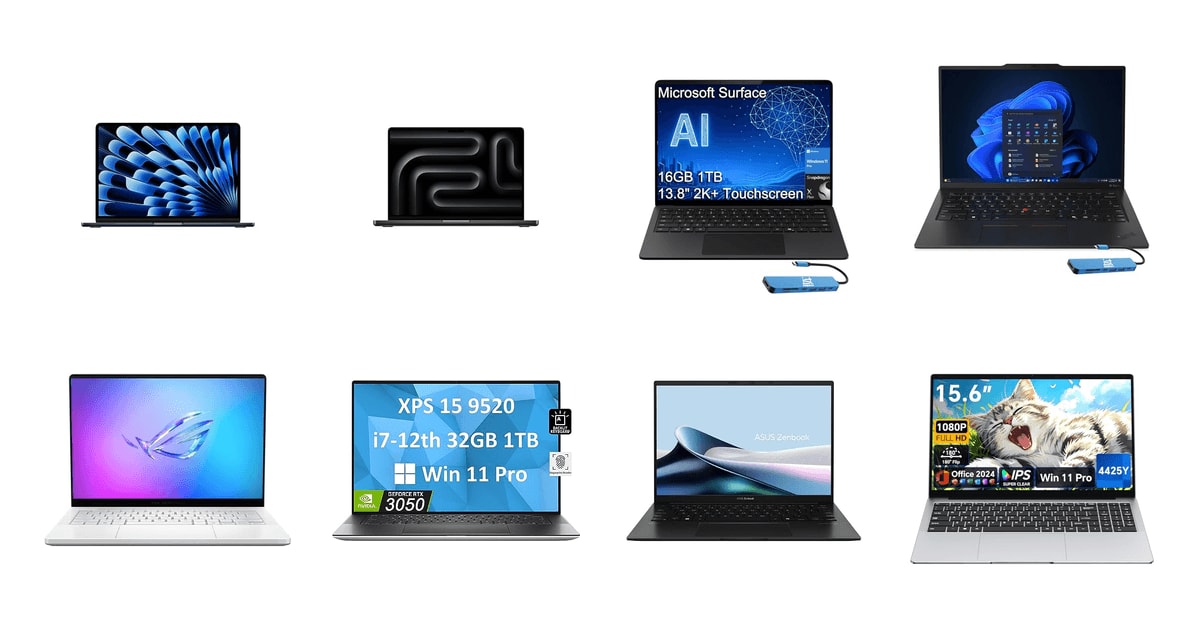
| Product | Processor | RAM & Storage | Price | |
|---|---|---|---|---|
| Apple 2025 MacBook Air 13-inch Laptop withTop pick | Apple M4 | 16GB/256GB SSD | Check price |
| Apple 2024 MacBook Pro with Apple M4Upgrade pick | Apple M4 | 16GB/512GB SSD | $1,349On sale |
| Microsoft Surface Laptop 7Runner-up | Snapdragon X Plus | 16GB/1TB SSD | Check price |
| Lenovo ThinkPad X1 Carbon Gen 13Also great | Intel Ultra 7 258V | 32GB/1TB SSD | $2,220 |
 | ASUS ROG Zephyrus G14 LatestAlso consider | Ryzen AI 9 HX 370 | 32GB/1TB SSD | $2,999.99 |
 | Dell XPS 15 9520 15.6" FHD+Also in lineup | Intel i7-12700H | 32GB/1TB SSD | Check price |
 | ASUS Zenbook 14 LaptopAlso consider | Ryzen 7 8840HS | 16GB/1TB SSD | $1,129.99 |
 | EYY 2026 Laptop ComputerAlso in lineup | Intel Pentium 4425Y | 4GB/128GB SSD | Check price |
Prices as of Nov 5, 9:31 AM PT · Details
How we picked
Battery you can trust. We compared manufacturer claims against standardized rundowns from Wirecutter, The Verge, Tom's Guide and Laptop Mag, because rated hours and measured hours often differ by half. Anything that couldn't clear a normal workday unplugged didn't make the picks.
Sustained performance. Burst benchmark scores don't tell you what happens twenty minutes into a video export. We looked for published results under prolonged load and favored machines with either active cooling or a chip efficient enough not to need it.
Screen quality. We read spec sheets alongside published brightness and color measurements from RTINGS.com, Tom's Hardware and PCMag. We treated 100% DCI-P3 and roughly 500 nits as the bar for anything above entry level.
Memory and storage. We treated 16GB as the minimum for a laptop you expect to keep four or more years, since most current machines solder their RAM. Configurations with 8GB or less were disqualified from the picks.
Ports and weight. We counted what you actually plug in: Thunderbolt or USB4, USB-A, HDMI and card readers. Weight mattered most for the travel and student recommendations, where anything over three pounds gets noticed by the end of a commute.
Top pick
Fanless, quiet, and it lasts all day, if you don't need Windows
Apple 2025 MacBook Air 13-inch Laptop with
The 13-inch MacBook Air with M4 has no fan at all, so it stays silent whether you're answering email or exporting video. Published battery rundowns put it near the top of every list, and at under three pounds it disappears into a bag.
Check priceatAmazonPrices as of Nov 5, 9:31 AM PT · Details
The Air is the rare laptop that gets out of your way. There's no fan inside, so there's no whir when you open too many tabs and no hot spot under your left palm. It wakes instantly. It charges over USB-C from the same brick as your phone. Owners consistently describe it as the machine they stopped thinking about, which is roughly the highest compliment a laptop can earn.
Battery life is the headline. Wirecutter measured about 15.5 hours in its standardized rundown, nearly double the roughly eight hours comparable Intel Core Ultra ultrabooks managed in the same test, and Tom's Guide recorded over 16 hours of continuous web browsing. Apple rates it at up to 18 hours. Whichever number you trust, the practical result is the same: you can leave the charger at home on a normal workday.
Performance-per-watt is what makes the rest of it work. The M4 handles photo edits, a wall of browser tabs, and a video call at once without the machine getting warm. It won't replace a desktop for heavy 3D or long renders. But Apple's 16-core Neural Engine runs 38 TOPS of on-device AI, so transcription and image tasks happen locally, with no internet connection required.
The 13.6-inch Liquid Retina panel is sharp and bright enough for a sunny kitchen table, and it covers a billion colors. The 12MP Center Stage camera is a real upgrade if you're on calls all day, and the four-speaker setup is better than the chassis suggests. This configuration ships with 16GB of unified memory, which is the floor we'd accept on a laptop you plan to keep for four or more years.
Flaws but not dealbreakers
The base configuration has a 256GB SSD, and that fills up faster than you'd think once you've synced a photo library. Neither the memory nor the storage is upgradeable later, so whatever you order is what you're stuck with. Buy more storage than you think you need, or plan on an external drive.
There are two Thunderbolt ports and a headphone jack. That's it. No HDMI, no SD card slot, no USB-A, so a dongle is part of the deal if you plug into monitors or pull photos off a camera. And because it's fanless, sustained work like a long video export will slow down as the chassis heats up. It's fine for most people. It's not a machine for all-day rendering.
Runner-up
The Windows ultrabook that finally runs a full workday
Microsoft Surface Laptop 7
The Surface Laptop 7 pairs a Snapdragon chip with a 13.8-inch 120Hz touchscreen and a genuinely good keyboard. It's the Windows machine that comes closest to MacBook Air battery life, and it keeps a USB-A port so you're not carrying an adapter everywhere.
Check priceatAmazonPrices as of Nov 5, 9:31 AM PT · Details
If you've been buying Windows ultrabooks for years, the thing that will surprise you is unplugging. Microsoft rates this one at up to 20 hours, and The Verge measured over 20 hours on the Snapdragon X Elite version, six to eight hours ahead of Intel Core Ultra competitors in equivalent testing. Laptop Mag's battery rankings tell the same story: ARM laptops took nine of the top ten spots for longevity.
This is also a real Copilot+ PC, and that's starting to mean something. Microsoft's standard requires at least a 40 TOPS NPU, which unlocks Recall, live captions, and on-device creative tools. PCMag found Copilot+ machines finished on-device AI transcription about four times faster than laptops that punt the work to the cloud, with no connection needed. If you work on planes or in bad hotel Wi-Fi, that's the practical payoff.
The 13.8-inch touchscreen runs at 2304 by 1536 and 120Hz, which makes scrolling feel smoother than the spec difference suggests. Ports are sensible for a thin machine: two USB4-C, one USB-A, Surface Connect, and a headphone jack, plus Wi-Fi 7. The 1080p IR camera with Windows Studio Effects handles background blur and auto-framing in hardware, so your daily standup looks better without a third-party app.
At 2.96 pounds it's slightly heavier than the Air, and the 16GB of DDR5 and 1TB SSD in this configuration is a sane long-term setup. You're not going to run out of storage in year two. Owners who came from an older Surface consistently point to the speed and the battery as the upgrades they actually notice day to day.
Flaws but not dealbreakers
This is an ARM machine, and a handful of older Windows programs still trip on it. Most mainstream apps now run natively or emulate well, but niche business software, some VPN and security clients, and older hardware drivers can be a problem. Owners moving legacy corporate tools over report exactly this friction. If you depend on one specific old application, check its ARM support before you buy.
There's no discrete GPU, so serious gaming and GPU-heavy rendering are off the table. Note also that this listing is the Snapdragon X Plus, not the X Elite that posted those record battery figures in published testing, so expect slightly less headroom under load.
Upgrade pickOn sale
A brighter screen, more ports, and no throttling under load
Apple 2024 MacBook Pro with Apple M4
The 14-inch MacBook Pro with M4 adds active cooling, an HDMI port, and an SD card reader to the formula, plus one of the brightest laptop displays ever measured. This one is a renewed unit, which is how it lands closer to Air money than a new Pro.
$1,349fromAmazonTypical pricePrices as of Nov 5, 9:31 AM PT · Details
The reason to step up is sustained work. The Air slows down once the chassis heats up, because there's nothing inside to move the heat out. The Pro has fans. If you export video, compile code, or run long batch edits, that's the difference between a job that finishes at full speed and one that crawls at the twenty-minute mark. For everything shorter, the Air is plenty.
The display is the other reason, and it's not close. RTINGS.com measured over 1,600 nits of peak HDR brightness on the M4 Pro version of this 14-inch panel, among the highest results in their laptop database. ProMotion pushes it to 120Hz. If you grade color, edit photos, or just want HDR video to look like HDR video, no Windows laptop in this guide comes near it.
Ports matter here too. You get HDMI and an SD card reader alongside Thunderbolt, which means a camera shoot or a conference-room projector doesn't require a bag of adapters. MagSafe charging keeps a Thunderbolt port free. It's a heavier machine than the Air at about 3.3 pounds, but it's still something you can carry every day without resenting it.
This configuration pairs 16GB of memory with a 512GB SSD, which is a more comfortable starting point than the Air's base storage. Space Black hides fingerprints better than the older finishes, mostly. And the keyboard and trackpad are the same excellent parts Apple puts in every current MacBook, so nothing about the typing experience is a downgrade.
Flaws but not dealbreakers
This is a renewed unit, not an Apple-certified refurbished one. Amazon-qualified suppliers inspect, test, and clean it, and the listing promises no cosmetic flaws visible at arm's length and a battery above 80% of original capacity. But 80% is a meaningful haircut on a machine you want to keep for five years, and the accessories in the box won't be Apple originals. Packaging may be generic.
It's an M4, not an M4 Pro, so you get the Pro chassis and screen without the extra CPU and GPU cores. Heavy 3D and long exports will still take longer than they would on a higher-tier chip. And like every current MacBook, memory and storage are soldered.
This renewed unit is eligible for a replacement or refund within 90 days of receipt if you're not satisfied.
Also great
The best keyboard on a Windows laptop, in a two-pound body
Lenovo ThinkPad X1 Carbon Gen 13
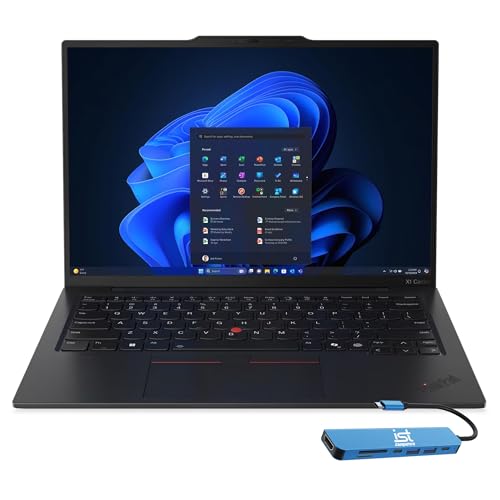
The ThinkPad X1 Carbon Gen 13 weighs about as much as a hardcover book and still has two Thunderbolt ports, two USB-A, and HDMI. If you type for a living and travel with your laptop, this is the one to look at.
$2,220fromAmazonPrices as of Nov 5, 9:31 AM PT · Details
Nothing else in this guide types like a ThinkPad. The keys have real travel and a shape that guides your fingertips, and the red TrackPoint is still there if you learned on one. That sounds like nostalgia until you spend a day writing on it. If your job is words or code, the keyboard is the component you touch most, and this is the one Windows laptop where it's clearly the best part.
It weighs 2.17 pounds. Notebookcheck clocked the X1 Carbon Gen 13 at roughly 1.09 kg, making it one of the lightest 14-inch business laptops that also carries all 12 MIL-STD-810H durability certifications. That combination is unusual. Most machines this light feel flexy; this one has a carbon-fiber lid that doesn't creak, and owners who've kept previous X1 Carbons for a decade tend to buy another.
The port selection is the quiet argument for it. Two Thunderbolt 4, two USB-A, HDMI 2.1, and a headphone jack means you can walk into any conference room and plug in. The 14-inch 2.8K OLED runs 120Hz with 500 nits and 100% DCI-P3 coverage, and Intel's Core Ultra 7 258V includes a 47 TOPS NPU, so it clears the Copilot+ bar.
This configuration comes with 32GB of memory and a 1TB SSD, which is more headroom than most people need and exactly right if you run virtual machines, big spreadsheets, or a dozen Docker containers. Windows 11 Pro is preinstalled with BitLocker and Remote Desktop, which matters if your IT department has opinions about disk encryption and remote management.
Flaws but not dealbreakers
An OLED panel at 120Hz costs you battery. Lenovo rates it at up to 15 hours, but that's a manufacturer figure on a low-power chip driving a bright screen, and real use will land well under the ARM machines in this guide. If maximum unplugged time is your priority, the Surface or the Air wins.
Owner feedback isn't uniformly glowing. Most people describe it as light, fast, and solid, but a few report hardware trouble within the first couple of months. That's a minority pattern rather than a trend, though it's worth registering the support path before you buy. It's also among the more expensive machines here for the performance you get.
Who this is for
Buy now if your current laptop can't hold a charge through a meeting, if it's stuck on 8GB of memory, or if it's an Intel-era MacBook that runs hot doing nothing. The jump in battery life from an ARM chip is the single biggest quality-of-life change in laptops right now, and you'll feel it the first week. Students and commuters should weight battery and weight above almost everything else. If you type all day, put the keyboard first instead.
Skip the upgrade if you bought a capable machine in the last two or three years and it still does what you need. Nothing here will transform a workflow that already works. This guide covers general-purpose laptops you'd use for school, office work, creative projects and some gaming. It doesn't cover Chromebooks, tablets with keyboard covers, desktop replacements above five pounds, or workstation-class mobile GPUs. And we only write about the specific configurations listed here, since memory and storage are usually soldered and can't be changed later.
How we picked
Battery: we compared standardized rundowns from Wirecutter, The Verge, Tom's Guide and Laptop Mag against manufacturer claims, and looked for machines that clear a full workday unplugged. Sustained performance: burst scores are easy, so we favored published results under prolonged load and machines with either fans or a chip efficient enough to skip them. Display: we leaned on published brightness and color measurements from RTINGS.com, Tom's Hardware and PCMag, treating 100% DCI-P3 and around 500 nits as the bar. Memory: 16GB is the floor for a laptop meant to last four or more years, because you can't add more later. Ports and weight: we counted the connections you actually use and kept the travel picks under three pounds. Longevity: we noted repairability, replacement-part availability and how long owners report keeping these machines.
Other laptops worth considering
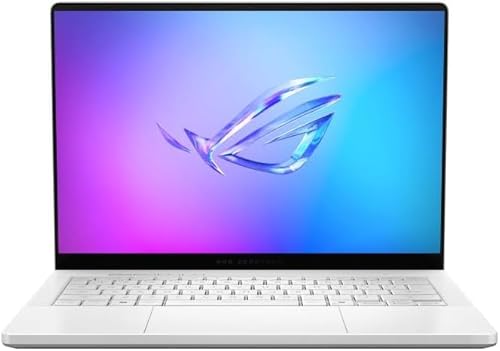
If you want to play real games without hauling a desktop replacement: The ASUS ROG Zephyrus G14 Latest — The ROG Zephyrus G14 puts a Ryzen AI 9 HX 370 and an RTX 5070 Ti into an aluminum chassis that's 0.63 inches thick and weighs about three and a half pounds. Notebookcheck measured a 34% multi-core Cinebench gain over the previous G14 in the same size body and the same 76Wh battery, which is a big generational jump. The 3K 120Hz OLED is genuinely good for both games and video, and the 50 TOPS NPU clears the Copilot+ bar. What you give up is quiet and battery life. Owners describe the fans as loud under load, and a gaming GPU drains a small battery quickly, so this is a laptop you carry to a desk with an outlet.
If you want an OLED touchscreen and a terabyte of storage on a budget: The ASUS Zenbook 14 Laptop — The Zenbook 14 OLED gets you a 14-inch 1920 by 1200 OLED touch panel with 500 nits and 100% DCI-P3, a Ryzen 7 8840HS, 16GB of memory and a 1TB SSD in a 2.82-pound body. PCMag noted that Zenbook OLED panels now hit those numbers for a fraction of what equivalent specs cost on competing laptops a couple of generations ago. Ports are better than the Air's too, with USB4, HDMI 2.1 and USB-A. The catch is stamina: ASUS rates the 75Wh battery at up to eight hours, and owners confirm it runs down faster than the ARM machines here. This listing also ships opened and resealed for a memory and storage upgrade, so check the unit carefully on arrival.
The competition
Here's what else the research turned up. This isn't the whole laptop market, just the other machines we looked at closely enough to have an opinion about. Both of these are still worth buying under the right circumstances, and we say who for.
The Dell XPS 15 9520 15.6" FHD+ — The Dell XPS 15 9520 is a well-built 15.6-inch machine with a 14-core i7-12700H, 32GB of DDR5, a 1TB SSD and an RTX 3050, plus Thunderbolt 4, USB-C, an SD card reader and a fingerprint reader. It's a couple of chip generations behind the picks, and at 4.22 pounds it's the heaviest laptop here by a wide margin. This configuration also has the FHD+ IPS panel rather than the OLED option that Tom's Hardware measured at 99.8% DCI-P3, so you're not getting the display that made the XPS 15 famous. Choose it if you want a large screen, a discrete GPU and a full port selection, and you'd rather spend the savings elsewhere. Note that the seller resealed it to upgrade the memory and SSD.
The EYY 2026 Laptop Computer — The EYY 15.6-inch laptop is an entry-level Windows machine with a Pentium 4425Y, 4GB of memory, a 128GB SSD, a Full HD IPS screen and Office preinstalled. It's the least demanding option here and the only one under our memory threshold, which is why it isn't a pick: 4GB isn't enough for comfortable multitasking, and you can't reasonably expect it to stay usable for four years. Owners are split, with some praising the fast boot and easy setup for browsing and Zoom classes, and others reporting sluggish performance and battery life well short of the claims. It makes sense as a first laptop for a kid learning to type, or as a spare for email and documents. It doesn't make sense as a student's only machine.
Setup and longevity
Order the memory and storage you'll need in three years, not the amount you need this week. On almost every laptop here, both are soldered, so the configuration you buy is permanent. Keep at least 10 to 15 percent of the SSD free, since drives slow down as they fill. Battery health lasts longer if you avoid sitting at 100% on the charger all day; most of these machines have a charge-limit setting buried in system settings, and it's worth turning on. Blow dust out of the intake vents once or twice a year on anything with fans, especially the gaming models. And set up a backup before you need one. A laptop is a device you drop.
Questions we get
What's the best laptop overall right now?
For most people it's the 13-inch MacBook Air with M4. It's silent, weighs under three pounds, and published rundowns from Wirecutter and Tom's Guide put it at 15 to 16 hours on a charge. If you need Windows, the Surface Laptop 7 is the closest equivalent.
Which laptops actually have the longest battery life?
ARM-based machines, by a clear margin. Laptop Mag's rankings put ARM laptops in nine of the top ten spots for longevity, and The Verge measured over 20 hours on a Snapdragon X Elite Surface Laptop 7. Comparable Intel Core Ultra ultrabooks averaged around eight hours in Wirecutter's standardized test.
Is a Copilot+ PC worth it, and what does it actually do?
Copilot+ requires at least a 40 TOPS NPU, which covers Snapdragon X chips, AMD Ryzen AI 300 and Intel Core Ultra 200V. It enables Recall, live captions and on-device creative tools that run without an internet connection. PCMag found those machines completed local AI transcription about four times faster than laptops relying on the cloud. It's a nice bonus, not a reason to buy on its own.
How much RAM do I need?
16GB is the floor for a machine you want to keep four or more years. Skip anything with 8GB or less, because on nearly every modern laptop the memory is soldered and can't be added later. Go to 32GB if you run virtual machines, edit long video timelines, or keep dozens of tabs open alongside heavy apps.
Should I get an OLED or a mini-LED display?
OLED gives you perfect blacks and excellent color, and it's now common on mid-range laptops. Mini-LED goes much brighter for HDR content: RTINGS.com measured over 1,600 nits on the 14-inch MacBook Pro's panel. OLED also draws more power, especially at high refresh rates, so it costs you some battery. Pick OLED for color work and mini-LED for HDR video and outdoor brightness.
What's the real difference between Snapdragon X and Intel Core Ultra?
Snapdragon is ARM-based and much more efficient, which is where the 20-hour battery figures come from. Intel Core Ultra is x86, so it runs every Windows application without emulation, including older business software and games. If you have one specific legacy app you can't live without, check its ARM support first. Otherwise the battery advantage is hard to argue with.
Why you should trust us
For this guide:
- We read published battery rundowns and benchmark results from Wirecutter, The Verge, Tom's Guide, Notebookcheck, RTINGS.com, Tom's Hardware, PCMag and Laptop Mag, and compared them against the manufacturer claims for each machine.
- We went through the full specification sheet for every configuration listed here, including the exact processor, memory, storage, panel and port selection, since sellers often list variants that differ from a manufacturer's flagship model.
- We read owner feedback across all of these listings for recurring themes rather than one-off complaints, which is how we identified the ARM software friction, the short battery life on some Windows models, and the condition risks on resealed and renewed units.
- We read owner reviews on every listing, weighted toward the critical ones, because that is where the recurring failures show up.
- We have a systematic way of automatically fetching the latest prices, so the numbers on this page stay current.
- This is a research-focused guide, so the team may not own every product listed — though we often do own the top winners, which gives us extra context for the recommendations.
- We don't accept free products, and the retailer commission never changes which product we recommend.
Sources
Best Laptops 2026 — Wirecutter (NYT), Wirecutter
Apple MacBook Air M4 Review — Tom's Guide, Tom's Guide
Best Laptop Display Rankings — RTINGS.com, RTINGS.com
Microsoft Surface Laptop 7 Review — The Verge, The Verge
ASUS ROG Zephyrus G14 2025 In-Depth Review — Notebookcheck, Notebookcheck
Framework Laptop 13 Repairability Assessment — iFixit, iFixit
Best Laptops Buying Guide — PCMag, PCMag
Annual Laptop Battery Life Rankings — Laptop Mag, Laptop Mag
Dell XPS 15 2025 Review — Tom's Hardware, Tom's Hardware
Lenovo ThinkPad X1 Carbon Gen 13 Review — Notebookcheck, Notebookcheck
ASUS Zenbook 14 OLED Review — PCMag, PCMag
Apple M4 Chip — Official Specs and Neural Engine, Apple
Amazon product listings and owner reviews for all 8 products
Manufacturer specification pages for each product
Some passages in this guide may be paraphrased with AI help.
Product prices and availability are accurate as of the date/time indicated and are subject to change. Any price and availability information displayed on Amazon.com at the time of purchase will apply to the purchase of this product.
More like this.
Continue exploring electronics reviews and recommendations.

The Best USB Hubs And Multi-Port Adapters For Laptops (2026)
Your laptop probably has two USB-C ports, maybe three. One of them is busy charging. That leaves one port for a monitor, a mouse, a keyboard, an external…

The Best Ergonomic Laptop Stands
A laptop puts your screen about a foot below where your eyes want it. You lean in, your chin drops, and after a few hours your neck lets you know. A stand…

The Best Laptop Backpacks for Commuters
A commuter backpack has one job that matters more than the rest: get your laptop to the office and home again without a scratch. But you feel the other…

The Best Hitch-Mounted Bike Racks
A hitch rack is the difference between a bike trip you look forward to and one you dread. Roof racks mean lifting a 30-pound bike over your head in a…

The Best Truck Nerf Bars And Running Boards
A modern half-ton truck sits high enough that climbing in becomes a small daily workout. Add a lift kit and it's a real one. Nerf bars and running boards…

The Best Travel Power Banks
A power bank is the one travel gadget you notice only when it's missing. Your phone dies at the gate, the airport outlet is blocked by someone's suitcase,…