The Best Under-Desk Cable Management Trays
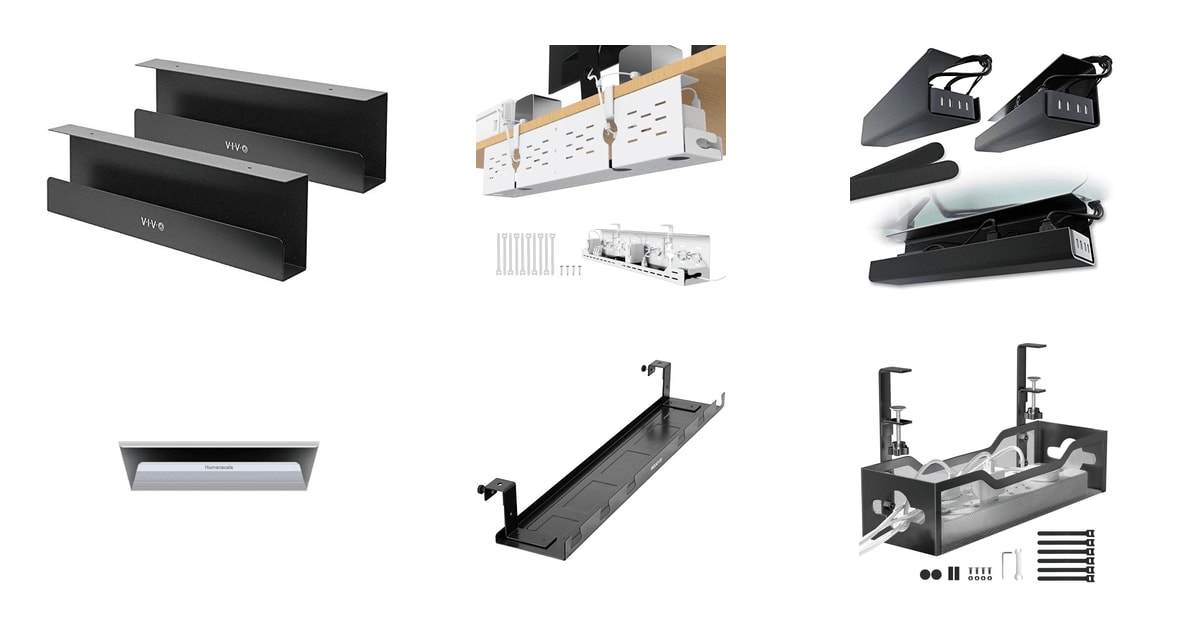
The mess under your desk is the part of your setup nobody photographs. A power strip on the carpet, three adapter bricks piled on top of it, and a knot of cords your feet find every time you stretch. A cable tray fixes most of that in an afternoon. It lifts the strip off the floor, gives the bricks somewhere to sit, and keeps the vacuum from eating your HDMI cable. You'll notice the difference the first time you roll your chair back without snagging anything.
Here's the honest part: no tray in this category holds everything you own. Depth is the constant limitation. Most of these baskets run three to five inches deep, and a wide-body surge protector or a UPS simply won't drop in. Mounting is the other catch. Screw mounts need wood or particle board, clamps need a straight desk edge, and adhesive needs a clean flat surface and a light load. There's no universal option, so you have to match the tray to your desk before you match it to your cables.
We think that the VIVO Under Desk 17-inch 2-Pack is the best under-desk cable management tray for most people, and that the Litwaro Clamp-Mount Metal Mesh Tray is the one to buy if you rent, can't drill, or just don't want to put screws in your desk.
Everything we recommend
Two sturdy steel baskets that cover a whole desk

No drilling, no adhesive, and it still holds a power strip

Hangs from the frame, so it rides with a standing desk

Peel-and-stick trays for light loads and no tools at all
At a glance
| Product | Length | Mounting Type | Price | |
|---|---|---|---|---|
| VIVO Under Desk 17 inch Cable ManagementTop pick | 16.5 in | Screws | $37.99 |
 | Univivi Under Desk Cable Management TrayAlso consider | 32 in | — | $38.69On sale |
| Scanfield Under Desk Cable Management TrayRunner-up | 17 in | Adhesive | $31.95 |
 | NeatLinks Under Desk Cable Manager Wire OrganizerAlso in lineup | — | — | $29.69 |
| Mount-It! Premium Under Desk Cable Management TrayAlso great | 23.2 in | Crossbar or Screw Mount | $29.99 |
| Under Desk Cable Management Tray No DrillBudget pick | 13.38 in | Clamp Mount | $13.99On sale |
How we picked
Mount versus desk. We compared the mounting method on every listing against the desk surfaces people actually own — particle board, laminate, glass, and sit-stand frames. Trays that offered only one mounting path had to be genuinely good at it.
Load capacity. A six-outlet surge protector with adapters plugged in runs roughly four to ten pounds. We favored trays with a stated rating comfortably above that and weighed owner reports of sagging or outright failure heavily.
Basket size. We read specs for width and depth together, since a long tray that's only three inches deep still won't take a wide power strip. Owner feedback about strips that wouldn't fit shaped which trays we could recommend broadly.
Cable access later. Front-opening and open-mesh designs let you add a cable without dismounting the tray. We treated that as a real advantage over enclosed shells for anyone whose setup changes.
Heat around adapters. Charging bricks and gaming strips get warm, so we preferred open or ventilated structures over sealed plastic. This mattered most for the trays meant to hold a full power strip.
Top pick
Two sturdy steel baskets that cover a whole desk
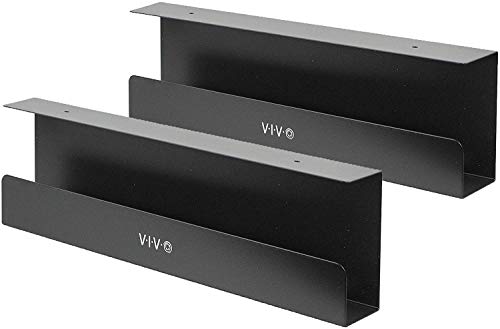
VIVO Under Desk 17 inch Cable Management
The VIVO set gives you two 16.5-inch steel mesh trays that mount with screws under a wood or particle-board desk. Together they span about 33 inches, which is enough to hold a power strip at one end and your adapter bricks at the other.
$37.99fromAmazonTwo trays beat one for most desks. A single tray forces you to cram the power strip and every charging brick into the same basket. With two, you can put the strip on one side and the loose adapters on the other, which keeps cords from crossing over each other. Owners with sit-stand desks, dual monitors, and a console under the desk report the pair handles the whole load without sagging.
The front-opening design is the part you'll appreciate six months from now. Once the trays are up, you slide a cable in from the side instead of unscrewing anything. Swap a monitor, add a dock, plug in a new charger — none of it requires taking the tray down. Enclosed trays make that same change a small project.
Steel mesh handles heat better than a closed plastic shell. If you run several USB-C bricks or a gaming strip, those adapters get warm, and open mesh lets that warmth escape. VIVO rates each tray at 11 pounds, which covers a loaded six-outlet strip with room to spare. Owners describe the metal as solid rather than flimsy, and none of the feedback points to bending under normal desk loads.
Installation is straightforward if you own a drill or even just a screwdriver. Mounting holes are pre-drilled and spaced 11 inches apart, and the screws come in the box. Several owners mention skipping the screws entirely and using strong mounting tape instead, which is a reasonable option on a desk you'd rather not drill — though we'd stick with screws if you're holding a real power strip.
Flaws but not dealbreakers
Each tray is only three inches wide, and that's the real constraint. Owners with wide-body surge protectors report the strip simply won't fit, and one gave up and went back to Velcro on the desk underside. Measure your power strip before you order. A slim strip drops right in; a double-wide one is a coin flip.
This is a screw-mount product with no clamp option. If you rent, or your desk is glass or acrylic, you can't use it as intended. The trays are also finished in black only, which is fine on most desks but obvious on a white or light oak top.
Budget pickOn sale
No drilling, no adhesive, and it still holds a power strip
Under Desk Cable Management Tray No Drill
The Litwaro clamps onto your desk edge with rubber-padded jaws and holds about 15 pounds of carbon steel mesh basket. It goes on in a few minutes with no tools, and it comes off just as fast when you move.
$13.99fromAmazonList priceClamping is the right compromise when you can't drill. Adhesive trays top out well below a loaded power strip and can let go without warning. A clamp grips the desk edge mechanically, so a warm room or a laminate surface doesn't matter. The 15-pound rating covers a six-outlet strip plus a few bricks, and owners consistently describe the tray as sturdy and stable once tightened.
The install really is a few minutes. You position the tray, tighten the clamps, and you're finished — no drill, no tape, no waiting for adhesive to cure. Rubber pads on the jaws keep the clamp from marking your desk edge, which matters if the desk isn't yours. Owners moving between apartments or hot-desking call this out as the reason they chose it.
You can mount the basket facing inward or outward, and there are cable pass-through holes on both sides. That flexibility helps when your outlet is behind the desk but your monitor cables come from the front. It fits desks from 0.4 to 2 inches thick, which covers almost every consumer desk top, including thin IKEA-style panels.
This is the single most popular tray in the lineup by a wide margin, and owner feedback skews strongly positive on build quality. People describe it as metal, not flimsy plastic, and mention it staying put under a real cable load. That's a useful signal for a product you're trusting to hold electronics over your feet.
Flaws but not dealbreakers
At 13.38 inches, the basket is the smallest here. It'll hold one power strip and some slack, but not a strip plus a laptop brick plus a dock. If your setup is dense, you'll want two units — and two Litwaros cost about what the VIVO pair does, without the screw-mount stability.
The clamp needs a straight, flat desk edge. Beveled tops, thick frame rails, or rounded profiles can prevent a secure grip or let the tray rock. Check your edge before you order. A few owners also wish it came with better cord retention inside the basket, since a heavy extension cable tends to slide around.
Also great
Hangs from the frame, so it rides with a standing desk
Mount-It! Premium Under Desk Cable Management Tray
The Mount-It! is a 23-inch powder-coated steel basket that hooks onto a sit-stand desk's crossbar instead of the tabletop. That keeps your cables organized as the desk travels between sitting and standing heights.
$29.99fromAmazonA standing desk needs a tray that moves with it. Mount a basket to the surface and every height change tugs the cable run. Hang it from the crossbar and the tray, the strip, and the slack all rise together. Mount-It! includes the steel hooks for this, plus screws if your frame doesn't have an accessible crossbar. There's no adhesive anywhere in the design.
The 23-inch basket is genuinely useful for the extra slack a moving desk creates. Going from about 28 inches seated to the mid-40s standing means a foot and a half of cable has to go somewhere, and a short tray forces it onto the floor. Owners report fitting two power strips end to end, front and back, with room for the cords in between.
Mount-It! uses a solid steel plate rather than open mesh on the base, which one owner points out sits flatter against a desk frame than a wire grid does. It's powder-coated black, it's about two pounds, and the finish is meant for offices where the tray might be visible from a low angle.
If your desk is fixed-height, this still works as a plain screw-mount tray, and 23 inches of continuous basket covers a dual-monitor setup that two short trays would split awkwardly. Just know you're paying for standing-desk hardware you won't use.
Flaws but not dealbreakers
The crossbar mount assumes your frame has an accessible horizontal member, and plenty of budget sit-stand frames don't. Without one you fall back to screws, which works but gives up the main reason to buy this tray.
Depth is limited at 2.9 inches, and owners say thick laptop power blocks are a struggle — one describes having to jam them in. Another found it not wide enough to reach usable mounting points on their desk and returned it. Owner feedback also includes a complaint about the mounting bracket flexing, which is worth weighing against the heavy-duty framing on the listing.
There's no no-drill option here at all. If you rent, this isn't your tray.
Runner-up
Peel-and-stick trays for light loads and no tools at all
Scanfield Under Desk Cable Management Tray
The Scanfield pair mounts with heavy-duty adhesive backing, so there's nothing to drill and nothing to clamp. It's the fastest install here, and it's the right answer when your desk edge won't take a clamp and you can't put screws in the top.
$31.95fromAmazonSome desks rule out every other mounting method. Glass tops, thick beveled edges, a landlord's furniture — if you can't drill and you can't clamp, adhesive is what's left. The Scanfield set gives you two 17-inch trays for that situation, which is enough coverage to keep a strip and a cable bundle off the floor.
The install takes about as long as it sounds. Wipe the surface, peel, press, hold. There's no hardware, no alignment, no drill. Owners repeatedly describe it as the easiest cable solution they've installed, and several mention successful mounts on glass and on smooth-finished wood where a clamp wouldn't have worked.
At 3.5 inches across, these trays are slightly wider than the VIVO baskets, and owners report fitting a power strip plus transformers with room left over. The black finish disappears under most desks. As a pair, they cover roughly the same span as the VIVO set without a single hole in your desk.
Flaws but not dealbreakers
Adhesive has a hard ceiling, and this is the flaw that decides whether you should buy it. Owner feedback includes trays that started sagging under a modest load and at least one that let go entirely within two weeks with only a couple of light cords inside. Warm rooms and laminate surfaces make it worse. Keep the load light — cables and a small charger, not a fully loaded surge protector.
There's no screw or clamp fallback. If the adhesive fails or your surface turns out to be incompatible, you're buying a different tray, not re-mounting this one. Prep matters more than the listing suggests: clean the surface thoroughly and press firmly for the full recommended time.
Who this is for
Buy a cable tray if your power strip currently lives on the floor, if your feet find cords when you stretch, or if you're on video calls and your desk underside shows. It's a cheap, reversible fix that takes an afternoon at most. It's especially worth it on a standing desk, where a floor-bound strip means the cable run gets yanked every time you change height.
Skip it if your desk already has a built-in cable channel or a factory-fitted spine, or if you're only routing two or three cords — a few adhesive clips will do the same job. This guide covers under-desk baskets and enclosed managers that hold a power strip and cable bundle. It doesn't cover wall raceways, desk-leg spines, braided sleeves, or grommets, though most tidy setups use a tray alongside one or two of those.
How we picked
We compared listing specs, published product information, and owner feedback themes across every tray here, weighing five things. Mount versus desk: screws need wood or particle board, clamps need a straight edge from about 0.4 to 2 inches thick, and adhesive needs a clean, flat, cool surface. Load capacity: a loaded surge protector runs four to ten pounds, so we looked for ratings well above that and took reports of sagging seriously. Basket size: width and depth together decide whether your strip fits, and depth is where most of these trays fall short. Cable access: front-opening and mesh designs let you add a cord later without taking the tray down. Heat: open steel mesh sheds warmth from adapter bricks that a sealed plastic shell traps.
Other under-desk cable management trays worth considering
If you want one continuous tray across a wide desk: The Univivi Under Desk Cable Management Tray ($38.69) — The Univivi runs 32 inches long and six inches wide, which is the most usable volume in this lineup by a good margin. A dual-monitor gaming setup — two display cables each, a headset stand, a capture card, a dock — routes through one basket instead of two separate ones. Owners report fitting two full-size surge protectors side by side. It mounts with C-clips for a traceless install or screws for a firmer hold, so it works for renters too. The catches are aesthetic and dimensional: it comes in white only, which stands out against the black and dark-walnut desks most people own, and its length is unforgiving. One owner found it slightly too long for their desk with no way to trim the difference. Measure the clear span under your desktop before you commit.
The competition
This is what our research surfaced in this category, not a census of everything for sale. Cable trays turn over constantly on Amazon, and plenty of near-identical mesh baskets ship under names that change month to month. The product below is a real option that lost to a pick for specific reasons.
The NeatLinks Under Desk Cable Manager Wire Organizer ($29.69) — The NeatLinks is the only fully enclosed manager here, and the idea is sound: a low-profile plastic shell that hides the power strip completely, so nothing is visible from a seated position. It mounts with screws or double-sided tape, both included, and the recyclable plastic construction and office pedigree make sense for cubicles and conference rooms where the configuration never changes. Two things kept it out of the picks. The enclosed shell means adding a single cable later requires opening it up, which is a chore compared to sliding one into an open mesh basket, and sealed plastic traps the heat that charging bricks throw off. Owner feedback is also almost nonexistent and what little exists is negative, which makes it hard to recommend over trays with a long, consistent track record. If you're outfitting an office where the aesthetic matters more than access, it's still worth a look.
Installation notes
Before you order anything, measure three things: your desk's thickness at the edge, the clear span under the top between frame rails, and your power strip's width. Those three numbers rule out most of the mismatches that cause returns. On a height-adjustable desk, run the desk to full standing height, measure the cable run from the tray to the wall, then add 14 to 18 inches of slack and let it hang in a loose loop near the floor. A cable pulled taut at standing height will work an adapter loose or crack the jacket within weeks. Bundle with hook-and-loop straps rather than zip ties, since you'll be adjusting the slack as your setup changes. If you're using adhesive, wipe the mounting surface with isopropyl alcohol first and press hard for the full time the instructions specify.
Questions we get
Can I install a cable tray without drilling into my desk?
Yes, and you have two approaches. A clamp mount like the Litwaro grips the desk edge mechanically and holds far more weight than adhesive, but it needs a straight, flat edge between about 0.4 and 2 inches thick. Adhesive trays like the Scanfield pair stick to any smooth, clean, flat surface including glass, but they're only appropriate for light cable loads. The Univivi's C-clips are a third traceless option if your desk suits them.
How much weight can an under-desk cable tray actually hold?
It depends almost entirely on the mount. Screw-mount steel trays like the VIVO are rated around 11 pounds each, and the Litwaro's clamp mount is rated to about 15. Adhesive is the weak link — owners report sagging and outright failure well below those numbers, especially on laminate and in warm rooms. A six-outlet surge protector with adapters plugged in often weighs six to eight pounds before you add cables, so it belongs in a clamp or screw mount.
Which tray should I get for a standing desk?
The Mount-It! is built for it. It hangs from the desk's crossbar on steel hooks rather than attaching to the tabletop, so the tray and everything in it rise and fall with the desk. That keeps the cable run from getting tugged at every height change. Check that your frame actually has an accessible horizontal crossbar first — some budget sit-stand frames don't include one.
What size tray do I need for a dual-monitor or gaming setup?
A full gaming rig with two monitors, a headset, a capture card, and a controller dock typically means eight to fourteen cables under the desk. Look at 23 to 32 inches of tray for that. The Univivi's 32-inch basket handles it in one span, and the Mount-It!'s 23 inches covers most setups. A single-monitor desk is fine with a pair of 17-inch trays like the VIVO set.
Will any of these work on a glass desk?
Screw mounts are out entirely. Adhesive will physically bond to glass — Scanfield owners report successful glass installs — but glass is smooth and non-porous, so the bond is best kept to light cable routing rather than a loaded power strip. A clamp mount is the safer choice if your glass top has a straight, compatible edge, though check the manufacturer's guidance since clamping force on glass is its own risk.
Is open mesh or an enclosed tray better?
Open mesh wins for most home offices and gaming setups. It lets heat escape from adapter bricks, it lets you add or pull a cable without dismounting anything, and it generally holds more weight. Enclosed managers like the NeatLinks look cleaner from a seated position, which matters in an office or on daily video calls, but they're best reserved for setups you configure once and leave alone.
Why you should trust us
For this guide:
- We compared manufacturer specifications for every tray here — stated load ratings, basket dimensions, desk-thickness ranges, and included mounting hardware — against what the listings claim in their marketing copy.
- We read through owner feedback for each product, focusing on recurring themes like adhesive sagging, power strips that wouldn't fit, and mounting brackets that flexed, and let those patterns shape the flaws we describe.
- We weighed each product's mounting method against the desk types people actually own rather than treating all no-drill solutions as equivalent.
- We read owner reviews on every listing, weighted toward the critical ones, because that is where the recurring failures show up.
- We have a systematic way of automatically fetching the latest prices, so the numbers on this page stay current.
- This is a research-focused guide, so the team may not own every product listed — though we often do own the top winners, which gives us extra context for the recommendations.
- We don't accept free products, and the retailer commission never changes which product we recommend.
Sources
Best Cable Management 2025 — Wirecutter (NYT), Wirecutter
Best Cable Management Products 2025 — PCMag, PCMag
Best Desk Cable Management Solutions 2025 — TechRadar, TechRadar
Best Cable Management Trays for Your Desk — Reviewed.com / USA Today, Reviewed.com
Best Under-Desk Cable Organizers — The Spruce, The Spruce
Amazon product listings and owner reviews for all 6 products
Manufacturer specification pages for each product
Some passages in this guide may be paraphrased with AI help. Prices are refreshed automatically.
More like this.
Continue exploring electronics reviews and recommendations.

The Best Magnetic Parts Trays
Anyone who's dropped a caliper bolt into gravel knows the appeal of a magnetic parts tray. You stick it to a fender, a tool cart rail, or the side of an…

The Best Aluminum Cable Deck Railing Kits
Cable railing sells itself on one thing: you stop noticing the railing and start noticing the yard. Thin horizontal cables block a fraction of the view…

The Best Cable Machines for Home Gyms
A cable machine is the piece that finally makes a home gym feel complete. Dumbbells and a barbell cover the heavy stuff, but cables give you the angles - …

The Best Boot Trays for a Winter Entryway
A boot tray does one job, and it does it at the exact spot where winter gets into your house. Wet boots come off at the door, the snow melts, and the salt…

The Best Electric Buffet Warming Trays
Getting eight dishes hot at the same moment is the hardest part of hosting. The turkey needs to rest, the rolls need the oven, and the mashed potatoes…

The Best Monitor Arms and Desk Mounts
Your monitor's factory stand puts the screen at one height, one angle, and one spot on the desk. That's fine until you actually work there all day. A…