The Best Work-From-Home Upgrades
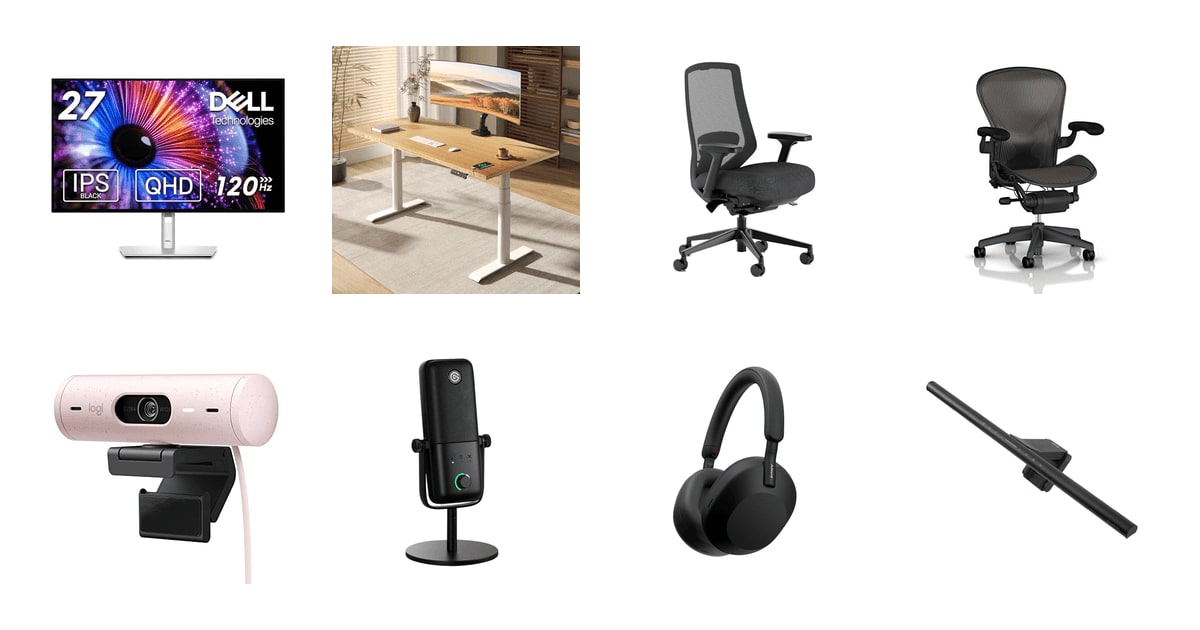
Most home offices got built in a hurry. A dining chair, a laptop propped on a stack of cookbooks, and whatever light happened to come through the window. That works for a week. It doesn't work for a career. The things that actually change your workday are boring and physical: what your spine rests against, how far your eyes travel to read a line of text, whether your neighbor's leaf blower makes it into the meeting. Get those right and everything else is decoration.
Here's the honest part. None of this gear fixes a bad workday, and a lot of it overlaps. A standing desk won't undo eight hours of slouching if your chair is still wrong. A great microphone can't rescue a call in a room with hard floors and no rug. Cornell's ergonomics guidance puts your monitor's top edge at or just below eye level, 20 to 28 inches out — and no laptop screen alone can do that, no matter what you buy. Some of this is furniture, not electronics, and furniture is expensive.
We looked at chairs, desks, a monitor, a webcam, a mic, headphones and a light bar, because a good setup is a stack and not a single purchase. If you buy one thing, buy the seat. We think that the Branch Ergonomic Chair Pro is the best work-from-home upgrade for most people, and that the Herman Miller Classic Aeron is the one to buy if you already have back trouble and want the chair that ergonomics professionals treat as the benchmark.
Everything we recommend
Real ergonomic adjustment without the executive-suite price

The benchmark chair, with a warranty to match, if your back demands it

One cable to your laptop, and the cable clutter mostly disappears

Fixes glare and dark-desk squinting, and costs you no desk space
Prices as of Nov 4, 9:24 AM PT · Details
At a glance
| Product | Product Type | Key Spec | Price | |
|---|---|---|---|---|
| Dell UltraSharp U2724DE 27-Inch Class WQHD LEDAlso great | Monitor | WQHD, 120Hz | $469.99 |
 | FLEXISPOT E6 Pro Large 60" x 30"Also consider | Standing Desk | 330 lbs Capacity | $522.49On sale |
| Branch Ergonomic Chair ProTop pick | Office Chair | 14-Pt Adjustment | Check price |
| Herman Miller Classic Aeron Chair - SizeUpgrade pick | Chair | Size B | $639 |
 | Logitech Brio 500 Full HD Webcam: AutoAlso in lineup | Webcam | Full HD 1080p | Check price |
 | Elgato Wave:3 MK.2 USB Condenser MicrophoneAlso in lineup | Condenser Microphone | USB-C | $134.99 |
 | Sony WH-1000XM5 Premium Noise Cancelling Wireless HeadphonesAlso consider | Wireless Headphones | 30-hr Battery | $199.99 |
| BenQ ScreenBar Pro LED Monitor Light BarAlso great | Monitor Light Bar | 1000lx Brightness | $139 |
Prices as of Nov 4, 9:24 AM PT · Details
How we picked
Ergonomic evidence. We leaned on published ergonomics guidance — Cornell's monitor-height recommendations and a meta-analysis in Applied Ergonomics on sit-stand desks — rather than manufacturer claims about posture. Anything sold as ergonomic had to have specific, adjustable support to back it up.
Adjustment range. We compared spec sheets for how much each chair and desk actually moves: armrest axes, lumbar travel, seat depth, height range. Fixed-position gear can only fit one body, and it's probably not yours.
Video call presence. For the webcam and microphone we looked at low-light handling, framing and how each one deals with background noise, since that's what colleagues notice on a call. Built-in laptop hardware was the baseline to beat.
Focus and noise. We weighted low-frequency noise cancellation heavily, because HVAC hum and traffic are what actually break concentration at home. RTINGS.com rates the Sony WH-1000XM5 as best in class for exactly that kind of noise.
Durability and warranty. We read owner feedback for failure patterns after the first few months and compared warranty terms. Furniture and monitors should outlast a laptop, so anything with a pattern of early failures had to be flagged.
Top pick
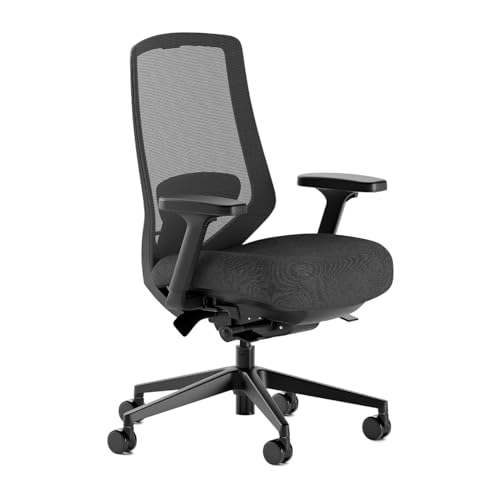
Real ergonomic adjustment without the executive-suite price
Branch Ergonomic Chair Pro
The Branch Ergonomic Chair Pro gives you 14 adjustment points, including 5D armrests and a lumbar cushion that slides up and down your back. That's the kind of fine-tuning that usually shows up on chairs several times the cost, and it's why this is the first thing we'd buy.
Check priceatAmazonPrices as of Nov 4, 9:24 AM PT · Details
A chair is the one purchase that compounds. Every other upgrade here makes a workday nicer. This one decides how your neck and lower back feel in three years. Owners who came from a cheap big-box chair describe shoulder and back pain fading within weeks, and that pattern shows up over and over in feedback on this chair. You sit in it forty hours a week. Nothing else on your desk gets that much contact time.
The adjustment count isn't marketing padding. The armrests move in five directions — height, width, depth, pivot and pad position — so you can park your forearms level with your keyboard instead of shrugging into them. The lumbar cushion moves vertically, which matters because the small of your back isn't in the same place as your coworker's. Most chairs in this range give you a fixed bump and call it lumbar support.
It's built like furniture, not like a task chair. Forty-two pounds, mesh back, molded high-density foam seat. Owners consistently call out how solid the arms feel compared to what they replaced, and assembly comes up as a non-event — one person, one included tool, well under an hour. The mesh back is the practical choice if you run warm or your office is a converted bedroom with no vent.
It's the chair to buy if you're tall-average and not sure what you need. The wide adjustment range means you don't have to diagnose your own posture before ordering. Set the seat height so your feet are flat, slide the lumbar until it meets your lower back, drop the armrests until your shoulders relax. That's the whole setup, and you'll know within a day whether it's dialed in.
Flaws but not dealbreakers
The seat runs deep. Shorter and slimmer people report the front edge pressing into the backs of their knees even with the depth pulled in as far as it goes. If you're under about 5'4", try it against a return window before you commit — this is the single most common complaint, and no amount of adjustment elsewhere fixes it.
It isn't cheap for what people expect a home chair to cost, and some owners feel the seat cushion doesn't quite match the rest of the chair's quality. It's a real step up from a hundred-dollar chair. It's not a Herman Miller, and it doesn't pretend to be.
Upgrade pick
The benchmark chair, with a warranty to match, if your back demands it
Herman Miller Classic Aeron Chair - Size
The Classic Aeron in Size B is what ergonomics professionals compare other chairs against. PostureFit supports the base of your spine, the Pellicle mesh seat breathes, and Herman Miller backs it with a 12-year warranty covering parts and labor.
$639fromAmazonPrices as of Nov 4, 9:24 AM PT · Details
If you already have back problems, this is the chair to spend on. PostureFit SL braces the sacrum — the very bottom of your spine — rather than pressing on your lumbar curve from behind. Owners with diagnosed lumbar and tailbone issues repeatedly describe going from an hour of tolerable sitting to a full workday. That's not a comfort upgrade. That's the difference between working and not working.
The kinematic tilt is the part you notice on day three, not day one. Its pivot points line up with your hips, knees and ankles, so leaning back feels like your body moving rather than a chair back swinging away from you. Combine that with the tilt limiter and seat angle adjustment and you can set exactly how far you're allowed to recline. Small thing. It stops the slow slide into a slouch.
Then there's the warranty: 12 years, 24/7 use, all parts and labor. That's the longest standard coverage in the premium chair category, and it reframes the purchase. Owners routinely report a decade or more of daily use before anything fails, and several describe bringing an office Aeron home and picking up where they left off. Spread across that many years, the arithmetic looks very different than it does at checkout.
Size B is the middle size, built for people roughly 5'5" to 6'2" and 150 to 230 pounds. Get that wrong and none of the above applies. The Aeron isn't a one-size chair, and buying the wrong shell is the most common way people end up disappointed with it.
Flaws but not dealbreakers
The Pellicle seat is firm. There's no cushion — you're sitting on suspended mesh — and some people never warm to it, especially if they're used to a padded seat. Owners are split on this in a way they aren't on any other part of the chair.
The Aeron is the most expensive thing in this guide by a wide margin, and buying one on Amazon adds risk. A meaningful share of the poor feedback here is about sellers shipping used or damaged units as new, and about plastic parts in the lumbar assembly not fitting together correctly. Buy from a source you can return to easily.
The classic Aeron design is old. That's mostly a compliment, but it means no headrest, a firm back and a look that reads office building rather than living room. If your desk is in the corner of a bedroom, it's a big graphite object to live with.
Herman Miller backs the Aeron with a 12-year, 24/7 warranty covering all parts and labor.
Also great
One cable to your laptop, and the cable clutter mostly disappears
Dell UltraSharp U2724DE 27-Inch Class WQHD LED
The Dell UltraSharp U2724DE is a 27-inch WQHD monitor with a 120Hz panel, full height and pivot adjustment, and a built-in hub that connects to a laptop over a single cable. It puts your screen at the right height and replaces a dock at the same time.
$469.99fromAmazonPrices as of Nov 4, 9:24 AM PT · Details
A monitor is the fastest way to fix your neck. Cornell's guidance puts the top edge of your screen at or just below eye level, 20 to 28 inches from your face — geometry that's structurally impossible on a laptop, since the screen and keyboard are attached. This one tilts, swivels, pivots and raises, so you set it to your body instead of hunching down to it. That's the whole point of an external display.
The single-cable setup is the part people underestimate. Plug your laptop in once and you get video, data and charging, which means no dock, no separate power brick and a lot less spaghetti behind the desk. Owners on MacBooks call out how clean this is. It's also the reason this monitor is worth more than a plain panel of the same size.
At 120Hz, scrolling and cursor movement look smoother than on the 60Hz monitor you're probably replacing — a small thing that reduces the low-grade eye fatigue of reading documents all day. The ambient light sensor nudges brightness and color temperature as your room changes, which matters if you work near a window and your afternoon looks nothing like your morning.
The nearly borderless design makes a dual-monitor setup look like one surface rather than two, and the downstream display port lets you daisy-chain a second screen from the first. If you're running spreadsheets next to a video call, that's a genuinely better arrangement than alt-tabbing all day.
Flaws but not dealbreakers
The USB-C and Thunderbolt ports are the weak point. Multiple owners report the charging-and-hub connection failing within a couple of months, leaving them on HDMI with a separate power cable — which defeats the reason you bought it. Support experiences in those reports are mixed. Register the warranty and test the hub hard in your first weeks.
Rotating it into portrait mode means pulling the monitor off the stand entirely. Annoying if you planned to flip it for reading code or long documents.
This is WQHD, not 4K. On a 27-inch screen most people find that plenty sharp, but if you want maximum text crispness or you do detailed photo work, look elsewhere.
Also great
Fixes glare and dark-desk squinting, and costs you no desk space
BenQ ScreenBar Pro LED Monitor Light Bar
The BenQ ScreenBar Pro clamps to the top of your monitor and throws light down onto your desk without bouncing any of it back at the screen. It adds brightness where you need it, takes up zero surface area, and turns itself on when you sit down.
$139fromAmazonPrices as of Nov 4, 9:24 AM PT · Details
Overhead lights and desk lamps both fight your monitor. This doesn't. The asymmetric optics aim the light downward and forward onto the desk surface, so nothing reflects off the screen into your eyes. If you work in a dim room and have been living with either a washed-out display or a lamp glaring across it, this is the fix — and it's a much smaller purchase than the rest of this list.
The space savings are the quiet win. A desk lamp eats a corner of your working surface; this clamps to a bezel you weren't using. It fits monitors from 0.17 to 2.56 inches thick, handles curved screens, and sits low enough that it doesn't block a webcam mounted above the display.
Brightness and color temperature adjust separately, which is more useful than it sounds — cool and bright for spreadsheets, warmer and dimmer for reading in the evening. The ultrasonic motion sensor lights up when you come near and shuts off after five minutes without you, so you stop thinking about it entirely. Owner feedback on this bar is unusually consistent, and setup comes up as a few minutes of work.
It's powered over USB-C, so it can run off the monitor's own hub or the included adapter. One less wall wart, which is on brand for the rest of this setup.
Flaws but not dealbreakers
It's expensive for a light. Cheaper bars exist and they do throw light on a desk. What you're paying for is the beam control and the sensor, and whether that's worth it depends on how much the glare currently bothers you.
The motion sensor can be a little eager, waking up when someone walks past. Not a dealbreaker, but worth knowing if your desk sits in a hallway or a shared room.
Who this is for
This guide is for anyone still working out of a setup they threw together in a hurry — a kitchen chair, a laptop flat on the table, earbuds for every meeting. If you're on calls most of the day, or you've started noticing your neck at 4 p.m., the upgrades here are aimed squarely at you. It's also for hybrid workers who want the home desk to feel at least as good as the office one, since that's usually the reason people dread the home days.
You can skip most of this if your setup already works. A chair that fits you and a screen at eye level cover the majority of the benefit; the mic, light bar and headphones are refinements on top of that. We're covering desk-side gear only — no laptops, no software, no chair mats or cable trays. And if you're dealing with real, persistent pain rather than end-of-day stiffness, buy the chair first and talk to a professional second. No purchase here substitutes for that.
How we picked
Ergonomics: we started from published guidance — Cornell on screen height, a meta-analysis in Applied Ergonomics showing sit-stand users cut continuous sitting by about 1.2 hours a day — and looked for gear that can actually meet those positions. Adjustment: we compared spec sheets for armrest axes, lumbar travel and height range, because a chair that doesn't move only fits one person. Calls: we prioritized low-light correction, framing and noise handling, since that's what your colleagues judge you on. Noise: we weighted low-frequency cancellation, the HVAC-and-traffic band that wrecks concentration at home. Durability: we read owner feedback for failures after the honeymoon period and compared warranty terms, because furniture should outlive your laptop.
Other work-from-home upgrades worth considering
If you want to stop sitting all day: The FLEXISPOT E6 Pro Large 60" x 30" — The FlexiSpot E6 Pro is a 60-by-30-inch bamboo standing desk with dual motors, a 330-pound capacity and a range from 23.6 to 48.8 inches — low enough to sit comfortably, high enough for most people to stand. Research in Applied Ergonomics found sit-stand users cut continuous sitting by roughly 1.2 hours a day, with the biggest reductions at home. Owners consistently praise how quiet and smooth the motors are, and the frame and motor carry a 10-year guarantee. Two caveats: some owners report noticeable wobble while typing even at low heights, and the bamboo top chips if you drop something on it. Budget for an anti-fatigue mat too, or your legs will send you back to the chair by lunch.
If your home is loud: The Sony WH-1000XM5 Premium Noise Cancelling Wireless Headphones — The Sony WH-1000XM5 is the pick when the problem isn't your desk, it's everything around it. RTINGS.com rates its noise cancellation best in class, especially against low-frequency sound — the HVAC drone and traffic rumble that make an apartment hard to think in. Eight microphones and two processors handle the cancelling, four beamforming mics handle your voice on calls, and the 30-hour battery means you charge it on weekends instead of at lunch. Multipoint lets you keep it paired to a laptop and a phone at once. The soft-fit leather earpads are comfortable for long stretches, though a minority of owners find the clamp too tight over a full day, and Bluetooth pairing to Windows PCs draws recurring complaints. Buy these instead of a mic upgrade if focus, not audio quality, is your bottleneck.
The competition
This is what our research surfaced across chairs, desks, displays, call gear and lighting — not a survey of everything you can buy. Plenty of good equipment isn't here simply because it didn't come up. The two below are solid products that lost out to picks doing a more important job in a typical home office.
The Logitech Brio 500 Full HD Webcam: Auto — The Logitech Brio 500 is the webcam we'd point most people to, and it only misses a pick slot because a chair and a screen change your day more than your camera does. It shoots 1080p, and RightLight 4 corrects exposure for backlighting and dim rooms in real time — a feature essentially no built-in laptop camera has. Autoframing keeps you centered when you shift around, dual noise-reduction mics clean up background sound, and a twist of the privacy shutter closes the lens between meetings. Show Mode tilts it down to point at your desk, which is genuinely useful if you sketch or demo physical things. Owner feedback is strongly positive and setup is close to plug-and-play. If you're on camera constantly, or you present to clients, buy it — the gap between this and a laptop camera is obvious to everyone else on the call.
The Elgato Wave:3 MK.2 USB Condenser Microphone — The Elgato Wave:3 MK.2 is a genuinely excellent USB condenser mic, and for most remote workers it's more than the job requires. The cardioid capsule keeps your voice forward and the room back, Clipguard 2.0 stops your levels from distorting when you laugh or raise your voice mid-call, and Auto Gain sets things sensibly without fiddling. There's a tap-to-mute dial on top, a headphone jack for direct monitoring, and Wave Link software for routing and effects. Owners who've had earlier Wave:3 units for years report them still working fine, which says something about the build. But it takes up desk space, the software has a learning curve, and on a Zoom call compressed to voice-chat quality, most colleagues won't hear the difference between this and a decent headset. Get it if you record, stream, or spend your day presenting — otherwise the money does more work in a chair.
Setting it up so it actually helps
Buying the gear is the easy half. Start with the chair: set the seat height so your feet sit flat and your thighs run roughly parallel to the floor, then slide the lumbar support until it meets the curve of your lower back, then drop the armrests until your shoulders unclench. Only then set your monitor — top edge at or just below eye level, 20 to 28 inches from your face, per Cornell's guidance. If you're on a standing desk, save presets for both your sitting and standing heights so you'll actually switch, and stand in stretches of twenty or thirty minutes rather than trying to last all morning. Run the light bar dimmer than feels right at first; your eyes adapt. Give any new chair two weeks before you decide, since a well-fitted one often feels worse for a few days while your posture changes.
Questions we get
What's the single most impactful work-from-home upgrade?
A chair that fits you. It's the only thing you're in physical contact with for eight straight hours, and bad seating causes damage that accumulates quietly over months. A monitor at the right height is a close second — Cornell's ergonomics guidance calls for the top edge at or just below eye level, which a laptop simply can't do. Everything else is a refinement on those two.
Is a standing desk actually worth it?
For most people, yes, but not for the reasons it's usually sold on. A meta-analysis in Applied Ergonomics found sit-stand users cut continuous sitting time by about 1.2 hours a workday, with the largest reductions in home offices. That's meaningful — but it comes from breaking up long stretches, not from standing all day. Plan on an anti-fatigue mat, and don't expect it to compensate for a bad chair.
Do I need a separate webcam if I have a modern laptop?
Only if you're on camera a lot. Laptop cameras are small sensors pointed up at you from below, and they struggle badly with a window behind you. The Logitech Brio 500's RightLight 4 corrects exposure automatically for backlighting and dim rooms, which is the thing built-in cameras still can't do. If you take a handful of calls a week, save your money for the chair.
What microphone do I need to sound better on Zoom or Teams?
Probably none. Video platforms compress audio heavily, so the difference between a good headset and a studio condenser is smaller than you'd expect. Fixing the room helps more — move off a hard surface, add a rug, get closer to whatever mic you have. If you record or present professionally, the Elgato Wave:3 MK.2 is a real step up, and its Clipguard circuit keeps you from distorting when you get animated.
Are noise-cancelling headphones worth it for remote work?
If you live with other people or noisy neighbors, they're one of the better purchases here. RTINGS.com rates the Sony WH-1000XM5's cancellation as best in class for low-frequency noise, which is exactly the HVAC hum and street rumble that makes focus hard at home. They also handle calls, so they do double duty. In a quiet house, they're a nice-to-have rather than a fix.
What's the best setup for a small apartment or a tiny desk?
Go vertical and go wireless where you can. A monitor with a built-in hub means one cable to your laptop instead of a dock and three peripherals cluttering the surface. A monitor light bar clamps to the screen and gives back the corner a desk lamp was eating. Skip the standing desk if floor space is tight — a good chair and a screen at the right height deliver most of the ergonomic benefit in a fraction of the footprint.
Why you should trust us
For this guide:
- We read manufacturer specifications for every product here, along with published ergonomics research from Cornell University and a sit-stand meta-analysis in Applied Ergonomics.
- We compared RTINGS.com's noise-cancellation assessment against the manufacturer's own claims for the headphones in this guide.
- We read through owner feedback for each product looking for failure patterns and fit complaints that show up after the first few weeks, not first impressions.
- We read owner reviews on every listing, weighted toward the critical ones, because that is where the recurring failures show up.
- We have a systematic way of automatically fetching the latest prices, so the numbers on this page stay current.
- This is a research-focused guide, so the team may not own every product listed — though we often do own the top winners, which gives us extra context for the recommendations.
- We don't accept free products, and the retailer commission never changes which product we recommend.
Sources
Best Monitors for Working From Home — Wirecutter / NYT, Wirecutter
Best Standing Desks — Wirecutter / NYT, Wirecutter
Best Office Chairs of 2026 — The Verge, The Verge
Dell UltraSharp U2723DE Monitor Review — RTINGS.com, RTINGS.com
Sony WH-1000XM5 Wireless Headphones Review — RTINGS.com, RTINGS.com
Best Webcams for Video Calls 2026 — Tom's Guide, Tom's Guide
Best USB Microphones for 2026 — PCMag, PCMag
Ergonomic Workstation Setup Guide — Cornell University Ergonomics Web, Cornell University
Does Working from Home Work? Evidence from a Chinese Experiment — Stanford University / Nicholas Bloom, Stanford University
Best Ergonomic Office Chairs — Consumer Reports, Consumer Reports
The Best Home Office Equipment for Remote Workers — Wired, Wired
Best Monitor Light Bars 2026 — Digital Trends, Digital Trends
Amazon product listings and owner reviews for all 8 products
Manufacturer specification pages for each product
Some passages in this guide may be paraphrased with AI help.
Product prices and availability are accurate as of the date/time indicated and are subject to change. Any price and availability information displayed on Amazon.com at the time of purchase will apply to the purchase of this product.
More like this.
Continue exploring home reviews and recommendations.

The Best RV Accessories and Camper Upgrades
An RV is a house that shakes at 65 miles an hour, and most of the parts that make it livable didn't come from the factory. You add them. Power that lasts…

The Best E-Bike Accessories and Upgrades
An e-bike changes what you ask of your gear. The bike is heavier, faster, and worth more than the commuter you probably owned before, and that shifts what…

The Best Posture Correctors for Desk Workers
You feel it around three in the afternoon. Your shoulders have crept forward, your chin juts toward the monitor, and there's a hot band of tension between…

The Best Noise-Cancelling Headphones for Focus and Deep Work
Most of us don't get to pick where we work. The open-plan office hums, the espresso machine shrieks, and the guy two desks over takes every call on…

The Best Insulated Lunch Bags for Work
A lunch bag has one job: keep your food at a safe temperature until you actually get to eat it. Everything else - pockets, straps, a clip that hooks onto…

The Best Wire Strippers and Crimpers for Automotive Work
Car wiring punishes sloppy work. Strip a wire with the wrong tool and you nick a few strands you'll never see again under heat shrink. Crimp a terminal…