The Best Govee Smart Lights
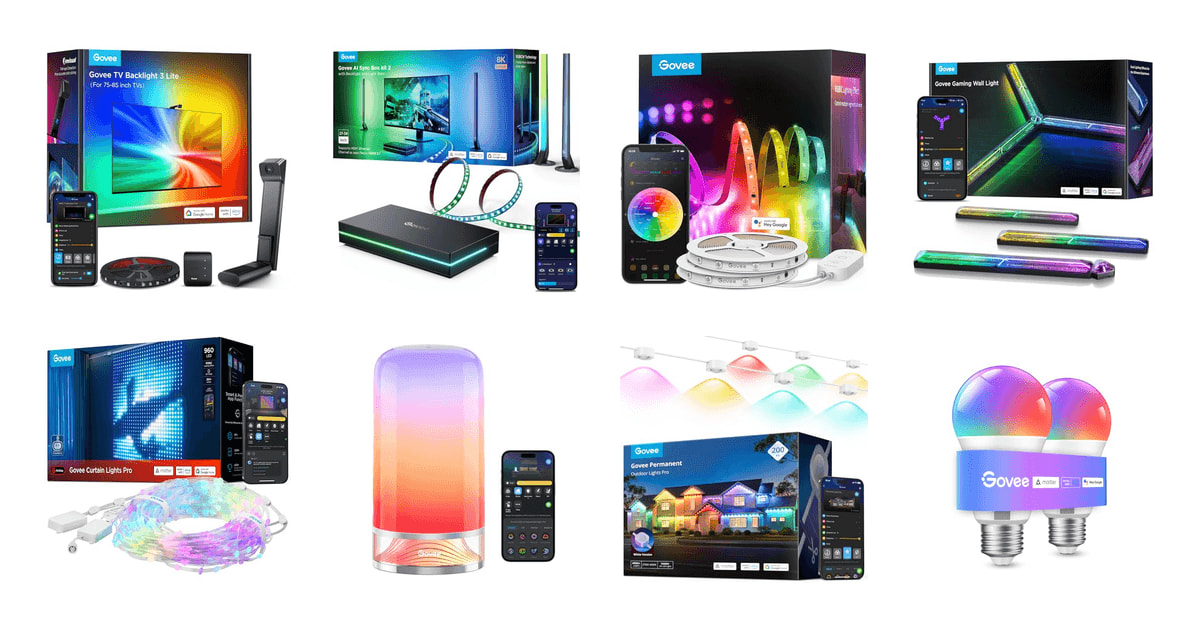
Smart lights sell themselves on party tricks, but you live with them differently. What you actually want is a strip behind the TV that stops the wall from looking gray at night, or a bulb that comes on when you say so without you opening an app first. Govee's appeal is that everything runs through one app and one account, so a strip, a lamp and a set of bulbs can share a single scene. Day to day, that consistency matters more than any one effect.
No smart light here is something you set up once and forget. Govee's gear leans on Wi-Fi and on the Govee Home app, so a router hiccup or a firmware update can leave a strip stuck on the wrong scene. Comparative reviews from CNET still give Philips Hue the edge on long-term firmware support and on mesh reliability once you're past 50 devices. And adhesive is adhesive — owners across nearly every Govee product report strips and panels peeling off the wall eventually. Plan on clips or better tape.
Which one you buy depends less on brand loyalty than on the job you're doing. A backlight behind the TV solves a different problem than a bulb in a hallway lamp, and the outdoor stuff is a weekend project rather than a purchase. The good news is that most current Govee gear speaks Matter, so you're not locked into one app forever. We think that the Govee TV Backlight 3 Lite is the best Govee smart light for most people, and that the Govee 100ft RGBIC LED Strip Lights set is the one to buy if you're lighting a whole room rather than a screen.
Everything we recommend

Screen-matched color that's easy to hang and easy to live with

Enough strip for a whole room, with segment-by-segment color

The simplest way to put color in a lamp you already own

Sharper, faster desk sync, if you'll run your gear through a box

Eave lights you install once and re-theme from the couch
How we picked
Sync accuracy and lag. We compared how each screen-syncing product reads color — a camera watching the panel versus a box reading the HDMI signal — using coverage from The Verge and PCMag alongside the manufacturer's specs. Anything meant for gaming had to pass through high refresh rates without throttling the display.
Color and zones. We leaned on RTINGS' explanation of RGBIC segmentation to separate strips that can run gradients and chases from single-zone strips that can't. We also gave weight to products with a dedicated white chip, since blended white is the most common complaint in owner feedback.
Smart home fit. Consumer Reports notes that most current Govee gear supports Matter, which lets Apple Home users skip the Govee app entirely. We treated Matter support as a strong plus and flagged the products that still only speak Alexa and Google.
Mounting and durability. We read owner feedback specifically for adhesive failures, fade and dead segments, because those are what turn a good light into a chore. For outdoor picks we required an IP65 rating or better on the lights themselves, per Tom's Guide's benchmark for continuous exterior installation.
App and scenes. Govee says the Home app can push one scene across strips, bulbs and panels at once, and owner feedback backs that up as the reason people stay in the ecosystem. We favored products that join that group rather than sitting off on their own.
Top pick
Screen-matched color that's easy to hang and easy to live with
Govee TV Backlight 3 Lite
A 16.4-foot strip for 75- to 85-inch TVs, paired with a small camera that watches the screen and pushes matching color onto the wall behind it. It works with anything you put on the TV, including the built-in streaming apps, and it doesn't touch your HDMI cables.
$89.99fromAmazonThe camera is the reason this is the easiest ambient TV lighting to live with. It clips to the top of your TV, watches the picture, and drives the strip to match. Nothing gets rewired. That means your TV's built-in Netflix app, your cable box and your console all sync the same way, which box-based systems can't manage without you routing every source through them first.
Govee calls the sensor Envisual, and the newer chip adds fish-eye correction so the edges of the screen map more accurately to the ends of the strip. The lamp beads are RGBICW — a warm white chip mixed in with the color LEDs. In practice that means whites on screen come out as actual white on your wall, not the pale blue you get from strips that fake white by blending red, green and blue.
If you already own other Govee lights, DreamView pulls them in. You can attach up to seven sub-devices — a lamp on the side table, a strip under the TV stand — and they'll all take their cue from what's on screen. Owners who've added a second product describe the effect as noticeably more immersive than the backlight alone, and it's the main reason people end up buying more Govee gear.
The app settings are where this earns its keep. You can tell it to ignore black bars on letterboxed movies, dim on a blank screen, and dial saturation and brightness down until the effect stops competing with the picture. Voice control runs through Alexa or Google Assistant. It's a lot of knobs, but they're the right knobs, and you only touch them once.
Flaws but not dealbreakers
Camera sync isn't as fast or as literal as an HDMI box. The Verge frames this trade-off plainly: sampling the screen from the outside costs you a bit of lag compared to reading the signal itself. For movies and most games you won't notice. In a competitive shooter, you might.
Setup rewards patience. A lot of owners report their first impression was underwhelming, then great once they redid the calibration — matching the on-screen markers correctly makes the difference between colors that track the picture and colors that wander. Budget twenty minutes and do it in a dark room. Bright lamps near the TV can also confuse the sensor.
This listing is the 75- to 85-inch length, and the strip really does need to match your TV. Too short and the corners go dark; too long and you're doubling back. Check your screen size before you buy.
Runner-up
Enough strip for a whole room, with segment-by-segment color
Govee 100ft RGBIC LED Strip Lights
A 100-foot RGBIC kit that ships as two 50-foot rolls, with segmented color control, an onboard mic for music sync, and Alexa and Google support. It's the entry point most people start with, and it covers a bedroom, a basement or a long bookcase run.
$47.44fromAmazonThis is the product that made Govee a household name, and the reason is RGBIC. As RTINGS explains, RGBIC strips split the run into independently controlled segments instead of lighting the whole thing one color at a time. So you get gradients, chases and rainbows that travel down the strip. Standard RGB strips at similar prices can only do one color at once, and once you've seen the difference it's hard to go back.
A hundred feet is more than you think, and that's the point. It's enough to run cove lighting around a whole bedroom ceiling, line nine feet of bookcases, or wrap a basement office and still have slack. Owners doing big builds tend to praise how well it cuts and reconnects at the marked points, which lets you turn one long run into several shorter ones that follow the shape of a room.
The music sync uses a mic built into the control box rather than your phone, so it hears the room instead of whatever your handset is near. There are eleven modes, and they range from subtle pulsing to full strobe. It's a gimmick you'll use more than you expect during parties and less than you expect the rest of the time.
Everything runs through the Govee Home app, which is genuinely good at the boring parts: grouping devices, scheduling, saving scenes and sharing DIY effects other people have made. Govee says a single scene can span strips, bulbs and panels at once, so once you own a few things you stop thinking about them individually and start flipping the whole room to one look.
Flaws but not dealbreakers
It's not waterproof. This is dry indoor surfaces only — no bathrooms with steamy showers, no covered patios, no garages that sweat in July. Govee sells outdoor-rated strips for that, and this isn't one of them.
The adhesive is the weak link, as it is across most of the category. Owners report strips releasing from popcorn ceilings, textured paint and anything dusty. Wipe the surface with alcohol first, and pick up mounting clips if you're going overhead. Some owners also describe visible brightness and color fade after about a year of running the lights daily, which is worth knowing before you commit to a permanent install.
You get two 50-foot rolls, not one continuous 100-foot line. Plan two separate runs and two power locations rather than one unbroken loop around the room.
Budget pick
The simplest way to put color in a lamp you already own
Govee Smart Light Bulbs
Standard A19 bulbs with an E26 base, 800 lumens, 16 million colors and 54 scene presets. No hub, no wiring, no commitment — you screw one into the lamp on your nightstand and control it from your phone or by voice.
$18.99fromAmazonIf you've never owned a smart light, start here. There's no controller box, no adhesive, no hub to plug into your router. You screw in a bulb, open the app, and it's on your Wi-Fi in a couple of minutes. Owners who came from other brands' bulbs consistently describe Govee's setup as the part that finally worked, and that first-time experience is most of the value.
At 800 lumens, these are real bulbs, not mood accessories. That's the standard brightness for a 60-watt replacement, so you can put one in a ceiling fixture or a reading lamp and actually use the room. CNET notes that Govee bulbs typically undercut comparable Philips Hue White and Color Ambiance bulbs by a wide margin while doing the same app-based scene control, which is why people buy them by the four-pack.
Group control is the feature you'll use daily. Put four bulbs in one room, name the group, and Alexa or Google will dim all of them at once. Add timers and sunrise or sunset modes and the lights start handling themselves — up in the morning, warm and low after dinner — without you touching anything.
Flaws but not dealbreakers
These bulbs don't support Matter, unlike most of the newer Govee gear. So Alexa and Google Assistant work fine, but Apple Home users are out of luck. If your household runs on iPhones and HomePods, spend a little more on a Matter bulb instead.
They need 2.4GHz Wi-Fi, and they can't live behind a smart switch or a dimmer. They also have to stay powered, which means anyone who flips the wall switch out of habit knocks them offline until it goes back on. In a shared house, that's a daily annoyance.
Upgrade pick
Sharper, faster desk sync, if you'll run your gear through a box
Govee HDMI 2.1 AI Sync Box Kit
An HDMI 2.1 sync box with a 5.5-foot RGBWIC strip sized for 27- to 34-inch monitors. It reads the video signal directly instead of watching the screen, so the lighting tracks faster and dims properly on dark scenes.
$299.99fromAmazonThe pitch is simple: a box reads the actual video signal, so it knows exactly what's on screen instead of guessing from outside. Owners who've moved up from Govee's camera systems describe the color accuracy as a clear step up, and they single out black scenes — the box dims down, where a camera tends to keep glowing. If you game in a dark room, that difference is the whole reason to buy this.
The HDMI 2.1 spec is the part that matters for a gaming desk. It passes through up to 8K at 60Hz or 4K at 144Hz, plus VRR and ALLM, so your monitor keeps its high refresh rate and adaptive sync instead of getting bottlenecked by the lighting. Older sync boxes topped out well below that. This one shouldn't be the reason your frame rate drops.
The strip itself is denser than Govee's cheaper ones — 75 LEDs per meter at 450 lumens per meter, with a dedicated white chip in the mix. On a monitor, where the wall is close and you're staring at it for hours, that density shows up as smoother gradients and fewer visible hot spots. It also supports Matter for lighting control, and DreamView will pull your other Govee lights into the same effect.
Govee's CogniGlow feature uses AI to recognize what's on screen and trigger specific effects — a red flash when your health drops, that kind of thing. When it works with a title you play, it's genuinely fun. Treat it as a bonus rather than a reason to buy, because the supported list is short and owners are blunt about that.
Flaws but not dealbreakers
Everything has to run through the box. That means a console, PC or streaming stick — your monitor's or TV's built-in apps output nothing to sync, so they simply won't work with it. Owners run into this constantly. If most of your watching happens in a smart TV's own Netflix app, buy the camera-based backlight instead.
The kit is sized for a 27- to 34-inch monitor. It's not a living room product at this length. Some owners also report that pushing 144Hz drops color depth to 8-bit, and the AI game recognition supports only a handful of titles, so the marketing runs ahead of what you'll actually see.
Also greatOn sale
Eave lights you install once and re-theme from the couch
Govee Permanent Outdoor Lights Pro
A 200-foot run of 120 individually controlled RGBICW lights, meant to be glued and clipped under your eaves and left there. IP67-rated and rated from -4°F to 140°F, so it handles orange in October, white in December and warm accent light the rest of the time.
$599.99fromAmazonList priceThe pitch is that you climb the ladder once and never again. Wired's reporting on outdoor smart lighting makes the case directly: permanently installed eave systems remove the seasonal put-up-and-take-down cycle that string lights demand. You change holidays from your phone. If you're the person who hangs lights in November cold and takes them down in January cold, that alone justifies the project.
These aren't holiday-only. Each light puts out up to 50 lumens and covers 2700K to 6500K, so you can run plain warm white as everyday accent lighting on the front of the house and most neighbors won't know it's an RGB system. The newer anti-glare lens softens the direct view of the diodes, which matters because these sit right where you look when you pull into the driveway.
Weatherproofing is where this line earns its keep. The lights are IP67 and the control box is IP65, rated up to 50,000 hours and across a wide temperature swing. Tom's Guide's coverage of Govee's permanent outdoor lighting makes the same point about continuous outdoor installation. Splices are waterproof every 16.4 feet, so a single bad connection doesn't take the whole run offline.
The run is cuttable and extendable up to the full 200 feet, which is what makes it fit an actual house instead of an idealized one. Owners with wraparound rooflines report getting all the way around with a bit left over. Matter, Alexa and Google support means you can fold the lights into whatever routines you already run indoors.
Flaws but not dealbreakers
This is the biggest project in this guide by a wide margin, and it's the one most likely to eat a weekend. You're on a ladder, running wire, hiding splices and finding an outlet — and the power adapter is rated for indoor use only, so you need a covered spot for it. Several owners describe planning the run as the hardest part, and a few were frustrated by how little guidance came in the box.
The included VHB adhesive gets mixed reports. The wire has real weight, and owners repeatedly describe lights sagging or dropping until they added the clips, extra glue or screws. Use the clips from the start. Plan on wire molding too if you care about how the runs look in daylight.
Who this is for
Buy Govee if you want a lot of controllable light without paying Philips Hue prices and without adding another hub to your network. It's a great fit if you're renting and need everything to come down cleanly, if you're building a gaming or streaming setup that should react to what's on screen, or if you're putting color in a kid's room and don't want to spend much per bulb. It's also the easiest brand to start with, since a single app covers everything and nothing needs wiring.
Look elsewhere if you're running a large, mixed installation — CNET's comparisons still favor Hue's Zigbee mesh and firmware cadence once you're past 50 devices, and reliability at that scale beats features. This guide covers Govee's own lineup only, so we're not weighing Hue, Nanoleaf or LIFX products against these directly. We also stick to plug-in and adhesive-mounted lighting: no hardwired fixtures, no recessed cans, nothing that needs an electrician.
How we picked
Sync accuracy: we compared camera-based and HDMI-box syncing using published coverage plus manufacturer specs, and required gaming products to pass through high refresh rates untouched. Color and zones: RGBIC segmentation was the baseline, and a separate white chip was a strong plus, since muddy whites are the most common gripe in owner feedback. Smart home fit: Matter support counted heavily, because it frees Apple Home users from the Govee app. Mounting and durability: we read owner reports for adhesive failure, fade and dead segments, and held outdoor products to IP65 or better. App and scenes: we favored lights that join Govee's cross-device grouping instead of living in their own corner of the app.
Other govee smart lights worth considering
If you want one smart light for a nightstand: The Govee RGBIC Smart Table Lamp 2 ($79.99) — The Smart Table Lamp 2 is the easiest thing here to justify. It's 500 lumens of RGBICWW with adjustable 2700K to 6500K white, 64-plus preset scenes and eight music modes, and it supports Apple Home through Matter — something the budget bulbs don't. Digital Trends points to the dual-layer diffuser as what separates it from flat-panel smart lamps: the light moves rather than sitting flat. The pat-to-wake feature is genuinely useful at 3 a.m. What you give up is versatility. It's corded, it lives in one spot, and 500 lumens is mood lighting more than reading light.
If you want your front window to put on a show: The Govee Smart Curtain Lights Pro ($199.99) — The Smart Curtain Lights Pro pack 960 individually addressable LEDs into a mesh roughly five and a half feet square, which is dense enough to run actual animations rather than blinking patterns. Govee's per-pixel canvas lets you upload images across 30 layers, and you can splice up to three sets into one wide display. IP67 components mean it survives weather. But it's a decoration, not room lighting — it won't brighten anything, hanging it neatly takes real effort, and learning the animation editor is a hobby in itself.
The competition
Here's what else our research turned up in Govee's lineup. This isn't everything the company sells, and Govee refreshes models often enough that a product name can outlive the hardware behind it.
The Govee Gaming Wall Light ($69.99) — The Govee Gaming Wall Light is a set of three modular bars with a circuit-board pattern under a diffuser panel, and the faceplate and diffusion line light separately for a layered look. TechRadar notes that Govee's wall panels do music-reactive modes off a built-in or phone mic, and Matter support means they'll play with Apple Home. Owners like them a lot — the vivid color and the swappable faceplates come up constantly, as does the need to replace the included tape with something stronger. It lost to our picks because it's decoration first and light second. Three bars cover a small patch of wall, so a real installation means buying several sets and the connectors to join them, and the cost climbs fast. Get it if you're styling a gaming corner and want the wall itself to be the feature.
Installation and upkeep
Wipe every mounting surface with rubbing alcohol and let it dry before you press anything down. Adhesive fails on dust, textured paint and popcorn ceilings more than on anything else, and clips cost little compared to redoing a run. Don't stretch a strip around a tight corner — use the connector pieces instead — and only cut at the marked points. Map your outlets before you unroll anything, because a strip that ends four feet from power is a strip you'll be reinstalling. Govee bulbs and strips need 2.4GHz Wi-Fi and constant power, so leave wall switches on and skip smart switches and dimmers. Check the app for firmware updates every few months; that's where sync accuracy and scene fixes arrive.
Questions we get
What's the difference between RGBIC and regular RGB strips?
A standard RGB strip lights up in one color at a time along its whole length. RGBIC splits the strip into segments that each take their own color, which is what makes gradients, chases and rainbow effects possible. RTINGS describes this segment control as the main functional divide in the category. At similar prices, RGBIC is worth the upgrade.
Do Govee lights work with Apple Home or Matter?
Many current Govee products do. Consumer Reports notes that Matter support on newer bulbs, strips and lamps lets you control them straight from Apple Home without routing through the Govee app. But it's product by product, not brand-wide — our budget bulb pick, for instance, only speaks Alexa and Google. Check the listing for Matter before you buy if HomeKit matters to you.
Do Govee lights need a hub?
No. Govee's lights connect straight to your 2.4GHz Wi-Fi, so there's no bridge to buy or plug into your router — that's a real advantage over Philips Hue for a first setup. The trade-off is that each device holds its own Wi-Fi connection, which is part of why Hue's Zigbee mesh holds up better in very large installations. For a normal home, hub-free is simpler.
Which Govee light is best for a TV backlight?
For most people, the camera-based TV Backlight 3 Lite. It syncs with anything on screen, including your TV's built-in streaming apps, and there's no HDMI rewiring. If you're lighting a monitor and everything already runs through a console or PC, the HDMI 2.1 sync box reads the signal directly and tracks faster, especially on dark scenes.
Is the Govee sync box better than Philips Hue Sync?
For raw specs and price, Govee makes a strong case — HDMI 2.1 passthrough at up to 4K/144Hz with VRR and ALLM, at a fraction of Hue's cost. Owners switching from Hue setups often say they'd have saved money starting here. Hue still wins on long-term software support and on integrating with a big Zigbee system. If you're not already deep in Hue, Govee is the sensible buy.
Can Govee curtain lights stay outside all the time?
The Curtain Lights Pro uses IP67-rated components, so rain and wind aren't a problem, and owners report leaving them up through a full holiday season and beyond. Govee's permanent outdoor lights are the ones actually engineered to live outside indefinitely, with an IP67 rating on the lights and IP65 on the control box, per Tom's Guide. Bring the curtain lights' adapter under cover either way.
Why you should trust us
For this guide:
- We read published coverage of Govee's lineup from RTINGS, The Verge, PCMag, Tom's Guide, Wired, CNET, Consumer Reports, TechRadar and Digital Trends, and compared their conclusions against Govee's own specifications.
- We went through each product's spec sheet for brightness, color handling, IP rating, refresh-rate passthrough and smart home compatibility, and flagged any claim we couldn't confirm.
- We read owner feedback across all eight products for recurring themes — adhesive failure, calibration difficulty, fade over time and app quirks — and used those patterns to write the flaws sections.
- We read owner reviews on every listing, weighted toward the critical ones, because that is where the recurring failures show up.
- We have a systematic way of automatically fetching the latest prices, so the numbers on this page stay current.
- This is a research-focused guide, so the team may not own every product listed — though we often do own the top winners, which gives us extra context for the recommendations.
- We don't accept free products, and the retailer commission never changes which product we recommend.
Sources
Govee Immersion TV Backlight Review, The Verge
Best Smart Lights 2026, Tom's Guide
Govee AI Gaming Sync Box Review, PCMag
Govee RGBIC LED Strip Light Review, RTINGS.com
Govee vs Philips Hue: Which Smart Lighting Ecosystem Is Right for You, CNET
Govee Glide Wall Light Review, TechRadar
Govee Curtain Lights Product Specifications, Govee (Manufacturer)
Govee Aura Smart Table Lamp Review, Digital Trends
Govee Permanent Outdoor Lights Review, Tom's Guide
Matter-Compatible Smart Bulbs Tested, Consumer Reports
Govee Home App: Features and Compatibility Guide, Govee (Manufacturer)
Best Outdoor Smart Lights for Every Budget, Wired
Amazon product listings and owner reviews for all 8 products
Manufacturer specification pages for each product
Some passages in this guide may be paraphrased with AI help. Prices are refreshed automatically.
More like this.
Continue exploring electronics reviews and recommendations.

The Best Radar Detectors
A radar detector earns its keep in the few seconds before you spot the patrol car. On a long interstate run, a good one gives you a mile or more of…

The Best Waterproof Roof Cargo Bags
A soft roof bag is the simplest way to buy back space in a packed car. You strap it down, you load it, and suddenly the middle seat isn't a luggage shelf…

The Best Monitor Arms and Desk Mounts
Your monitor's factory stand puts the screen at one height, one angle, and one spot on the desk. That's fine until you actually work there all day. A…

The Best Wireless Earbuds for Working Out
Workout earbuds live a hard life. They get soaked in sweat, yanked out by a hoodie, bounced around during sprints, and dropped on rubber gym flooring more…

The Best Truck Bed Liners
A pickup bed is the only part of a truck you're allowed to abuse. Gravel gets dumped in it, toolboxes slide the length of it, and somebody's mountain bike…

The Best USB-C Hubs and Docking Stations
A laptop with two ports and a desk full of stuff is a daily annoyance. You want your monitor, your keyboard, your mouse, your wired network and your…