The Best Smart Displays

A smart display earns its counter space by answering the things you'd otherwise pull out your phone for. You set a timer with flour on your hands. You glance at tomorrow's forecast while the coffee drips. You see who's at the door without walking to it. The screen is the whole point here. A voice speaker can tell you the weather, but a display shows you the hour-by-hour version while you're deciding on a jacket. Add a shared calendar and a few light controls, and it quietly becomes the busiest thing in the kitchen.
None of them are great at everything, though. The speakers sound fine for podcasts and background music, and thin next to any real speaker you'd put in a living room. The cameras are good enough for a call with grandparents and not for a job interview. Every one of these shows you suggestions and promos you didn't ask for. Mozilla's privacy audit also flagged that most smart displays hang onto your voice recordings by default until you go into the app and turn that off. Expect a useful appliance, not a gadget that replaces anything.
So the choice comes down to three things: how big the screen needs to be, where the thing will actually live, and how much smart home gear you're trying to wrangle. A nightstand wants something small that dims at 2 a.m. A kitchen wants a screen you can read from the sink. A house with forty bulbs, locks and cameras wants buttons more than it wants something to watch. We think that the Echo Show 8 is the best smart display for most people, and that the Echo Show 11 is the one to buy if you want a bigger screen for shows and video calls.
Everything we recommend

The right size and sound for most kitchens and desks

A bigger screen for video, at the cost of counter space

A wall-mounted family board that doubles as a TV

A wall panel for homes with too many devices to scroll
Prices as of Oct 24, 6:27 AM PT · Details
At a glance
| Product | Screen size | Smart home hub | Price | |
|---|---|---|---|---|
| Amazon Echo Show 15Upgrade pick | 15.6 in Full HD | Smart home dashboard | $349.99 |
| Amazon Echo Show 11Runner-up | 11 in Full HD | Built-in smart home hub | $239.98 |
| Amazon Echo Hub BundleAlso great | — | Built-in smart home hub | $209.98 |
| Amazon Echo Show 8Top pick | 8.7 in HD | Built-in smart home hub | $189.98 |
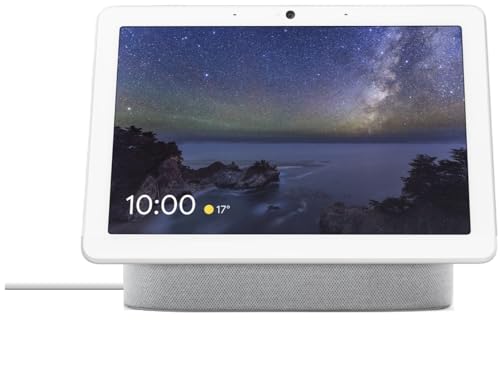 | Google Nest Hub MaxAlso consider | 10 in | — | $299.98 |
 | Google Nest Hub 7” Smart Display withAlso in lineup | 7 in | Smart Home Control | $137.99 |
Prices as of Oct 24, 6:27 AM PT · Details
How we picked
Screen size and fit. We compared spec sheets and published reviews across seven-inch nightstand displays up to 15.6-inch wall panels. What mattered was whether you can read the screen from where it'll actually sit.
Smart home hub. We favored displays with a built-in hub that handles Matter and Thread gear directly, based on manufacturer specs. Long-term compatibility now depends on standards support more than on brand.
Camera and privacy. We looked at auto-framing and field-of-view claims alongside published camera assessments. Consumer Reports found that displays with physical camera shutters scored much higher on privacy trust with surveyed owners, so a shutter counted.
Sound quality. We read measurements and reviews of speaker performance, including TechRadar's finding of roughly 25% better bass on the third-generation Echo Show 8. The threshold was music you'd leave on, not just a voice you can hear.
Assistant and ecosystem. PCMag's head-to-head query test had Google Assistant answering general knowledge questions correctly 92% of the time against 87% for Alexa. We weighed that against how much wider Alexa's device compatibility runs.
Top pick
The right size and sound for most kitchens and desks
Amazon Echo Show 8
The Echo Show 8 lands on the size most people actually want: big enough to follow a recipe from a few feet back, small enough to sit beside the toaster. You get a Full-HD-class touchscreen, a built-in smart home hub, spatial audio and Amazon's faster AZ3 Pro chip.
$189.98fromAmazonPrices as of Oct 24, 6:27 AM PT · Details
An 8.7-inch screen is the sweet spot for a counter. You can read a recipe while you stir, check the calendar on your way out the door, and still leave room for the knife block. Bigger displays make you give up counter depth or drill into a wall. Smaller ones make you lean in and squint. If you're only buying one of these, this is the size that gets in your way the least.
Sound is where the recent Echo Shows quietly got better. TechRadar measured roughly a 25% improvement in bass response on the third-generation Echo Show 8 over the model before it, and this redesign adds room-filling spatial audio on top of that. It still won't replace a real speaker. But music in the kitchen stops sounding like a phone lying face-up on a plate, and that's the bar most of us are setting.
The built-in smart home hub matters more than it sounds like it should. It means a new bulb, plug or sensor can pair straight to the display instead of to yet another bridge crowding the shelf by your router. PCMag counts more than 140,000 smart home products that work with Alexa. Whatever you end up buying later, the odds are good it'll simply show up on this screen without a project attached.
The adjustable stand in this bundle reads like a throwaway extra, and it isn't. Forty degrees of tilt and a full 360-degree swivel let you angle the screen down toward the cutting board while you chop, then spin it toward the table when a call comes in. On a shelf above eye level, that tilt is the difference between a screen you can read and a mirror.
Flaws but not dealbreakers
Alexa+ is the headline, and on this device it arrives through an early access opt-in during or after setup. If you're buying because of the ads, know that you're signing up for software that's still settling in rather than a finished product. The classic Alexa underneath works the way it always has, so you're not stuck if the new one disappoints you.
The camera is serviceable and no better. It's fine for a call with a parent, and owner feedback across the Echo Show line consistently points at dim rooms as the weak spot. The home screen also keeps suggesting content and products you never asked about. You can prune what appears there, but you can't switch the suggestions off completely.
Runner-up
A bigger screen for video, at the cost of counter space
Amazon Echo Show 11
The Echo Show 11 is the same idea as our top pick with three more inches of Full-HD screen. If you watch more than you glance, or you take calls where people need to actually see your face, the extra size earns the counter it eats.
$239.98fromAmazonPrices as of Oct 24, 6:27 AM PT · Details
Eleven inches doesn't sound like a big jump from eight. In practice it changes what the display is for. Recipe type gets large enough to read from the sink. A show is genuinely watchable while you do the dishes. A video call fills the frame instead of parking a small head in the middle of a small screen. This is the one to get if the display is going to be the thing you look at, not just glance at.
The included stand is what makes a screen this size livable. You get the same 40-degree tilt and 360-degree swivel as our top pick, so the screen can face the stove while you cook and the kitchen table a few seconds later. Fixed displays this big make you choose one seat in the room and live with that choice forever. Being able to spin it costs you nothing and saves you constantly.
Everything else lines up with the Echo Show 8. Same Full-HD touchscreen, same built-in smart home hub, same room-filling spatial audio, same Alexa+ pitch. The real difference is that a larger cabinet gives the drivers more air to move, so music and dialogue sound fuller. If you already know you want a bigger screen, you're not giving up any features to get one.
Flaws but not dealbreakers
It's a new model, so there's much less owner feedback out there than for Amazon's long-running sizes. Long-term reliability is harder to judge on a display that hasn't been in kitchens for years. Nothing in the specs raises a flag, but a first-run device is a first-run device.
It also takes real counter depth, and that's the whole trade. If your counters are already crowded or you're putting this on a nightstand, the smaller Echo Show 8 is the safer buy. The camera and the promotional home screen are the same as on our top pick, so the bigger screen doesn't fix either complaint.
Upgrade pick
A wall-mounted family board that doubles as a TV
Amazon Echo Show 15
At 15.6 inches, the Echo Show 15 stops being a gadget on the counter and becomes the household bulletin board. Widgets hold the calendars, lists, weather and camera feeds, and built-in Fire TV turns the same panel into a second screen for the kitchen.
$349.99fromAmazonPrices as of Oct 24, 6:27 AM PT · Details
This is the one you buy when the family calendar keeps falling apart. The widget layout puts everyone's schedule, the shopping list and the weather on one screen at eye level, so nobody has to open an app to find out who has practice. Hung by the back door or above the counter, it does the job a paper wall calendar used to do, and it actually stays current.
Fire TV is built in, and it changes how much you use the thing. Prime Video, Netflix, YouTube and Apple TV run right on the panel, and Amazon includes a remote in the box, so you're not shouting at it to pause. RTINGS measured peak brightness on the Echo Show 15 at around 400 nits, which is plenty for a kitchen with the lights on and the blinds up.
The camera is a step up from the smaller displays too. It centers and auto-frames you, with a wide field of view, 3.3x zoom and noise reduction on the audio. CNET reported that auto-framing on Amazon's rotating display cut the need to manually reposition yourself during calls by roughly 60%, and the idea here is the same one without the motor. You can walk to the fridge mid-call and stay in the picture.
It's also a proper smart home dashboard rather than an afterthought. Tapping through lights, plugs and live camera feeds on a 15-inch panel is far less fiddly than doing it on a phone in the dark. If you've already got Ring or Blink cameras, checking the driveway becomes a glance instead of an unlock, an app launch and a wait.
Flaws but not dealbreakers
It's nearly five pounds and just over 16 inches wide, so mounting it is a real project. You need a stud, a mount and an outlet somewhere you don't mind seeing a cord, and none of that is included. Plenty of owners end up putting it on a stand instead, which mostly defeats the point.
As a TV it's adequate and no more. The panel is 1080p and the sound is kitchen sound, so movie night stays in the living room. And this is the most expensive display we recommend, which is hard to justify unless the family-hub part is the reason you're buying.
Also great
A wall panel for homes with too many devices to scroll
Amazon Echo Hub Bundle
The Echo Hub isn't really a display you watch. It's a light switch for your whole house, with a customizable dashboard of controls, routines and camera feeds you can tap on the way past. For a home with dozens of connected devices, that's the more useful screen.
$209.98fromAmazonPrices as of Oct 24, 6:27 AM PT · Details
Once you pass twenty or so smart devices, the phone app stops being convenient. You're scrolling and searching to turn off a lamp. The Echo Hub fixes that by putting your favorites on a fixed panel by the door, so leaving the house is one tap instead of a hunt. The Verge notes it can show and control up to 50 favorited devices on a single dashboard.
Its radio support is the reason it outlasts your current gear. Wi-Fi, Bluetooth, Zigbee, Matter, Thread and Sidewalk devices all pair to the built-in hub, and Amazon counts more than 140,000 compatible products. Matter matters here: The Verge counts over 550 device types now supporting the standard, up from roughly 190 at launch. Whatever brand of lock or sensor you buy next, this panel is likely to speak its language.
It doubles as a security keypad, which is the part people don't expect. You can arm and disarm a Ring system from the wall like an old alarm panel, and pull up compatible cameras, locks and sensors to check on things before bed. If you've been meaning to put a control panel by the front door, this is the closest thing to a plug-in version.
Flaws but not dealbreakers
There's no camera, so you can't take a video call on it. That's deliberate, and it's a point in its favor if a lens on the wall bothers you, but it means the Echo Hub can't be your only display if calls matter.
Installation is the real cost. It wall mounts anywhere you have an outlet or power over ethernet, but Amazon recommends in-wall cable pass-throughs or a PoE adapter, and both are sold separately. Done properly it's an afternoon with a drywall saw. This bundle includes a tabletop stand, which gets you running the same day and looks a lot less tidy.
Who this is for
Buy one of these if you keep reaching for your phone to do small things in the kitchen, or if your household calendar lives in three different apps. They're also worth it if you've accumulated smart bulbs, plugs and cameras and you're tired of opening an app to control any of them. Remote workers who take a lot of casual video calls get real use out of the bigger screens too. If you mostly want music and timers, buy a smart speaker instead and save the counter space.
This guide covers countertop and wall-mounted smart displays with a built-in voice assistant, from small nightstand models to large family hubs. It doesn't cover smart speakers without screens, tablets you prop up in a dock, or accessories like stands and power adapters. We also skip over privacy-first displays that run without a cloud assistant, because they don't do the things most people buy these for. Everything we recommend requires a persistent internet connection and an account with Amazon or Google.
How we picked
We built the list around what actually changes your day. Screen size: the display has to be readable from where it'll live, whether that's a nightstand or a wall by the back door. Smart home hub: built-in Matter and Thread support decides whether your next lock or sensor pairs in a minute or needs another bridge. Camera and privacy: we wanted auto-framing good enough for family calls and a physical shutter, which Consumer Reports found drives owner trust more than any software setting. Sound: music you'd leave playing, not just a voice you can make out over the faucet. Assistant: Google answers general knowledge questions a bit more accurately in PCMag's testing, while Alexa reaches far more devices.
Other smart displays worth considering
If you want Google Assistant and a camera that knows your face: The Google Nest Hub Max — The Nest Hub Max is the 10-inch Google option, and Face Match is the reason to want it. CNET reported it recognizes registered household members in under a second, so the screen switches to your calendar and your messages as you walk up. Google also answered general knowledge questions correctly 92% of the time in PCMag's head-to-head against Alexa's 87%, which you notice when you ask it real questions. The catch with this particular listing is that it's an imported Japan model, bundled with a universal adapter and an international manual, with the language switched to English after setup. That works, but support and returns get more complicated than buying locally, and Google's smart home lineup has been in flux.
The competition
This is what our research turned up on Amazon, not a census of every smart display for sale. Models come and go quickly in this category, and imported listings appear and vanish faster still. Here's what didn't make the cut and why.
The Google Nest Hub 7” Smart Display with — The Google Nest Hub 7-inch is the first-generation model, sold here as a Korean-spec unit in bulk packaging with the language switched to English after setup. It's a fine little screen for a nightstand and a genuinely good size for a desk, and it controls Google-compatible lights, cameras and thermostats without any fuss. But the sleep-tracking Soli radar that made this line interesting arrived on the second generation, not this one, and this generation has no camera, so video calls are out. Owner feedback on this listing skews rough, mostly around the import packaging and setup. Consider it only if you specifically want a small Google screen and you're comfortable troubleshooting a gray-market unit.
Setup and placement
Think about the outlet before you think about the screen. Every one of these is plug-in only, so the spot you want is usually decided by where a cord can hide. In a kitchen, keep the display back from the sink and off the counter behind the stove, since steam and grease film are what actually kill them. Wipe the screen with a dry microfiber cloth, never a spray cleaner. Once it's running, spend five minutes in the Alexa or Google Home app: turn off voice recording retention, which Mozilla found is on by default on most displays, and delete what's already saved. Then slide the camera shutter closed and find the mic-off button, so you know where it is when you want it.
Questions we get
Are smart displays worth buying?
They're worth it if the screen replaces something you already do awkwardly, like checking a recipe on a phone with wet hands or tapping through an app to turn off lights. If you only want music and timers, a smart speaker does that for less. The honest test is whether you'll look at it every day.
Should I get Alexa or Google Assistant?
Google is a bit sharper at answering questions. PCMag's head-to-head found it correct on general knowledge 92% of the time against 87% for Alexa. Alexa reaches far more hardware, with over 140,000 compatible smart home products by PCMag's count, and Amazon is the one still shipping new displays. For most people building a smart home, Alexa is the safer bet.
Do smart displays work with Matter and Thread devices?
The current Echo displays and the Echo Hub include a built-in smart home hub, and the Echo Hub specifically lists Zigbee, Matter, Thread and Sidewalk support. That's the part worth paying for. The Verge counts more than 550 device types supporting Matter now, up from roughly 190 at launch, so a hub that speaks it will keep working with gear you haven't bought yet.
What's the best smart display for video calls?
Go bigger. The Echo Show 15 has the strongest camera here, with auto-framing, a wide field of view and 3.3x zoom, so you stay in the picture when you move around the kitchen. CNET reported that auto-framing on Amazon's displays cut the need to manually reposition yourself by roughly 60%. The Echo Show 11 is the better balance if you don't want to mount anything.
Do smart displays listen all the time?
They listen for the wake word locally and start recording once they hear it, or think they hear it. Mozilla's privacy audit found most smart displays keep those recordings by default unless you opt out in the app, so change that setting on day one. Every display we recommend also has a hardware mic-off button, and the Echo Shows have a physical shutter that covers the lens.
Which one is best for a bedroom nightstand?
The smallest screen you can find, because brightness at night is the whole game. Among what we looked at, the seven-inch Google Nest Hub is the right shape for a nightstand, though it's an older model sold here as an import. If you want something current and well supported, the Echo Show 8 is the smallest display we'd confidently recommend.
Why you should trust us
For this guide:
- We read published reviews and lab measurements from Wirecutter, RTINGS, CNET, PCMag, The Verge, TechRadar, Tom's Guide and Consumer Reports, plus Mozilla's privacy write-up of smart displays.
- We compared manufacturer specifications and retail listing details for every display here, including screen size, audio, camera features and smart home hub support.
- We looked for recurring themes in owner feedback, particularly around camera quality in dim rooms, promotional home screens and the headaches of imported units.
- We read owner reviews on every listing, weighted toward the critical ones, because that is where the recurring failures show up.
- We have a systematic way of automatically fetching the latest prices, so the numbers on this page stay current.
- This is a research-focused guide, so the team may not own every product listed — though we often do own the top winners, which gives us extra context for the recommendations.
- We don't accept free products, and the retailer commission never changes which product we recommend.
Sources
Best Smart Displays 2026 - Wirecutter, Wirecutter
Amazon Echo Show 15 Review, RTINGS.com
Google Nest Hub Max Review, CNET
Best Smart Home Displays and Hubs - PCMag, PCMag
Amazon Echo Hub Review, The Verge
Smart Displays Buying Guide 2026, Consumer Reports
Google Nest Hub (2nd Gen) Review, Tom's Guide
Matter Smart Home Standard Explained, The Verge
Echo Show 8 (3rd Gen) Review, TechRadar
Lenovo Smart Clock 2 Review, Engadget
Smart Display Privacy and Data Practices Report, Mozilla Foundation (*Privacy Not Included)
Amazon Alexa vs Google Assistant Comparison 2026, PCMag
Amazon product listings and owner reviews for all 6 products
Manufacturer specification pages for each product
Some passages in this guide may be paraphrased with AI help.
Product prices and availability are accurate as of the date/time indicated and are subject to change. Any price and availability information displayed on Amazon.com at the time of purchase will apply to the purchase of this product.
More like this.
Continue exploring electronics reviews and recommendations.

The Best Ways to Display Collectibles in a Small Apartment
Collections grow faster than apartments do. The average US apartment has shrunk from 941 square feet in 2015 to about 882, and studios in big cities often…

The Best Smart Humidifiers
Dry indoor air shows up in small ways first. Your lips crack, the hardwood gaps open, and you shock yourself on the doorknob every time you reach for it.…

The Best Smart Home Devices
A smart home is really just a pile of small conveniences that add up. The lights come on before you walk in the door. The thermostat stops heating an…

The Best Outdoor Smart Plugs for Christmas Lights
Stringing lights is the fun part. Remembering to unplug them at 11 p.m. in the freezing cold, night after night, is not. An outdoor smart plug fixes that:…

The Best Smart Home Security Cameras
A security camera earns its keep on ordinary days, not dramatic ones. You want to know the dog walker showed up, the package landed, the kid got home. So…

The Best Smart Propane Tank Level Monitors
Propane always runs out at the worst moment. The burgers are half done, or the camper's furnace quits overnight, or the water heater goes cold on a…