The Best Smart Home Devices
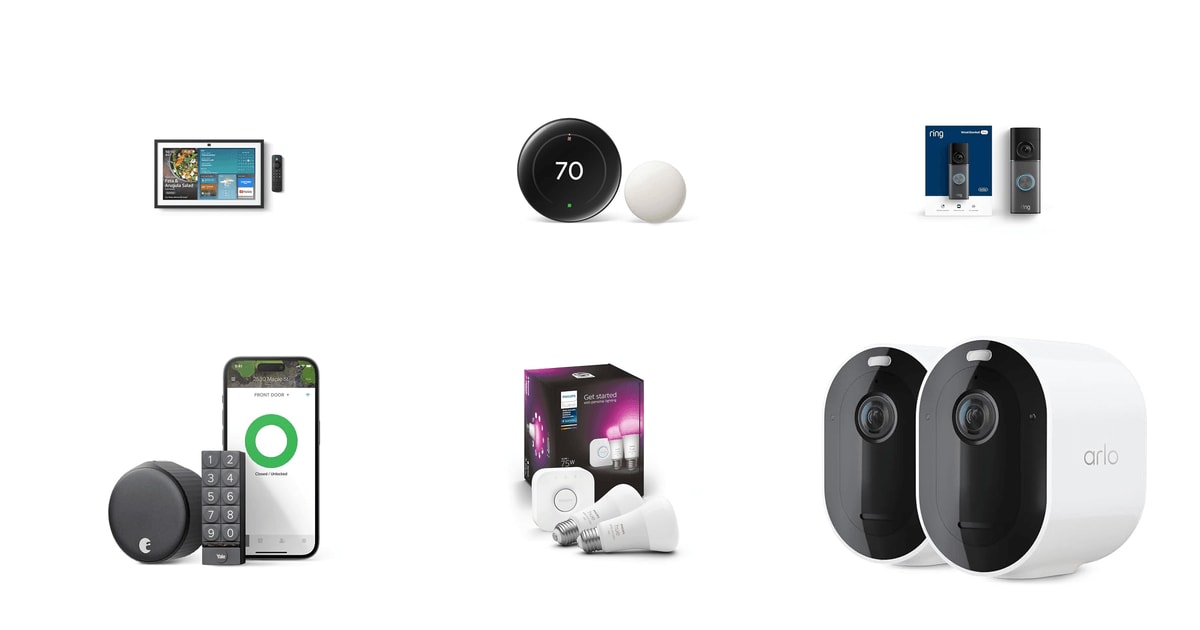
A smart home is really just a pile of small conveniences that add up. The lights come on before you walk in the door. The thermostat stops heating an empty house at 2 p.m. You see who rang the bell while you were on a call. None of that is life-changing on its own. But when the pieces work together and stay connected, you stop thinking about them — and that's the point. The best devices are the ones you forget you installed.
Nothing in this category plugs into everything else without friction. Matter was supposed to fix the walled gardens, and it's helping, but you'll still hit gaps where a feature works in one app and not another. Most cameras and doorbells lock their best features behind a monthly fee. And every one of these devices leans on your Wi-Fi — a weak signal at the front door will make an expensive doorbell feel broken. Budget for the network, not just the gadgets.
We looked at spec sheets, manufacturer documentation, published reviews and the themes that come up over and over in owner feedback. We weighted Matter support, whether installation is something a renter can undo, and how much of the device is useless without a subscription. We think that the Amazon Echo Show 15 is the best smart home device for most people, and that the Google Nest Learning Thermostat (4th gen) is the one to buy if you'd rather your first purchase pay for itself.
Everything we recommend

One screen that runs the house, if you have wall space

The one purchase that eventually pays you back

Sharper video and smarter alerts, for a subscription

The lighting system everything else plugs into

A kid's speaker that doubles as a cheap voice endpoint
Prices as of Nov 4, 9:24 AM PT · Details
At a glance
| Product | Price | |
|---|---|---|
| Amazon Echo Show 15Top pick | $349.99 |
| Google Nest Learning ThermostatRunner-up | $219.99 |
| Ring Wired Doorbell 4K ProUpgrade pick | $249.99 |
 | August Home Matte Black Wi-Fi Smart LockAlso consider | Check price |
| Philips Hue Smart Light Bulbs Starter KitAlso great | $71.79On sale |
 | Arlo Pro 5S 2K Spotlight Camera -Also consider | $79.99 |
| Amazon Echo Pop KidsBudget pick | $49.99 |
Prices as of Nov 4, 9:24 AM PT · Details
How we picked
Matter and cross-brand support. We prioritized devices that support Matter or work natively across Alexa, Google Home and Apple Home. PCMag's reader survey found brand incompatibility was owners' top frustration, so anything locked to one platform lost ground.
Subscription honesty. We read the fine print on what each device does without a paid plan. Devices that keep core function intact without a subscription ranked above ones that gate recording or alerts entirely.
Install and reversibility. We checked manufacturer instructions for whether a renter could install and remove a device without touching the door, the wall or the wiring. Retrofit designs got credit.
Real-world payback. Where a device claims energy savings, we looked for published figures rather than marketing language. Google's Nest study and Lawrence Berkeley National Laboratory's home energy management research both informed how much weight we gave the thermostat.
Owner-reported reliability. We looked for repeated themes in owner feedback — battery drain, Wi-Fi band problems, connection drops — rather than isolated complaints. Patterns that showed up across many buyers shaped the flaws sections.
Top pick
One screen that runs the house, if you have wall space
Amazon Echo Show 15
The Echo Show 15 turns a blank kitchen wall into a control panel for everything else you own. Widgets show calendars, timers and camera feeds at a glance, and Alexa reaches more third-party devices than any other assistant.
$349.99fromAmazonPrices as of Nov 4, 9:24 AM PT · Details
A smart home falls apart when nobody but you can operate it. That's the problem a big wall display solves. Your partner doesn't need the app. Your kid doesn't need to know the light is called "Living Room 2." They tap the dashboard, or they say it out loud, and it works. At 15.6 inches, the screen is readable from across a kitchen, which matters when your hands are covered in flour.
Alexa's real advantage is reach. Amazon's developer documentation puts compatibility at more than 140,000 devices from over 9,500 brands — more third-party support than any competing assistant. So when you buy a random smart plug or an off-brand air purifier down the line, the odds are good it just works. That's worth a lot in a category where PCMag's reader survey found brand incompatibility was the single biggest frustration for smart home owners.
The Fire TV integration is a genuine bonus rather than a checkbox. You can pull up a recipe video while you cook, then switch to your camera feed when the doorbell goes. A remote comes in the box. Owners who upgraded from the original Show 15 consistently point to the built-in Fire TV as the change that made the device feel worth keeping on the wall.
Video calls are better than you'd expect from a wall panel. The camera auto-frames and follows you around the room, so you can keep cooking while you talk to your mother. There's a 3.3x zoom and noise reduction. For families spread across time zones, this ends up being the feature that gets used daily, even though nobody buys the thing for it.
Flaws but not dealbreakers
It's big, and it needs a spot. You're either mounting it to a wall or buying a stand, and neither is a five-minute job in a rental. Think about placement before you order.
The subscription creep is real and owners are vocal about it. Prime alone no longer unlocks everything the device can do — some Alexa capabilities now sit behind a separate plan. Nothing here is broken without it, but the value math changes if you were expecting Prime to cover it.
It's a camera and a microphone in your kitchen. There's a shutter and a mute button, and Amazon processes plenty of requests in the cloud. If that arrangement bothers you, no dashboard feature will fix it, and you should look at Apple's ecosystem instead.
Runner-up
The one purchase that eventually pays you back
Google Nest Learning Thermostat
The 4th-gen Nest learns your schedule instead of making you program one, and it's the rare smart device with a payback period you can calculate. It supports Matter, so it works with Alexa, Siri and Google Assistant alike.
$219.99fromAmazonPrices as of Nov 4, 9:24 AM PT · Details
Google's own energy study puts savings at roughly 10 to 12% on heating and about 15% on cooling for a typical U.S. household. That means most homes recoup the cost inside two years. No other smart home category comes close on return — a doorbell doesn't lower your bills, and neither do color bulbs. If you only buy one connected thing, the math says buy this.
Matter support is what moves this from a Google product to a smart home product. You can control it with Siri, Alexa or Google Assistant, and Matter 1.3 formally brought thermostats into the interoperability standard. That matters more than it sounds. Your platform loyalty can change over five years; a thermostat you'll live with that long shouldn't lock you in.
The included temperature sensor fixes the oldest complaint about thermostats: the hallway is comfortable and the bedroom isn't. Put the sensor where you actually sleep and the system heats to that room instead. Owners repeatedly single this out as the part that made the upgrade feel worthwhile rather than cosmetic.
The Dynamic Farsight display lights up when you walk toward it and shows the temperature, a clock or the weather from across the room. It's a small thing. But you glance at a thermostat far more often than you touch it, and a screen you can read from the couch beats one you have to walk up to.
Flaws but not dealbreakers
The C-wire situation trips people up. Google says most 24V systems work without one, but the 4th gen's mounting hardware differs from the 3rd gen, and some owners who swapped an older Nest found their setup no longer worked. Run the compatibility checker before you buy, not after.
It asks permission before changing your schedule, which is more transparent than older Nests but also more nagging. You'll get notifications in the Google Home app that need a tap. Most people settle into it within a couple of weeks.
This is a wired device attached to your HVAC. It's not a renter-friendly purchase unless your landlord is on board, and you'll want to keep the old thermostat in a drawer for move-out day.
Upgrade pick
Sharper video and smarter alerts, for a subscription
Ring Wired Doorbell 4K Pro
Ring's 4K Pro is the most capable wired doorbell here, with 10x zoom that actually resolves a license plate or a package label. You'll need a Ring subscription to get the features that justify the price.
$249.99fromAmazonPrices as of Nov 4, 9:24 AM PT · Details
Resolution matters at a front door in a way it doesn't elsewhere. You're often trying to read something small at a distance — a delivery label, a plate, a face at the sidewalk. Retinal 4K plus 10x enhanced zoom gives you something to actually work with. Owners upgrading from older Ring Pros describe the zoom in particular as the clearest step up.
The 3D Motion Detection cuts down on junk alerts. Instead of pinging you every time a car passes, it maps where the motion happened on your property and filters accordingly. If you've ever muted a doorbell app out of frustration, this is the feature that keeps you from doing it again.
Ring's own consumer research found 74% of doorbell owners felt safer after installing one, with 62% citing package theft as the reason they bought. That tracks with what shows up in owner feedback here — people buy it for porch pirates and keep it for the peace of mind. The head-to-toe field of view means a box on the mat is in frame, not below it.
Low-Light Sight keeps color video going with just a bit of ambient light — a porch bulb or a streetlamp is enough. In total darkness it drops to black and white rather than turning to mush. For most front doors with any lighting at all, you get usable color at night.
Flaws but not dealbreakers
It's wired, so you need existing doorbell wiring or a transformer. That rules out a lot of apartments and some older houses.
Several owners report trouble on 2.4 GHz Wi-Fi specifically, with video and connection problems that clear up on 5 GHz. If your router is far from the door and only 2.4 GHz reaches, that's a real risk. A mesh node near the entry solves it.
The subscription isn't optional in practice. Video Descriptions and recorded clips both require a Ring plan, and without one you're mostly getting live view and notifications. Factor the recurring cost in before you commit.
Also greatOn sale
The lighting system everything else plugs into
Philips Hue Smart Light Bulbs Starter Kit
Hue's starter kit includes the Bridge, which is the whole point — it's what makes the lights fast, reliable and controllable from anywhere. Two color bulbs get you started, and the ecosystem goes as deep as you want.
$71.79fromAmazonTypical pricePrices as of Nov 4, 9:24 AM PT · Details
Cheap Wi-Fi bulbs work until you own eight of them. Then your router is crowded and half of them respond a second late. Hue puts the bulbs on their own Zigbee network through the Bridge, which is why the lights feel instant and stay online. The Bridge is Matter compatible too, so the whole system shows up in Alexa, Google Home and Apple Home.
The app ecosystem is Hue's real moat. More third-party apps and accessories support Hue than any other bulb system, which means sync-to-TV tools, wake-up routines and complicated automations all exist and are maintained. If you like tinkering, this is the platform with the most to tinker with.
Philips rates these bulbs at 25,000 hours — around 22 years at three hours a day, against roughly 1,000 hours for an incandescent. Even setting the smart features aside, you're not climbing a ladder for a very long time. That reframes the upfront cost as something closer to a fixture purchase.
Sixteen million colors sounds like marketing, and mostly it is. What you'll actually use is the warm-to-cool white range: bright and cool for cleaning the kitchen, dim and amber at 10 p.m. Owners describe swapping harsh overheads for a few lamps on these bulbs as the change that made a room feel different.
Flaws but not dealbreakers
Two bulbs and a Bridge is a starting point, not a house. Lighting a whole home gets expensive quickly, and the per-bulb cost is well above generic smart bulbs.
Some owners find the 75W-equivalent brightness underwhelming for a main ceiling fixture — 1100 lumens is fine for a lamp and a bit thin for a large room. Plan on more fixtures rather than fewer.
A smart bulb only works if the wall switch stays on. Anyone who flips the switch out of habit kills the bulb's connection. It's a small household training problem, but it's a real one.
Budget pick
A kid's speaker that doubles as a cheap voice endpoint
Amazon Echo Pop Kids
The Echo Pop Kids is the least expensive way to add Alexa to a room, and the kid features are genuinely good — filtered music, bedtime routines and story games. Adults get full voice control of the same smart home.
$49.99fromAmazonPrices as of Nov 4, 9:24 AM PT · Details
The simplest way to make a smart home feel finished is to add another place to talk to it. Voice control from the bedroom, the bathroom, the hallway — that's what makes the whole setup feel present rather than confined to one room. The Echo Pop is small, cheap and does that job as well as any bigger speaker.
The kids' angle isn't a gimmick. Explicit lyrics get filtered from Amazon Music, Apple Music, Spotify and Pandora requests. Sleep Studio provides wind-down playlists from Calm, Headspace and Moshi, and parents set the schedule from the Kids Parent Dashboard. Parents in owner feedback describe timers for tooth-brushing and alarms as the everyday uses that stick.
Buy this one first if you're not sure smart home is for you. It's the lowest-stakes entry point in the category — no wiring, no landlord conversation, nothing to undo. Plug it in and try asking it to do things. If it clicks, you've got a voice endpoint you'll keep using when you add lights and locks later.
The Marvel and Disney designs matter more than an adult would guess. A speaker a kid wants on their nightstand gets used; a plain gray puck gets ignored. Owner feedback is consistent that the character voices and design are what makes children engage with it.
Flaws but not dealbreakers
The kid features lean on Amazon Kids+, and the audiobook and ad-free podcast library is a subscription. The speaker still works fine without it, but the pitch on the box assumes you'll subscribe.
Sound quality is adequate, not good. It's a small mono speaker — fine for stories, timers and background music, thin for anything you'd actually sit down and listen to.
It's an Avengers-branded speaker. If you want a plain Alexa speaker for a guest room, the design is a commitment you may not want to make.
Who this is for
This guide is for anyone building a smart home from scratch or filling in the obvious gaps: a hub, a thermostat, a doorbell, lights, a lock, a camera. Parks Associates found 40% of U.S. broadband households owned at least one smart device in 2024, up from 33% two years earlier, and most of those homes stopped at a speaker or a bulb. If that's you, the picks here are the logical next steps. If you're renting, start with the speaker, the bulbs and the retrofit lock — none of them modify anything permanently.
This isn't the guide for you if you're chasing a fully local, no-cloud setup. Most of what's here talks to a manufacturer's servers, and building a private, self-hosted system is a different project with different hardware. We also don't cover mesh Wi-Fi here, even though it's the foundation everything else depends on. If your smart devices keep dropping offline, fix the network before buying anything on this page.
How we picked
We weighted five things. Interoperability: Matter support or native compatibility across Alexa, Google Home and Apple Home, since brand silos are the complaint owners raise most. Subscriptions: how much of a device still works when you don't pay monthly, and whether the paywall covers a core feature or a nice-to-have. Installation: whether a renter can put it in and take it out without a drill or a landlord conversation. Payback: for anything claiming energy savings, published figures from Google's Nest study and Lawrence Berkeley National Laboratory rather than marketing copy. Reliability: repeated themes across owner feedback — battery life, Wi-Fi band trouble, dropped connections — instead of one-off complaints.
Other smart home devices worth considering
If you rent and want keyless entry: The August Home Matte Black Wi-Fi Smart Lock — The August Wi-Fi Smart Lock mounts over your existing deadbolt from the inside, so the exterior hardware and your keys stay exactly as they are. Installation takes about ten minutes and leaves no trace when you move out — which is why it's the smart lock we'd point renters to first. It works with Alexa, Google Assistant, Apple HomeKit and SmartThings, and the included keypad means guests get a code instead of an app. Consumer Reports' 2024 smart lock testing found auto-lock features cut door-left-unlocked incidents to under 1%, versus 11% for households using manual deadbolts. The catch is batteries. Owners report replacement intervals ranging from a few weeks to a few months, and several describe it as the device's defining annoyance. Rechargeables help. Owner sentiment overall is more mixed than for the picks above, mostly on that one issue.
If you want outdoor cameras with no wiring: The Arlo Pro 5S 2K Spotlight Camera - — The Arlo Pro 5S 2K is a wire-free outdoor camera that mounts anywhere and runs on battery, which makes it the practical choice for a driveway, a side gate or a back fence with no power nearby. You get 2K HDR video with 12x zoom, dual-band Wi-Fi that picks whichever band is stronger, and an integrated spotlight that enables color night vision. In CNET's outdoor camera roundup, the Pro 5S earned top marks for color night vision, with reliable face identification out to about 30 feet in full darkness using the spotlight. This two-pack is a renewed unit, so cosmetic condition and warranty terms differ from new stock — check what the seller covers. Like most cameras here, cloud recording needs an Arlo subscription, and battery life depends heavily on how much traffic passes the lens.
The competition
This is what our research surfaced in this category, not a survey of everything for sale. Smart home hardware turns over quickly and plenty of capable devices from Aqara, Eve, Ecobee, Wyze and others didn't make this lineup. What follows are the products we looked at that didn't earn a pick.
Setting up a smart home that stays connected
Start with the network. Weak Wi-Fi at the far corners of the house is behind most smart home frustration, so put a mesh node near your front door and any outdoor camera before you blame the device. Give everything a name you'd say out loud — "porch light," not "Hue Color 3" — because you'll be speaking to it, not typing. Keep firmware updates turned on; they patch security holes as well as bugs. Put your smart devices on a guest or IoT network separate from your laptops if your router supports it, and use a unique password plus two-factor authentication on every account. Finally, write down what needs batteries and when you last changed them. Locks and sensors fail quietly, and you'll want the reminder.
Questions we get
What smart home device should I buy first?
A voice speaker or a smart thermostat, depending on what you want out of it. The speaker is cheap, takes two minutes and lets you find out whether you like talking to your house. The thermostat costs more but is the only category with a real payback — Google's data suggests most households recoup the cost in roughly two years.
Which platform is best — Alexa, Google Home, or Apple HomeKit?
Alexa has the widest device support, with Amazon citing more than 140,000 compatible products from over 9,500 brands. Apple HomeKit is the strongest on privacy, since more processing happens locally rather than in the cloud. Google Home sits in between and works best if you're already deep in Google's apps. With Matter support, the choice matters less than it used to.
Can I mix Amazon, Google and Apple devices in the same house?
Yes, and Matter is what makes it workable. A Matter-certified device can be added to multiple platforms at once, so a Nest thermostat responds to Siri and a Hue bulb responds to Alexa. You'll still hit gaps — advanced features sometimes only appear in the manufacturer's own app. Pick one platform as your primary and treat the others as backups.
Do smart home devices work without internet?
Partly. Devices on a local hub — Hue bulbs through the Bridge, for instance — keep working from wall switches and local controls when your internet drops. Anything that depends on cloud processing, including most voice commands and all remote access, stops. Locks and thermostats keep their manual controls no matter what.
Are smart home devices safe from hackers?
They're reasonably safe if you set them up properly, and risky if you don't. Use a unique password on every account, turn on two-factor authentication, and keep automatic firmware updates enabled. If your router supports it, put smart devices on a separate network from your computers and phones so a compromised gadget can't reach your data.
What happens if my smart lock's battery dies?
With a retrofit lock like the August, your original key still works from the outside because the exterior cylinder is untouched. That's a real advantage over locks that replace the whole assembly. You'll also get low-battery warnings in the app well before it quits, though some owners find those alerts unreliable with rechargeable batteries. Keep a spare key somewhere you can reach it.
Why you should trust us
For this guide:
- We read manufacturer spec sheets and product documentation for every device in this guide, along with published reviews from CNET, PCMag and Consumer Reports.
- We compared energy-savings claims against Google's Nest study and Lawrence Berkeley National Laboratory's research on home energy management systems.
- We looked for repeated themes across owner feedback — battery life, Wi-Fi band problems, subscription surprises — and used them to shape the flaws we list rather than to score products.
- We read owner reviews on every listing, weighted toward the critical ones, because that is where the recurring failures show up.
- We have a systematic way of automatically fetching the latest prices, so the numbers on this page stay current.
- This is a research-focused guide, so the team may not own every product listed — though we often do own the top winners, which gives us extra context for the recommendations.
- We don't accept free products, and the retailer commission never changes which product we recommend.
Sources
Best Smart Home Devices 2026 — Wirecutter (NYT), Wirecutter
Best Smart Home Devices 2026 — CNET, CNET
Best Smart Home Devices — PCMag, PCMag
Best Smart Home Devices 2026 — TechRadar, TechRadar
Smart Home Device Reviews & Ratings — Tom's Guide, Tom's Guide
Best Smart Thermostats — Consumer Reports, Consumer Reports
Nest Thermostat Energy Savings Independent Study, Google Nest
Matter Smart Home Standard — Connectivity Standards Alliance, Connectivity Standards Alliance
Smart Home Market Outlook 2025–2030 — Statista, Statista
Smart Home Device Ownership Report — Parks Associates, Parks Associates
Arlo Pro 5S 2K Outdoor Camera Review — CNET, CNET
Google Nest Protect Product Specs & Testing Data, Google
Amazon product listings and owner reviews for all 7 products
Manufacturer specification pages for each product
Some passages in this guide may be paraphrased with AI help.
Product prices and availability are accurate as of the date/time indicated and are subject to change. Any price and availability information displayed on Amazon.com at the time of purchase will apply to the purchase of this product.
More like this.
Continue exploring electronics reviews and recommendations.

The Best Motorcycle GPS Navigation Devices
A phone in a handlebar clamp works right up until it doesn't. Then you're squinting at a washed-out screen in afternoon sun, or watching the map freeze…

The Best Hiking GPS Devices
A hiking GPS earns its place in your pack on the days your phone can't help. Cold drains a phone battery fast. Rain turns a touchscreen into a smudge. And…

The Best At-Home Skincare Devices
A good at-home skincare device does one thing for your evening: it makes five minutes at the bathroom mirror feel worth it. Microcurrent wands nudge…

The Best Microcurrent Facial Devices
Microcurrent devices send a low-level electrical current through your skin to stimulate the facial muscles underneath. In practice that means five minutes…

The Best Anti-Snoring Mouthpieces and Devices
Snoring is one of those problems you rarely notice yourself. Your partner does. And once it's a nightly thing, the fixes people reach for first - a…

The Best LED Face Masks and Red Light Therapy Devices
Red light therapy asks very little of you and gives back slowly. You put on a mask, sit still for a few minutes, and repeat that several times a week for…