The Best Smart Door Locks and Keyless Entry Systems
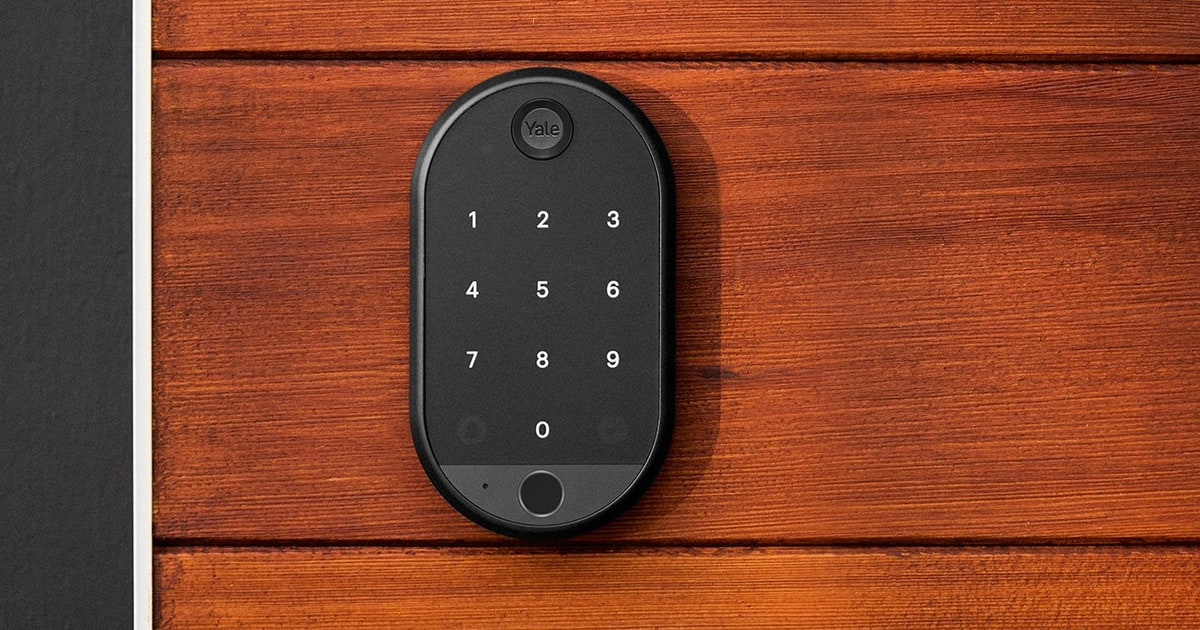
A smart lock earns its keep in the small moments. You're carrying groceries in both arms and the door opens anyway. Your kid gets home from school and you get a notification instead of a phone call. The dog walker lets herself in with a code that stops working on Friday. Consumer Reports' member survey found the top reason people buy one is simply losing or forgetting keys, and that tracks — most of the value here isn't security theater, it's not having to think about a key ever again.
But no smart lock is trouble-free. Every one of these runs on batteries that will die, usually at the worst time, and owner feedback across nearly every brand here circles back to the same two complaints: battery life falls short of the claim, and the app occasionally does something dumb. Fingerprint readers get finicky with wet or dry hands. Firmware updates break things that used to work. You should plan on keeping a backup key somewhere sensible, because you'll want it eventually.
We read spec sheets, published reviews and owner feedback across the category to sort out which locks hold up and which just look good on a listing. We think that the Schlage Encode Plus is the best smart lock for most people, and that the Yale August Wi-Fi Smart Lock with Keypad Touch is the one to buy if you rent and can't touch your existing deadbolt.
Everything we recommend

The most secure option, with Apple tap-to-unlock built in

Keeps your existing deadbolt and keys, which renters need

Fast fingerprint entry for a fraction of the price

Invisible hardware, if you'd rather not see a smart lock at all
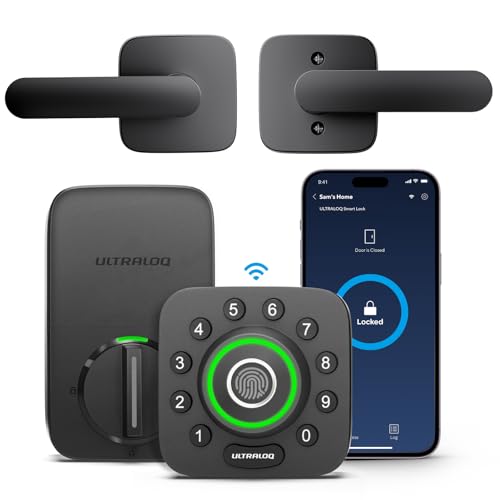
Six ways in, plus a matching handle, at a mid-range price
At a glance
| Product | Unlock Method | Connectivity | Price | |
|---|---|---|---|---|
| Schlage Encode Plus Smart WiFi Deadbolt LockTop pick | Tap To Unlock | Built-in WiFi | $321.80 |
| Yale August Wi-Fi Smart Lock with KeypadRunner-up | Fingerprint Scanner | Built-in Wi-Fi | $129 |
 | Yale Assure Lock 2 Keypad Deadbolt withAlso consider | Keypad | Wi-Fi | $191.99On sale |
| ULTRALOQ U-Bolt Pro WiFi Fingerprint Smart LockAlso great | Fingerprint ID | Built-in WiFi | $209.99On sale |
| Level Lock Pro - World’s SmallestUpgrade pick | Apple Home Key | Matter-Over-Thread | $349 |
 | Kwikset 959TRLFPRT-15S Halo Touch Traditional Fingerprint DeadboltAlso in lineup | Fingerprint | Built-in WiFi | $149On sale |
| Wyze Auto-Lock Bolt v2Budget pick | Fingerprint Scanner | Wi-Fi | $79 |
 | eufy Security Smart Lock C30Also consider | Physical Key | Built-in Wi-Fi | $79.99 |
How we picked
Security certification. We compared BHMA grade ratings across every lock's spec sheet, since Grade 1 requires withstanding 360 pounds of force against Grade 2's 250. We gave weight to Grade 1 on any lock we'd recommend for a front door.
How you get in. We looked at how many entry methods each lock supports and, more importantly, what owner feedback says about whether they actually work. Fingerprint readers in particular vary enormously between brands.
Hub or no hub. We favored locks with WiFi or Matter built in, because a separate bridge adds cost and another thing to fail. Where a hub is required, we say so plainly.
Battery reality. We weighed manufacturer battery claims against what owners report, and the gap is often large. Wirecutter's long-term findings put WiFi locks at 4–6 months per set of AA batteries versus 8–12 for Bluetooth and Z-Wave.
Install and fit. We checked backset and door-thickness specs against the standard 2-3/8 and 2-3/4 inch dimensions on most US doors, and noted which locks retrofit over an existing deadbolt for renters.
Top pick
The most secure option, with Apple tap-to-unlock built in
Schlage Encode Plus Smart WiFi Deadbolt Lock
The Encode Plus is a full deadbolt replacement with built-in WiFi, a 100-code keypad, and Apple Home Key so you can tap your iPhone or Watch to get in. It's certified to the highest residential grade and adds a forced-entry alarm most locks skip.
$321.80fromAmazonThis is the security pick, and the certification isn't marketing. ANSI/BHMA Grade 1 means the lock survives 360 pounds of static force and a strike test simulating a kick-in, plus a rated 250,000 open/close cycles. Grade 2 locks stop at 250 pounds, Grade 3 at 200. If you want the deadbolt on your front door to be the strong part of the door rather than the weak part, this is where the category tops out.
Apple households get the feature almost nothing else has. Home Key lets you tap an iPhone or Apple Watch to the lock and walk in — no app, no code, no fumbling. Apple's Emergency Reserve Power means it still works for a while after your phone's battery dies. Fewer than fifteen residential locks support it. If you're already deep in Apple Home, that alone probably decides this for you.
PCMag's review called out something we think gets underrated: the built-in door alarm. The lock senses movement and forced-entry attempts and pushes an alert to the app. That's a hardware layer, not a software trick, and it's genuinely rare at any price. Pair it with the activity log and you get a decent picture of who came and went, which matters more than most people expect once they have it.
Setup stays simple because the WiFi is built in. No hub, no bridge, no extra box on a shelf. It talks to Alexa and Google Assistant through the Schlage Home app, and it installs with a screwdriver on standard doors — 1-3/8 to 1-3/4 inch thickness, 2-3/8 or 2-3/4 inch backset. Bob Vila's research suggests roughly 85% of US exterior doors already fit that spec.
Flaws but not dealbreakers
It's the most expensive lock in this guide by a wide margin, and owner feedback is genuinely split. A meaningful share of buyers report units that arrived defective or failed within weeks, and several describe Home Key pairing as fussy the first time through. When it works it seems to work for years — but the failure stories aren't rare enough to wave off.
Installation instructions and illustrations don't always match what's in the box, particularly around the strike plate. If you've swapped a deadbolt before you'll be fine. If you haven't, budget more than the advertised few minutes.
The interior housing is bulky. This is a full deadbolt replacement, so renters are generally out unless a landlord signs off.
Runner-up
Keeps your existing deadbolt and keys, which renters need
Yale August Wi-Fi Smart Lock with Keypad
The August lock mounts on the inside of your door over the deadbolt you already have, so the exterior hardware and your old keys keep working. The bundled Yale Keypad Touch adds fingerprint and code entry anywhere within Bluetooth range.
$129fromAmazonIf you rent, this is realistically your only good option. Nothing about your door changes from the outside. Your landlord's key still works, the exterior hardware stays put, and when you move you unscrew the interior half and take it with you. Tom's Guide timed the fourth-generation August at under fifteen minutes to install with just a screwdriver — the fastest retrofit in its comparison group.
The keypad mounts separately, which turns out to be more useful than it sounds. You can put it beside the door, on a post, wherever makes sense, as long as it's in Bluetooth range of the lock. That's handy on doors with odd trim or a storm door in the way. It handles fingerprints and custom codes, and the app's activity feed tells you when the kids got home.
Built-in WiFi means no hub, and auto-unlock triggers as you walk up. Owners describe the core lock as reliable — it grabs the deadbolt with enough torque to forgive a door that doesn't sit perfectly square in its frame, which is a common complaint with retrofits on older houses.
Everything you need ships in the box. No bridge, no subscription for the basics, no separate purchase to get remote access working.
Flaws but not dealbreakers
The keypad's fingerprint reader is the weak link, and owners say so repeatedly. Some report it's slow, unreliable, or never enrolls certain fingers at all. Treat fingerprint entry as a bonus, not the main way you plan to get in — the code and the app are the dependable paths.
Battery life draws complaints too, with some owners burning through a set faster than expected. And because this bolts onto your existing deadbolt, it inherits whatever security grade that deadbolt has. A cheap builder-grade bolt doesn't become Grade 1 just because there's a smart motor on it.
Budget pick
Fast fingerprint entry for a fraction of the price
Wyze Auto-Lock Bolt v2
The Wyze Auto-Lock Bolt v2 reads a fingerprint in about half a second, includes WiFi for remote control, and takes a USB-C power bank if the batteries die. It's the least expensive lock here and owner sentiment is the strongest in this guide.
$79fromAmazonFor most people who just want to stop carrying keys, this does the job for a fraction of what the premium locks cost. Fingerprint, keypad, app, and physical backup keys — four ways in, all of them covered. Wyze rates the scanner at half a second, and the tempered glass surface resists the scratches and smudges that make cheap readers degrade over a year.
The USB-C port is a genuinely smart touch. If the batteries die while you're standing outside, any phone power bank gets you in. That's a better answer to the dead-battery problem than most locks costing several times as much, which typically give you a 9V contact point or nothing at all.
It ships with eight AA batteries and Wyze rates it at eight months. Owners consistently describe installation as quick — a straight deadbolt swap in around fifteen minutes — and setup through the Wyze app as painless. If you already own a Wyze video doorbell, you can unlock straight from the live feed after you see who's there.
Owner feedback here is the most positive of anything in this lineup by a clear margin, which counts for something in a category where the expensive options draw a lot of angry reviews.
Flaws but not dealbreakers
It's BHMA Grade 2, not Grade 1 — 250 pounds of static force instead of 360. That's fine for most doors but it's a real step down from the Schlage if security grade is what you care about.
The IP53 rating is for light splashing, not driving rain. On a fully exposed door with no overhang, you'd want something rated higher. There's no HomeKit or Matter support either, so Apple Home users should look elsewhere.
Some owners struggled to enroll certain fingerprints during setup, though most got there eventually. The keypad beep is quiet enough that a few people wished they could hear their own presses.
Upgrade pick
Invisible hardware, if you'd rather not see a smart lock at all
Level Lock Pro - World’s Smallest
The Level Lock Pro hides its entire mechanism inside the door, so both sides look like an ordinary deadbolt. It runs Matter over Thread, supports Apple Home Key, and carries the same top-tier BHMA certification as our top pick.
$349fromAmazonNothing else in this category disappears the way this does. Level puts the motor, the electronics, and the battery inside the bore hole, so from the hallway and from the porch you see a normal deadbolt. It's about 62% smaller than typical smart locks with no chunky interior housing. If you've held off on a smart lock because they all look like a gadget stapled to your front door, this solves exactly that.
It's certified BHMA AAA and ANSI Grade 1/A, with a bump- and pick-resistant cylinder — the same top rating as the Schlage, in a package with no visible hardware. Matter over Thread means it works with Apple Home, Google Home, Alexa, and SmartThings through one standard rather than a brand-specific bridge, and Thread's low latency makes commands feel close to instant.
Door status detection is built into the lock itself. No stick-on magnet on your door frame, no adhesive sensor to peel off later — it just knows when the door is open and tells you. Small thing, but it's the kind of detail that separates this from locks that bolt a sensor on as an afterthought.
There's no keypad and no fingerprint reader, which is the trade. You unlock by phone, by Apple Watch tap, by voice, or with a key. For some households that's cleaner. For others it's a dealbreaker, and you should know which you are before buying.
Flaws but not dealbreakers
Remote access needs a Matter hub or Level's own WiFi bridge, sold separately. Out of the box you get Bluetooth. If you don't already own a HomePod, Apple TV, Echo hub or similar, budget for another purchase to get the remote features working.
The app draws the sharpest criticism. Owners report login and password-reset loops that lock them out of the software even when the hardware is fine. Some also flag uncertainty about Level's long-term support, which is worth weighing on a product you expect to keep for a decade.
Installation is more involved than a surface-mount deadbolt because the hardware goes inside the door. Several owners found the lock itself easy to remove and the new one fiddly to seat correctly.
The Level Lock Pro is backed by a two-year limited warranty.
Also greatOn sale
Six ways in, plus a matching handle, at a mid-range price
ULTRALOQ U-Bolt Pro WiFi Fingerprint Smart Lock
The Ultraloq U-Bolt Pro WiFi bundles a fingerprint reader, anti-peep keypad, app, auto-unlock, eKey sharing and mechanical keys into one Grade 1 lock with a matching handle. It's the most flexible entry system here for the money.
$209.99fromAmazonList priceIf you want every entry method and you don't want to pay premium prices, this is the one. Fingerprint ID, a keypad with anti-peep entry so someone watching can't read your code, app control, auto-unlock as you approach, web portal access, eKey sharing, voice control, and two physical keys. Ultraloq says the reader stores up to 100 fingerprints. Nothing else in this lineup covers that many bases at once.
It's ANSI Grade 1 with an IP65 rating, meaning it's sealed against dust and water jets — not just splashes. That matters on an exposed door in a place with real weather. The set includes a matching handle, so you're not hunting for hardware that coordinates with your new deadbolt.
The eKey and code-sharing setup makes this a natural fit for short-term rental hosts. You can issue and revoke access remotely, see a timestamped log of every entry, and get alerts when the door opens. Built-in WiFi handles all of it with no hub. It works with Alexa, Google Home, SmartThings and IFTTT.
Ultraloq's customer service comes up repeatedly in owner feedback as a genuine strength. Several owners describe failures well into ownership that got resolved with replacement parts. That's not nothing in a category where support quality varies wildly.
Flaws but not dealbreakers
Battery drain is the recurring complaint. Multiple owners report going through a set far faster than expected — a few weeks in the worst accounts. Auto-unlock and the WiFi radio are the likely culprits, and turning off geofencing helps if you can live without it.
The bundled handle isn't as well made as the deadbolt. Some owners report the knob seizing or failing while the smart lock half kept working fine.
It's 2.4 GHz WiFi only, which trips up people on mesh systems that don't let you separate the bands.
Ultraloq covers the mechanical parts for life and the electronics for 18 months.
Who this is for
Buy one of these if you're tired of keys — losing them, copying them, hiding one under a rock that everyone on your street knows about. Smart locks make the most sense for families with kids coming home alone, anyone who hosts short-term rental guests, and people who share their place with dog walkers, cleaners or in-laws. If you rent, stick to the retrofit option; anything that replaces the exterior hardware needs your landlord's blessing.
Skip it if your door or frame is in bad shape. A smart lock on a rotted jamb is a smart lock on a rotted jamb. Fix the door first. This guide covers residential deadbolts for standard exterior doors only — we're not looking at commercial hardware, mortise locks, lever-handle sets, padlocks, or locks for sliding doors and gates. Security.org's analysis of reported smart lock compromises found that break-ins traced back to weak passwords and social engineering, not radio protocol exploits, so use a strong unique account password and turn on two-factor if the app offers it.
How we picked
We built the shortlist around a handful of things that actually change how a lock lives on your door. Security grade: we compared BHMA certifications and favored Grade 1, which means 360 pounds of resistance rather than 250. Entry methods: we counted what each lock supports and cross-checked owner feedback on whether fingerprint readers and keypads hold up in daily use. Connectivity: built-in WiFi or Matter beat anything needing a separate hub, since a bridge is one more purchase and one more failure point. Battery: we set manufacturer claims against owner reports, using Wirecutter's long-term finding that WiFi locks run 4–6 months per set versus 8–12 for Bluetooth and Z-Wave. Fit: we checked backset and thickness specs against the standard dimensions on roughly 85% of US exterior doors, and flagged the retrofit designs that renters can use.
Other smart door locks and keyless entry systems worth considering
If you want to match existing brass hardware: The Yale Assure Lock 2 Keypad Deadbolt with ($191.99) — The Yale Assure Lock 2 with WiFi comes in a Lifetime Brass finish that looks genuinely good next to warm-toned door hardware, and owners consistently say the lock feels heavy and substantial in a way budget models don't. It replaces your deadbolt with a screwdriver, auto-locks once DoorSense confirms the door is shut, and auto-unlocks as you walk up. The Assure line also comes in Z-Wave, Zigbee and Matter versions if you already have an ecosystem to match. What you give up against our top pick: no Apple Home Key, no fingerprint reader, and a few owners report it fits poorly on doors thicker than two inches. It's 2.4 GHz WiFi only and US/Canada only.
If you want physical buttons instead of a touchscreen: The eufy Security Smart Lock C30 ($79.99) — The eufy Smart Lock C30 uses real pressable buttons rather than a capacitive touchscreen, which sounds trivial until you've stood in the cold jabbing at an unresponsive panel with gloves on. It has built-in WiFi with no bridge, an IP65 weather rating that clears it for a fully exposed door, and it works from -22°F to 158°F. No subscription is required for any core feature. The catch is battery life: eufy claims up to five months from 4 AA cells, and owner feedback pushes back hard on that figure — several people report swapping batteries far more often. There's no fingerprint reader either, so it's code, app, voice or key.
The competition
Here's what our research turned up beyond the picks. This isn't a survey of every smart lock sold — it's the set of models that kept coming up in published reviews and owner discussion, plus a few that looked promising on paper and didn't hold together on closer reading.
The Kwikset 959TRLFPRT-15S Halo Touch Traditional Fingerprint Deadbolt ($149) — The Kwikset Halo Touch is a fingerprint deadbolt with built-in WiFi and Kwikset's SmartKey cylinder, which lets you rekey the lock yourself in seconds without a locksmith — genuinely useful if you've just moved in or need to cut off a former tenant. Owners praise how fast it responds and how easy the app makes enrolling multiple fingerprints, including small kids' fingers. It lost to the Wyze on price and to the Schlage on security features, and its fingerprint reader is the sticking point: owner reports split sharply, with a real contingent describing failures when hands are wet, chapped or cold. Large households also report going through AA batteries roughly monthly. Choose it if the tool-free rekeying matters to you and you want a fingerprint lock from an established lock brand rather than a tech company.
Installation and upkeep
Before you buy, measure three things: your door's thickness, the backset (the distance from the door edge to the center of the bore hole), and the bore hole diameter. Most US exterior doors use a 2-3/8 or 2-3/4 inch backset, so most of these locks drop in without drilling — but the exceptions are the reviews you see people writing in anger. Doors thicker than two inches cause trouble with several models. Once installed, check that the bolt slides into the strike plate without you having to lift or shove the door; a bolt fighting a misaligned strike burns through batteries fast. Keep a physical key somewhere off-site, like a neighbor's house or your car. Swap batteries at the first low-battery alert rather than waiting, and use lithium AAs in cold climates — alkalines lose a lot of capacity below freezing.
Questions we get
What's the best smart lock for Apple HomeKit and Home Key?
The Schlage Encode Plus is our pick for Apple households. It supports Apple Home Key, so you tap your iPhone or Apple Watch to the lock and it opens — and thanks to Emergency Reserve Power, that still works for a while after your phone's battery dies. The Level Lock Pro also supports Home Key and runs Matter over Thread, which gives it very fast response, but it needs a Matter hub for remote access.
Can smart locks be hacked?
Not usually the way people imagine. Security.org's analysis of reported residential smart lock compromises found they were overwhelmingly traced to weak account passwords or social engineering, not to someone cracking Bluetooth, Z-Wave or Zigbee radio traffic. The practical advice is boring but effective: use a strong unique password on the lock's app account, turn on two-factor authentication, and don't reuse a PIN you use elsewhere. A determined burglar is still far more likely to break a window.
Do smart locks work if the internet goes down?
Yes, the lock itself keeps working. The keypad, fingerprint reader and physical key all function locally with no network at all, and Bluetooth control from your phone works when you're standing near the door. What you lose is remote access — you can't lock the door from work, and you won't get activity notifications until the connection comes back.
What is a Matter smart lock, and do I need one?
Matter is the shared standard that lets a lock work across Apple Home, Google Home and Alexa without a brand-specific bridge. Matter 1.3 added native door lock support, so a certified lock can be controlled from all three platforms at once. You need it if you're mixing ecosystems or want to avoid being stuck with one company's app forever. If you're happy in a single ecosystem, a built-in WiFi lock like the Encode Plus does the job without it.
Will a smart lock fit my door without drilling?
Probably. Bob Vila's installation research puts roughly 85% of US exterior residential doors at a standard 2-3/8 or 2-3/4 inch backset, which is what these locks are built for. Measure your backset and door thickness first — most of these fit doors between 1-3/8 and 1-3/4 inches, and thicker doors cause real problems. If you rent, the August retrofit mounts over your existing deadbolt with no changes to the exterior at all.
How long do the batteries last, and what happens when they die?
Plan on 4–6 months from a set of AA batteries on a WiFi lock, per Wirecutter's long-term findings, and 8–12 months on Bluetooth or Z-Wave models. Real-world numbers are often worse, especially with auto-unlock geofencing running. Every lock here warns you well before it quits, and every one has a physical key backup. The Wyze goes further and takes a USB-C power bank to jump it open from outside.
Why you should trust us
For this guide:
- We read manufacturer spec sheets for every lock in this guide, comparing BHMA certification levels, IP weather ratings, backset and door-thickness requirements, and stated battery life.
- We reviewed published coverage from Wirecutter, PCMag, Tom's Guide, Consumer Reports, Bob Vila and Security.org, along with technical documentation from Apple and the Connectivity Standards Alliance on Home Key and Matter.
- We read through owner feedback across all eight listings, looking for repeated themes — battery drain, fingerprint reliability, app problems and fit issues — rather than isolated complaints.
- We read owner reviews on every listing, weighted toward the critical ones, because that is where the recurring failures show up.
- We have a systematic way of automatically fetching the latest prices, so the numbers on this page stay current.
- This is a research-focused guide, so the team may not own every product listed — though we often do own the top winners, which gives us extra context for the recommendations.
- We don't accept free products, and the retailer commission never changes which product we recommend.
Sources
The Best Smart Locks — Wirecutter (NYTimes), Wirecutter
Best Smart Locks for 2026 — CNET, CNET
Best Smart Locks — Tom's Guide, Tom's Guide
Best Smart Locks 2026 — PCMag, PCMag
Smart Lock Buying Guide & Ratings — Consumer Reports, Consumer Reports
Best Smart Door Locks — SafeWise, SafeWise
Smart Locks Tested and Rated — Security.org, Security.org
Best Smart Locks — Bob Vila, Bob Vila
ANSI/BHMA Lock Grade Standards — Builders Hardware Manufacturers Association, BHMA
Matter Smart Home Standard — Connectivity Standards Alliance, Connectivity Standards Alliance
Amazon product listings and owner reviews for all 8 products
Manufacturer specification pages for each product
Some passages in this guide may be paraphrased with AI help. Prices are refreshed automatically.
More like this.
Continue exploring home reviews and recommendations.

The Best Smart Wi-Fi Garage Door Openers
A garage door is the biggest moving thing most people own, and it's also the door you're most likely to leave open by accident. A smart opener fixes that.…

The Best DIY Smart Home Security Systems
A home security system earns its keep on the days nothing happens. You leave for a long weekend, glance at your phone in an airport line, and see every…

The Best Smart Garden Systems for Fresh Herbs
Fresh herbs go bad fast. You buy a clamshell of basil for one recipe, use a third of it, and find the rest slimy in the crisper a week later. A smart…

The Best Smart Home Gym Systems
A home gym only works if you'll walk over to it on a Tuesday night when you're tired. That's the whole game. The best connected systems shrink the…

The Best Smart Home Gym Systems
The pitch for a smart home gym is simple: the equipment is already in your house, so the hardest part of working out - getting there - disappears. That's…

The Best Blackout Curtains for Bedrooms
A dark bedroom is one of the simplest sleep upgrades you can make. Research published in the Journal of Clinical Sleep Medicine found that even dim light…