The Best UGREEN Charging Accessories
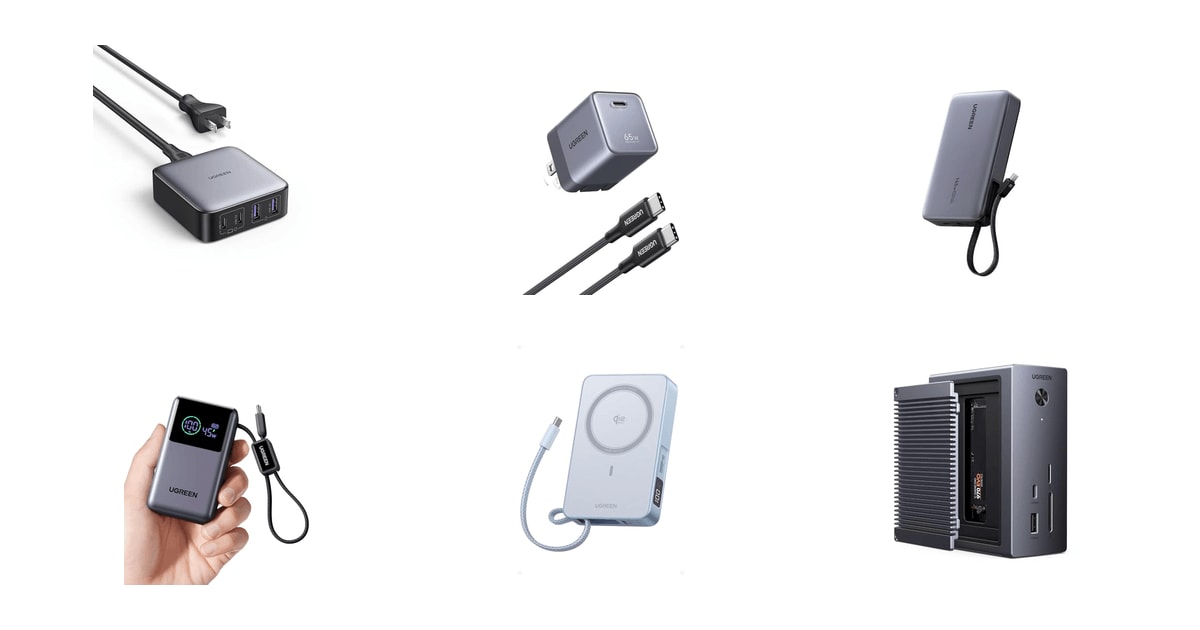
Charging gear is the least glamorous thing in your bag, and the thing you notice most when it fails. You want a brick that refills your laptop over lunch, a battery that survives a delayed flight, and ports that don't argue over who gets power. UGREEN sells all of that, usually for less than the big-name equivalent. The catch is that the lineup is enormous and the names blur together. Nexode, Nexode Air, Nexode Pro, MagFlow, Revodok — they aren't interchangeable, and picking wrong means carrying more than you need.
None of this gear escapes physics. Wattage gets shared, not multiplied: plug four things into a 100W station and your laptop gives up some speed. Small GaN bricks run hot at full output, and owners say so plainly; when they get hot, they slow down. Magnetic banks charge more slowly than a cable, always. And a battery big enough to refill a laptop is heavy enough that you'll feel it on your shoulder by the end of a travel day. Any spec sheet promising all of that at once is selling you a headline number.
So buy for the job you actually do. One person needs a single brick that disappears into a jacket pocket. Another needs six ports so the family stops unplugging each other overnight. A third needs a battery that can bring a laptop back from empty in an airport with no free outlet. We think that the UGREEN Nexode Air 65W GaN Charger is the best UGREEN charging accessory for most people, and that the UGREEN 100W 6-Port GaN Charging Station is the one to buy if your desk has more devices than outlets.
Everything we recommend

Laptop-class power in a cube you'll forget you packed
Six ports for a crowded desk, if you'll share the watts

A pocket battery with its own cable and a screen

Enough battery to refill a laptop, at a weight you'll feel
Snap-on wireless power for an iPhone, with real weight
How we picked
Real per-port wattage. We read UGREEN's published per-port specs rather than the headline total, because a 100W station that splits into 65W, 35W and 22.5W behaves very differently from one 100W port. Anything that couldn't hit at least 65W on a single USB-C port was out of the running as a laptop charger.
Size and weight. We compared listed dimensions and weights across the lineup, since GaN's whole point is fitting laptop wattage into something pocketable. TechRadar's figure of roughly 30 to 40 percent smaller than silicon equivalents set the bar we expected each charger to clear.
Capacity versus carry. For power banks we weighed usable charges against what you'd actually shoulder all day, and we favored 10,000mAh models for commuting and 20,000mAh for laptop work. We also gave credit to banks with output displays, which published reviews consistently call the easiest way to confirm a fast charge.
Heat and safety. We looked for stated protections — temperature sensing, flame-rated housings, multi-layer battery safeguards — and then checked owner feedback for repeated complaints about heat or throttling. Compact chargers all warm up; we wanted the ones where owners describe it as manageable rather than alarming.
Cables and pairing. Wired notes that braided USB-C cables rated for 100W and 5A hold up far better at the connector than rubber-jacketed cords over repeated bending. We favored gear that ships with a decent cable or makes it obvious which rating you need.
Top pick
Laptop-class power in a cube you'll forget you packed
UGREEN Nexode Air 65W USB C GaN
This is the charger to keep in your bag and stop thinking about. It's roughly the size of a golf ball, the prongs fold flat, a cable comes in the box, and 65 watts is enough to take a MacBook Air from empty to about half in half an hour.
$24.99fromAmazonIf you buy one charger, make it a 65-watt one. That's the tier where a brick stops being a phone charger and becomes a laptop charger. Tom's Guide points to 65W as the practical floor for fast-charging ultrabooks and MacBook Air models, which makes it the most useful single number for a traveler. Below it, you wait. Above it, you're mostly paying for headroom you'll use once a year.
The size is the whole argument. UGREEN lists it at about 1.2 by 1.3 by 1.6 inches, with prongs that fold in, and it weighs under three ounces. That's smaller than the plastic brick that shipped with most laptops. GaN chips are what make it possible — TechRadar puts gallium nitride chargers at roughly 30 to 40 percent smaller than silicon chargers of the same wattage, because they run more efficiently and waste less power as heat.
It comes with a cable, which sounds minor until you're in a hotel room without one. The included cord is a little over three feet, which is fine for a nightstand or a tray table and short if the only outlet is behind the bed. It's rated well above what this charger can push, so the cable won't be your bottleneck.
One port keeps things simple. Nothing gets negotiated away, so your laptop takes the full 65 watts every time and nobody at the table can borrow your port mid-charge. Owners who run a docked Switch 2 or a Steam Deck off it point that out specifically — a second device plugging in shouldn't interrupt the first. If you need two things charging at once, the desktop stations below are the better answer.
Flaws but not dealbreakers
Push it hard and it gets hot. Owners describe compact bricks like this one warming up quickly at full output and then throttling to cool off. That's normal for something this small, but it means the fast numbers on the box apply to the first stretch of a charge more than the whole session. Give it some air instead of burying it under a pillow or a folded jacket.
The bundled cord is a charging cable, not a data cable — owners report it doesn't carry data. Keep a separate cable if you sync a camera or an external drive. And with a single port, this can't be your only charger in a two-device household.
Runner-up
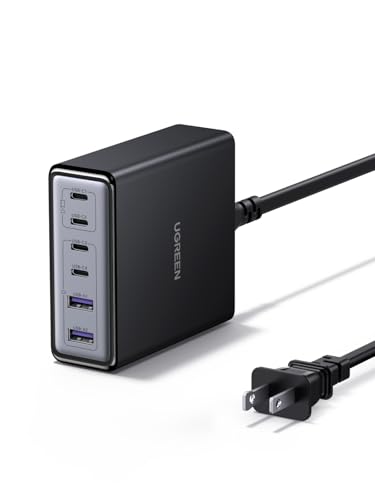
Six ports for a crowded desk, if you'll share the watts
UGREEN 100W USB C Charging Station
Count the chargers under your desk. If it's three or more, this one replaces all of them, with four USB-C ports and two USB-A ports on a compact vertical body. It comes with an AC extension cord, so you're not fighting a power strip for room.
$39.49fromAmazonThis is the fix for a household where everyone is unplugging everyone else. A laptop, a phone, a tablet, earbuds, a Switch and a controller can all sit on it at the same time. The ports run up the face of the unit rather than across a wide brick, so cables come off the top instead of sprawling sideways across your desk.
The wattage split is the part worth reading twice. UGREEN rates the two main USB-C ports at up to 65W each, the other two USB-C ports at 35W, and the USB-A ports at 22.5W — but the station tops out at 100W total. Load every port and your laptop drops to a slower trickle. That's how USB-PD works on every multiport charger; it just matters more when there are six.
GaN is doing the same size work here that it does on our top pick. A six-port, 100-watt charger built the old way would be a bulky, warm slab. This one stays small enough to travel, and owners who take it on trips like that the extension cord lets them reach an awkward hotel outlet behind a desk and still charge four things.
For most people, 65 watts from a single port is enough. It covers a MacBook Air, a Dell XPS, an iPad Pro and every phone in the house at full speed. If your laptop is a 16-inch MacBook Pro or a gaming machine, this isn't the charger for it — you want the desktop-class wattage in our upgrade section, or a dedicated brick.
Flaws but not dealbreakers
The 100W total is the ceiling, and it's easy to bump into. Two laptops and a tablet will each get less than their maximum. Owners also note that it can leave a phone warmer than a simple single-port brick would, especially an older phone that doesn't manage its own charging as carefully.
No cables are included, and cable quality matters more here than on a single-port charger. A worn or underrated USB-C cable will cap a 65W port at something much lower, and you'll blame the charger. Owners consistently recommend pairing it with cables rated for the wattage you actually want.
Budget pick
A pocket battery with its own cable and a screen
UGREEN Nexode Pro 10000mAh 45W Mini Power
A cylindrical 10,000mAh bank with a short braided cable built into the body, so there's nothing extra to remember. It pushes up to 45 watts, and a small display tells you exactly how much power is going out and how much is left.
$39.97fromAmazonThe built-in cable is the reason to pick this one. It's about nine inches, braided, and it doubles as a wrist strap, so the battery and the cable can't get separated in the bottom of a bag. UGREEN rates the cord for more than 10,000 bend cycles. If you've ever found a dead bank and no cord at the same time, you know why that matters.
A screen turns guessing into knowing. The display shows real-time wattage, remaining charge and battery health, so you can tell whether your phone is actually pulling a fast charge or crawling along at a few watts because of a bad cable. That's the single most useful feature on a small power bank, and it's usually reserved for pricier models.
Forty-five watts is generous for something this size. UGREEN says it takes a Galaxy S25 Ultra to about 65 percent or an iPhone 17 Pro Max to about 66 percent in half an hour, and it can hand a MacBook or an iPad an emergency top-up. The 10,000mAh capacity works out to roughly 1.6 full charges for an iPhone 17 Pro — a workday, not a weekend.
Flaws but not dealbreakers
Capacity is the trade. Ten thousand milliamp-hours goes fast if you're feeding a tablet or a laptop, and owners who keep their phones on low battery all day say they burn through it quickly. Treat it as a day bag battery, not a trip battery.
Sustained output tapers. Owners report seeing the full 45 watts at the start and roughly half that after the bank warms up over a longer session, which is typical for a battery this compact. The port count is also modest: one loose USB-C port, one USB-A, and the attached cable.
Upgrade pick
Enough battery to refill a laptop, at a weight you'll feel
UGREEN Nexode 20000mAh 145W Built-in USB-C Power
This 20,000mAh bank pushes up to 100 watts from one USB-C port, which is real laptop charging rather than a slow trickle. Use two ports and you get 100W plus 45W at once, so a laptop and a tablet can both come back from empty.
$64.99fromAmazonThis is the one that makes an outlet optional. A hundred watts from a single port covers a MacBook Pro, and the 20,000mAh capacity means a full laptop refill with room left for a phone. If you work from trains, airport gates and conference floors, that's the difference between rationing your screen brightness and just working.
The dual-USB-C setup is smarter than it first looks. There's a built-in USB-C cable plus a separate 45W USB-C port, so two laptops can charge from one brick without you carrying a second cord. It also speaks PD, PPS, SCP and UFCS, which in plain terms means iPhones, Samsung, Xiaomi and Huawei phones all get their proper fast-charge speeds instead of a generic slow one.
PCMag notes that the onboard display shows real-time output, and on a bank this powerful that's more than a gimmick. Laptops negotiate wattage quietly, and a bad cable can drop you from 100 watts to something closer to a phone charger without any obvious sign. A number on the screen tells you in a second whether to swap the cable.
At 20,000mAh it also stays within the capacity airlines generally allow in a carry-on, which is why this size is the sweet spot for travel batteries. Owners take it camping and on long trips and report it recharges itself reasonably quickly, so it's ready again by morning.
Flaws but not dealbreakers
It weighs about a pound, and owners bring that up constantly. It's fine in a backpack and genuinely annoying in a jacket. This is a bank you plan around, not one you forget about.
Check what your laptop demands before you buy. Some machines refuse to charge from anything under 100 watts, and a few owners discovered that only after unboxing. If you're pairing this with a high-draw gaming laptop, confirm the input requirement first — PD 3.1 machines can ask for far more than this can give.
Also great
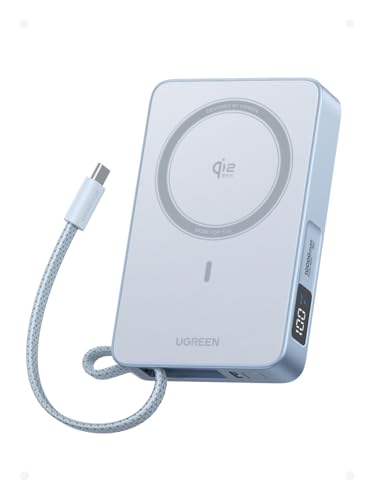
Snap-on wireless power for an iPhone, with real weight
UGREEN MagFlow 10000mAh Qi2 25W Wireless Power
A Qi2-certified magnetic bank that clicks onto the back of an iPhone and charges at 25 watts wirelessly, which is faster than the usual magnetic pack. A built-in USB-C cable adds up to 30 watts of wired power and doubles as a carry strap.
$89.98fromAmazonMagnetic banks usually make you choose between convenience and speed. Android Central puts most MagSafe-style packs at 7.5 to 15 watts wireless, well behind what a cable can do. This one is Qi2 certified at 25 watts — UGREEN says that gets an iPhone 17 Pro Max to half in around 38 minutes, against roughly 54 minutes at 15 watts. It's still not cable-fast, but the gap is much smaller.
The magnets are the unsung part. There are 17 of them, and owners describe the snap as firm enough that the phone stays put while they're walking or holding it up to watch something. A magnetic pack that slides out of alignment charges slowly and heats up, so grip is a performance feature, not a convenience one.
The built-in USB-C cable makes this more flexible than most magnetic banks. Snap it to your phone in a taxi, then plug the cable into a tablet or a friend's phone at 30 watts when you get where you're going. It also tucks into a recess along the edge and works as a strap, which keeps one more loose cord out of your bag.
Flaws but not dealbreakers
Wireless charging wastes energy as heat, so a 10,000mAh magnetic bank gives you noticeably less usable charge than the same capacity over a cable. Owners describe it running warm during long wireless sessions and say the pack feels heavy attached to a phone — fine at a desk, less pleasant held up for a while.
Fit and speed depend on your phone. iPhone 17 and 16 Pro Max models snap on directly; older iPhone 12 through 15 handsets and any Android phone need proper magnet support or a magnetic case. Pixel owners report the wireless side works well while wired output is more limited than the headline number suggests.
Who this is for
Buy now if you're replacing a lost laptop brick, packing for a trip, or tired of a nest of chargers behind your desk. UGREEN is a sensible place to start: CNET's roundups group it with Anker and Baseus among the strongest budget-to-midrange GaN brands, and the per-watt math generally favors it. If you own a working 65W charger and a battery that still lasts a day, none of this is urgent — charging gear is a replace-when-it-fails category, not an upgrade-every-cycle one.
This guide covers UGREEN's chargers, power banks and one docking station: the accessories that put power into your devices. It doesn't cover phone cases, audio gear, surge protectors or data-only cables, and it isn't a cross-brand comparison — we're sorting through one company's confusingly large lineup, not crowning a category winner across every brand. If you need more than 145 watts for a high-draw gaming laptop, note that USB-PD 3.1 allows up to 240 watts and newer Nexode chargers support it, but nothing in this lineup goes that high.
How we picked
Per-port wattage: we read the split, not the headline number, and expected at least 65W from one USB-C port for laptop duty. Size: GaN should buy you a meaningfully smaller brick, on the order of a third smaller than silicon, or it isn't worth the name. Capacity versus carry: 10,000mAh for a commute, 20,000mAh when a laptop needs refilling, with a display so you can confirm what's actually flowing. Heat and safety: stated protections plus owner feedback about how warm each one runs under load. Cables: braided, properly rated cords, because a cheap cable will quietly cap an expensive charger.
Other ugreen charging accessories worth considering
If you want one cable to run your whole desk: The UGREEN Revodok NVMe 10-in-1 Docking Station 4K@60Hz ($59.99) — This 10-in-1 Revodok dock turns a single USB-C connection into 4K 60Hz HDMI, gigabit Ethernet, four more USB ports, an SD and microSD reader, and an M.2 NVMe slot for a spare drive — while passing up to 100 watts through to your laptop. Digital Trends highlights that combination of full-speed passthrough alongside video and Ethernet as what makes a dock worth the desk space. It's a hub, though, not a charger: it doesn't include a power supply, so you'll need one of the bricks above to feed it. Owners also flag that you need a proper video-capable USB-C cable for HDMI to work, and a few report display trouble on certain MacBooks. Check your laptop's port before buying.
The competition
Here's what our research surfaced from UGREEN's own lineup — not a survey of every charging accessory on the market. The models below are worth knowing about, but each lost to a pick for a specific reason.
The UGREEN Nexode 65W GaN USB C Charging ($59.99) — The Nexode 65W 4-Port Desktop Charger is a genuinely good, well-liked station with two USB-C and two USB-A ports, a temperature sensor, and a flame-rated housing. Owners praise how quietly it runs — no coil whine, which is a real complaint about some competing bricks. It loses to our runner-up on simple arithmetic: 65 watts total across four ports means a laptop plus anything else forces a compromise, where the 6-port model gives you 100 watts to divide and two more ports to divide it among. Choose this one if your desk only ever has three or four small devices on it and you'd rather have the smaller footprint. Owners do wish it had keyholes or magnets for mounting under a desk.
Care and cable notes
Most charging problems are cable problems. Match the cable to the job: a cord rated for 100W and 5A for laptops, and a braided one if it lives in a bag, since Wired notes braided jackets resist fraying at the connector far better than rubber over repeated bending. Pull from the plug, never the cord. Give chargers air — a GaN brick under a pillow or a stack of paper will throttle itself rather than cook, and you'll blame the charger for being slow. Store power banks around half charged if you won't use one for months, and top it up every so often instead of leaving it flat. If a bank or brick swells, gets uncomfortably hot at low load, or stops holding a charge, retire it.
Questions we get
Is UGREEN a good brand compared with Anker?
Yes. CNET's roundups consistently place UGREEN alongside Anker and Baseus among the top budget-to-midrange GaN brands, and UGREEN usually wins on watts per dollar. Anker's ecosystem is broader and its warranty support has a longer track record. For a charger or a power bank, the difference is small enough that specs should decide it.
What UGREEN charger can fast-charge a MacBook Pro?
For a 14-inch MacBook Pro, the Nexode Air 65W is enough for normal work, though it'll charge more slowly under heavy load. For a 16-inch machine you want a full 100 watts from a single port, which in this lineup means the 20,000mAh 145W power bank or a dedicated desktop-class Nexode charger. The 100W 6-port station tops out at 65 watts per port, so it isn't the right pick for the biggest MacBook Pro.
Can one charger power a laptop and a phone without slowing down?
Only if the total wattage covers both. Total output gets divided among active ports and renegotiated every time you plug something in, so a 65W station running a laptop and a phone gives the laptop less than 65 watts. Look at the per-port ratings, not the headline number. A 100W station handles a 65W laptop plus a phone comfortably; a 65W one won't.
Does UGREEN make a MagSafe-compatible power bank for iPhone?
The MagFlow 10,000mAh is the one to get. It's Qi2 certified at 25 watts, which is faster than the 7.5 to 15 watts most magnetic packs manage, and its 17-magnet array holds an iPhone 17 or 16 Pro Max firmly. Older iPhone 12 through 15 models attach but may charge more slowly. Android phones need a magnetic case.
Do these power banks work with a Steam Deck or a Nintendo Switch?
Yes, as long as the wattage matches. Both consoles charge over USB-C PD, and the 45W mini bank will keep a Switch going while the 145W bank can run a Steam Deck at full speed. Owners also use the 65W chargers to run a docked Switch 2. Handhelds draw more when you're actually playing, so expect a battery to drain faster than the capacity math suggests.
Are UGREEN GaN chargers safe to leave plugged in overnight?
Generally, yes. These models list temperature sensing, over-current and short-circuit protection, and flame-rated housings, and GaN runs cooler than older silicon designs at the same wattage. Give the charger open air rather than covering it, and use a cable rated for the wattage you're pulling. If a charger ever gets too hot to hold comfortably at a light load, stop using it.
Why you should trust us
For this guide:
- We read published reviews and roundups from TechRadar, PCMag, Tom's Guide, Wired, CNET, Digital Trends and 9to5Toys covering GaN chargers, power banks and docks, and used them to set the wattage and durability thresholds in this guide.
- We compared UGREEN's own published per-port wattage figures, dimensions, weights and protocol support across every model in the lineup rather than relying on headline totals.
- We looked for recurring themes in owner feedback — heat and throttling on compact bricks, real usable capacity on power banks, and cable-related bottlenecks — and folded those into the flaws sections.
- We read owner reviews on every listing, weighted toward the critical ones, because that is where the recurring failures show up.
- We have a systematic way of automatically fetching the latest prices, so the numbers on this page stay current.
- This is a research-focused guide, so the team may not own every product listed — though we often do own the top winners, which gives us extra context for the recommendations.
- We don't accept free products, and the retailer commission never changes which product we recommend.
Sources
Best Portable Chargers and Power Banks 2026, TechRadar
Best USB-C Chargers and Charging Accessories, Tom's Guide
Best GaN Chargers Tested, PCMag
Best Power Banks for Travel, CNET
Best MagSafe Chargers and Power Banks, Android Central
UGREEN Nexode Series Official Specifications, UGREEN
UGREEN Revodok Docking Station Specifications, UGREEN
Best USB-C Hubs and Docking Stations, Digital Trends
Deals and Roundups on UGREEN Charging Gear, 9to5Toys
Best Charging Cables Tested for Durability and Speed, Wired
Amazon product listings and owner reviews for all 7 products
Manufacturer specification pages for each product
Some passages in this guide may be paraphrased with AI help. Prices are refreshed automatically.
More like this.
Continue exploring electronics reviews and recommendations.

The Best Bluetooth Multi-Device Keyboards
A multi-device keyboard earns its keep in the small moments. You're typing an email on your work laptop, a Slack message pops up on your personal desktop,…

The Best Socket Organizers and Rails
A drawer full of loose sockets costs you time on every single job. You know the routine: you're halfway under the hood, you need a 13mm, and you're…

The Best Gifts for Truck Drivers
A truck cab is an office, a bedroom and a dashboard all fighting for the same few square feet. That's the frame for every gift here. Whatever you give has…

The Best Powered Car Subwoofers
Most factory car stereos stop working somewhere around 80 to 100Hz, according to measurements published by CNET's Roadshow car audio coverage. That's not…

The Best Tire Chains and Snow Traction Cables
Chains live in your trunk for years and matter for about twenty minutes. But those twenty minutes tend to happen on a dark shoulder, in falling snow, with…

The Best Car Seat Covers
Your car's seats take more abuse than any other surface inside it. Muddy paws, juice boxes, gym bags, work boots, sunscreen, coffee - it all lands on the…