The Best Compact Photo Printers
A compact photo printer turns the thousands of pictures buried on your phone into something you can stick on a fridge, tuck into a card, or hand to your grandmother. That's the whole appeal, and it's a good one. But the printer is only half the purchase. Every one of these machines runs on a proprietary consumable, and the paper you buy over the next two years will usually cost more than the hardware did. So the real question isn't which printer prints best. It's which format you want to keep feeding.
Here's the honest caveat: none of these printers is fast, and none is cheap to run. A single 4x6 takes close to a minute, so printing a batch for a party means standing around watching a sheet pass through four times. Instant film ejects right away but takes a minute and a half to develop, and you can't reprint a frame you botched. Companion apps are the weak point across the whole category — they crash, they lose Bluetooth pairing, they nag you to make an account. Nobody has solved this.
Think about size and permanence first, then let cost per print break the tie. If you want 4x6 prints you'll frame or put in an album, get a dye-sublimation model. If you want stickers and party favors, a 2x3 pocket printer is plenty. And if you want the physical film look, that's a different purchase entirely. We think that the Canon Selphy CP1500 is the best compact photo printer for most people, and that the Fujifilm INSTAX Mini Link 3 bundle is the one to buy if you want real instant film rather than digital reprints.
Everything we recommend

Lab-quality 4x6 prints that should outlast you

Real instant film, with the app to make it fun

Nearly the same 4x6 quality, in a simpler package

Cheap stickers on demand, with no cartridges ever
At a glance
| Product | Print Size | Print Speed | Price | |
|---|---|---|---|---|
| Fujifilm INSTAX Mini Link 3 Smartphone PrinterAlso great | 2 x 3" | — | $129.95 |
| Canon Selphy CP1500 Wireless Compact Photo PrinterTop pick | — | — | $178.85 |
 | HP Sprocket Studio Plus 4x6 Wireless InstantAlso consider | 4x6" | Instant | $169.99 |
| KODAK Dock Plus 4x6'' Photo PrinterRunner-up | 4x6" | ~55 Seconds | $109.99 |
 | Polaroid Hi-Print + Paper Bundle - 2ndAlso consider | 2x3" | Under 50 Sec | $139.99 |
| KODAK Step Wireless Mobile Photo Mini PrinterBudget pick | 2x3" | — | $94.99 |
 | Fujifilm Instax Square Link Smartphone Printer- AshAlso in lineup | 3.39x2.83" | — | $129.95 |
How we picked
Print technology. We compared how dye-sublimation, ZINK and Instax film differ in color accuracy and stated longevity. Anything meant for framing or archiving needed dye-sub; ZINK and film had to earn their place on convenience or aesthetics.
Cost per print. We looked at what each consumable actually costs per sheet across formats, since that outweighs the hardware price within a year of regular use. Printers that lock you into an expensive proprietary consumable had to offer something in return.
App and pairing. Owner feedback across this category is dominated by app crashes and dropped Bluetooth connections, not broken hardware. We favored printers whose companion apps draw the fewest of those complaints, and connection methods that avoid the app entirely.
Power and portability. We checked weight, dimensions and whether a battery is built in, sold separately, or absent. A printer that needs a wall outlet is a different product from one you can carry to a park.
What's in the box. We noted included paper, film and cartridges, because a printer with no consumable is furniture. Bundles that cover a full event out of the box scored higher than bare units.
Top pick
Lab-quality 4x6 prints that should outlast you
Canon Selphy CP1500 Wireless Compact Photo Printer
The Selphy CP1500 makes 4x6 dye-sublimation prints that come out dry, water-resistant and rated to last a century. It prints from your phone over Wi-Fi, from a memory card, or straight off a USB stick, and the 3.5-inch screen means you don't always need a phone at all.
$178.85fromAmazonThis is the print quality benchmark, and the gap is visible. Dye-sublimation heats solid ink to a gas and bonds it to the paper in continuous tone layers, rather than spraying dots. You get smooth gradients in skin tones and skies instead of the slightly plasticky look ZINK gives you. Canon rates the output to last up to 100 years in normal storage. If you're printing a newborn photo for a frame, that difference actually matters.
It connects to nearly everything, which is rarer than it sounds. Wi-Fi handles phones and laptops, and Wi-Fi Direct works without a router — useful at a cabin or a campsite. There's also USB, a memory card slot, and a USB flash drive port. Hand your camera's SD card to it and print without a phone in the loop. Most printers here give you Bluetooth and nothing else.
The built-in screen makes it a printer your parents can use. A 3.5-inch display lets you scroll through images, crop, and apply sepia or black-and-white filters right on the device. No app, no account, no pairing. That's a real advantage if you're buying this for a household where not everyone wants to install software to print a picture.
Prints come out dry and water-resistant, so there's no waiting. A 4x6 takes roughly 47 seconds and you can handle it immediately. No smudging, no drying rack, no worrying about a kid with damp hands. For an event where you're handing prints to guests, that's the difference between a nice moment and a pile of ruined photos.
Flaws but not dealbreakers
There's no battery in the box. The Selphy is small enough to carry, but out of the box it needs a wall outlet. Canon sells a battery pack separately, and you'll want it if you actually plan to print at a park or a wedding reception. Budget for it as part of the purchase, not an optional extra.
The paper cassette system trips up first-time users. The cassette has to match the paper size you've loaded, and owners regularly report jams or refusals that turn out to be a mismatch or a cassette that isn't seated right. It's not hard once you understand it. But the first setup is fussier than dropping a paper pack into a 2x3 printer.
It's the biggest desktop footprint here after the Kodak Dock. At around three and a half pounds with a paper tray that extends out the back during printing, this isn't a thing you slip in a jacket pocket. It lives on a shelf and comes out when you need it.
Also great
Real instant film, with the app to make it fun
Fujifilm INSTAX Mini Link 3 Smartphone Printer
The Mini Link 3 prints genuine Instax Mini film from your phone, so each shot is a one-of-a-kind physical negative rather than a reprint. The bundle includes 20 exposures, which means you can print the night you unbox it instead of hunting for film.
$129.95fromAmazonInstax film looks like nothing a digital printer can fake. The chemistry gives you warm, slightly lifted colors and soft blacks — the look people actually want when they say instant photo. A dye-sub printer makes a more accurate print. It doesn't make this one. If the aesthetic is the point, no amount of color accuracy elsewhere substitutes.
Bluetooth 5.1 pairing is quick, and the app is the best in this category. Companion apps are where compact printers usually fall apart, and Fujifilm's is the exception. You get filters, frames, text and stickers, plus the ability to pull a frame out of a video and print it. Collage mode makes photo-booth style grids on a single frame. It's the app you'll actually keep on your phone.
AR Studio adds something to a print that a print can't normally do. You can embed a scannable 3D effect into a photo, then point a phone at the finished print later and watch it play. It's a party trick, and it's genuinely charming as one. Remote live view lets a friend on a second phone frame the shot, which helps for group photos where the person holding the camera keeps getting left out.
Buying the bundle removes the annoying part of the purchase. Twenty exposures and a cleaning cloth come in the box. Instant printers are frequently bought as gifts, and there's nothing worse than unwrapping one on a birthday and discovering it can't print anything until someone drives to a store.
Flaws but not dealbreakers
Film is the most expensive consumable in this guide, by a wide margin. Every frame costs meaningfully more than a dye-sub print, and there's no volume discount that closes the gap. If you print regularly, you'll spend more on film in a year than the printer cost. Print occasionally and it's fine. Print constantly and it stings.
Every frame is one-and-done. There's no reprint. If the exposure ejects and the framing is off or someone blinked, that film is gone. Dye-sub printers let you print the same file ten times for the cost of paper.
You're locked into 2x3 Instax Mini forever. There's no larger format in this line and no way to get a 4x6 out of it. If you eventually want prints for a frame or an album, you're buying a second printer.
The Mini Link 3 comes with a limited one-year manufacturer warranty.
Runner-up
Nearly the same 4x6 quality, in a simpler package
KODAK Dock Plus 4x6'' Photo Printer
The Kodak Dock Plus makes 4PASS dye-sublimation 4x6 prints with a protective laminate layer, and it ships with 50 sheets. Setup is about as simple as this category gets: plug it in, connect over Bluetooth, print.
$109.99fromAmazonThe 4PASS process seals every print under a clear laminate. Three color passes lay down the image, then a fourth adds a protective coat. The result resists fingerprints, water and fading — you can hand a print around a table without worrying about what people's thumbs are doing to it. Each 4x6 takes about 55 seconds.
Setup is genuinely idiot-proof, which matters more than it should. Power on, pair over Bluetooth, print. There's no account to create, no Wi-Fi network to join, no cassette to match. If you're buying a printer for someone who finds technology tiring, this is the one that won't generate a phone call.
The docking station solves the wireless drop-out problem. Set a compatible phone on the printer and it charges while it prints, over a stable wired connection. Bluetooth pairing failures are the single most common complaint owners have about printers in this category. A physical connection sidesteps it entirely.
Fifty sheets in the box is a real head start. That's enough for a family event with plenty left over, and it means the printer is useful the day it arrives rather than after a second order.
Flaws but not dealbreakers
The dock only fits a narrow set of phone models. Its headline feature works with specific connectors and phone shapes, and plenty of owners find their current phone isn't one of them. You can still print over Bluetooth, but then you're paying for a dock you can't use.
Bluetooth only means it's a bad party printer. There's no Wi-Fi, so guests can't queue prints from their own phones without disconnecting and re-pairing one at a time. For a single household printing family photos, that's fine. For a room of twenty people, it's a bottleneck.
The app is functional and not much more. Editing tools are basic next to Fujifilm's, and the interface feels dated. It does the job of getting a photo to the printer, which is most of what you need. It just isn't pleasant.
Budget pick
Cheap stickers on demand, with no cartridges ever
KODAK Step Wireless Mobile Photo Mini Printer
The Kodak Step uses ZINK zero-ink paper, so there's no cartridge or ribbon to buy — just paper. It's palm-sized, runs on a built-in battery for about 25 prints per charge, and the 2x3 sheets peel off as stickers.
$94.99fromAmazonThere is no ink, ever, and that removes a whole category of hassle. ZINK paper has dye crystals baked into it that heat activates. You load a paper pack and you're done. No cartridge to run out mid-print, nothing to leak in a backpack, nothing extra to remember to order. For a printer that's going to live in a teenager's bag, that's the right design.
Every print is a sticker, and that changes how people use it. The 2x3 sheets have peel-off backing, so prints end up on laptops, lockers, notebooks and water bottles rather than in a drawer. If you're buying this for scrapbooking or for a kid, this feature is most of the reason to.
NFC tap-to-print is the fastest connection method in this guide. Android users hold a phone against the printer and the job starts — no app-opening, no pairing menu, no waiting. Bluetooth works too, for iPhones and anything else. It's the least fussy printer here to get connected.
It weighs under a pound and prints off its own battery. Palm-sized, roughly the footprint of a phone but thicker, with a rechargeable battery good for about 25 prints per charge. You can throw it in a bag for a trip and never think about power. The Kodak app handles collages, filters, borders, stickers and text — everything a casual user needs.
Flaws but not dealbreakers
ZINK prints don't last, and you should plan around that. Expect roughly 5 to 10 years before visible fading, versus a century for dye-sub. Sunlight, heat and humidity speed it up. These are party favors and sticker fodder, not archival prints of your wedding.
Color accuracy is a clear step down. Next to a dye-sub print, ZINK output looks flatter, with muddier shadows and less believable skin tones. It's perfectly good for a sticker on a notebook. It's not good enough to frame.
2x3 is the ceiling. There's no larger paper in this line. If you decide later that you want prints for an album, you're starting over with a different printer.
Who this is for
Buy one of these if you want physical photos without a trip to a drugstore kiosk — for a fridge, a scrapbook, a card, a party favor, or a frame on a desk. They're especially good for parents documenting a kid's first years, for anyone who gives handmade gifts, and for events where guests want something to take home. If you print a handful of photos a year, though, a drugstore kiosk is cheaper and the quality is comparable. And if you need to print documents, none of these will help you; they only do photos, in one or two fixed sizes.
This guide covers small photo-only printers that work wirelessly from a phone, in 2x3, Instax Mini, Instax Square and 4x6 formats. It doesn't cover full-size inkjet photo printers, all-in-one office machines, or instant cameras with built-in printers. If you want a printer that also handles tax forms and shipping labels, you want a different category entirely.
How we picked
We weighed five things. Print technology: dye-sublimation for smooth continuous tone and long life, ZINK for zero-cartridge convenience, Instax for actual film chemistry — each is a different purchase, not a better one. Cost per print: the consumable outruns the hardware price fast, so we treated per-sheet cost as a primary spec rather than a footnote. App and pairing: owner complaints in this category cluster on software and dropped Bluetooth, so we favored polished apps and connection methods like NFC and Wi-Fi Direct that reduce the app's role. Power and portability: we separated printers you can carry from printers that need an outlet, since a built-in battery changes where a printer is useful. What's in the box: included film, paper and cartridges decide whether a printer works on day one or waits for a second order.
Other compact photo printers worth considering
If you want a printer for a party or a wedding: The HP Sprocket Studio Plus 4x6 Wireless Instant ($169.99) — The HP Sprocket Studio Plus is built for a room full of people. Wi-Fi lets guests on iPhones and Androids queue prints from their own phones at the same time, instead of taking turns re-pairing over Bluetooth. And it ships with 118 sheets and three cartridges — several times what most bundles include, and enough to cover a four-hour reception without a supply run. The 4x6 dye-sub output lands on waterproof, tear-resistant, smudge-proof paper, so prints survive a table with drinks on it. What you give up is portability and simplicity: it's the least pocketable unit here, and the app makes you create an account before your first print, which is an irritating thing to discover with a line of guests waiting.
If you want dye-sub quality in a jacket pocket: The Polaroid Hi-Print + Paper Bundle - 2nd ($139.99) — The Polaroid Hi-Print Gen 2 is the only true pocket printer here that uses dye-sublimation instead of ZINK, and the difference shows up immediately in richer color and deeper blacks on its 2x3 business-card-size prints. It weighs about half a pound, prints in under 50 seconds, and the bundle includes 40 sheets, so you can cover a full day out. Sticky-back paper is available if you want prints on a wall or in a scrapbook. The catch is the cartridge: it's a proprietary dye-sub format that's harder to find than standard ZINK paper, and it costs more. There's also no NFC, so Android users don't get the tap-to-print shortcut the Kodak Step offers.
The competition
These are the printers our research turned up alongside the picks — not a survey of everything for sale. The compact photo printer market churns constantly, and new models and bundle variations appear faster than any guide can track. What follows is what we compared, and why each one didn't win.
The Fujifilm Instax Square Link Smartphone Printer- Ash ($129.95) — The Fujifilm Instax Square Link prints the 62x62mm Instax Square format, which matches a square Instagram composition exactly with no cropping. It's light, it runs about 100 prints per charge on a built-in battery, and it has the same AR print trick as the Mini Link 3, embedding a scannable QR code that plays back content over the photo. It lost to the Mini Link 3 on economics: Square film costs more per exposure than Mini film, and no film is included in the box, so you can't print until you've made a second purchase. Choose it anyway if you shoot square and the larger frame is the whole point.
Care and paper handling
Store your paper and film flat, sealed, and away from heat — a hot car or a sunny windowsill will warp sheets and cause jams, and it fogs Instax film before it's ever exposed. Handle new packs by the edges, since fingerprints on the coated side of dye-sub paper can show up in the finished print. If a printer starts jamming, the cause is almost always a misloaded cassette or a paper pack that's been squeezed in a bag, not a mechanical failure. For the prints themselves, keep them out of direct sunlight and away from humidity. That's what actually determines whether a photo lasts a decade or several. Frames with UV-filtering glass help a lot, and an album in a closet beats a fridge door for anything you want to keep.
Questions we get
What's the difference between ZINK and dye-sublimation?
ZINK paper has dye crystals embedded in it that a heating element activates, so no cartridge is ever needed. It's convenient and low-maintenance, but colors are less accurate and prints fade noticeably within roughly 5 to 10 years. Dye-sublimation heats solid ink into a gas and bonds it to the paper in continuous tone layers, which is why the output looks like a lab print and is rated to last far longer. Dye-sub costs more up front and less per print.
How long do these prints actually last?
Dye-sublimation prints from the Canon Selphy, HP Sprocket Studio Plus and Kodak Dock Plus are rated for 100 years or more when kept away from sunlight and humidity. ZINK prints hold up for roughly 5 to 10 years before visible fading. Instax film varies a lot with storage — decades if you keep it in an album, much less on a sunny wall. Storage matters more than the rating does.
Can I print from an iPhone without Wi-Fi?
Yes. Every printer in this guide connects over Bluetooth, so no network is required. The Canon Selphy and HP Sprocket Studio Plus also support Wi-Fi Direct, which builds a connection straight between your phone and the printer without a router. The Kodak Step adds NFC tap-to-print, though that one is an Android feature.
Which one is best for travel?
For the smallest and lightest option, the Kodak Step and the Polaroid Hi-Print Gen 2 both weigh under a pound and run on built-in batteries. The Mini Link 3 is a good travel choice too if you want film souvenirs, and its bundle means you don't have to find Instax film in an unfamiliar city. Skip the Canon Selphy for travel unless you buy the optional battery pack.
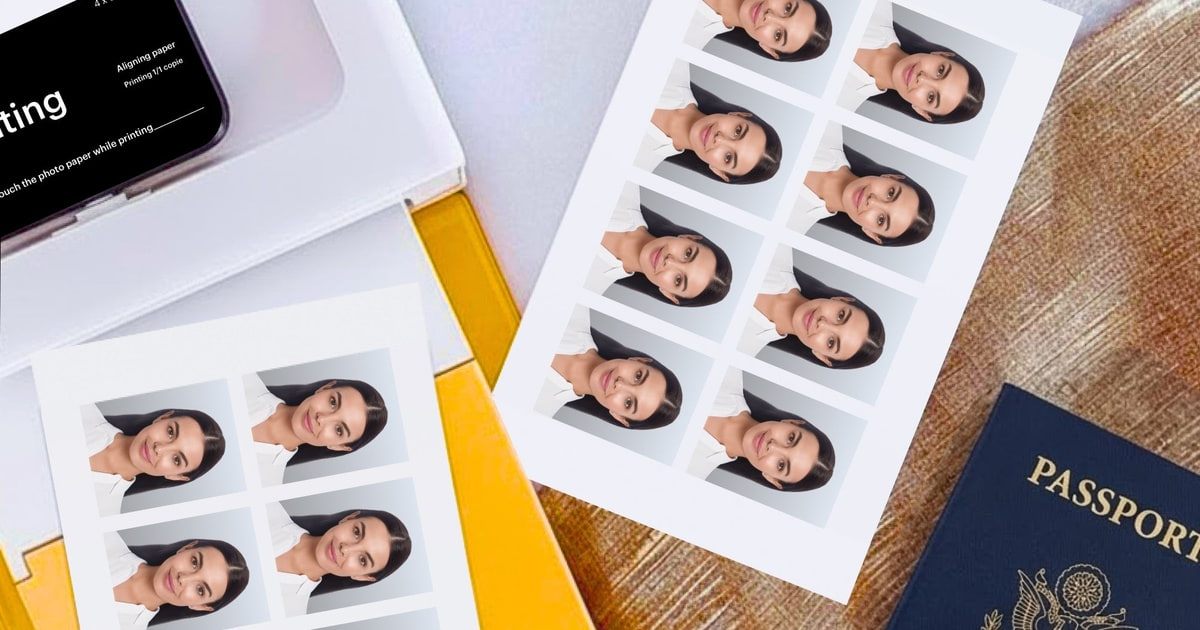
Can these print passport photos?
The 4x6 models can get close. The Canon Selphy's layout app includes a dedicated ID photo mode, and the HP Sprocket app can produce a photo ID layout as well. But passport authorities set strict rules on dimensions, background color and resolution, and those vary by country. Check the official requirements before you submit anything you printed at home.
Are these worth it if I only print occasionally?
Probably not. A drugstore or warehouse-club kiosk gives you comparable 4x6 quality with no hardware to buy and no paper to store. These printers earn their keep when you print often enough that convenience matters, or when the format itself is the point — instant film, stickers, or a print handed over seconds after the photo was taken.
Why you should trust us
For this guide:
- We read manufacturer specifications and published reviews for all seven printers, comparing print technology, stated longevity, connection options and consumable formats.
- We reviewed owner feedback themes across the category and found that complaints cluster on companion apps and Bluetooth pairing rather than hardware failure, which shaped how we weighted app quality.
- We compared what each bundle includes, since included film, paper and cartridges change the real cost of getting started.
- We read owner reviews on every listing, weighted toward the critical ones, because that is where the recurring failures show up.
- We have a systematic way of automatically fetching the latest prices, so the numbers on this page stay current.
- This is a research-focused guide, so the team may not own every product listed — though we often do own the top winners, which gives us extra context for the recommendations.
- We don't accept free products, and the retailer commission never changes which product we recommend.
Sources
Best Portable Photo Printers — Wirecutter (NYT), Wirecutter
The Best Photo Printers for 2026 — PCMag, PCMag
Best Photo Printers 2026 — Tom's Guide, Tom's Guide
Canon SELPHY CP1500 Review — Digital Camera World, Digital Camera World
Fujifilm Instax Mini Link 3 Review — TechRadar, TechRadar
Amazon product listings and owner reviews for all 7 products
Manufacturer specification pages for each product
Some passages in this guide may be paraphrased with AI help. Prices are refreshed automatically.
More like this.
Continue exploring electronics reviews and recommendations.

The Best Gifts for 3D Printing Enthusiasts
A 3D printing hobby eats accessories. The printer itself is only the start - after that comes filament in colors they don't own yet, a way to keep that…

The Best Compact Rowing Machines
Rowing is the rare cardio machine that doesn't punish you for using it. One stroke pulls in your legs, back, core and arms at once, and your knees never…

The Best Wind-Resistant Compact Umbrellas
Most days, a compact umbrella just has to keep rain off your head for a four-block walk. The trouble is that rain rarely shows up alone. Wind is what…

The Best Motorcycle Jackets And Gloves
Gear is the part of riding you notice every day, long before you ever need it. A jacket that's too warm stays on the hook, and gloves that pinch turn a…

The Best Budget Mechanical Keyboards
A mechanical keyboard is one of the few upgrades you feel every single minute you're at a desk. The keys have a defined bottom, a consistent weight, and a…

The Best Universal Travel Adapters
You land at midnight with a phone at 4 percent, a dead laptop, and a hotel room whose only free outlet sits behind the nightstand. That's the moment a…