The Best Height-Adjustable Standing Desks
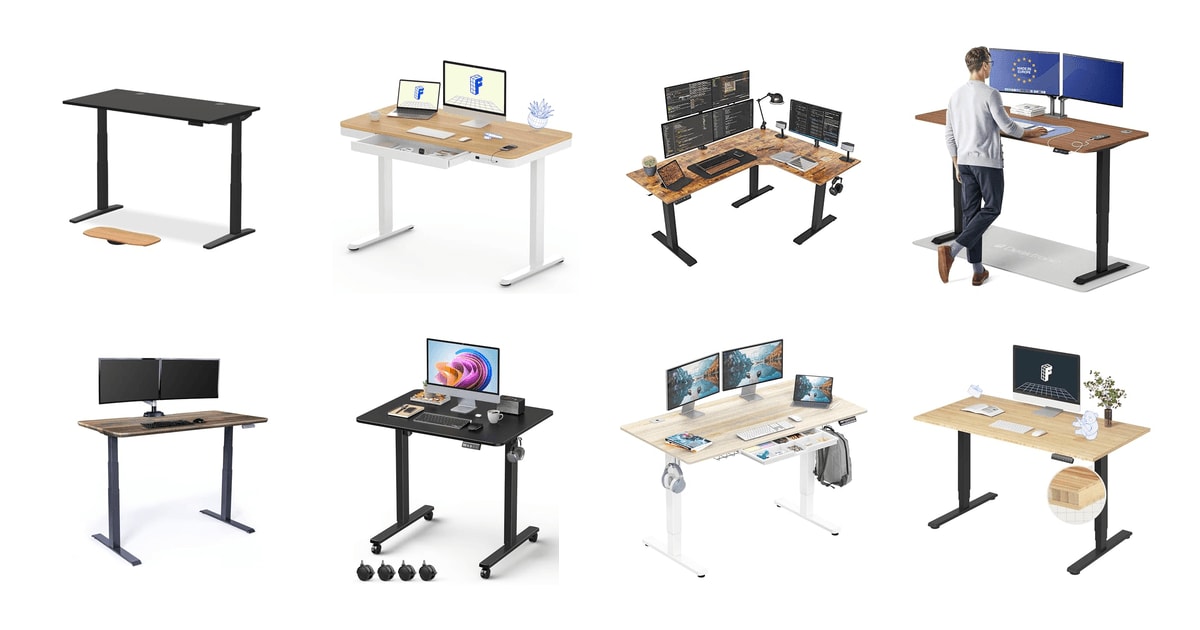
A standing desk earns its keep in the small moments. It's the mid-afternoon slump when your lower back starts complaining and you'd rather not sit through another hour of it. A good one rises in a few seconds, holds your monitors without shimmying, and remembers exactly where you like it. A bad one wobbles when you type, whines loud enough to derail a call, and takes an entire Saturday to assemble. The difference usually comes down to the frame underneath, not the wood on top.
Here's the honest part: no standing desk fixes bad ergonomics on its own. If your chair is wrong, your monitor is too low, or you never actually press the up button, the desk is just expensive furniture. Research published in the British Journal of Sports Medicine found sit-stand desk users cut about 1.2 hours of daily sitting over a year — real, but not dramatic. Mayo Clinic experts suggest switching every 30 to 60 minutes, and people with programmable presets are about twice as likely to stick with it than crank-desk owners.
Every desk here does the basic job. What separates them is stability at full height, how long the warranty runs, and how much of your weekend assembly eats. We think that the UPLIFT DESK V3 is the best height-adjustable standing desk for most home offices, and that the Desktronic HomePro is the one to buy if you want a wide, wobble-free surface for a triple-monitor setup without stepping up to the priciest tier.
Everything we recommend

The steadiest frame here, with the warranty to match

A wider, faster desk with charging ports built in
Nearly no assembly, and a lifetime warranty on top

Corner-office surface area, with three motors holding it level

Electric lift and a drawer, without the premium frame
At a glance
| Product | Height Range | Weight Capacity | Price | |
|---|---|---|---|---|
| UPLIFT DESK V3 2-Leg Black Laminate WoodTop pick | — | 355 lbs | $808 |
 | FLEXISPOT Comhar 48" Electric Standing Desk withAlso in lineup | 28.9"-46.5" | — | $229.99On sale |
| FEZIBO Triple Motor 63" L Shaped StandingUpgrade pick | 27-48 in | 330 lbs | $399.99 |
| Desktronic HomePro Standing Desk 72x30Runner-up | 25.4"-51.2" | 352.7 lbs | $719.99 |
| Vari Classic Electric Standing DeskAlso great | 25"-50.5" | — | $829 |
 | 32" Small Rolling Electric Standing Desk AdjustableAlso consider | 29.9"-48.4" | 176 lbs | $99.99 |
| SHW 55 x 28 Electric Height AdjustableBudget pick | 28"-45" | 110.2 lbs | $189.87 |
 | FlexiSpot E6 Bamboo 3-Stage Dual Motor ElectricAlso consider | 23.6"-48.8" | 220 lbs | $289.96 |
How we picked
Stability at height. We prioritized dual- and triple-motor frames with three-stage legs, since published reviews consistently find these hold steadier at full extension. PCMag's review of a FlexiSpot dual-motor frame reported under 1mm of lateral wobble at 45 inches under a 60-pound load, which is the kind of benchmark we looked for.
Height range. We read spec sheets for both ends of the range, not just the maximum. A minimum below 25 inches matters for anyone under about 5'4", and OSHA's seated guidance puts the comfortable zone around 28 to 30 inches for average users.
Capacity and load. We compared rated weight capacities against realistic setups: two monitors on arms, a dock, a laptop and speakers add up fast. Anything under about 150 pounds we treated as a light-duty desk.
Warranty terms. Coverage length tracks component quality in this category — budget desks commonly carry one to two years while premium frames run 8, 15 or lifetime. We favored longer, clearly stated frame-and-motor coverage.
Setup and noise. We weighed assembly time and stated noise levels from manufacturer specs and owner feedback, since a desk under 50 dB won't intrude on calls and a desk that takes a full afternoon may never get moved again.
Top pick
The steadiest frame here, with the warranty to match
UPLIFT DESK V3 2-Leg Black Laminate Wood
The UPLIFT V3 pairs dual German motors with three-stage legs and a 355-pound capacity, so it stays planted at standing height even loaded with monitors. Four one-touch presets, a gyroscope collision sensor and real cable management round it out.
$808fromAmazonStability is the whole reason to spend more, and this is where the V3 earns it. Three-stage legs mean shorter, thicker column sections at any given height, which is what keeps a desk from swaying when you type hard at full extension. The steel frame is rated for 355 pounds. If you run an ultrawide plus two side monitors on arms, that headroom matters more than any other spec on the page.
Owners who came from cheaper frames tend to mention the same two things. The crossbar sits farther back, so your knees don't hit it. And the wobble they lived with before mostly disappeared. That's consistent with what the three-stage design should do, and it's the kind of feedback that shows up across years of ownership rather than the first week.
The Advanced Keypad stores four heights and moves with a single touch — no holding the button while the desk crawls. That sounds minor. It isn't. Presets are the difference between actually alternating positions and standing once on your first day. The six-axis gyroscope collision sensor stops the desk when it meets an obstacle, and you can dial the sensitivity down if it's too twitchy.
Uplift also thought about the cables, which most brands treat as your problem. The FlexMount cable manager and desktop grommets give you somewhere to route power and monitor cords, so raising the desk doesn't yank a charger out of the wall. The laminate top resists water, stains and scratches, which is about all you can ask of a surface that lives under a coffee mug.
Flaws but not dealbreakers
This is a two-person job for the top, and expect the better part of an afternoon if you assemble carefully. Several owners report roughly an hour and a half, which is normal for a flat-pack frame but a lot if you were hoping to be working in ten minutes.
The laminate top is the weakest part of an otherwise excellent package. It's durable and fine to look at, but the frame is what you're paying for. Shipping damage to the desktop corner also comes up in owner feedback, so unbox and inspect before you start building.
The collision sensor can be sensitive enough to trip on things you didn't consider obstacles. Adjustable sensitivity helps, and if you have kids around, an overeager sensor is the failure mode you want.
Runner-up
A wider, faster desk with charging ports built in
Desktronic HomePro Standing Desk 72x30
The Desktronic HomePro gives you a 72-by-30-inch one-piece top, dual synchronized motors rated to 352.7 pounds, and a 2-inch-per-second lift. USB-A and USB-C ports sit right in the desktop, and assembly takes under half an hour.
$719.99fromAmazonStart with the surface, because that's the reason to pick this one. Seventy-two by thirty inches is genuinely wide — enough for three monitors plus a keyboard, a notebook and the mug you keep forgetting about. It's a single piece, not two panels bolted together, so there's no seam running under your mousepad and no flex where the halves meet.
The lift speed is the fastest here, and you'll feel it. Two inches per second means a full sit-to-stand transition happens in a few seconds rather than a slow grind. Combined with three memory presets on a touchscreen controller, switching positions stops feeling like an interruption. That's the practical mechanism behind actually alternating every hour instead of intending to.
The 25.4-to-51.2-inch range covers a wider span of bodies than most desks here — Desktronic rates it for users from 5'0" to 6'8". If you're short, that low end matters. OSHA's guidance puts a comfortable seated desk height around 28 to 30 inches for average users, and going lower is what lets a smaller person get their elbows right without perching.
Built-in USB-A and USB-C charging is one of those features you dismiss until you have it. No brick hanging off the back, no cable snaking up from a floor strip. An anti-collision sensor reverses the top on contact. Owners describe assembly in the 30-to-45-minute range, which is fast for a desk this size.
Flaws but not dealbreakers
At 130 pounds it's heavy and awkward, and the top needs a second person to flip once it's built. Several owners managed alone, but they mention it as the hard part.
Three presets instead of four is a small step down if you share the desk with a partner or switch between sitting, standing and a walking pad. The printed instructions also draw complaints; the video walkthrough is reportedly clearer.
The warranty is described only as a full manufacturer warranty, without a stated term. If long, specific coverage is what you're after, our top pick is the safer bet.
Also great
Nearly no assembly, and a lifetime warranty on top
Vari Classic Electric Standing Desk
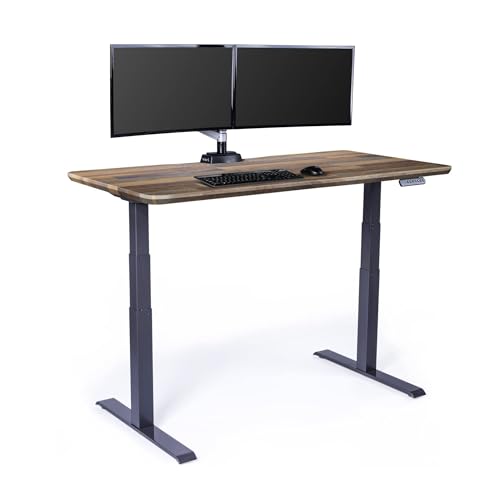
The Vari Classic arrives with the frame pre-installed and legs that slide and lock, so it's usable in roughly ten minutes. A thick one-piece 3D-laminate top, four presets and a 25-to-50.5-inch range make it the low-hassle choice.
$829fromAmazonIf flat-pack furniture makes you dread the delivery, this is your desk. The frame ships assembled and the legs slide and lock into place — no bolt patterns, no hex key marathon. Vari puts setup under ten minutes. Wirecutter has reported a comparable Vari desk going from box to usable in under 15 minutes, against 60 to 90 minutes for typical competitors.
That matters most if you move. Renters and anyone who relocates every year or two pay a hidden tax on flat-pack desks: every move is a partial disassembly. This one breaks down and sets back up in about the time it takes to find your tape measure.
The top is a thick single piece with a 3D laminate finish over heavy steel T-style legs, and owners consistently describe it as corporate-grade rather than home-office-grade. The reclaimed-wood look is the nicest-feeling surface among the laminate desks here. Four programmable heights and an LED panel handle the day-to-day, and the range runs from 25 inches up to 50.5.
Vari backs it with a lifetime warranty, which is a meaningful signal about the components even before you need to use it. Budget desks generally carry one or two years. Uplift's V2 Commercial frame runs 15. Coverage length tends to track real differences in motor and frame quality across this category.
Flaws but not dealbreakers
It's heavy, and the top and legs sometimes ship as separate packages arriving on different days. Owners report shipping mishaps often enough that it's worth confirming both boxes landed before you plan your setup evening.
There's no built-in charging, and cable management is basic compared with our top pick. You'll be adding a tray or a power strip yourself.
It's among the more expensive desks here without matching the top pick's weight capacity headroom or its three-stage lift speed. You're paying for convenience and the warranty.
Vari backs the Classic Electric Standing Desk with a lifetime warranty.
Upgrade pick
Corner-office surface area, with three motors holding it level
FEZIBO Triple Motor 63" L Shaped Standing
The Fezibo L-shaped desk uses three motors to lift a 63-inch corner surface evenly, which is what large frames historically got wrong. A 330-pound capacity, anti-collision sensing and casters make it a practical fit for gaming and multi-monitor setups.
$399.99fromAmazonThree motors is the fix for the problem that used to make big L-shaped desks not worth buying. A corner surface loaded on one wing puts uneven force on the frame, and two-motor systems handle that badly. The third leg shares the load and keeps the top level as it rises. The range runs 27 to 48 inches at 35 millimeters per second, under 50 dB.
Sixty-three inches of corner space changes what you can keep within reach. Two monitors on one wing, a laptop and notes on the other, and you still have room to write. If you game and work at the same desk, this is the layout that stops you from shuffling gear between sessions.
The steel frame holds up to 330 pounds, and there's anti-collision sensing built in. Casters let you roll the whole thing to vacuum, which is more useful than it sounds with a desk this size. Two hooks handle a headset or a bag. Owners who've had it for years describe it as still sturdy and reliable, which is the review that actually counts.
It ships in two packages and takes real time to build alone — plan a few hours. But the payoff is a corner workstation that doesn't sag or twist, at a price well below what dedicated ergonomic brands charge for L-shaped frames.
Flaws but not dealbreakers
Multi-motor systems can drift out of sync over time, and at least one long-term owner reports exactly that: enough flex in the structure that one leg gradually ends up slightly off from the others. A reset usually squares it up, but it's a known quirk of three-motor designs.
The desktop is a splice board — two pieces joined at the corner — with a pressed-wood surface that feels slick rather than premium. It's honest for what it costs, but it isn't bamboo or solid wood.
It's big and heavy, and the single shipping box is genuinely unwieldy. Unpack the desktop panels and the legs separately before you try to move anything.
Budget pick
Electric lift and a drawer, without the premium frame
SHW 55 x 28 Electric Height Adjustable
The SHW 55-by-28 desk gets you a motorized lift, programmable heights, a storage drawer and a cable tray at the lowest entry point here. Capacity is limited and the frame is simpler, but owners report little wobble for the money.
$189.87fromAmazonIf a motorized desk has felt out of reach, this is the practical way in. You get electric adjustment from 28 to 45 inches, programmable height settings, a drawer, a cable management tray, desktop grommets and hooks for a headset. That's a real feature list, not a stripped-down teaser.
The 55-by-28 surface fits dual monitors and a laptop comfortably, and the curved front edge is easier on your wrists than a square one. Adjustable floor levelers help on the uneven floors that older apartments and finished basements are full of. Small things, but they're the difference between a stable desk and a rocking one.
The wobble question is where budget desks usually fall apart, and this one holds up better than its price suggests. Owners repeatedly single out stability as the surprise. Some have run it for years, including one five-year owner. The lift is quiet and smooth, and assembly typically takes an hour or so with clearly labeled parts.
It's the obvious choice for a student, a part-time home worker, or a second desk in a spare room. Pair it with a walking pad — owners do — and you have a functional setup for a fraction of what the premium frames cost.
Flaws but not dealbreakers
Weight capacity tops out around 110 pounds, which is roughly a third of what our top pick handles. Heavy monitor arms, a big display and a laptop dock will eat into that faster than you'd think.
The maximum height of 45 inches is the lowest ceiling in this guide. If you're much over six feet, you may not get a properly upright standing position.
Quality control is inconsistent. Owner feedback includes defective units and slow replacements alongside a large volume of satisfied buyers, so check that everything works before the return window closes.
Who this is for
This guide is for anyone setting up or upgrading a home office who wants to alternate between sitting and standing without fighting their furniture. That includes full-time remote workers, gamers who log long sessions, and people whose backs have started sending complaints after a day at a fixed-height desk. If you're short or tall, pay close attention to the range specs — a desk that bottoms out at 28 inches or tops out at 45 will quietly make your ergonomics worse rather than better.
You should skip a full standing desk if you work from a laptop on the couch a few hours a week, or if your main problem is a bad chair and a monitor at the wrong height. Fix those first; they're cheaper and they matter more. We've limited this guide to electric height-adjustable desks and frames with tops. Manual crank desks, desktop converters that sit on an existing surface, monitor arms, chairs and anti-fatigue mats are all outside its scope.
How we picked
We built this guide from manufacturer spec sheets, published reviews and recurring themes in owner feedback, weighing five things. Stability: dual- or triple-motor frames with three-stage legs, since those hold steadiest at full standing height under a real monitor load. Height range: both ends of the span, because a minimum above 25 inches shuts out shorter users and a maximum under 48 inches shuts out taller ones. Capacity: rated load measured against a realistic setup of monitors, arms, a dock and a laptop. Warranty: length and clarity of frame-and-motor coverage, which reliably tracks component quality here. Setup and noise: how long assembly takes and whether the lift stays quiet enough to run mid-call.
Other height-adjustable standing desks worth considering
If you want a bamboo top over MDF or laminate: The FlexiSpot E6 Bamboo 3-Stage Dual Motor Electric ($289.96) — The FlexiSpot E6 puts a one-piece FSC-certified bamboo surface on a three-stage dual-motor frame, and it's the sustainable choice here that doesn't feel like a compromise on looks. Bamboo is genuinely tough — FSC-certified bamboo runs about 25% harder than maple on the Janka scale, so it shrugs off scratches better than most laminate. The range runs 23.6 to 48.8 inches, which is low enough for shorter users, and the motors stay under 45 dB. FlexiSpot covers the frame and motor for five years and the electronics for two. What you give up is capacity: 220 pounds is well short of the 355 our top pick handles, and the top ships in a separate box with no pre-drilled center holes, so mounting a grommet or monitor arm means drilling it yourself.
If you're working in a genuinely small room: The 32" Small Rolling Electric Standing Desk Adjustable ($99.99) — The Xyndyx 32-inch rolling desk is built for the corner of a bedroom or a studio apartment where a 60-inch top simply won't fit. The 31.5-by-23.6-inch surface holds a laptop and a monitor, casters let you wheel it between rooms, and it rises from 29.9 to 48.4 inches at under 50 dB with two memory presets. Owners with carpet report it rolls fine and stays steady at full height. The trade-offs are real, though: 176 pounds of capacity, only two presets, and a minimum height near 30 inches that's too tall for shorter users to sit at comfortably. Owner feedback also includes missing hardware and cosmetic shipping damage, so inventory the box before you start.
The competition
These are the other desks our research surfaced, not a survey of everything on the market. Each one is a reasonable product that lost to a pick on a specific point — stability, range, capacity or coverage — and a couple of them will still be the right call depending on what your room and your body need.
The FLEXISPOT Comhar 48" Electric Standing Desk with ($229.99) — The FlexiSpot Comhar is an all-in-one 48-inch desk with a pull-out drawer, USB charging, four presets and a child lock, on an FSC-certified one-piece top. It's a tidy package for a small apartment and it assembles quickly. But the range of 28.9 to 46.5 inches is narrow at both ends, and it uses a single motor rather than the dual setups our picks rely on, which shows up as less confidence at full height with a heavy monitor. The drawer also draws the most consistent criticism from owners — it's the part most likely to disappoint. Choose it if the built-in storage and child lock solve a specific problem for you, and if your setup is light.
Setup and daily use
Set your seated height first: sit with your feet flat and your elbows at roughly 90 to 110 degrees, per OSHA's ergonomic guidance, then save that as a preset. Do the same standing, with your wrists straight and your monitor top near eye level. Two presets, saved on day one, are what make the desk part of your routine instead of a fixed-height desk with buttons. Route power through the grommets and leave slack — a cable that's taut at seated height will pull something loose the first time you stand. Aim to switch every 30 to 60 minutes; Mayo Clinic experts recommend alternating rather than standing all day. Wipe laminate and bamboo with a damp cloth, not a soaking one, and check the leg levelers if you notice a rock. If your desk uses three motors and starts lifting unevenly, run the reset routine in the manual before assuming something's broken.
Questions we get
Do I need a single-motor or dual-motor standing desk?
Dual-motor for almost everyone. A second motor drives both legs independently, which keeps the top level and steady at full standing height — the point where single-motor frames start to sway. If you run more than one monitor or an ultrawide, treat dual motors as the minimum. Single-motor desks are fine for a laptop and light use.
What standing desk height is right for my height?
It's less about a number and more about your elbows. OSHA's guidance is a 90-to-110-degree elbow angle, which for average users lands around 28 to 30 inches seated. If you're under about 5'4", look for a desk that goes below 25 inches; if you're over six feet, make sure the maximum clears 48 inches so you're not hunching while standing.
How much wobble is normal for a standing desk?
A little side-to-side movement at full height is normal on any frame. What's not normal is your monitor visibly shaking while you type. PCMag's review of a dual-motor three-stage frame found under 1mm of lateral movement at 45 inches under a 60-pound load, which is a good target. Three-stage legs and a dual-motor frame are what get you there.
Are standing desks actually good for your health?
They help, modestly. A 2025 British Journal of Sports Medicine study found sit-stand desk users cut about 1.2 hours of daily sitting over 12 months. The American Heart Association links prolonged sitting to substantially higher cardiovascular risk. But the desk only works if you use it — Mayo Clinic experts recommend alternating every 30 to 60 minutes, and people with memory presets are about twice as likely to follow through.
What's the best L-shaped standing desk for a corner home office?
The Fezibo triple-motor 63-inch L-shape is the one we'd pick. Corner desks put uneven load on the frame, and a third motor keeps the surface level as it rises — that's what used to make big L-shapes wobbly. You get room for a full multi-monitor setup plus a writing area, though expect a long assembly and a splice-board top rather than solid wood.
What standing desk has the best warranty?
Coverage varies more than almost any other spec. The Vari Classic carries a lifetime warranty, and among premium brands the Uplift V2 Commercial frame and motors are covered for 15 years — the longest of any major standing desk brand. FlexiSpot's E6 runs five years on the frame and motor, two on the electronics. Budget desks commonly stop at one or two years, which is a reasonable proxy for expected component life.
Why you should trust us
For this guide:
- We compared manufacturer spec sheets for every desk here, focusing on motor count, stage count, height range, rated capacity and stated noise levels.
- We read published reviews from Tom's Guide, PCMag, Wirecutter and Good Housekeeping alongside guidance from OSHA and Mayo Clinic on seated and standing ergonomics.
- We looked for recurring themes in owner feedback — assembly difficulty, shipping damage, long-term motor behavior and wobble at full height — rather than isolated complaints.
- We read owner reviews on every listing, weighted toward the critical ones, because that is where the recurring failures show up.
- We have a systematic way of automatically fetching the latest prices, so the numbers on this page stay current.
- This is a research-focused guide, so the team may not own every product listed — though we often do own the top winners, which gives us extra context for the recommendations.
- We don't accept free products, and the retailer commission never changes which product we recommend.
Sources
Best Standing Desks of 2026 — Wirecutter, Wirecutter / NYT
Best Standing Desks Tested by Our Editors — Good Housekeeping, Good Housekeeping
Standing Desk Reviews & Ratings — Consumer Reports, Consumer Reports
The Best Standing Desks for Every Budget — Forbes Home, Forbes Home
Best Standing Desks 2026: Expert-Tested Picks — Tom's Guide, Tom's Guide
Uplift V2 Commercial Desk Review — Rtings.com, RTINGS.com
The Health Case for Standing Desks — Mayo Clinic, Mayo Clinic
Sedentary Behavior and Cardiovascular Risk — American Heart Association, American Heart Association
Prolonged Sitting at Work Study — British Journal of Sports Medicine, British Journal of Sports Medicine
FlexiSpot E7 Pro Review — PCMag, PCMag
Fully Jarvis Standing Desk Long-Term Review — The Verge, The Verge
Ergonomic Workstation Guidelines — OSHA, OSHA
Amazon product listings and owner reviews for all 8 products
Manufacturer specification pages for each product
Some passages in this guide may be paraphrased with AI help. Prices are refreshed automatically.
More like this.
Continue exploring home reviews and recommendations.

The Best Standing Desk Converters
A standing desk converter sits on the desk you already own and lifts your monitor and keyboard to standing height. That's the whole idea, and it's a good…

The Best Electric Standing Desks
A standing desk earns its keep in small moments. You take a call on your feet, you stretch out your lower back between meetings, you drop the surface an…

The Best LED Desk Lamps for Studying and Eye Comfort
If you read or work at a desk for hours, your lamp does more for your eyes than almost anything else on the desk. The problem isn't usually brightness.…

The Best TV Stands and Media Consoles
A TV stand is furniture you stop noticing about a week after you buy it, which is exactly the problem. You notice it again when the cable box runs hot…

The Best Cookbook Stands
A cookbook stand does one job: it holds your book open, at an angle you can read, somewhere the sauce can't reach it. That sounds trivial until you're…

The Best Adjustable Weight Benches
A bench is the piece of gear that turns a pile of dumbbells into an actual gym. Flat, incline, decline - change the angle and you change which part of…