The Best Smart Light Bulbs

A smart bulb earns its keep in the small moments. You're carrying groceries and the kitchen lights come on by themselves. You're already in bed when you remember the hallway light, and you fix it without getting up. The good ones dim smoothly down to a candle glow, shift from cool morning white to a warm amber at night, and never make you wait while an app connects. The bad ones drop off your network, flicker at low brightness, and turn a simple light switch into a chore.
Here's the honest part. No smart bulb solves the wall switch problem. Flip the switch off and the bulb is just a bulb, cut off from your phone and your voice assistant until someone flips it back. Color accuracy is another soft spot. Deep reds and true greens still look washed out on most bulbs compared to what you see in the marketing photos. And every one of these bulbs depends on something else working, whether that's your router, a hub, or a Thread border router tucked inside a speaker.
We looked at brightness, color range, how each bulb connects, and how well the ecosystem holds up when you add a dozen more bulbs. Hub-based systems still win on reliability at scale. Wi-Fi bulbs win on simplicity. Matter has made the choice less permanent than it used to be, which is good news if you're just starting out. We think that the Philips Hue White and Color Ambiance A19 is the best smart light bulb for most people, and that the LIFX Color A19 is the one to buy if you don't want a hub sitting on your shelf.
Everything we recommend

The most reliable system, if you'll add a bridge
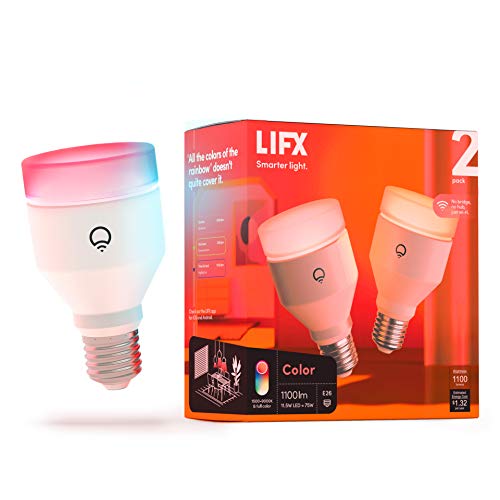
Brighter and more saturated, with no hub to buy

Most of the smarts for a fraction of the cost

Thread networking without a proprietary hub
Prices as of Oct 24, 6:27 AM PT · Details
At a glance
| Product | Brightness | Connection | Price | |
|---|---|---|---|---|
| Philips Hue Smart White and Color AmbianceTop pick | 60W equivalent | — | $66.96 |
| LIFX Smart Light Bulbs A19Runner-up | 1100 lumens | — | $39.98 |
| WYZE BULB COLOR RGBBudget pick | — | — | $63.94 |
 | Govee Smart Light BulbsAlso consider | 800 lumens | 2.4GHz Wi-Fi | $39.99 |
| Nanoleaf Essentials Smart Light BulbsAlso great | 60W equivalent | — | $26.99 |
 | Sengled Dual Mode Smart Light Bulbs withAlso in lineup | 60W | — | $29.99 |
 | Eve Light SwitchAlso in lineup | — | — | $95.35 |
Prices as of Oct 24, 6:27 AM PT · Details
How we picked
Brightness and white range. We compared published lumen measurements and manufacturer specs, looking for at least 800 lumens and a color temperature range wide enough to cover warm evening light through cool daylight. Bulbs that only did one white temperature didn't make the cut.
Connection reliability. We weighed published evaluations of Zigbee, Thread, and Wi-Fi performance, with particular attention to how each held up as bulb counts climbed. Owner feedback about dropped connections and re-pairing carried real weight here.
Ecosystem and Matter. We favored bulbs that work with Alexa, Google Assistant, and Apple Home rather than locking you into one. Matter support mattered because it keeps your options open if you switch phones or platforms later.
App depth. We read reviews of scheduling, scenes, geofencing, and routine-building in each company's app. A bulb with good hardware and a shallow app ends up being a remote-controlled lamp.
Cost to expand. We considered what it costs to go from two bulbs to twenty, including any required hub. A bulb that's affordable alone can get expensive fast across a house.
Top pick
The most reliable system, if you'll add a bridge
Philips Hue Smart White and Color Ambiance
Hue bulbs screw in and work with Bluetooth right away, but the Hue Bridge is where the system gets good. Add it and you get remote access, deep automations, and a Zigbee mesh that stays connected when you scale past a handful of bulbs.
$66.96fromAmazonPrices as of Oct 24, 6:27 AM PT · Details
Hue's mesh is the reason to buy in. Wirecutter's evaluation found Hue's Zigbee network held reliable connectivity across installations of more than 40 bulbs, which pure Wi-Fi setups struggled to match. Each bulb repeats the signal to its neighbors, so the far corner of the basement isn't relying on your router. If you're lighting one room, this doesn't matter much. If you're lighting a house, it's the whole ballgame.
The app is the other half. PCMag rated Hue's app as offering the deepest routine and geofencing customization of any bulb ecosystem it evaluated. You can set lights to fade up over 30 minutes before your alarm, trigger a scene when your phone crosses a geofence, or build a wind-down routine that shifts everything amber after 9 p.m. Plenty of apps claim this. Hue's actually holds up when you stack rules on top of each other.
RTINGS measured these bulbs at roughly 800 lumens across a 2700K to 6500K range. That's a standard 60-watt replacement, bright enough for a bedroom or living room lamp but not the brightest bulb here. The white tuning is the part you'll use daily. Crisp daylight for reading, warm amber for evening, and the transitions are smooth rather than steppy.
The accessory lineup is what locks people in. Dimmer switches, motion sensors, light strips, outdoor fixtures, smart buttons that stick to the wall. If you want a physical switch so guests aren't stranded, Hue sells one that works. Nobody else has this much surrounding hardware, and it's the difference between a few smart bulbs and a house that actually behaves the way you want.
These are Matter compatible, so you're not permanently married to the Hue app. You can bring them into Apple Home, Google Home, or Alexa and control them alongside gear from other brands. That flexibility used to cost you something. It doesn't anymore.
Flaws but not dealbreakers
Hue is the most expensive way to light a room on this list, and it gets worse as you add bulbs. Two of these cost about what four Wyze bulbs cost, and that gap compounds across a whole house. If you're lighting three lamps and calling it done, cheaper bulbs will make you just as happy.
The bridge isn't included. You can run these over Bluetooth without it, but Bluetooth caps you at about ten bulbs, kills remote access, and gives up the mesh reliability that's the main reason to choose Hue. Budget for the bridge or buy something else.
Color saturation is good, not extraordinary. Deep reds and rich blues look more pastel than what LIFX produces, which matters if you're chasing dramatic movie-night lighting rather than everyday room light.
Runner-up
Brighter and more saturated, with no hub to buy
LIFX Smart Light Bulbs A19
LIFX bulbs connect straight to your Wi-Fi and skip the hub entirely. They're rated at 1100 lumens with 82-plus CRI, which makes them the brightest and most vivid option here, and they support Matter so they'll join whichever ecosystem you use.
$39.98fromAmazonPrices as of Oct 24, 6:27 AM PT · Details
Brightness is the headline. Tom's Guide measured LIFX Color bulbs at over 1,100 lumens, noticeably higher than most competing color bulbs. In a room with one lamp doing all the work, that difference is obvious. You get a bulb that can genuinely light a space rather than just accent it, and you can always dim it down.
Color is where LIFX pulls ahead. The listing rates these at 82-plus CRI with what LIFX calls SuperColor, and reviewers consistently describe the saturation as deeper than Hue's. Reds look red instead of pink. If you're building a home theater setup or you want lighting that reads as a color rather than a tint, this is the bulb.
No hub means setup is a phone, an app, and your Wi-Fi password. That's it. For renters and anyone who doesn't want another box plugged into the router, this removes the single biggest barrier to getting started. Matter support means you can then hand these off to Apple Home, Google Home, or Alexa without maintaining a separate account.
The app leans into effects. Music Sync and Visualizer make the bulbs pulse along with whatever's playing, and there are curated themes like Golden Hour and Movie Night with slow animation built in. Some of this is party-trick material. But the scheduling and circadian tuning underneath it are genuinely useful day to day.
Flaws but not dealbreakers
Wi-Fi bulbs each take a slot on your network, and LIFX bulbs are known for being chattier than most. If you're planning fifteen or twenty of these, a consumer router can start to wheeze. This is the tradeoff you accept for skipping the hub, and it's why Hue is our top pick for large homes.
Owner feedback points to occasional firmware updates that temporarily break connections or reset settings. It usually sorts itself out. But it's a more fiddly ownership experience than Hue's, and if you want lights that you never think about, that's worth weighing.
There's no accessory ecosystem to speak of. No matching dimmer switch, no motion sensors, no light strips designed to sync. What you buy is what you get.
Budget pick
Most of the smarts for a fraction of the cost
WYZE BULB COLOR RGB
The Wyze Bulb Color comes in a four-pack, does 16 million colors plus tunable white, and works with Alexa and Google Assistant. It costs roughly a third of what a comparable Hue bulb runs, per TechHive, and the app handles routines and scenes better than the price suggests.
$63.94fromAmazonPrices as of Oct 24, 6:27 AM PT · Details
Budget bulbs finally caught up. Wyze bulbs now hit brightness and color quality that premium bulbs were charging a premium for three or four years ago. TechHive puts Wyze at about one-third the per-bulb cost of comparable Hue color bulbs. For a guest room, a closet, a garage, or a first-time setup, that math is hard to argue with.
You get real scheduling and scene control, not a stripped-down remote. The Wyze app handles routines, sunrise and sunset triggers, and groups, and it works with Alexa and Google Assistant for voice control. If your smart home ambitions are turning lights on at dusk and off at bedtime, this covers it completely.
Buying in a four-pack changes how you think about smart lighting. Instead of picking one lamp to make smart, you can do a whole room at once. That's when the automations start feeling worthwhile, because half-smart rooms are more annoying than dumb ones.
These are Wi-Fi bulbs with no hub, so setup is quick and there's nothing extra to buy. The catch, as with all Wi-Fi bulbs, is that scale eventually becomes a router problem rather than a bulb problem.
Flaws but not dealbreakers
Color accuracy is the compromise. Whites drift slightly green or blue at some settings, and saturated colors look flatter than what LIFX or Hue produce. In a bedroom at 20 percent brightness, you won't notice. In a room you're trying to make look good, you might.
There's no Matter support here, so you're tied to Wyze's app and its Alexa and Google integrations. Apple Home users should look elsewhere. Wyze has also had service outages that took app control offline temporarily, which is the risk you accept with a cloud-dependent budget ecosystem.
Low-end dimming isn't as clean as the pricier bulbs. Below about 10 percent, some owners report visible stepping rather than a smooth fade.
Also great
Thread networking without a proprietary hub
Nanoleaf Essentials Smart Light Bulbs
Nanoleaf Essentials bulbs run on Thread and Matter, which means they mesh with each other and join Apple Home, Google Home, or Alexa directly. CNET found Thread bulbs dropped connections less often than 2.4GHz Wi-Fi bulbs on congested home networks.
$26.99fromAmazonPrices as of Oct 24, 6:27 AM PT · Details
Thread splits the difference between hub and no hub. You don't buy a proprietary bridge, but you do get a mesh network where bulbs relay for each other instead of all shouting at your router. CNET's evaluation found this reduced dropped-connection incidents compared with Wi-Fi-only bulbs in congested homes. If your network is already crowded with phones, TVs, and cameras, that's meaningful.
The catch is you need a Thread border router. That's usually something you already own, like a recent HomePod, Apple TV, Echo, or Nest Hub. Check before you buy. Without one, these fall back to Bluetooth and you lose most of what makes them appealing.
Matter support here is the real thing, not a checkbox. The Verge notes that Matter lets a single bulb be controlled simultaneously by Apple Home, Google Home, and Alexa without separate accounts. For a household where one person uses an iPhone and another uses Android, that solves an actual argument.
These are rated 9W for 60W-equivalent output with circadian lighting built in, so they'll shift warmer through the evening and pull blue light out before bed. You can run all of it from the Nanoleaf app or hand it entirely to Apple Home and never open Nanoleaf's app again.
Flaws but not dealbreakers
Owner feedback is more mixed than for Hue or LIFX, with recurring reports of setup trouble and bulbs that need to be re-paired. Some of that traces back to Thread border router confusion rather than the bulbs themselves. But it makes for a rockier first hour than a plain Wi-Fi bulb.
The Nanoleaf app is thinner than Hue's. Scenes and schedules are there, but the routine-building depth isn't, so you'll likely lean on Apple Home or Google Home for anything complicated.
Color output is decent rather than vivid. If saturation is your priority, LIFX is the better buy.
Who this is for
Buy smart bulbs if you have lamps and fixtures where a smart switch isn't practical, or if color and tunable white are the point. Renters get the most out of them because nothing gets wired and everything comes with you. If you mostly want overhead lights on a schedule and you're comfortable behind a wall plate, a smart switch is cheaper and more reliable than filling a five-bulb fixture with smart bulbs.
This guide covers screw-in A19 and A21 color bulbs in the standard E26 base, the kind that go in table lamps, bedroom fixtures, and most ceiling cans. We're not covering light strips, panels, outdoor fixtures, floodlights, or specialty bases like candelabra and BR30. We also skip white-only bulbs, which are cheaper but give up the color temperature tuning that makes smart lighting worth the trouble.
How we picked
We started from published measurements and manufacturer specs, then weighed owner feedback themes for each bulb. Brightness: at least 800 lumens, with a white range spanning warm 2700K to cool 6500K. Reliability: how the bulb's network holds up as you add more, drawing on published evaluations of Zigbee mesh, Thread, and direct Wi-Fi. Ecosystem: works with Alexa, Google Assistant, and ideally Apple Home, with Matter support to keep your options open. App depth: scenes, schedules, geofencing, and routines that survive being stacked together. Cost to expand: what twenty bulbs actually costs, hub included.
Other smart light bulbs worth considering
If you want color effects on a budget: The Govee Smart Light Bulbs — Govee's A19 color bulb runs 800 lumens with 16 million colors and 54 preset scenes, and it costs a fraction of what the premium bulbs do. The draw is effects. Music Sync uses your phone's microphone to make the lights react to whatever's playing, and Govee's segmented RGBIC bulbs can do gradient and chase patterns that single-zone bulbs like Hue and LIFX simply can't, per Tom's Guide. For a game room, a party, or a kid's bedroom, that's genuinely fun. What you give up is precision. Color accuracy and even room lighting are better on our picks, there's no Matter support, and the listing warns these can't be used with smart switches. Treat them as accent lighting rather than the bulbs you read by.
The competition
These are the other bulbs our research turned up, not a complete map of the market. Smart lighting moves fast and new models land constantly. Each of these lost to a pick for a specific reason, but a couple of them make sense for particular households.
The Sengled Dual Mode Smart Light Bulbs with — Sengled's Dual Mode bulb is an unusual case. It runs on a local mesh with no Wi-Fi and no cloud account, controlled by an app or a physical remote that can address up to 150 bulbs across three groups, and it does 2700K to 6500K dimmable color. The privacy story is appealing and the remote is genuinely useful for family members who won't touch an app. But this particular version explicitly doesn't support Alexa or Google Assistant, the remote isn't even included in the box, and owner sentiment is noticeably weaker than for our picks. If you want voice control, look at the picks. If you specifically want offline, remote-driven lighting for a grandparent's house, it's worth a look.
The Eve Light Switch — The Eve Light Switch is a Matter-over-Thread wall switch, not a bulb, and it solves the problem bulbs can't. It replaces your existing switch, works with single-pole and 3-way setups, and controls whatever dumb bulbs are already in the fixture. TechHive has highlighted Eve's local Thread control and lack of a mandatory cloud account for privacy-focused buyers. It's the better answer for a five-bulb dining room fixture. The catches are real, though: you need a neutral wire, a Thread border router, and enough comfort with wiring to do the install. It also gives up color and tunable white entirely, and early owner feedback skews rough. We're keeping it here rather than in the picks because it's a different tool for a related job.
Living with smart bulbs
The first rule is to leave the wall switch on. A smart bulb with no power is a dead bulb, so put a note on the switch or swap in a switch guard until the household adapts. Group your bulbs by room in the app before you build any routines, because renaming twelve bulbs later is miserable. Firmware updates come through the app and are worth installing, even though they occasionally reset a scene or two. If a bulb starts dropping off, power-cycle it at the switch first, then re-pair it. Most A19 smart bulbs carry a rated lifespan of roughly 15,000 to 25,000 hours, which works out to something like 13 to 23 years at three hours a day, so plan for the electronics to fail before the LED does.
Questions we get
Do I need a hub for smart light bulbs?
Usually not anymore. Wi-Fi bulbs like LIFX, Wyze, and Govee connect straight to your router with nothing extra to buy. Thread bulbs like Nanoleaf Essentials need a Thread border router, which is often already built into a device you own, such as a HomePod, Apple TV, or Echo. Hue is the main exception where a bridge genuinely improves things, especially past ten bulbs.
What's the difference between Matter, Thread, and Zigbee?
Thread and Zigbee are both low-power mesh networks where bulbs relay signals to each other instead of each talking to your router. Matter is a compatibility standard layered on top, and it's what lets one bulb answer to Apple Home, Google Home, and Alexa at the same time without separate accounts, per The Verge. In practice, Thread plus Matter is the combination that keeps your options open.
Can smart bulbs be used with regular light switches?
Yes, but the switch has to stay on. Cut power at the wall and the bulb loses its network connection until someone turns it back on. That's why smart switches are often the better answer for ceiling fixtures, and why most people put a piece of tape or a switch guard over the switch in rooms where guests might flip it.
How much do smart bulbs add to my electric bill?
Almost nothing. CNET puts a typical smart LED bulb used three hours a day at roughly 2.5 to 3 kWh per month, which is a rounding error on most bills at average U.S. rates. The standby draw when the bulb is off is small but not zero, since the radio stays awake. Ten bulbs is still less than a single old incandescent running all evening.
Do smart bulbs work if my Wi-Fi goes down?
It depends on how they connect. Wi-Fi bulbs lose app and voice control entirely, though the wall switch still works. Zigbee and Thread bulbs keep talking to their hub or border router locally, so scenes and schedules often keep running even with the internet out. Sengled's Dual Mode bulbs go furthest here, running on a local mesh with no network required at all.
Are RGBIC bulbs worth it over standard color bulbs?
Only for effects. RGBIC bulbs split the bulb into separately addressable zones, which lets them do gradients and chase patterns that single-zone bulbs can't, per Tom's Guide. That's great for a game room or a party. For reading light, even room illumination, or accurate whites, a single-zone bulb like Hue or LIFX is the better choice.
Why you should trust us
For this guide:
- We read published lab measurements and reviews from RTINGS, Tom's Guide, PCMag, CNET, TechHive, The Verge, and Wirecutter covering brightness, color rendering, and network reliability.
- We compared manufacturer spec sheets and Amazon listing details for every bulb here, including lumen output, color temperature range, and connectivity method.
- We reviewed owner feedback themes across each product to identify recurring complaints about setup, dropped connections, and dimming behavior.
- We read owner reviews on every listing, weighted toward the critical ones, because that is where the recurring failures show up.
- We have a systematic way of automatically fetching the latest prices, so the numbers on this page stay current.
- This is a research-focused guide, so the team may not own every product listed — though we often do own the top winners, which gives us extra context for the recommendations.
- We don't accept free products, and the retailer commission never changes which product we recommend.
Sources
Best Smart Light Bulbs - Wirecutter, Wirecutter
Philips Hue Review - RTINGS.com, RTINGS.com
Best Smart Bulbs for 2026 - CNET, CNET
Matter Smart Home Standard Explained - The Verge, The Verge
Best Smart Bulbs, Tested - PCMag, PCMag
LIFX Color A21 Review - Tom's Guide, Tom's Guide
Wyze Bulb Color Review - TechHive, TechHive
Govee RGBIC Smart Bulbs Tested - Tom's Guide, Tom's Guide
Nanoleaf Essentials Matter Bulb Review - The Verge, The Verge
TP-Link Tapo Smart Bulbs Review - PCMag, PCMag
Thread and Matter: What They Mean for Smart Lighting - CNET, CNET
Eve Systems Matter Lighting Review - TechHive, TechHive
Amazon product listings and owner reviews for all 7 products
Manufacturer specification pages for each product
Some passages in this guide may be paraphrased with AI help.
Product prices and availability are accurate as of the date/time indicated and are subject to change. Any price and availability information displayed on Amazon.com at the time of purchase will apply to the purchase of this product.
More like this.
Continue exploring electronics reviews and recommendations.

The Best Outdoor Smart Plugs for Christmas Lights
Stringing lights is the fun part. Remembering to unplug them at 11 p.m. in the freezing cold, night after night, is not. An outdoor smart plug fixes that:…

The Best Smart RGB LED Strip Lights for Bedrooms
Bedroom light gets used in a specific way. You want a soft glow behind the headboard at night, something bright enough to find a charging cable, and a…

The Best LED Headlight Bulbs
Factory halogen bulbs go dim so gradually that you stop noticing. Then one night you're on an unlit two-lane road, and a deer steps out at the edge of…

The Best Boat Navigation Lights
Navigation lights are the simplest safety gear on your boat and the easiest to ignore until it's dark. They tell every other skipper out there which way…

The Best Ring Lights for Content Creators
A ring light does one job: it puts even light straight onto your face so your camera isn't guessing. That matters most in the rooms creators actually work…

The Best Rechargeable LED Work Lights
Most of the time you need a work light, both of your hands are already busy. You're under a hood chasing a dropped bolt, or up in an attic splicing wire,…