The Best Wireless Presentation Clickers
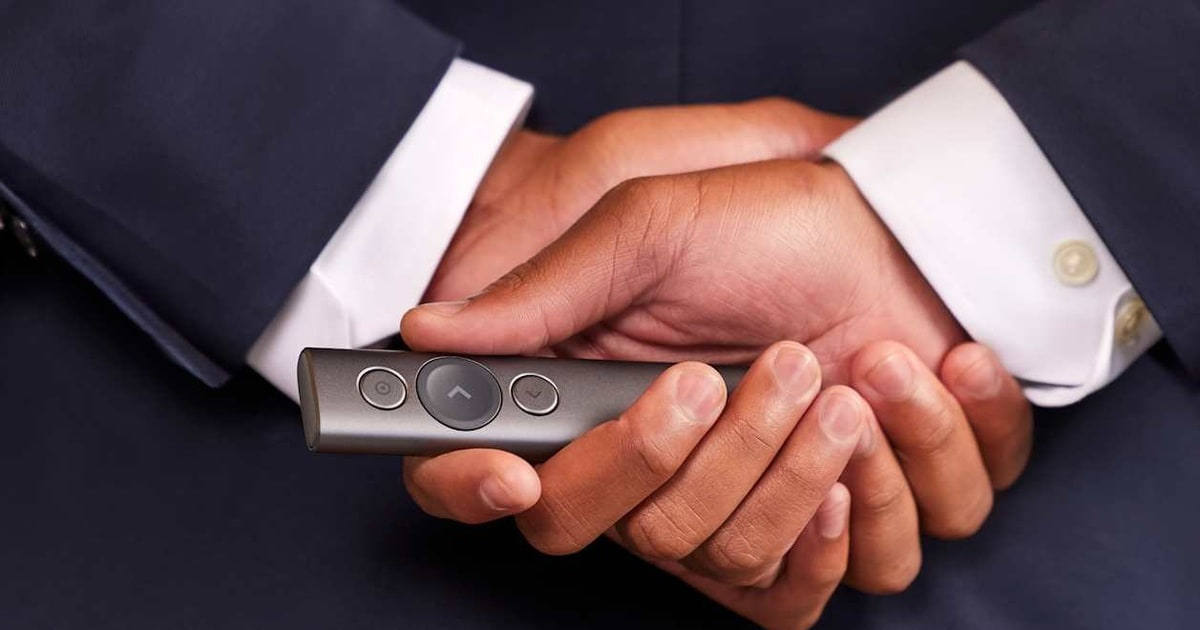
A clicker sounds like a small thing until you've given a talk without one. You end up tethered to the laptop, tapping the space bar, half-turned away from the room. A good remote gets you out in front of people, lets you point at the thing you're actually talking about, and keeps your hands free. The buttons should be findable by thumb alone, in a dark room, while you're mid-sentence. That's most of the job. The rest is not dying on you halfway through.
No clicker fixes a bad deck, and none of them are as reliable as the marketing suggests. Range numbers assume a clear line of sight, which a packed conference room never gives you. Red laser dots wash out under bright lights, and every physical laser is completely invisible to people watching your screen share from home. Most models skip a timer, so you'll still be glancing at a phone. Buttons are small, unlabeled and easy to mix up until you've used them a few times.
We read published reviews, manufacturer specs and owner feedback across the models here, then sorted them by who's actually presenting and where. If you speak to a live room and a remote audience at once, the priorities change completely. If you present twice a year to a dozen people, almost anything works. We think that the Logitech Spotlight is the best wireless presentation clicker for most people, and that the Logitech R500s (Renewed) is the one to buy if you mostly need dependable slide advance on whatever laptop you're handed.
Everything we recommend

Digital highlighting that works in the room and on a screen share

Bluetooth or USB, whichever laptop you're handed
Bare-bones and instant, minus the blank-screen button
At a glance
| Product | Range | Connectivity | Price | |
|---|---|---|---|---|
| Logitech Spotlight Presentation Remote - Universal WirelessTop pick | 30 m | Bluetooth | $99.99On sale |
 | Logitech Professional Presenter R800 with Green LaserAlso consider | 100 ft | Wireless | $39.99 |
 | Kensington Expert Wireless Presenter with Red LaserAlso in lineup | — | Wireless | $52.99 |
| Logitech R500s Laser Presentation Remote Clicker withRunner-up | — | Bluetooth or USB | $29.99 |
| Wireless Presentation Clicker for PowerPoint PresentationsBudget pick | 100 ft | USB Dongle | $14.99 |
How we picked
Control layout. We looked for a dedicated blank-screen button and buttons you can find by thumb without looking down. Anything that forces you back to the keyboard mid-talk lost ground.
Pointer visibility. We compared laser specs and published reviews on how red and green dots hold up under room lighting, and weighed digital highlighting for screens where a laser does nothing at all.
Connection and ports. We checked whether each model uses a USB-A receiver, Bluetooth or both, since most current laptops have no USB-A port. Dual-mode remotes scored highest for people who present on more than one machine.
Range that matches the room. We treated roughly 20 meters as enough for a conference room or classroom and 30 meters as the bar for an auditorium, using manufacturer ratings and reviewer accounts of real-world dropouts.
Power and upkeep. We favored replaceable batteries for infrequent presenters and fast USB-C charging for daily ones, and read owner feedback for complaints about remotes dying without warning.
Top pickOn sale
Digital highlighting that works in the room and on a screen share
Logitech Spotlight Presentation Remote - Universal Wireless
The Spotlight skips the laser dot and draws a magnified highlight into your slides instead. That means everyone sees it — the people in the room, and the people watching your screen share from a laptop three time zones away.
$99.99fromAmazonList priceThe on-screen highlight solves the problem a laser dot can't. A laser needs a surface to land on, which is fine for a projector screen and useless on an LCD panel or a rear-projection setup. The Spotlight renders the highlight into the slide content itself, so it scales with the display and stays readable whether the room is dim or fully lit. You're not fighting ambient light anymore.
If you present to remote attendees, this is the only pick that works. People on the other end of a Zoom or Teams call see your slides, not your conference room wall. Point a physical laser and they see nothing at all. The Spotlight's highlight travels with the screen share, so an in-person audience and a remote one follow the same emphasis at the same time. Hybrid meetings are where this earns its keep.
Cursor control means you stop walking back to the laptop. The on-screen cursor moves like a mouse, so you can pause an embedded video, click a link or scroll a PDF from where you're standing. That's the fidgety part of most talks — the awkward trip back to the keyboard to start a clip. Logitech says it works across PowerPoint, Keynote, Google Slides, PDF and Prezi.
The vibration timer is quietly the best feature. You set milestones in the Logi Options+ app and the remote buzzes in your hand when you're close to your limit. Nobody sees it. You don't have to look at a phone or squint at a clock at the back of the room. Running long is the most common way a good talk goes bad, and this is a genuinely elegant fix.
Charging won't sneak up on you. Logitech rates a one-minute top-up for about three hours of use over USB-C, which is roughly the time it takes to walk from the parking garage to the stage. It connects over Bluetooth or the bundled USB-A receiver, and the receiver docks inside the remote so it doesn't vanish into a bag.
Flaws but not dealbreakers
It's a lot of money for features plenty of people will never touch. If you present once a quarter to fifteen coworkers around a table, you're paying for highlighting, cursor control and timer alerts that a much simpler remote makes unnecessary. The R500s does the core job for a fraction of the outlay.
The best parts need an app, and some work laptops won't allow it. Timer milestones and highlight customization live in Logi Options+. On a locked-down corporate machine where you can't install software, you're left with basic slide advance and a very expensive remote. Check your IT policy before you commit.
Direct sunlight is the one place a green laser still wins. An on-screen overlay depends on the display's own contrast, so a midday talk in a glass-walled room or an outdoor event can wash the highlight out. A bright physical laser doesn't care about your windows.
Runner-up
Bluetooth or USB, whichever laptop you're handed
Logitech R500s Laser Presentation Remote Clicker with
The R500s connects over Bluetooth or a USB receiver, so it works on a portless MacBook and on the ancient conference room desktop. It has the blank-screen button, a sensible thumb layout and Logitech build quality, sold here as a Renewed unit.
$29.99fromAmazonDual connectivity is the reason to pick this one. Bluetooth covers modern laptops that dropped USB-A years ago. The nano receiver covers everything else, including the shared machine in the training room that nobody has updated since forever. If you travel between a personal MacBook and an office workstation, you carry one remote instead of one remote and an adapter you'll eventually lose.
It has the blank-screen button, and that matters more than range. One press blanks the slide to black so the room looks at you instead of the wall. You'll use it during Q&A, after a video clip, and any time you want to talk without the next slide hovering. Skipping it means reaching for the laptop's B key mid-sentence, which always looks worse than it sounds.
The thumb layout is easy to run without looking. Forward, back, blank screen and laser sit where your thumb naturally falls, so you can drive it one-handed while holding notes or a water glass in the other. It works natively with PowerPoint, Keynote and Google Slides, no configuration and no driver hunting.
A single AAA battery is the low-maintenance choice. If you present a few times a month, you'll never think about it. There's no cable to remember and no scenario where you arrive at a venue with a dead remote because you forgot to plug it in overnight. Swapping a battery in the green room takes ten seconds.
Flaws but not dealbreakers
It's sold Renewed, so expect it to look used. Certified Renewed units are tested to work like new, but cosmetic scuffs and plain packaging are part of the deal. If you want something pristine out of the box, or you're buying it as a gift, this isn't the listing for that.
The range is fine for rooms, not for halls. Logitech rates it around 20 meters, which covers a conference room or a classroom comfortably. Stand at the back of a large auditorium and you're at the edge of what it's built for. The R800 or the Spotlight are the safer bets in a big venue.
There's no timer and no display. The red laser is also just a red laser — perfectly visible in a normal room, harder to follow in a bright hall from fifty feet back.
Budget pick
Bare-bones and instant, minus the blank-screen button
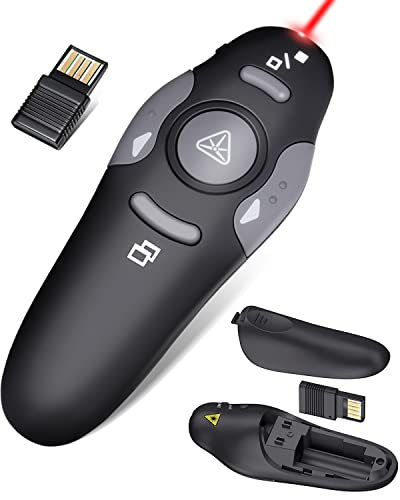
Wireless Presentation Clicker for PowerPoint Presentations
The CLIKBUTM does slide advance and a red laser, and that's about it. But it works on any machine you plug it into without installing anything, which makes it a great pick for students, borrowed classroom computers and a spare in your bag.
$14.99fromAmazonNothing about the setup can go wrong. Plug the dongle into a USB-A port, press the connect button on the back, and the computer sees a keyboard. No drivers, no account, no app. When you're presenting on a shared lab machine or a client's laptop where you can't install software, that's not a nice-to-have — it's the whole reason to own this one.
It works with basically everything. The listing covers Windows going back many versions, plus macOS and Linux, and it drives PowerPoint, Keynote, Google Slides, PDF viewers, Word and Excel. Slide advance sends the arrow keys, which every presentation app understands. There's nothing clever here to break.
It's small enough to forget you packed it. At 109mm and 38g, it disappears into a laptop sleeve, and the dongle stores inside the battery compartment so it doesn't rattle loose. It runs on one AAA battery. Even if you own a nicer remote, this is a reasonable backup to leave in the bag permanently.
Flaws but not dealbreakers
No blank-screen button, and you'll feel it. This is the one omission that separates budget clickers from professional ones. Without it, pausing for questions means either leaving your slide up or walking back to hit B on the keyboard. For a student talk that's fine. For regular business presenting, it's the reason to step up to the R500s.
The hardware feels like what it is. Button action and materials are basic, and reviewers consistently place its build a tier below the Logitech models. It's USB-A only with a red laser, so a portless laptop needs an adapter and a large bright room will swallow the dot.
Who this is for
Buy one if you speak in front of groups more than a couple of times a year and you're still tapping the space bar on your laptop. Teachers, sales reps, conference speakers and anyone running a weekly all-hands get the most out of it. If you present to remote or hybrid audiences, pay close attention to the pointer question — a laser dot means nothing to someone watching your screen share, and that alone can justify the Spotlight.
Skip it if your presenting is a monitor at your desk with two colleagues leaning in. You don't need range or a laser for that. This guide covers handheld remotes for slide control and pointing, and it doesn't cover presentation software, capture cards, laser pointers sold as standalone tools, or clickers built into conference room systems. Every model here works with PowerPoint, Keynote and Google Slides.
How we picked
Controls: a dedicated blank-screen button and a layout your thumb can work in the dark, because reaching for the keyboard mid-sentence undoes the point of a remote. Pointer: we weighed laser wavelength and brightness against digital on-screen highlighting, which is the only option that reaches a remote audience or an LCD panel. Connectivity: USB-A receivers still work everywhere, Bluetooth saves you an adapter on a portless laptop, and dual-mode covers both. Range: about 20 meters for a room, 30 meters before we'd trust it in an auditorium. Power: replaceable AAA batteries for people who present rarely, fast USB-C charging for people who present constantly.
Other wireless presentation clickers worth considering
If you want a green laser for a big auditorium: The Logitech Professional Presenter R800 with Green Laser ($39.99) — The Logitech R800 is the traditional pick for lecture halls, and its green laser is the reason. Green light reads far brighter to the eye than red at the same output, so the dot stays visible from the back of a fully lit hall where a red one gives up around fifty feet. It's rated for 100 feet of range and has an LCD countdown timer on the remote itself, which conference speakers ask for constantly. The trade-offs are real: it's bulkier than modern slim remotes, it runs off two AAA batteries with no rechargeable option, and it connects only through a USB-A receiver, so a portless laptop needs an adapter. Retail availability has also been spotty, so confirm you can actually get one before you plan a talk around it.
The competition
This is what our research surfaced, not a census of every clicker sold. The category is full of near-identical unbranded remotes, and we focused on models with enough published coverage and owner feedback to say something useful about them.
The Kensington Expert Wireless Presenter with Red Laser ($52.99) — The Kensington Expert Wireless Presenter is a genuinely good remote that lost to the R500s on one point. It's plug-and-play over a USB receiver with no drivers on macOS, Windows or Linux, it drives Keynote natively, and its two-mode design flips between slide control and full cursor control with one button — handy if you annotate slides or click links mid-talk. The four-button layout is easy to learn and the slim grip is comfortable over a long session. But it's USB-A only, so a current MacBook needs a dongle, its red laser fades in a large bright room, there's no timer, and its rated range of about 65 feet stops short of auditorium duty. Choose it over the R500s if you have USB-A ports, want the better cursor mode, and prefer buying new rather than Renewed.
Setup and travel notes
Pair or plug in before you're standing at the front of the room, not after. USB receiver models register as a keyboard, so they're ready in seconds, but the dongle is the part people lose — every model here has a dock or battery-compartment slot for it, so use it. For Bluetooth models, pair once on each laptop you present from so you're not opening system settings while an audience waits. Advance a few slides and try the blank-screen button before you start; that's when you'll catch a dead battery or a machine that didn't wake the receiver. If you're on a portless laptop, keep a USB-C adapter in the bag as backup. And check the laser against the actual screen — a red dot that looked fine at your desk can vanish under stage lights.
Questions we get
What's the difference between a red and a green laser pointer?
Green lasers at 532nm look roughly five to six times brighter to the human eye than red ones at 650nm, at the same power output. In a fully lit hall, a red dot gets hard to follow past about fifty feet, while the R800's green dot stays clear out to its full 100-foot rating. In a small or dim conference room the difference doesn't matter, and a red laser saves you money.
Do these work on a Mac without installing drivers?
Yes. Every USB receiver model here uses the HID protocol, which macOS treats as a plain keyboard, so the Kensington Expert and the CLIKBUTM work with Keynote, PowerPoint and Google Slides straight out of the box. Bluetooth models like the Spotlight need a one-time pairing in System Settings, but no drivers after that. The Spotlight's highlighting and timer features do need the Logi Options+ app.
What range do I need in a large auditorium?
Plan on at least 100 feet, or 30 meters, for a hall seating several hundred people. Both the R800 and the Spotlight are rated for that. The Kensington Expert and the R500s are rated closer to 20 meters, which is plenty for a conference room or a classroom but can get unreliable at the back of a big lecture hall. Bodies and furniture cut into real-world range, so leave yourself margin.
Is the Spotlight worth stepping up to from the R500s?
It's worth it in three cases: you present to remote or hybrid audiences where a physical laser is invisible, you present on LCD panels or touchscreens where a laser dot is useless, or you present often enough that vibration timer alerts change how you deliver. For plain slide advance in a room with a projector, the R500s does the same core job for far less.
What does the blank-screen button actually do?
It blanks your slide to solid black so the audience looks at you instead of the wall. Speakers use it during Q&A, after a video, and any time they want to talk without the next slide showing early. In PowerPoint it's the B key shortcut. Every Logitech model here has a dedicated button for it; the CLIKBUTM doesn't, which is the main reason to spend more.
Can I use a clicker if my laptop has no USB-A port?
Yes, two ways. The Spotlight and the R500s both connect over Bluetooth, so they need no port at all. Otherwise a USB-C to USB-A adapter lets any receiver-based clicker work, though it's one more thing to manage and one more thing to fail while people are watching. If you're on a USB-C-only laptop full time, buy a Bluetooth model.
Why you should trust us
For this guide:
- We compared manufacturer specifications for range, laser wavelength, connectivity and battery type across all five models.
- We read published reviews and owner feedback for recurring complaints, especially around dropped connections, button feel and remotes arriving with dead batteries.
- We weighed each model against how people actually present today, including hybrid meetings where a physical laser never reaches the remote audience.
- We read owner reviews on every listing, weighted toward the critical ones, because that is where the recurring failures show up.
- We have a systematic way of automatically fetching the latest prices, so the numbers on this page stay current.
- This is a research-focused guide, so the team may not own every product listed — though we often do own the top winners, which gives us extra context for the recommendations.
- We don't accept free products, and the retailer commission never changes which product we recommend.
Sources
Best Presentation Remotes 2026, Wirecutter
Best Clickers for Presentations 2026, PCMag
Best Presentation Remotes and Clickers, Tom's Guide
Best Wireless Presenters 2026, CNET
Logitech Spotlight Plus Review, TechRadar
Amazon product listings and owner reviews for all 5 products
Manufacturer specification pages for each product
Some passages in this guide may be paraphrased with AI help. Prices are refreshed automatically.
More like this.
Continue exploring electronics reviews and recommendations.

The Best Wireless Charging Car Phone Mounts
Your phone is the navigation system in most cars now. It's also the thing that dies fastest when you're running maps, music and CarPlay on a long drive. A…

The Best Wireless Subwoofers
Bass is the part of a movie you feel more than hear. A soundbar alone can only move so much air, so explosions land flat and a bass line in a song just…

The Best Noise-Canceling Wireless Earbuds
Noise-canceling earbuds earn their keep in the boring moments. The drone of a plane cabin at cruising altitude. A neighbor's leaf blower during your…

The Best Noise-Cancelling Wireless Earbuds
Good noise cancelling changes how a commute feels. The train rumble drops away, an airplane's engine drone turns into a soft hush, and the open-plan…

The Best Wireless Earbuds for Working Out
Workout earbuds live a hard life. They get soaked in sweat, yanked out by a hoodie, bounced around during sprints, and dropped on rubber gym flooring more…

The Best Wireless Charging Pads and Stands
Wireless charging isn't about speed. It's about the small friction you stop noticing: no fumbling for a cable in the dark, no worn-out port on a…