The Best Products for Wrist Pain Relief
Wrist pain sneaks up on you. It starts as a dull ache after a long day at the keyboard, then it's pins and needles at 3 a.m., and eventually you're shaking your hand out under the desk between meetings. The National Institute of Neurological Disorders and Stroke estimates that up to 10 million Americans have carpal tunnel syndrome, and the Bureau of Labor Statistics puts the median time away from work at 28 days. That's a long time to lose to something you can often head off early.
Here's the honest part: no brace, sleeve, mouse or rubber bar cures anything. A splint holds your wrist still so irritated tissue gets a break, and compression makes a sore joint feel warmer and more stable. Neither one repairs a nerve. The American Academy of Orthopaedic Surgeons says about 80% of carpal tunnel patients respond to non-surgical treatment when it's caught early, which also means some people won't. If your fingers go numb and stay numb, see a doctor.
We looked at braces, splints, compression sleeves, a rehab tool and two pieces of desk hardware, because wrist pain rarely has one cause. We think that the BraceAbility Gaming Wrist Brace is the best product for wrist pain relief for most people, and that the Mueller Green Fitted Wrist Brace is the one to buy if you want simple wraparound support for mild aches and sprains without paying for a full splint.
Everything we recommend

Rigid overnight support in something you'll actually keep on

Enough support for mild aches, for a lot less money

Changes what your wrist does all day instead of bracing it
Soft daytime compression you can actually type in
At a glance
| Product | Support Type | Wrist Size | Price | |
|---|---|---|---|---|
| MUELLER Sports Medicine Green Fitted Wrist BraceBudget pick | Adjustable | 5"-8" | $19 |
 | THERABAND FlexBar Resistance BarAlso consider | Resistance Bar | — | $14.99 |
 | FUTURO Performance Comfort Wrist SupportAlso in lineup | Moderate-Support | Adjustable | $15.26 |
| BraceAbility Gaming Wrist Brace - Video GameTop pick | Aluminum Splints | 5-9 Inches | $24.99 |
| IMAK Brownmed RSI SmartGloveAlso great | Flexible Splints | Small | $22.99 |
 | Copper Wrist Compression BraceAlso in lineup | Compression | Small | $9.99 |
| logitech MX Vertical Advanced Ergonomic MouseUpgrade pick | Ergonomic Design | — | $53.99On sale |
 | KINESIS Freestyle Edge RGB Plus Split MechanicalAlso consider | Palm Support | — | $199 |
How we picked
Clinical evidence. We gave the most weight to approaches with real backing — neutral-position night splinting for carpal tunnel, eccentric loading for tendinopathy. Marketing claims without a mechanism behind them didn't move us.
Right support level. We matched rigidity to the problem, from aluminum-stay splints for nerve compression down to soft sleeves for warmth and proprioception. A product had to be honest about which job it does.
Day versus night. We read spec sheets and owner feedback for whether a brace can be worn while typing or only while sleeping. Anything that immobilizes your fingers is a night-only product, and we say so.
Fit and sizing. We looked for measured size ranges and hand-specific versions rather than one-size-fits-most guesses. Owner complaints cluster hard around fit, more than any other issue.
Fixing the cause. We included desk hardware because OSHA names sustained ulnar deviation as a primary modifiable RSI risk factor. A brace manages symptoms; changing your input devices removes a trigger.
Top pick
Rigid overnight support in something you'll actually keep on
BraceAbility Gaming Wrist Brace - Video Game
This is a laced cock-up splint with a removable aluminum stay that holds your wrist flat and neutral. That's the exact position clinical evidence supports for carpal tunnel, and it's the reason we'd start here if your symptoms wake you up at night.
$24.99fromAmazonThe aluminum palmar stay is the whole point. A Cochrane systematic review found that nighttime neutral-position splinting produced statistically significant reductions in carpal tunnel symptom severity compared to no treatment at all. Soft sleeves can't do that, because they can't stop your wrist from curling. The removable metal stay here is pre-formed to keep the joint flat, and the stiffer dorsal stay can be bent to suit your arm.
It's built for the hours you're asleep, which is when splinting earns its keep. Most people bend their wrists under a pillow all night without knowing it, and that's what leaves you numb by morning. The listing calls out sleeping use specifically, and the breathable fabric is meant to stay bearable over a long stretch. If you only wear one thing on this list, wear this one overnight.
You can get it on with the hand that hurts. The lacing system is designed for one-handed application, which sounds like a small thing until you've tried to thread a strap with a wrist that won't cooperate. It wraps the thumb, hand and forearm, so tightening is even rather than pinched in one spot. One size covers wrist circumferences from 5 to 9 inches.
Your fingers still work. The splint immobilizes the wrist without locking down your knuckles, so you can hold a glass, a phone or a controller. BraceAbility markets it at gamers, but the construction is the same cock-up laced splint that gets recommended for tendinitis, De Quervain's tenosynovitis, sprains, post-cast recovery and post-surgical use. Don't let the name talk you out of it.
Flaws but not dealbreakers
You have to order the correct hand. It comes in right and left versions, and there's no swapping. If both wrists bother you — which is common, since carpal tunnel often shows up bilaterally — you're buying two.
It's too much brace for a full workday. Holding your wrist rigid for eight hours weakens the muscles that stabilize it, and you'll fight it every time you reach for the mouse. Treat this as a night splint, plus flare-ups, not your default. For daytime, the IMAK glove below is the better call.
It's bulky. A laced forearm splint doesn't fit under a shirt cuff, and it's warm. If you sleep hot, expect an adjustment period of a few nights.
Budget pick
Enough support for mild aches, for a lot less money
MUELLER Sports Medicine Green Fitted Wrist Brace
Mueller's fitted brace is a breathable-mesh wraparound with a one-handed cinch, sized to your actual wrist measurement. It won't immobilize you the way a splint does, but for a nagging ache from tendinitis or a mild sprain, it's the sensible place to start.
$19fromAmazonThe cinch design lets you dial in exactly how tight you want it. Pull it snug for a gym session, loosen it for a quiet afternoon. You can do all of that one-handed, which matters when the hand you'd normally use for fiddly adjustments is the sore one. It holds its position through most activity rather than creeping down your forearm.
Mueller sizes it, and that's a real advantage. You measure the widest part of your wrist: small/medium fits 5 to 8 inches, large/extra-large fits 8 to 10. A lot of braces are one-size-fits-most, which in practice means loose on small wrists and tight on large ones. Getting a fitted brace means the support lands where your joint actually is.
Breathable mesh makes all-day wear tolerable. This is the difference between a brace you wear and a brace that lives in a drawer. The mesh moves air, so your skin stays drier under it during a workday or a long drive. Mueller also builds the Green line from non-petroleum materials, with a liner made from recycled plastics and 73% recycled spandex binding.
It covers the everyday stuff well. Mueller pitches it at carpal tunnel, tendinitis, general wrist pain, osteoarthritis and tenosynovitis, and that matches how flexible braces get used in practice: reduce the range of motion, add a little warmth and pressure, get through the day. For an ache that's annoying rather than alarming, that's usually enough.
Flaws but not dealbreakers
There's no rigid stay, so it's not a carpal tunnel night splint. It limits movement; it doesn't stop it. If numbness is waking you up, this isn't the product that will fix that — go rigid instead.
It's hand-specific. This listing is the right-hand version, so check before you order. Two sore wrists means two braces.
Cinch straps loosen. Any wraparound closure needs a re-tug after an hour of typing or a set of push-ups. Not a dealbreaker, just something you'll do.
Upgrade pickOn sale
Changes what your wrist does all day instead of bracing it
logitech MX Vertical Advanced Ergonomic Mouse
The MX Vertical stands your hand up at a 57-degree angle, so your forearm stops twisting to reach the mouse. If your pain is desk-related, this does something no brace can: it removes a cause rather than managing a symptom.
$53.99fromAmazonList pricePronation is the problem, and this eliminates it. A conventional mouse forces your forearm flat, palm down, for hours at a stretch. The MX Vertical's 57-degree grip angle puts your hand in more of a handshake position. Logitech's own ergonomics research measured roughly a 10% reduction in forearm muscle strain against a standard mouse — a manufacturer figure, but a plausible one given the geometry.
Mayo Clinic points at repetitive hand and wrist motion as the most common trigger of tendinitis and RSI. Mousing is that motion, thousands of times a day. If you spend your working life in spreadsheets, design software or a CAD window, your mouse hand is doing more repetitions than anything else you own. That's the input worth changing first.
It's a normal wireless mouse in every other respect. It connects over Bluetooth or the included USB receiver, works on Mac and Windows, and Logitech rates battery life at about four months. The optical sensor tracks precisely enough for detailed work. You're not giving up function to get the ergonomics.
It pairs well with everything else here. Wear a splint at night, fix your mouse hand during the day. That combination addresses both halves of the problem — recovery while you sleep, less irritation while you work — and it's the approach we'd recommend to any desk worker who's started noticing symptoms.
Flaws but not dealbreakers
This listing is a renewed unit. That means refurbished, not new-in-box, so cosmetic wear and shorter coverage are possible. Check the seller's return terms before you commit.
Vertical mice take about a week to feel normal. Your fine-motor accuracy dips at first, and precision tasks feel clumsy. Most people adapt. Some never love it.
It's the most expensive thing on this list, and it treats only one cause. If your wrist pain comes from lifting, sports or arthritis rather than a desk, a mouse won't help you at all.
Also great
Soft daytime compression you can actually type in
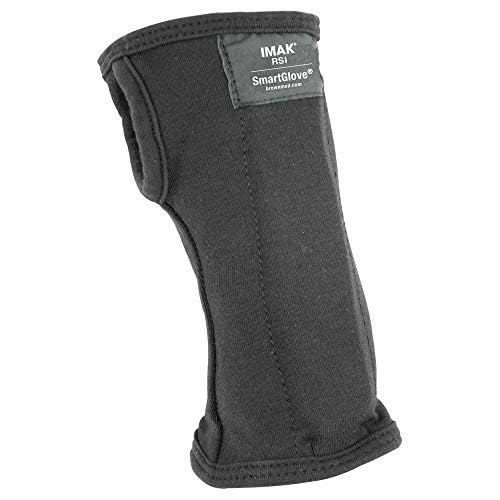
IMAK Brownmed RSI SmartGlove
The IMAK RSI SmartGlove is a soft cotton glove with flexible splints and an open-finger design. It keeps your wrist near neutral and adds gentle warmth, without taking away the fine motor control you need for a keyboard.
$22.99fromAmazonOpen fingers mean you can keep working. You can type, use a trackpad, sign your name and pick up a coffee cup. That's the entire reason to choose a glove over a splint for daytime. Rigid braces get taken off within an hour at a desk, which makes them useless during the exact stretch of time your wrist is being aggravated.
The Arthritis Foundation endorses compression gloves like this for daily arthritis management, citing evidence that hand warmth and compression reduce stiffness and pain. If your mornings start stiff, the warmth is doing as much work as the support is. Slip it on with your first cup of coffee and let your hands loosen up.
The cotton blend is the comfort story. It's 92% cotton and 8% spandex, so it breathes in a way neoprene doesn't, and it pulls on in one motion — no straps, no laces, no adjustment. For anyone with arthritic fingers, that easy pull-on design matters more than it sounds.
It's FSA and HSA eligible. If you have a health spending account sitting there, this is a straightforward thing to put it toward. The flexible splints hold your wrist and thumb near neutral without the hard stop of a metal stay, which is the right amount of restriction for daytime use.
Flaws but not dealbreakers
Soft splints are soft. This won't hold your wrist in place overnight, and it isn't the right choice for an acute sprain or post-surgical recovery. Pair it with a rigid splint at night rather than treating it as a replacement.
Cotton absorbs everything. Sweat, hand lotion, the coffee you spill. Plan on washing it often and owning a spare if you wear it daily.
Sizing is unforgiving. This listing is a small, and a glove that's slightly off fits worse than a brace that's slightly off. Measure before you order.
Who this is for
This guide is for you if your wrists ache after a workday, if your hand goes numb at night, or if a gym session or a long gaming stretch leaves your forearm sore. It's aimed at office and remote workers with repetitive strain symptoms, people with early carpal tunnel, arthritis patients who want warmth and compression, and anyone nursing a mild sprain. Women should pay particular attention: NINDS reports they're three times more likely to develop carpal tunnel, likely because of smaller carpal tunnel anatomy.
This is not for you if you've already had surgery and been given a specific post-op protocol, or if your pain came from a fall and you haven't had it imaged. Constant numbness, weakness in your grip, or thumb muscle wasting are all reasons to see a hand specialist rather than order a brace. We also don't cover prescription custom orthoses, cortisone injections or anything else that involves a clinician — those sit outside what you can buy and use on your own.
How we picked
Clinical evidence: we favored approaches with published backing, like neutral-position night splinting and eccentric loading, over claims about fabric technology. Support level: each product had to be honest about whether it immobilizes, restricts or merely compresses, since a sleeve and a splint solve different problems. Day versus night: anything that locks your fingers down is a sleeping product, and we flagged which picks you can type in. Fit and sizing: we preferred measured size ranges and hand-specific versions, because poor fit is the single biggest theme in owner complaints. Fixing the cause: we included a vertical mouse and a split keyboard, since OSHA identifies sustained ulnar deviation as a leading modifiable RSI risk factor, and no brace addresses that.
Other products for wrist pain relief worth considering
If you want to rebuild the tendon rather than rest it: The THERABAND FlexBar Resistance Bar ($14.99) — The TheraBand FlexBar has more peer-reviewed support behind it than almost anything else here. A randomized trial in the Clinical Journal of Sport Medicine found that the FlexBar eccentric protocol reached an 81% success rate for lateral epicondylitis at one-year follow-up, against 9% for standard physiotherapy alone. The red bar gives 10 pounds of resistance and is the usual starting point; yellow is lighter, green and blue step up. It's a 12-inch rubber bar with a 1.25-inch grip — no batteries, no setup, and it fits in a bag. What it gives up is instant relief. This is a strengthening tool, and you'll need to do the twists consistently for weeks before you feel much. Ask a physical therapist to show you the motion, because doing it wrong just annoys the tendon further.
If you type all day and want to stop the wrist angle at its source: The KINESIS Freestyle Edge RGB Plus Split Mechanical ($199) — The Kinesis Freestyle Edge RGB Plus splits fully in half, so you can set each side at shoulder width and stop bending your wrists inward to reach the keys. That inward angle is ulnar deviation, and studies published in Applied Ergonomics report split designs cut it by up to 15 degrees. Kinesis includes a lift kit for tenting the halves and a detachable palm support, and the hotswap tactile switches, RGB and full programmability mean you're not sacrificing anything to get the ergonomics. The catch is the adjustment. Expect your typing speed to drop for a week or two while your hands relearn the layout, and expect this to cost considerably more than the braces here. It's also a big object — two of them, really — so a cramped desk is a genuine constraint.
The competition
This is what our research surfaced, not a census of every wrist product for sale. Plenty of good braces exist that we didn't look at, and drugstore shelves turn over constantly. The two below are real options that lost to a pick for specific reasons.
The FUTURO Performance Comfort Wrist Support ($15.26) — The Futuro Performance Comfort Wrist Support is a moderate-support adjustable brace from 3M, and it does one thing our other braces don't: it wears on either wrist. If you have pain on both sides or you're not sure which hand you'll need it for, that flexibility is worth something, and Futuro says it's backed by an in-house panel of engineers and medical professionals. It uses breathable materials and adjusts for how much compression you want. It ranks behind the Mueller because an ambidextrous brace is a compromise design — it can't be shaped to one hand the way a fitted or hand-specific brace can, and owner feedback on universal braces tends to circle back to fit. It's still a reasonable buy at a drugstore when you need something today.
The Copper Wrist Compression Brace ($9.99) — The ANHOGEU copper compression sleeves come as a pair, which is nice if both wrists ache, and they're thin enough to wear under a sweatshirt or through a workout. The 3D-knit construction applies even pressure around the joint, and they slide on and off in a second. Copper is the selling point, and it's the part to be skeptical about: copper-infused fabric has mild antimicrobial properties, but it's the compression doing the work on your pain, not the metal. That's fine — compression genuinely helps with proprioception and comfort during activity. What it can't do is hold your wrist neutral, so it's no help with nighttime carpal tunnel symptoms. Size down if you're between sizes and want firmer pressure, up if you want comfort.
Fit, sizing, and how long to wear it
Measure the widest part of your wrist with a tape measure before you order anything, and check whether the brace is hand-specific — most rigid splints are. Don't wear a rigid splint around the clock. Holding a joint immobile for days weakens the muscles that stabilize it, and you can end up weaker than you started. The usual pattern is a splint overnight plus during flare-ups, and something softer or nothing at all during the day. Wash soft braces and gloves often, since cotton and neoprene hold sweat and start to smell. Loosen any strap that leaves a mark, tingles, or makes your fingers cold — that's too tight, and it can make nerve symptoms worse rather than better.
Questions we get
Should I wear a wrist brace while sleeping for carpal tunnel?
Yes, and that's the single most useful thing you can do. A Cochrane systematic review found nighttime neutral-position splinting significantly reduced carpal tunnel symptom severity compared to no treatment. Most people bend their wrists in their sleep, which compresses the nerve for hours at a stretch. A rigid splint like our top pick stops that.
What's the difference between a wrist splint and a wrist brace?
A splint has a rigid stay — usually aluminum — that holds the joint in a fixed position and genuinely immobilizes it. A brace is softer and just limits your range of motion while adding compression and warmth. Use a splint for nerve compression and acute injuries. Use a brace for general aches and activity.
Is it bad to wear a wrist brace all day and all night?
It's not great. Continuous immobilization lets the stabilizing muscles around the joint weaken, which can leave you more vulnerable once you take the brace off. Wear a rigid splint overnight and during flare-ups, then switch to something soft or nothing during the day. If you feel like you need it constantly, see a doctor instead.
Are vertical ergonomic mice actually better, or is it marketing?
The mechanism is real. A vertical mouse stops your forearm from twisting palm-down, which is a sustained load you hold for hours. Logitech's own ergonomics research measured about a 10% reduction in forearm muscle strain for the MX Vertical's 57-degree angle versus a standard mouse. Treat the exact number as a manufacturer figure, but the principle holds up.
Do copper compression sleeves really work?
The compression works. The copper mostly doesn't. Copper-infused fabric has mild antimicrobial and moisture-wicking benefits, but the pain relief people feel comes from even pressure and proprioceptive feedback around the joint — the same thing any well-fitted sleeve provides. Buy one for how it fits, not for the metal content.
How do I know if it's carpal tunnel or just a sprain?
Carpal tunnel is a nerve problem, so it typically means numbness or tingling in the thumb, index and middle fingers, often worst at night, sometimes with a weakening grip. A sprain hurts in a specific spot, usually after a specific event, and it doesn't make your fingers go numb. If you have persistent numbness or you're dropping things, see a hand specialist.
Why you should trust us
For this guide:
- We read the clinical literature on wrist splinting and tendon loading, including a Cochrane systematic review on night splinting and a randomized trial on the FlexBar protocol published in the Clinical Journal of Sport Medicine.
- We compared manufacturer specifications and listing details across braces, splints, sleeves and desk hardware, checking support level, sizing ranges and whether each product can be worn while typing.
- We reviewed guidance from NINDS, the American Academy of Orthopaedic Surgeons, the Arthritis Foundation, OSHA and Mayo Clinic, and weighed recurring themes in published reviews and owner feedback about fit and comfort.
- We read owner reviews on every listing, weighted toward the critical ones, because that is where the recurring failures show up.
- We have a systematic way of automatically fetching the latest prices, so the numbers on this page stay current.
- This is a research-focused guide, so the team may not own every product listed — though we often do own the top winners, which gives us extra context for the recommendations.
- We don't accept free products, and the retailer commission never changes which product we recommend.
Sources
Carpal Tunnel Syndrome Fact Sheet, National Institute of Neurological Disorders and Stroke (NINDS) — cites prevalence of up to 10 million U.S. cases and notes women are 3x more likely to develop CTS than men
Carpal Tunnel Syndrome — OrthoInfo Patient Guide, American Academy of Orthopaedic Surgeons (AAOS) — states 80% of CTS patients respond to non-surgical treatment including splinting when caught early
Computer Workstations Ergonomics — eTool, OSHA — identifies sustained wrist flexion, ulnar deviation, and repetitive keystroke motion as primary risk factors for upper-extremity musculoskeletal disorders
Wrist Splints for Carpal Tunnel Syndrome — Cochrane Systematic Review, Cochrane Library — found that nighttime neutral-position splinting significantly reduced CTS symptom severity vs. no treatment in short-term follow-up
Musculoskeletal Disorders and Days Away from Work, U.S. Bureau of Labor Statistics — MSDs account for ~30% of all worker injury cases; median days away from work for CTS is 28, among the highest of any workplace injury
Repetitive Stress Injuries — Symptoms and Causes, Mayo Clinic — identifies typing, assembly work, and certain sports as the most common triggers of wrist tendinitis and RSI
Best Ergonomic Mouse 2026, Wirecutter (NYT) — long-term testing panel cites the Logitech MX Vertical as top pick for office workers with wrist fatigue, noting immediate comfort improvement in daily use
Best Ergonomic Keyboards 2026, Wirecutter (NYT) — recommends split keyboards for ulnar-deviation-related RSI; notes Kinesis Freestyle as best option for severe or chronic cases
Logitech MX Vertical Ergonomic Mouse Review, RTINGS.com — objective hardware testing; notes the 57-degree angle as the differentiating ergonomic design feature
Eccentric Decline Squat with Wrist Flexion Bar for Lateral Epicondylitis, Clinical Journal of Sport Medicine (2009) — RCT demonstrating 81% success rate at 1-year follow-up for FlexBar eccentric protocol vs. 9% for standard physiotherapy alone
Wrist Braces for Arthritis — Product Guidance, Arthritis Foundation — recommends compression gloves and flexible wrist supports for daily arthritis management; endorses IMAK SmartGlove line
Ergonomic Keyboard and Mouse Effects on Musculoskeletal Outcomes, Applied Ergonomics Journal — peer-reviewed studies show split keyboard designs reduce ulnar wrist deviation by up to 15 degrees vs. standard flat keyboards
Amazon product listings and owner reviews for all 8 products
Manufacturer specification pages for each product
Some passages in this guide may be paraphrased with AI help. Prices are refreshed automatically.
More like this.
Continue exploring health reviews and recommendations.

The Best Wrist Braces for Carpal Tunnel
Carpal tunnel symptoms don't usually announce themselves at the office. They wake you up at 3 a.m. with a hand that feels like it fell asleep and won't…

The Best Allergy Relief Medications
Seasonal allergies wreck ordinary days. You wake up with a nose that won't stop running, eyes that itch through your morning meeting, and a head that…

The Best Inversion Tables for Back Relief
If your lower back aches by mid-afternoon, an inversion table is one of the simplest things you can try at home. You strap in your ankles, tip backward,…

The Best Percussion Massagers for Back Pain
A knot between your shoulder blades has a way of taking over your whole day. You reach for it, your arm gives out halfway, and you end up mashing a tennis…

The Best Heating Pads for Back Pain
A heating pad is the rare pain remedy that asks almost nothing of you. You plug it in, you lie down, and 20 minutes later the knot between your shoulder…

The Best Mattresses for Side Sleepers With Back Pain
Most adults sleep on their side, and if your lower back hurts, that position asks a lot of a mattress. Your shoulder and hip press in hard while your…