The Best Soldering Stations
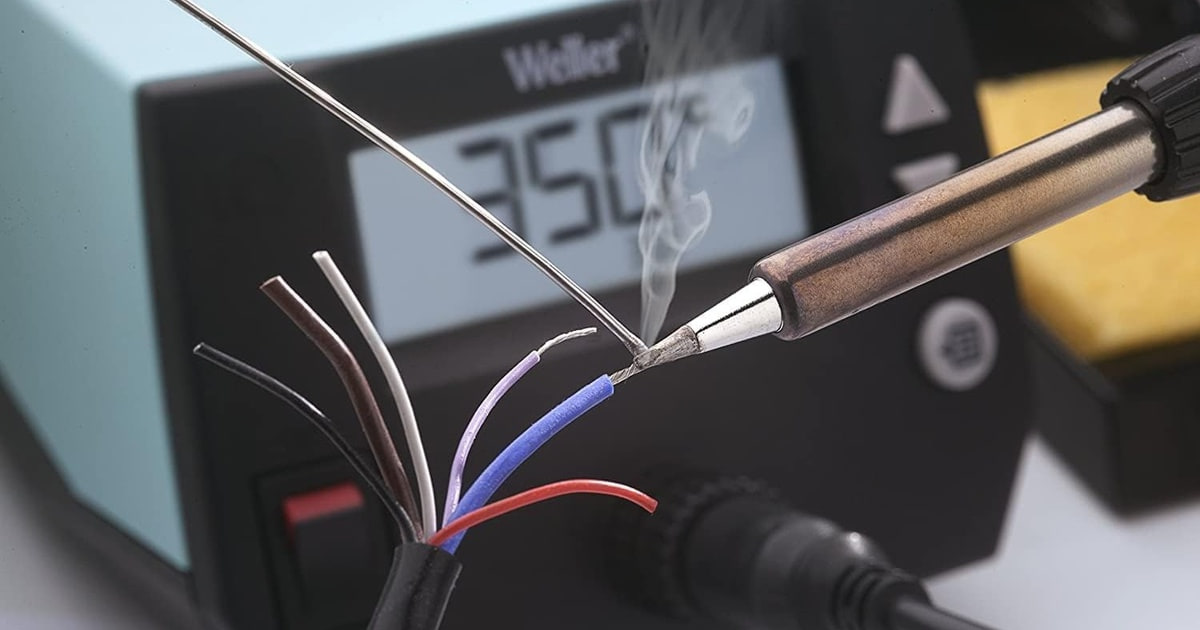
A soldering station is what decides whether your joints come out shiny and solid or gray and cracked. Temperature control is the whole game. A cheap pencil iron just heats until it stops, so it scorches flux, chews through tips, and drops temperature the moment you touch a big ground pad. A station with closed-loop control holds the number you set, which means your joints behave the same on the fortieth one as they did on the first. If you build kits, mod keyboards, or fix boards, that consistency is what you're paying for.
No station fixes technique, though, and none of them are as universal as the box suggests. Tips are consumables, and every family — Hakko's T18, cartridge systems, TS100-style pencils — locks you into its own shapes and its own supply. Wattage numbers oversell things too. A powerful station still stalls on a thick ground plane if the tip carries too much mass. And most of these ship with a single general-purpose tip, so plan on buying two or three more before fine work feels comfortable.
Your solder matters about as much as your iron does. Leaded 60/40 melts lower and forgives slow hands; lead-free SAC305 wants a hotter tip and wears it out faster. So buy for the work you actually do, not the work you picture yourself doing someday. We think that the Hakko FX888DX-010BY is the best soldering station for most people, and that the Weller WE1010NA is the one to buy if you'd rather grab tips off a local store shelf than wait on shipping.
Everything we recommend

A knob instead of buttons, on the most proven bench platform
Store-shelf tips and more power, if local supply matters to you

Real temperature control in your pocket, if you bring the power

More power and quicker recovery, for people who solder most days
At a glance
| Product | Wattage | Temp Range | Price | |
|---|---|---|---|---|
| Hakko FX888DX-010BY - Digital Soldering Station withTop pick | — | 120-899°F | $122.15 |
| Weller 70 Watt Digital Soldering StationRunner-up | 70W | — | $115 |
| PINECILBudget pick | — | — | $39.99 |
 | KSGER T12 Soldering Station DIY STM32 V3.1SAlso consider | 72W (Max 120W) | 50C-480C | $79.99 |
| Hakko FX-971 - Soldering Station with FX-9701Upgrade pick | 100W | 120-850°F | $329.97 |
 | Metcal MX-RM3E Soldering and Rework Hand-Piece forAlso in lineup | — | — | $154On sale |
 | JBC CD-2BQF - Compact Series Soldering StationAlso in lineup | 230V | — | $647.19 |
How we picked
Temperature control. We looked for closed-loop regulation with a manufacturer-stated stability figure, since unregulated irons drift under load and produce cold joints. Anything without real feedback control was out.
Thermal recovery. Published reviews and community threads consistently show low-mass cartridge tips climbing back to temperature faster than heavy barrel tips at the same wattage. We weighed tip design as heavily as the wattage on the box.
Tip supply and cost. Tips are the consumable, so we favored systems with many shapes available from more than one seller. A station tied to a thin, proprietary catalog gets expensive to keep running.
ESD safety. We checked spec sheets for grounded, ESD-rated construction, which matters the moment you handle bare microcontrollers or CMOS logic. Static damage often shows up weeks later, not immediately.
Power and plug. We confirmed each unit runs on standard North American 120V power or on a supply you can realistically source. Owner reports about voltage mismatches and missing power supplies shaped this criterion more than any spec did.
Top pick
A knob instead of buttons, on the most proven bench platform
Hakko FX888DX-010BY - Digital Soldering Station with
This is the Hakko bench station most hobbyists eventually buy, updated with a rotary knob for setting temperature. It holds heat steadily, plugs straight into a North American outlet, and taps the deepest tip supply in the hobby market.
$122.15fromAmazonThe rotary encoder is the reason to pick this version over the older FX-888D. You turn the knob to choose a temperature and press it to confirm. That's the whole procedure. The button sequence on the previous model sent plenty of owners back to the manual after a few months away from the bench. If you solder in bursts — a weekend build here, a repair there — an interface you can't forget is worth something real.
The temperature range covers everything a hobbyist touches. Hakko lists 120 to 899°F. That spans low-temp specialty alloys, leaded 60/40 in the 570 to 625°F band, and lead-free SAC305 up near 660 to 700°F. Published reviews of this platform describe tight, steady regulation rather than the slow drift you get from an unregulated iron. Steady heat is what keeps solder wetting properly on the tenth joint in a row.
The T18 tip library is the quiet advantage. Chisel, conical, bevel, knife, micro — Hakko sells them, and so does a large third-party market. Tips are the part you replace, so a deep and widely stocked supply keeps a station useful for a decade instead of a season. Buy one fine chisel and one broader chisel along with the station and you'll cover nearly every job you run into.
It's the 120V North America version, and the iron is ESD-safe. The blue-and-yellow housing is Hakko's marker for the domestic configuration, so you plug it in and start working. No transformer, no adapter, no guessing at the listing. The grounded station matters if you handle bare microcontrollers, FPGAs, or CMOS logic, where a static hit can leave a chip that works today and quits next month.
Flaws but not dealbreakers
T18 tips carry more thermal mass than cartridge systems, so recovery is slower. Dump heat into a wide ground plane or a heavy connector shell and you'll wait a beat for the tip to climb back. On ordinary through-hole boards you'll never notice this. If you spend most evenings on fine-pitch rework, one of the cartridge stations below suits you better.
This listing is newer, so there's less owner history behind it. The thermal core is the long-running FX-888D design, and that's the part that either holds up or doesn't. Even so, the knob version hasn't collected the years of buyer reports the button version has. What you're paying extra for, compared with that older model, is mostly the interface.
Runner-up
Store-shelf tips and more power, if local supply matters to you
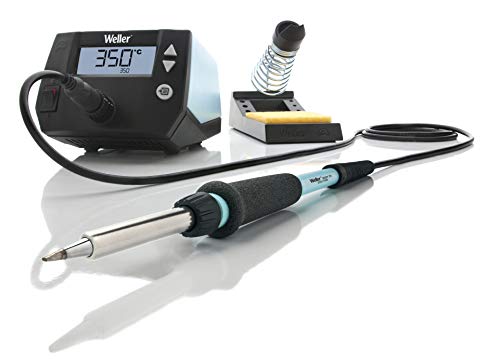
Weller 70 Watt Digital Soldering Station
The WE1010NA is a 70-watt digital station with a display, standby, and a temperature lock. It performs about like our top pick on everyday joints, and its real edge is that Weller parts sit on shelves at hardware stores near you.
$115fromAmazonSeventy watts gives you margin on the joints that fight back. Weller says this station is 40% more powerful than the two models it replaces, and you notice it on ground planes, battery tabs, and connector shells that pull heat out faster than a small iron can put it in. On ordinary through-hole work the extra power mostly buys you less waiting. You touch the joint, it flows, you move on.
The controls ask almost nothing of you. There's a digital readout, a standby mode with auto setback, and a temperature lock so a stray bump doesn't cook your tip or your parts. You can even password-protect the settings, which is handy if the bench is shared with a classroom, a maker space, or a curious kid. Weller quotes stability of ±2°C, so repeat joints come out consistent.
Buying tips in person is a genuine advantage. Weller is stocked at big-box hardware stores and electronics shops in a way that most brands here aren't. If you snap a tip on a Saturday afternoon with a half-finished board on the bench, that's the difference between finishing today and waiting on a package. Nobody talks about distribution in reviews, but it changes how the tool fits your week.
The silicone cable is a small thing you'll appreciate every session. It's heat resistant and stays limber, so the iron doesn't fight you or drag itself off the rest. Rubber-jacketed cords stiffen with age, crack near the strain relief, and eventually get scorched by the tip. The kit also comes with the safety rest, sponge, tip retainer, and a 1.6 mm screwdriver tip, so you can solder the day it arrives.
Flaws but not dealbreakers
It's the most expensive AC station among our picks, and it does about what the top pick does. Core temperature performance on standard through-hole work is close enough that most people won't tell them apart. You're paying for the interface, the brand, and the shelf availability. If you order everything online anyway, that premium is hard to justify.
Weller's tip range is narrower than Hakko's, and you get one tip in the box. The included screwdriver tip handles general work, but fine-pitch SMD and drag soldering need shapes you'll have to buy. Third-party options are thinner on the ground here than they are for Hakko-compatible tips, so expect to shop within Weller's own catalog more often.
Budget pick
Real temperature control in your pocket, if you bring the power
PINECIL
The PINECIL is a pen-sized iron that runs off USB-C or a DC barrel jack and reaches working temperature in about 12 seconds. It gives you genuine closed-loop control for a fraction of what a bench station costs, as long as you already own a capable charger.
$39.99fromAmazonIt's hot and ready before you've finished tinning the tip. PINE64 rates it at 12 seconds to operating temperature, which beats most AC stations from cold. That changes how you use an iron. Instead of flipping it on and waiting while you find your flux, you grab it for a two-minute fix and put it back. For a quick wire repair or a single reflowed joint, that speed is the whole appeal.
It takes power from nearly anything you own. USB-C handles both PD and QC 3.0, and there's a DC5525 barrel jack for bench supplies and battery packs. A laptop charger works. A capable power bank works, so you can solder in a car, a garage, or a friend's kitchen table with no outlet nearby. That flexibility is why this thing shows up in so many field kits and drone repair bags.
The open-source IronOS firmware is a real feature, not a novelty. You get configurable temperature profiles, an on-demand boost for stubborn joints, sleep behavior you can tune, and live power readouts on the little screen. The firmware keeps improving, and updating it is straightforward. If you like tools you can adjust rather than tolerate, you'll get more out of this than out of most bench stations.
It's small enough that you'll actually carry it. The whole iron is about six inches long and weighs a couple of ounces, so it disappears into a drawer or a laptop bag. Auto standby kicks in when you set it down, which protects the tip and calms the part of your brain that worries about hot metal. For anyone who solders in more than one place, that portability beats raw wattage.
Flaws but not dealbreakers
The power supply isn't included, and that's the catch. To get full performance you want a 65W USB-C PD charger. Plenty of people already have one from a laptop, in which case you're done. If you don't, you're buying a charger on top of the iron, and a weak or low-rated source will throttle right when you're pushing heat into something large.
There's no stand, no holder, and no base. You're getting an iron, not a workstation, so you'll want a separate stand and a way to keep a hot pencil from rolling toward your arm. There's also no tip storage or grounding point built in. On a dedicated bench, an AC station's integrated rest and sponge are genuinely more pleasant to live with.
The TS100-compatible tip range is smaller than the big bench ecosystems. You'll find the common chisel and conical shapes without trouble. Specialty profiles, though, are far easier to source for Hakko-compatible systems. If your work leans toward odd geometries or heavy drag soldering, that limitation shows up eventually.
Upgrade pick
More power and quicker recovery, for people who solder most days
Hakko FX-971 - Soldering Station with FX-9701
The FX-971 is Hakko's next-generation bench station, built from the FX-951 design, with 100 watts and a 120–850°F range. It's meant for people doing fine-pitch rework and lead-free assembly regularly, not for occasional kit building.
$329.97fromAmazonOne hundred watts and a 120–850°F range cover work the smaller stations struggle with. That window handles low-temp specialty alloys at one end and lead-free SAC305 in the 660 to 700°F band at the other. If you assemble boards with lead-free solder, you're living at the hot end of the scale all day. A station with headroom holds its number there instead of sagging every time you load it.
The cartridge-style T39 tips recover faster than high-mass barrel tips. Hakko lists more than 60 shapes and sizes, sold separately, so you can build out exactly the set your work needs. Low-mass cartridges put the heating element close to the working end, which is why they climb back to temperature quickly after a big thermal dump. On fine-pitch ICs, that stability protects pads from long dwell times.
The handpiece knows when you've set it down. A sensor in the iron detects use and puts it to sleep on its own, so there's no cord to connect between the holder and the station. That means longer tip life and less oxidation across a long session with interruptions. It also removes one more cable from a bench that probably has too many already.
It supports both standard and micro handpieces, so the investment stretches. The standard iron is included, and adding a micro handpiece later gives you a dedicated tool for very small work without buying a second station. Hakko builds the FX-971 from the parts of the FX-951 that professionals kept coming back for. That lineage is the reason this station shows up on production benches.
Flaws but not dealbreakers
It's overkill if you solder a few boards a month. Our top pick handles nearly everything a hobbyist does, and it costs far less. The FX-971 starts earning its keep when you're producing multiple boards a week or doing regular fine-pitch rework where a lifted pad means scrapping the assembly. Below that threshold, put the difference toward tips, flux, and a decent magnifier.
Tips are sold separately, and this listing hasn't been around long. Budget for a starter set of T39 shapes on top of the station, since the included handpiece only gets you so far. The platform it descends from has a long track record, but this specific model has less accumulated owner feedback than Hakko's older stations do.
Who this is for
This guide is for people soldering electronics at home: kit builds, keyboard mods, Arduino and Raspberry Pi projects, board repair, and light surface-mount work. If you're still using an unregulated pencil iron and fighting dull joints, moving to a controlled station is the single biggest improvement you can make. If you already own a working temperature-controlled station and it holds its setting, you probably don't need a new one — buy better tips and better flux instead.
We're covering irons and stations only. Hot air rework units, reflow ovens, desoldering guns, and the heavy irons used for stained glass or plumbing are all different tools with different buying advice. We also skipped listings that turn out to be components rather than complete tools, since a handpiece without its base station isn't something most people should click buy on.
How we picked
Temperature control: we required real closed-loop regulation with a stated stability figure, because unregulated irons drift and leave cold joints. Thermal recovery: low-mass cartridge tips climb back to temperature faster than heavy barrel tips at the same wattage, so tip design counted as much as watts. Tip supply: we favored systems with many shapes from multiple sellers, since tips are what you keep buying. ESD safety: grounded, ESD-rated construction is non-negotiable once you're handling bare CMOS parts. Power and plug: each pick has to run on standard North American power or on a supply you can actually get, which knocked out more listings than you'd expect.
Other soldering stations worth considering
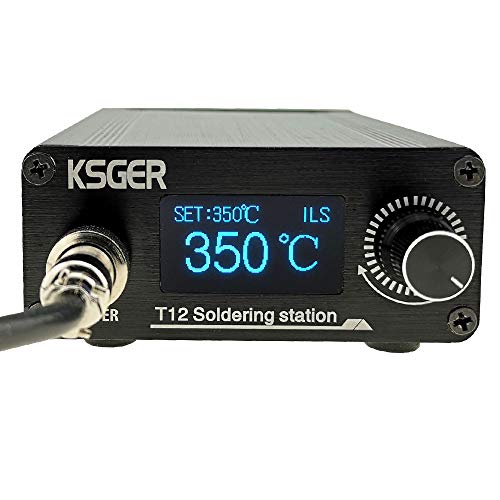
If you want cartridge-tip speed without paying bench-station money: The KSGER T12 Soldering Station DIY STM32 V3.1S ($79.99) — The KSGER T12 gets you the fast-recovery cartridge design in a small aluminum case with an OLED readout and an STM32 controller doing genuine PID regulation. It's rated at 72 watts with a 120-watt peak and claims 300°C in about eight seconds, which is quicker than most AC stations here. What you give up is consistency between units — owners report build quality varying from batch to batch, with connectors and firmware behavior being the usual complaints. The auto-sleep can also nod off mid-session if you work slowly on small parts. Note that no power cord is included, so you'll need to supply your own. It's the enthusiast choice: excellent when you get a good one, and you should be willing to fiddle.
The competition
Here's what else turned up while we were researching this category. It isn't a survey of every soldering station sold — it's the rest of the lineup we looked at, and why it didn't make the picks. In a category this crowded, plenty of capable tools lose on something mundane like plug compatibility rather than on performance.
The JBC CD-2BQF - Compact Series Soldering Station ($647.19) — The JBC CD-2BQF is, by reputation, about as good as a compact soldering station gets. Its Exclusive Heating System is the benchmark that other manufacturers get compared against, and the T245-A handle is a professional standard for precision and comfort. But this listing is the 230-volt version, and JBC says plainly that it's not for use in the United States. Running it on a standard 120V household circuit without a properly rated step-up transformer risks wrecking the station and creating a shock hazard, and adding a transformer means more cost, more clutter, and another thing to get wrong. It's also the most expensive unit in this lineup by a wide margin. If you're in North America, look for a 120V JBC Compact variant instead, or take our upgrade pick. If you're on 230V mains and doing production-level work, this is a legitimately superb station.
Tip care and temperature
Set your iron for the solder you're using, not for the highest number the station allows. Leaded 60/40 flows well at 570 to 625°F, and lead-free SAC305 wants 660 to 700°F. Sustained temperatures much above 750°F accelerate oxidation and shorten tip life noticeably, so use the lowest setting that gives you a clean, wetted joint. Wipe the tip on a damp sponge or brass wool as you work, and tin it with fresh solder before you shut down — that coat of solder is what keeps oxygen off the working face overnight. Replace a tip when it pits, when black oxide won't clean off, or when solder stops wetting it despite correct temperature. And work somewhere ventilated, since flux fumes irritate your airway regardless of alloy.
Questions we get
What temperature should I use for through-hole soldering?
For leaded 60/40 or 63/37, set 300–330°C, which is roughly 570–625°F. For lead-free SAC305, go to 350–370°C, or about 660–700°F. Use the lowest setting that gives you a shiny, fully wetted joint. Dwell time matters as much as the number — sitting on a pad too long lifts it, whatever the temperature says.
Do I really need an ESD-safe station for hobby work?
Yes, if you touch microcontrollers, FPGAs, or any modern CMOS logic. Static damage often doesn't kill a chip outright; it weakens it, and the part fails weeks later under normal use. Every one of our picks is designed for safe use around sensitive components. Pair the station with a grounded mat and a wrist strap when you're handling bare ICs.
What's the difference between a soldering iron and a soldering station?
An iron is a standalone pencil with fixed or roughly adjustable heat. A station is a system: a control unit, a separate handpiece, closed-loop feedback, a display, a rest, and usually a sleep function. Stations hold temperature far more consistently, which means longer tip life and better joints. That said, a modern smart pencil like our budget pick blurs the line — it has the same closed-loop control in a much smaller package.
Can I get by with a cheap unregulated pencil iron?
You can make joints with one, but they'll be worse. Unregulated irons typically run somewhere between 350 and 450°C with nothing holding them there, so tips oxidize fast and the temperature collapses the moment you touch a large pad. That combination produces cold joints and cooked components. Even the least expensive iron in this guide will outperform an unregulated one for PCB work.
What wattage do I need for large connectors and ground planes?
Around 60 watts or more is the usual guidance for joints that act as heat sinks. Our runner-up runs 70 watts and the upgrade pick 100, so both have room to spare. But tip mass matters just as much: a low-mass cartridge tip delivers and recovers heat faster than a heavy barrel tip at identical wattage. Watts alone won't save you if the tip can't move the heat.
Do I need a hot air rework station too?
Not for through-hole work or ordinary surface-mount soldering. Hot air becomes necessary for QFN, BGA, and other no-lead packages you simply can't reach with a tip. If you're repairing modern consumer boards — phones, game consoles, laptop motherboards — you'll want one eventually alongside your iron. For kit building and general project work, skip it.
Why you should trust us
For this guide:
- We read published reviews, manufacturer spec sheets, and long-running hobbyist community threads for each platform in this guide, focusing on temperature stability, tip design, and what's actually in the box.
- We compared owner feedback themes across these listings — tip life, controller reliability, missing power supplies, and voltage mismatches — rather than leaning on any single write-up.
- We based every claim here on documented specifications, published reviews, and owner reports, not on first-hand use of these irons.
- We read owner reviews on every listing, weighted toward the critical ones, because that is where the recurring failures show up.
- We have a systematic way of automatically fetching the latest prices, so the numbers on this page stay current.
- This is a research-focused guide, so the team may not own every product listed — though we often do own the top winners, which gives us extra context for the recommendations.
- We don't accept free products, and the retailer commission never changes which product we recommend.
Sources
IronOS Firmware Documentation — PINECIL V2 Performance Benchmarks (reaches 350°C in approximately 6–7 seconds with 65W USB-C PD supply), IronOS / Ralim
Amazon product listings and owner reviews for all 7 products
Manufacturer specification pages for each product
Some passages in this guide may be paraphrased with AI help. Prices are refreshed automatically.
More like this.
Continue exploring home reviews and recommendations.

The Best Home EV Charging Stations
Home charging is the whole reason an EV feels easy. A 240-volt Level 2 charger adds roughly 25 to 45 miles of range an hour, so you plug in after dinner…

The Best Portable Power Stations for Camping
A power station is the quiet fix for the two things that actually annoy you at a campsite: a cooler that has to keep working, and phones that die by…

The Best Elevated Dog Bowls and Feeding Stations
Feeding a dog is a floor-level job, and for plenty of dogs that's fine. But if your dog is tall, stiff in the shoulders, or simply old, dropping the head…

The Best USB-C Hubs and Docking Stations
A laptop with two ports and a desk full of stuff is a daily annoyance. You want your monitor, your keyboard, your mouse, your wired network and your…

The Best Drying Racks for Laundry
A drying rack is one of those objects you don't think about until you need one. Then it's the only thing standing between a wet load of sweaters and a…

The Best Dual-Zone Heated Mattress Pads
Most bedroom fights about temperature are really fights about one thermostat and two bodies. A dual-zone heated mattress pad settles that at the mattress…