The Best Ergonomic Office Chairs for Back Pain
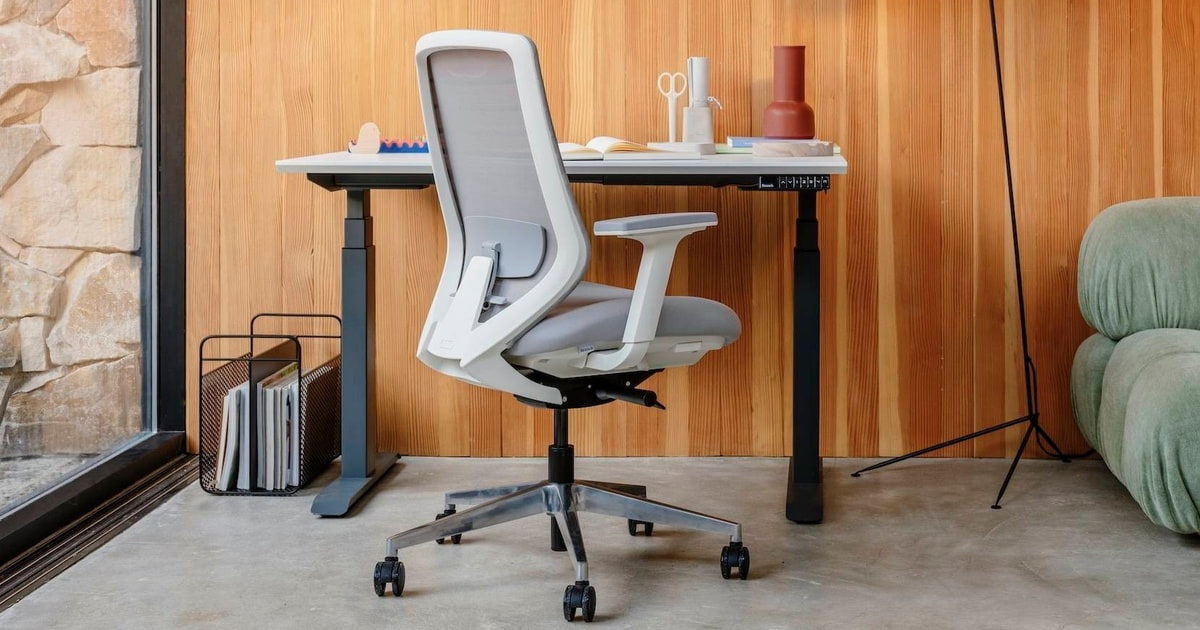
Your chair decides how your lower back feels at 4 p.m. If you sit six to ten hours a day, that's not a small thing. The spine has a natural inward curve at the lower back, and a bad chair lets it flatten out under hours of pressure. That's where most desk-job back pain starts. A good ergonomic chair holds that curve for you, lets you shift position without losing support, and keeps your thighs and arms in neutral positions. It won't make you love sitting. It will make sitting hurt less.
Here's the honest part: no chair fixes a back. Chairs help with pain that comes from posture and sustained loading, and that's a real chunk of desk-worker discomfort. But if your pain radiates into a leg, or you feel numbness or tingling, that's a doctor's question, not a shopping question. Even the best chair here needs you to get up every half hour or so. And every one of these chairs demands setup — seat height, seat depth, lumbar position, armrests. Buy any of them, leave the defaults alone, and you've mostly bought expensive furniture.
We also can't promise a chair will feel right for your body. Femur length, hip width and height all change the answer, and mesh that one person calls supportive another calls hard. Sizing matters more than the feature list. We think that the Herman Miller Aeron Chair Size B is the best ergonomic office chair for back pain for most people, and that the Steelcase Leap V2 is the one to buy if you sit for eight hours or more and want a chair that moves with you instead of holding one shape.
Everything we recommend

The most precise back support you can sit in, if you fit it
A back that reshapes itself as you shift, for very long days

Real lumbar adjustment without the premium-chair outlay

It sets itself up, and the headrest follows you back

A gaming chair that takes your lower back seriously
At a glance
| Product | Lumbar Support | Armrests | Price | |
|---|---|---|---|---|
| Herman Miller Aeron Chair Size B FullyTop pick | Posture Fit | — | $650 |
| Steelcase Leap V2 Desk Chair in Buzz2Runner-up | Height Adjustable Lumbar | 4-Way Adjustable Arms | $1,523 |
| Humanscale Freedom Office Chair with Headrest -Upgrade pick | Responsive Backrest | Height Adjustable | $1,921 |
| Branch Ergonomic Chair - A Versatile DeskBudget pick | Adjustable Lumbar | — | $389 |
| Secretlab Titan Evo Black Gaming Chair -Also great | Lumbar Support | 4D Armrests | $729 |
How we picked
Lumbar support quality. We looked for adjustable lumbar height and depth rather than a fixed pad, since support parked at the wrong spot on your spine does almost nothing. Systems that adapt as you move, described in manufacturer documentation and consistently praised in published reviews, ranked highest.
Fit and sizing range. We compared stated seat height and depth ranges, weight capacities and size variants against typical adult dimensions. A chair that doesn't fit your body cancels out every ergonomic feature it has, so wide or multi-size coverage counted heavily.
Adjustment depth. We favored 4D armrests, adjustable seat depth and real recline tension control over marketing counts of adjustment points. The threshold was whether a chair could be tuned to a specific body rather than an average one.
Heat and materials. Owner feedback across this category returns to temperature more than almost anything else, so we weighed mesh against foam and leatherette and noted which chairs get warm during long sessions.
Durability signals. Third-party certification, stated duty ratings and warranty length gave us proxies for how long a chair holds its adjustments. A twelve-year term and a one-year term say very different things about expected component life.
Top pick
The most precise back support you can sit in, if you fit it
Herman Miller Aeron Chair Size B Fully
The Aeron's PostureFit SL props up both your sacrum and your lumbar curve, which is more anatomically specific than what any other chair here does. The mesh keeps you cool, and Size B fits most adults — but you have to confirm that before you buy.
$650fromAmazonPostureFit SL supports two places instead of one, and that's the whole argument. Most lumbar systems push on the small of your back and stop there. The Aeron adds a second pad lower down, at the sacrum — the wedge-shaped bone at the base of your spine. Left unsupported, that bone rotates back over a long sitting session and drags your lumbar curve flat with it. Holding both points is why spine-focused reviewers keep putting this chair first.
The mesh means you don't peel yourself off the chair in July. The 8Z Pellicle suspension spreads your weight across eight tension zones rather than pressing it into foam. Air moves through it. If you work in a bedroom office with a window unit, or anywhere the afternoon sun wins, this is a bigger deal than it sounds. Every foam or leatherette chair here traps more heat than the Aeron does.
You can adjust almost everything, including the tilt behavior. Seat angle, forward tilt, tilt limiter, tilt tension, armrest height, width, depth and pivot, plus the lumbar pad position. The forward tilt is worth calling out. Lean in to read something closely and the whole seat pitches slightly forward, so your pelvis rolls with you instead of your lower back doing the bending. Therapists recommend that posture for focused work.
Three sizes mean the chair can actually match your body. A, B and C cover the great majority of adults, and Size B is the middle. Getting this right matters more than any single feature — an undersized or oversized chair puts the lumbar pad at the wrong height on your spine, and then none of the engineering helps you. Check your height and weight against the size chart before you click buy, not after.
A twelve-year warranty tells you what the maker expects. Very few chairs carry a term like that. Spread over a dozen years, a chair this expensive stops looking like a splurge and starts looking like a slow purchase. The parts are also serviceable, so a worn cylinder or caster is a repair rather than a replacement.
Flaws but not dealbreakers
The mesh feels hard at first, and some people never warm to it. There's no plush give here. Owners commonly describe a week or two of adjustment before the seat stops registering as firm, and a minority stay unconvinced. If you like sinking into a chair, you'll be happier with the Leap V2's fabric.
The listing here is a renewed Classic, not the current Remastered version. This is the 1994–2016 design, refurbished by a third party. Functionally it's the Aeron people have recommended for decades, but condition varies by seller and refurbisher, and the newer Remastered has updated mesh and tilt hardware. Know which chair you're buying.
No headrest, and assembly isn't trivial. The Aeron was designed without one, and add-on headrests are a separate purchase from third parties. If you lean back on calls and want your neck supported, look at the Humanscale Freedom instead. Setup also runs longer than you'd expect for a chair, and owners report the instructions are less clear than they should be.
The Aeron carries a 12-year manufacturer warranty.
Runner-up
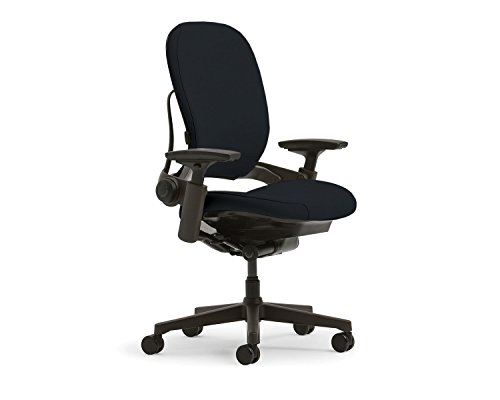
A back that reshapes itself as you shift, for very long days
Steelcase Leap V2 Desk Chair in Buzz2
The Leap V2's backrest flexes in two zones and changes shape as you move, which suits people whose back pain builds over the course of the day. It's comfortable immediately, with no break-in, and it ships fully assembled.
$1,523fromAmazonThe backrest moves with your spine instead of holding one shape. Steelcase calls it LiveBack, and it flexes independently in the upper and lower zones as you lean, slouch and straighten. That matters because holding even a textbook posture for hours still fatigues muscle and loads discs. If your back feels fine at 9 a.m. and cranky by 3 p.m., this is the chair to look at first.
Reclining doesn't push you away from your monitor. The seat glides forward as the back opens, so your eyes stay about the same distance from the screen. On a normal chair, leaning back means reaching forward for the keyboard, and you trade lumbar relief for neck and shoulder strain. Here you can actually stay reclined and keep working, which is the only way recline helps a real workday.
You get separate control over lower-back firmness. Height-adjustable lumbar plus an independent firmness dial for the lower zone lets you tune pressure where you need it without stiffening the whole back. Combined with adjustable seat depth and genuinely 4-way arms, this is the most granular fit adjustment in the roundup outside the Aeron.
Fabric is comfortable on day one and stays comfortable in a cold room. No break-in period, no firm-mesh adjustment window. If your office runs cold in winter, upholstery beats mesh by a wide margin. It also ships fully assembled, which spares you the floor-covered-in-parts evening.
It's built for continuous use and backed accordingly. The listing rates it for 24/7 duty and a 300-pound capacity, with a twelve-year warranty behind it. That's commercial-contract territory, and it shows up in how the chair holds its adjustments over years rather than months.
Flaws but not dealbreakers
Fabric holds heat. In a warm room or a stretch of summer without good air conditioning, you'll notice the difference against a mesh back. This is the main reason to pick the Aeron over the Leap V2 if your climate runs hot.
There's no headrest option. For a chair aimed at people who sit all day and recline through calls, that's a real gap. Tall users who want cervical support have to look elsewhere.
The recline can feel stiff out of the box. Owners describe the mechanism loosening up over a few weeks of regular use. Until then, dial the tension down and give it time before deciding it's wrong.
The Leap V2 comes with a 12-year manufacturer warranty.
Budget pick
Real lumbar adjustment without the premium-chair outlay
Branch Ergonomic Chair - A Versatile Desk
The Branch gives you a height-adjustable lumbar pad, adjustable seat depth and 4D armrests — the features that actually matter for back pain — for a fraction of what the premium chairs cost. Build quality is a step down, and you'll feel it in the plastics.
$389fromAmazonYou get the adjustments that matter, not a stripped-down imitation. Seat height, seat depth, tilt tension, tilt lock, recline angle and 4D armrests, plus a lumbar pad you can move up and down. That last one is the important one. Support parked at the wrong height on your spine does very little, so being able to slide it to your own lower-back curve is what separates this from a generic task chair.
It's the obvious upgrade from a dining chair or a basic task chair. If you've been working from a kitchen chair or an entry-level seat from the office store, this is a large jump in support for a modest outlay. You don't need a four-figure chair to stop your lower back flattening out — you need adjustable lumbar support at the right height, and this has it.
The mesh back keeps you cooler than any foam or leatherette chair here. For a home office without great airflow, that's a daily comfort win over the Leap V2 and the Titan Evo. The seat itself is cushioned, so you get the mesh benefit where you sweat and padding where you sit.
Branch is a direct-to-consumer office brand, and this is its standard chair. It's widely covered by mainstream review outlets and consistently lands near the top of budget ergonomic roundups. That breadth of independent coverage is unusual at this price and makes the recommendation easier to trust than a no-name listing with similar specs.
Flaws but not dealbreakers
The lumbar pad is static support, not an adaptive system. You set it once and it stays there. That's fine for preventing slouch and easing moderate discomfort. It isn't the same thing as the Aeron's dual-zone approach or the Leap V2's moving back, and if you have a diagnosed disc problem, the step up is worth considering.
The materials feel like what they cost. Plastic components have a lighter, hollower feel than the premium chairs, and owners report some lateral flex in the armrests if you plant your elbows and lean. Seat foam can also soften after a few years of heavy daily use, where the mesh-suspension chairs hold their support characteristics much longer.
Adjustment range and color options are narrower. Very tall or very short users may run out of seat-height travel, and there's little choice in finish. Check the height and depth ranges against your desk before ordering.
Upgrade pick
It sets itself up, and the headrest follows you back
Humanscale Freedom Office Chair with Headrest -
The Freedom's recline balances against your own body weight, so there are no tension knobs to fiddle with. The counterbalanced headrest stays with your neck through the whole recline arc, which no other chair here does.
$1,921fromAmazonYou sit down and it's already right. The recline uses your body weight as its own counterweight, so there's no tension dial to guess at. That sounds like a convenience feature and it isn't. Most people never touch the controls on a complex chair, which means they sit in a badly configured one for years. A chair that can't be set up wrong beats a chair that can, if you're honest about your habits.
The headrest moves with you, not to a fixed spot you set once. It pivots on the same counterbalance as the back, so your neck stays supported at every recline angle. Every other headrest — built-in or strapped on — supports you at one angle and abandons you at the others. If you spend hours on calls or reading and your neck and upper traps are what hurt, this is the chair.
The cushions are shaped to your contours rather than flat. Sculpted padding increases contact area, which spreads load instead of concentrating it in a few pressure points. Over a long session that's the difference between shifting constantly and settling in. It's a different comfort philosophy from the Aeron's taut mesh, and plenty of people prefer it.
Reclining here keeps your eyes level. As the back opens, the angle between torso and legs increases — which is what decompresses your hips and lower back — but your sightline stays roughly where it was. You get the physiological benefit of leaning back without the neck-craning penalty.
Flaws but not dealbreakers
Barely anything is manually adjustable, and that cuts both ways. The lumbar support isn't independently adjustable for height or depth, so if your curve sits higher or lower than the average, you can't move the support to meet it. People who want granular control over every parameter will find this chair frustratingly hands-off.
The self-balancing recline assumes an average adult. Very light or very heavy users can find the resistance imprecise — too easy to tip back, or too much work to lean at all. There's no dial to correct it.
Seat depth adjustment is more limited than on the Aeron or Leap V2. If you have notably long or short femurs, check the dimensions carefully. And it's the most expensive chair here by a clear margin.
Also great
A gaming chair that takes your lower back seriously
Secretlab Titan Evo Black Gaming Chair -
The Titan Evo builds a 4-way adjustable lumbar mechanism into the backrest instead of tossing in a loose pillow, which is rare in this category. It reclines to 165° and the XL size handles frames the office chairs here can't.
$729fromAmazonThe lumbar support is engineered in, not a pillow strapped on. Almost every gaming chair hands you a removable cushion that slides around and can't be positioned properly. Secretlab built an adjustable mechanism into the backrest with control over height, depth, side-bolster spread and angle. It's the reason this chair belongs in a back-pain guide at all.
It covers work posture and couch posture in one seat. Recline runs to 165°, so you can sit upright at a keyboard during the day and drop back for a game or a movie at night. None of the office chairs here go anywhere near that far. If your desk chair is also your evening chair, that's a genuine practical advantage.
The XL size fits bodies the others don't. It's specified for people between 5'11" and 6'9" and up to 395 pounds. If you're tall or heavy and have watched standard office chairs sag or bottom out, this is the one in the lineup built for you.
Build quality is well above the usual gaming-chair standard. Cold-cure foam holds its shape longer than ordinary polyurethane, the armrests are full-metal 4D units with replaceable tops, and the leatherette is rated far more abrasion-resistant than typical PU. There's a five-year extended warranty behind it.
Flaws but not dealbreakers
Leatherette runs hot. After a couple of hours in a warm room, you'll notice — this is the least breathable chair in the roundup by a distance. If you live somewhere humid or work without air conditioning, pick a mesh chair instead.
The bucket seat and bolsters aren't for everyone. The racing-seat shape looks out of place in a formal office, and the side bolsters can restrict how you shift your hips if you're broad through the seat. Some people find that snugness supportive; others find it confining.
The lumbar mechanism is good for its category, not clinical-grade. It's a meaningful adjustable pad, but it doesn't match the dual-zone precision of PostureFit SL or the moving backrest of the Leap V2. For a diagnosed spinal condition, the office chairs are the safer choice.
Secretlab offers a five-year extended warranty on the Titan Evo.
Who this is for
This guide is for people who sit at a desk for hours and whose backs are telling them about it. If you're working from a dining chair, a folding chair or a basic task chair with a flat back, any pick here is a real upgrade and you'll likely feel the difference within a few weeks. It's also for people trying to prevent the problem — if you've just moved to a full-time desk job, even the budget pick here beats the free one you inherited. If you already own a properly configured ergonomic chair and your pain persists, a new chair probably isn't your answer.
We cover full-size ergonomic task chairs for adult desk work, including one gaming chair serious enough to belong in the conversation. We don't cover kneeling chairs, saddle stools, ball chairs, standing-desk stools or seat cushions and lumbar pillows meant to rescue a bad chair. And to be direct about the limits: pain that radiates into your legs, numbness, tingling or pain that doesn't change when you change position needs a physician, not a shopping guide. Conditions like herniated discs and spinal stenosis may need real treatment no matter what you sit in.
How we picked
We built this guide from manufacturer specifications, published reviews from established outlets and recurring themes in owner feedback, weighing five things. Lumbar support: we wanted adjustable height and depth, or a system that adapts as you shift, rather than a fixed pad that can't meet your curve. Fit: stated seat height and depth ranges, weight capacity and size variants had to cover a realistic range of adult bodies, because a poorly sized chair undoes every other feature. Adjustment depth: 4D armrests, adjustable seat depth and genuine recline tension control mattered more to us than a headline count of adjustment points. Heat: owners talk about temperature constantly, so we noted which backs and seats breathe and which don't. Durability: certification, duty ratings and warranty length told us what each maker expects its chair to survive.
The competition
This is what our research surfaced in this lineup, not a census of every ergonomic chair sold. Every chair we looked at here earned a recommendation for some type of buyer, which is unusual — the lineup skews toward well-reviewed models rather than the flood of generic listings that dominate this category. If none of these fits your body or your budget, the criteria above travel well to chairs we didn't cover.
Setup and adjustment
A new ergonomic chair does most of its work only after you set it up, and the order matters. Start with seat height: feet flat on the floor, knees near 90 degrees, not floating and not crammed up. Next set seat depth so two or three finger widths remain between the front edge of the seat and the back of your knees — too deep and you either lose contact with the lumbar support or press on the blood vessels behind your knee. Then position the lumbar pad or mechanism at the inward curve of your lower back, usually around belt level or just above. Set the armrests so your elbows sit near 90 degrees with your shoulders relaxed rather than shrugged. Finally, dial tilt tension until leaning back gives a smooth, controlled recline instead of a snap. Those five settings get you most of the benefit; everything else is refinement.
Questions we get
What's the best ergonomic office chair for lower back pain?
We'd start with the Herman Miller Aeron Size B. Its PostureFit SL supports the sacrum and the lumbar curve separately, which targets the specific way your lower back collapses over a long sitting session. If your budget is tighter, the Branch Ergonomic Chair gives you a height-adjustable lumbar pad and the other adjustments that matter most for back pain.
Are expensive ergonomic chairs actually worth it?
If you sit six to ten hours a day, generally yes. The premium chairs adjust more precisely, hold those adjustments for years, and carry twelve-year warranties that budget chairs can't match — so the cost spread over the chair's life is closer than the sticker suggests. If you sit at a desk two hours a day, that math stops working and the Branch is plenty.
What should I look for if I have a herniated disc?
Prioritize lumbar support you can adjust in height and depth, forward seat tilt, adjustable seat depth and recline tension you can actually control. Sitting bolt upright without moving raises disc pressure more than a slight recline does, so a chair that lets you shift is doing real work. The Aeron and the Leap V2 are the two here most often pointed to for disc conditions. Ask your physician or physical therapist how to configure whatever you buy.
What's the best chair if I sit more than eight hours a day?
The Steelcase Leap V2. Its backrest flexes in two zones and changes shape as you move, so your muscles aren't holding one position for the whole day — which is exactly the pattern that makes pain worse in the afternoon. The glide-forward recline also means leaning back doesn't push you away from your screen. The Aeron is a close second and the better pick if your room runs warm.
Can an ergonomic chair fix chronic lower back pain?
It can meaningfully reduce pain that comes from poor seated posture and sustained loading, which covers a lot of desk-worker discomfort. Owners moving from a basic task chair often report clear relief within a few weeks. But a chair won't resolve structural spinal conditions, nerve impingement or inflammatory disease. Pair the chair with movement breaks every half hour or so, some core work, and a monitor at eye level.
What's the difference between lumbar support and lumbar adjustment?
Lumbar support is any mechanism that holds the inward curve of your lower back — that includes fixed foam pads. Lumbar adjustment is being able to move that support up, down or in and out after the chair is assembled. Plenty of budget and gaming chairs have support you can't reposition, which limits how much good it does. Look for at least a few inches of vertical travel in the lumbar zone.
Why you should trust us
For this guide:
- We read manufacturer specification sheets and listing details for every chair here, comparing stated seat height and depth ranges, weight capacities, armrest degrees of freedom and warranty terms side by side.
- We reviewed published evaluations from established office-furniture and ergonomics outlets, along with clinical guidance on seated posture and lumbar support.
- We read through owner feedback for each model, looking for repeated themes — heat buildup, break-in periods, armrest flex and sizing surprises — rather than isolated complaints.
- We read owner reviews on every listing, weighted toward the critical ones, because that is where the recurring failures show up.
- We have a systematic way of automatically fetching the latest prices, so the numbers on this page stay current.
- This is a research-focused guide, so the team may not own every product listed — though we often do own the top winners, which gives us extra context for the recommendations.
- We don't accept free products, and the retailer commission never changes which product we recommend.
Sources
Best Office Chairs of 2026 — Wirecutter (NYT), Wirecutter / The New York Times
Best Ergonomic Office Chairs — RTINGS.com, RTINGS.com
Ergonomic Chair Reviews and Ratings — Consumer Reports, Consumer Reports
Lower Back Pain and Office Chair Selection — Cleveland Clinic, Cleveland Clinic
Sitting and Lower Back Pain: Ergonomic Interventions — Spine-Health, Spine-Health
Prolonged Sitting and Musculoskeletal Disorders — PubMed / NIOSH, PubMed / National Institute for Occupational Safety and Health
Herman Miller Aeron Chair Review 2026 — The Strategist, The Strategist / The Cut
Best Office Chairs for Back Pain — Forbes Health, Forbes Health
Amazon product listings and owner reviews for all 5 products
Manufacturer specification pages for each product
Some passages in this guide may be paraphrased with AI help. Prices are refreshed automatically.
More like this.
Continue exploring home reviews and recommendations.

The Best Mattress Toppers for Back Pain
Back pain rarely announces itself at bedtime. It shows up at 6 a.m., when you roll over and your lower back feels like it's been clenched for hours. A lot…

The Best Mattresses for Side Sleepers With Back Pain
Most adults sleep on their side, and if your lower back hurts, that position asks a lot of a mattress. Your shoulder and hip press in hard while your…

The Best Heating Pads for Back Pain
A heating pad is the rare pain remedy that asks almost nothing of you. You plug it in, you lie down, and 20 minutes later the knot between your shoulder…

The Best Percussion Massagers for Back Pain
A knot between your shoulder blades has a way of taking over your whole day. You reach for it, your arm gives out halfway, and you end up mashing a tennis…

The Best Soundproofing Materials for a Home Office or Studio
Noise is the thing that ruins a home office. You can buy a great mic and a fast laptop, but if the neighbor's dog barks through every client call, none of…

The Best Ergonomic Snow Shovels
Shoveling is one of the few chores where the tool you grab decides how your back feels the next morning. A driveway after a six-inch storm means dozens of…