The Best HyperX Gaming Gear
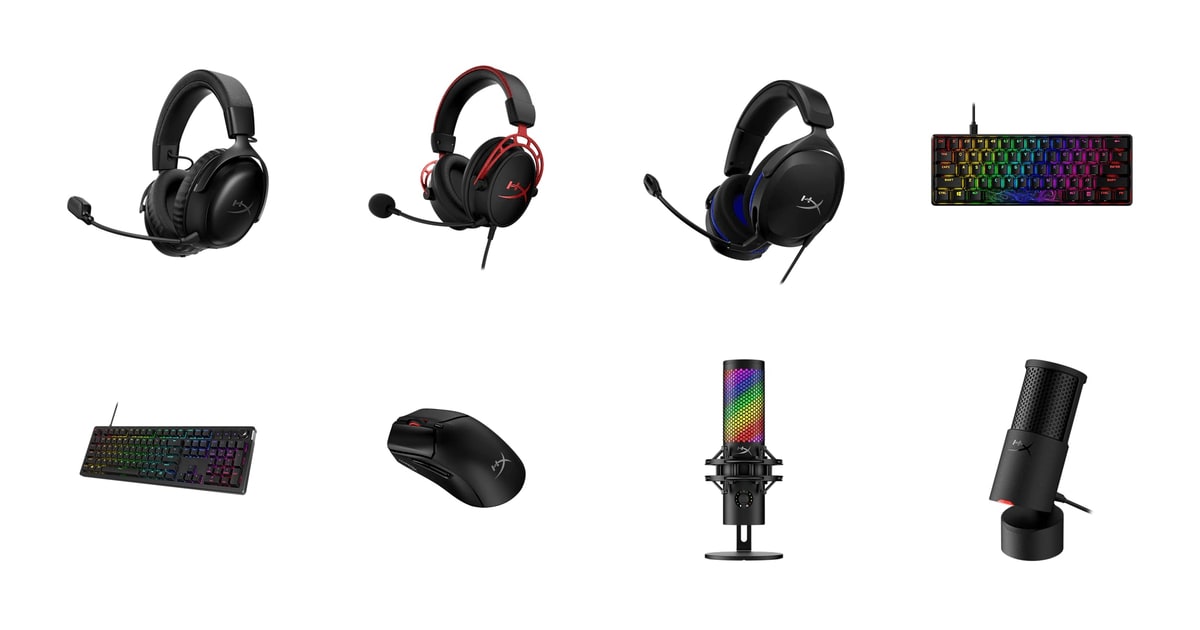
Gaming gear lives on your desk, your head, and under your hands for hours at a time. That's why the boring stuff matters more than the spec sheet does. A headset that stops pinching after hour three. A keyboard that still types cleanly after a year of crumbs. A mouse light enough that your wrist doesn't ache during a long night of ranked matches. HyperX built its name on exactly that kind of gear — solid, comfortable, and priced so a first PC build doesn't have to be all-in on peripherals.
Here's the honest caveat: the software is the weak link across the whole lineup. NGENUITY handles RGB sync, macros, and mic filters well enough when it works, but owners regularly run into it failing to detect hardware, needing reinstalls, or just being slow to load. None of the picks here depend on it for basic function — plug them in and they work. But if you're the type who wants deep per-key remapping and rock-solid profile switching, you'll probably be annoyed at some point.
We also can't promise every unit is flawless. Scroll wheels and individual key switches show up in owner complaints often enough to mention, though HyperX's hot-swap boards make one of those problems fixable at home. We think that the HyperX Cloud III S Wireless is the best HyperX gaming gear for most people, and that the HyperX Cloud Alpha is the one to buy if you'd rather skip batteries entirely and put the savings toward the rest of your setup.
Everything we recommend

The one you charge once and then forget about

Skip the battery, keep the sound, spend less

Light, simple, and enough for a first setup

A tiny aluminum board that frees your mouse arm

The streaming mic that doesn't need extra purchases
How we picked
Sound and drivers. We compared driver sizes and design approaches across the headset line, leaning on Tom's Hardware and TechRadar coverage of HyperX's dual-chamber design and 50mm drivers. What mattered was whether the design keeps game audio clear when the volume goes up, not raw driver size.
Battery and wireless. We compared rated runtimes across manufacturer specs and RTINGS coverage, and weighted owner feedback about connection reliability heavily. A headset that lasts 120 hours on paper still loses if owners report dropouts.
Comfort over hours. We read owner feedback for reports of pressure points, clamping, and pad wear over months of use, and checked which models use memory foam and aluminum frames versus plastic. Weight in grams mattered most for the budget picks.
Keyboard feel and repair. We looked at switch ratings, keycap material, mounting style, and whether switches are hot-swappable — because a board you can fix at home outlasts one you can't. Owner reports of dead or double-firing keys were a red flag we tracked closely.
Mic setup cost. We favored mics that include the shock mount and pop filter, since buying those separately is where a cheap mic stops being cheap. Polar pattern flexibility and mute controls were the tiebreakers.
Top pick
The one you charge once and then forget about
HyperX Cloud III S
The Cloud III S Wireless runs up to 120 hours on 2.4GHz and up to 200 on Bluetooth, so charging becomes a monthly chore instead of a nightly one. Angled 53mm drivers, memory foam, and an aluminum frame make it comfortable enough for six-hour sessions.
$129.99fromAmazonBattery life is the whole argument here. Up to 120 hours on the 2.4GHz dongle means you can play three hours a night for over a month before you think about a cable. Bluetooth stretches that further, up to 200 hours. Most wireless headsets ask you to top up every few days, and that's the thing that quietly ruins them — you sit down to play and the battery's dead. This one you plug in on a weekend and forget.
The 53mm drivers sit at an angle inside the cups, aimed toward your ears rather than straight at the side of your head. HyperX's engineers tuned them for game audio specifically, so footsteps and reloads sit forward in the mix. Owners who've used the earlier Cloud III describe this version as the better-sounding of the two, and several of them use it for music and video calls as much as for gaming.
Comfort is where HyperX has always won, and it hasn't slipped. Memory foam in both the headband and the cushions, leatherette that stays soft, and an aluminum frame that flexes instead of cracking. Owners routinely report six- to eight-hour stretches without pressure spots. If you wear glasses or have a larger head, that combination of foam depth and frame flex is the reason to look here first.
You get real controls on the cup instead of a menu dive. A wireless mode selector to jump between 2.4GHz and Bluetooth, a volume wheel, a mute button with an LED indicator on the boom, and a multi-function button for skipping tracks or answering a call. The mic detaches when you're just listening to music. That's a small thing that makes the headset feel less like gaming-only equipment.
It works on nearly everything you own. PC, PS5, and mobile over Bluetooth, all from one headset. Switching between the dongle and Bluetooth takes a couple of button presses rather than repairing from scratch. It's not instant, and owners note the mode swap isn't seamless, but it's quick enough that using one headset for the PC and the phone stops being a hassle.
Flaws but not dealbreakers
Wireless is the part of HyperX's lineup that draws the sharpest owner complaints. Long-time buyers who love the brand's wired headsets have reported connection dropouts and units that stopped working, and some of them specifically recommend staying wired for that reason. Most owners don't hit these problems, but the pattern is consistent enough that we'd want to buy from a seller with a friendly return window.
NGENUITY is the soft spot again. It's not required — the headset sounds fine and all the on-cup controls work without it — but if you want to change EQ curves or lighting behavior, expect some frustration. Several owners describe the hardware as excellent and the software as an afterthought.
It's the priciest headset in this guide by a wide margin, and the sound advantage over the wired Cloud Alpha isn't night-and-day. You're mostly paying for the cable to go away.
Runner-up
Skip the battery, keep the sound, spend less
HyperX Cloud Alpha - Gaming Headset
The Cloud Alpha is the wired headset HyperX built its reputation on. Dual-chamber drivers split bass and treble into separate paths, and it plugs into anything with a 3.5mm jack — PC, PS5, Xbox, Switch, or a controller.
$64.50fromAmazonThe dual-chamber driver is a real design idea, not a marketing one. HyperX physically separates the bass path from the mids and treble inside each cup. Tom's Hardware notes this reduces distortion when you crank the volume, and that's exactly when most gaming headsets fall apart — an explosion muddies the dialogue right when you need to hear it. The 50mm drivers are also among the largest in this price tier, per TechRadar.
It plugs in and works. No dongle to lose, no pairing, no battery anxiety before a long session. A 3.5mm cable means it runs off a PS5 or Xbox controller, a Switch in handheld mode, a laptop, or a phone with an adapter. If you bounce between a console in the living room and a PC in the bedroom, this is genuinely simpler than anything wireless.
This is the most-bought headset in the lineup by a wide margin, and the owner feedback runs long. People describe it as their default for years, coming back to it after trying more expensive options. The aluminum frame and expanded headband have held up in reports from owners a year or more in. The cable is detachable and braided, with inline volume and mute — so if you fray a cord, you replace the cord, not the headset.
For competitive shooters, the appeal is positional clarity rather than thump. The separated frequency paths keep footsteps and reload sounds from getting buried under gunfire. HyperX headsets that support DTS Headphone:X can also simulate 7.1 surround on PC, per IGN, which some players find helps them place sounds — though plenty of competitive players prefer plain stereo.
Flaws but not dealbreakers
The ear pads are the weak point. Owners describe them as merely okay out of the box and note they compress and wear over time. They're replaceable, but budget for that eventually if you play daily.
Some long-time owners of the original Cloud and Cloud II consider the Alpha a lateral move rather than an upgrade, and a few call it a downgrade in build feel. If you already own a working older HyperX headset, this probably isn't the reason to replace it.
There's no wireless option, obviously, and no on-headset EQ. What you hear is what HyperX tuned. That's fine for most people and limiting if you like to fiddle.
Budget pick
Light, simple, and enough for a first setup
HyperX Cloud Stinger 2 Core - Gaming
The Cloud Stinger 2 Core is the lightest wired headset HyperX offers, at roughly 260 grams, with 40mm drivers tuned for bass and a mic that mutes when you flip it up. It's the one to hand a kid or buy for a first PC.
$24.98fromAmazonIf this is your first real headset, it's a big jump from whatever came with your console. The 40mm drivers are tuned to push bass, so explosions and engine noise land with some weight instead of sounding tinny. Owners who upgraded from cheap headsets describe the difference as dramatic — and specifically say it doesn't have that hollow, in-a-can sound that plagues budget gear.
It's light. At roughly 260 grams it's the lightest wired headset HyperX makes, per Rock Paper Shotgun, and that's most of what makes a headset wearable for a long session. Nothing digs into the top of your head. If you're buying for a teenager who plays for hours, weight matters more than driver size does.
The swivel-to-mute mic is the feature you'll actually use every day. Flip the boom up and you're muted, flip it down and you're live. No hunting for a button mid-match, no wondering whether the mute took. Volume controls sit right on the cup too, so you're never diving into Windows settings to duck a loud teammate.
It's built for PlayStation but works broadly over 3.5mm, and it costs a fraction of what the Cloud III S does. That's the trade in a sentence: you give up wireless, spatial audio, and the plusher pads, and you keep clear game sound and all-day comfort.
Flaws but not dealbreakers
The mic is the recurring complaint. Multiple owners report it records quietly, with teammates struggling to hear them and no easy way to boost the level. Some voices fare worse than others. If voice chat is the main reason you're buying a headset, spend up or plan on a separate mic.
Build materials are plainly cheaper here — plastic where the pricier models use aluminum, and thinner cushions. Owners generally call it sturdy rather than flimsy, but it doesn't feel like the Alpha.
There's no detachable cable and no wireless path. When the cord goes, the headset goes.
Also great
A tiny aluminum board that frees your mouse arm
HyperX Alloy Origins 60 - Mechanical Gaming
The Alloy Origins 60 strips a keyboard down to 60% of the usual size and puts the space back on your desk for wide mouse swings. An aircraft-grade aluminum body and double-shot PBT keycaps make it feel far sturdier than its footprint suggests.
$79.99fromAmazonSixty percent keyboards exist to give your mouse room, and this one does that better than most. Cut the number pad, the function row, and the arrow cluster, and you free up a stretch of desk that matters at low mouse sensitivity. Competitive shooter players make wide arm sweeps. If you've been bumping your keyboard mid-flick, this is the fix.
The build is the reason to pick it over other small boards. The whole body is aircraft-grade aluminum, so it doesn't flex or slide when you're mashing keys. The keycaps are double-shot PBT, which resists the shine that cheaper ABS caps develop within months. Secondary functions are printed on the sides of the caps, which sounds gimmicky and turns out to be genuinely useful when you're learning the layer shortcuts.
HyperX rates its own linear Red switches for 80 million presses, and owner reports back that up — people a year in describe no dead or sticky keys and easy cleaning. The linear feel is smooth rather than clicky, which suits gaming and works fine for typing. One owner with a small writing station bought it for exactly that.
You will spend a week relearning where things are. Arrows, function keys, and Delete all live on a held-down layer. Most people adapt, but it's a real adjustment period, and it's why we'd steer anyone doing spreadsheets or CAD work toward the Alloy Rise instead.
Flaws but not dealbreakers
NGENUITY draws the loudest complaint on this board. Owners report it failing to detect the keyboard at all, which leaves the per-key RGB and macro features stranded. The keyboard's defaults work fine without it — but you're buying the customization and then possibly not getting it.
The switches are soldered in. Unlike the Alloy Rise, you can't swap to a tactile or clicky feel later without desoldering, so pick your switch type carefully up front.
The 60% layout is a genuine dealbreaker for some jobs. No number pad, no dedicated arrows, no media keys. If you enter numbers all day, look elsewhere.
Upgrade pick
The streaming mic that doesn't need extra purchases
HyperX QuadCast 2 S
The QuadCast 2 S bundles the shock mount, pop filter, and four polar patterns into one unit, so a first stream setup is one box instead of four. Tap the top to mute, and turn one knob for gain, monitor mix, or pattern.
$155.99fromAmazonBuying this is buying a whole mic setup at once. A shock mount to keep desk thumps out of your audio, a pop filter for hard consonants, and a stand — all included and pre-attached. PCMag notes the anti-vibration mount cuts keyboard-click bleed without an external arm. Compare that to a bare condenser mic, where you'll spend another round on a mount and filter before you sound good.
Four polar patterns cover situations most people don't anticipate. Cardioid for solo streaming picks up your voice and ignores the room. Bidirectional works for a two-person interview across a desk. Omnidirectional catches a whole table. Stereo for instruments. The Verge notes this range on the QuadCast line, and you switch between them with the same multifunction knob that handles gain and monitor mix.
The tap-to-mute sensor is the streamer feature that pays for itself. Touch the top of the mic and you're muted, with the lighting confirming it at a glance. No fumbling for a switch and no clunk on the recording. It's the difference between quietly muting for a sneeze and broadcasting one.
Over 100 individually addressable RGB LEDs give it the look, if that's what you're after. It runs USB-C into PC or Mac, and there's a 3.5mm jack on the mic for zero-latency headphone monitoring. Owners consistently describe it as sounding good straight out of the box, before touching any software.
It's not subtle. This is a big mic that will sit in frame on your camera, weighing nearly two pounds with the mount and standing about ten inches tall. Some streamers want exactly that. If you want your mic invisible, the SoloCast 2 is the better shape.
Flaws but not dealbreakers
It's the most expensive item in this guide, and owners who like it still question whether the audio jump over cheaper USB mics justifies the gap. The polar patterns and the built-in mount are what you're really paying for.
The size cuts both ways. On a shallow desk it eats real estate, and it will show up in a webcam shot unless you mount it on an arm and swing it out of frame.
The RGB is a lot. There's no way to make this mic look understated on a work-from-home desk, even with the lighting dimmed.
Who this is for
This guide is for anyone building or upgrading a gaming setup who wants to stay in one brand and have things match — lighting, software, and support all in one place. It's aimed at PC and console players, first-time builders, and streamers getting started. If you're a competitive player who cares mostly about mouse feel and headset positional audio, the Cloud III S and Pulsefire Haste 2 are where you should look. If you mostly work at your desk and game at night, the Alloy Rise and SoloCast 2 do double duty better than the gaming-first options.
It's not for you if you're chasing the absolute best in any single category. Audiophile headphones outperform any gaming headset on music, custom keyboards beat these on typing feel, and XLR mics with an interface will beat any USB mic if you're willing to learn the setup. We also don't cover chairs, monitors, or capture cards here — this is peripherals only. And if NGENUITY's reputation worries you, know that everything here works without it; you just lose the customization layer.
How we picked
We read published coverage from RTINGS, Tom's Hardware, PC Gamer, TechRadar, PCMag, The Verge, IGN, and Rock Paper Shotgun alongside HyperX's own specifications and a broad sample of owner feedback. Sound and drivers: whether the design keeps footsteps and dialogue clear at high volume, not just how big the drivers are. Battery and wireless: rated runtime measured against owner reports of dropouts and dead units. Comfort over hours: memory foam depth, frame material, and weight, weighed against reports of pressure points and pad wear after months. Keyboard feel and repair: switch ratings, PBT versus ABS caps, mounting style, and whether you can swap a failed switch yourself. Mic setup cost: whether the shock mount and pop filter come in the box, and how many recording situations the polar patterns cover.
Other hyperx gaming gear worth considering
If you want the lightest mouse HyperX makes: The HyperX Pulsefire Haste 2 ($59.99) — The Pulsefire Haste 2 Wireless weighs 61 grams with a solid upper shell and still runs up to 100 hours per charge — RTINGS notes it comes in under 61 grams despite housing a full receiver and battery. That combination is unusual; most ultralight mice trade away battery to get there. The HyperX 26K sensor tracks to 26,000 DPI and 650 IPS, which is well past what anyone needs but means it won't be the limiting factor. Owners with small to medium hands and a claw grip are the happiest with it. What you give up is durability confidence: scroll wheel problems come up repeatedly in owner feedback, sometimes within a year, with the wheel jumping or scrolling the wrong direction. It's a great-feeling mouse with a known weak spot.
If you want a mic that disappears on your desk: The HyperX SoloCast 2 ($44.99) — The SoloCast 2 is the low-profile alternative to the QuadCast 2 S, and it's the better choice if your webcam frame is tight or your desk is shallow. It records at 24-bit/96kHz with a built-in foam pop filter and an internal suspension system, so you get shock-mount benefits without the bulky cage. Tap the top to mute, with a red LED showing when you're live. NGENUITY adds high-pass, low-pass, and voice-enhancement filters that save directly to the mic, so your settings travel with it. What you lose is polar pattern choice — this is cardioid only, so no across-the-desk interviews or room recording. Owners consistently call the sound clean for work calls and voiceovers. Add a boom arm and it gets noticeably better.
More from HyperX
These are the other HyperX products the research surfaced, not everything the brand sells. Each one suits a specific kind of shopper, and any of them could be the right call depending on your desk and how you play.
The HyperX Alloy Rise ($99.99) — The Alloy Rise is HyperX's full-size showpiece keyboard, and it's built for people who like to tinker. Switches hot-swap without soldering, so you can change from linear to tactile on a whim. Top plates, badges, and rotary knobs all swap out toolessly. It's gasket mounted with factory-lubed linear switches for a softer, quieter typing feel than the Alloy Origins 60, and an ambient light sensor adjusts the RGB brightness to your room. Dedicated media controls and a volume knob make it the pick if you work at this desk as well as game at it. But it's also the riskiest product here: owner reports include RGB failing within days, keys that double-fire or stop responding, and frustrating support experiences. The hot-swap sockets mean a bad switch is a five-minute fix at home, which softens the risk. Buy it if the customization is the point and you're comfortable troubleshooting.
Is HyperX worth it?
HyperX built its reputation on comfort and durability at a price that didn't hurt, and that reputation still holds where it was earned — the wired headsets. The Cloud Alpha has been a default recommendation for years, and owner feedback bears that out with people describing units still working after a year or more of daily use. The aluminum frames, memory foam, and detachable cables are genuinely better construction than most gear at similar prices. Where HyperX is less consistent is everything with a chip in it. NGENUITY draws complaints across nearly every product line — failing to detect hardware, needing reinstalls, or simply not being worth opening. Wireless reliability is the other soft spot, with dropouts and dead units showing up in owner reports for both the headsets and the mouse. Against rivals, HyperX sits in a sensible middle: better comfort and build than budget brands, less polished software than the larger peripheral makers, and usually cheaper than the direct competition. Buy for the hardware, expect little from the app.
Not set on HyperX?
If the Pulsefire Haste 2's scroll wheel reports give you pause, this guide covers the lightweight wireless mice from every brand and where each one's weak point sits. our wireless gaming mice guide →
Worth a look if you're buying a mic for voice work rather than gaming, since the priorities shift toward room treatment and boom arms over RGB and tap-to-mute. our USB microphone guide →
The closest brand-for-brand comparison if you want a matching setup but aren't set on HyperX, with a stronger software story and generally higher prices. our Razer gear guide →
Setup and upkeep
Start by plugging everything in and using it before you install NGENUITY. Every product here works at full function without software, and you'll know what you actually need customized. If you do install it and it can't see your hardware, try a different USB port directly on the motherboard rather than through a hub — that solves a surprising share of detection problems. For headsets, ear pads are the first thing to wear out; they compress and flake after a year or two of daily use, and replacements cost far less than a new headset. Wipe leatherette with a barely damp cloth, never an alcohol wipe. On keyboards, pull the keycaps every few months and blow the dust out — PBT caps handle repeated removal fine. If a single key on the Alloy Rise starts double-firing, pull that switch and reseat it before assuming the board is dead.
Questions we get
Is HyperX still a good gaming brand?
For headsets and keyboard hardware, yes. The comfort and build quality that made the brand popular are still there — aluminum frames, deep memory foam, and PBT keycaps rated for 80 million presses. The weak spots are NGENUITY software and wireless reliability, both of which show up regularly in owner feedback across product lines.
What's the best HyperX headset for competitive gaming?
The Cloud Alpha, if you want to keep it simple. Its dual-chamber drivers separate bass from mids and treble, which keeps footsteps audible when gunfire is happening — and being wired means zero wireless latency to think about. If you'd rather go wireless, the Cloud III S adds spatial audio support and the battery to play all week.
Do HyperX headsets work on PS5 and Xbox without adapters?
The wired ones do. Both the Cloud Alpha and Cloud Stinger 2 Core use a 3.5mm plug that goes straight into a PS5 or Xbox controller, no adapter needed. The Cloud III S connects to PS5 with its 2.4GHz dongle; Xbox wireless support is more restricted, so check the specific listing before buying for an Xbox.
What's the difference between the Cloud Alpha and the Cloud Stinger 2 Core?
The Alpha has 50mm dual-chamber drivers, an aluminum frame, a detachable cable, and a detachable noise-cancelling mic. The Stinger 2 Core has 40mm drivers, a plastic build, a fixed cable, and a flip-up mute mic. The Stinger is lighter and costs much less; the Alpha sounds clearer at volume and lasts longer.
Which HyperX keyboard has hot-swappable switches?
The Alloy Rise. Its sockets let you pull a switch out and drop a new one in with no soldering, so you can change the feel or replace a dead switch yourself. The Alloy Origins 60 does not hot-swap — its switches are soldered, so choose your switch type before you buy.
Is the QuadCast 2 S worth it over the SoloCast 2?
Only if you need the extra polar patterns or the external shock mount. The QuadCast 2 S covers cardioid, omnidirectional, bidirectional, and stereo, which matters for interviews and room recording. If you're a solo streamer talking into a mic in front of you, the SoloCast 2 does that job well in a much smaller package.
Why you should trust us
For this guide:
- We read published coverage from RTINGS, Tom's Hardware, PC Gamer, TechRadar, PCMag, The Verge, IGN, and Rock Paper Shotgun on driver design, battery specs, weight, and mic features across the HyperX lineup.
- We compared HyperX's own specifications for driver size, switch ratings, form factor, and connectivity side by side across every product here.
- We read owner feedback across all eight listings for recurring themes — pad wear, scroll wheel failures, quiet mics, NGENUITY detection problems, and wireless dropouts.
- We read owner reviews on every listing, weighted toward the critical ones, because that is where the recurring failures show up.
- We have a systematic way of automatically fetching the latest prices, so the numbers on this page stay current.
- This is a research-focused guide, so the team may not own every product listed — though we often do own the top winners, which gives us extra context for the recommendations.
- We don't accept free products, and the retailer commission never changes which product we recommend.
Sources
HyperX Cloud III Wireless Review, RTINGS.com
HyperX Cloud Alpha Review: Still the Best Value Gaming Headset, Tom's Hardware
Best Gaming Headsets 2026, PCMag
HyperX Alloy Origins 60 Review, PC Gamer
Best Mechanical Keyboards for Gaming 2026, TechRadar
HyperX Pulsefire Haste 2 Wireless Review, RTINGS.com
HyperX QuadCast S Review: A Great All-in-One Streaming Mic, The Verge
Best USB Microphones for Streaming and Podcasting, PCMag
HyperX SoloCast Review, TechRadar
HyperX Cloud Stinger 2 Core Review, Rock Paper Shotgun
HyperX Alloy Elite 2 Review, Tom's Hardware
Amazon product listings and owner reviews for all 8 products
Manufacturer specification pages for each product
Some passages in this guide may be paraphrased with AI help. Prices are refreshed automatically.
More like this.
Continue exploring electronics reviews and recommendations.

The Best Mechanical Keyboards for Gaming and Typing
A keyboard is the thing your hands touch for eight hours a day, and most of us settle for whatever came in the box with the computer. A good mechanical…

The Best Smart Home Security Cameras
A security camera earns its keep on ordinary days, not dramatic ones. You want to know the dog walker showed up, the package landed, the kid got home. So…

The Best Camera Drones
A camera drone earns its keep in the ten minutes after you park the car. You unfold it, it finds satellites, and you get a shot of the coastline that no…

The Best All-Season Tires
Your tires are the only thing connecting a two-ton car to the road, and most of us think about them once every few years, in a hurry, after a nail or a…

The Best Sonos Speakers
Most wireless speakers get used the same handful of ways: background music while you cook, a podcast in the shower, a movie on a Friday night. What makes…

The Best Car Wax and Paint Sealants
Wax won't make your car faster or safer. It just keeps the paint from looking tired. A coat of wax or sealant is a sacrificial layer that takes the UV,…